Solar Stone Pair - Speaker ION - Free user manual and instructions
Find the device manual for free Solar Stone Pair ION in PDF.


| Product Type | Wireless Outdoor Speaker, Water-Resistant |
| Brand | ION Audio |
| Model | Solar Stone |
| Power | Internal rechargeable lead-acid battery + built-in solar panel + AC adapter (5V) |
| Wireless Technology | Bluetooth for audio streaming and stereo connection between two speakers (Link) |
| Solar Charging | Yes, the solar panel helps maintain charge with typical daily use |
| Charging via Adapter | Yes, adapter included; full charge recommended before first use |
| Water Resistance | Splash resistant, do not submerge |
| Link Function | Allows linking two speakers for stereo sound (left/right) |
| Voice Notifications | Voice prompts for power on, pairing, connected, disconnected (can be disabled) |
| Bluetooth Range | Up to 9 m between speakers for Link connection |
| Automatic Shutdown | After 30 minutes of inactivity |
| Reset | Reset button underneath the unit (in case of abnormal operation) |
| LED Indicators | Charge LED (red), Bluetooth LED (blue), Link LED |
| Outdoor Use | Designed for garden, pool, outdoor dining; blends into natural surroundings |
| Maintenance | Bring indoors in extreme cold or heavy rain; avoid standing water |
| Box Contents (Individual) | 1 speaker, 1 charging adapter, quick start guide, safety instructions |
| Support | Website: ionaudio.com for info and registration |
| Warranty | See included safety instructions and warranty information |
Frequently Asked Questions - Solar Stone Pair ION
User questions about Solar Stone Pair ION
0 question about this device. Answer the ones you know or ask your own.
Ask a new question about this device
Download the instructions for your Speaker in PDF format for free! Find your manual Solar Stone Pair - ION and take your electronic device back in hand. On this page are published all the documents necessary for the use of your device. Solar Stone Pair by ION.
USER MANUAL Solar Stone Pair ION
Thank you for purchasing the ION Audio Solar Stone! Solar Stone simulates a natural rock finish that blends into your landscaping, with a solar-rechargeable battery-powered, water-resistant speaker. Equipped with Bluetooth technology, you can listen to your favorite music wirelessly while working in the garden, hosting a dinner party, or relaxing by the pool.
- Make sure all items listed in the Box Contents are included in the box.
- Read Safety & Warranty Manual before using the product
- Make sure that you have completely charged the battery prior to first use for maximum battery life.
Box Contents
If an individual speaker is purchased:
If purchased as a boxed pair:
1 Solar Stone
2 Solar Stones
1 Charging Adapter 2 Charging Adapters
Quickstart Guide Quickstart Guide
Safety & Warranty manual Safety & Warranty Manual
Support
For the latest information about this product (system requirements, compatibility information, etc.) and product registration, visit ionaudio.com.
Rechargeable Batteries
Rechargeable lead-acid batteries are the same type used in automobiles. As with your car battery, how you use this battery has a significant impact on its lifespan. With proper use and treatment, a lead-acid battery can last for years. Here are some recommendations for getting the longest life from the internal battery.
General Usage
Fully charge the battery before using it.
Charge the battery completely after each use.
Storage
For best product longevity, do not store at exceedingly hot (greater than 90^ / 32^ ) or exceedingly cold (less than 32^ / 0^ ) temperatures.
It is acceptable to leave your sound system plugged in. This will not overcharge the battery.
If you leave the battery level low and do not charge it for 6 months, it may permanently lose capacity.
Repair
If the battery fails to charge, contact ION Audio at ionaudio.com.
Disposal
Bring the unit to a recycling center or dispose of in accordance with local ordinances.
Outdoor Use and Care
Though Solar Stone is water-resistant and able to tolerate splashing water, please review the tips below to get the best performance from Solar Stone:
- Bring Solar Stone indoors during extreme cold, heavy rain, or melting snow.
- Please do not place Solar Stone in standing water.
- Please do not connect the charging adapter to Solar Stone in a wet environment.
WARNING: Keep any non-water-resistant devices (phones, music players, etc.) in a dry place where they will not be affected by water and cause a risk of electric shock.
Features
Back Panel
- Power: Hold this button to power Solar Stone on and off.
- Bluetooth Connect: Press this button briefly to begin Bluetooth connecting.
Note: Solar Stone will automatically power off after 30 minutes if no audio is playing.
- Link: Press this button to link two Solar Stone units together.
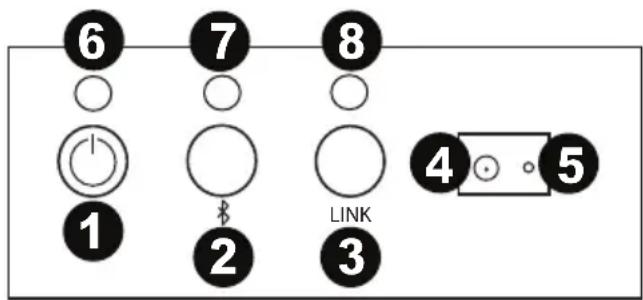
- Charging Adapter Input: Insert the included charging adapter here to charge the Solar Stone battery.
Solar Stone should be fully charged prior to first use for maximum battery life. Once fully charged, Solar Stone's solar panel can provide suitable power for typical daily use without the need to connect the charging adapter. Results will vary depending on daily number of hours Solar Stone is exposed to direct sunlight.
- Reset: If Solar Stone is working abnormally, shutdown the unit by placing a paperclip into the Reset hole located on the bottom of Solar Stone, and gently push until the unit turns off. Try this only after you have first attempted to reboot Solar Stone using the power button.
- Charging LED: This LED is solid red when the battery is charging and turns off when the battery is fully charged/no adapter is connected.
- Bluetooth LED: This LED slowly blinks blue when the speaker is powered on, blinks fast while Bluetooth searching, and is solid when Bluetooth connected.
- Link LED: This LED blinks fast when searching for another Solar Stone and is solid when linked to another Solar Stone.
Bluetooth Connecting with Solar Stone
Connecting to One Solar Stone
- Power on Solar Stone by holding down the power button. You will hear "Power On" for confirmation. *
- Press the Bluetooth Connect button briefly to enter Connecting Mode - the Bluetooth LED will blink fast, and you will hear "Pairing" to indicate this. *
- Navigate to your device's Bluetooth setup screen, find Solar Stone, and connect. Bluetooth LED will light up solid when it is connected and you will hear "Pairing successful, connected" for confirmation.
Note: If you experience trouble in connecting, select "Forget this Device" on your Bluetooth device and try to connect again.
- To disconnect, hold the Bluetooth Connect button on Solar Stone. You will hear "Disconnected" for confirmation. *
- If your Bluetooth device is not able to connect to Solar Stone, hold the Bluetooth Connect button on the speaker to break previous Bluetooth connections and reset the Bluetooth module.
Linking Two Solar Stones to each other for Stereo Sound
Note: Ensure that the speakers are not already Bluetooth connected in single mode. If either of them is connected, hold the Bluetooth Connect button to disconnect and then follow the steps below.
- Power on each Solar Stone by holding down their power buttons. You will hear "Power On" for confirmation.*
- Press the Link button on each Solar Stone. The speakers will search for each other while playing an intermittent tone. Once the stereo pair is successfully linked, you will hear "Pairing successful, connected" followed by "Left channel" and "Right channel" on the respective speakers.
This process may take up to 2 minutes the first time two speakers are linked. Speakers that were previously linked will relink automatically in a few seconds if powered on in range of one another.
Note: Solar Stones should be within 30 ft. (9 m) of each other to Link properly.
- On the Left speaker, the Bluetooth LED will blink. Press the Bluetooth Connect button briefly to enter Bluetooth Pairing mode.
Note: The Left speaker will be the "master" speaker, and the unit from which the Bluetooth range will be determined. - Navigate to your device's Bluetooth setup screen, find Solar Stone, and connect. You will hear "Connected" for confirmation. *
Note: If you experience trouble in connecting, select "Forget this Device" for Solar Stone on your Bluetooth device and try to connect again. - To disconnect linking, hold the Link button on the "master" Solar Stone for 2 seconds. You will hear "Disconnected" for confirmation. *
- If your Bluetooth device is not able to connect to Solar Stone, hold the Bluetooth Connect button on the speaker to break previous Bluetooth connections and reset the Bluetooth module.
Note: When two speakers are linked, hold the power button on the "master" speaker to turn both speakers off. If you want to only turn off the "slave" speaker, press and hold the power button on that speaker. The speakers will relink automatically the next time they are both powered on.
- Tip: If you would like to disable (or enable) the voice prompts, simultaneously press the Bluetooth Connect and Link buttons briefly.
1 Ladeadapter 2 Ladeadapter
Technical Specifications
| Speaker Output | 20 W (peak) |
| Power | Via power adapter or solar panel Power adapter: 15V DC, 2000mA, center-positive Solar panel: 1 W output |
| Battery | Type: Built-in rechargeable 12V lead-acid battery Battery Life: Up to 50 hours* Recharge Time: 5.5 hours by AC adapter; 55 hours by solar panel |
| Driver | 6.5"; 165 mm |
| Water-Resistant Class | IPX Level 4 |
| Supported Bluetooth Profile | A2DP |
| Bluetooth Range | Up to 100 ft. / 30.5 m ** |
| Linked Stereo Range | Up to 30 ft. / 9 m ** between 2 linked Solar Stones |
| Dimensions (width x depth x height) | 10.75" x 9"x 9" 273 mm x 229 mm x 229 mm |
| Weight | 9.2 lbs. 4.17 kg |
Specifications are subject to change without notice.
- Battery life may vary based on temperature, age, and volume usage of product.
** Available range is affected by walls, obstructions, and movement. For optimal performance, place the product so it is unobstructed by walls, furniture, etc.
Trademarks & Licenses
ION Audio is a trademark of ION Audio, LLC, registered in the U.S. and other countries.
The Bluetooth word mark and logos are owned by the Bluetooth SIG, Inc. and any use of such marks by ION Audio is under license.
All other product or company names are trademarks or registered trademarks of their respective owners.