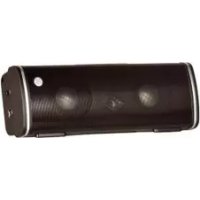
MAXtreme - Speaker ALBRECHT - Free user manual and instructions
Find the device manual for free MAXtreme ALBRECHT in PDF.



| Product Type | Portable Bluetooth Speaker |
| Brand | Albrecht |
| Model | MAXtreme |
| Output Power | 2 x 3W RMS |
| Drivers | 2 x 1.5 inches / 4 ohms |
| Frequency Response | 80 Hz - 20 kHz |
| Sensitivity | 86 dB |
| Distortion | ≤ 1% |
| Signal-to-Noise Ratio | ≥ 82 dB |
| Dimensions (W x D x H) | 150 x 32.5 x 54 mm |
| Weight | 165 g |
| Power Supply | Nokia BL-5C lithium battery (included) or USB 5V |
| Charging Time | About 3 hours (5V/500mA) |
| Connectivity | Bluetooth V3.0 + EDR, class 2, AUX 3.5mm input |
| Functions | Play/Pause, Next/Volume+, Previous/Volume-, hands-free mode, call reject |
| LED Indicators | Bluetooth, AUX, charging |
| Material | Aluminum alloy mesh |
| Box Contents | Speaker, audio cable, USB cable, user guide |
| Care and Cleaning | Clean with a soft cloth, without chemical solvent |
| Safety | Do not expose to rain or moisture, do not disassemble, use at room temperature |
| Spare Parts and Repairability | Replacement Nokia BL-5C battery, repair by distributor or authorized service center |
| General Information | 2-year warranty, mandatory recycling, CE declaration conforming to standards |
Frequently Asked Questions - MAXtreme ALBRECHT
User questions about MAXtreme ALBRECHT
0 question about this device. Answer the ones you know or ask your own.
Ask a new question about this device
Download the instructions for your Speaker in PDF format for free! Find your manual MAXtreme - ALBRECHT and take your electronic device back in hand. On this page are published all the documents necessary for the use of your device. MAXtreme by ALBRECHT.
USER MANUAL MAXtreme ALBRECHT
natural_image
Black cylindrical electronic device with visible speaker grille and buttons (no text or symbols)1 Verpackungsinhalt
text_image
M I I OFF ONPST professional support technologies GmbH Breitscheider Weg 117a 40885 Ratingen
natural_image
Black cylindrical electronic device with visible speaker grille and buttons (no text or symbols)1 Packing list
- Speaker
- Audio cable
- USB cable
- Manual
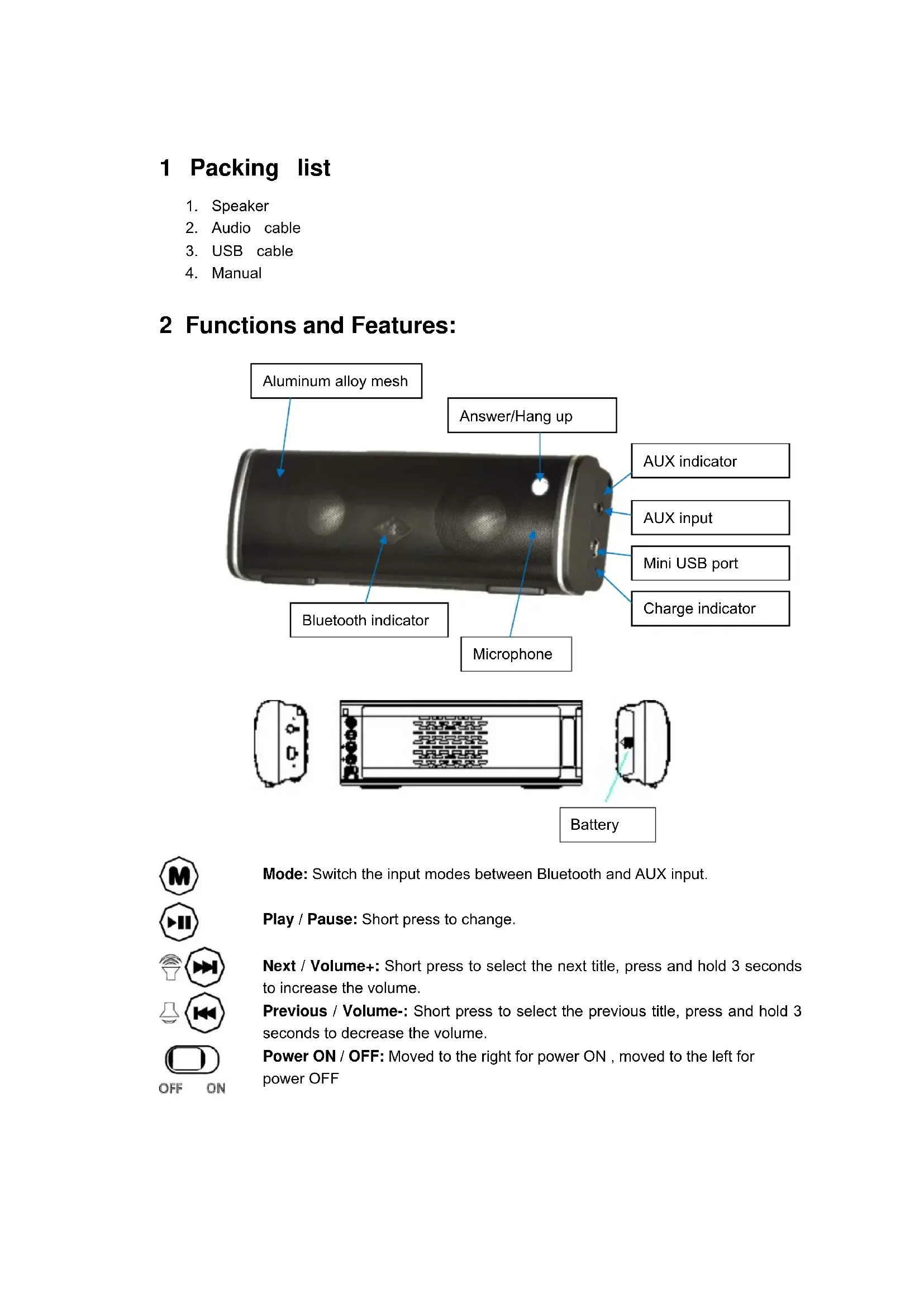
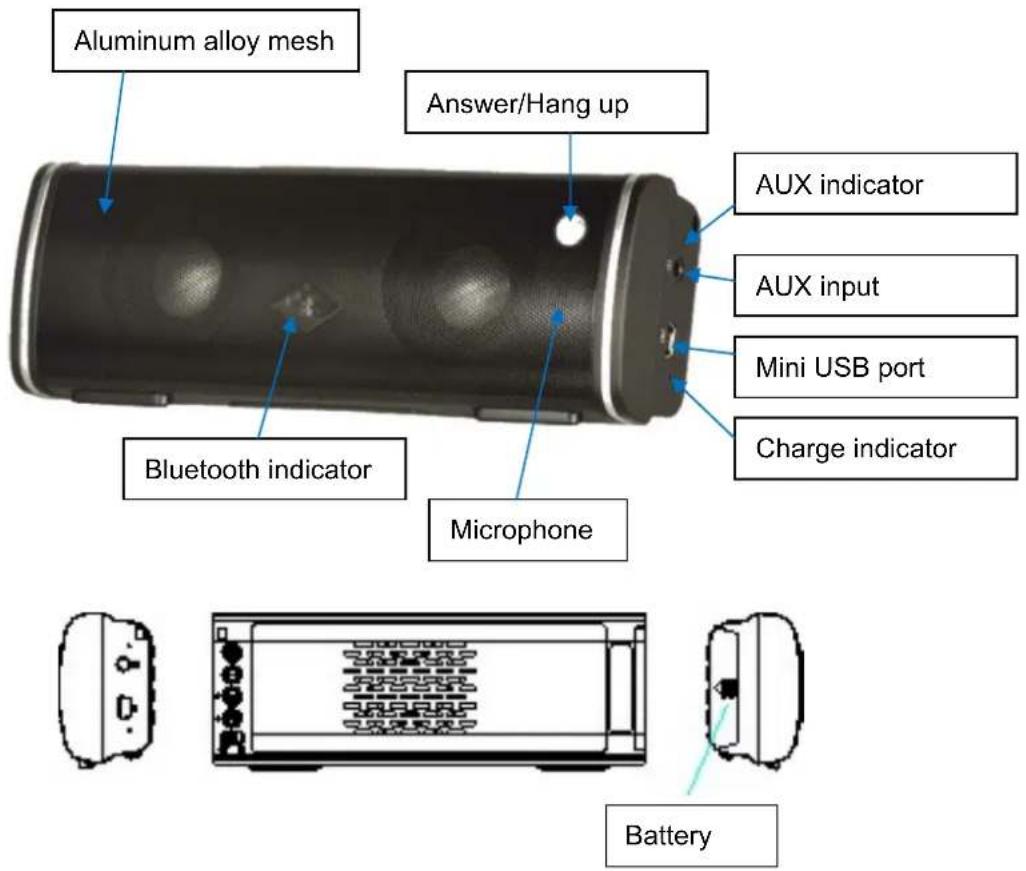
2 Functions and Features:
text_image
Aluminum alloy mesh Answer/Hang up Bluetooth indicator Microphone AUX indicator AUX input Mini USB port Charge indicator Battery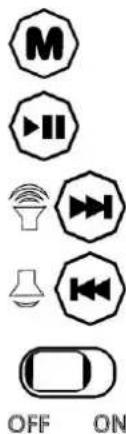
text_image
M I I OFF ONMode: Switch the input modes between Bluetooth and AUX input.
Play / Pause: Short press to change.
Next / Volume+: Short press to select the next title, press and hold 3 seconds to increase the volume.
Previous / Volume-: Short press to select the previous title, press and hold 3 seconds to decrease the volume.
Power ON / OFF: Moved to the right for power ON, moved to the left for power OFF
3 Bluetooth pairing
Power ON, ALBRECHT MAX-treme automatically enters the Bluetooth mode, the LED indicator lights up and flashes quickly. Now you can start the Bluetooth search. Your Bluetooth device will display the "Albrecht MAX-treme" in the device list. Now you can connect to it, if you are asked for a password by your Bluetooth device enter "0000". The Bluetooth device has been paired with the speaker successfully, when the Bluetooth indicator light flashes once every 5 seconds.
4 Playing and talking per Bluetooth
4.1 Play music and other audio files from Bluetooth device.

Play / Pause: Short press to change

Next / Volume+: Short press to select the next title, press and hold 3 seconds to increase the volume.

Previous / Volume-: Short press to select the previous title, press and hold 3 seconds to decrease the volume.
Side indicator light flashes quickly when adjusting the volume.
4.2 Hands-Free for Calling and answering the telephone
Answer / Hang up: Short press to answer an incoming call or to hang up an existing call; press and hold 3 seconds to refuse an incoming call; press and hold the button for 3 seconds when calling if you don't want to use the speaker for this phone call.
5 AUX audio input
5.1 AUX input (Connected to PCs, Pads, Ultrabooks, etc.)
Power ON. Short press "M" to enter AUX input, the AUX indicator light flashes one time every 5 seconds. In AUX mode, short press "Play / Pause" to mute, press again to cancel mute.

Next / Volume+: Press and hold 3 seconds to increase the volume. Next button is invalid.

Previous / Volume-: Press and hold 3 seconds to decrease the volume. Previous button is invalid.
When phone paired with ALBRECHT MAX-treme successfully, then switch to the AUX input., If there is incoming call, the MAX-treme will automatically switch to enter the Bluetooth calling state.
6 Li-battery charging
Put the Li-battery of NOKIA BL-5C into the speaker battery storehouse properly, then plug the mini USB end of the USB charge cable (included in the package) into the speaker's
mini USB port and plug the other USB end into the computer's USB port.
It also can be charged by DC 5V USB adapter.
LED indicator is red when charging, the LED indicator is off after the Li-battery charge full.
Normal charging time is about 3 hours from 5V/500mA power supply.
When the battery capacity is less than 6%, the AUX indicator light flashes quickly for prompted, please charging timely.
When the battery fully charged, the speaker system's micro-computer control will stop charging automatically.
7 Specification
Output power: 2 x 3W RMS
Speaker driver: 2 x 1,5 inch/4 ohms
Frequency range: 80Hz\~20KHz
Sensitivity: 86dB
Distortion: ≤1%
S/N ratio: ≥82dB
Unit dimension: W150 x D32,5 x H54 mm
Unit weight: 165g
8 Notices:
* Keep or use this device at room temperature.
* Do not expose this device to rain or moisture.
* Do not throw the device to avoid the damage by falling.
* Do not disassemble, repair and remodification the device.
* Do not use Chemical solvent to clean the device.
* If necessary, please use the general Li-battery of Nokia BL-5C, PC USB Port or DC 5V adapter to power the device.
* Please follow the safety and operating instructions of the Li-battery, do not discard it at random or throw it into the fire to avoid danger.
9 CE Declaration of Conformity
European laws require that the manufacturer of any transmitting device must add his declaration of Conformity with the European standards and regulations. This device is a 2,4GHz DIGITAL


SHORT RANGE DEVICE with Bluetooth compatible Class 2 V 3.0 + EDR protocol for use together with Bluetooth or compatible phones or other BT-master-devices for office, home or other private use in all European countries free of any license or charges.
This device shall only be sold in countries, where the user manual is available in the
country specific language. We confirm herewith, that the system is constructed according to following standards:
Recycling of no more used electronic items
All electronic items shall be properly recycled after their lifetime cycle. It is no more allowed to throw not any more used electronic items into any household trash. In all communities you will find now collecting stations, where your electronic items will be accepted free of charge for recycling. The recycling procedures are financed by the manufacturers, so please use this offer as contribution to the environment protection. The crossed trash symbol on all electronic items shall remember to the correct recycling.
European warranty regulations and service hints
All electronics items are covered by the European 2 years warranty regulations. If a product should have a problem, please contact the distributor where you have bought the product. The distributor will repair the product, exchange it or send it to an authorized service partner. In case where the distributor is not available, please send to the authorized repair service, but please do not forget to attach a problem description and a copy of the invoice or sales receipt. No warranty is granted if a product has been modified or not used as intended. The product shall not be opened by anybody for repair, who is not qualified.
For units sold in Germany, please call our German repair & service hotline for further repair details, or if you should have any technical questions under 01805-012204 (0.14 Euro per minute from German fixed network; from mobile phones the costs may be different).
Our e-mail support service can be reached from all countries and is free of charge.
alan-service@ps-tech.de
Our technical webserver supports all user manuals and technical documentations for free download from
www.service.alan-electronics.de

ALBRECHT® Audio
natural_image
Black cylindrical electronic device with visible speaker grille and buttons (no text or symbols)text_image
M II Sweaker OFF ONnatural_image
Black cylindrical electronic device with three speakers and a logo, no visible text or symbols on bodyManuale
natural_image
Black cylindrical electronic device with three speakers and a logo, no visible text or symbols on bodyManual
1 Lista del envase
- Altavoz
- Cable de audio
- Cable USB
- Manual