CDCX10 - Car stereo AIWA - Free user manual and instructions
Find the device manual for free CDCX10 AIWA in PDF.



| Product type | Car stereo with CD player |
| Brand | Aiwa |
| Model | CDCX10 |
| Dimensions (W x H x D) | 182 × 53 × 155 mm |
| Power supply | 14.4 V DC (11 to 16 V allowable), negative ground |
| Max. output power | 25 W + 25 W (rear) / 7 W + 7 W (front) |
| Load impedance | 4 ohms |
| Radio frequency range | FM: 87.5 to 108 MHz; AM: 530 to 1710 kHz |
| CD frequency response | 17 Hz to 20 kHz (+0/-3 dB) |
| CD signal-to-noise ratio | More than 90 dB |
| Main functions | FM/AM radio, CD player, repeat playback, random, programmed (10 tracks), intro, preset of 6 stations per band, automatic search, tone control (bass/treble), loudness, detachable panel |
| Maintenance and cleaning | Clean discs from the center outward with a soft cloth; never use solvent (benzine, alcohol) |
| Safety | Do not disassemble the unit (dangerous laser rays); use a fuse of the same amperage; do not insert foreign objects; avoid exposure to excessive heat |
| Operating temperature | Avoid excessively high ambient temperature (park in shade if necessary) |
| Included accessory | Carrying case for the control panel |
Frequently Asked Questions - CDCX10 AIWA
User questions about CDCX10 AIWA
0 question about this device. Answer the ones you know or ask your own.
Ask a new question about this device
Download the instructions for your Car stereo in PDF format for free! Find your manual CDCX10 - AIWA and take your electronic device back in hand. On this page are published all the documents necessary for the use of your device. CDCX10 by AIWA.
USER MANUAL CDCX10 AIWA
For your convenience, record the model number and serial number (you will find them on the bottom of your set) in the space provided below. Please refer to them when you contact your AIWA dealer in case of difficulty.
TABLE OF CONTENTS
PRECAUTIONS 3
DETACHING THE CONTROL PANEL 4
CONTROL PANEL 5
TURNOING ON/OFF THE UNIT 6
SOUND ADJUSTMENTS 7
RADIO OPERATION 8
PRESETTING STATIONS 10
CD PLAYBACK 12
PROGRAM PLAY 14
SPECIFICATIONS 16
TROUBLESHOOTING 17
NOTE
FOR USE IN THE U.S.A.
This equipment has been tested and found to comply with the limits for a Class B digital device, pursuant to Part 15 of the FCC Rules. These limits are designed to provide reasonable protection against harmful interference in a residential installation.
This equipment generates, uses, and can radiate radio frequency energy and, if not installed and used in accordance with the instructions, may cause harmful interference to radio communications. However, there is no guarantee that interference will not occur in a particular installation. If this equipment does cause harmful interference to radio or television reception, which can be determined by turning the equipment off and on, the user is encouraged to try to correct the interference by one or more of the following measures:
- Reorient or relocate the receiving antenna.
- Increase the separation between the equipment and receiver.
- Connect the equipment into an outlet on circuit different from that to which the receiver is connected.
- Consult the dealer or an experienced radio/ TV technician for help.
CAUTION
Modifications or adjustments to this product, which are not expressly approved by the manufacturer, may void the user's right or authority to operate this product.
PRECAUTIONS
- Do not attempt to disassemble this unit. Laser rays from the optical pickup are dangerous to the eyes.
Make sure that pins or other foreign objects do not get inside the unit; they may cause malfunctioning, or a safety hazard such as electrical shock or exposure of laser rays. - When your car is parked under direct sunlight in summer, there may be a considerable rise in temperature inside the car. Ensure to let the ambient temperature cool down before operating the unit.
This unit is designed to be operated on a 12 volt DC negative ground electrical system only. - When replacing the fuse, be sure to use the fuse whose amperage rating is identical. Use of a fuse with higher amperage may cause serious damage to the unit.
Notes on CDs
A defective or soiled disc inserted into the unit can cause sound to drop out during playback.
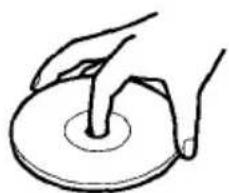
- Handle the disc by holding its inner and outer edges.
- Do not touch the surface of the unlabeled side of the disc.
- Do not stick paper or tape etc. on the surface.
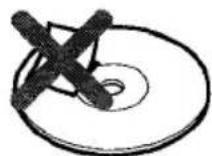
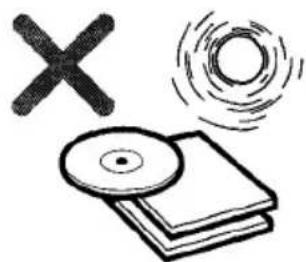
- Do not expose the disc to direct sunlight or excessive heat.
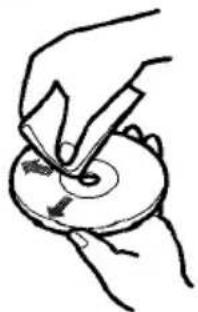
Clean the disc before playback. Wipe the disc from the center outward with a cleaning cloth.
- Never use solvents such as benzine or alcohol to clean the disc.
- Do not use an adaptor when playing a 3-inch (8 cm) CD. It may cause malfunctioning.
DETACHING THE CONTROL PANEL
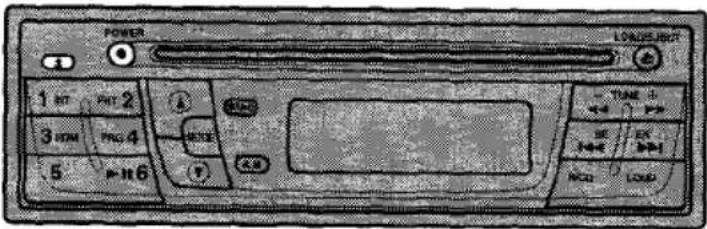
You can detach the control panel from the unit and carry it with you when you leave your car unattended.
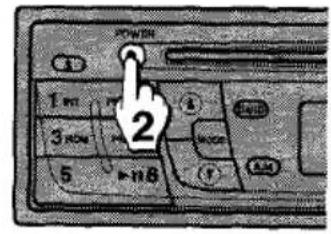
1 If a disc is inserted, remove it to prevent possible damage to the unit.
2 Press POWER to turn the unit off.
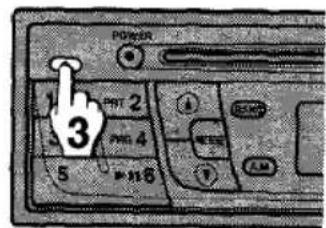
3 While supporting the control panel with one hand, press to release one side of the panel. Care must be taken not to drop the panel as it may suddenly eject at this point.
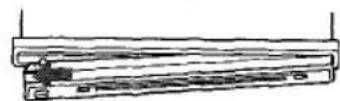
4 When the control panel is lifted from the unit, remove it by pulling away from the unit.
Note
- Put the control panel inside the supplied carrying case to protect it from being damaged when you carry it with you.
Attaching the control panel
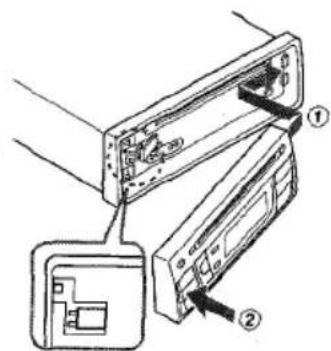
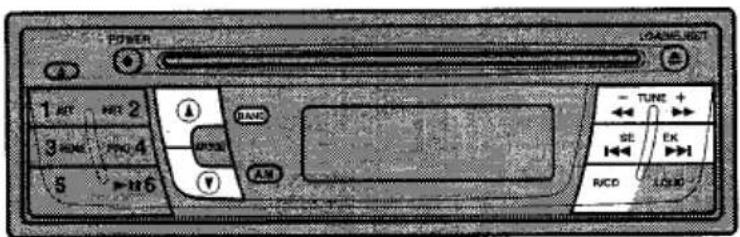
CONTROL PANEL
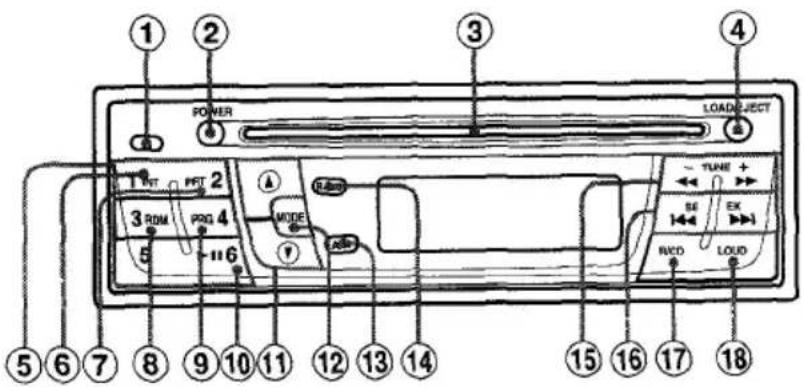
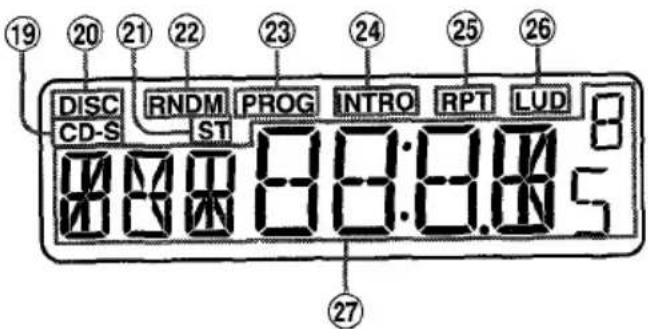
Display window
(1) (detach) button
② POWER ● button
③ Disc compartment
④ LOAD/EJECT button
⑤ Preset Station buttons 1-6
⑥ INT (intro) button
⑦ RPT(repeat)button
⑧ RDM (random) button
PRG (program) button
10 II (play/pause) button
(1) (up/down) button
12 MODE button
13 A.M (auto memory) button
14 BAND button
15 TUNE+ button
SEEK button
17 R/CD (radio/CD) button
18 LOUD button
CD-S (CD single) indicator
DISC indicator
② ST(stereo)indicator
22 RNDM (random) indicator
PROG (program) indicator
INTRO indicator
25 RPT (repeat) indicator
LUD (loud) indicator
2 Main Display section
To turn off the unit
Press POWER.
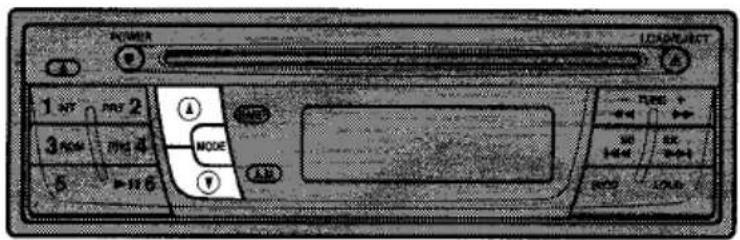
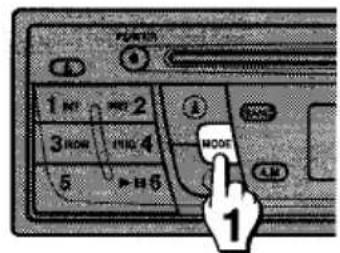
1 Press MODE to select the mode you want to adjust from VOL (volume), BAS (bass), TRE (Treble), BAL (balance), and FAD (fader).
The mode indicator lights up in the following order.

The selected mode changes to the volume mode when MODE is pressed for more than 5 seconds.
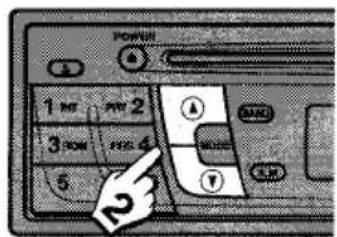
2 Press or (for less than 0.5 seconds) to adjust the sound quality.
To change the level rapidly, press and hold or down longer.
| ▲ side | ▼ side | |
| VOL | Increases the volume level. | Decreases the volume level. |
| BAS | Increases the bass level. | Decreases the bass level. |
| TRE | Increases the treble level. | Decreases the treble level. |
| BAL | Decreases the level of the left speaker(s). | Decreases the level of the right speaker(s). |
| FAI | Decreases the level of the front speakers. | Decreases the level of the rear speakers. |
Note
Without selecting any mode with MODE, only the volume level can be adjusted by pressing or .
LOUD (loudness) function
Press LOUD to reinforce bass and treble especially when listening at low volume level. To cancel the loudness, press LOUD again.
To set the turn-on volume level
The unit can be set to always turn on at the same volume level.
After adjusting the volume with or , press and hold POWER down for more than 2 seconds until a beep tone is heard.
RADIO OPERATION
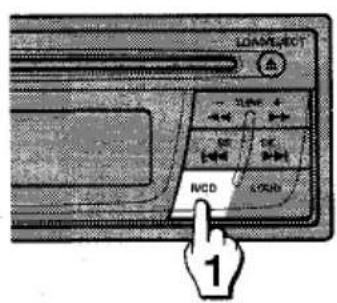
1 Press any button (except ± ) to turn on the unit.
The radio frequency is displayed.
If the unit is in the CD operation, press R/CD to select the radio operation.
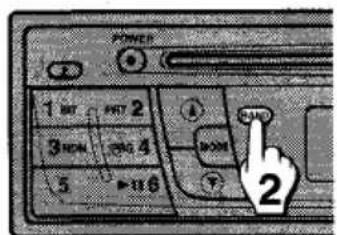
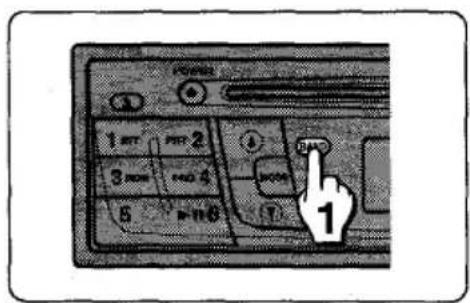
2 Press BAND to select the desired band from FM1, FM2, FM3, and AM.
The band indicator [FM1, FM2, FM3, or AM] is displayed.
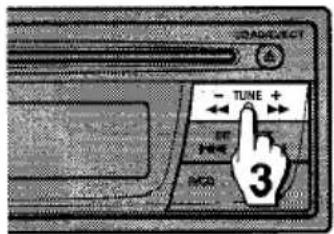
3 Press -TUNE+ repeatedly to tune in the desired station.
Press + to increase and - to decrease the frequency.
To change the frequency rapidly, press and hold + or - down longer.
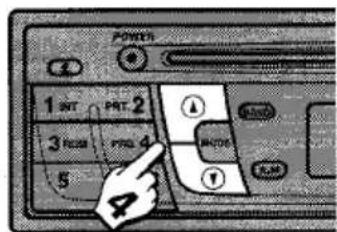
4 Adjust the volume with or .
Note
FM1, FM2, and FM3 have the same frequency range.
ST indicator lights up when an FM stereo broadcast is received with a sufficient signal strength.
Seek Tuning
The seek function is used to search for the station automatically.
1 Press BAND to select the desired band.
2 Press SEEK to start the seek function.
Press to search for the higher frequencies and for the lower frequencies.
The seeking stops when the nearest station with good reception is tuned in.
Press or repeatedly until the desired station is received.
To turn off the radio
Press R/CD or insert a disc.
The radio is turned off and the CD operation starts.
PRESETTING STATIONS
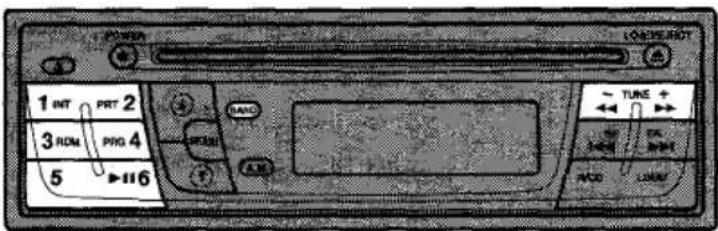
Up to 6 stations for each band [FM1, FM2, FM3, and AM] can be stored on the preset station buttons.
1 Press BAND to select the desired band from FM1, FM2, FM3, and AM.
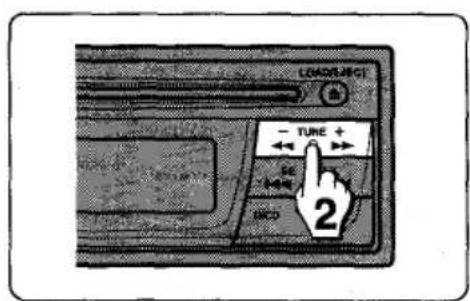
2 Tune in the station to be preset.
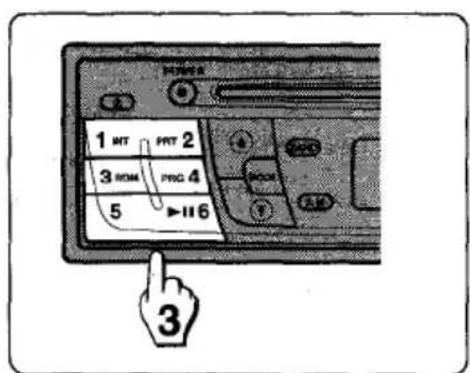
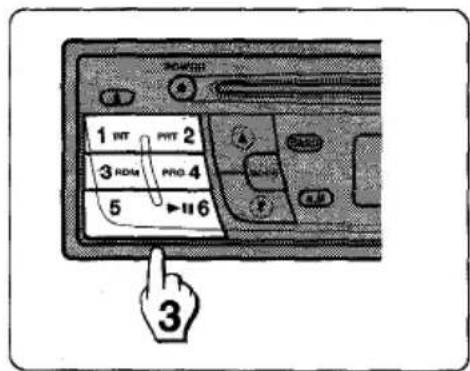
3 Press one of the preset station buttons (1-6) for more than 2 seconds until a beep tone is heard. The number of the pressed preset station button is displayed.
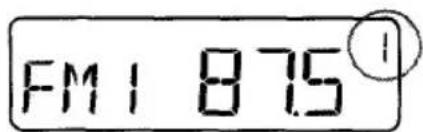
4 Repeat steps 2 and 3 to preset other stations.
Note
As FM1, FM2, and FM3 have the same frequency range, up to 18 stations can be preset for FM.
- When a station is preset on the preset station button on which another station of the same band has already been preset, the previously preset station is automatically erased.
Automatic Presetting
The automatic presetting function is used to automatically preset up to 6 stations for each band.
1 Press BAND to select the desired band.
2 Press and hold A.M down for more than 2 seconds until a beep tone is heard.
The scanning starts from the currently displayed frequency to higher frequencies and stops when 6 stations have been preset or the receivable frequencies have been scanned once.
Note
The presetting is not performed if there is no station to be tuned in.
- When the automatic presetting is performed, the previously preset stations are automatically erased.
- To stop the automatic presetting, press A.M again or press any of the preset station buttons (1 - 6).
To scan the preset stations
Press A.M for less than 1 second.
Each preset station is tuned in for 5 seconds in order.
To stop the scanning, press A.M again or any of the preset station buttons (1-6).
To tune in the preset stations
Press BAND to select the desired band and press the desired preset station button (1 - 6).
The number of the preset station button is displayed and the preset station is received.
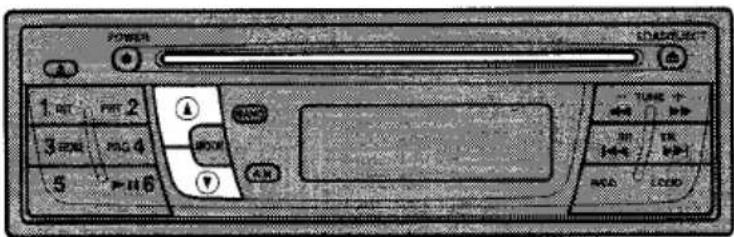
Press any button (except ± ) to turn on the unit.
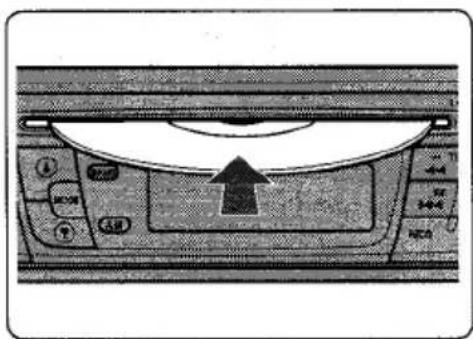
1 Insert a disc with the labeled side up to start playback.
If a disc is already inserted, press R/CD to select the CD operation.
DISC indicator lights up, and the track number and elapsed playing time are displayed.
If a 3-inch (8 cm) CD is inserted, both CD and CD-S indicators light up.
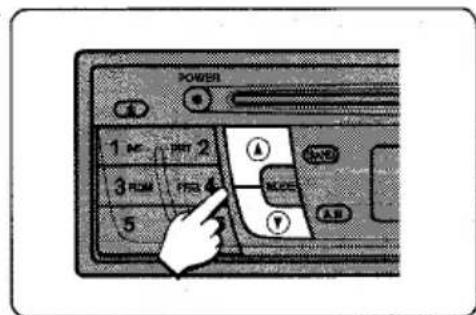
2 Adjust the volume with or .
Press these buttons to operate CD playback.
| Press | To |
| ▲ | Load or eject a disc. |
| ▶II | Pause play. The track number and elapsed playing time flash on and off. To resume play, press▶II again. |
| ▶ | Forward on the disc. Press and hold▶ down until the start of the desired passage, then release it. |
| ← | Reverse on the disc. Press and hold← down until the start of the desired passage, then release it. |
| ▶I | Skip to the next track with a short press (for less than 0.5 seconds). Each extra press skips forward one extra track. To skip forward rapidly, press and hold▶I down until the desired track number is displayed, then release it. |
| ← | Restart the track currently in play with a short press (for less than 0.5 seconds). Each extra press skips backward one extra track. To skip backward rapidly, press and hold← down until the desired track number is displayed, then release it. |
Note
The disc is neither inserted nor ejected when the unit is not turned on.
- Smaller 3-inch (8 cm) CDs can be played on this unit without an adaptor. Do not use an adaptor as it may cause malfunctioning.
The playback starts from the first track on the disc only when inserting a disc. In other cases (when switching from the radio operation or turning on the unit), the playback starts from the beginning of the track being played when the playback has stopped.
- A disc can be inserted by putting it into the disc compartment slot, and either pushing it lightly with fingers or pressing LOAD/EJECT.
Intro Play
Press INT during playback.
INTRO indicator lights up and the first 10 seconds of all the tracks on the disc are played in order.
When the desired track is found, press INT again. The unit returns to the normal playback.
Note
The intro play cannot be performed with the repeat or random play.
Repeat Play
Press RPT during playback.
RPT indicator lights up and the currently selected track is played repeatedly.
To cancel the repeat play, press RPT again.
Note
- If the repeat play is not selected, all the tracks on the disc are played repeatedly.
The repeat play cannot be performed with the intro or random play.
Random Play
Press RDM during playback.
RNDM indicator lights up and the tracks on the disc are played randomly.
To cancel the random play, press RDM again.
Note
The random play cannot be performed with the intro or program play. If the repeat play is selected during the random play, the random play is canceled.
- During the random play, even if is pressed repeatedly, the track currently in play is restarted.
PROGRAM PLAY
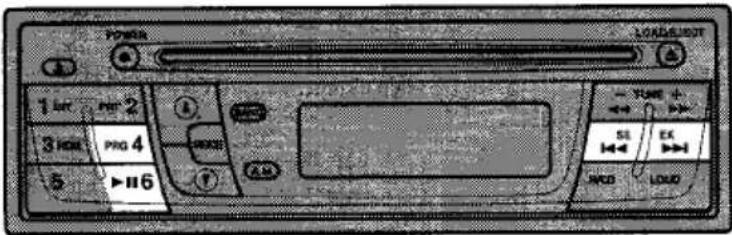
Up to 10 tracks can be set in the program memory in any order.
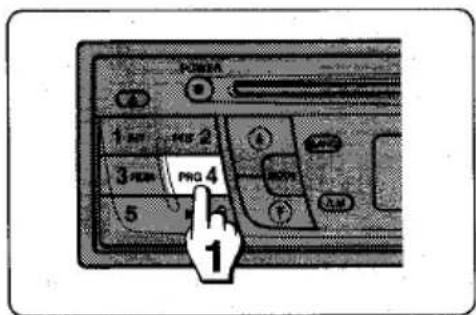
1 Press PRG. PROG indicator lights up.
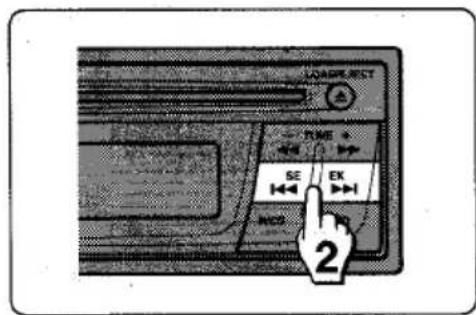
2 Select a desired track by pressing SEEK▶ until its number is displayed.
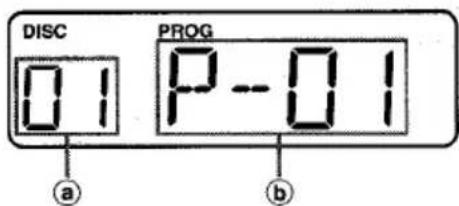
a Track number b Program number
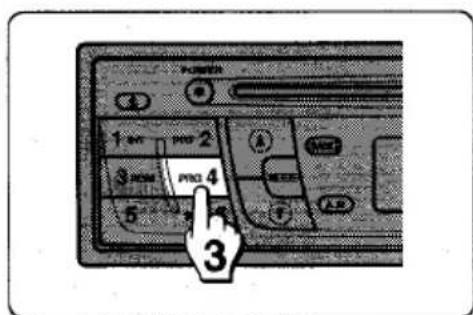
3 Press PRG to set the track in the program memory. If PRG is not pressed within 5 seconds, the program play is canceled.
4 Repeat steps 2 and 3 to set other tracks.
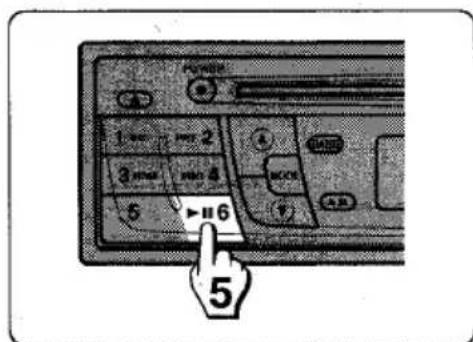
5 To start the program play, press II.
To confirm the programmed tracks
Press PRG in sequence.
The track and program numbers are displayed in the order of the playback.
To stop the program play, press PRG again.
Note
The program memory of the disc is not erased even after turning off the unit. The program memory is erased when ejecting the disc and inserting another disc.
The program play cannot be performed with the intro, repeat, or random play.
SPECIFICATIONS
RADIO SECTION
FM
Frequency Range: 87.5 MHz - 108 MHz
Usable Sensitivity: 12.7dBf
50 dB Quieting Sensitivity:
17.2 dBf
IF Rejection: 80 dB
Frequency Response: 30 Hz - 15,000 Hz
S/N Ratio: 63 dB
Stereo Separation: 35 dB at 1 kHz
Alternate Channel Selectivity:
70dB
Capture Ratio: 3 dB
AM
Frequency Range: 530 kHz - 1,710 kHz
Usable Sensitivity: 30 V (30 dB)
CD SECTION
Frequency Response: 17Hz - 20kHz + 0 / - 3 dB
Dynamic Range: More than 85 dB
Channel Separation: More than 70 dB
S/N Ratio: More than 90 dB
Wow/Flutter: Unmeasurable
AUDIO SECTION
Max. Power Output: 25 W + 25 W (rear)
7W + 7W (front)
GENERAL
Power Supply Voltage:
14.4 V (11 to 16 V allowable),
DC, negative ground
Load Impedance:
4Ω
Tone Control:
Bass ± 10 dB at 100 Hz
Treble ± 10 dB at 10kHz
Pre-amp Output Voltage:
3 V (max.)
Installation Size:
182(W)×53(H)×
155 (D) mm
(7^1 / 4(W)× 2^1 / 8(H)×
61/8 (D) inches)
Accessory Supplied:
Carrying case (1)
- Specifications and external appearance are subject to change without notice due to product improvement.
TROUBLESHOOTING
In the following cases, the corresponding error code indicator is displayed.
| Error code | Cause | Solution |
| E--2, E--3, E--6, E--8 | The disc is not inserted or ejected properly. | Press RESET and insert the disc again. |
| E--4, E--5, E--7 | The disc cannot be read properly. | The disc may be damaged or dirty. Insert another disc. |
| E--9 | The ambient temperature is too high. | Allow the unit to cool off (by moving the car out of direct sunlight, etc.). |
Reset button
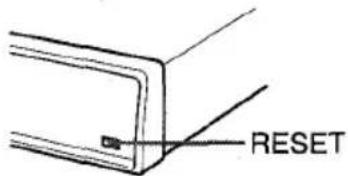
The reset button (RESET) is located on the front side of the unit behind the control panel (see "DETACHING THE CONTROL PANEL" on page 4).
If the unit does not operate properly, press RESET with a pointed object such as a pencil, etc. to reset it. Note that the memory contents are erased when pressing RESET.
TABLE DES MATIERES
PRECAUTIONS 19
RETRAIT DU PANNEAU DE COMMANDE 20
PANNEAU DE COMMANDE 21
MISE SOUS/HORS TENSION DE L'APPAREIL 22
AJUSTEMENTS SONORES 23
FONCTIONNEMENT DE LA RADIO 24
PREREGLAGE DE STATIONS 26
LECTURE DE CD 28
LECTURE DE PROGRAMME 30
SPECIFICATIONS 32
EN CAS DE PANNE 33
ATTENTION
2 Accorder la station a prerégler.