
Baby monitor DECT - Baby monitors TERRAILLON - Free user manual and instructions
Find the device manual for free Baby monitor DECT TERRAILLON in PDF.



User questions about Baby monitor DECT TERRAILLON
0 question about this device. Answer the ones you know or ask your own.
Ask a new question about this device
Download the instructions for your Baby monitors in PDF format for free! Find your manual Baby monitor DECT - TERRAILLON and take your electronic device back in hand. On this page are published all the documents necessary for the use of your device. Baby monitor DECT by TERRAILLON.
USER MANUAL Baby monitor DECT TERRAILLON
Thank you for purchasing this Terraillon product. We hope you enjoy using the product. In order to be completely satisfied, we recommend that you read these directions carefully.
This Terraillon baby monitor will enable you to audio monitor your baby's activity while going about your own activities within the home.
IMPORTANT INFORMATION FOR YOUR SAFETY
Never substitute the use of the baby monitor for adult supervision.
ADVICE AND PRECAUTIONS TO BE TAKEN WHEN USING
We recommend you test the appliances prior to use, and continue to do so at regular intervals.
- For optimum use, plug devices into the mains.
- Always make sure the devices are upright when operational.
- Make sure you remain within the reception area when wearing the receiver attached to your belt clip.
- Keep the devices away from all sources of dampness and heat (radiator, sun...).
- Never take the devices apart nor immerse in water.
- In the event of a storm, unplug the mains adapters.
- Keep mains adapters out of reach of children.
- Unplug devices before cleaning with a damp cloth.
- If you have been using alkaline batteries in your device, remember to remove them whenever the baby monitor is not to be used for an extended period of time.
- Vox system: in the absence of activity, the transmitter will automatically switch to standby mode so as not to waste the batteries or unnecessary power.
- When using your baby monitor, never use adapters other than those intended for use with the Terraillon baby monitor.
- Always turn off both devices should you not intend using them for an extended period.
- Never try to dismantle the product if the electric cable is damaged or for any other problem. All repairs must be carried out by the manufacturer, the customer service of your supplier or an authorised service centre.
CAUTION: To reduce the risk of electric shock, do not expose this appliance to rain or moisture.
This monitor uses DECT digital technology that ensures reception without interference up to 300 meters approximately, in the absence of obstacles, and guarantees maximum privacy. The portable receiver with the rechargeable battery allows the parent to move freely and to talk to child by activating the reply function.
In accordance with the European directive 2002/96/CE, this product must not be disposed of with your other household waste. Dispose of your waste equipment by handing it over to a designated collection point for the recycling of waste electrical and electronic equipment. The separate collection and recycling of your
waste equipment at the time of disposal will help to conserve natural resources and ensure that it is recycled in a manner that protects human health and the environment.
ALIMENTATION
INSTALLING BATTERIES
Important: Do not throw old batteries away. Place them in a container specially provided for flat batteries so that they may be collected and recycled.
PARENTUNIT
- 1 recharging battery pack supplied.
- Base for battery charging.
Light indicator.
The lights enable you to check the battery charge:
- battery full: 3 bars light up and gradually decrease as the batteries lose their charge.
- battery low: the low battery symbol flashes. The monitor beeps. The parent unit turns off automatically after 30 minutes if you do not plug it into the mains.
- When the device is charging on the base, the 3 bars light up one by one repeatedly. They all light up and stop flashing once the device is charged.
Note: The power level will display on the screen whether the device is on or off.
POWER CHARGING STAND
This includes a socket at the back for connecting a mains adapter. Input voltage: 230 V AC output voltage: 6 V DC
The red light remains on when the base is plugged into the mains and turn off when the base is unplugged.
BABY UNIT
4 AAA batteries.
- Mains adapter.
Light indicator.
Open the battery compartment situated at the back of each device.
- Insert the batteries positioning the positive and negative terminals correctly.
- Replace the cover.
Normal use: green light.
- Low battery power: red light. The baby unit
turns off automatically after 30 minutes if you do not plug it into the mains.
- When attached to mains: green light.
DESCRIPTION OF PRODUCT
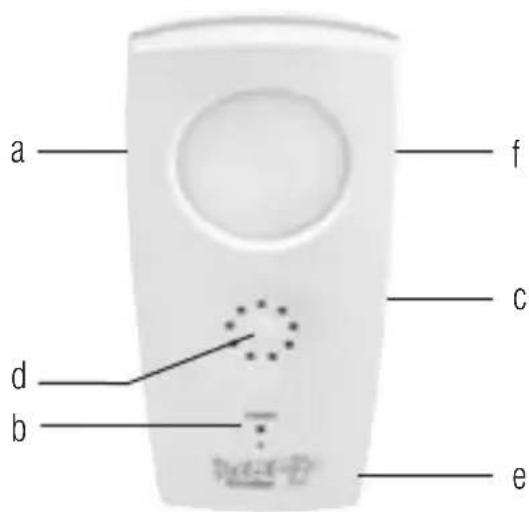
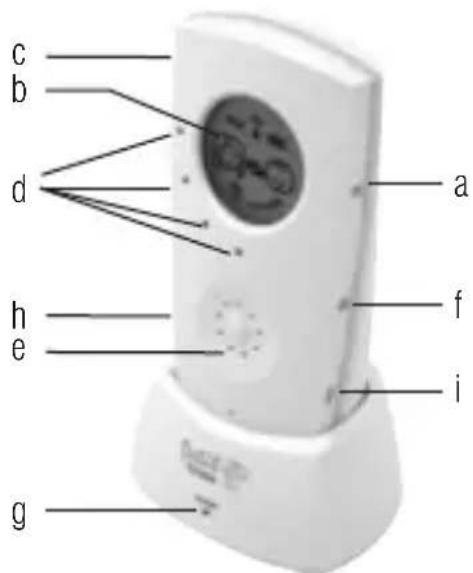
Transmitter
a. Adjust volume
b. Light (red or green)
c. Night light
d. Speaker
e. Socket for mains adapter
f. On/off button
Receiver
a. On/off button
b.LCD display
c. Adjust volume
d. Lights indicating baby activity and power
e. Speaker
f. Night light command
9.LED charger indicator
h. Talk
i.Vox

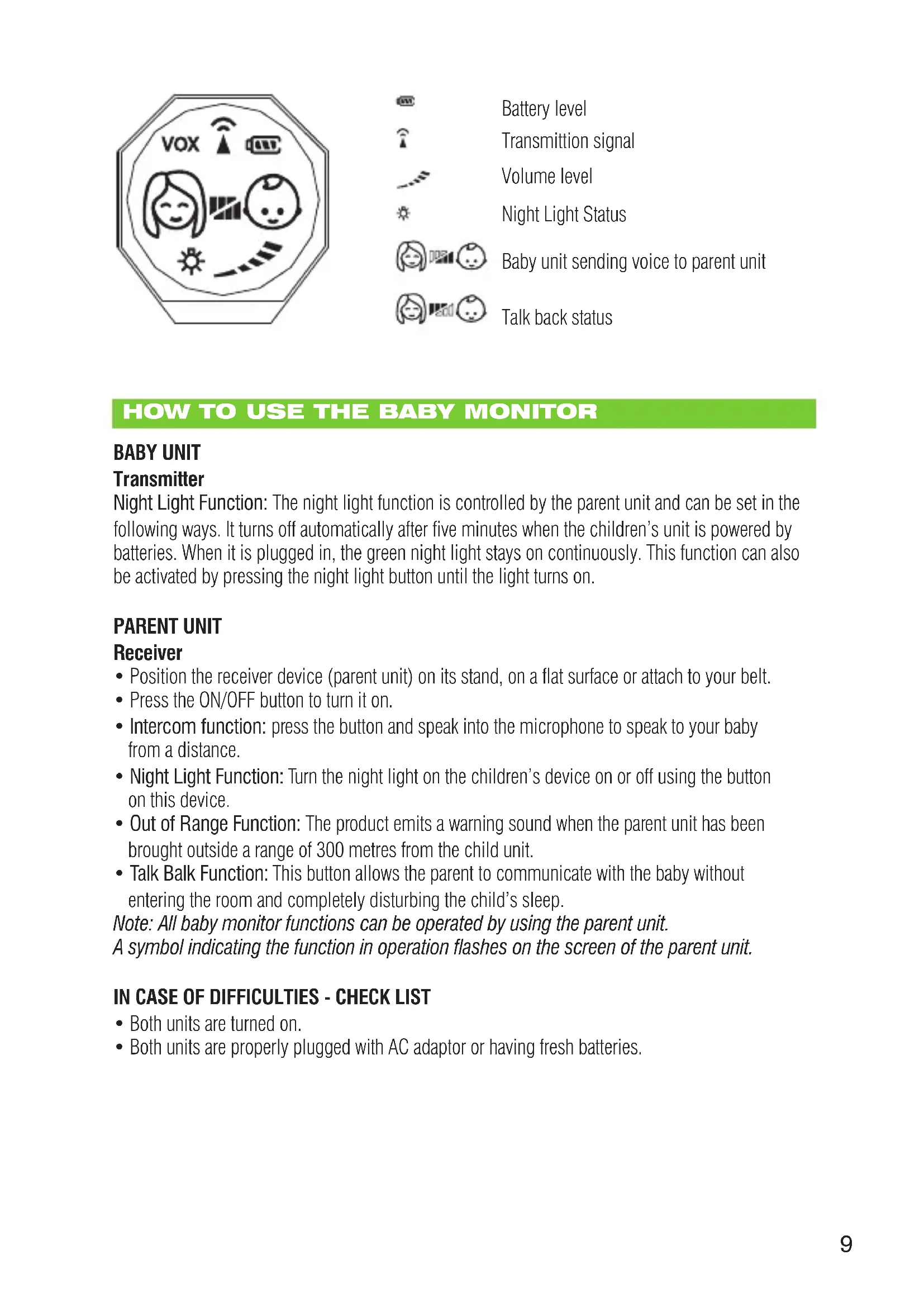
| Battery level |
| Transmission signal |
| Volume level |
| Night Light Status |
| Baby unit sending voice to parent unit |
| Talk back status |
HOW TO USE THE BABY MONITOR
BABY UNIT
Transmitter
Night Light Function: The night light function is controlled by the parent unit and can be set in the following ways. It turns off automatically after five minutes when the children's unit is powered by batteries. When it is plugged in, the green night light stays on continuously. This function can also be activated by pressing the night light button until the light turns on.
PARENT UNIT
Receiver
- Position the receiver device (parent unit) on its stand, on a flat surface or attach to your belt.
- Press the ON/OFF button to turn it on.
- Intercom function: press the button and speak into the microphone to speak to your baby from a distance.
- Night Light Function: Turn the night light on the children's device on or off using the button on this device.
- Out of Range Function: The product emits a warning sound when the parent unit has been brought outside a range of 300 metres from the child unit.
- Talk Balk Function: This button allows the parent to communicate with the baby without entering the room and completely disturbing the child's sleep.
Note: All baby monitor functions can be operated by using the parent unit.
A symbol indicating the function in operation flashes on the screen of the parent unit.
IN CASE OF DIFFICULTIES - CHECK LIST
- Both units are turned on.
- Both units are properly plugged with AC adaptor or having fresh batteries.
| Probleme Grunde Aktionen | ||
| No sound (both units are on) | AC adaptor not properly connectedDead battery | Recheck AC adaptor fittingReplace battery |
| Power indicatorlight dimming | Dead batteryAC adaptor jack not properly connected | Replace batteryRecheck AC adaptor fitting |
| Weak reception | Weak batteryOut of range | Replace batteryMove receiver closerto transmitter |
| Static | May be due to electric appliances such as mixers, motors | Eliminate cause of static |
| Out of range | Move receiver closer totransmitter | |
| Decreased transmittingrange | Unit near metal constructionAntenna coveredUnit not in upright position | Test unit in different locationRemove obstructionsKeep unit upright |
| Weak battery Replace battery | ||
| Feedback | Receiver too close to transmitterVolume too high | Move receiver further awayfrom transmitterLower the volume |
Use only AAA batteries.
WARRANTY
This product has a 2-year warranty against defective material and workmanship. During this period, such defects shall be repaired free of charge (proof of purchase should be presented whenever you have a complaint during the warranty period). This warranty does not cover damage caused by accidents, misuse or negligence. In case of complaint, please contact the shop from which you bought the device before contacting anyone else.
Babyfoon DECT
Besteklant,
INSTALACAO DAS PILHAS
Terraillon France & Headquarters
B.P.73-78403 Chatou Cedex-France