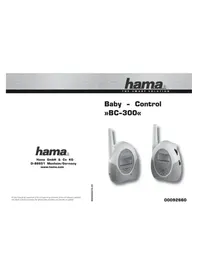
BC300 - Baby monitors HAMA - Free user manual and instructions
Find the device manual for free BC300 HAMA in PDF.


| Product Type | Audio Baby Monitor |
| Brand | Hama |
| Model | BC300 |
| Transmitter Power Supply | 3 AAA batteries (rechargeable or alkaline) or AC 230V - DC 6V adapter |
| Receiver Power Supply | 3 AAA batteries (rechargeable or alkaline) or AC 230V - DC 6V adapter |
| Channels | 2 channels (CH1 and CH2) |
| Operating Frequencies | CH1: 864.875 MHz, CH2: 864.925 MHz |
| Range | Up to 800 meters in ideal conditions |
| Transmitter Sensitivity | Adjustable from 0 to 8 |
| Main Functions | Audio transmission, energy-saving mode, "Baby sleeps" icon, "Baby calls" icon, out-of-range alarm, pilot tone signal (16 codes), automatic LCD lighting, belt clip, hanging hook |
| Screen Type | LCD |
| Safety | Does not replace adult supervision; do not use near water; do not place the receiver in the crib; specific adapter provided |
| Care and Cleaning | Clean with a soft, dry cloth; do not use abrasive products |
| Batteries | Alkaline AAA or rechargeable AAA (provided); charging time: approximately 9 hours |
| Certifications | CE, compliant with R&TTE Directive 1999/5/EC |
Frequently Asked Questions - BC300 HAMA
User questions about BC300 HAMA
0 question about this device. Answer the ones you know or ask your own.
Ask a new question about this device
Download the instructions for your Baby monitors in PDF format for free! Find your manual BC300 - HAMA and take your electronic device back in hand. On this page are published all the documents necessary for the use of your device. BC300 by HAMA.
USER MANUAL BC300 HAMA
All listed brands are trademarks of the corresponding companies. Errors and omissions excepted, and subject to technical changes. Our general terms of delivery and payment are applied.
00092660/06.09
00092660
GB Operating Instruction
You have just purchased a qualified baby monitor. Please read the instructions thoroughly before using the monitor system and keep it for future reference.
Content and Features
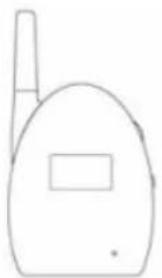
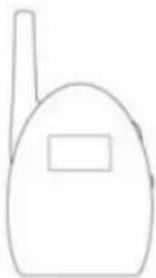
Transmitter Receiver
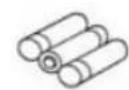
Supplied rechargeable batteries

AC Adapter
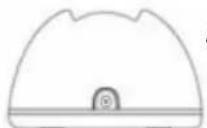
Desktop charger stand
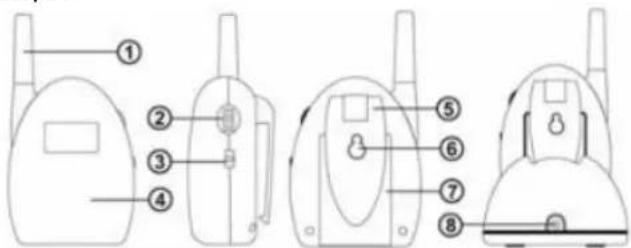
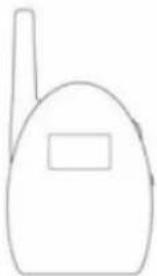
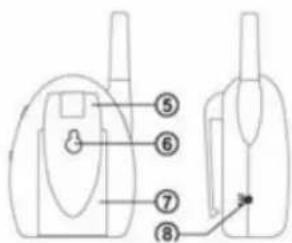
Transmitter
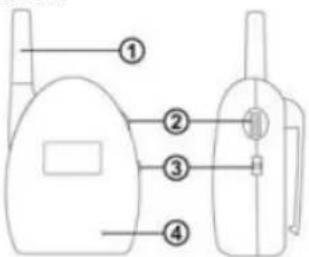
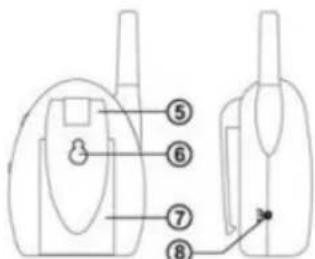
- Soft Antenna 4.Microphone
- Sensitivity Control :0-8 level 5. Belt Clip
-
Power Control / CHANNEL Switch: 6. Hanging Hook OFF/CH1/CH2 7. Battery Compartment
-
AC/DC Power Supply Socket
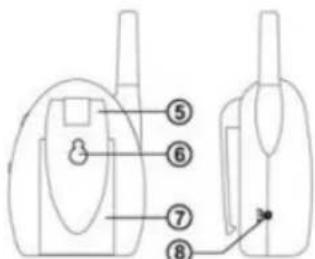
Receiver
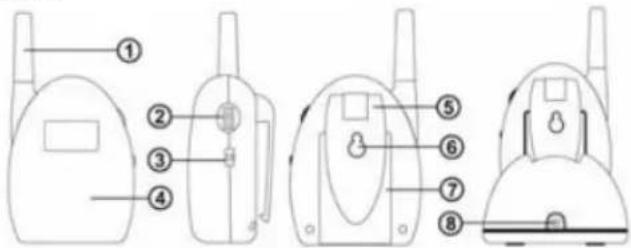
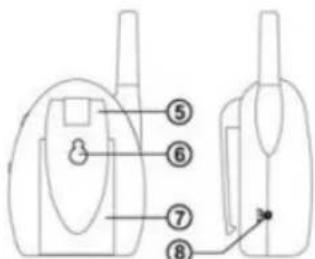
- Soft Antenna 5. Belt Clip
- Volume Control 6. Hanging Hook
- Power Control / Channel Switch: 7. Battery Compartment OFF/CH1/CH2 8. AC/DC Power Supply Socket
- Speaker
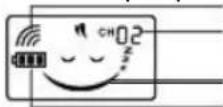
Main LCD Screen
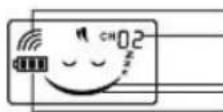
Out of range alarm icon
Channel:CH01/CH02
Baby sleeping icon (energy saving mode)
Battery icon:

Full battery level
Low battery level, reminds you to change the batteries
Empty and flashing, batteries change is a must
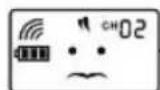
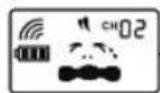
Baby calling icon: constantly changing display-readouts
AC Adaptor:
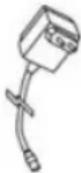
The AC Adaptors are low voltage power source that allows you to use your household electricity to run the Baby Monitor. Connect the AC Adaptors to the AC Adaptor Jack in the Parents and Baby Unit. Both plug into any standard volt electrical outlet in your home. It is recommended to turn off the units before plug in or unplug the adaptors.
CAUTION: These adaptors were made with a specific design for this product. They cannot be used with any other appliance. Never use a different type of adaptor with Baby Monitor.
CAUTION
This product cannot replace responsible adult supervision.
- This Baby Monitor is intended as an aid. Do not use it as a medical monitor or a substitute for responsible and proper adult supervision.
- Make sure the Receiver and adaptor cable are always out of child's reach. Do not place the Receiver inside the baby's crib or playpen!
- The antenna on the Units are fixed, do not try to extend them. Never attempt to modify the product.
- Avoid using the product near water and expose to rain or moisture.
Receiver & Transmitter Battery Installation
- Locate the battery compartment door on the back of the Units.
- Open the battery compartment door.
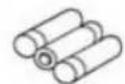
- Insert 3 * AAA batteries into the Receiver and the Transmitter according to the +/- signs shown in the battery compartment, respectively.
- Replace battery compartment doors.
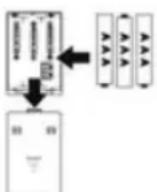
Battery Tips:
- If the product is not in use for a long time, disconnect both units from the household electrical outlet. And remove the batteries or the exhausted batteries from the units, otherwise battery leakage and corrosion can damage them.
• Non-rechargeable battery is not to be recharged
- Rechargeable batteries are only to be charged under adult supervision.
- CAUTION: Danger of explosion if battery is incorrectly replaced. Replace only with the batteries of the same and equivalent type.
Transmitter & Receiver Battery Charging
If the battery level becomes low, in both LCD displays the empty battery icon. The battery icon and the out of range alarm icon flash, in order to warn you about the low battery level. The receiver also emits a warning tone continually.
Charging the batteries
Please charge the rechargeable batteries first time usage.
The rechargeable batteries to the transmitter and receiver must not be taken out of the units for charging. The battery icon loops and flashes while charging. It stops flashing when the batteries are fully charged.
Charging the transmitter
- Connect the power supply unit to the thin plug on the 6V-socket of the transmitter.
- Once the power supply unit is connected to the transmitter, charging automatically begins.
- The charging time for completely charging empty battery takes about 9 hours when the transmitter is turned off.
Charging the receiver
- Connect the power supply unit to the thick plug on the charger stand socket
- Once the power supply unit is connected to the charger stand and the receiver is on the charger stand, charging automatically begins.
- The charging time for completely empty batteries and turned off unit is about 9 hours.
Remarks:
-
Use only the DC adaptors or desktop charger stand which are included in the package. Plug into any nearby standard household electrical outlet.
-
And connect them with the units.
- Supply Power : DC 6V
Note:
- User can also install 3 alkaline AAA batteries instead of the supplied rechargeable batteries.
- Or directly operated by the supplied adaptors.
Testing Before First Time Usage
Test the Transmitter emission and the Receiver reception.
- Place Transmitter and Receiver in room where you intend to use it.
- Set both Transmitter and Receiver to the same channel (01 or 02) by switching the OFF/CH1/CH2 channel switch. Selected channel will be shown on the top right corner of the LCD screen.
- Set both Transmitter and Receiver to the same pilot tone when using. By selecting a Dip switch(ON/DIP/1/2/3/4) at the battery compartment for different pilot tones to ensure privacy. There are 16 combinations of pilot tone for use selection. (Please refer to the PILOT TONES COMBINATION TABLE)
NOTE:
It is important that with both units the switch settings are the same because if this is not the case the transmitter and the receiver will not be able to connect to one another.
Transmitter emission:
- By using the SENSITIVITY knob you can turn in the sensitivity of the transmitter individually, according to your wishes.
- As soon as the transmitter transmits a signal the "Baby calling" icon will be flashed on the LCD screen. During the entire transmission the LCD backlight is activated.
- If the transmitter hears hardly any noise, it automatically switches to the energy saving mode. "Baby sleeping" icon shown on the LCD screen and the LCD backlight will automatically be turned off.
Receiver reception:
- By turning the volume knob from right side the receiver will be turned on. A turning it on the LCD display is activated and indicates you that the unit is ready for operation. The channel being used will be displayed in the top right of the LCD screen. By turning the volume more you can adjust is as you wi
- If the unit receives a signal, the LCD backlight lights up automatically during the entire transmission and the "Baby calling" icon flashes.
- A few seconds after the unit receives no more signals, the receiver is automatically switched to energy saving mode. The "Baby sleeping" icon will be shown and the LCD backlight will automatically turned off.
Set Up & Use
IMPORTANT! Test sound reception before use and whenever location of transmitter is changed. (Refer to Testing Before First Time Usage)
- Transmitter detects sound levels within a range of 1 to 2 meters (3 to 6.5 fe
for NORM setting. - Place transmitter in the same room with child. Point microphone directly toward child location, such as crib or playing area.
- Set both Receiver and Transmitter to the same channel (01 or 02) and pilot tone.
- Push transmitter SENSITIVITY switch to a desired position.
- Adjust different detecting sound level sensitivity by switching the SENSITIVITY switch.
- The receiver will go to energy saving mode and "Baby sleeping" icon shown when it doesn't detect sound from the surrounding area.
- Place receiver where you stay and hear it.
- Set the receiver to the same channel and pilot tone with the transmitter by switching OFF/CH1/CH2 switch and Dip switch.
- Rotate VOLUME knob to adjust volume.
10.Turning off by slide the OFF/CH1/CH2 switch to "OFF" position.
Note:
- Position the Transmitter at least 1 meter away from the baby for transmission
- Plug the adaptor into the nearest standard household electrical outlet.
Other functions
Pilot tone
Radio security and being free of interference for this Baby-calling unit is significantly improved by a signal this is inaudible for you and which has been digitally coded and tested in practice.
The coding causes the receiver to be turned on only when noises (e.g. of a waking baby) are transmitted from its own transmitter.
There are 16 different pilot tones for user selection with the DIP-switch positioned in the battery compartment individually according to your environment.
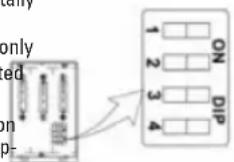
PILOT TONES COMBINATION TABLE
| Pilot Tones | Switch 1 | Switch 2 | Switch 3 | Switch 4 | ||||
| Code 1 | 0 | n | 0 | n | 0 | n | ||
| Code 2 | 0 | n | 0 | n | 0 | |||
| Code 3 | 0 | n | 0 | n | 0 | |||
| Code 4 | 0 | n | 0 | n | 0 | |||
| Code 5 | 0 | n | 0 | ff | On | On | ||
| Code 6 | 0 | n | 0 | ff | On | Off | ||
| Code 7 | 0 | n | 0 | ff | Off | On | ||
| Code 8 | 0 | n | 0 | ff | Off | Off | ||
| Code 9 | 0 | ff | On | On | On | |||
| Code 10 Off On On Off | |||
| Code 11 Off On Off On | |||
| Code 12 Off On Off Off | |||
| Code 13 Off Off On On | |||
| Code 14 Off Off On Off | |||
| Code 15 Off Off Off On | |||
| No Code Off Off Off Off |
Remarks:
• OFF: No pilot tone is selected.
- If no pilot tone is selected for Receiver indicates an almighty code is selected. In this status, the receiver can receive signal from transmitter in the same channel whether any pilot tone of transmitter is selected.
n
Out of Range alarm and Range controls
If the receiver is out of the range of the transmitter, it will be signaled to you
ff Offashing visual range alarm icon shown on the receiver. In addition the range alarm sound from Receiver will be heard continuously.
ff Off the out of range alarm will be still heard after the connection with the transmi is broken.
Furthermore, the visual and audible range alarm of the receiver is set off if
- the connection between transmitter and receiver is broken, such as the
• transmitter is turned off. - the transmitter is turned into a different channel to that of the receiver.
- the transmitter is tuned into a different pilot tone to that of the receiver.
- the transmitter or receiver is working with a charger with low batteries.
Backlight LCD display
When Power on / Out of range / Low battery level / Baby calling (i.e. a sound is sent and received), the backlight of the transmitter as well as the receiver will automatically turned on. Once no more signals are sent and received, the backlight is automatically turned off.
Belt Clip
The transmitter and receiver can both be carried around using the belt clip provided on the rear of each unit.
Trouble Shooting
| Problems Solutions | |
| 1. No power • Unit is not | turned on. Push the Unit OFF/CH1/CH2 switch to CHI or CH2 positionCheck if the batteries are installed properly.Make sure the adaptor is connected to the properly if using the adaptor instead of batteries.The Unit may be battery low, change for net batteries. |
| 2. Message not transmitted | • Sound sensitivity level of Transmitter is too low. Turn the Sound Sensitivity level proper position.Units are out of range or lost connection. M Receiver closer to Transmitter.Ensure both units are in the same channel a pilot tone. |
| 3. Hearing static or rustle from Receiver. | The Receiver is too near to the transmitter and its volume is high . Increases the distance between the transmitter and receiver.Reposition or replace batteries. |
Technical Specifications
Power Supply Voltage:
Transmitter 3 AAA rechargeable batteries / alkaline batteries
& adaptor : AC 230V - DC 6V
Receiver 3 AAA rechargeable batteries / alkaline batteries
& adaptor : AC 230V - DC 6V
Channel : 2 Channels
Operation Frequency : CH1: 864.875 MHZ
CH2: 864.925 MHZ
Operating Range: up to 800 metre in ideal conditions
Registration and Safety Certification/General Information
This device bears the CE symbol as specified by the provisions of Directive R & (1999/5/EC).
Hama GmbH & Co. KG hereby declares that this device is in compliance with the basic requirements and other relevant guidelines and regulations of the 1999/5/EC guideline. You will find the declaration of compliance and declaration of conformity in the Internet http://www.hama.com
F Mode d'emploi
Récepteur
symbool „baby roept“: permanent wisselende displayweergaven
AC-adapter:

Pantalla LCD principal
Πομπός Δέκτης

- GB OPERATING INSTRUCTION
- AC ADAPTOR
- CAUTION
- RECEIVER & TRANSMITTER BATTERY INSTALLATION
- BATTERY TIPS
- TRANSMITTER & RECEIVER BATTERY CHARGING
- CHARGING THE BATTERIES
- CHARGING THE TRANSMITTER
- CHARGING THE RECEIVER
- REMARKS
- NOTE
- TESTING BEFORE FIRST TIME USAGE
- TRANSMITTER EMISSION
- RECEIVER RECEPTION
- SET UP & USE
- OTHER FUNCTIONS
- PILOT TONE
- OUT OF RANGE ALARM AND RANGE CONTROLS
- BACKLIGHT LCD DISPLAY
- BELT CLIP
- TECHNICAL SPECIFICATIONS
- POWER SUPPLY VOLTAGE
- REGISTRATION AND SAFETY CERTIFICATION/GENERAL INFORMATION
- F MODE D'EMPLOI
- AC-ADAPTER
Brand : HAMA
Model : BC300
Category : Baby monitors