EH1413 - Air Conditioning Prem-I-Air - Free user manual and instructions
Find the device manual for free EH1413 Prem-I-Air in PDF.


User questions about EH1413 Prem-I-Air
0 question about this device. Answer the ones you know or ask your own.
Ask a new question about this device
Download the instructions for your Air Conditioning in PDF format for free! Find your manual EH1413 - Prem-I-Air and take your electronic device back in hand. On this page are published all the documents necessary for the use of your device. EH1413 by Prem-I-Air.
USER MANUAL EH1413 Prem-I-Air
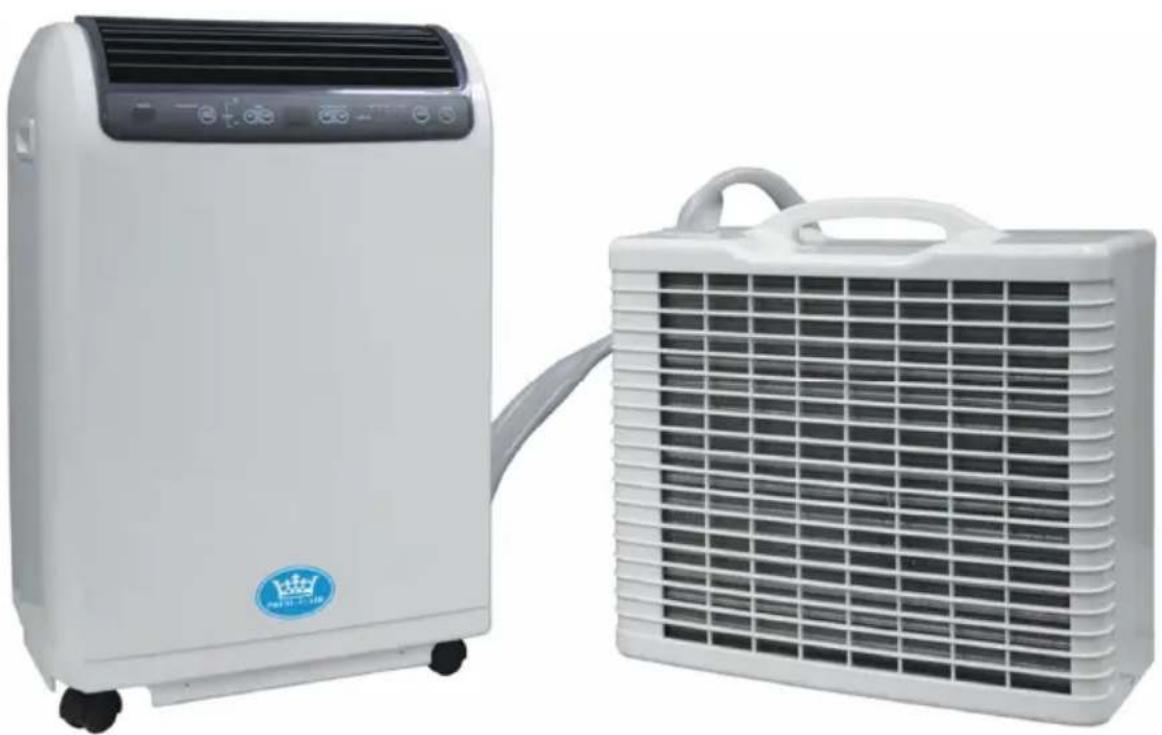
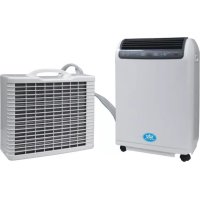
EH1413 Portable Air Conditioner
Split-unit air conditioner
4.3 kW (15000 BTU/hour) cooling capacity
User Manual
Notice d'Utilisation
IMPORTANT Installer and Users please note:
These instructions should be read carefully and left with the user of the product for future reference.
BEFORE USE
Inspect the product including its cable and plug for any signs of damage. If the product is damaged, DO NOT use it, and contact your supplier immediately.
INSTALLATION
Transport and store in an upright position. Leave the appliance in an upright position for at least 3 hours before first use.
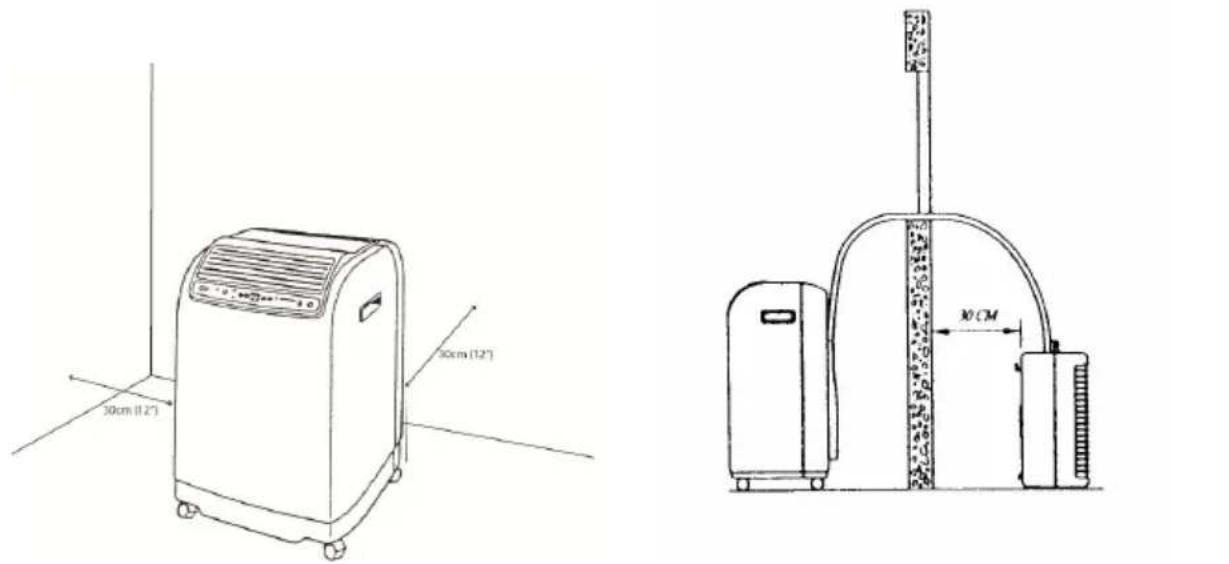
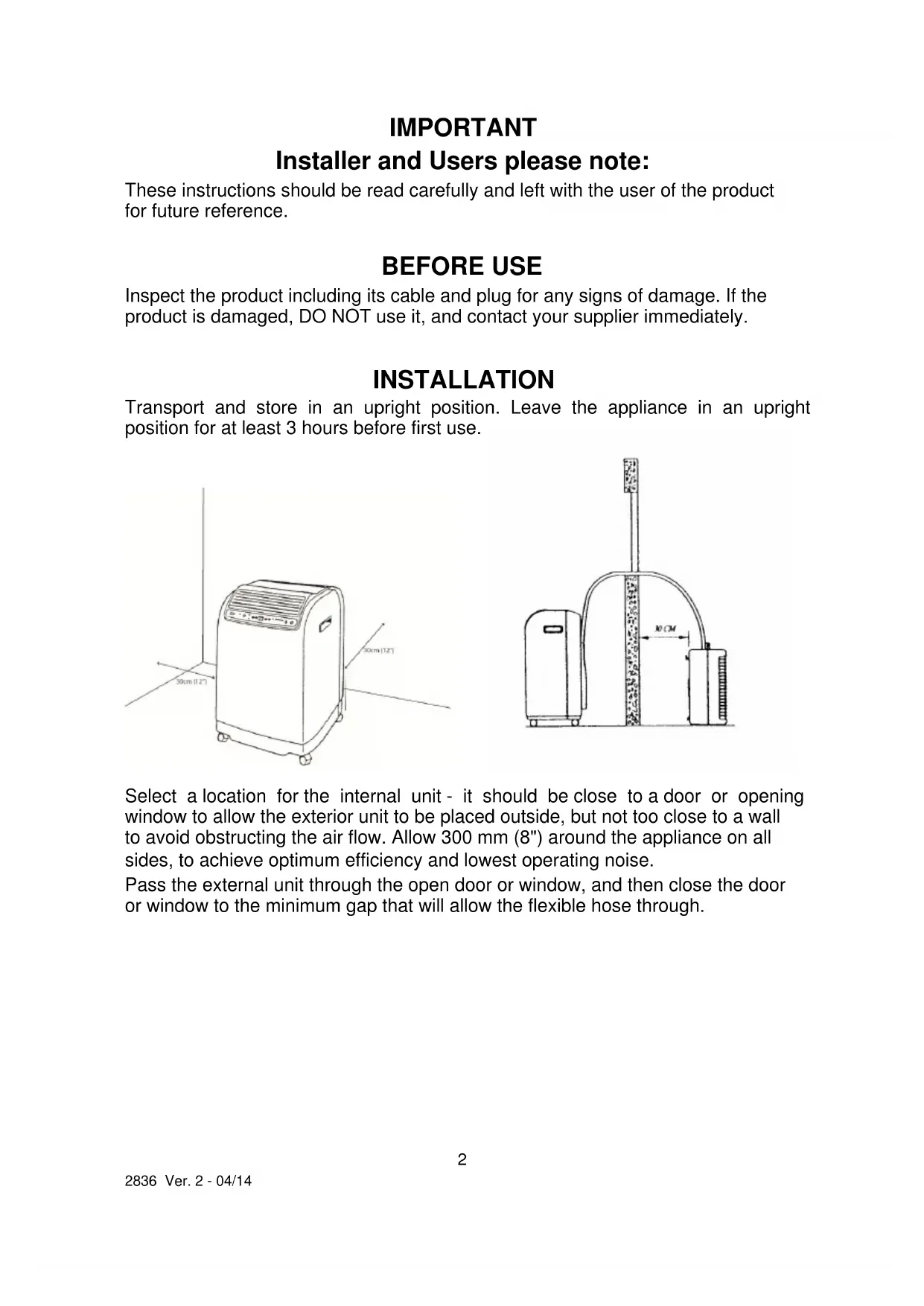
Select a location for the internal unit - it should be close to a door or opening window to allow the exterior unit to be placed outside, but not too close to a wall to avoid obstructing the air flow. Allow 300mm (8") around the appliance on all sides, to achieve optimum efficiency and lowest operating noise.
Pass the external unit through the open door or window, and then close the door or window to the minimum gap that will allow the flexible hose through.
If the appliance is to be used frequently in the same location, then the bracket can be attached to the exterior wall, and the external appliance can be hung on the bracket. See installation diagram below.
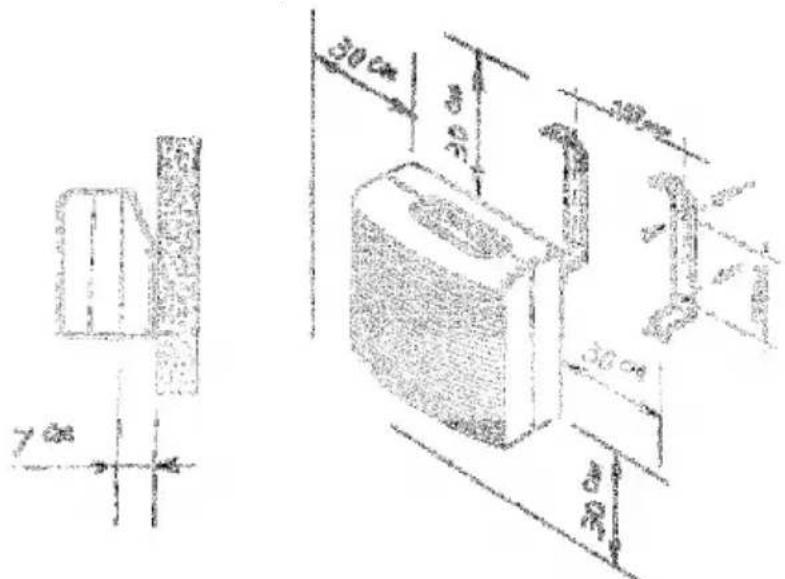
The internal and external units must remain connected by the flexible hose at all times. The flexible hose may only be disconnected by persons with the necessary qualifications under the "F Gas Regulations".
PRODUCT SAFETY
- This appliance is not intended for use by persons (including children) with reduced physical, sensory or mental capabilities, or lack of experience and knowledge, unless they have been given supervision or instruction concerning use of the appliance by a person responsible for their safety.
Children should be supervised to ensure that they do not play with the appliance - Ensure that there is at least 300mm (1') between the sides of the appliance and any flammable materials
- Ensure that there is at least 900mm (3') from the top of the appliance and any flammable materials.
- Do not place on soft surfaces.
- For indoor use only
- Not suitable for use in boats, caravans or similar locations.
- Do not use in bathrooms, or in wet locations.
- Do not place the mains lead beneath a carpet or rug.
- Do not use the product in locations where paint, petrol or other flammable liquids are used or stored.
- Do not use unless correctly installed
- Do no insert any object into the appliance through the grilles. This may damage the product or result in electric shock.
- Do not obstruct the air intake and exhaust vents on either internal or external appliance.
GENERAL SAFETY REQUIREMENTS
Domestic wiring must be tested periodically by a qualified electrician at least once every 10 years or at every change of occupancy. For office and retail premises, and buildings such as village halls, the wiring must be inspected at least once every 5 years.
It is recommended that all building be fitted with smoke alarms (it is mandatory for new buildings).
INSTALLATION AND OPERATION
If the remote control is to be used, install two AAA batteries into the battery compartment, ensuring the correct polarity.
Plug the mains lead into a 13 Amp mains socket.
If connecting via an extension lead, make sure that the lead is rated at 13 Amps or more, and that it is fully unwound.
Switch the appliance on at the mains socket.
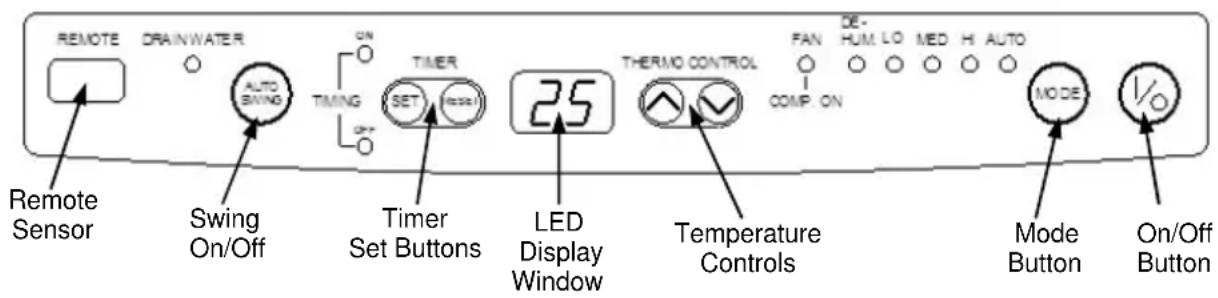
Press the "1/0" button to start the appliance
Select the mode by pressing the "MODE" button. The available modes are:
-
AUTO: Automatic mode: selects the optimum fan speed to maintain the selected room temperature.
HI/MED/LO: Selects high, medium or Low fan speed. -
Set the required room temperature using the THERMO CONTROL buttons. The set temperature is displayed on the LED display. Cooling modes only.
-
DEHUM: Dehumidifier setting; in this mode there is no cooling and the fan speed is selected automatically.
FAN: Fan only mode with no cooling.
AUTO SWING: Selects up and down movement of the louvers.
THERMO CONTROL: The default temperature setting is 25^ , use these buttons to select the desired room temperature (16^ - 30^) . When the temperature reaches the desired figure the compressor will stop and the unit will operate as fan only till the temperature rises sufficiently for the compressor to restart.
TIMER: The timer can operate as countdown until the unit turns off or as a countdown until the unit turns on.
- TIMING OFF: To set the hour you want the unit to turn off, press the TIMER SET button when the unit is "ON". And the TIMING OFF indicator will illuminate, set the time till the unit switches off by repeatedly pressing the TIMER SET button (1 hour intervals). When the set time has elapsed the unit will switch OFF. Pressing the power "I/O" button at any time whilst the timer is set will cancel the timer setting and the unit will turn OFF.
- TIMING ON: To set the hour you want the unit to turn ON, press the TIMER SET button when the unit is "OFF". And the TIMING ON indicator will illuminate, set the time till the unit switches ON by repeatedly pressing the TIMER SET button (1 hour intervals). When the set time has elapsed the unit will switch ON. Pressing the power "I/O" button at any time whilst the timer is set will cancel the timer setting and the unit will turn ON.
The timer function can be cancelled at any time by pressing the RESET button.
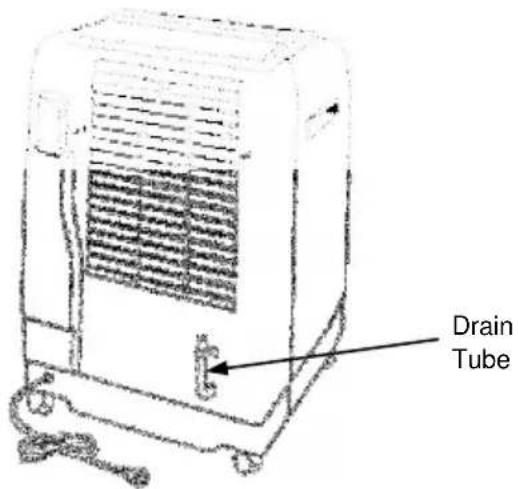
If the DRAIN WATER indicator illuminates, place a container underneath the end of the water drain tube (on the back of the internal appliance) and remove the bung. Allow the water to drain out, and then replace the bung.
USING THE REMOTE CONTROL
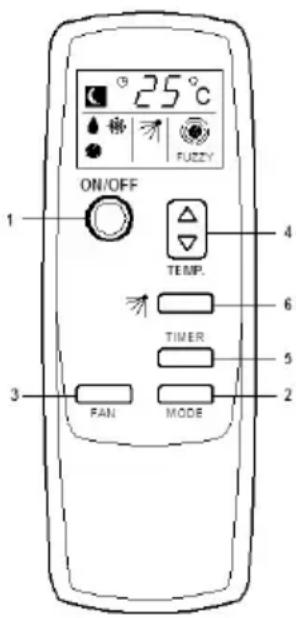
The operating modes are selected in exactly the same way as using the control panel on the main appliance. To operate the remote control, make sure that it control is pointed at the window in the front panel labelled "REMOTE".
- ON/OFF Button
- MODE Button
- FAN Speed Button
- TEMPERATURE CONTROL Button
- TIMER Setting Button
- AUTO SWING Button
MAINTENANCE
Before cleaning, turn the appliance off using the button on the control panel (NEVER switch off the power at the mains socket whilst the appliance is running). Wait until the appliance stop and then disconnect from the mains supply. The case may then be cleaned using a damp cloth with a drop of washing-up liquid to remove any dust or dirt from the case. Do no use stronger detergents or solvents as these may damage the plastic.
Using a dry 1'' (25 mm) paint-brush, remove any dust from the grilles.
Every two weeks, clean the air filter; the filter is located at the back of the appliance towards the top. Remove the filter, and wash with hand-hot water with a drop of detergent. Dry thoroughly before replacing.
Using the EH1413 with a blocked filter will severely reduce its efficiency, and using without the filter may lead to a build-up of a dust on the heat exchangers, which may constitute a fire hazard.
If the mains lead is damaged, it must be replaced by the manufacturer or an authorised service centre. If the mains plug needs to be replaced, proceed as follows:
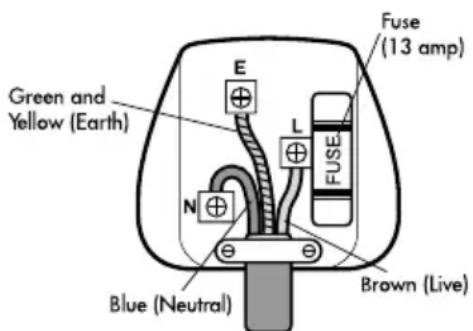
positioned correctly (over the outer sheath of the cable) and it fully tightened.
- Connect the brown wire to the terminal labelled "L".
- Connect the blue wire to the terminal labelled "N"
- Connect the green/yellow wire to the terminal labelled with the earth symbol or "E".
- Make sure that the cord-grip is
OPERATING COSTS
At time of going to press, the average cost of electricity is £0.14 per appliance (kilowatt-hour). The amount you are being charged will be shown on your electricity bill.
At this cost, the EH1413 will cost a maximum of £0.17 per hour to run; the actual amount will depend on the set temperature, and the room temperature.
PAT TESTING.
When used in an office environment we recommend that this product should be safety-tested yearly by a qualified electrician (PAT Tested).
We recommend that it is PAT tested regularly when used in a domestic environment.
DISPOSAL AND RECYCLING
You must not dispose of this appliance with domestic household waste.
Most local authorities have specific collection system for appliances and disposal is free of charge to the end-user.
When replacing an existing appliance with a similar new appliance your retailer may take the old appliance for disposal.
This air conditioner contains R410a refrigerant gas. At the end of its life the disposal of this product must be in accordance with local regulations.
FAULT-FINDING
If the EH1413 is not operating, proceed as follows:
Check that the mains plug is firmly in the socket, and that the socket is switched ON.
When the appliance is switched on there will be a delay of about 1 minute before it starts to operate.
- Appliance stops running:
Target temperature has been reached.
Timer has been set.
- In cooling mode, no cool air is produced:
Room temperature is lower than set temperature
The appliance is defrosting (this will take a few minutes, and afterwards, it will resume operation)
- Remote control does not work:
Check batteries are correctly installed, and are not exhausted.
Make sure that the remote control is pointed towards the appliance when being used.
TECHNICAL SPECIFICATION
Dimensions (internal unit): 470 × 335 × 695 ~mm
Dimensions (external unit): 510 × 230 × 490 ~mm
Weight (internal unit): 36 kg
Weight (external unit): 14 kg
Cooling capacity: 4.3 kW (15000 BTU/h)
Power supply: 230 V~
Power consumption: 1310 W
SEER (For Cooling) 4.6
Dehumidifying capacity: 45 litres/day
Operating current: 5.8 A
Air volume: 600 m
Refrigerant: R410a (1.08 kg)
Noise(max) Indoor 59 dB (A)
Outdoor 64 dB (A)
3/hour
SERVICE WARRANTY
Prem-i-Air guarantees the product free from defects in materials and workmanship for a period of twelve months.
Should this appliance be operated under conditions other than those recommended, at voltages other than the voltage indicated on the appliance, or any attempts made to service or modify the appliance, then the warranty will be rendered void.
The product you buy may sometimes differ slightly from illustrations. This warranty is in addition to, and does not affect, your statutory rights.
If you have any problems with this product, please call our Help Desk on (0845) 459 4816.
Prem-i-Air Appliances Ltd.,
Lancots Lane, Sutton,
St. Helens, Merseyside.
WA9 3EX, UK
website: www.prem-i-air.com
IMPORTANT
Prem-I-Air Appliances Ltd
Z.A. du Bel Air
17 D rue de Creil
95340 BERNES-SUR-OISE
Site Internet: www.prem-i-air.eu