
KLE 502 - Boiler AEG - Free user manual and instructions
Find the device manual for free KLE 502 AEG in PDF.



| Product type | Electric convector baseboard |
| Brand | AEG |
| Model | KLE 502 |
| Dimensions (H x W x D) | 250 x 662 x 100 mm |
| Weight | 4 kg |
| Power supply | 230/240 V ~ 50 Hz, 0.5 kW |
| Protection rating | IP24 |
| Protection class | II |
| Temperature adjustment range | 10 to 30 °C |
| Frost protection | Yes, at 7 °C |
| Operating modes | Comfort, Reduced, Automatic, Frost protection |
| Heating indicator | Yes, lights up when heating is on |
| Safety limiter | Yes, cuts off heating in case of overheating |
| Mounting | Wall-mounted, bracket supplied |
| Power cable | 3 wires (neutral, phase, pilot), without plug |
| Care and cleaning | Clean when cold with standard non-abrasive products; vacuum the grilles regularly |
| Spare parts and repairability | Original parts recommended; cable replacement by a qualified installer |
| Minimum operating age | 3 years under supervision; 8 years unsupervised after training |
| Certifications | CE marking |
Frequently Asked Questions - KLE 502 AEG
User questions about KLE 502 AEG
0 question about this device. Answer the ones you know or ask your own.
Ask a new question about this device
Download the instructions for your Boiler in PDF format for free! Find your manual KLE 502 - AEG and take your electronic device back in hand. On this page are published all the documents necessary for the use of your device. KLE 502 by AEG.
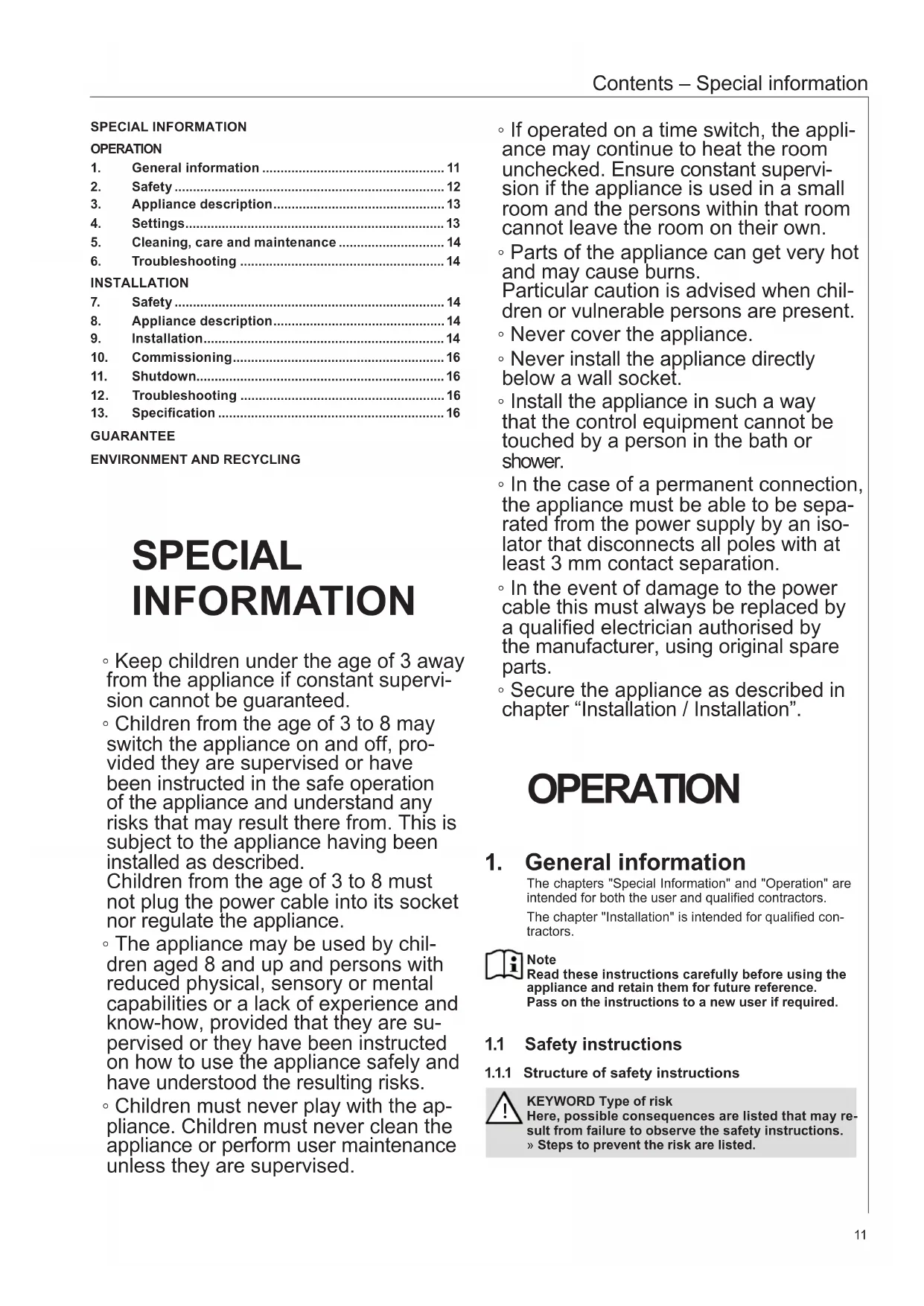
USER MANUAL KLE 502 AEG
Plinth convector heater
Operation and installation 11
D0000047394
26_07_31_0061
- General information ...... 11
- Safety 12
- Appliance description....13
- Settings....13
- Cleaning, care and maintenance 14
- Troubleshooting .... 14
INSTALLATION
- Safety 14
- Appliance description....14
- Installation....14
- Commissioning....16
- Shutdown....16
- Troubleshooting 16
- Specification 16
GUARANTEE
ENVIRONMENT AND RECYCLING
SPECIAL INFORMATION
- Keep children under the age of 3 away from the appliance if constant supervision cannot be guaranteed. • Children from the age of 3 to 8 may switch the appliance on and off, provided they are supervised or have been instructed in the safe operation of the appliance and understand any risks that may result there from. This is subject to the appliance having been installed as described. Children from the age of 3 to 8 must not plug the power cable into its socket nor regulate the appliance. • The appliance may be used by children aged 8 and up and persons with reduced physical, sensory or mental capabilities or a lack of experience and know-how, provided that they are supervised or they have been instructed on how to use the appliance safely and have understood the resulting risks. • Children must never play with the appliance. Children must never clean the appliance or perform user maintenance unless they are supervised.
• If operated on a time switch, the appliance may continue to heat the room unchecked. Ensure constant supervision if the appliance is used in a small room and the persons within that room cannot leave the room on their own. - Parts of the appliance can get very hot and may cause burns. Particular caution is advised when children or vulnerable persons are present. - Never cover the appliance. - Never install the appliance directly below a wall socket. • Install the appliance in such a way that the control equipment cannot be touched by a person in the bath or shower. • In the case of a permanent connection, the appliance must be able to be separated from the power supply by an isolator that disconnects all poles with at least 3 mm contact separation. • In the event of damage to the power cable this must always be replaced by a qualified electrician authorised by the manufacturer, using original spare parts. - Secure the appliance as described in chapter "Installation / Installation".
OPERATION
1. General information
The chapters "Special Information" and "Operation" are intended for both the user and qualified contractors.
The chapter "Installation" is intended for qualified contractors.

Note
Read these instructions carefully before using the appliance and retain them for future reference.
Pass on the instructions to a new user if required.
1.1 Safety instructions
1.1.1 Structure of safety instructions

KEYWORD Type of risk
Here, possible consequences are listed that may result from failure to observe the safety instructions.
» Steps to prevent the risk are listed.
1.1.2 Symbols, type of risk
| Symbol Type of risk | |
 | Injury |
 | Electrocution |
 | Burns(burns, scalding) |
1.1.3 Keywords
| KEYWORD Meaning | |
| DANGER Failure | to observe this information will result in serious injury or death. |
| WARNING Failure | to observe this information may result in serious injury or death. |
| CAUTION Failure | to observe this information may result in non-serious or minor injury. |
1.2 Other symbols in this documentation

Note
General information is identified by the adjacent symbol.
» Read these texts carefully.
| Symbol Meaning | ||
 | Material losses(appliance damage, consequential losses and environmental pollution) | |
 | Appliance disposal | |
» This symbol indicates that you have to do something. The action you need to take is described step by step.
1.3 Information on the appliance
| Symbol Meaning | |
| Never cover the appliance | |
1.4 Units of measurement

Note
All measurements are given in mm unless stated otherwise.
2. Safety
2.1 Intended use
This appliance is designed to heat living areas.
This appliance is intended for domestic use. It can be used safely by untrained persons. The appliance can also be used in a non-domestic environment, e.g. in a small business, as long as it is used in the same way.
Any other use beyond that described shall be deemed inappropriate. Observation of these instructions and of instructions for any accessories used is also part of the correct use of this appliance.
2.2 General safety instructions

WARNING Burns
Never operate this appliance...
- if the minimum clearances to adjacent object surfaces such as furniture, net curtains, curtains, textiles or other flammable materials are not maintained.
- in rooms where the appliance is at risk of fire or explosion as a result of chemicals, dust, gases or vapours. Ventilate the room sufficiently before heating.
- in the direct proximity of electrical cables or receptacles that carry or contain flammable or explosive materials.
- if an appliance component is damaged, the appliance has fallen over or already has a fault.
- outdoors.

WARNING Burns
Never place any flammable, combustible or insulating objects or materials on the appliance or in direct proximity to it.

WARNING: Burns
Ensure that no foreign bodies enter the ventilation or extract air apertures. This could result in electric shock, fire or damage to the appliance.

WARNING: Burns
To prevent fires, ensure that the air inlets and outlets are never blocked.
Never position the appliance on soft surfaces such as a bed, as this could result in the apertures becoming blocked.

WARNING: Burns
If operated on a time switch, the appliance may continue to heat the room unchecked. Ensure constant supervision if the appliance is used in a small room and the persons within that room cannot leave the room on their own.

WARNING: Injury
Keep children under the age of 3 away from the appliance if constant supervision cannot be guaranteed. Children from the age of 3 to 8 may switch the appliance on and off, provided they are supervised or have been instructed in the safe operation of the appliance and understand any risks that may result therefrom. This is subject to the appliance having been installed as described. Children from the age of 3 to 8 must not plug the power cable into its socket or regulate the appliance. The appliance may be used by children aged 8 and up and persons with reduced physical, sensory or mental capabilities or a lack of experience and know-how, provided that they are supervised or they have been instructed on how to use the appliance safely and have understood the resulting risks. Children must never play with the appliance. Children must never clean the appliance or perform user maintenance unless they are supervised.

CAUTION: Burns
Parts of the appliance can get very hot and may cause burns. Particular caution is advised when children or vulnerable persons are present.

Material losses
Never cover the appliance.
Never stand on the appliance.
2.3 CE designation
The CE designation shows that the appliance meets all essential requirements according to the:
- Electromagnetic Compatibility Directive
- Low Voltage Directive
2.4 Test symbols
See type plate on the appliance.
3. Appliance description
The appliance is a wall mounted electric direct heater.
The appliance is suitable for use as a standalone heating system, or can be used between seasons and as a booster heater in smaller rooms, such as hobby and guest rooms.
The air in the appliance is heated by a heating element and expelled via natural convection through the air outlet grille at the top. Cooler indoor air is drawn in through openings on the underside of the appliance.
The external casing of the appliance is made from stove enamelled sheet steel.
The operating unit and temperature sensor can be found at the back of the appliance.
The appliance has a high limit safety cut-out that switches it off when there is a risk of overheating.
4. Settings
4.1 Operating unit
The operating unit can be found at the back of the appliance, at the top right, and can be operated from above.
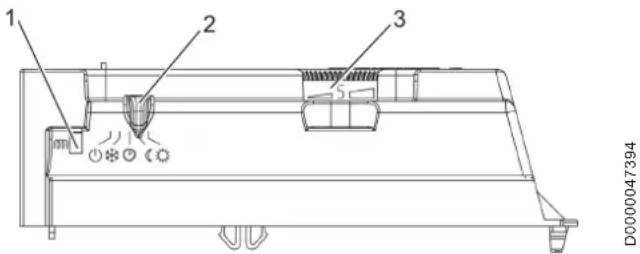
1 Heating indicator 2 Sliding switch 3 Temperature selector
Use the sliding switch to select the desired operating mode or to switch the appliance off.
Use the temperature control knob to set the room temperature (10–30 °C).
The heating indicator lights up when the appliance is heating. When the set room temperature has been reached, the heating indicator goes off.
4.2 Operating modes
| Symbol Operating mode | |
| Appliance switched off | |
| Comfort mode | |
| Setback mode | |
| Programmed operation | |
| Frost protection |
4.2.1 Comfort mode
In comfort mode, the appliance switches off automatically as soon as the required room temperature has been reached. By heating intermittently, the appliance maintains a constant room temperature.
To select comfort mode, proceed as follows:
» Set the sliding switch to comfort mode. » To select the desired room temperature, turn the temperature control knob to the left.

Note
To achieve the same temperature in two different rooms, the setting on the temperature control knob might be different on each appliance.
The same is true if there is more than one appliance in a single room.

Note
If a window is open, the room temperature regulator may not turn the appliance off.
Turn the appliance off while you are airing the room, to avoid excessive electricity consumption.
4.2.2 Setback mode
In setback mode, the appliance automatically reduces the room temperature selected in comfort mode by about 3.5 °C.
If you are leaving the room for more than 2 hours, use setback mode.
Set the sliding switch to setback mode. To select the desired room temperature, turn the temperature control knob to the left.
4.2.3 Programmed operation
You can connect the appliance to an optional control unit via the appliance's integral control cable (see chapter "Installation / Electrical connection").
Depending on the setting of the control unit, the appliance operates in comfort, setback or frost protection mode at specific times of the day.
If you set the sliding switch to programmed operation with no control device connected, the appliance will operate in comfort mode.
4.2.4 Frost protection
In frost protection mode, the temperature controller turns the appliance on automatically as soon as the room temperature falls below 7 °C.
4.3 Restricting the control switches
At the rear of the operating unit there are 3 pins with which you can fix or restrict the settings of the sliding switch and temperature control knob.
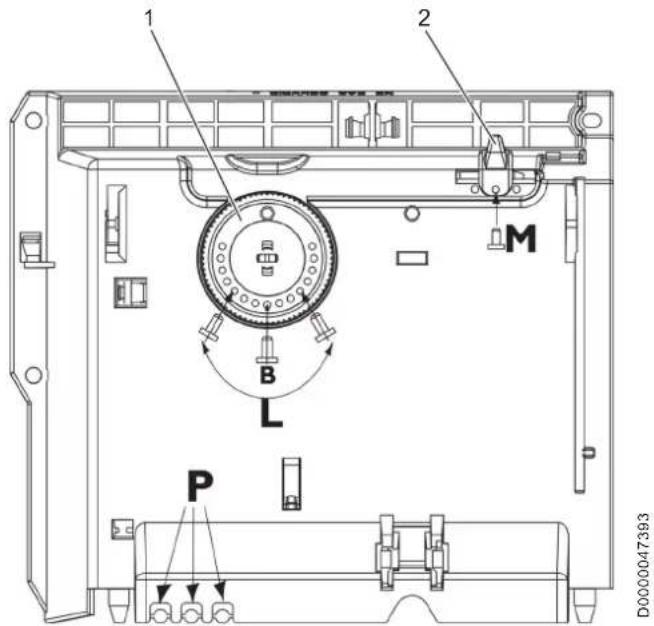
1 Temperature selector 2 Sliding switch P Pin holder B Fixing the temperature control knob to a specific temperature L Restricting the temperature control knob to a specific temperature range M Fixing the sliding switch to a specific operating mode
5. Cleaning, care and maintenance
The appliance contains no user serviceable parts.
Clean the appliance when cold with ordinary cleaning products. Avoid abrasive or corrosive cleaning products. If a pale brownish discolouration appears on the appliance casing, wipe it off with a damp cloth. Regularly clean the upper and lower ventilation grilles of the appliance with a vacuum cleaner.

Material losses
Never spray cleaning spray into the air slot.
6. Troubleshooting
| Problem Cause Remedy | ||
| The appli-ance does not heat up. | The temperature is set too low. | Check the temperature set on the appliance. |
| The power supply has been interrupted. | Check the MCB/fuse in your fuse box/distribution panel. | |
| The appliance has overheated. The high limit safety cut-out has switched the appliance off. | Remedy the cause, such as a covered or dirty air outlet or intake.After a few minutes of cooling down the appliance will restart. | |
If you cannot remedy the fault, notify your qualified contractor. To facilitate and speed up your request, provide the number from the type plate (000000-0000-000000).
INSTALLATION
7. Safety
Only a qualified contractor should carry out installation, commissioning, maintenance and repair of the appliance.
7.1 General safety instructions
We guarantee trouble-free function and operational reliability only if original accessories and spare parts intended for the appliance are used.
7.2 Instructions, standards and regulations

Note
Observe all applicable national and regional regulations and instructions.
8. Appliance description
8.1 Standard delivery
The following are delivered with the appliance: - Wall mounting bracket
8.2 Accessories
8.2.1 Further accessories
- Control unit
9. Installation
9.1 Installation site

WARNING Electrocution
Install the appliance in such a way that the control equipment cannot be touched by a person in the bath or shower.

Material losses
Fit the appliance to a vertical wall that is heat-resistant to at least 85 °C.

Material losses
Never install the appliance directly below a wall socket.

Material losses
Maintain the minimum clearances to adjacent surfaces.
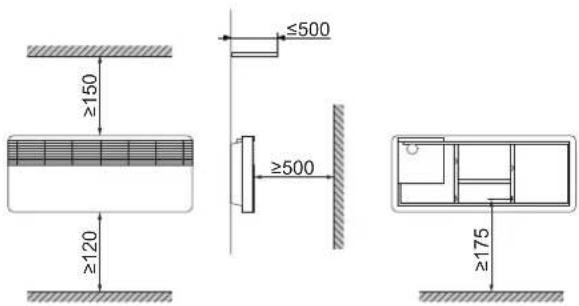
9.2 Installing the wall mounting bracket

Material losses Observe the necessary floor clearance.
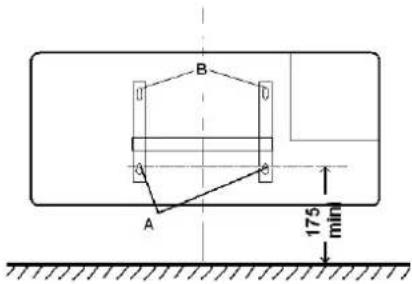
| KLE 502 KLE 1002 | |||
| A mm | 210 654 | ||

Note Use appropriate fixing materials.
» Unhook the wall mounting bracket from the appliance. » Use the holes in the mounting bracket as a template for drilling the wall. » Mark out the holes for the wall mounting bracket. » Drill the holes and insert rawl plugs. » Screw the wall mounting bracket to the installation wall.
9.3 Appliance installation

» Hook the lower slots on the back of the appliance onto the tabs of the wall mounting bracket.
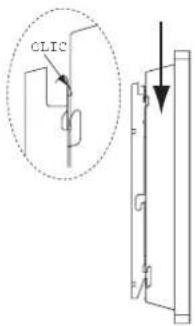
» Tilt the appliance back against the upper tabs. » Secure the appliance by pushing it towards the wall until it audibly snaps into place on the wall mounting bracket.
9.4 Removing the appliance
» To release the appliance, push the metal tabs at the top of the mounting bracket towards the wall.
9.5 Power supply

WARNING Electrocution In rooms with high moisture levels, such as shower rooms and kitchens, install the connection socket at least 25 cm above the floor.

WARNING Electrocution Ensure that the power cable is not in contact with any appliance components.

Material losses Ensure the appliance can be separated from the power supply by an isolator that disconnects all poles with at least 3 mm contact separation.

Material losses Observe the type plate. The specified voltage must match the mains voltage.

Note Ensure that the cross-section of the on-site supply cable is adequate.

Note Ensure that a flush-mounted junction box for a permanent power supply is installed at a distance of at least 10 cm from the side of the appliance.

Note Carry out all electrical connection and installation work in accordance with relevant regulations.
The appliance is supplied without a plug and has a 3-core power cable.
» Connect the 3-core power cable to a connection socket as illustrated:
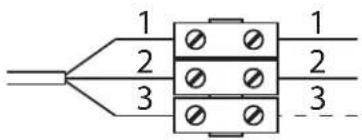
1 Neutral wire (blue) 2 Live (brown) 3 Control cable (black)
9.5.1 Control cable

Material losses If operating the appliance in programmed mode using the control cable, observe the correct polarity.

Material losses When not in use, isolate the control cable in order to prevent a short circuit.
There are 3 possible ways to connect the appliance:
Appliance connected without control cable
The control cable is not connected. The appliance is not controlled.
» Isolate the control cable.
Temperature setback via control cable
To reduce the temperature set at the thermostat (by 3.5 °C), the black control cable is activated via an external electronic contact (e.g., a time switch).
Control cable connected to a control unit
You can connect the appliance to any control unit that issues the following waveforms as control signals:
| Command Oscilloscope Operating | mode | Heating temperature | |
| No power Comfort | mode | Subject to the setting of the temperature control knob | |
| Complete oscillation 230 V | 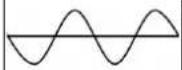 | Setback mode | Approx. 3.5 °C lower than the temperature set on the temperature control knob |
| Semi-oscillation negative -230 V | 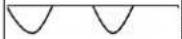 | Frost protection | Frost protection temperature (approx. 6 °C) |
| Semi-oscillation positive +230 V | Appliance OFF | None | |
10. Commissioning
10.1 Initial start-up
When the appliance is first started up, it may give off a smell. Make sure that the room is adequately ventilated (with a partially open window, for example).
10.2 Appliance handover
» Explain the functions of the appliance to the user. » In particular, draw attention to the safety instructions. » Hand over the operating and installation instructions to the user.
11. Shutdown
» Move the sliding switch to the "appliance off" position.
12. Troubleshooting

Note
The power cable may only be replaced by a qualified contractor using original spare parts supplied by us.
13. Specification
13.1 Dimensions and connections
| KLE 502 KLE 1002 | |||||
| a20 | Appliance | Width | mm | 665 | 1110 |
| b01 | Power connection | Entry electrical cables | |||
| i13 | Wall mounting bracket | Horizontal hole spacing | mm | 210 | 654 |
Guarantee
The warranty conditions of our German companies do not apply to appliances acquired outside of Germany. In countries where our subsidiaries sell our products, it is increasingly the case that warranties can only be issued by those subsidiaries. Such warranties are only granted if the subsidiary has issued its own terms of warranty. No other warranty will be granted.
We shall not provide any warranty for appliances acquired in countries where we have no subsidiary to sell our products. This will not affect warranties issued by any importers.
Environment and recycling
We would ask you to help protect the environment. After use, dispose of the various materials in accordance with national regulations.
SPECIAL REMARKS
USE
WARNING: BURN HAZARD
WARNING: BURN HAZARD
WARNING: BURN HAZARD
WARNING: BURN HAZARD
Urzhumskaya street 4,
building 2
129343 Moscow
Tel. 0495 7753889
Fax 0495 7753887
Switzerland
STIEBEL ELTRON AG
Industrie West
Gass 8
5242 Lupfig
Tel. 056 4640-500
Fax 056 4640-501


- PLINTH CONVECTOR HEATER
- INSTALLATION
- GUARANTEE
- SPECIAL INFORMATION
- OPERATION
- GENERAL INFORMATION
- SAFETY INSTRUCTIONS
- STRUCTURE OF SAFETY INSTRUCTIONS
- SYMBOLS, TYPE OF RISK
- KEYWORDS
- OTHER SYMBOLS IN THIS DOCUMENTATION
- NOTE
- INFORMATION ON THE APPLIANCE
- UNITS OF MEASUREMENT
- SAFETY
- INTENDED USE
- GENERAL SAFETY INSTRUCTIONS
- WARNING BURNS
- WARNING: BURNS
- WARNING: INJURY
- CAUTION: BURNS
- MATERIAL LOSSES
- CE DESIGNATION
- TEST SYMBOLS
- APPLIANCE DESCRIPTION
- SETTINGS
- OPERATING UNIT
- OPERATING MODES
- COMFORT MODE
- SETBACK MODE
- PROGRAMMED OPERATION
- FROST PROTECTION
- RESTRICTING THE CONTROL SWITCHES
- CLEANING, CARE AND MAINTENANCE
- TROUBLESHOOTING
- INSTRUCTIONS, STANDARDS AND REGULATIONS
- STANDARD DELIVERY
- ACCESSORIES
- FURTHER ACCESSORIES
- INSTALLATION SITE
- WARNING ELECTROCUTION
- INSTALLING THE WALL MOUNTING BRACKET
- APPLIANCE INSTALLATION
- REMOVING THE APPLIANCE
- POWER SUPPLY
- CONTROL CABLE
- APPLIANCE CONNECTED WITHOUT CONTROL CABLE
- TEMPERATURE SETBACK VIA CONTROL CABLE
- CONTROL CABLE CONNECTED TO A CONTROL UNIT
- COMMISSIONING
- INITIAL START-UP
- APPLIANCE HANDOVER
- SHUTDOWN
- SPECIFICATION
- DIMENSIONS AND CONNECTIONS
- ENVIRONMENT AND RECYCLING
- SPECIAL REMARKS
- USE
- WARNING: BURN HAZARD
- SWITZERLAND
Brand : AEG
Model : KLE 502
Category : Boiler