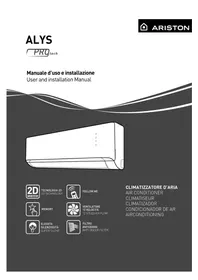
Alys - Air Conditioning Ariston Thermo - Free user manual and instructions
Find the device manual for free Alys Ariston Thermo in PDF.


| Product type | Wall-mounted split air conditioner |
| Brand | Ariston Thermo |
| Model | Alys (range 25, 35, 50) |
| Power supply | 220-240 V ~ 50 Hz (10 A for Alys 25, 16 A for Alys 35/50) |
| Refrigerant | R410A |
| Nominal cooling capacity | 2.5 kW (Alys 25), 3.5 kW (Alys 35), 5 kW (Alys 50) |
| Nominal heating capacity | Similar depending on model (heat pump) |
| Operating modes | Cooling, heating, ventilation, dehumidification, automatic |
| Special functions | Turbo, Sleep, Follow Me, Self-Clean, Silence, Auto-Restart, Memory |
| Filters | Washable dust filter (every 15 days) + anti-odor filter (replacement every 24 months) |
| Ventilation speeds | 12 speeds (3 main with 3 intermediate each) |
| Display | LED screen with Timer, Run, Defrost, Turbo indicators |
| Remote control | Wireless with wall mount, batteries included |
| Timer | On/Off programming (Timer) |
| Swing | Automatic vertical louver oscillation |
| Operating range | Cooling: -15°C to 50°C outdoor; Heating: -15°C to 30°C outdoor |
| Max pipe length | 20 m (Alys 25/35), 25 m (Alys 50) |
| Max height difference | 8 m (Alys 25/35), 10 m (Alys 50) |
| Standard refrigerant charge | 0.8 kg (Alys 25), 0.95 kg (Alys 35), 1.25 kg (Alys 50) |
| Safety | Mandatory grounding, 30 mA residual current device, safety shutdown |
| Compliance | WEEE Directive 2002/96/EC |
Frequently Asked Questions - Alys Ariston Thermo
1. Is the temperature set on the remote control correct?
2. Are the filters dirty? Clean them if necessary.
3. Are there any open doors or windows?
4. Are the air inlet/outlet grilles blocked?
5. Is the outdoor unit exposed to sunlight?
If the problem persists, contact a technician.
- Timer: timer active
- Run: air conditioner running
- Defrost: outdoor unit defrosting in progress
- Turbo: Turbo function activated. Refer to the manual for more details.
User questions about Alys Ariston Thermo
0 question about this device. Answer the ones you know or ask your own.
Ask a new question about this device
Download the instructions for your Air Conditioning in PDF format for free! Find your manual Alys - Ariston Thermo and take your electronic device back in hand. On this page are published all the documents necessary for the use of your device. Alys by Ariston Thermo.
USER MANUAL Alys Ariston Thermo
User and installation Manual
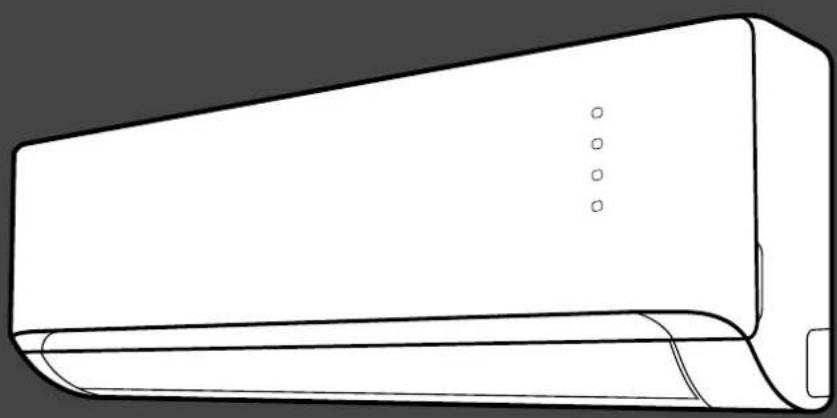
natural_image
Line drawing of a wall-mounted air conditioner unit (no text or symbols)
TECNOLOGIA 2D
2D TECHNOLOGY

FOLLOW ME
CLIMATIZZATORE D'ARIA
AIR CONDITIONER
CLIMATISEUR
CLIMATIZADOR
CONDICIONADOR DE AR
AIRCONDITIONING

MEMORY
VENTILATORE
12 VELOCITÁ
12 SPEED AIR FLOW

ELEVATA
SILENZIOSITÁ
SUPER SILENT

FILTRO
ANTIODORE
ANTI-ODOUR FILTER
INTRODUZIONE
1.2 Display
3. PICCOLA MANUTENZIONE
ATTENZIONE:
natural_image
Line drawing of a hand holding a rectangular device with a curved handle, labeled (FIG. 1), showing motion direction (no text or symbols on the device itself)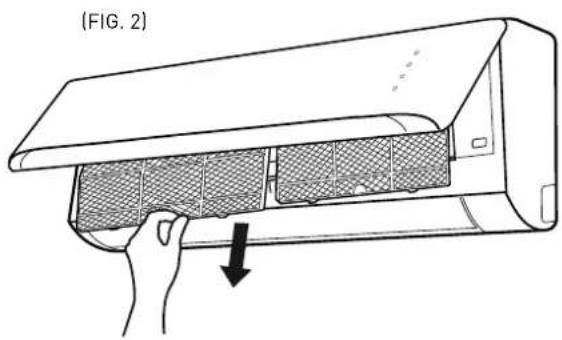
(FIG. 3)
natural_image
Line drawing of a rectangular air conditioner unit with no text or symbols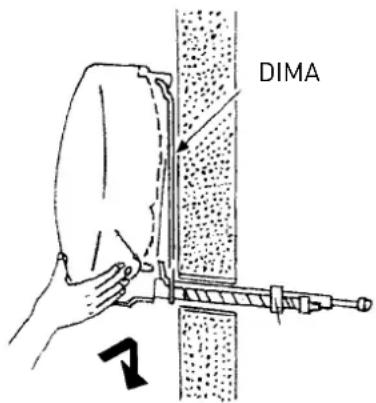
natural_image
Line drawing of a front-mounted air conditioner unit with circular vent and side panel (no text or symbols)2. TUBAZIONI E COLLEGAMENTI
ATTENZIONE:
natural_image
Technical line drawing of a mechanical device with a screw base and mounting bracket (no text or symbols)2.4 Strumenti
This manual is intended for the air conditioning unit installers and end users. Failure to observe the indications contained in this manual shall void the warranty.
This manual constitutes an integral and essential part of the product. It must be stored with care by the user and should always be passed on to new owners or users of the appliance, and/or when the latter is transferred to another system.
In order to ensure correct and safe use of the appliance, both installer and user, each for his/her respective requirements, must read the instructions and precautions contained in this manual carefully, as they provide important safety indications concerning installation, use and maintenance of the appliance.
This manual is divided into two separate sections:
1. OPERATING AND MAINTENANCE INSTRUCTIONS
This section contains all the information required to operate the appliance correctly and to carry out regular checks and maintenance procedures on the appliance.
2. INSTALLATION
This section is intended for installers. It contains all the indications and instructions that professionally qualified personnel must observe in order to ensure optimal installation of the appliance.
The manufacturer reserves the right to modify the data and contents of this manual without prior notice, with the aim of improving the quality of the relative products.
In order to make the content - provided in several languages and applicable to various countries - easier to understand, all illustrations can be found towards the end of the manual and apply to all languages.
THIS PRODUCT CONFORMS TO EU DIRECTIVES 2002/96/EC AND
The barred dustbin symbol appearing on the device indicates that the product must be disposed of separately from household waste once it reaches the end of its lifespan, and transferred to a waste disposal site for electric and electronic equipment, or returned to the dealer when purchasing a new device of the same kind.
The user is responsible for delivering the decommissioned device to a suitable waste disposal site.
Proper separated collection of the decommissioned device and its subsequent eco-compatible recycling, treatment and disposal helps to prevent negative effects on the environment and health, besides encouraging the reuse of the materials comprising the product.
For further details on the available waste collection systems, contact your local waste disposal office, or the dealer from which the product was purchased.


TABLE OF CONTENTS:
OPERATING AND MAINTENANCE INSTRUCTIONS
SAFETY STANDARDS......page 28
- WALL-HUNG MODEL ...... page 30
1.1 Internal unit panel
1.2 Display....page 31
- OPERATION......page 31
2.1 Basic functions
2.2 Special functions....page 32
2.3 Air treatment filters
- SIMPLE MAINTENANCE ......page 33
3.1 Cleaning the filters
3.2 Cleaning the air conditioning unit
- END OF SEASON MAINTENANCE ......page 34
4.1 If the air conditioning unit does not work
INSTALLATION
INSTALLATION ACCESSORIES page 35
SAFETY STANDARDS......page 36
- INSTALLATION......page 38
1.1 Minimum distances
1.2 Installing the template
1.3 Installing the internal unit......page 39
1.4 Installing the external unit
- PIPING AND CONNECTIONS ......page 40
2.1 Connecting the refrigeration piping
2.2 Draining the condensation from the internal unit
2.3 Draining the condensation from the external unit
2.4 Tools....page 41
2.5 Thickness of the copper pipes
2.6 How to connect the pipes
2.7 Connections to the internal unit
2.8 Connections to the external unit ...... page 42
2.9 Creating a vacuum and checking the seal
2.10 Recovering the refrigerant....page 44
2.11 Charging the refrigerant gas
- ELECTRICAL CONNECTIONS......page 45
3.1 Connecting the internal unit
3.2 Connecting the external unit
3.3 Connecting to the mains electricity supply ......page 46
3.4 Connection types
- FINAL STAGES ...... page 47
4.1 Testing
DIMENSIONS......page 141
WIRING DIAGRAMS......page 143
LEGEND page 145
INTERNAL AND EXTERNAL UNIT LABEL......page 148
OPERATING AND MAINTENANCE INSTRUCTIONS
SAFETY STANDARDS
READ THIS MANUAL THOROUGHLY AND KEEP IT IN A SAFE PLACE, AS IT CONTAINS IMPORTANT INFORMATION FOR THE SAFE INSTALLATION, USE AND MAINTENANCE OF YOUR NEW APPLIANCE.
Symbol legend:
⚠️ Failure to comply with this warning implies the risk of injury to persons, which in some circumstances may be fatal.
| STANDARD RISK | ||
| Do not perform any operations that involve opening the appliance. | Electrocution due to exposure to live components.Personal injury caused by burns due to overheated components, or wounds caused by sharp edges or protrusions. | ⚠️ |
| Do not perform operations that involve removing the device from its housing. | Electrocution due to exposure to live components.Personal injury from burns due to cooling gases leaking from disconnected piping. According to relevant standards, the font size must be at least 3 mm for capital letters. | ⚠️ |
| Do not start or stop the appliance simply by plugging it into the electricity mains supply or unplugging it. | Electrocution through contact with a damaged cable or plug, or socket. | ⚠️ |
| Do not wrap/damage/modify/heat the power supply cable, or stand heavy objects on top of it. | Electrocution from non-insulated live wires. | ⚠️ |
| Do not leave anything on top of the appliance. | Personal injury from an object falling off the appliance following vibrations. | ⚠️ |
| Do not climb onto the appliance. Personal injury due to the appliance falling. | ⚠️ | |
| Do not climb onto chairs, stools, ladders or unstable supports to clean the device. | Personal injury caused by falling from a height or shearing (stepladders shutting accidentally). | ⚠️ |
| Do not attempt to clean the appliance without first turning it off and unplugging it or switching the dedicated switch off. | Electrocution due to exposure to live components. | ⚠️ |
| This appliance can be used by children over 8 years of age or by inexperienced persons under supervision, provided that they have been suitably instructed in safe appliance operation and warned about the potential risks connected with it. | Damage to the device caused by improper use.Personal injury. | ⚠️ |
| This appliance can be used under supervision by persons with limited physical, mental or sensory abilities, provided that they have been suitably instructed in safe appliance operation and warned about the potential risks connected with it. | Damage to the device caused by improper use.Personal injury. | ⚠️ |
| Do not direct the air flow towards gas hobs or gas stoves. | Explosions, fires or intoxication from the discharge of gas from supply nozzles. Flames extinguished by the air flow. | ⚠️ |
| Do not place your fingers in the air outlets or in the air inlet grilles. | Electrocution due to exposure to live components.Personal injury from cuts. | ⚠️ |
| Do not drink the condensation water. Personal injury from poisoning. | ⚠️ | |
| If you smell burning or see smoke coming out of the device, disconnect it from the power supply, open all windows and contact the technician. | Personal injury from burns or smoke inhalation. | ⚠️ |
| Children must not play with the appliance. | Damage to the device caused by improper use.Personal injury. | ⚠️ |
| Cleaning and maintenance must not be carried out by children without supervision. | Damage to the device caused by improper use.Personal injury. | ⚠️ |
| Do not perform operations that involve removing the device from its housing. | Flooding caused by water leaking from disconnected piping. | ⚠️ |
| Do not leave anything on top of the appliance. | Damage to the appliance or any underlying objects caused by the appliance coming loose from its fixing brackets and falling. | ⚠️ |
| If the power supply cable is damaged, it must be replaced by the manufacturer or by its technical assistance service, or at least by a suitably qualified individual, in order to prevent all hazards. | Personal injury due to electrocution. | ⚠️ |
| Do not operate the unit in the presence of hazardous substances or flammable/corrosive gases. | Risk of fire, injury, explosion. | ⚠️ |
| Do not use insecticides, solvents or aggressive detergents to clean the device. | Damage to plastic or painted parts. | △ |
| Do not use the appliance for any purpose other than normal domestic use. | Damage to the device caused by operation overload. Damage to objects caused by improper use. | △ |
| Do not direct the air flow towards valuable items, plants or animals. | Damage or perishing due to excessive cold/heat, humidity, ventilation. | △ |
| Do not use the air conditioning unit for extended periods of time in conditions where the humidity level is over 80%. | Damage to objects due to excessive dripping of condensation from the appliance. | △ |
| Do not position other electrical appliances, furniture or humidity-sensitive items directly underneath the internal or external unit. | Condensation water may drip and cause damage or malfunctioning. | △ |
| Provide sufficient ventilation in the room in which the air conditioning unit is installed if a combustion appliance is also located there. | Lack of oxygen. | △ |
| Avoid prolonged exposure to the air flow. Health issues. | △ | |
| Make sure the external unit frame and supporting structure are intact at least once every 12 months. | Personal injury caused by objects falling from a height, damage to the product. | △ |
Failure to comply with this warning implies the risk of damage, in some circumstances serious, to property, plants or animals.
1. WALL-HUNG MODEL
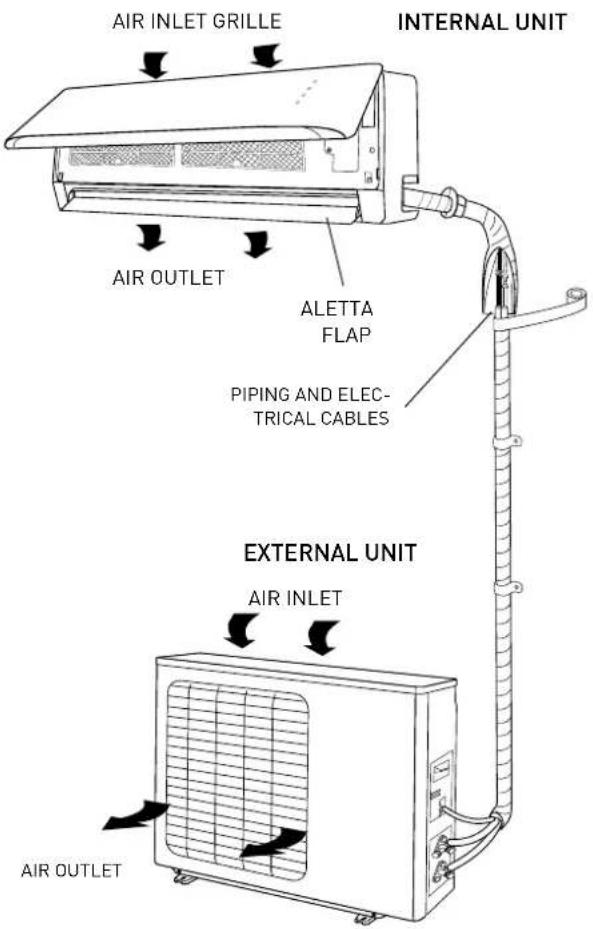
The air conditioning unit consists of two (or more) units connected to one another by (suitably insulated) piping and an electrical power supply cable. The Internal Unit should be installed on a wall of the room to be air conditioned. The External Unit can be free standing on the floor or fitted to a wall, on special supporting brackets.
In the case of monosplit type installation, the external unit has a single connection to the internal unit, while in a multisplit installation several internal units are connected to a single external unit.
Operating recommendations:
- For the air conditioning unit to work at its best, make sure it is suitably sized for your specific air conditioning requirements (risk of poor appliance performance).
- Do not obstruct the air inlet and outlet grilles with any objects (risk of the appliance overheating).
- If the appliance is left unused for an extended period of time, disconnect the power supply cable from the mains as the appliance would otherwise remain powered (risk of personal injury from fire and fumes).
- For optimal appliance performance, keep the room temperature uniform using the swing function, close doors and windows and clean the filters regularly.
- Do not cool the room excessively, to prevent sudden changes in temperature.
WARNING:
- Do not start or stop the appliance by simply plugging it into or out of the electricity mains (risk of personal injury due to electrocution).
- Do not climb onto the internal or external unit and do not place any objects on them at all (risk of personal injury and damage to any objects that fall from a height).
- Avoid prolonged direct exposure to the air flow (risk of personal injury due to sensitisation of the skin).
1.1 Internal unit panel
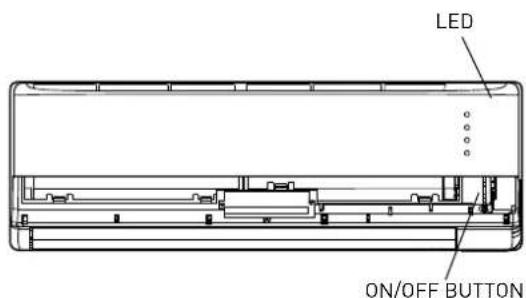
"ON/OFF" BUTTON
Press this button to switch the unit on/off.
The operating mode is AUTO (Tset=24°C).
If the on/off button is pressed twice in succession, the air conditioning unit enters forced cooling mode (used exclusively by the installer during the testing phase).
WARNING:
- Do not operate the switch with wet hands (risk of personal injury from electrocution).
1.2 Display
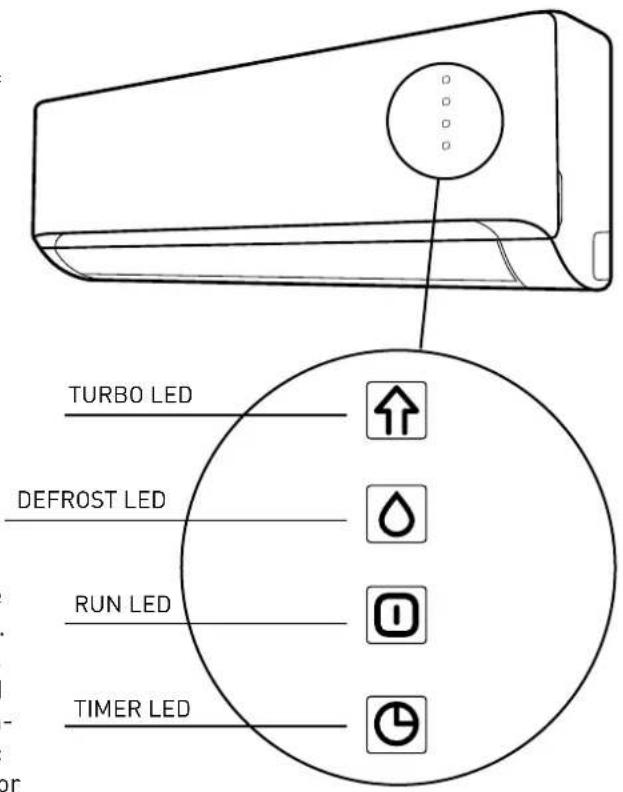
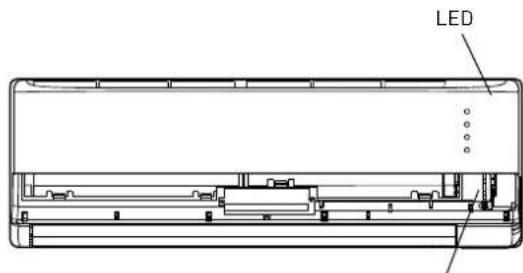
The air conditioning unit has a display which enables viewing of the operating parameters (see figure).
- TIMER LED
indicates that the timer function is enabled
- RUN LED
indicates that the air conditioning unit is switched on
- DEFROST LED
indicates that the defrost function is running inside the external unit
- TURBO LED
indicates that the turbo function is enabled
2. OPERATION
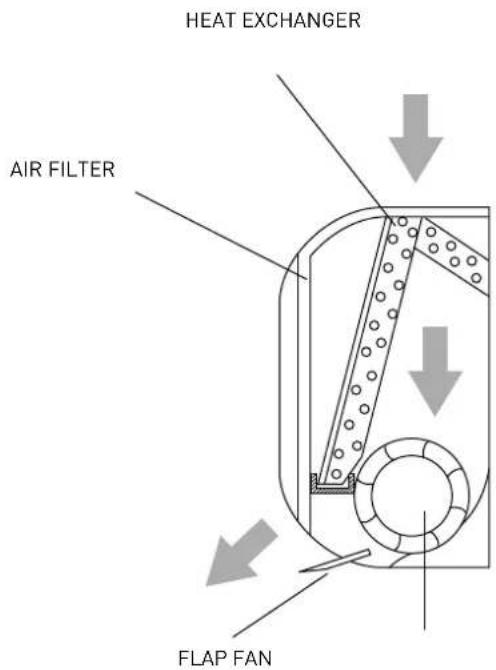
The air conditioning unit is an appliance designed to create the ideal climatic conditions for the well-being of people in a room. It cools, dehumidifi es and heats air completely automatically. The air sucked in by the fan enters via the grille at the top and then passes through the fi lter that traps any dust it may contain. It is then conveyed through the fins of a "heat exchanger": namely a fi nned coil that cools the air and dehumidifi es it, or even heats it. The heat removed from (or transferred to) the room is vented (or drawn in from) outside via the external unit. The fan circulates the air around the room: the direction in which the air exits the unit is adjusted vertically by the fl ap and horizontally by the automatic louver defl ectors.
2.1 Basic functions
- HEATING
In this mode, the air conditioning unit heats the room by means of "heat pump" operation.
- COOLING
In this mode, the air conditioning unit cools down the room while at the same time reducing the humidity in the air.
- VENTILATION
This mode circulates air throughout the room.
• DEHUMIDIFICATION
This mode, with its alternating cooling and ventilation cycles, is designed to achieve air dehumidification without significantly altering the room temperature.
- AUTO
Fan mode and speed are set automatically based on the room temperature detected.
- TURBO
This function allows the unit to reach the set temperature in the shortest possible time.
- TIMER
This function allows you to turn the air conditioning unit on or off at the desired time.
• VERTICAL SWING
This function enables automatic oscillation of the fl ap.
2.2 Special functions
- SLEEP FUNCTION
This function adjusts the temperature automatically in order to make the room more comfortable at night.
• FOLLOW-ME FUNCTION
The operation of the air conditioning unit depends on the sensor of the remote control, which detects the actual room temperature of the environment it is located in.
- SELF CLEAN
In self clean mode, the air conditioning unit automatically cleans and dries the evaporator, keeping it in optimal conditions for subsequent operation
- LOW AMBIENT
With this function the air conditioning unit works in cooling mode with external temperatures lower than 15°C.
- AUTORESTART
This function makes the air conditioning unit restart from the last function set as soon as the electricity comes back on following a power failure (mode, temperature, fan speed and fl ap position).
- SILENCE
This function allows the air conditioning unit to set an ultra minimum fan speed of the internal unit, making the room extremely quiet.
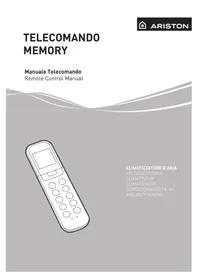
- MEMORY
It is used to save the current settings or restore the previous settings.
- LED
This function switches off the display of the internal unit.
- 12 SPEED FAN
For each of the 3 speeds which can be set (HIGH, MED, LOW), the air conditioning unit has three speed sublevels (HIGH, HIGH+, HIGH-, MED, MED+, MED-, LOW, LOW+, LOW-) which are set automatically. These 9 sublevels in addition to those of the dehumidification, turbo and silence functions, mean that the air conditioning unit has a total of 12 air flow speeds.
- FLAP AUTO MEMORY
When switched off, the air conditioning unit saves the last set position of the fl ap.
- REFRIGERANT LEAK SENSOR (in cooling mode only)
The air conditioning unit possible leaks of refrigerant and shows "EC" on the display (in the case of LED display, the RUN and TIMER LEDs flash.
2.3 Air treatment filters
- Anti-odour filter
Removes unpleasant odours and volatile organic compounds.
3. SIMPLE MAINTENANCE
WARNING:
- Unplug the appliance or switch off the dedicated switch before performing any operations (risk of personal injury from electrocution).
- Do not touch the air conditioning unit with wet hands (risk of personal injury from electrocution).
- When cleaning the appliance, do not climb onto a table or unstable chair (risk of personal injury due to falling from a height).
- When removing filters, take care not to touch any metal parts, especially the heat exchanger inside the internal unit (risk of personal injury from cuts).
3.1 Cleaning the filters
Cleaning the fi lters regularly is essential for optimal performance of the air conditioning unit. For domestic settings, we recommend that fi lters be cleaned fortnightly.
Anti-dust filters
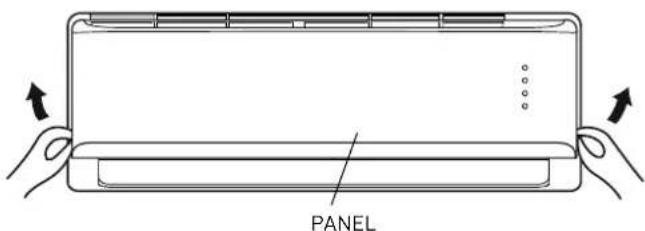
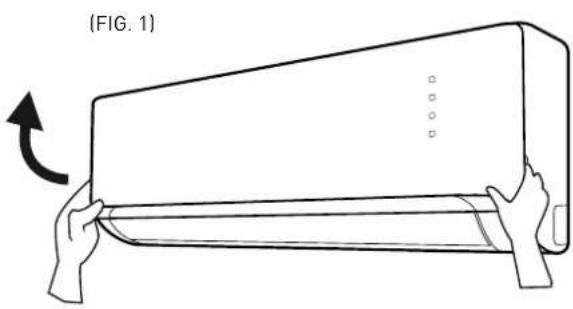
Open the front panel by pushing it upwards at the "grooves" on the sides (fi q. 1).
Remove the fi liters by pulling them gently downwards (fi g. 2). Clean them using a vacuum cleaner or wash them in lukewarm water and neutral detergent. Make sure you dry them thoroughly before replacing them. Do not leave them exposed to sunlight. Do not operate the air conditioning unit without the air fi liters.
Air conditioning filters
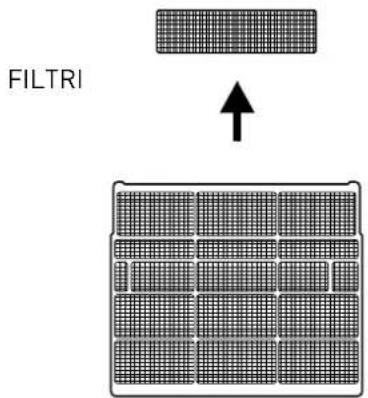
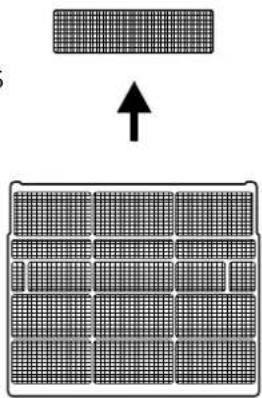
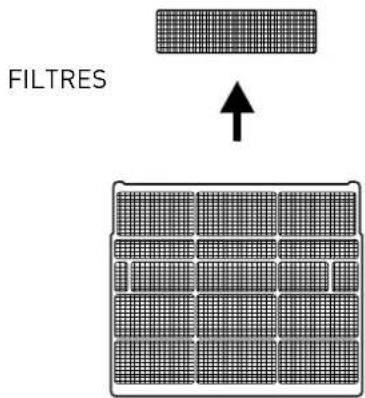
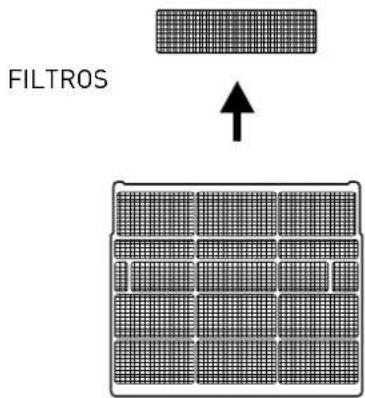
Open the front panel and remove the anti-dust filters as explained above. Remove the air conditioning filters as shown in fig. 3 and replace them with new ones.
- Anti-odour filter
These filters must be replaced once they are no longer able to perform their function (about 24 months).
natural_image
Diagram of a hand holding a rectangular device with a curved arrow indicating rotation (no text or symbols)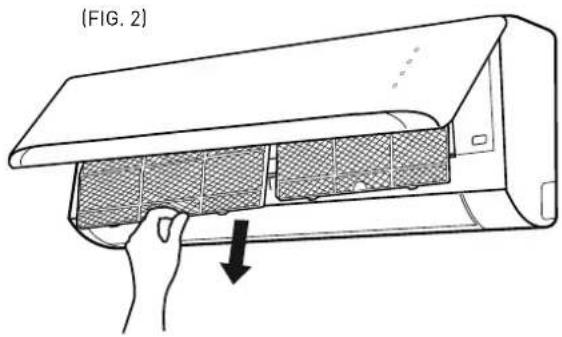
natural_image
Line drawing of a hand opening a wall-mounted air conditioner unit, showing internal mesh structure and airflow direction (no text or symbols)(FIG. 3) FILTERS
natural_image
Diagram showing a grid pattern with an upward arrow, no text or symbols present3.2 Cleaning the air conditioning unit
Clean the Internal Unit and remote control, if necessary, using a cloth moistened with lukewarm water (no hotter than 40°C) and mild soap; do not use solvents or aggressive detergents, insecticides or spray cleaners (risk of damaging or corroding the plastic parts of the appliance).
Take extra care when cleaning the front panel, as it is very easy to scratch.
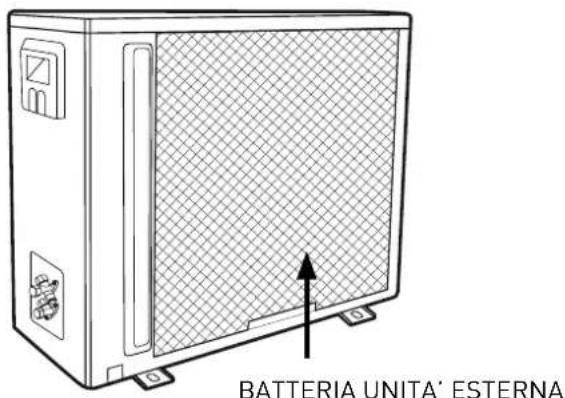
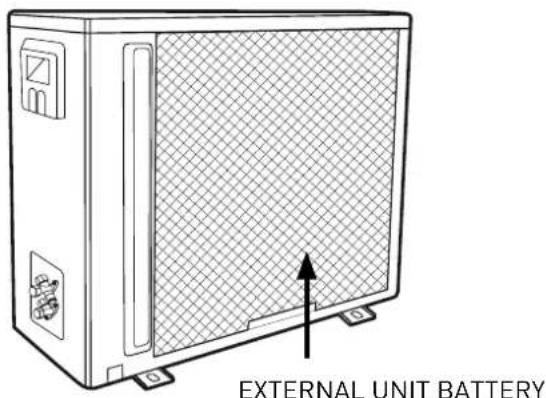
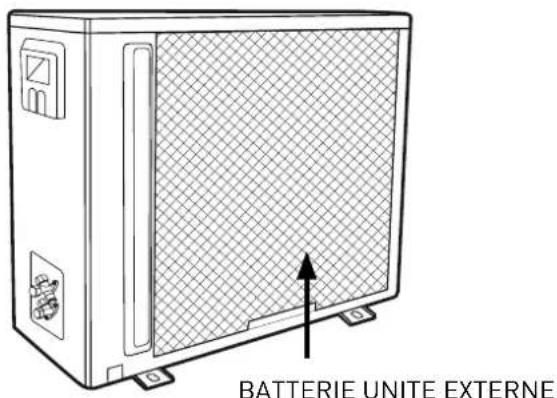
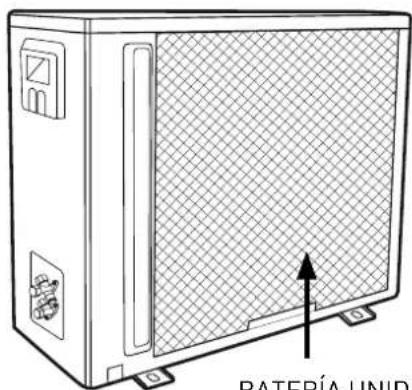
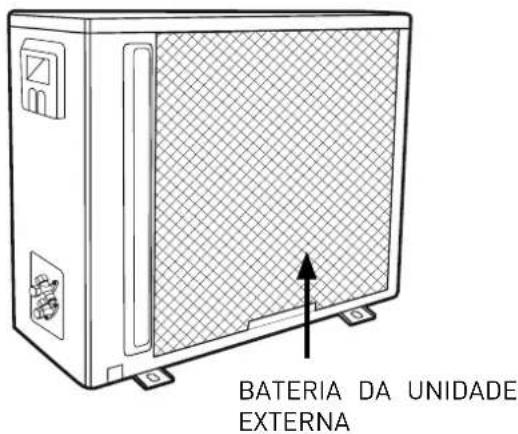
If the External Unit battery is clogged up, remove all leaves and deposits and then wash off all dust with a water jet or some water.
4. END OF SEASON MAINTENANCE
WARNING:
- Unplug the appliance or switch off the dedicated switch before performing any operations (risk of personal injury from electrocution).
- Do not touch the air conditioning unit with wet hands (risk of personal injury from electrocution).
- When cleaning the appliance, do not climb onto a table or unstable chair (risk of personal injury due to falling from a height).
-
When removing filters, take care not to touch any metal parts, especially the heat exchanger inside the internal unit (risk of personal injury from cuts).
-
Clean the filters and secure them back in place.
-
Unplug the appliance or disable the automatic switch.
-
On a sunny day, run the air conditioning unit in ventilation mode for a few hours, so that the inside is completely dry.
4.1 If the air conditioning unit does not work
-
If the appliance shows no signs of life, make sure that:
-
power is being supplied from the mains
- the automatic switch has not blown
- the power supply has not been cut off
-
the air conditioning unit comes on when the ON-OFF button on the internal unit is pressed
-
If the cooling (or heating) effect seems to be lower than normal:
-
has the temperature been set correctly on the remote control?
- has a door or window been opened?
- is the Internal Unit exposed to direct sunlight?
- are the filters clogged?
- are there any obstacles preventing the free circulation of air to the Internal Unit or External Unit?
The performance levels and the characteristics of any cooling appliance are noticeably affected by the environmental conditions where the Internal and External Units operate.
| Cooling outdoor temperature between -15° and 50°C | |
| Heating outdoor temperature between -15° and 30°C |
WARNING:
The relative humidity in the room must be lower than 80%. If the air conditioning unit operates above this limit, condensation may form on its surface and begin to drip.
INSTALLATION
MONOSPLIT 2,5 - 3,5 - 5 kW
Installation accessories
| Name and Description Qty. Operation | ||
Template for the internal unit 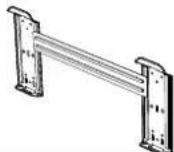 | 1 To install the internal unit | |
Screws + Rawlplugs 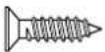 | 5 | |
Condensation discharge pipette with seal 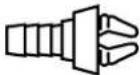 | 1 | To empty the external unit of condensation |
Batteries 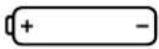 | 2 For the remote control | |
Remote control with support 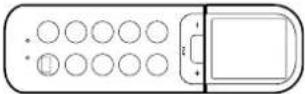 | 1 + 1 | |
Air treatment filter 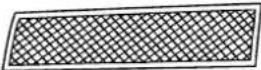 | 1 | |
Internal unit – external unit compatibility
Each internal unit can be connected to an external unit as specified in the table below.
| INSTALLATION TYPE EXTERNAL UNIT INTERNAL UNIT SET | |||
| MONOSPLIT | ALYS 25 MC8-0 ALYS 25 | MC8-I ALYS 25 MC8 | |
| ALYS 35 MC8-0 ALYS 35 | MC8-I ALYS 35 MC8 | ||
| ALYS 50 MC8-0 ALYS 50 | MC8-I ALYS 50 MC8 | ||
SAFETY STANDARDS
READ THIS MANUAL THOROUGHLY AND KEEP IT IN A SAFE PLACE, AS IT CONTAINS IMPORTANT INFORMATION FOR THE SAFE INSTALLATION, USE AND MAINTENANCE OF YOUR NEW APPLIANCE.
Symbol legend:
| STANDARD RISK | ||
| Make sure the installation site and any systems to which the device must be connected comply with the applicable regulations. | Electrocution caused by contact with live wires that have been incorrectly installed. | ⚠️ |
| When drilling the wall, take care not to damage any electrical wiring or existing piping. | Electrocution caused by exposure to live wires. Explosions, fi re or intoxication due to gas leaks from damaged pipes. | ⚠️ |
| Protect connection piping and cables so as to prevent damage to them. | Electrocution caused by exposure to live wires. Cold burns due to gas leaking from damaged piping. | ⚠️ |
| Use suitable manual tools and equipment (make sure in particular that the tool is not worn out and that its handle is fi xed properly); use them correctly and make sure they do not fall from a height. Replace them once you have fi nished using them. | Personal injury from falling splinters or fragments, inhalation of dust, shocks, cuts, pricks and abrasions. | ⚠️ |
| Use electrical equipment suitable for the intended use (in particular, make sure that the power supply cable and plug are intact and that the parts featuring rotary or reciprocating motion are fastened correctly); use this equipment correctly; make sure no equipment could fall from a height. Disconnect it and put it safely back in place after use. | Personal injury from electrocution, fl ying splinters or fragments, inhalation of dust, shocks, cuts, pricks, abrasions, noise and vibration. | ⚠️ |
| Make sure that any portable ladders are securely positioned, that they are strong enough, that the steps are intact and not slippery, that the ladders are not moved with someone on them and that someone supervises at all times. | Personal injury caused by falling from a height or shearing (stepladders shutting accidentally). | ⚠️ |
| Make sure that any rolling ladders are positioned securely, that they are suitably sturdy, that the steps are intact and not slippery. Make sure that the ladders are fi tted with handrails on either side of the ladder and parapets on the landing. | Personal injury caused by falling from a height. | ⚠️ |
| During all work carried out off the floor (generally at a height over two metres or 6 feet), make sure that parapets are used to surround the work area or individual harnesses designed to prevent falls worn, that the space covered during any accidental fall is free from dangerous obstacles, and that any impact upon falling is cushioned by semi-rigid or deformable surfaces. | Personal injury due to impact, tripping and wounds. | ⚠️ |
| During all work procedures, wear individual protective clothing and equipment. | Personal injury caused by electrocution, fl ying splinters or fragments, inhalation of dust, shocks, cuts, puncture wounds, abrasions, noise and vibration. | ⚠️ |
| All operations inside the device must be performed with the necessary caution in order to avoid sudden contact with sharp parts. | Personal injury from cuts, pricks and abrasions. | ⚠️ |
| Recharge the refrigerant gas in accordance with the instructions provided on the product safety data sheet, while wearing protective clothing and avoiding sharp bursts of gas from the tank or from the system connections. | Personal injury from cold burns. | ⚠️ |
| Do not direct the air flow towards gas hobs or gas stoves. | Explosions, fi res or intoxication from the discharge of gas leaking from the burner nozzle once the air flow has put the flame out. | ⚠️ |
| Do not install the external unit in places where it could constitute a risk or an obstruction to passers by, or where it could disturb people due to the noise it makes, the heat produced or the air flow. | Personal injury from contusions, stumbling, noise and excessive ventilation. | ⚠️ |
| Install the appliance in a site which complies with its IP rating, in line with current standards. | Damage to the appliance, injury. | ⚠️ |
| When lifting loads with a crane or hoist, make sure the equipment used for lifting is stable and effi cient and suitably sized for the movement and weight of the load itself; place the load correctly in slings, tie ropes around it to limit any oscillations and lateral movements; lift the load from a position where there is a full view of all the space covered by the load during lifting; do not allow people to pass or stop in the vicinity of the suspended load. | Personal injury due to objects falling from a height. Damage to the appliance or surrounding objects due to the appliance falling from a height, knocks. | ⚠️ |
| Do not direct the air flow towards valuable items, plants or animals. | Damage or perishing due to excessive cold/heat, humidity, ventilation. | ⚠️ |
| Install the device on a solid wall that is not subject to vibrations. Noise during operation. | ⚠️ | |
| Place the condensation drainpipe in such a way as to ensure the correct flow of water towards places where it cannot disturb or injure people or animals, or damage possessions. | Damage to objects due to dripping water. | ⚠️ |
| Perform all electrical connections using suitably-sized conductors. | Fire caused by overheating due to electrical current passing through undersized cables. | ⚠️ |
| Use electrical equipment suitable for the intended use (in particular, make sure that the power supply cable and plug are intact and that the parts featuring rotary or reciprocating motion are fastened correctly); use this equipment correctly; make sure no equipment could fall from a height. Disconnect it and put it safely back in place after use. | Damage to the appliance or surrounding objects from falling splinters, knocks and incisions. | ⚠️ |
| Protect the appliance and all areas in the vicinity of the work site using suitable material. | Damage to the device or surrounding objects caused by fl ying splinters, knocks and incisions. | ⚠️ |
| Move the appliance with the necessary care. | Damage to the device or surrounding objects caused by shocks, knocks, incisions and crushing. | ⚠️ |
| Organise the dislocation of all debris and equipment in such a way as to make movement easy and safe, avoiding any piles that could give way or collapse. | Damage to the device or surrounding objects caused by shocks, knocks, incisions and crushing. | ⚠️ |
| Reset all safety and control functions affected by any work performed on the appliance and make sure that they operate correctly before restarting it. | Damage or shutdown of the device caused by out-of-control operation. | ⚠️ |
| The appliance must be installed in full compliance with national system regulations. | Personal injury. | ⚠️ |
| If the power supply cable is damaged, it must be replaced by the manufacturer or by its technical assistance service, or at least by a suitably qualified individual, in order to prevent all hazards. | Personal injury due to electrocution. | ⚠️ |
| Installation should be performed by an individual in possession of all necessary qualifications as required by law. | Personal injury. | ⚠️ |
| During the installation process, the refrigeration system should be connected fi rst, followed by the electricity supply. In the event of replacement, proceed in the reverse order. | Personal injury due to electrocution or cold burns, injury from shocks, cuts or abrasions. | ⚠️ |
| The air conditioning unit must be fully earthed to prevent electric shocks. Do not connect the earth wire to lightning conductors, water or gas piping or telephone system earth wires. | Personal injury due to electrocution. | ⚠️ |
| Do not install the air conditioning unit near sources of heat or fl am- mable material. | Personal injury, fi re hazard. | ⚠️ |
Failure to comply with this warning implies the risk of injury to persons, which in some circumstances may be fatal.
△ Failure to comply with this warning implies the risk of damage, in some circumstances serious, to property, plants or animals.
1. INSTALLATION
1.1 Minimum distances
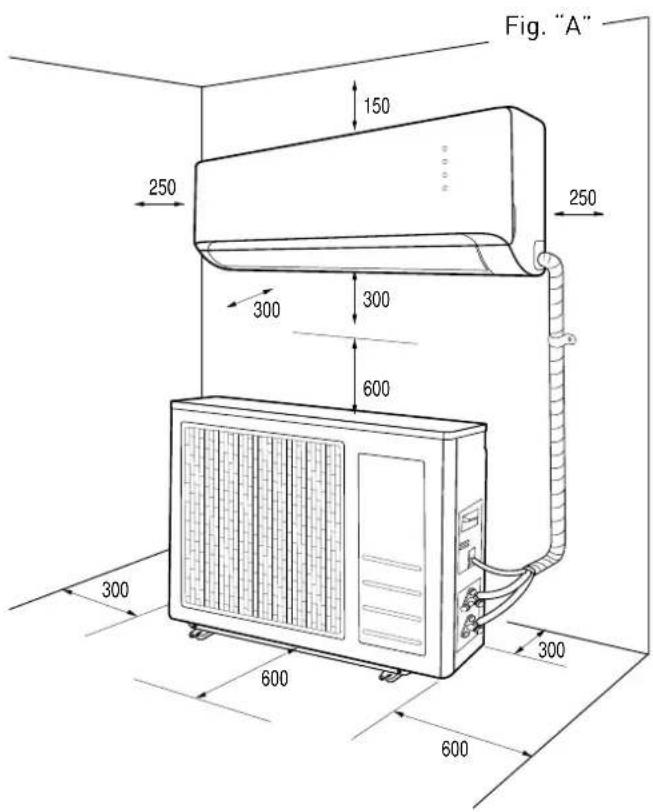
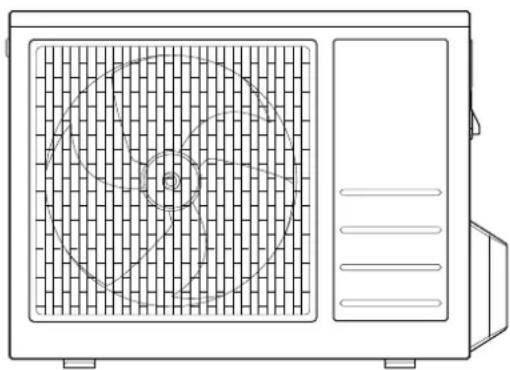
To ensure the appliance is installed correctly, keep to the minimum distances indicated in figure "A" and leave enough room for air to circulate freely. Use the accessories provided with the appliance to carry out the installation properly.
NOTES:
The dimensions of the internal and external units are given at the back of the manual.
WARNING:
- Make sure the installation site and any systems to which the appliance must be connected comply with the applicable standards in force.
- Use manual tools and equipment that are suitable for the intended purpose.
- When lifting loads with a crane or hoist, make sure the equipment used for lifting is stable and efficient and suitably sized for the movement and weight of the load itself; place the load correctly in slings, tie ropes around it to limit any oscillations and lateral movements; lift the load from a position where there is a full view of all the space covered by the load during lifting; do not allow people to pass or stop in the vicinity of the suspended load.
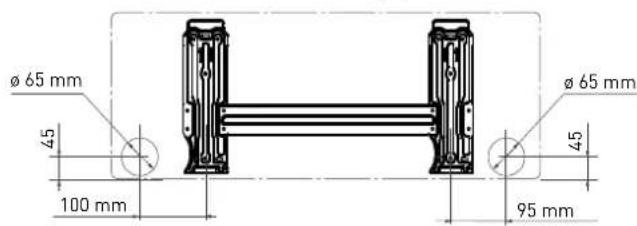
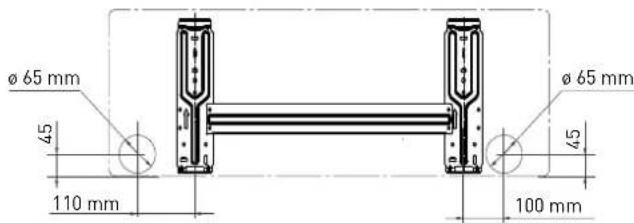
1.2 Installing the template
NOTES:
Install the internal unit in a place free from all obstacles (such as curtains) that could hinder the receipt of the remote control signals and that allows for the air filters to be pulled out without causing any inconvenience. Install the internal unit in a position where the air flow will not be obstructed.
WARNING:
Install the template on a solid wall that is not subjected to any vibrations.
- Using a mason's level, position the template in such a way as to ensure it is perfectly on-axis, both vertically and horizontally.
- Fasten the template with 5 screws. Be careful not to pierce or damage any pipes or wiring in conduits (risk of personal injury from electrocution).
- Then use the other screws to fasten the template to the wall uniformly across the entire surface.
- Make a hole in the wall for all piping and electrical connections to pass through.
2,5 - 3,5 kW
5 kW
1.3 Installing the internal unit
- Push the piping, together with all cables, through the hole made in the wall and hook the internal unit onto the top of the template.
- Shape the piping and cables well.
- Push the lower part of the internal unit well up against the template.
Make sure that:
a. The top and bottom hooks on the internal unit are securely fastened onto the template.
b. The unit is fully horizontal.
If the appliance is not level, water may leak from it onto the floor.
c. The drain pipe is at the right gradient (minimum of 3 cm for each metre in length).
d. The drain pipe stays at the bottom of the hole in the wall.
NOTES:
- Do not kink or constrict the internal unit piping in any way. Avoid bends measuring less than 10 cm in radius.
- Do not bend the same section of the pipe too often as it could kink after 3 attempts.
- Only remove the closing plugs from the internal unit piping immediately prior to making the connections.
- Keep the condensation drain pipe at the bottom of the hole in the wall, otherwise it could leak.
N.B.: Drill a hole in the wall that is 5-10 mm lower on the outside than it is on the inside, so that the slope encourages downward flow of the condensation.
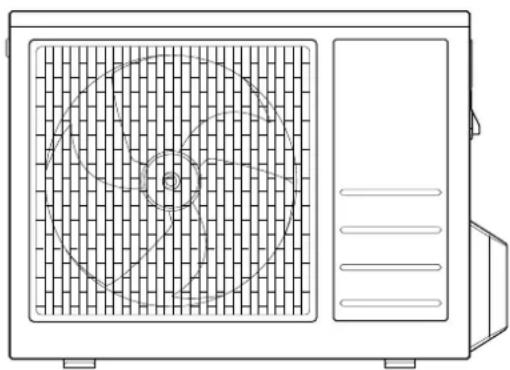
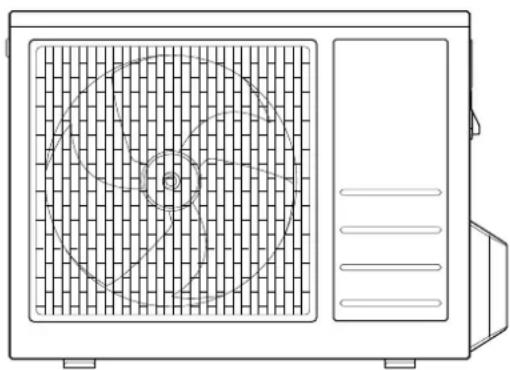
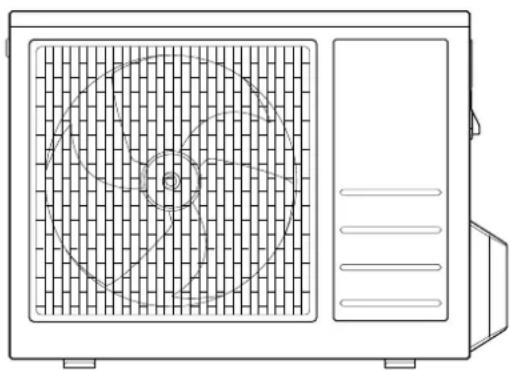
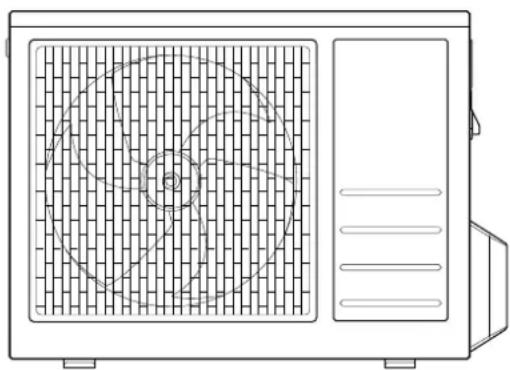
1.4 Installing the external unit
The external unit must be moved and stored in an upright position, to ensure suitable distribution of the oil in the refrigerant circuit and prevent damage to the compressor.
Adhere to the procedure as described, and then start connecting the piping and electrical wiring.
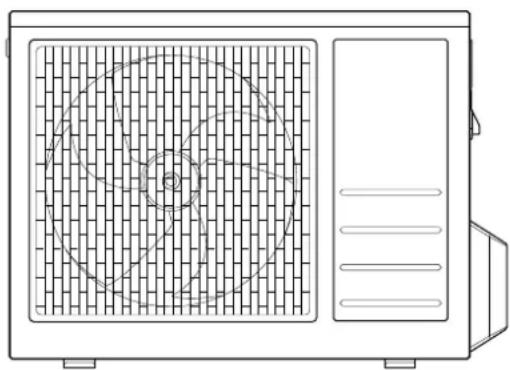
- Install the external unit in a place where the noise made by the appliance and the expelled hot air cannot be a source of inconvenience.
- Choose a place that does not obstruct free passage and where the condensation water produced can easily be ducted to the outside.
- Do not install the external unit in narrow areas which limit the air flow, or in places exposed to strong winds.
For wall installation:
- install the unit securely onto a solid wall;
- pinpoint the most suitable position on the wall, allowing enough room for any maintenance work to be carried out easily;
- fasten the brackets to the wall using rawlplugs suitable for the type of wall in question (take care not to damage any wiring or piping in conduits);
- use rawlplugs which can support a weight greater than that of the external unit: during operation the machine vibrates and should remain installed for years without the screws becoming loose.
natural_image
Line drawing of a rectangular air conditioner unit with no text or symbols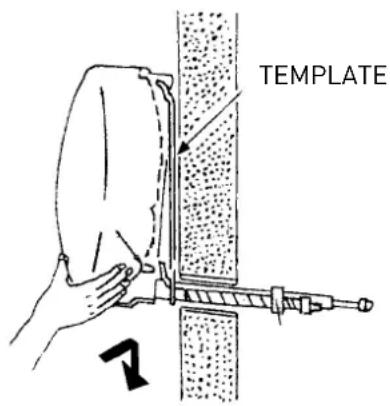
natural_image
Line drawing of a front-mounted air conditioner unit with circular vent and side panel (no text or symbols)2. PIPING AND CONNECTIONS
WARNING:
- Do not drink the condensation water (personal injury from poisoning).
- Position the condensation drain pipe in such a way as to allow for the correct downward flow of water in dedicated areas, and to prevent any inconvenience or damage to people, things, animals, plants and structures.
- Use manual tools and equipment that are suitable for the intended purpose.
2.1 Connecting the refrigeration piping
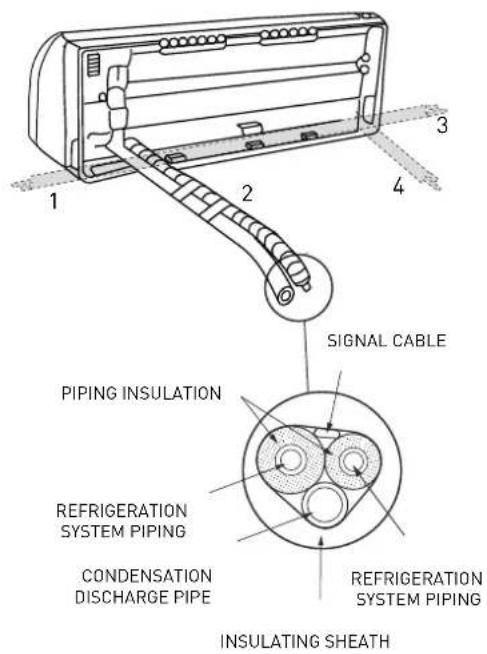
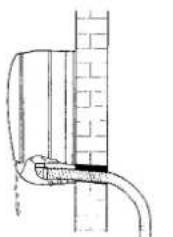
The piping can be positioned in different directions as indicated by numbers 1, 2, 3, 4 and 5 in the adjacent figure. When the pipes are positioned in directions 1, 3 or 5, the special groove marked on the side of the internal unit should be cut using a suitable tool. Turn the pipes in the direction of the hole in the wall, taking care not to constrict them in any way, and tape the refrigeration system piping, condensation drain pipe and electrical wiring together with electric (insulating) tape, keeping the condensation drain pipe at the bottom so that the water can flow freely.
2.2 Draining the condensation from the internal unit
The proper draining of condensation from the internal unit is fundamental for a good installation.
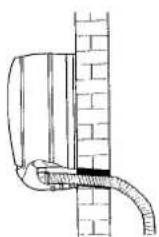
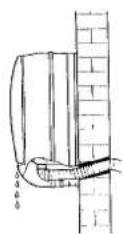
- Keep the condensation drain pipe (diameter 16,5 mm) at the bottom of the hole in the wall.
- Make sure the condensation drain pipe has a continuous gradient of approximately 3 cm per metre.
- Do not include any traps in the condensation discharge piping.
- Do not immerse the free end of the condensation drain pipe in water and do not leave it in the vicinity of places emanating unpleasant odours.
- When the installation is complete, before switching on the appliance, make sure the condensation drain pipe works properly by pouring some water into the condensation drip water tray situated inside the internal unit.
2.3 Draining the condensation from the external unit
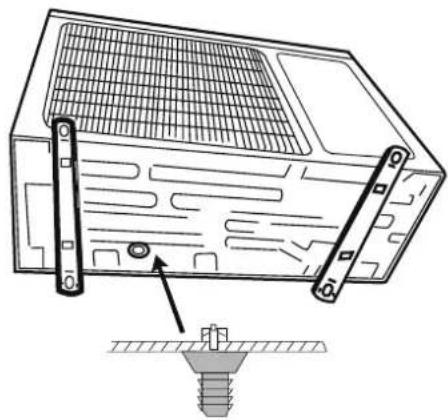
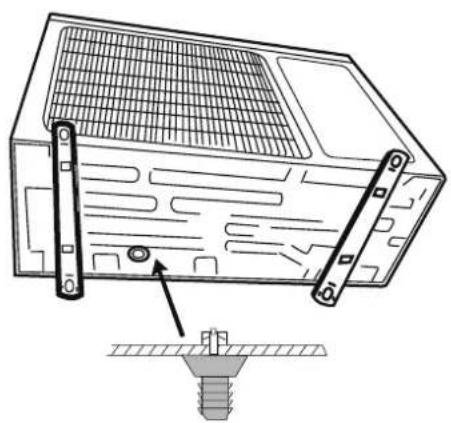
The condensation or water that forms in the external unit during operation in heating mode can be removed via the drain pipe fi tting. Installation: fasten the drain pipe fi tting (diameter 16 mm) to the hole on the bottom of the unit, as illustrated in the adjacent diagram. Connect the condensation drain pipe to the drain pipe fi tting and ensure the other end of the pipe is ducted into a suitable drain.
WARNING:
- Only use piping specifi cally designed for ACR air conditioning units.
- Protect all connection cables and pipes in order to prevent their being damaged.
- Never use pipes with a thickness of under 0.8 mm.
- The appliance must be installed in full compliance with national system regulations.
- During the installation process, the refrigeration system should be connected first, followed by the electricity supply. In the event of replacement, proceed in the reverse order.
YES
NO
natural_image
Pure technical line drawing of a pipe or pipe connection without any text, numbers, or symbolsNO
natural_image
Technical line drawing of a mechanical device with a screw base and mounting bracket (no text or symbols)2.4 Tools
| TOOLS |
| A pressure gauge assembly |
| B pipe cutter |
| C recharge pipe |
| D electronic scale for refrigerant recharge |
| E dynamometric spanner |
| F clamp-shaped pipe vice |
| G xx mm hex key |
| H refrigerant canister |
| I vacuum pump |
| L HFC refrigerant leak detector |
2.5 Thickness of the copper pipes
| NOMINAL DIAMETER(inches) | EXTERNAL DIAMETER(mm) | THICKNESS(mm) |
| 1/4 6.35 0.8 | ||
| 3/8 9.52 0.8 | ||
| 1/2 12.70 0.8 | ||
| 5/8 15.88 1.0 |
Split type air conditioning units operating with R410A refrigerant use a three-way external unit valve with a pin valve.
2.6 How to connect the pipes
- Only remove the pipe caps immediately prior to connection: under no circumstances must you let dampness or dirt enter.
- If a pipe is bent too many times, it becomes hard: do not bend it more than 3 times in the same section. Unwind the pipe by unrolling it without pulling.
- The insulation around the copper pipes must be at least 6 mm thick.
2.7 Connections to the internal unit
- Shape the connection pipes well following the outline.
- Remove the end cap from the pipes of the internal unit (check that no impurities have been left inside).
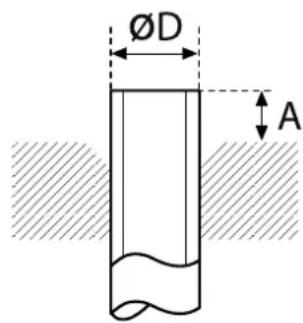
- Insert the pipe union and position the flange at the end of the connection pipe, following the instructions in the table (for copper piping):
| ∅ NOMINAL | ∅ EXTERNAL | mm THICKNESS | MEASUREMENT "A" mm PIPE VICE | TRADITIONAL PIPE VICE | |
| CLAMP-SHAPED | BUTTERFLY | ||||
| 1/4 | 6.35 | 0.8 | 0-0.5 | 1.0-1.5 | 1.5-2.0 |
| 3/8 | 9.52 | 0.8 | 0-0.5 | 1.0-1.5 | 1.5-2.0 |
| 1/2 | 12.70 | 0.8 | 0-0.5 | 1.0-1.5 | 2.0-2.5 |
| 5/8 | 15.88 | 0.8 | 0-0.5 | 1.0-1.5 | 2.0-2.5 |
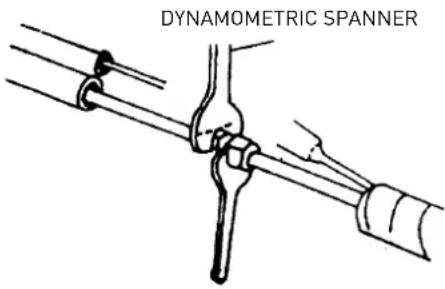
- Connect the pipes using two spanners, taking care not to damage the piping. If the tightening force is insufficient, then there may well be leaks. And if the tightening force is excessive, then there may also be leaks as the fl ange could be damaged. The safest system is constructed by tightening the connection using a fixed spanner and a dynamometric spanner: in this case, use the table "tightening torques for fl ange connections".
- We recommend you leave an extra 50 cm of pipe for any subsequent work carried out in the vicinity of the cocks.
2.8 Connections to the external unit
Screw the pipe unions onto the external unit connections with the same tightness as for the internal unit.
To avoid leaks, pay particular attention to the following points:
- Tighten the pipe unions, taking care not to damage the piping.
- If the tightening force is insufficient, then there may well be leaks. And if the tightening force is excessive, then there may also be leaks as the flange could be damaged.
- The safest system is constructed by tightening the connection using a dynamometric spanner: in this case, use the tables below (for copper piping).
TIGHTENING TORQUES FOR FLANGE CONNECTIONS
| Pipe Tightening torque[kgf x cm] | Corresponding effort(using a 20 cm spanner) |
| 6.35 mm (1/4") 160 - 200 wrist force | |
| 9.52 mm (3/8") 300 - 350 arm force | |
| 12.70 mm (1/2") 500 - 550 arm force | |
| 15.88 mm (5/8") 630 - 770 arm force |
TIGHTENING TORQUE FOR PROTECTION CAPS
| Tightening torque [kgf x cm] | |
| Service connection 70-90 | |
| Protection caps 250-300 |
LENGTH OF THE PIPING
The maximum length for the connection piping varies depending on the model. When the length is over 5 m, take care to add the right amount of refrigerant per metre.
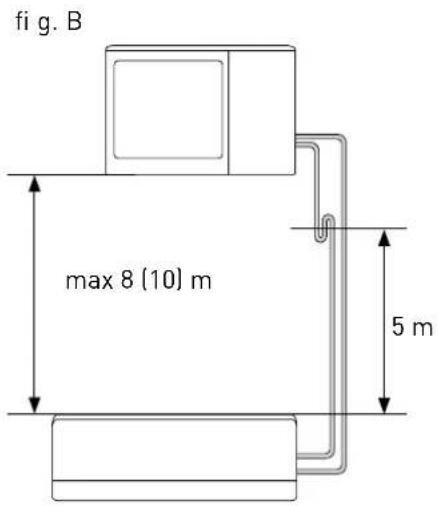
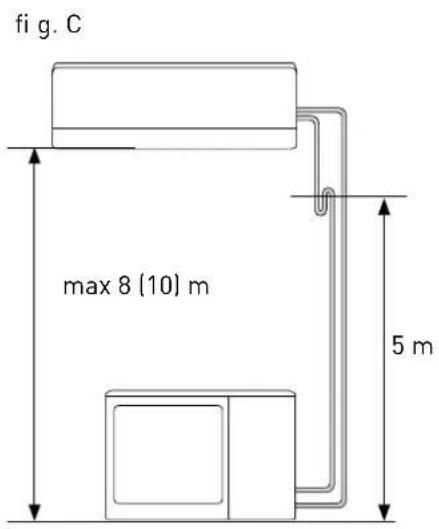
If you need to install the external and internal units with a height difference over 5 m (fi g. B and fi g. C), use siphons on the gas piping in order to allow oil to return to the compressor properly.
NOTE:
We recommend making a loop in the piping near the external unit, so as to reduce the vibrations transmitted from that point.
IMPORTANT: CHECK FOR REFRIGERANT LEAKS
Once you have created the connections and a vacuum, open the cocks so that the gas fills the piping and always check for leaks using a leak detector (risk of personal injury from cold burns).
2.9 Creating a vacuum and checking the seal
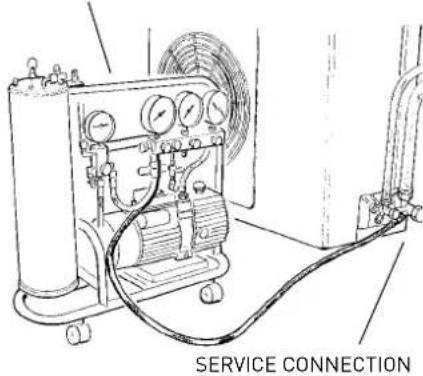
A vacuum pump suitable for use with R410A must be used to bleed the circuit.
Make sure the vacuum pump is filled with oil to the level indicated by the oil indicator light, and that the two cocks on the external unit are shut off:

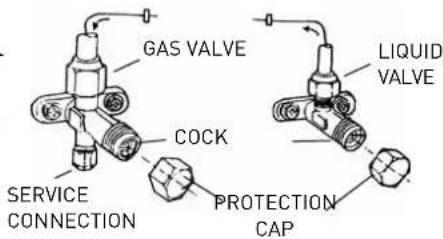
- unscrew the caps on the cocks of the two-way and three-way valves, and on the service valve:
- connect the vacuum pump to the small service valve in the external unit three-way valve:
- once you have opened the corresponding valves on the pump, start the latter and leave it running. Create the vacuum for approximately 20/25 minutes:
- make sure the pressure gauge reads -0.101 MPa (-760 mmHg);
- shut the cocks on the pump and turn it off. Check that the needle on the pressure gauge does not move for approximately 5 minutes. If the needle moves, this means that air is seeping into the system, and you must check all connections are tight enough and that the piping connections were all performed correctly; then repeat the procedure from step 3:
- disconnect the vacuum pump;
- open the cocks on the two-way and three-way valves fully,
- screw the cap tightly to the service outlet, ensuring that it is well sealed;
- after having tightened all the caps, check their entire circumference for gas leaks.
WARNING:
Always protect the connection cables and pipes to prevent their being damaged, as they could cause gas leaks when damaged (personal injury from cold burns)
VACUUM PUMP
MONOSPLIT INSTALLATION TECHNICAL SPECIFICATIONS
| OUTDOOR UNIT MODEL ALYS 25 | MC8-0 | ALYS 35 MC8-0 | ALYS 50 MC8-0 | |
| Liquid pipe diameter inches 1/4 1/4 1/4 | ||||
| Gas pipe diameter inches 3/8 3/8 1/2 | ||||
| Maximum length of pipe with standard charge m 5 5 5 | ||||
| Maximum pipe length* m 20 20 25 | ||||
| Standard charge | kg | 0,8 | 0,95 | 1,25 |
| Extra gas recharge | g/m | 20 20 20 | ||
| Maximum difference in height between internal and external unit** | m | 8 | 8 | 10 |
| Type of refrigerant | R410A | R410A | R410A |
(*) at the maximum distance, efficiency is approximately 90%.
[**] with a difference in height over 5 m, we recommend you include a trap.
2.10 Recovering the refrigerant
Procedure for returning all the refrigerant to the external unit:
- unscrew the caps from the cocks on the two-way and three-way valves.
- set the appliance to cooling mode (check whether the compressor works) and leave the appliance on for a few minutes.
- connect the pressure gauge.
- shut off the two-way valve.
- when the pressure gauge reads "0", shut off the three-way valve and turn the air conditioning unit off immediately.
- shut the caps on the valves.
WARNING:
Recharge refrigerant gas as necessary in accordance with the instructions provided for the product used, wearing protective clothing, avoiding sharp bursts of gas from the tank or from the system connections.
2.11 Charging the refrigerant gas
Before proceeding with the refrigerant charging operations, check that all the valves and cocks are shut.
N.B.: during initial installation, perform the procedure described in paragraph 2.9 "Creating a vacuum and checking the seal".
- Connect the low pressure connection of the pressure gauge to the service valve, and connect the refrigerant tank to the central inlet of the pressure gauge. Open the refrigerant tank and then open the cap on the central valve and work the pin valve until you hear the refrigerant exiting, then release the pin and screw the cap back on;
- Open the three-way valve and the two-way valve;
- Turn on the air conditioning unit in cooling mode. Leave it running for a few minutes;
- Place the refrigerant canister on the electronic scales and record its weight;
- Check the pressure shown on the pressure gauge;
- Open the "LOW" knob and allow the refrigerant to flow gradually;
- When the refrigerant charge in the circuit reaches the specified value (calculated by means of the difference in weight of the canister), shut off the "LOW" knob;
- When charging is complete, test operation by measuring the temperature of the gas pipe with the special thermometer: the temperature should be 5 to 8°C over the temperature read on the evaporation temperature section of the pressure gauge. Now check the stability of the pressure, by connecting the pressure gauge assembly to the three-way service valve. Open the two-way and three-way valves fully, turn on the air conditioning unit and check for refrigerant leaks using the leak detector (if there are any leaks, carry out the procedure described in paragraph 2.10 "Recovering the refrigerant");
- Disconnect the pressure gauge from the valve and turn the air conditioning unit off;
- Disconnect the tank from the pressure gauge and close all caps.
WARNING:
Do not release R410A into the atmosphere.
R410A is a fl uorinated greenhouse gas, covered by the Kyoto Protocol, with a GWP* = 1975.
(*) GWP is an acronym of "Global Warming Potential", referring to the greenhouse effect.
3. ELECTRICAL CONNECTIONS
WARNING:
Before performing any electrical connections, make sure that the units have been disconnected from the electricity supply and that the systems to which the equipment should be connected conform to current standards.
- Only use cables with a suitable cross-section.
- Leave some extra length on the connection cables to allow for future maintenance.
- Never connect the power supply cable by cutting it in half as this could cause a blaze.
- If the power supply cable is damaged, it must be replaced by the manufacturer or by its technical assistance service, or at least by a suitably qualified individual, in order to prevent all hazards.
NOTE:
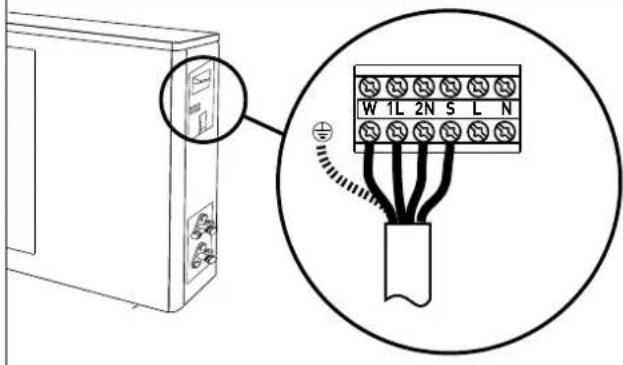
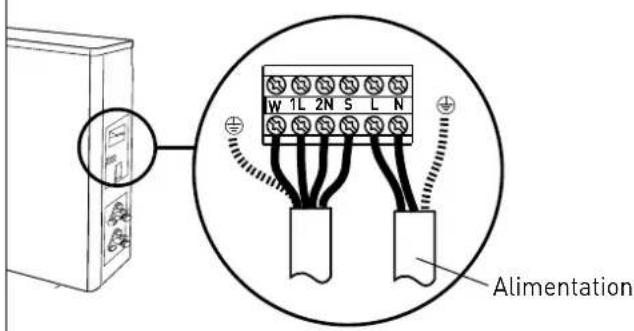
Strip both ends of the wires in the power supply cable and the internal - external unit connection cable, as indicated in the figure, and use the longest earth wire out of the active wires.
Make sure the wires do not come into contact with the piping or other metal parts.

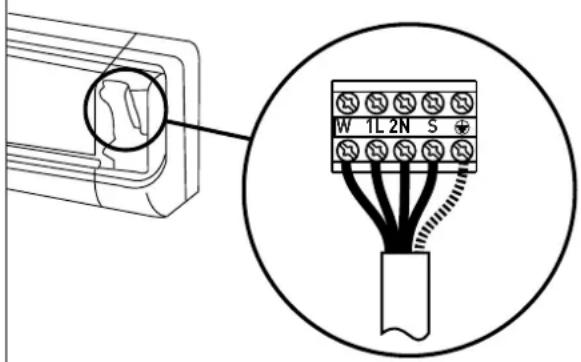
3.1 Connecting the internal unit
- Lift the panel and remove the terminal board cover.
- Route the internal/external unit connection cable behind the internal unit and prepare the end of the cable.
- Connect the conductors to the screw terminals in accordance with the numbering.
MONOSPLIT INSTALLATION
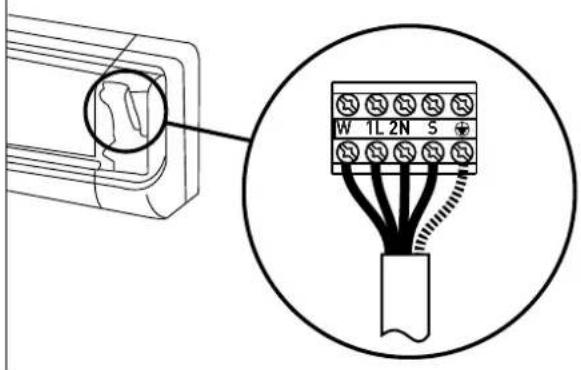
- Use the wire clamp situated underneath the electrical terminal board.
- Put the cover back in place, ensuring it is positioned correctly.
NOTE: the connection cables must not be routed near junction boxes, wireless data transmission systems (wifi routers) or other cables.
3.2 Connecting the external unit
- Remove the cover.
- Connect the wires to the screw terminals using the same numbering system as for the internal unit. Screw the terminal board screws tightly to avoid any loosening.
MONOSPLIT INSTALLATION
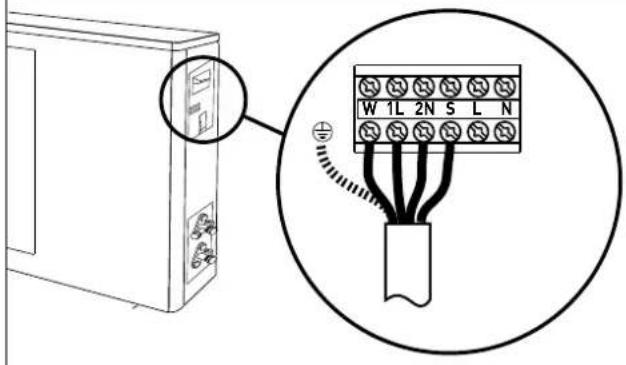
- Fasten the cables using the cable clamp.
- Put the cover back in place, ensuring it is positioned correctly.
3.3 Connecting to the mains electricity supply
Appliance connection must adhere to European and national standards, and must be protected by a 30 mA differential switch. Connection to the mains must be permanent (not using a plug) and equipped with an omnipolar switch complying with current CEIEN standards (contact air gap of at least 3 mm when open, preferably fitted with a fuse). Proper connection to an efficient earthing system is essential for ensuring safe operation of the device.
- Remove the cover.
- Connect the conductors to the screw terminals. Screw the terminal board screws tightly to avoid any loosening.
- Fasten the cables using the cable clamp.
- Put the cover back in place, ensuring it is positioned correctly.
MONOSPLIT INSTALLATION
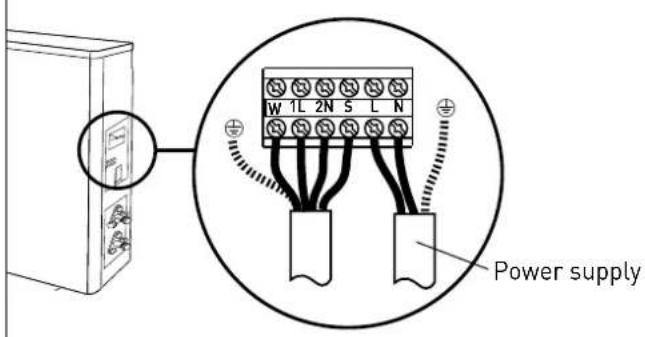
3.4 Connection types
MONOSPLIT INSTALLATION
| External unit model | Power supply Switch type Connection cable | Connection cable type | Power supply cable | Power supply cable type | |
| ALYS 25 MC8-0 220-240 - 50 Hz 10 A 5G 1,5 mm | ^2 | H07RN-F | 3G 1,5 mm^2 | H07RN-F | |
| ALYS 35 MC8-0 220-240 - 50 Hz 16 A 5G 1,5 mm | ^2 | H07RN-F | 3G 1,5 mm^2 | H07RN-F | |
| ALYS 50 MC8-0 220-240 ~ 50 Hz 16 A 5G 1,5 mm | ^2 | H07RN-F | 3G 1,5 mm^2 | H07RN-F | |
4. FINAL STAGES
WARNING:
- Use manual tools and equipment that are suitable for the intended purpose.
- Always protect the connection cables and pipes to prevent their being damaged, as they could cause gas leaks when damaged. (Personal injury from cold burns).
-
Recharge the refrigerant gas in accordance with the instructions provided on the product safety data sheet, while wearing protective clothing and avoiding sharp bursts of gas from the tank or from the system connections. (Personal injury from cold burns).
-
Wrap some insulating material around the joints of the internal unit and fasten it in place using electric (insulating) tape.
- Fasten the extra part of the signal cable to the piping or to the external unit.
- Fasten the piping to the wall (fi rst cover the pipes with electric insulating tape) using some clips or otherwise fi t the pipes into plastic channels.
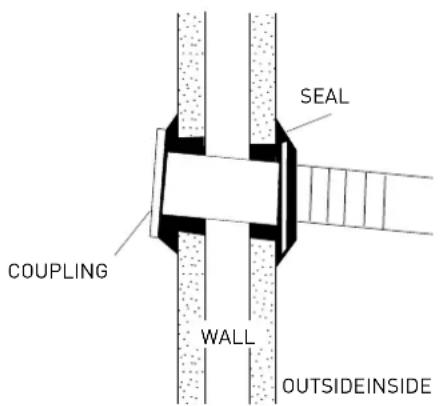
- Use a suitable seal to fill in the hole in the wall through which the piping passes so that no air or water can filter through.
- Outside, insulate all the bare piping, including all valves.
- If the piping has to pass above the ceiling or via a warm damp place, wrap all pipes with some extra insulating material available on sale to prevent condensation from forming.
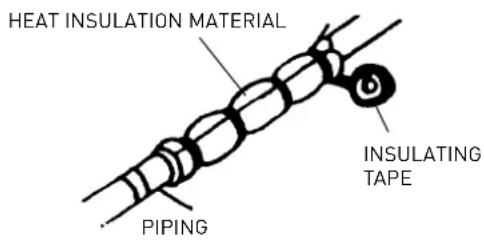
4.1 Testing
Check the following points:
- INTERNAL UNIT
- Are the ON/OFF and FAN buttons working properly?
- Is the MODE button working properly?
- Are the buttons for the set-point and TIMER working properly?
- Do all the LEDs come on?
- Are the fl aps used to direct the air flow effi cient?
- Is the condensation drained regularly?
- EXTERNAL UNIT
- Is there any noise or vibration during operation?
- Could the noise, air flow or condensation drainage disturb the neighbours?
- Are there any refrigerant leaks?
NOTE:
The electronic control will only allow the compressor to start three minutes after the unit has been powered.
WARNING:
- Before carrying out any work, make sure that the units have been disconnected from the electricity supply.
- Make sure the systems to which the appliance should be connected comply with current applicable standards.
CHECKS WITHOUT THE USE OF TOOLS OR INSTRUMENTS
Operation in Cooling mode - Visual checks on the Internal Unit
| Problem Check Action | ||
| 1 - Frost forms on the Internal Unit heat exchanger. | 1.A - Frost only at the bottom of the heat exchanger: gas leak.1.B - Frost covers the entire heat exchanger: the air fi lter is clogged.The room temperature is low( < 20°C). | · Find the leak and recharge.· Clean the air fi lter.Unplug the appliance and switch off the dedicated switch before cleaning (risk of electrocution).· Check the room temp. |
| 2 - No condensation forms. | 2.A - If the Internal Unit heat exchanger remains dry and the electricity consumption is much lower than the rated value, then there is a leak. | · Find the leak.· Replace the heat exchanger. |
| 3 - The compressor runs but there is little cooling. | 3.A - The External Unit heat exchanger is clogged or covered: you do not have a good heat exchange.3.B - The fl aps on the External Unit heat exchanger are bent. | · Clean the External Unit heat exchanger.· Straighten the fl aps on the external heat exchanger. |
| 4 - The air temperature is low, but there is little cooling. | 4.A - The Internal Unit fi lter is clogged.4.B - The air recirculates in the Internal Unit.4.C - The machine has not been sized correctly or is overloaded e.g.: heat sources, overcrowding,...). | · Clean the fi lter.· Encourage the free circulation of air.· Replace the appliance or remove the overload. |
| 5 - The compressor does not start. | 5.A - The compressor is very hot: heat protection. | · Wait for the temperature to drop. |
| 6 - The appliance comes to a stop after a few minutes of operation. | 6.A - The internal unit fan is broken. | · Replace the motor.· Only use original spare parts. |
TROUBLESHOOTING - electrics
| Problem Check Action | ||
| 1 - The appliance gives no sign of life (no LEDs lit, no beeps sounded), not even when you press the ON-OFF button on the internal unit. | 1.A - Check whether there has been a power failure.1.B - Check whether the plug is inserted fully in the socket in the wall.1.C - Check whether the automatic switch has blown.1.D - Check whether the selector has been set to stop. | ·Restore the power supply and the correct connections.·Plug the appliance in fully.·Reset the automatic switch.·Set the selector to another function. |
| 2 - The remote control does not work or only works from a short distance. | 2.A - Check whether the batteries are low.2.B - Check whether there are any obstacles (curtains or ornaments) between the remote control and the air conditioning unit.2.C - Check whether the distance between the remote control and the unit is too far. | ·Replace the batteries.·Remove all obstacles.·Move closer to the air conditioning unit. |
INTRODUCTION
natural_image
Diagram of a hand holding a rectangular device with a curved arrow indicating rotation (no text or symbols)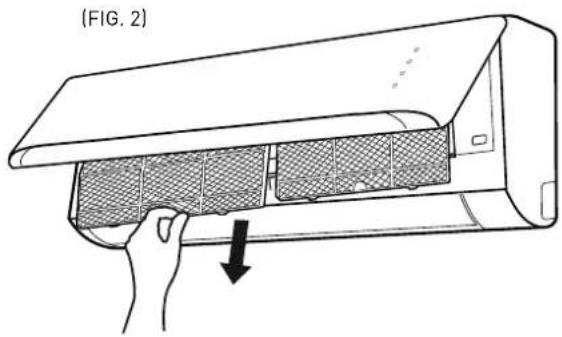
natural_image
Line drawing of a hand opening a wall-mounted air conditioner unit, showing mesh insulation and airflow direction (no text or symbols)(FIG. 3)
4. ENTRETIEN FIN DE SAISON
ATTENTION :
natural_image
Line drawing of a rectangular air conditioner unit with no text or symbols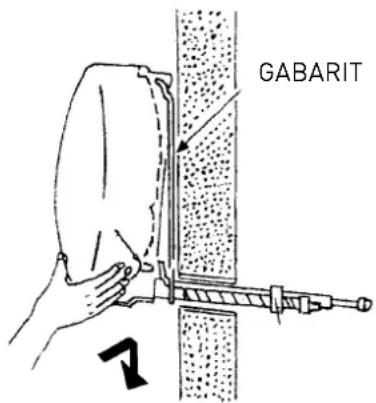
natural_image
Line drawing of a front-mounted air conditioner unit with circular vent and side panel (no text or symbols)2. TUYAUTERIES ET RACCORDEMENTS
ATTENTION :
natural_image
Technical line drawing of a mechanical component with a screw base and mounting bracket (no text or symbols)2.4 Instruments
INSTALLATION MONOSPLIT
INSTALLATION MONOSPLIT
INSTALLATION MONOSPLIT
3.4 Types de raccordement
INSTALLATION MONOSPLIT
natural_image
Diagram of a hand holding a rectangular device with a curved arrow indicating rotation (no text or symbols)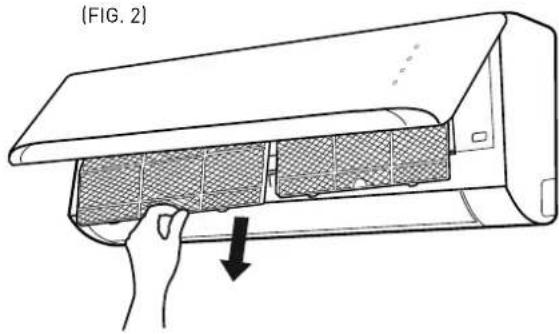
natural_image
Line drawing of a hand opening a wall-mounted air conditioner unit, showing airflow direction (no text or symbols)(FIG. 3)
BATERÍA UNIDAD EXTERNA
4. MANTENIMIENTO DE FINAL DE TEMPORADA
ATENCIÓN:
natural_image
Line drawing of a rectangular air conditioner unit with no text or symbols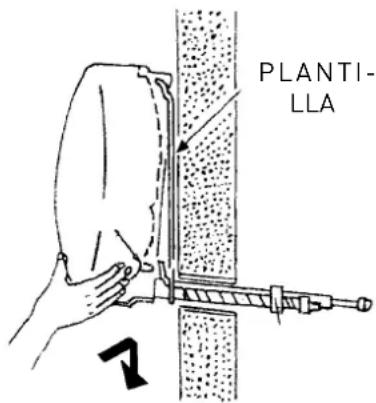
natural_image
Line drawing of a front-mounted air conditioner unit with circular vent and side panel (no text or symbols)2. TUBOS Y CONEXIONES
ATENCIÓN:
natural_image
Technical line drawing of a computer monitor with a screw base and indicator lights (no text or symbols)2.4 Herramientas
1.2 Visor
natural_image
Diagram of a hand holding a rectangular device with a curved arrow indicating rotation (no text or symbols)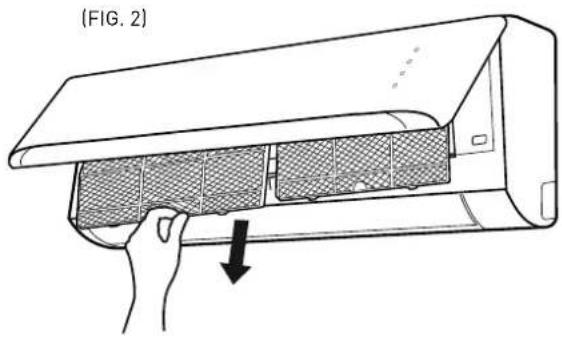
natural_image
Line drawing of a hand opening a wall-mounted air conditioner unit, showing mesh insulation and airflow direction (no text or symbols)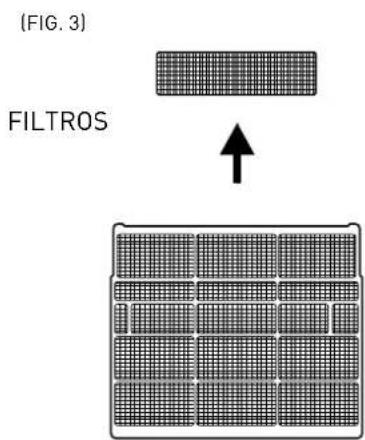
natural_image
Line drawing of a rectangular air conditioner unit with no text or symbols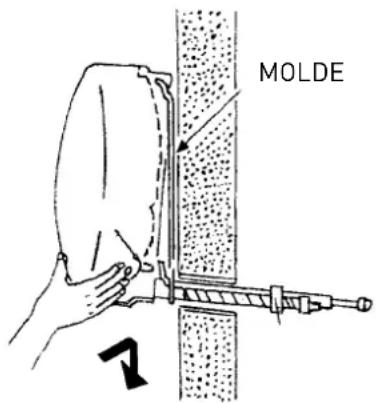
natural_image
Line drawing of a front-mounted air conditioner unit with circular vent and side panel (no text or symbols)2. TUBAGENS E LIGAÇÕES
ATENÇÃO:
natural_image
Technical line drawing of a mechanical device with a screw base and mounting bracket (no text or symbols)2.4 Instrumentos
4. FASES CONCLUSIVAS
ATENÇÃO:
DIT PRODUCT IS CONFORM AAN DE EU RICHTLIJN 2002/96/EC
natural_image
Diagram of hands holding a rectangular device with arrows indicating rotation, no text or symbols presentBEDIENINGSPANEEEL.
TOETS ON/OFF
1.2 Display
natural_image
Line drawing of a rectangular air conditioner unit with no text or symbols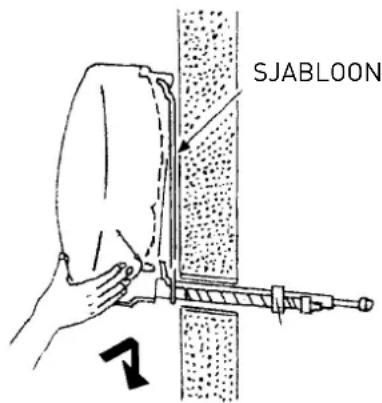
natural_image
Line drawing of a front-mounted air conditioner unit with circular vent and side panel (no text or symbols)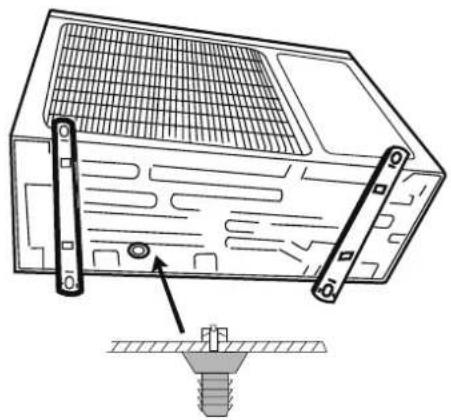
natural_image
Technical line drawing of a computer monitor with a screw base and mounting bracket (no text or symbols)2.4 Gereedschap
MONOSPLIT INSTALLATIE
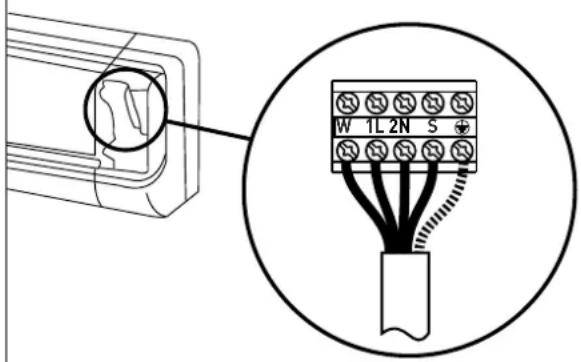
MONOSPLIT INSTALLATIE
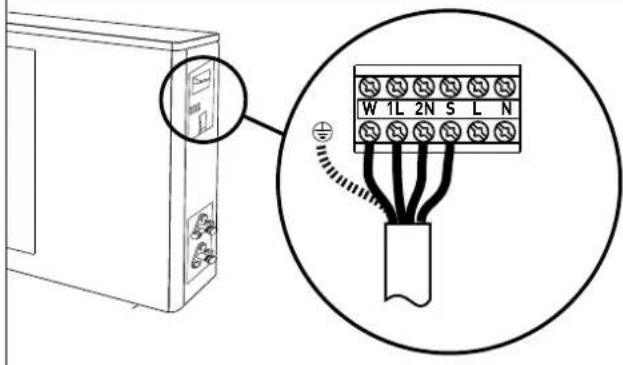
MONOSPLIT INSTALLATIE
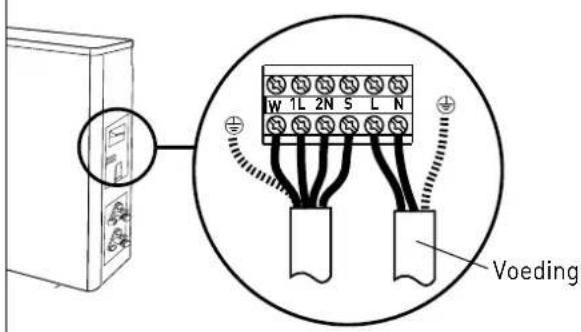
MONOSPLIT INSTALLATIE
| Model externe eenheid | Voeding | Type schake- laar | Verbindingskabel | Type verbin- dingskabel | Voedingskabel | Type voedings- kabel |
| ALYS 25 MC8-O 220 | 20-240 ~ 50 Hz 10 A 5G | 1,5 mm | ^7 | H07RN-F | 3G 1,5 mm ^2 | H07RN-F |
| ALYS 35 MC8-O 220 | 20-240 ~ 50 Hz 16 A 5G | 1,5 mm | ^2 | H07RN-F | 3G 1,5 mm ^2 | H07RN-F |
| ALYS 50 MC8-O 220 | 20-240 ~ 50 Hz 16 A 5G | 1,5 mm | ^2 | H07RN-F | 3G 1,5 mm ^2 | H07RN-F |
4. AFSLUITENDE FASEN
OPGELET:
DIMENSIONI/ DIMENSIONS / DIMENSIONS DIMENSIONES / DIMENSÕES/ AFMETINGEN
UNITÁ INTERNA/ INDOOR UNIT/ UNITE INTERNE/ UNIDAD INTERNA/ APARELHO INTERNO/ INTERNE EENHEID
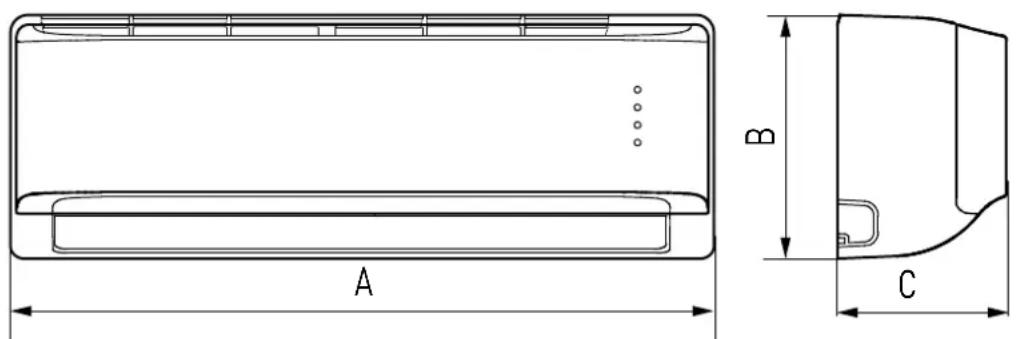
| MOD. A B C | |||
| ALYS 25 MC8-I | 800 275 188 | ||
| ALYS 35 MC8-I | |||
| ALYS 50 MC8-I | 940 275 205 |
UNITÁ ESTERNA/ OUTDOOR UNIT/ UNITE EXTERNE/ UNIDAD EXTERNA/ APARELHO EXTERNO/ I EXTERNE EENHEID
ALYS 25 MC8-0; ALYS 35 MC8-0
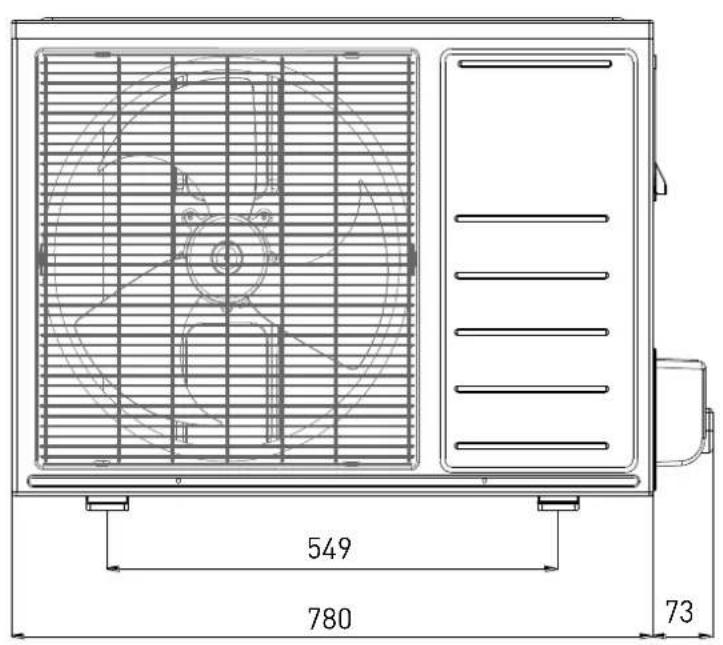
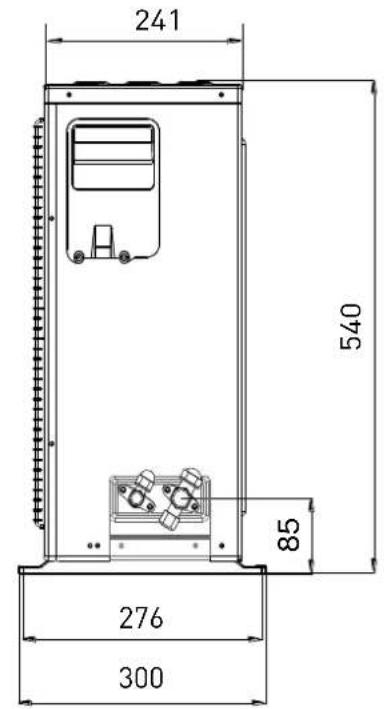
ALYS 50 MC8-0
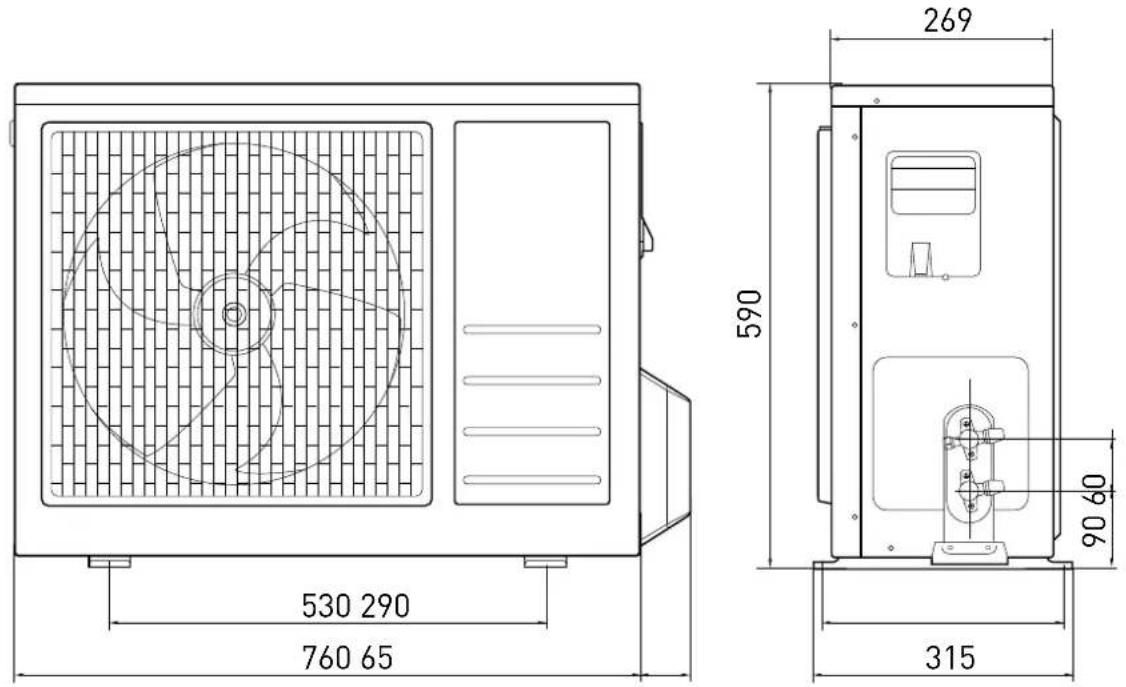
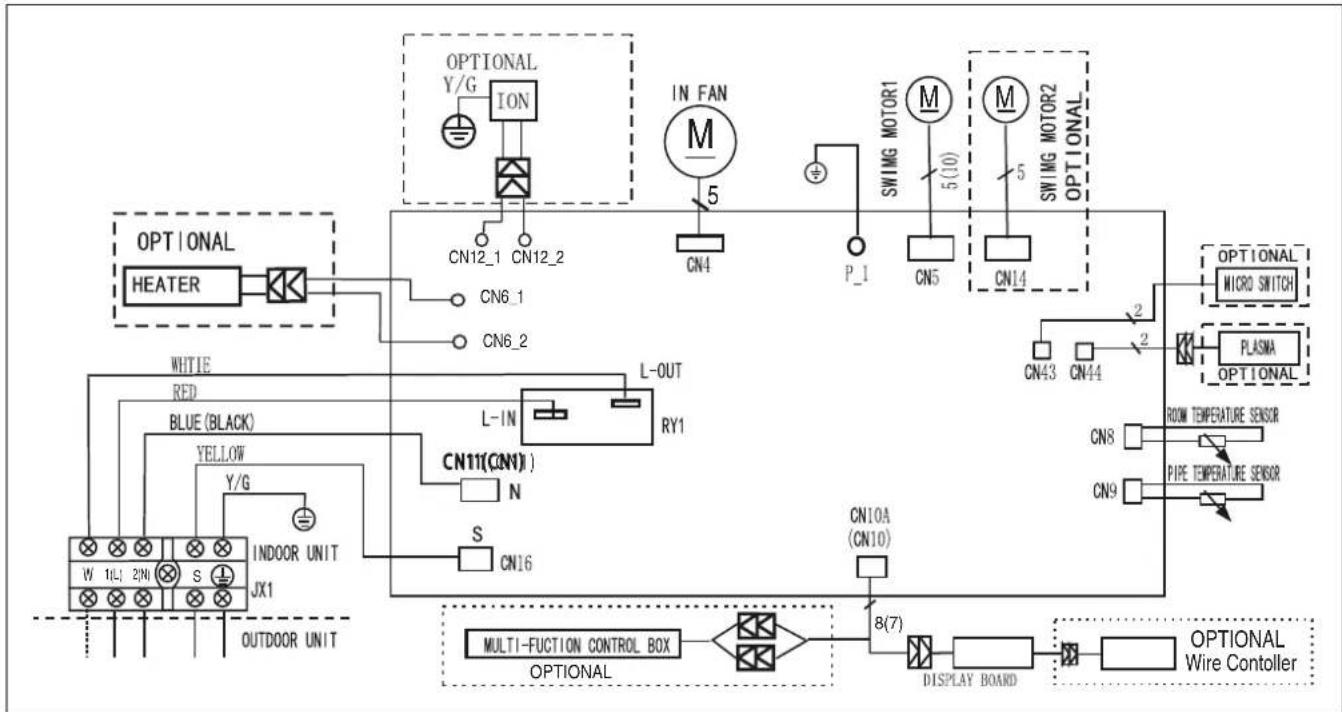
SCHEMI ELETTRICI - WIRING DIAGRAMS - SCHÉMAS ÉLECTRIQUES ESQUEMAS ELÉCTRICOS - ESQUEMAS ELÉCTRICOS ELEKTRISCHE SCHEMA'S
UNITÁ INTERNA/ INDOOR UNIT/ UNITE INTERNE/
UNIDAD INTERNA/ APARELHO INTERNO/ INTERNE EENHEID
ALYS 25 MC8-I; ALYS 35 MC8-I
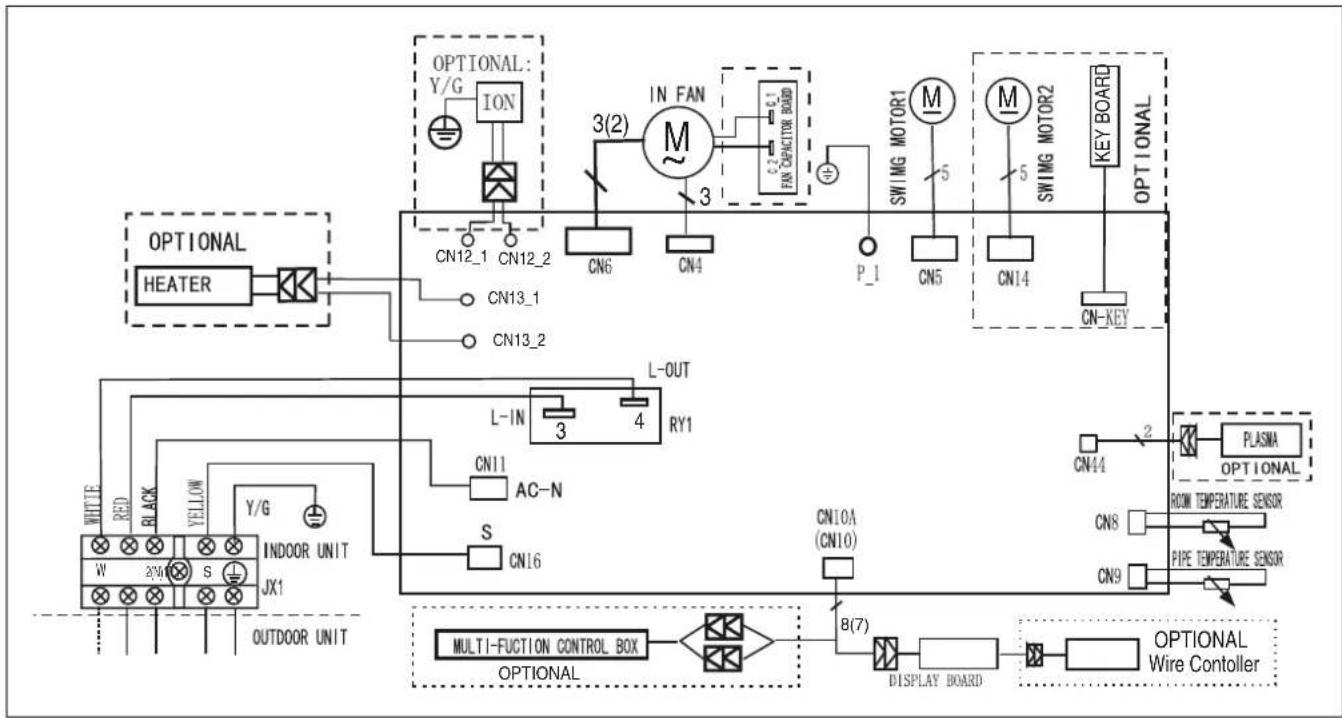
flowchart
graph TD
    A["HEATER"] --> B["IN FAN"]
    B --> C["SWING MOTOR1"]
    B --> D["SWING MOTOR2"]
    B --> E["KEY BOARD"]
    B --> F["L-OUT"]
    B --> G["RY1"]
    B --> H["L-IN"]
    H --> I["AC-N"]
    H --> J["CN11"]
    H --> K["S"]
    H --> L["CN16"]
    B --> M["IN FAN"]
    M --> N["CN12_1"]
    M --> O["CN12_2"]
    M --> P["CN13_1"]
    M --> Q["CN13_2"]
    M --> R["CN6"]
    M --> S["CN4"]
    M --> T["P_1"]
    M --> U["CN5"]
    M --> V["CN14"]
    M --> W["CN_KEY"]
    X["INDOOR UNIT"] --> Y["W 2/40"]
    X --> Z["S 2/40"]
    X --> AA["OUTDOOR UNIT"]
    AB["MULTI-FUCTION CONTROL BOX"] --> AC["Multi-FUCTION CONTROL BOX OPTIONAL"]
    AD["OPTIONAL Wire Controller"] --> AE["B(7)"]
    AE --> AF["DISPLAY BOARD"]
    AF --> AG["OPEN"]
    AH["OPTIONAL"] --> AI["Y/G"]
    AH --> AJ["IN FAN"]
    AH --> AK["L-IN"]
    AH --> AL["L-OUT"]
    AH --> AM["RY1"]
    AH --> AN["L-OUT"]
ALYS 50 MC8-1
flowchart
graph TD
    A["HEATER"] --> B["IN FAN"]
    B --> C["SWIMG MOTOR1"]
    B --> D["SWIMG MOTOR2"]
    C --> E["M"]
    D --> F["M"]
    E --> G["CN4"]
    F --> H["CN5"]
    G --> I["P_1"]
    H --> J["CN43"]
    I --> K["CN44"]
    J --> L["OPTIONAL MICRO SWITCH"]
    K --> M["PLASMA"]
    L --> N["OPTIONAL"]
    M --> O["ROOM TEMPERATURE SENSOR"]
    M --> P["PIPE TEMPERATURE SENSOR"]
    N --> Q["8(7)"]
    P --> R["DISPLAY BOARD"]
    Q --> S["MULTI-FUCTION CONTROL BOX"]
    R --> T["OPTIONAL Wire Controller"]
    U["WHITE RED BLUE (BLACK) YELLOW Y/G INDOOR UNIT JX1 OUTDOOR UNIT"] --> V["L-IN CN11(CN1)"]
    V --> W["L-OUT RY1"]
    W --> X["L-OUT RN1"]
    X --> Y["L-OUT L-IN CN6_1"]
    Y --> Z["L-OUT CN6_2"]
    AA["OPTIONAL Y/G"] --> AB["ION"]
    AB --> AC["CN12_1"]
    AB --> AD["CN12_2"]
    AE["IN FAN"] --> AF["M"]
    AF --> AG["5(10)"]
    AF --> AH["5"]
    AI["SWIMG MOTOR1"] --> AJ["M"]
    AK["SWIMG MOTOR2"] --> AL["M"]
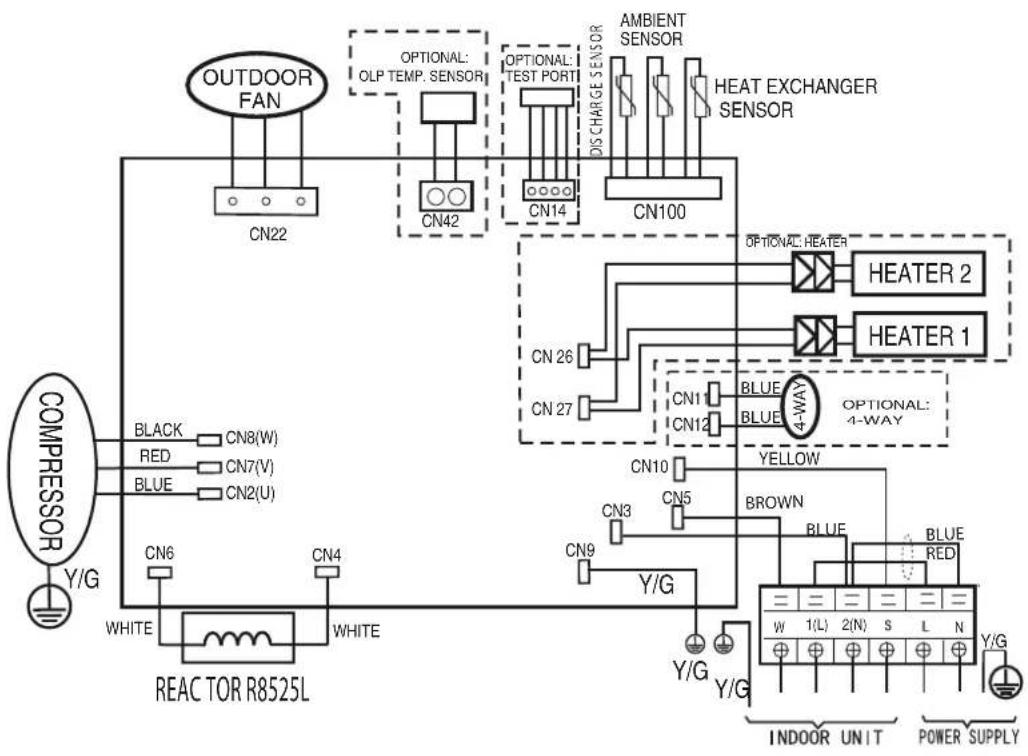
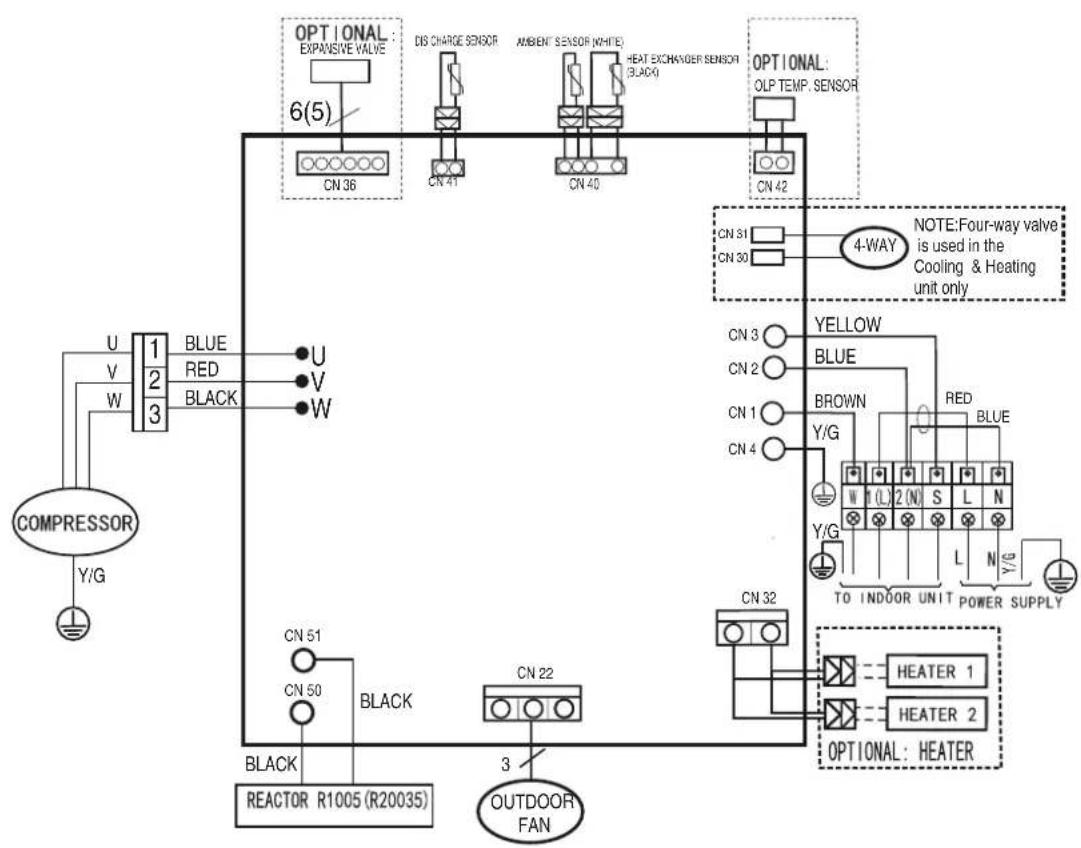
UNITÁ ESTERNA/ OUTDOOR UNIT/ UNITE EXTERNE/
UNIDAD EXTERNA/ APARELHO EXTERNO/ I EXTERNE EENHEID
ALYS 25 MC8-0
flowchart
graph TD
    A["COMPRESSOR Y/G"] --> B["REACTOR R8525L"]
    B --> C["OUTDOOR FAN"]
    C --> D["CN22"]
    D --> E["CN42"]
    E --> F["CN14"]
    F --> G["CN100"]
    G --> H["HEATER 2"]
    G --> I["HEATER 1"]
    G --> J["4-WAY"]
    J --> K["BROWN"]
    K --> L["Y/G"]
    L --> M["INDOOR UNIT"]
    L --> N["POWER SUPPLY"]
    B --> O["WHITE"]
    B --> P["WHITE"]
    B --> Q["WHITE"]
    B --> R["WHITE"]
    B --> S["WHITE"]
    B --> T["WHITE"]
    B --> U["WHITE"]
    B --> V["BLUE"]
    B --> W["BLUE"]
    B --> X["BLUE"]
    B --> Y["BLUE"]
    B --> Z["BLUE"]
    B --> AA["BLUE"]
    B --> AB["BLUE"]
    B --> AC["BLUE"]
    B --> AD["BLUE"]
    B --> AE["BLUE"]
    B --> AF["BLUE"]
    B --> AG["BLUE"]
    B --> AH["BLUE"]
    B --> AI["BLUE"]
    B --> AJ["BLUE"]
    B --> AK["BLUE"]
    B --> AL["BLUE"]
    B --> AM["BLUE"]
    B --> AN["BLUE"]
    B --> AO["BLUE"]
    B --> AP["BLUE"]
    B --> AQ["BLUE"]
    B --> AR["BLUE"]
    B --> AS["BLUE"]
    B --> AT["BLUE"]
    B --> AU["BLUE"]
    B --> AV["BLUE"]
ALYS 35 MC8-0; ALYS 50 MC8-0
flowchart
graph TD
    A["COMPRESSOR"] --> B["U"]
    A --> C["V"]
    A --> D["W"]
    A --> E["3"]
    B --> F["BLUE"]
    C --> G["RED"]
    D --> H["BLACK"]
    E --> I["U"]
    E --> J["W"]
    F --> K["CON 51"]
    G --> L["CON 50"]
    H --> M["BLACK"]
    I --> N["REACTOR R1005 (R20035)"]
    J --> O["OUTDOOR FAN"]
    K --> P["CON 51"]
    L --> Q["CON 50"]
    M --> R["CON 22"]
    N --> S["CON 22"]
    O --> T["CON 22"]
    P --> U["CON 22"]
    Q --> V["CON 22"]
    R --> W["CON 22"]
    S --> X["CON 22"]
    T --> Y["CON 22"]
    U --> Z["CON 22"]
    V --> AA["CON 22"]
    W --> AB["CON 22"]
    X --> AC["CON 22"]
    Y --> AD["CON 22"]
    Z --> AE["CON 22"]
    AA --> AF["CON 22"]
    AB --> AG["CON 22"]
    AC --> AH["CON 22"]
    AD --> AI["CON 22"]
    AE --> AJ["CON 22"]
    AF --> AK["CON 22"]
    AG --> AL["CON 22"]
    AH --> AM["CON 22"]
    AI --> AN["CON 22"]
    AJ --> AO["CON 22"]
    AK --> AP["CON 22"]
    AL --> AQ["CON 22"]
    AM --> AR["CON 22"]
    AN --> AS["CON 22"]
    AO --> AT["CON 22"]
    AP --> AU["CON 22"]
    AQ --> AV["CON 22"]
    AR --> AW["CON 22"]
    AS --> AX["CON 22"]
    AT --> AY["CON 31"]
    AU --> AZ["CON 30"]
    AV --> BA["CON 31"]
    AW --> BB["CON 30"]
    AX --> BC["CON 31"]
    AY --> BD["CON 31"]
    AZ --> BE["CON 31"]
    BA --> BF["CON 31"]
    BB --> BG["CON 31"]
    BC --> BH["CON 31"]
    BD --> BI["CON 31"]
    BE --> BJ["CON 31"]
    BF --> BK["CON 31"]
    BG --> BL["CON 31"]
    BH --> BM["CON 31"]
    BI --> BN["CON 31"]
    BJ --> BO["CON 31"]
    BK --> BP["CON 31"]
    BL --> BQ["CON 31"]
    BM --> BR["CON 31"]

    subgraph Legend
        direction TB
        direction LR
        note1["NOTE: Four-way valve is used in the Cooling & Heating unit only"]
        note2["YELLOW"]
        note3["RED"]
        note4["HEATER"]
        note5["HEATER"]
        note6["OPTIONAL: HEATER"]
        note7["OPTIONAL: HEATER"]
        note8["TO INDOOR UNIT POWER SUPPLY"]
        note9["HEATER 1"]
        note10["HEATER 2"]
- Model
- Power supply voltage
- Code
- Electricity supply frequency
- Nominal cooling capacity (MIN-MAX)
- Nominal heating capacity (MIN-MAX)
- Nominal cooling power absorption (MIN-MAX)
- Nominal heating power absorption (MIN-MAX)
- Max. absorbed power
- IP protection rating
- Weight
- Refrigerant gas
- Amount of refrigerant gas
- Type of protection from electric shocks
- Maximum circuit pressure (discharge)
- Maximum circuit pressure (suction)
- Serial number
- Manufacturer
LEGENDE (FR)
Modèle
ARISTON THERMO GROUP
Ariston Thermo S.p.A.
Viale Aristide Merloni 45
60044 Fabriano (AN)
T: (+39) 0732 6011
Fax: (+39) 0732 602331
www.ariston.com

- CLIMATIZZATORE D'ARIA
- INTRODUZIONE
- Display
- PICCOLA MANUTENZIONE
- ATTENZIONE:
- TUBAZIONI E COLLEGAMENTI
- Strumenti
- OPERATING AND MAINTENANCE INSTRUCTIONS
- INSTALLATION
- THIS PRODUCT CONFORMS TO EU DIRECTIVES 2002/96/EC AND
- TABLE OF CONTENTS:
- OPERATING AND MAINTENANCE INSTRUCTIONS
- INSTALLATION
- SAFETY STANDARDS
- WALL-HUNG MODEL
- Operating recommendations:
- WARNING:
- Internal unit panel
- OPERATION
- Basic functions
- Special functions
- - SLEEP FUNCTION
- • FOLLOW-ME FUNCTION
- - SELF CLEAN
- - LOW AMBIENT
- - AUTORESTART
- - SILENCE
- - MEMORY
- - LED
- - 12 SPEED FAN
- - FLAP AUTO MEMORY
- - REFRIGERANT LEAK SENSOR (in cooling mode only)
- Air treatment filters
- - Anti-odour filter
- SIMPLE MAINTENANCE
- Cleaning the filters
- Anti-dust filters
- Air conditioning filters
- Cleaning the air conditioning unit
- END OF SEASON MAINTENANCE
- If the air conditioning unit does not work
- Internal unit – external unit compatibility
- INSTALLATION
- Minimum distances
- NOTES:
- Installing the template
- Installing the internal unit
- Make sure that:
- Installing the external unit
- For wall installation:
- PIPING AND CONNECTIONS
- Connecting the refrigeration piping
- Draining the condensation from the internal unit
- Draining the condensation from the external unit
- Tools
- Thickness of the copper pipes
- How to connect the pipes
- Connections to the internal unit
- Connections to the external unit
- LENGTH OF THE PIPING
- NOTE:
- IMPORTANT: CHECK FOR REFRIGERANT LEAKS
- Creating a vacuum and checking the seal
- Recovering the refrigerant
- Charging the refrigerant gas
- ELECTRICAL CONNECTIONS
- Connecting the internal unit
- Connecting the external unit
- Connecting to the mains electricity supply
- Connection types
- FINAL STAGES
- Testing
- - INTERNAL UNIT
- - EXTERNAL UNIT
- CHECKS WITHOUT THE USE OF TOOLS OR INSTRUMENTS
- TROUBLESHOOTING - electrics
- INTRODUCTION
- ENTRETIEN FIN DE SAISON
- ATTENTION :
- TUYAUTERIES ET RACCORDEMENTS
- Instruments
- Types de raccordement
- MANTENIMIENTO DE FINAL DE TEMPORADA
- ATENCIÓN:
- TUBOS Y CONEXIONES
- Herramientas
- Visor
- TUBAGENS E LIGAÇÕES
- ATENÇÃO:
- Instrumentos
- FASES CONCLUSIVAS
- DIT PRODUCT IS CONFORM AAN DE EU RICHTLIJN 2002/96/EC
- Gereedschap
- AFSLUITENDE FASEN
- OPGELET:
- DIMENSIONI/ DIMENSIONS / DIMENSIONS DIMENSIONES / DIMENSÕES/ AFMETINGEN
- UNITÁ ESTERNA/ OUTDOOR UNIT/ UNITE EXTERNE/ UNIDAD EXTERNA/ APARELHO EXTERNO/ I EXTERNE EENHEID
- SCHEMI ELETTRICI - WIRING DIAGRAMS - SCHÉMAS ÉLECTRIQUES ESQUEMAS ELÉCTRICOS - ESQUEMAS ELÉCTRICOS ELEKTRISCHE SCHEMA'S
- LEGENDE (FR)
Brand : Ariston Thermo
Model : Alys
Category : Air Conditioning