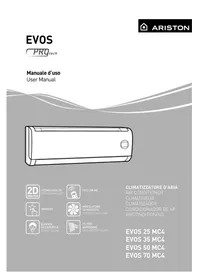
Evos 70 MC4 - Air Conditioning Ariston Thermo - Free user manual and instructions
Find the device manual for free Evos 70 MC4 Ariston Thermo in PDF.


| Product Type | Wall-mounted split air conditioner |
| Brand | Ariston Thermo |
| Model | Evos 70 MC4 |
| Installation Type | Wall-mounted (indoor and outdoor units) |
| Operating Modes | Cooling, Heating (heat pump), Fan, Dehumidification, Auto |
| Cooling Capacity | 2.5 kW (estimated) |
| Heating Capacity | 2.5 kW (estimated, heat pump) |
| Power Supply | 220-240 V ~ 50 Hz |
| Indoor Unit Dimensions (W x H x D) | Approx. 800 x 270 x 200 mm |
| Indoor Unit Weight | Approx. 10 kg |
| Outdoor Unit Dimensions (W x H x D) | Approx. 700 x 500 x 250 mm |
| Outdoor Unit Weight | Approx. 25 kg |
| Noise Level (Indoor Unit) | 25-35 dB(A) (estimated) |
| Noise Level (Outdoor Unit) | 50-55 dB(A) (estimated) |
| Filters | Washable dust filter, Anti-odor filter (replace every 24 months) |
| Special Functions | Turbo, Sleep, Follow-me, Self Clean, Low Ambient, Autorestart, Silence, Memory, Swing vertical, Timer, 12 fan speeds, Flap auto memory |
| Safety | Automatic stop in case of power failure (Autorestart), refrigerant leak detector |
| Routine Maintenance | Clean filters every 15 days, exterior cleaning with damp cloth and neutral soap |
| Operating Limits | Cooling: outdoor -15 °C to 50 °C; Heating: outdoor -15 °C to 30 °C; Relative humidity < 80% |
| Included Accessories | Remote control, air filters |
Frequently Asked Questions - Evos 70 MC4 Ariston Thermo
User questions about Evos 70 MC4 Ariston Thermo
0 question about this device. Answer the ones you know or ask your own.
Ask a new question about this device
Download the instructions for your Air Conditioning in PDF format for free! Find your manual Evos 70 MC4 - Ariston Thermo and take your electronic device back in hand. On this page are published all the documents necessary for the use of your device. Evos 70 MC4 by Ariston Thermo.
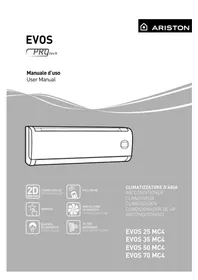
USER MANUAL Evos 70 MC4 Ariston Thermo
natural_image
Line drawing of a rectangular air conditioner unit with a square button and handle (no text or symbols)
TECNOLOGIA 2D
2D TECHNOLOGY

FOLLOW ME

MEMORY

VENTILATORE
12 VELOCITÁ
12 SPEED AIR FLOW
ELEVATA
SILENZIOSITÁ
SUPER SILENT

FILTRO
ANTIODORE
ANTI-ODOUR FILTER
CLIMATIZZATORE D'ARIA
AIR CONDITIONER
CLIMATISEUR
CLIMATIZADOR
CONDICIONADOR DE AR
AIRCONDITIONING
EVOS 25 MC4
EVOS 35 MC4
EVOS 50 MC4
EVOS 70 MC4
ITALIANO....3
ENGLISH 10
FRANÇAIS 17
ESPAÑOLAS 24
PORTUGUÊS 31
NEDERLANDS....38
Egregio Signore,
natural_image
Symbol of a trash bin crossed with a diagonal line, no text or numbers presentNORME DI SICUREZZA
CONSERVARE E CONSULTARE ATTENTAMENTE IL PRESENTE LIBRETTO IN QUANTO TUTTE LE AVVERTENZE FOR-NISCONO INDICAZIONI IMPORTANTI PER LA SICUREZZA NELLE FASI DI INSTALLAZIONE, USO E MANUTENZIONE.
PICCOLA MANUTENZIONE
ATTENZIONE:
We would like to thank you for having chosen one of our air conditioning units.
We are confident in having supplied you a technically sound product.
This booklet is designed to provide you with instructions and helpful advice to inform you as to the correct use and maintenance of this high quality appliance.
Keep this booklet in a safe place for further reference.
Should need be, please feel free to contact your nearest technical after-sales service centre for any queries you may have.
Kind Regards.
Despite the painstaking care taken in publishing this booklet, errors may have been overlooked by our proof-reading department.
Would you therefore kindly inform us of any mistakes you may have noticed, to help us improve the service we offer.
THIS PRODUCT CONFORMS TO EU DIRECTIVE 2002/96/EC
The barred dustbin symbol appearing on the device indicates that the product must be disposed of separately from household waste once it reaches the end of its lifespan, and transferred to a waste disposal site for electric and electronic equipment, or returned to the dealer when purchasing a new device of the same kind.
The user is responsible for delivering the decommissioned device to a suitable waste disposal site.
Proper separated collection of the decommissioned device and its subsequent eco-compatible recycling, treatment and disposal helps to prevent negative effects on the environment and health, besides encouraging the reuse of the materials comprising the product.
For further details on the available waste collection systems, contact your local waste disposal offi ce, or the dealer from which the product was purchased.
natural_image
Symbol of a trash bin crossed with a diagonal line, no text or numbers presentSAFETY REGULATIONS
READ THIS MANUAL THOROUGHLY AND KEEP IT IN A SAFE PLACE, AS IT CONTAINS IMPORTANT INFORMATION FOR THE SAFE INSTALLATION, USE AND MAINTENANCE OF YOUR NEW APPLIANCE.
| NORM RISK | ||
| Do not perform any operations that involve opening the appliance. | Electrocution due to exposure to live components.Personal injury caused by burns due to overheated components, or wounds caused by sharp edges or protrusions. | ⚠️ |
| Do not perform operations that involve removing the device from its housing. | Electrocution due to exposure to live components.Personal injury from burns due to cooling gases leaking from disconnected piping. | ⚠️ |
| Do not start or stop the appliance simply by plugging it into the electricity mains supply or unplugging it. | Electrocution from a damaged cable or plug, or socket. | ⚠️ |
| Do not wrap/damage/modify/heal the power supply cable or rest heavy objects on it. | Electrocution from non-insulated live wires. | ⚠️ |
| Do not leave anything on top of the appliance. | Personal injury from an object falling off the appliance following vibrations. | ⚠️ |
| Do not climb onto the appliance. Personal injury due to the appliance falling. | Personal injury caused by falling from heights or shearing [stepladders shutting accidentally]. | ⚠️ |
| Do not climb onto chairs, stools, ladders or unstable supports to clean the appliance. | Electrocution due to exposure to live components. | ⚠️ |
| Do not allow children or inexperienced people to use the appliance. | Damage to the appliance due to improper use. | ⚠️ |
| Do not direct the air flow towards gas hobs or gas stoves. | Explosions, fi res or intoxication from the discharge of gas from burner nozzles.Air flow has blown the flame out. | ⚠️ |
| Do not place your fingers in the air outlets or in the air inlet grilles. | Electrocution due to exposure to live components.Personal injury from cuts. | ⚠️ |
| Do not drink the condensation water. Personal injury from poisoning. | Personal injury from burns or smoke inhalation. | ⚠️ |
| If you smell burning or see smoke coming out of the device, disconnect it from the power supply, open all windows and contact the technician. | Personal injury from burns or smoke inhalation. | ⚠️ |
| Do not perform operations that involve removing the device from its housing. | Flooding caused by water leaking from disconnected piping. | ⚠️ |
| Do not leave anything on top of the appliance. | Damage to the appliance or any underlying items caused by the appliance detaching from its fixing brackets and falling. | ⚠️ |
| Do not use insecticides, solvents or aggressive detergents to clean the device. | Damage to plastic or painted parts. | ⚠️ |
| Do not use the device for any purpose other than normal household operation. | Damage to the device caused by operation overload. Damage to objects caused by improper use. | ⚠️ |
| Do not allow children or inexperienced persons to operate the device. | Damage to the device caused by improper use. | ⚠️ |
| Do not direct the air flow towards valuable articles, plants or animals. | Damage or perishing due to excessive cold/heat, humidity, ventilation. | ⚠️ |
| Do not use the air conditioning unit for extended periods of time in conditions of more than 80% humidity. | Damage to objects due to excessive dripping of condensation from the appliance. | ⚠️ |
| Do not place other electrical devices, furniture or objects that must be kept dry below the internal or external units. | Possible drainage of the condensation water causing damage or malfunction | ⚠️ |
| Make sure there is enough ventilation in the room where the air conditioning unit is installed if there is also a combustion appliance | Lack of oxygen | ⚠️ |
| Do not expose yourself to the air flow for a prolonged period of time | Health problems | ⚠️ |
| Do not activate the unit near hazardous substances and fl am- mable or corrosive gases | Risk of fire, injuries, explosions | ⚠️ |
| At least every twelve months, check the integrity of the support frame and structure of the external unit | ⚠️ |
Symbol legend:

Failure to comply with this warning implies the risk of injury to persons, which in some circumstances may be fatal.
Failure to comply with this warning implies the risk of damage, in some circumstances serious, to property, plants or animals.
WALL-HUNG MODEL
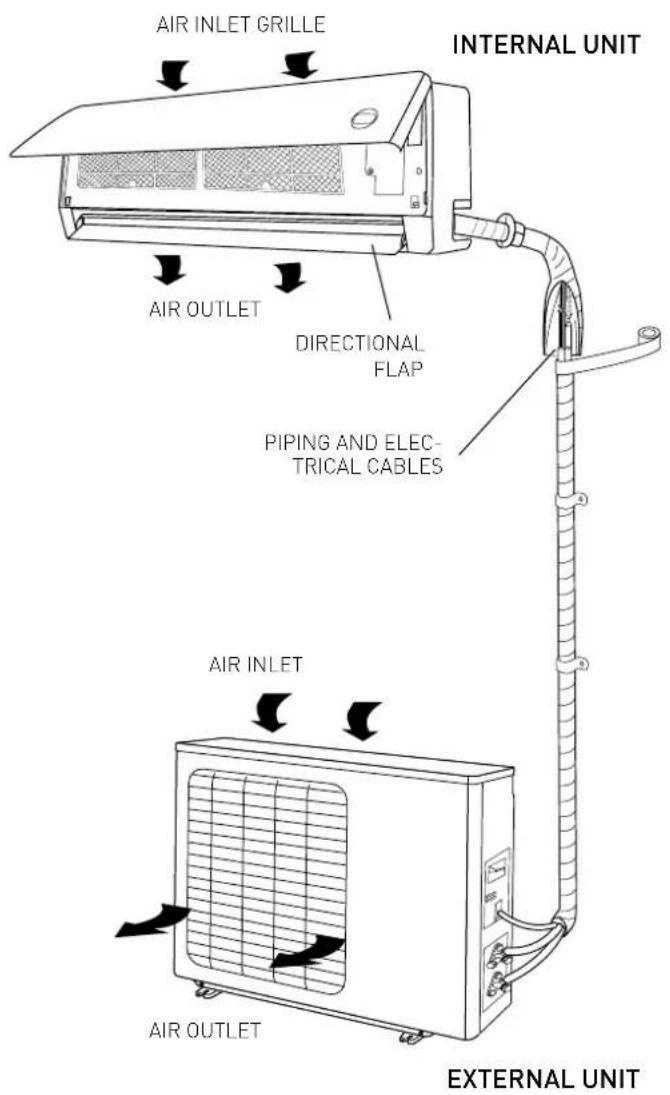
The air conditioning unit is made up of two separate units linked up to one another by copper piping (suitably insulated) and
a power supply cable.
The Internal Unit should be installed on a wall of the room to be air conditioned. The External Unit can be free standing on the floor or installed on a wall, on special supporting brackets.
Operating suggestions:
- For the air conditioning unit to work at its best, make sure it is suitably sized for your specific air conditioning requirements. (Risk of poor appliance performance).
- Do not obstruct the air inlet and outlet grilles with any objects. (Risk of the appliance overheating).
- If the appliance is left unused for an extended period of time, disconnect the power supply cable from the mains as the appliance would otherwise remain powered. (Risk of personal injury from fire and fumes).
- For optimal appliance efficiency, maintain the room temperature constant through the swing function, close doors and windows, clean the filters regularly
- Do not excessively cool the room to avoid sudden temperature changes
WARNING:
- Do not start or stop the appliance by simply plugging it into or out of the electricity mains (risk of personal injury due to electrocution).
- Do not climb onto the internal or external unit and do not place any objects on them at all (risk of personal injury and damage to any objects that fall from a height).
- Do not expose yourself to the direct air flow for a prolonged period of time (risk of personal injury from skin sensitisation).
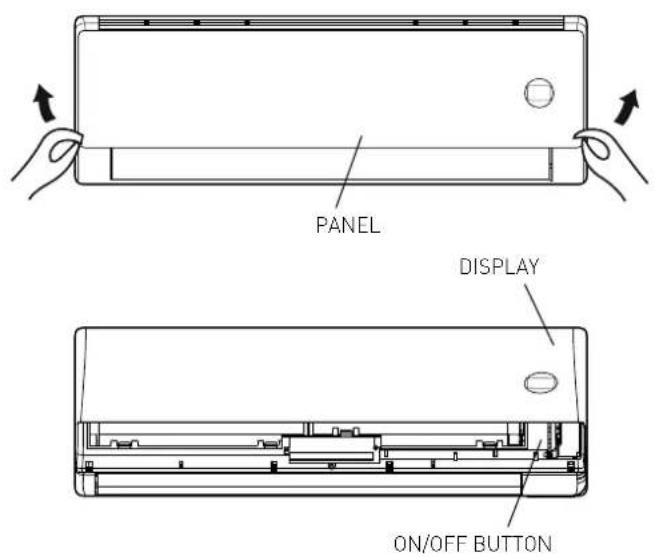
INTERNAL UNIT PANEL
"ON/OFF" BUTTON
by pressing this button, the unit switches on/off. The operating mode is AUTO (Tset=24°C).
By pressing twice the on/off button, the air conditioning unit enters the forced cooling mode (used exclusively by the installer during testing).
WARNING:
- Do not use the switch with wet hands (risk of personal injury from electrocution).
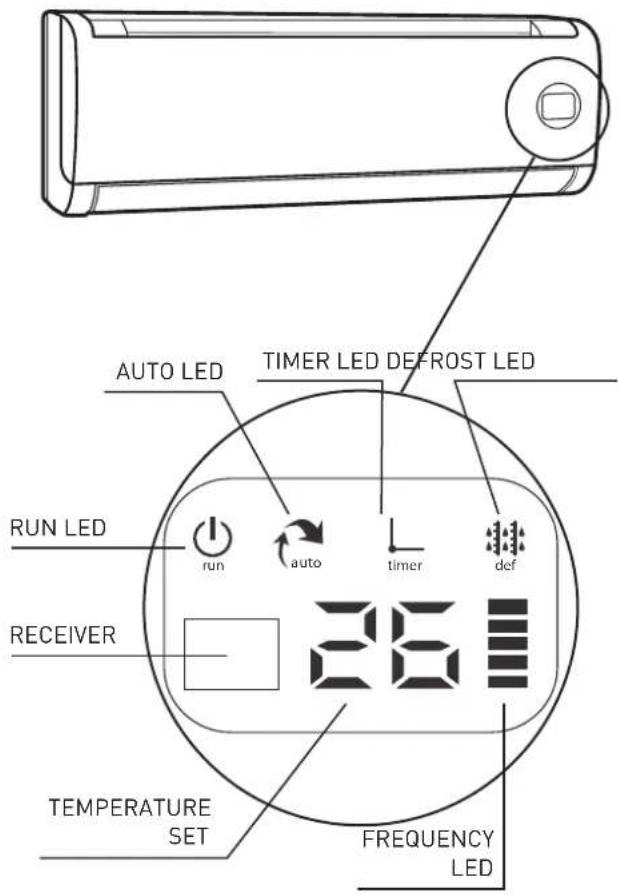
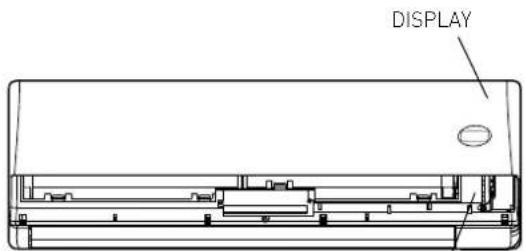
LED - DISPLAY
The air conditioning unit is provided with a display which enables the operation parameters to be visualised (see figure).
- RUN led
indicates that the appliance is on - AUTO led
shows that the unit is operating in automatic mode - TIMER led
indicates that the Timer is on - DEFROST led
indicates that the Defrostr is on - FREQUENCY
indicates the operating frequency of the compressor
OPERATION
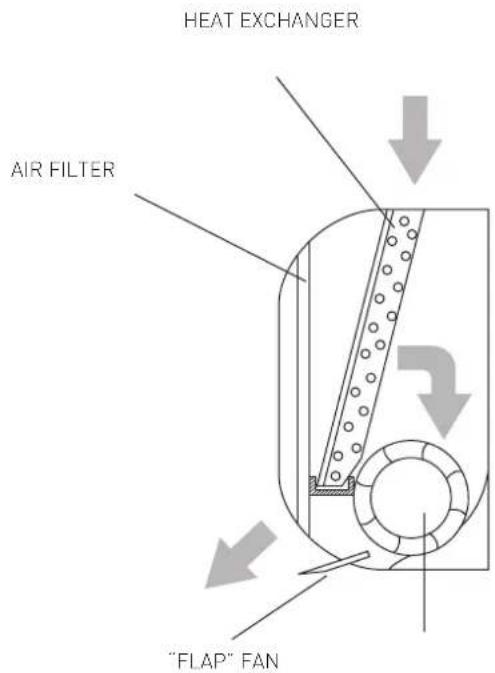
The air conditioning unit is an appliance designed to create the ideal climatic conditions for the well-being of people in a room. It completely automatically cools, dehumidifi es and heats the air.
The air sucked in by the fan enters via the upper grille and then passes through the filter that traps any dust it may contain. It is then conveyed through the fins of a "heat exchanger": namely a finned coil that cools the air and dehumidifies it, or even heats it.
The heat removed from the room is vented outside
by the External Unit.
The fan circulates the air around the room: the direction in which the air exits the unit is adjusted vertically by the fl ap (and by the horizontal defl ectors horizontally).
BASIC FUNCTIONS
- HEATING
In this mode, the air conditioning unit heats the room by means of the "heat pump" operation. - COOLING
In this mode, the air conditioning unit cools down the room while at the same time reducing the humidity in the air. - VENTILATION
This mode circulates air throughout the room. - DEHUMIDIFICATION
This mode, with its alternating cooling and ventilation cycles, is designed to obtain the dehumidifi cation of the air without the room temperature being altered considerably. - AUTO
In this mode, the mode and speed of the fan are set automatically based on the room temperature detected.
• TURBO
This function allows the unit to reach the preset temperature in the shortest time possible. - TIMER
This function allows the air conditioning unit to be turned on or off at the desired time. - VERTICAL SWING
This function activates the automatic oscillation of the fl ap.
SPECIAL FUNCTIONS
- SLEEP FUNCTION
This function adjusts the temperature automatically in order to make the room more comfortable at night. - FOLLOW-ME FUNCTION
The operation of the air conditioning unit depends on the sensor of the remote control, which detects the actual room temperature of the environment it is located in.
- SELF CLEAN
In self clean mode, the air conditioning unit automatically cleans and dries the evaporator, keeping it in optimal conditions for subsequent operation
- LOW AMBIENT
With this function the air conditioning unit works in cooling mode with external temperatures lower than 15^ .
- AUTORESTART
This function makes the air conditioning unit restart from the last function set as soon as the electricity comes back on following a power failure (mode, temperature, fan speed and fl ap position).
• SILENCE (2,5kW - 3,5kW - 5 kW)
This function allows the air conditioning unit to set an ultra minimum fan speed of the internal unit, making the room extremely quiet.
- MEMORY
It is used to save the current settings or restore the previous settings.
• LED
This function switches off the display of the internal unit.
• 12 SPEED FAN (2,5kW - 3,5kW - 5 kW)
For each of the 3 speeds which can be set (HIGH, MED, LOW), the air conditioning unit has three speed sublevels (HIGH, HIGH+, HIGH-, MED, MED+, MED-, LOW, LOW+, LOW-) which are set automatically. These 9 sublevels in addition to those of the dehumidification, turbo and silence functions, mean that the air conditioning unit has a total of 12 air flow speeds.
- FLAP AUTO MEMORY
When switched off, the air conditioning unit saves the last set position of the fl ap.
• REFRIGERANT LEAK SENSOR (in cooling mode only)
The air conditioning unit possible leaks of refrigerant and shows "EC" on the display (in the case of LED display, the RUN and TIMER LEDs flash.
AIR CONDITIONING FILTERS
- Anti-odour filter
Removes unpleasant odours and volatile organic compounds.
SIMPLE MAINTENANCE
WARNING:
- Unplug the appliance or switch off the dedicated switch before performing any operations (risk of personal injury from electrocution).
- Do not touch the air conditioning unit with wet hands (risk of personal injury from electrocution).
- When cleaning the appliance, do not climb onto a table or unstable chair (risk of personal injury from falling from a height).
- When removing filters, take care not to touch any metal parts, especially the heat exchanger inside the internal unit (risk of personal injury from cuts).
CLEANING THE FILTERS
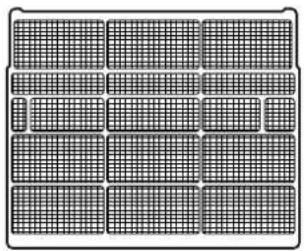
Cleaning the filters regularly is essential for the optimal performance of the air conditioning unit. For domestic settings, we recommend that filters be cleaned fortnightly.
Anti-dust filters
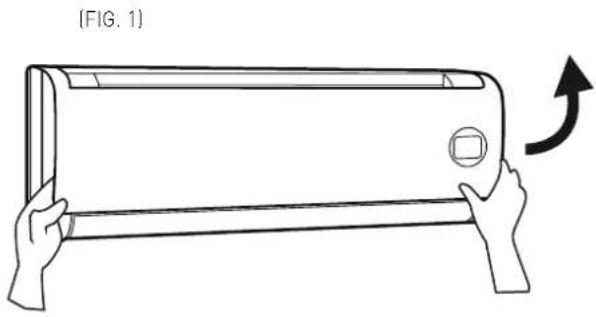
Open the front panel by pushing it upwards at the "grooves" on the sides (fi g. 1).
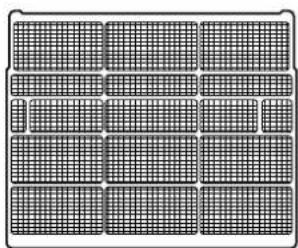
Remove the fi liters by pulling them gently downwards (fi g. 2). Clean them using a vacuum cleaner or wash them in lukewarm water and neutral detergent. Make sure you dry them thoroughly before replacing them. Do not leave them exposed to sunlight. Do not operate the air conditioning unit without the air fi liters.
Air conditioning filters
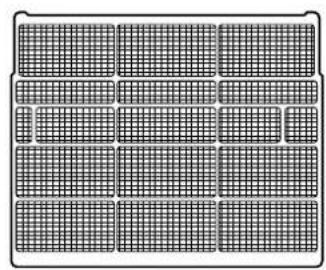
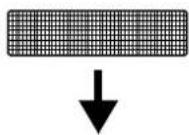
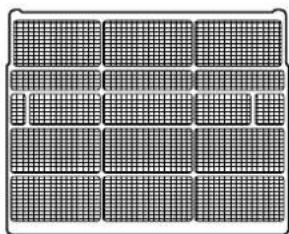
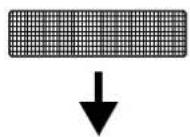
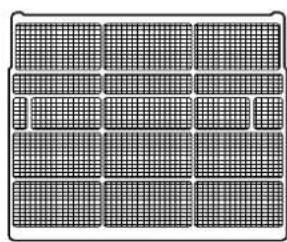
Open the front panel and remove the anti-dust fil ters as explained above. Remove the air conditioning fil ters as shown in fig. 3 and replace them with new ones.
- Anti-odour filter
These filters must be replaced once they are no longer able to perform their function (about 24 months).
CLEANING THE AIR CONDITIONING UNIT
Clean the Internal Unit and the remote control if necessary, use a damp cloth with warm water (not more than 40°C) and mild soap; do not use solvents or aggressive detergents, insecticides or spray cleaners (these could damage and corrode the appliance's plastic parts).
Pay special attention to the cleaning of the front panel, since it is very susceptible to scratching.
If the battery in the External Unit is clogged: remove all leaves and deposits and then wash off all dust with a water jet or some water.
natural_image
Line drawing of a hand holding a wall-mounted air conditioner with an arrow indicating rotation (no text or symbols)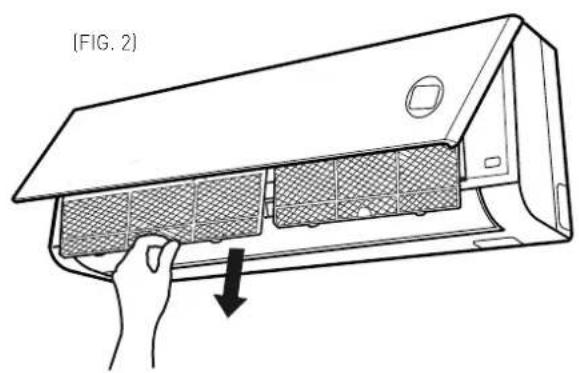
natural_image
Line drawing of a hand inserting a mesh component into a rack, labeled (FIG. 2), with no text or symbols on the diagram itself.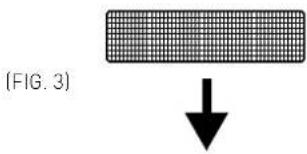
FILTERS
natural_image
Grid-patterned panel with uniform square cells, no text or symbols visible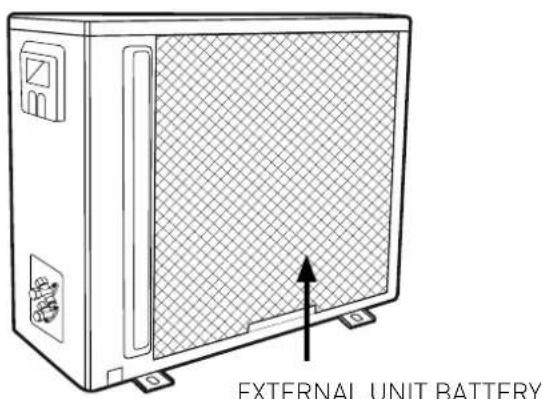
END OF SEASON MAINTENANCE
WARNING:
- Unplug the appliance or switch off the dedicated switch before performing any operations (risk of personal injury from electrocution).
- Do not touch the air conditioning unit with wet hands (risk of personal injury from electrocution).
- When cleaning the appliance, do not climb onto a table or unstable chair (risk of personal injury from falling from a height).
-
When removing filters, take care not to touch any metal parts, especially the heat exchanger inside the internal unit (risk of personal injury from cuts).
-
Clean the filters and secure them back in place.
- On a sunny day, operate the air conditioning unit in ventilation mode for a few hours, so that the inside is dried completely.
- Unplug the appliance or disable the automatic switch.
IF THE AIR CONDITIONING UNIT DOES NOT WORK
- If the air conditioning unit gives no sign of life, check:
- the supply voltage
- that the automatic switch has not blown
- that there has not been a power failure
-
The air conditioning unit is turned on by pressing the ON-OFF button located on the internal unit
-
If the cooling (or heating) effect seems to be lower than normal:
- has the temperature been set correctly on the remote control?
- has a door or window been opened?
- is the Internal Unit exposed to direct sunlight?
- are the filters clogged?
- are there any obstacles obstructing the free circulation of air to the Internal Unit or External Unit?
The performance levels and the characteristics of any cooling appliance are noticeably affected by the environmental conditions where the Internal and External Units operate.
| Cooling external temperature between -15° and 50°C | |
| Heating | external temperature between -15° and 30°C |
WARNING: The relative humidity level of the room must be below 80%. If the conditioner operates above this limit, D condensation may form on its surface and cause drips to start falling.
Cher Monsieur,
natural_image
Symbol of a trash bin crossed with a diagonal line, no text or numbers presentCONSIGNES DE SECURITE
CONSULTEZ ATTENTIVEMENT CE MANUEL ET CONSERVEZ-LE CAR IL CONTIENT DES INSTRUCTIONS IMPORTANTES CONCERNANT LA SECURITE D'INSTALLATION, D'EMPLOI ET D'ENTRETIEN DE L'APPAREIL.
natural_image
Line drawing of hands holding a rectangular air conditioner with an arrow indicating upward motion (no text or symbols)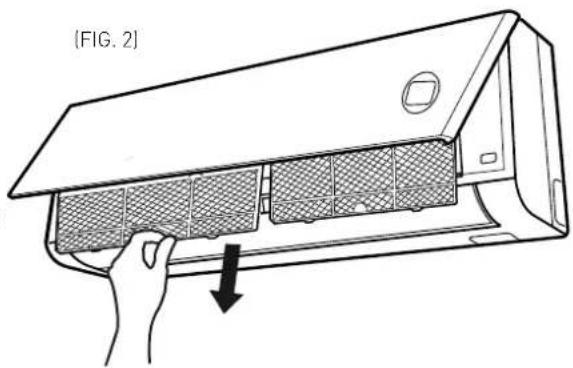
[FIG. 3]
FILTRES
natural_image
Grid of 16 rectangular panels with varying shades of gray, arranged in a 3x3 grid (no text or symbols)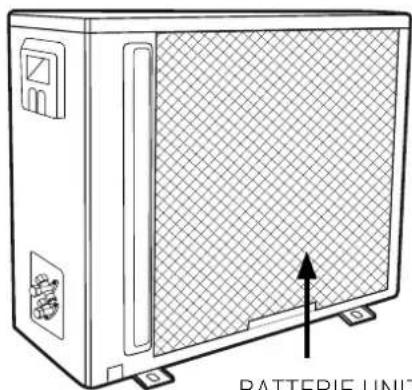
natural_image
Line drawing of a battery unit with grid-patterned panel and mounting base (no text or symbols on the unit itself)BATTERIE UNITE EXTERNE
ENTRETIEN FIN DE SAISON
ATTENTION :
NORMAS DE SEGURIDAD
natural_image
Line drawing of a hand holding a rectangular air conditioner with an arrow indicating rotation (no text or symbols)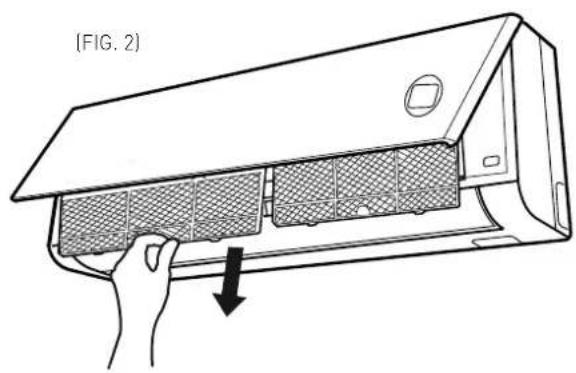
natural_image
Line drawing of a hand inserting a mesh air conditioner into a device (no text or symbols)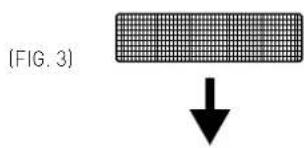
FILTROS
natural_image
Grid-patterned panel with uniform rectangular cells, no text or symbols visible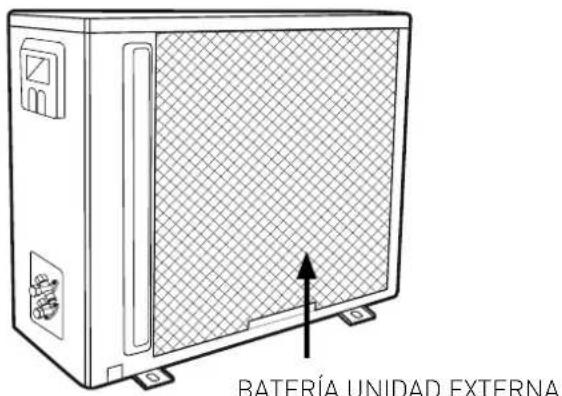
MANTENIMIENTO DE FINAL DE TEMPORADA
ATENCIÓN:
natural_image
Symbol of a trash bin crossed with a diagonal line, no text or numbers presentREGRAS DE SEGURANÇA:
natural_image
Diagram of two hands holding a rectangular device with a circular button and directional arrows indicating rotation (no text or symbols)PAINEL
TECLA ON/OFF
LED - DISPLAY
natural_image
Line drawing of a hand holding a wall-mounted air conditioner with an arrow indicating rotation (no text or symbols)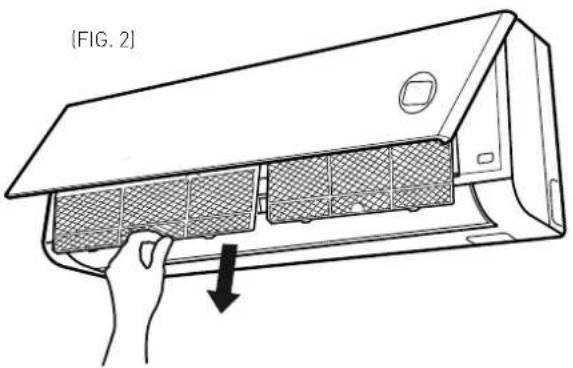
![[FIG. 3]](/content/2026/02/371869/images/f7c96bd6d6dfefe3a4eed06b8ad8b47747b472281daa0fc7f8e69696906d79da.jpg)
FILTROS
natural_image
Grid-patterned panel with uniform square cells, no text or symbols visible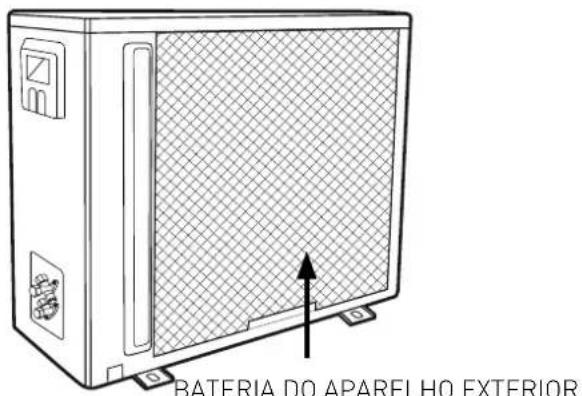
DIT PRODUCT IS CONFORM AAN DE EU RICHTLIJN 2002/96/EC
VEILIGHEIDSV00RSCHRIFTEN
BEWAAR EN RAADPLEEG DIT BOEKJE ZORGVULDIG, DAAR ALLE WAARSCHUWINGEN BELANGRIJKE INFORMATIE BEVATTEN VOOR DE VEILIGHEID TIJDENS INSTALLATIE, GEBRUIK EN ONDERHOUD.
natural_image
Line drawing of a hand holding a wall-mounted air conditioner with an arrow indicating rotation (no text or symbols)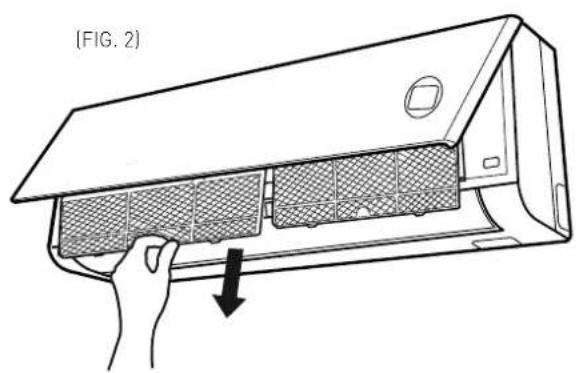
natural_image
Line drawing of a household air conditioner unit with a hand holding the lid and a downward arrow indicating airflow direction (no text or symbols)(FIG. 3)
FILTERS
natural_image
Grid-patterned panel with 12 rectangular cells, no text or symbols visible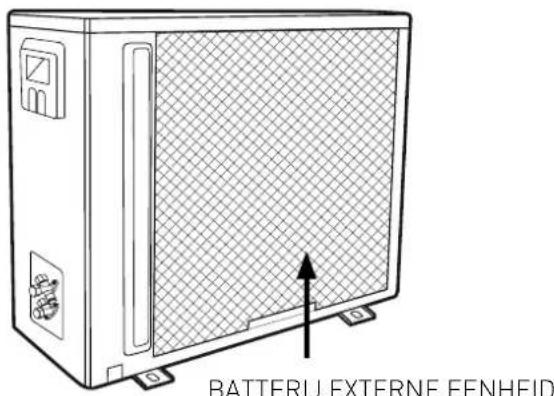
ONDERHOUD EINDE SEIZOEN
OPGELET:
ARISTON THERMO GROUP
Ariston Thermo S.p.A.
Viale Aristide Merloni 45
60044 Fabriano (AN)
T: (+39) 0732 6011
Fax: (+39) 0732 602331
www.ariston.com

- CLIMATIZZATORE D'ARIA
- Egregio Signore,
- NORME DI SICUREZZA
- PICCOLA MANUTENZIONE
- ATTENZIONE:
- THIS PRODUCT CONFORMS TO EU DIRECTIVE 2002/96/EC
- SAFETY REGULATIONS
- WALL-HUNG MODEL
- Operating suggestions:
- WARNING:
- INTERNAL UNIT PANEL
- "ON/OFF" BUTTON
- LED - DISPLAY
- OPERATION
- BASIC FUNCTIONS
- SPECIAL FUNCTIONS
- AIR CONDITIONING FILTERS
- SIMPLE MAINTENANCE
- CLEANING THE FILTERS
- Anti-dust filters
- CLEANING THE AIR CONDITIONING UNIT
- END OF SEASON MAINTENANCE
- IF THE AIR CONDITIONING UNIT DOES NOT WORK
- Cher Monsieur,
- ENTRETIEN FIN DE SAISON
- ATTENTION :
- NORMAS DE SEGURIDAD
- MANTENIMIENTO DE FINAL DE TEMPORADA
- ATENCIÓN:
- REGRAS DE SEGURANÇA:
- DIT PRODUCT IS CONFORM AAN DE EU RICHTLIJN 2002/96/EC
- VEILIGHEIDSV00RSCHRIFTEN
- ONDERHOUD EINDE SEIZOEN
- OPGELET:
Brand : Ariston Thermo
Model : Evos 70 MC4
Category : Air Conditioning