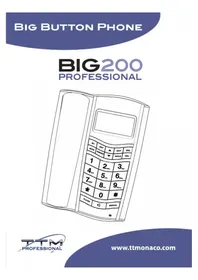
BIG 200 - Telephone ITT - Free user manual and instructions
Find the device manual for free BIG 200 ITT in PDF.



| Product type | Wired landline phone with advanced functions |
| Brand | ITT |
| Model | BIG 200 |
| Power supply | 3 AAA 1.5V batteries (included) |
| Display | LCD screen with smart backlight and 5 contrast levels |
| Menu languages | English, French, Spanish, Italian, Dutch, Danish, Turkish |
| Incoming call memory | 150 groups (12 digits, 4 characters) |
| Phonebook | 70 groups (16 digits, 16 characters) |
| Outgoing call memory | 16 calls with time display and max 16 digits |
| Direct memory | 1 number of 16 digits |
| Prefix numbers | 5 selectable prefix numbers |
| Long distance numbers | 6 prefix numbers |
| Pre-dialed numbers | 32 numbers |
| Ring tones | 8 different melodies to choose from |
| Baby Call function | Yes, with programming of an emergency number |
| Music hold | Yes |
| Mute function | Yes |
| Speakerphone volume | 4 adjustable levels |
| Call waiting function | Yes |
| Package contents | Base unit, handset, telephone cable, instruction manual, 3 AAA batteries |
| Care | Keep dry, do not disassemble, clean without chemicals |
Frequently Asked Questions - BIG 200 ITT
User questions about BIG 200 ITT
0 question about this device. Answer the ones you know or ask your own.
Ask a new question about this device
Download the instructions for your Telephone in PDF format for free! Find your manual BIG 200 - ITT and take your electronic device back in hand. On this page are published all the documents necessary for the use of your device. BIG 200 by ITT.
USER MANUAL BIG 200 ITT
BIG200
PROFESSIONAL

www.ttmonaco.com
USER MANUAL - ENGLISH
Features
Menu in English/French/German/Spanish/Italian/Danish/Turkish selectable
Incoming calls dynamic memory:
- 150 groups(12 digits,4 characters)
Phone-book memory:
- 70 groups(16 digits,16 characters)
16 outgoing calls, each with time and LCD display of 16 digits maximum
1 one-touch memories of 16 digits
5 digit Area Code
6 digit Long-dist code
5 level LCD contrast adjustment
32 digit pre-dialing function
8 normal rings built-in
BABY CALL
Music on hold, released automatically by parallel phone
Mute function
Intelligent backlight
Low battery indicator
Ring/HF volume 4- level digital adjustment
Call waiting function
Unpacking your phone
Your packing includes the following:
-
The base unit telephone
-
1 x Handset
-
Telephone line/line cord
-
Instruction manual
5.3 x 1.5V AAA batteries
Keep the packing material in a safe place in case you later need to transport the unit
Connecting the telephone
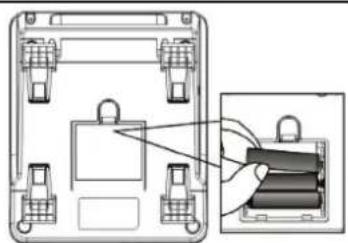
Connect the battery compartment, on the base of the telephone, and insert 3 x 1.5V AAA batteries(supplied)
Replace the battery compartment cover
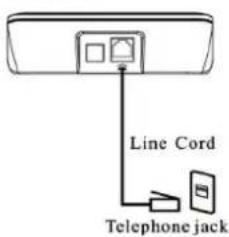
Connect the line cord plug into the telephone jack
BASE UNIT:
natural_image
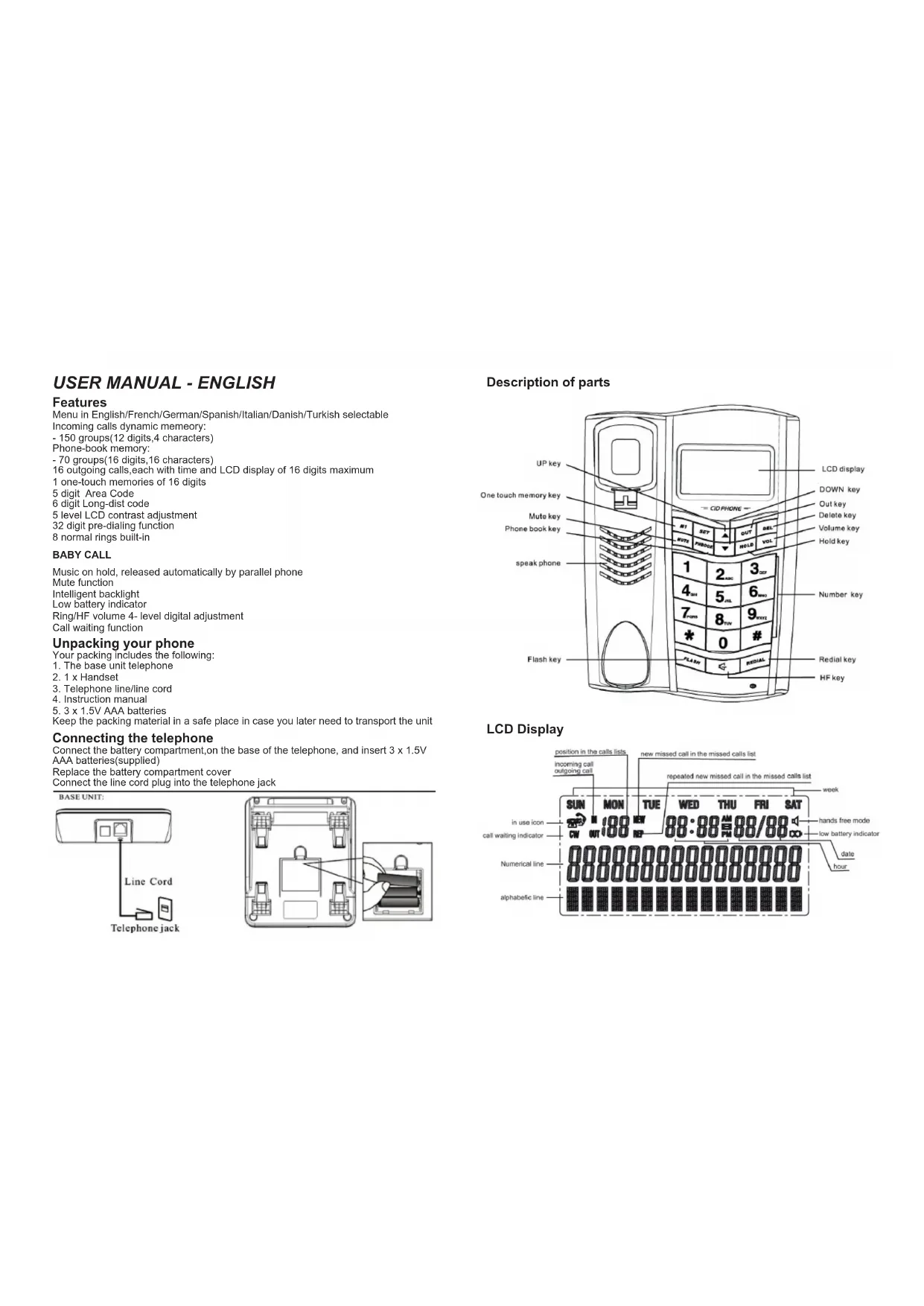
Technical diagram of a device casing with internal components and an inset showing a close-up view of a battery pack (no text or symbols present)Description of parts
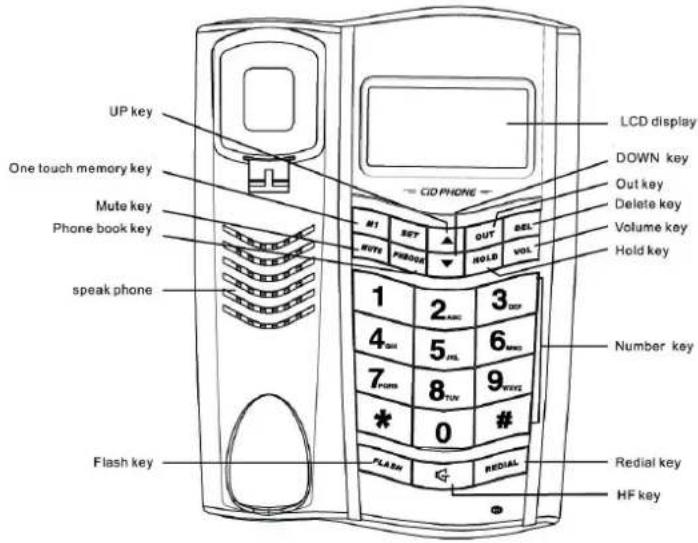
LCD Display
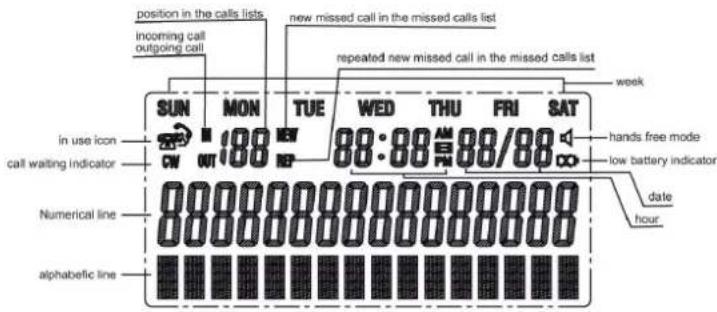
Menu setting:
Press SET in on hook mode, LCD will show VIEW MENU ↑↓, choose the menu by pressing UP or DOWN key. Press SET again to enter the selected menu:
Select Language
Press SET. Scoll to "SELECT LANGUAGE" by pressing UP or DOWN key. There are 7 languages for choice: English/French/Spanish/Italian/German/Turkish/Danish, with English as the default. Choose the desired language by pressing UP or DOWN key.
Set area code
Press SET, Scoll to "SET AREA CODE" by pressing UP or DOWN key. Press to confirm, LCD will show----, with the first"- " blinking if there is no code set before. If there is code, LCD will show the numbers, and the first number will blink.
Press UP or DOWN key to input the digit. Go to the next digit setting by pressing SET. There are 5 digitals that can be set. Confirm the setting and go to next by pressing SET.
Long distances
Press SET. Scroll to "LONG DIST ACCESS" by pressing UP or DOWN key. LCD will show----,with the first"--" blinking, if there is no code set before. If there is A code. LCD will show the numbers, and the first number will blink. Press UP or DOWN key to input the digit. Go to the Next digit setting by pressing SET There are 6 digitals that can be set. Confirm the setting and go to next by pressing SET
Date/ Time
Press SET. Scroll to "DATE/TIME" by pressing UP or DOWN. After entry, the year will be blinking. Modify it by UP or DOWN then go to the next time setting by pressing SET. After setting the date and time, LCD will show the corresponding week. All the information will update automatically if the incoming call is FSK type.
Contrast adjust
Press SET. Scroll to "CONTRAST ADJUST" by pressing UP or DOWN. Press SET to enter this menu. LCD shows the current contrast, Choose the desired level by pressing UP or DOWN.
Baby call
Press SET. Scroll to "BABY CALL" by pressing UP or DOWN. Press SET to enter this menu. LCD shows the current state, switch on or off by pressing UP or DOWN. When you choose on press SET to confirm. LCD shows BABY CALL NUMBER, indicating user to input the baby call's number. After inputting the desired number, press SET to confirm. The default setting is "BABY CALL OFF". When the desired baby call number is programmed into the phone and the function is set to "ON", pressing any key on the phone (except the SET key) or lifting the
handset, will dial the baby call number automatically.
Ring Melody
Press SET. Scroll to "RING MELODY" by pressing UP or DOWN. Press SET to enter this menu. LCD will show the current ring. Choose the desired ring by pressing UP or DOWN. If you choose the C1 option, this menu will be shielded.
Phonebook input
Press SET. Scroll to "PHONEBOOK INPUT" by pressing UP or DOWN press SET to enter this menu. LCD will prompt to input number. After inputting numbers, press SET to save and start inputting name. Move the cursor by UP or DOWN keys when editing name, and delete the wrong content by DEL. After name is edited, press SET to confirm and go to the next.
Phonebook edit
Press SET. Scroll to "PHONEBOOK EDIT" by pressing UP or DOWN. Press SET to enter this menu. LCD will prompt to input the name to search the desired item, or just view all the items by pressing UP or DOWN. Then press SET to edit the item, the operation is the same as PHONEBOOK INPUT.
Flash time
Press SET. Scroll to "FLASH TIME" by pressing UP or DOWN. There are 4 flash time for choice: 100ms/300ms/600ms/1000ms. The default time is set by the option. Choose the desired time by pressing UP or DOWN.
Operation in on hook mode:
Incoming call's display
When receiving an incoming call, phone will show the information of this call, such as name, date and time, and record the total number of all incoming calls. If the call is DTMF signal, phone will put its date & time to this call, due to that there is only number but no other information taken with the signal. If no name has been sent out by exchange, LCD will show the name if the phonebook have the same number. If it is the new incoming call, there will appear a "NEW" icon on LCD; If it's not, then "REP" icon appears at the same time. If it's a private call, LCD will indicate PRIVATE CALL. And OUT OF AREA will display on LC if the call is out of area, and ERROR if the CLI DATA is not correct.
Review the incoming calls
Review the incoming calls by pressing UP or DOWN in the idle mode, it will display all the information such as number, date and time of the calls. Pressing UP or DOWN more than 2s can change the item quickly.
Dial Back
Pressing REDIAL or SPK or lifting hook can dail back when reviewing the incoming calls. Pressing REDIAL twice can add long-dist code at first.
Review the outgoing calls and dial out
Press OUT to review the outgoing calls. The items can be dialed out by Pressing REDIAL or SPK or lifting hook. Pressing OUT more than 2s can change the items quickly.
Review the phonebook
Press PHBOOK,LCD will prompt to input the name to search the desired item. Input the first character to get the desired item, or just view all the items by press UP or Down key,The items can be dialed out by Pressing REDIAL / SPK or lifting hook.
Pre-dial function
In on hook mode, press any digital button to input the pre-dialing number. Modify it by DEL key. Pressing REDIAL / SPK or lifting hook can dial them out directly.
Delete function
In menu setting mode, DEL key is used to exit the state or erase characters input wrongly.
In pre-dialing mode, DEL key is used to erase numbers input wrongly.
- In incoming calls reviewing mode, DEL key is used to delete the item, and pressing this key more than 2s can delete all the incoming calls.
- In outgoing calls reviewing mode, DEL key is used to delete the item.
- In phonebook reviewing mode, DEL key is used to delete the item.
Baby call function
If the baby call function is switched on, press any keys (including lifting hook) except SET can dial the number out.
Intelligent backlight
Any operation will turn on the backlight automatically, and it will turn off if there is no operation in 6s.
Number storing
ONE-TOUCH
Store: In on hook mode, number+SET+M1.
Review: In on hook mode, Press M1.
P.s. "Number" includes: pre-dialing numbers, incoming call numbers
To store a incoming call in Phonebook
Store: In on hook mode, incoming call+SET+PHONEBOOK+SET, Then enter into the phone book editing mode.
Ring selection
In the on hook mode, view the ring by pressing HOLD.
Ring volume adjustment
In on hook mode, Press VOL to adjust ring volume, There are 4 levels for choice, the default is the highest one.
Operation in off hook mode:
MUTE function
When in off hook mode; press mute can mute the transmit.
Review the incoming / outgoing calls / phone book
The same operation as reviewing in on hook mode.
Dial out the one-touch memory
In off hook mode, press M1.
Music on hold
In off hook mode, press the HOLD to enter into the music on hold mode. When lifting the handset, the music stops, and enters into the handset mode;
When pressing the HOLD again, the music stops, and enters into the hands-free mode.
When pressing the SPK key, the music stops, and enters into the hands-free mode. When the parallel phone is turning to the off-hook state, the music stops, and goes to on hook mode automatically.
Call timer
When entering into the off hook mode, the calling timer will start after 6s.
Hands-free volume control
When in hands-free mode, can adjust the receiving volume by pressing VOL
Call waiting function
Call waiting is a feature that is available on some telephone networks. It allows a user to receive a call while he is already on the line with someone else. While engaged in a conversation, the telephone user is alerted to the incoming call by a call waiting alert, which usually sounds like a short tone or beep.
Making a call
Pick up the handset or press the SPK key on the base unit.
A dial tone will be heard.
Dial the desired phone number.
Or pre-dialing.
Dial the desired phone number.
Pick up the handset or press the SPK key on the base unit.
Ending a call
Upon completion of a call:
Hand up by returning the handset back to its cradle on the base unit or, in hands free mode, press the SPK key.
Receiving a call
The presence of an incoming call is indicated by ringer tones. The calling number and name are displayed if sent by network of PABX.
The calling name is also displayed if the number is stored in the phonebook.
Pick up the handset or press the SPK key.
The call timer starts.
Flash function
If you wish to make several phone calls, one after the other, you can simply press the FLASH as a shortcut to establish a dialing tone. Therefore, there is no need to hand up in-between calls to establish a dialing tone.
Maintenance
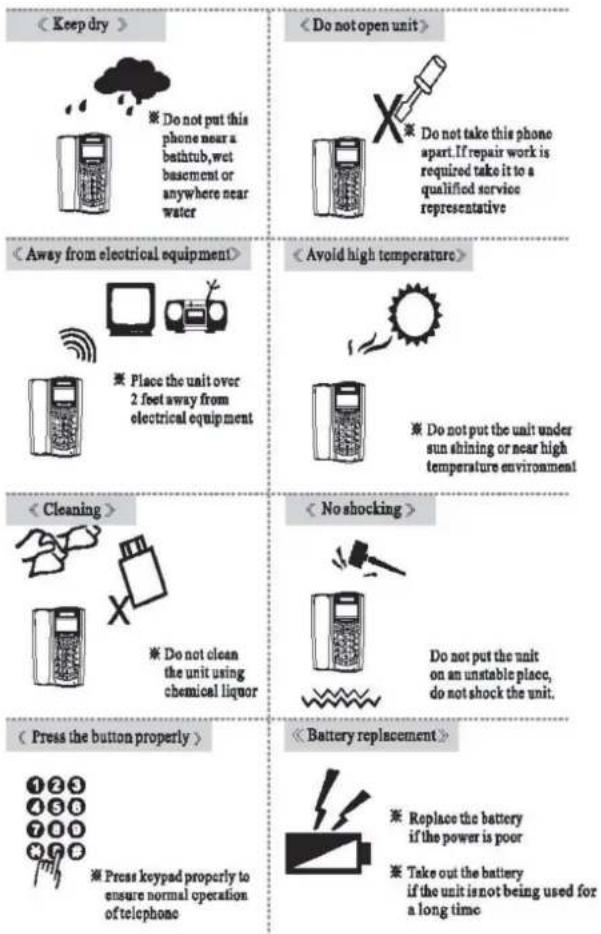
natural_image
Diagram of a device casing with internal components and an inset showing a close-up of a battery pack (no text or symbols)natural_image
Diagram of a device housing with internal components and an inset showing a hand inserting a battery into a housing (no text or symbols present)natural_image
Diagram of a device housing with internal components and an inset showing battery casing (no text or symbols)Description des parties
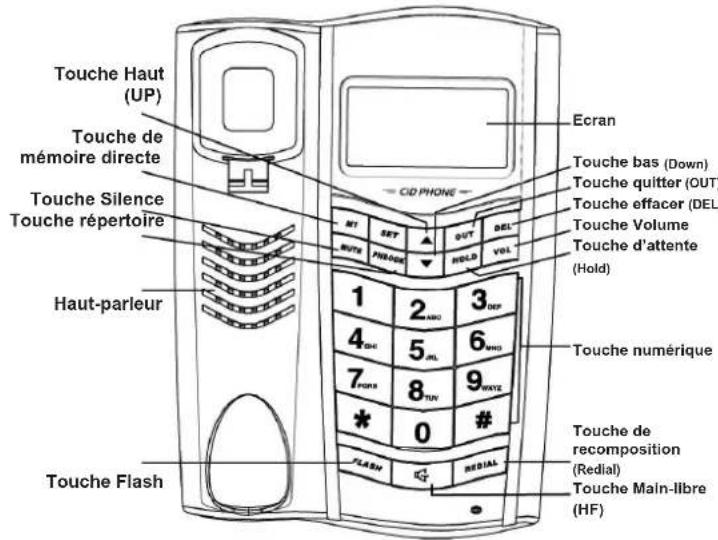
Ecran
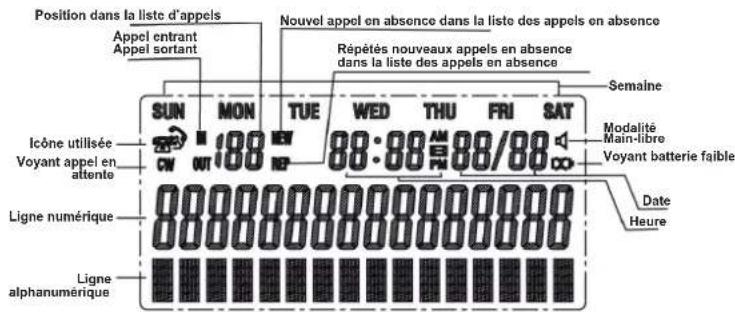
natural_image
Diagram of a device housing with internal components and a close-up view showing battery pack (no text or symbols)natural_image
Diagram of a device housing with internal components and an inset showing a battery pack (no text or symbols)DECLARATION OF CONFORMITY
W e TOP TRONIC MONACO s.a.r.l.
of 20, Blvd Princesse Charlotte - MC 98000 Monaco
declare under sole responsibility that the product
M o d . BIG 200 PROFESSIONAL
Description Corded phone
is in conformity with the essential requirements of the following specifications:
SAFETY EN 60950-1: 2006 + A11: 2009
E M C EN 55022:2006 + A1: 2007
EN 55024: 1998 +A1: 2001 + A2: 2003
Following the provisions of Low Voltage Directive 2006/95EC and EMC R&TTE Directive 1999/5/EC on the approximation of the laws of the Member States relating to electromagnetic compatibility.

The product is marked with CE marking and Notify Body number CE 1313

This product complies with the European Directive for the Restriction of Hazardous Substances (RoHS) 2002/95/EC

natural_image
Symbol of a trash bin crossed with two crossed lines, no text or labels present
CE ^1313

www.ttmonaco.com


- REDIAL
- BIG200
- PROFESSIONAL
- USER MANUAL - ENGLISH
- Features
- BABY CALL
- Unpacking your phone
- Connecting the telephone
- Menu setting:
- Select Language
- Set area code
- Long distances
- Date/ Time
- Contrast adjust
- Ring Melody
- Phonebook input
- Phonebook edit
- Flash time
- Operation in on hook mode:
- Incoming call's display
- Review the incoming calls
- Dial Back
- Review the outgoing calls and dial out
- Review the phonebook
- Pre-dial function
- Delete function
- Baby call function
- Number storing
- ONE-TOUCH
- To store a incoming call in Phonebook
- Ring selection
- Ring volume adjustment
- Operation in off hook mode:
- MUTE function
- Review the incoming / outgoing calls / phone book
- Dial out the one-touch memory
- Music on hold
- Call timer
- Hands-free volume control
- Call waiting function
- Making a call
- Ending a call
- Receiving a call
- Flash function
- DECLARATION OF CONFORMITY
Brand : ITT
Model : BIG 200
Category : Telephone