
BIG 100 - Telephone ITT - Free user manual and instructions
Find the device manual for free BIG 100 ITT in PDF.



| Product type | Landline phone |
| Brand | ITT |
| Model | BIG 100 |
| Dialing system | Dual FSK/DTMF |
| Power supply | 3 AA alkaline batteries |
| Display | Backlit, liquid crystal display, 5 contrast levels |
| Incoming call memory | 61 numbers |
| Outgoing call memory | 16 numbers |
| VIP memory | 61 numbers (lockable) |
| Two Touch memory | 10 locations |
| Area code filter | Yes, to filter display of incoming numbers |
| Ringtones | 20 melodies, 4 volume levels (including silent) |
| IDD lock | 3 levels (red, green, yellow) via dedicated key |
| Additional functions | Calculator, alarm, music hold, hands-free mode, double recall |
| Protections | Anti-theft (PPP code), lightning protection |
| Maintenance | Place in a dry and ventilated area, change batteries if display dims |
Frequently Asked Questions - BIG 100 ITT
User questions about BIG 100 ITT
0 question about this device. Answer the ones you know or ask your own.
Ask a new question about this device
Download the instructions for your Telephone in PDF format for free! Find your manual BIG 100 - ITT and take your electronic device back in hand. On this page are published all the documents necessary for the use of your device. BIG 100 by ITT.
USER MANUAL BIG 100 ITT
Please ensure the phone is placed in a dry and ventilated place without corrosive air.
Please Install 3 x AA batteries for viewing the LCD display. If the LCD does not display clearly, please change the batteries.
Before operation, please check if you had applied for caller ID service from Telecom for caller ID display.
FEATURES:
- FSK/DTMF dual system
- 61 incoming call memories, call back function
- 16 outgoing call memories and conversation time review and radial back
- 61 VIP numbers
- Local area code filter
- Pre-dial number and call out
LCD display of year, month, date and time
20 ringer tone selection - IDD 3 level Lock function
- Back light display
10 two touch memory - 5 levels of LCD contrast
- Alarm function
- Hold with music
- Thunder-proof and protection against steal operation
- Hands-free dialing and speaking function
OPERATION:
1.Function setting:
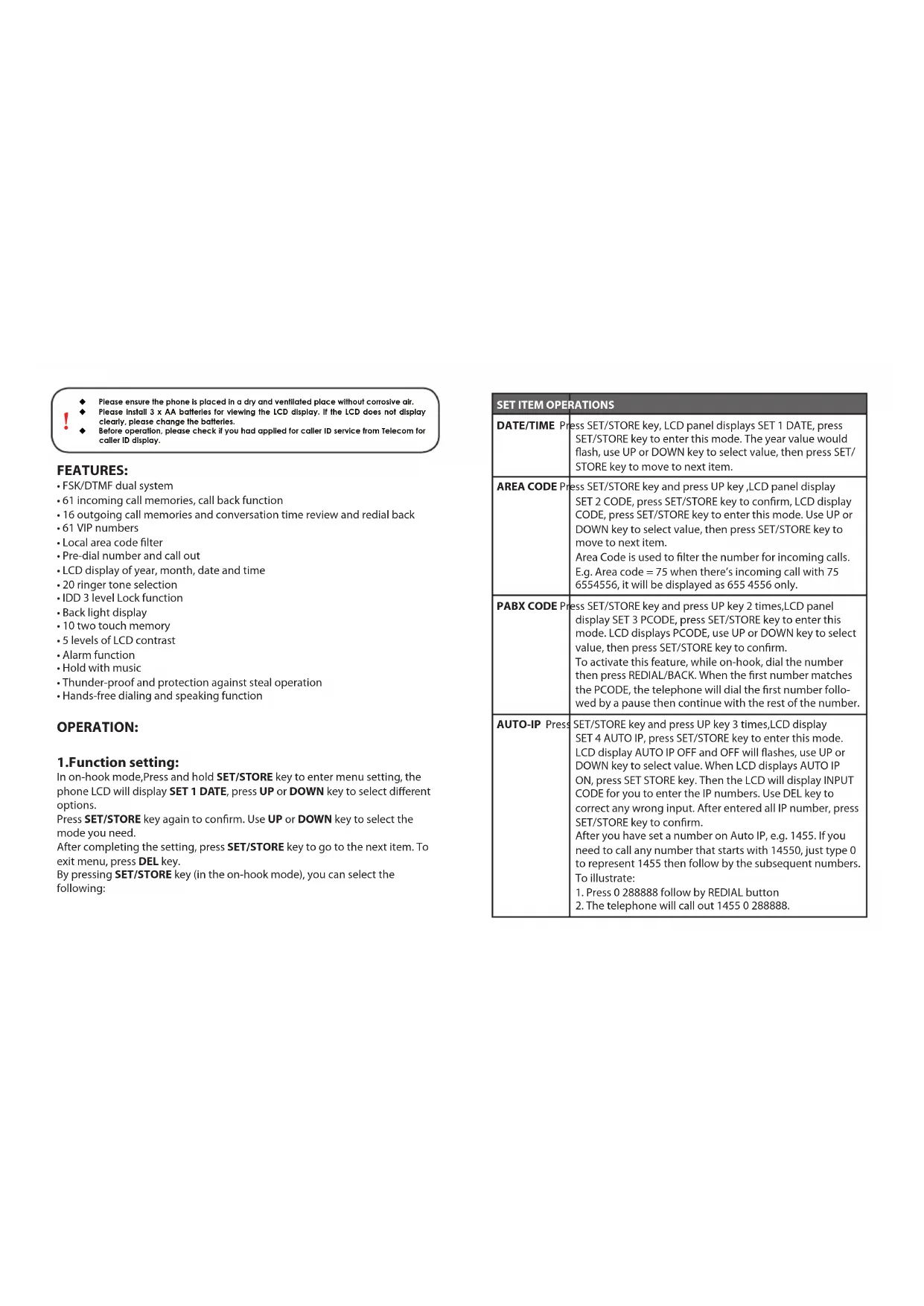
In on-hook mode, Press and hold SET/STORE key to enter menu setting, the phone LCD will display SET 1 DATE, press UP or DOWN key to select different options.
Press SET/STORE key again to confirm. Use UP or DOWN key to select the mode you need.
After completing the setting, press SET/STORE key to go to the next item. To exit menu, press DEL key.
By pressing SET/STORE key (in the on-hook mode), you can select the following:
| SET ITEM OPERATIONS | |
| DATE/TIME Press SET/STORE key, LCD panel displays SET 1 DATE, press SET/STORE key to enter this mode. The year value would flash, use UP or DOWN key to select value, then press SET/STORE key to move to next item. | |
| AREA CODE Press SET/STORE key and press UP key ,LCD panel display SET 2 CODE, press SET/STORE key to confirm, LCD display CODE, press SET/STORE key to enter this mode. Use UP or DOWN key to select value, then press SET/STORE key to move to next item.Area Code is used to filter the number for incoming calls.E.g. Area code = 75 when there's incoming call with 75 6554556, it will be displayed as 655 4556 only. | |
| PABX CODE Press SET/STORE key and press UP key 2 times,LCD panel display SET 3 PCODE, press SET/STORE key to enter this mode. LCD displays PCODE, use UP or DOWN key to select value, then press SET/STORE key to confirm.To activate this feature, while on-hook, dial the number then press REDIAL/BACK. When the first number matches the PCODE, the telephone will dial the first number followed by a pause then continue with the rest of the number. | |
| AUTO-IP Press SET/STORE key and press UP key 3 times,LCD display SET 4 AUTO IP, press SET/STORE key to enter this mode.LCD display AUTO IP OFF and OFF will flashes, use UP or DOWN key to select value. When LCD displays AUTO IP ON, press SET STORE key. Then the LCD will display INPUT CODE for you to enter the IP numbers. Use DEL key to correct any wrong input. After entered all IP number, press SET/STORE key to confirm.After you have set a number on Auto IP, e.g. 1455. If you need to call any number that starts with 14550, just type 0 to represent 1455 then follow by the subsequent numbers.To illustrate:1. Press 0 288888 follow by REDIAL button2. The telephone will call out 1455 0 288888. | |
| ALARM Press SET/STORE key and press UP key 4 times,LCD display SET 5 ALart, press SET/STORE key to enter this mode. LCD display 00-00 OFF means this function is off. Use UP or DOWN key set time and select ON or OFF. The telephone will ring once the alarm time is reached and make sure batteries are loaded when you use this function. | |
| FLASH Press SET/STORE key and press UP key 5 times,LCD display SET 6 FLASH, press SET/STORE key to enter this mode. LCD display FLASH 3 600,"3"flashes, press UP or DOWN key to select desired flash time |
2. INSTALLING OR REPLACING THE BATTERY
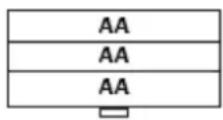
Install 3 Alkaline AA batteries into the battery compartment and re-fit the cover before use.
IMPORTANT - before removing the battery compartment cover, ensure the base unit is disconnected from the telephone line.
3XAAAlkaline Battery
3. IDD LOCK switch
Use the keys provided in the package. The telephone allows all outgoing number if the key is on red point. It cannot dial outgoing number starting with digit 0 or 95 when the key is on green point. It cannot dial all outgoing number when the key is on yellow point.
4. Function key operation
UP or DOWN key
In any mode, press UP or DOWN key to check all the incoming numbers. If there is no incoming number, the unit will display END.
OUT key
In any mode, press OUT key to check the outgoing numbers with time. Press REDIAL key to dial the selected number.
VOLkey
Press H.F key (In off-hook),press VOL key to adjust handsfree volume.there are two levels of volume for selection.LCD displays HF VOL 1 OR HF VOL 2. In on-hook,press VOL key to adjust ring volume,there are four levels of volume for selection.the LCD display ING VOL 1-3 and VOL OFF,Press VOL to select one which you want .
DELETE
In on-hook state, press UP or OUT key to review the desired incoming number/outgoing number.
Press DEL key to delete the number, then LCD display the next number. NOTE: Press DEL key for 3 seconds, all the incoming message are erased.
RD/BACK key
In the off-hook mode, press this key to redial the last dialed number. In on-hook mode, pre-dial the numbers and press this key to dial out using hands free speakerphone.
When the line busy, press this key, the unit will auto dial the number till success.
RING/HOLDkey
In the on-hook mode, press RING/HOLD key, the phone LCD will display RING 01, which means there is 1 high ringing tones. Select your preferred ringing tone by pressing RING/HOLD. In the off-hook mode, press this key into hold mode and the hold music is sent out and the receiver can hear nothing but the music,to release the hold mode,you can do:
Picking up the HS again if you hang up, the music stops, and you will go back to the conversation again;
Press the HOLD key again, the music stops and go back to the conversation.
again. Press HF key if you hang up, the music stops and go back to the conversation HF sate.
FLASH/BRTkey
In the on-hook mode, press FLASH/BRT key, the phone LCD will display LCD 1-5, which means there are 5 contrast levels. In the off-hook mode, press this key to auto-hang up, after that you can press REDIAL key or dial out another number.
CAL Key
In on-hook state,press Cal key,LCD display 0,the units is in calculator state, the units is available for operation of ^ 喜 + , ^ 一 , × , ÷ " in the calculator state,"#/=" is used as ^ 喜 = " ,the **/."is used as ^ 喜 ,and UP/- or DOWN/+ key is used as sign of negative/ positive.
HANDSFREE (HF) key
While on-hook, press the HANDSFREE key to go into handsfree mode. You can talk through the microphone and listen from the speakerphone without lifting the handset. While off-hook, press the HANDSFREE key and put down the handset to go into handsfree mode.
- Setting:In on-hook state,pre-dialing a number or find the number from incoming and outgoing memory +SET / STORE + NO.(NO. + 1 - 9) 2. Dialing:In off-hook state,press RECALL ^+ No (NO_r = 1 - 9) Key,then the number what stored in that memory will be dialed out automatically.
PAUSE/VIP Key
When checking the incoming and outgoing calls, press PAUSE/VIP key to set the number as VIP number and a VIP logo"Lock icon"will show on the LCD with this number, the VIP number could not be deleted when the lock icon displays on LCD.
Note: when press and hold DEL key for 3 sec. All numbers are deleted including the VIP numbers. When the number stored full, The unit will auto-cover the earliest ordinary one.
ANTI-STEAL DIALING MODE FUNCTION
-
In on-hook state, press and hold "#" key 3 seconds, LCD displays PPP ON.
-
Press and hold "#" key 3 seconds again, LCD displays PPP OFF, After set PPP ON, When one wants to dial a number from the extension, The extension is given "DI-DI-DI"beep continuously.
PULSE AND TONE FUNCTION
1.In on-hook state,press and hold **key 3 seconds,LCD displays PULSE. 2.Press and hold **key 3 seconds again,LCD displays TONE.
5. ADDITIONAL NOTES
INCOMINGCALLLCDINDICATOR
When there is incoming call, the unit will be automatically display the caller number, date and time, and also display its serial number. If the incoming call is in private mode, it will display "p"; it will display "0" if exchange cannot determine the number; it will display "E-" if the call signal contains error.
TROUBLESHOOTING GUIDE
(Q) I do not hear any dial tone from the handset.
(A) Ensure the handset cord is connected correctly from the handset to the handset cord jack at the base. Ensure you have plug in the telephone cable from the telephone to the wall socket correctly. If the problem persists, please check with your local dealer.
(Q) I could not see the caller's number on the LCD when there is incoming call.
(A) Ensure that you have subscribed Caller ID service from your local telecom provider.
(Q) There is no LCD Display / Backlight after I have connected the telephone line. I can call out normally.
(A) Ensure that you have inserted the batteries on the battery compartment. If there is still no display, change the batteries and ensure it is not empty. If the problem persists, please check with your local dealer.
GUIDA RICERCA GUASTI
2. INSTALLER OU REMPLACER LES PILES (batteries)
DECLARATION OF CONFORMITY
W e TOP TRONIC MONACO s.a.r.l.
of 20, Blvd Princesse Charlotte - MC 98000 Monaco
declare under sole responsibility that the product
M O d BIG 100 PROFESSIONAL
Description Corded phone
is in conformity with the essential requirements of the following specifications:
SAFETY EN 60950-1:2006 +A1:2007
E M C EN 55022:2006 +A1:2007
EN 55024: 2010
Following the provisions of Low Voltage Directive 2006/95EC and EMC R&TTE Directive 1999/5/EC on the approximation of the laws of the Member States relating to electromagnetic compatibility.
The product is marked with CE marking and Notify Body number CE 1313


This product complies with the European Directive for the Restriction of Hazardous Substances (RoHS) 2002/95/EC


C E 1313

www.ttmonaco.com


- FEATURES:
- OPERATION:
- 1.Function setting:
- INSTALLING OR REPLACING THE BATTERY
- IDD LOCK switch
- Function key operation
- UP or DOWN key
- OUT key
- VOLkey
- DELETE
- RD/BACK key
- RING/HOLDkey
- FLASH/BRTkey
- CAL Key
- HANDSFREE (HF) key
- PAUSE/VIP Key
- ANTI-STEAL DIALING MODE FUNCTION
- PULSE AND TONE FUNCTION
- ADDITIONAL NOTES
- INCOMINGCALLLCDINDICATOR
- TROUBLESHOOTING GUIDE
- I do not hear any dial tone from the handset.
- GUIDA RICERCA GUASTI
- INSTALLER OU REMPLACER LES PILES (batteries)
- DECLARATION OF CONFORMITY
Brand : ITT
Model : BIG 100
Category : Telephone