
WakeUp Light HF3505 - Light therapy PHILIPS - Free user manual and instructions
Find the device manual for free WakeUp Light HF3505 PHILIPS in PDF.
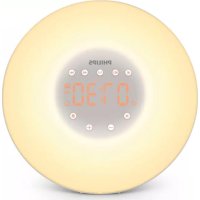



| Product type | Light therapy wake-up light |
| Brand | Philips |
| Model | WakeUp Light HF3505 |
| Category | Light therapy |
| Power supply | Mains adapter 100-240 V, 50/60 Hz, output <15 Vdc |
| Power consumption | Low standby (lamp and radio off) |
| Light intensity | Adjustable to several levels, bedside lamp included |
| Dawn simulation | Automatic progression over 30 minutes before alarm |
| FM radio | Yes, with automatic frequency scanning |
| Wake-up sounds | 2 natural sounds or FM radio |
| Alarm with snooze | Yes, 9 minutes (touch top) |
| Digital display | Adjustable brightness on 4 levels (high, medium, low, very low) |
| Time format | 12 h or 24 h |
| Recommended distance | 40 to 50 cm from head |
| Maintenance | Soft cloth, do not use solvents or abrasive products |
| Safety | Do not look directly at the lamp, do not use in humid environment, do not immerse in water |
| Operating temperature | 10 °C to 35 °C |
| Warranty | 2 years (manufacturing defects) + 45 days money-back satisfaction |
| Support | Tel. 1-866-832-4361, website www.philips.com/support |
| Spare parts | No user-serviceable parts |
| Usage | Indoor only |
Frequently Asked Questions - WakeUp Light HF3505 PHILIPS
User questions about WakeUp Light HF3505 PHILIPS
0 question about this device. Answer the ones you know or ask your own.
Ask a new question about this device
Download the instructions for your Light therapy in PDF format for free! Find your manual WakeUp Light HF3505 - PHILIPS and take your electronic device back in hand. On this page are published all the documents necessary for the use of your device. WakeUp Light HF3505 by PHILIPS.
USER MANUAL WakeUp Light HF3505 PHILIPS
IMPORTANT SAFETY INSTRUCTIONS
WARNING - To reduce the risk of FIRE, ELECTRIC SHOCK, OR INJURY TO PERSONS:
- Never use the appliance if the lamp housing is damaged, broken or missing.
- Heed all warnings.
- Do not look directly at lighted lamp.
- If the appliance, power supply cord or cord has been damaged in any way, liquid has spilled or objects have fallen into the appliance, the appliance has been exposed to rain or moisture, does not operate normally or has been dropped or damaged, it should not be operated.
- Read this user manual carefully before you use the appliance and save it for future reference.
- Water and electricity are a dangerous combination. Do not use this appliance in wet surroundings (e.g. in the bathroom or near a shower or swimming pool).
- Make sure the adapter does not get wet.
- Do not let water run into the appliance or spill water onto the appliance (see below).
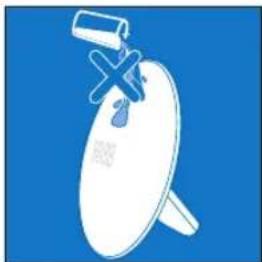
- Do not immerse the appliance in water or rinse under the tap.
- The adapter contains a transformer. Do not cut off the adapter to replace it with another plug, as this causes a hazardous situation.
- Do not use the adapter in or near a power outlet that contains an electric air freshener to prevent damage to the adapter.
- Only use the original adapter. If the adapter is damaged, do not use. Call 1-866-832-4361 for assistance.
- This appliance is for indoor use only.
- Make sure the vents on the appliance remain open during use.
- Protect the power cord from being walked on or pinched, particularly at plugs, outlet and point where they exit from lamp.
- The appliance has no on/off switch. To disconnect the appliance from the power source, remove the plug from the wall outlet.
SAVE THESE INSTRUCTIONS
General

What's in the box

Important information 7
Introduction 10

Overview 11
First use

Setting clock time 12
Buttons

Adjusting time format 13

Display brightness 14

Light on/off button 15

Radio on/off button 16

Alarm on/off button 17

Alarm sound 18

Snooze 19

Demo mode 20

Storage 21

Disposal 21

Assistance 21

45-Day Money-Back Guarantee 22

Full Two-Year Warranty 22

Troubleshooting 23

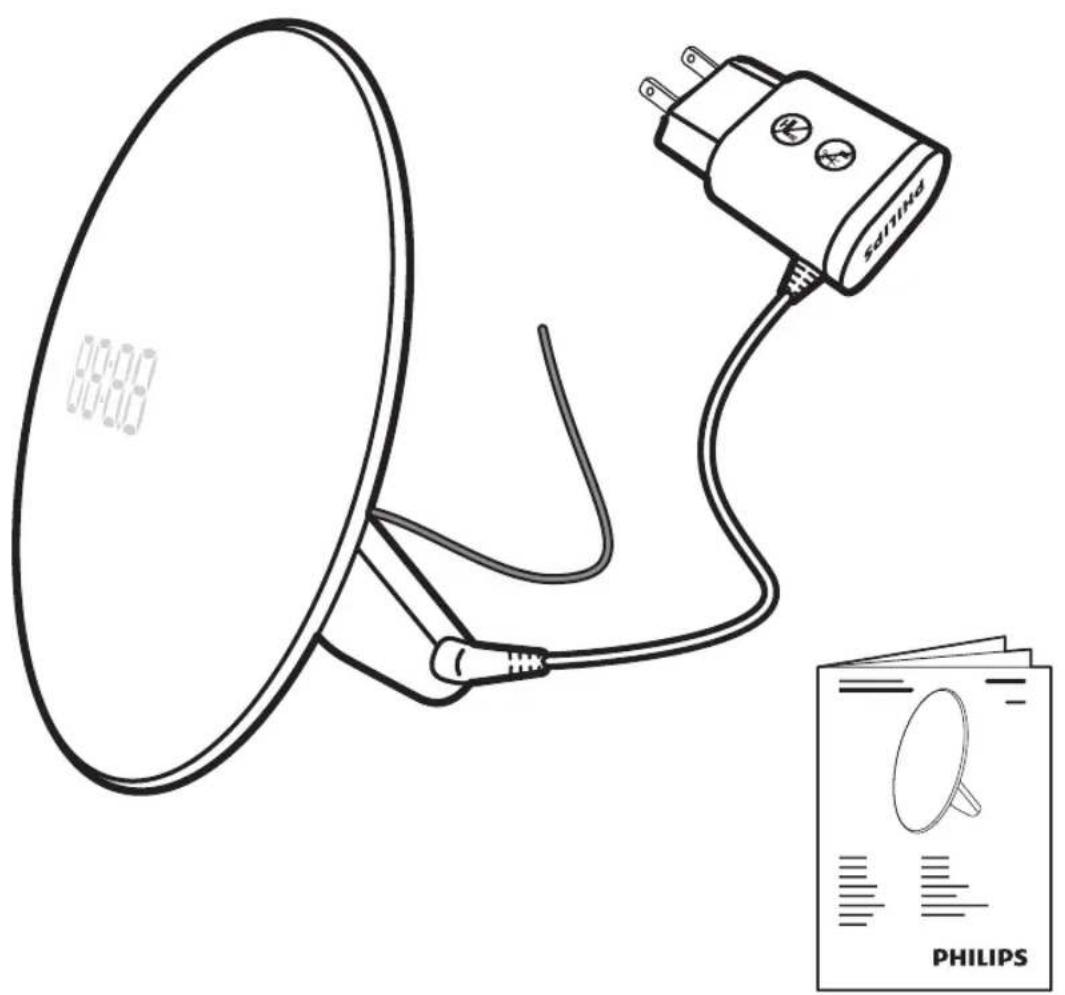
What's in the box

Important information
Warning
- Check if the voltage indicated on the adapter corresponds to the local voltage before you connect the appliance.
- This adapter transforms 100-240 volts to a safe, low voltage of less than 15 Vdc.
- The appliance is suitable for a voltage of 120 V AC and a frequency of 50/60 Hz.
- Close supervision is necessary when this appliance is used by, or near children or invalids.
- Children should be supervised to ensure that they do not play with the appliance.
Caution
- Do not drop the appliance on the floor, hit it hard or expose it to other heavy shocks.
- Place the appliance on a stable, level and non-slippery surface.
- Do not use the appliance at room temperatures lower than 50°F / 10°C or higher than 95°F / 35°C.
- Consult your doctor before you start using the appliance if you have suffered from or are suffering from serious depression. Do not use this appliance as a means to reduce your hours of sleep. The purpose of this appliance is to help you wake up more easily. It does not diminish your need for sleep. This appliance is only intended for household use, including similar use in hotels. Do not use attachments not recommended by Philips Electronics North America Corporation.
General
- This appliance allows you to choose the light intensity level you want to wake up to. If you often wake up too early or with a headache, reduce the light intensity level and/or the sunrise simulation time. If you share a bedroom with someone else, this person may unintentionally wake up from the light of the appliance, even though this person is further removed from the appliance. This is the result of differences in light sensitivity between people.
- The power consumption of the appliance is lowest when the radio and the lamp are turned off.
FCC Information
- This equipment has been tested and found to comply with the limits for a Class B digital device, pursuant to part 15 of the FCC rules. These limits are designed to provide reasonable protection against harmful interference in a residential installation. This equipment generates, uses and can radiate radio frequency energy and, if not installed and used in accordance with the instructions, may cause harmful interference to radio communications. However, there is no guarantee that interference will not occur in a particular installation. If this equipment does cause harmful interference to radio or television reception, which can be determined by turning the equipment off and on, the user is encouraged to try to correct the interference by one or more of the following measures:
- Reorient or relocate the receiving antenna.
- Increase the separation between the equipment and the receiver.
- Connect the equipment into an outlet on a circuit different from that to which the receiver is connected.
- Consult the dealer or an experienced radio/TV technician for help.
- This device complies with Part 15 of the FCC Rules. Operation is subject to the following two conditions: (1) This device may not cause harmful interference, and (2) this device must accept any interference received, including interference that may cause undesired operation.
- This Class B digital apparatus complies with Canadian ICES-003 and ICES-005.

Introduction
Congratulations on your purchase and welcome to Philips! To fully benefit from the support that Philips offers, register your product at www.philips.com/welcome.
The Philips Wake-up Light helps you wake up more pleasantly. The light intensity of the lamp gradually increases to the set level in the 30 minutes before the set wake-up time. The light gently prepares your body for waking up at the set time. To make waking up an even more pleasant experience, you can use natural wake-up sounds or the FM radio to wake up to.
The effects of the Wake-up Light
The Philips Wake-up Light gently prepares your body for waking up during the last half hour of sleep. In the early morning hours our eyes are more sensitive to light than when we are awake. During that period the relatively low light levels of a simulated natural sunrise prepare our body for waking up and getting alert. People who use the Wake-up Light wake up more easily, have a better overall mood in the morning and feel more energetic. Because the sensitivity to light differs per person, you can set the light intensity of your Wake-up Light to a level that matches your light sensitivity for an optimal start of the day. For more information about the Wake-up Light, see www.philips.com.

Overview
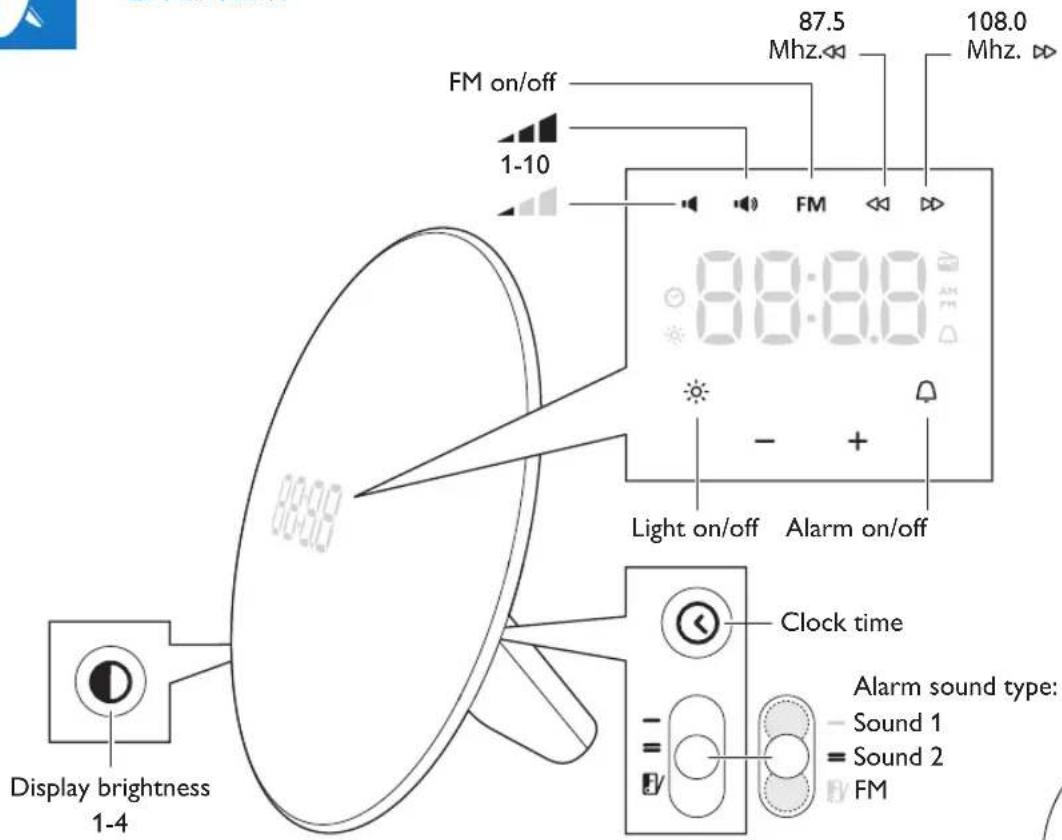
First use - placing the Wake-up light
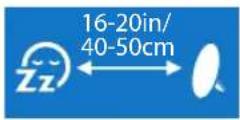
Place the Wake-up Light 16-20in/40-50cm from your head, for example on a bedside table.

First use - setting the clock time
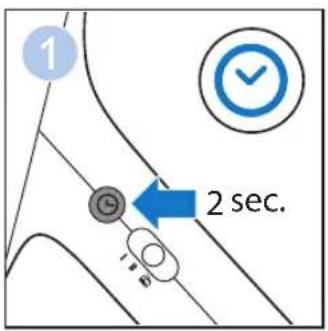
You have to set the clock time when you plug in the appliance for the first time and when there has been a power failure.
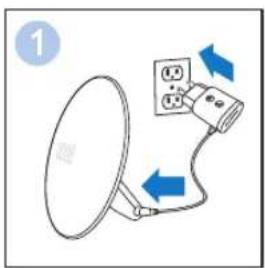
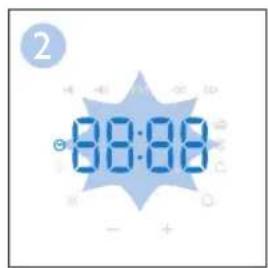
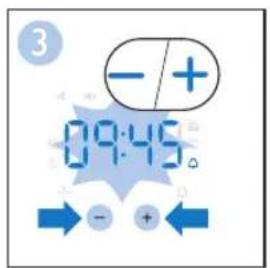
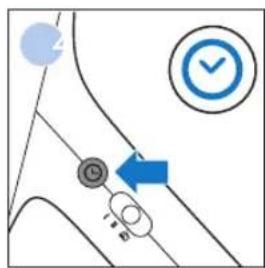
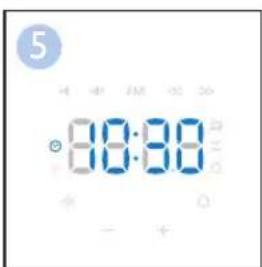

Adjusting the time format
Choose between a 12-hour and a 24-hour clock and then adjust the time.
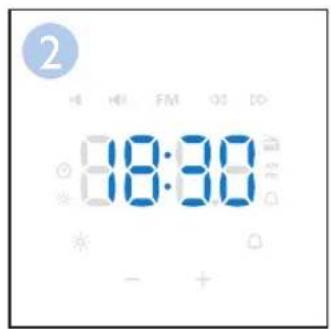
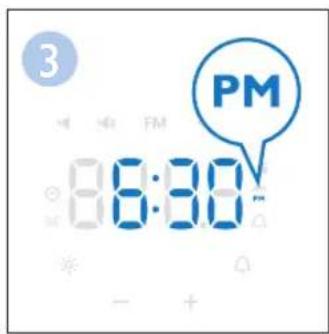
Note:
When the 12-hour time format is selected, PM or AM will be displayed.

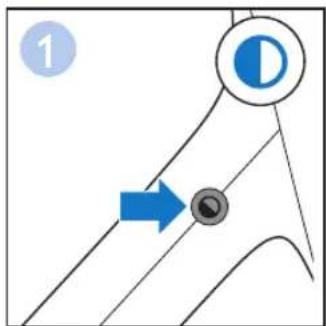
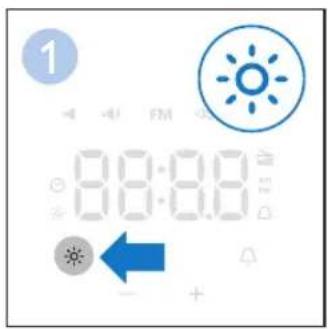
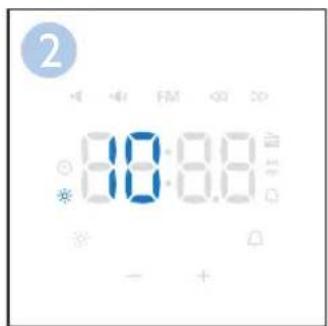
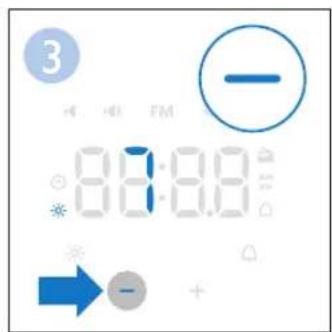
Setting the display brightness
You can adjust the display brightness from high-medium-low-very low. Choose a level that is optimal for you to see the display at night.

Switching the light on/off
Press the lamp on/off button to switch on the light and use it as a bedside lamp. You can adjust the light intensity by pressing the + and - buttons. To switch off the light, press the lamp on/off button again.
Switching the FM radio on/off
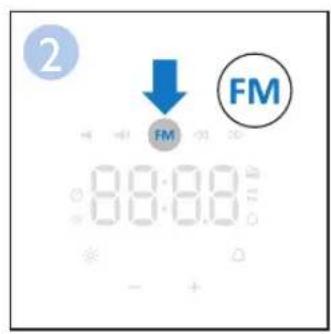
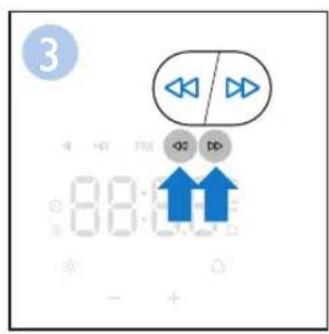
Press the FM on/off button to switch on the FM radio. The current radio frequency is shown in the display for 5 seconds, before clock time is shown again. To scan radio frequencies automatically, press and hold the arrow buttons for approx. 2 seconds. To set the volume level, press the volume increase or decrease button. You can choose a volume level between 1 and 10.
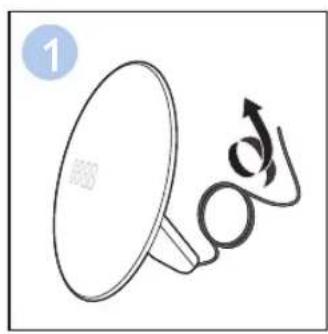
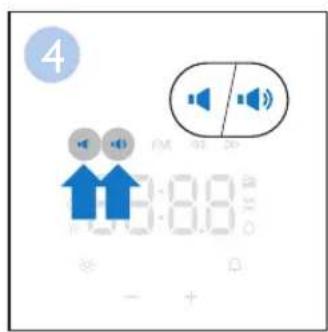
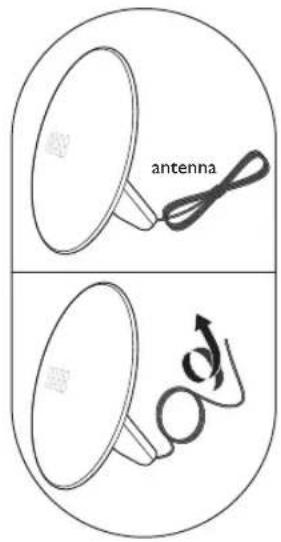
Tip: To get a good radio signal, fully unwind antenna and move it around until you receive the best reception.

Setting the alarm
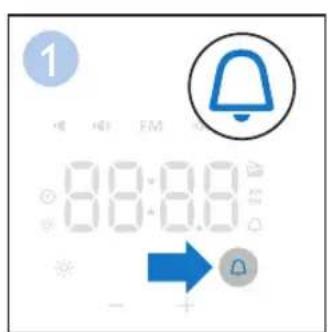
Press the alarm button if you want to switch the alarm on or off. The alarm symbol appears on the display when you switch on the alarm. It disappears when you switch off the alarm. When you switch on the alarm, the hour indication starts to blink and you can adjust the alarm time.
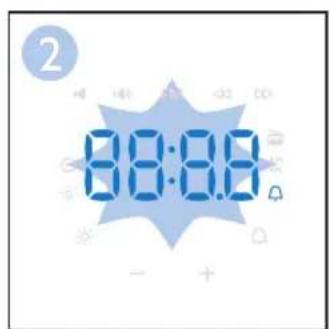
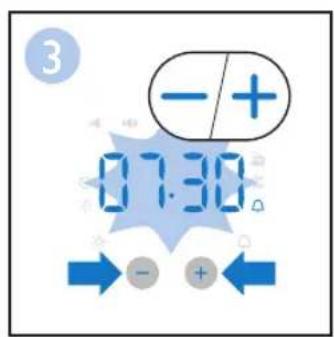
Note: Press the Alarm button to confirm set alarm time or wait 5 seconds.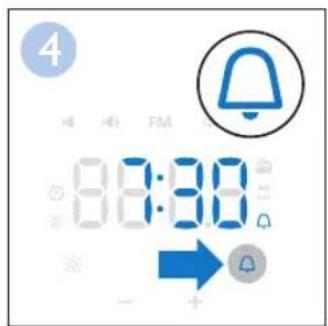

Setting your alarm sound
You can choose between 2 pre-set sounds or the FM radio as a wake-up sound. When switching to a new alarm sound or radio, a preview of that sound/radio will be played for 5 seconds.
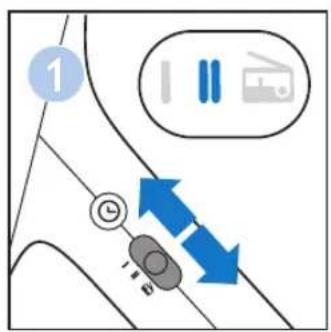
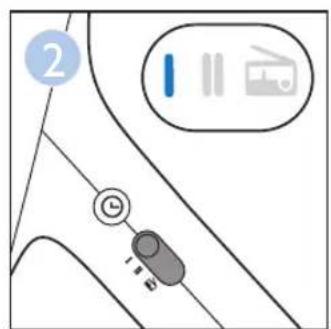
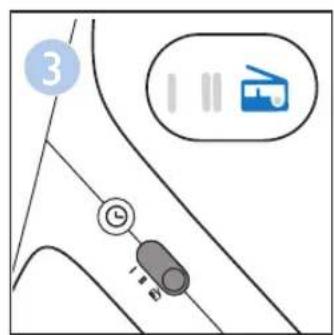

Snoozing
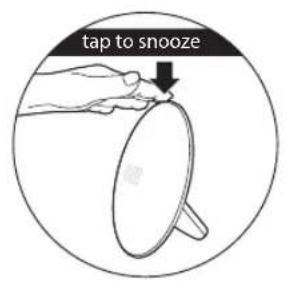
When the alarm sound is played at the set time, tap on the top of the Wake-up Light to snooze for 9 minutes. The lamp stays on, but the alarm sound stops. After 9 minutes, the alarm sound is automatically played again. Do not hit the Wake-up Light with too much force, as this may cause damage.
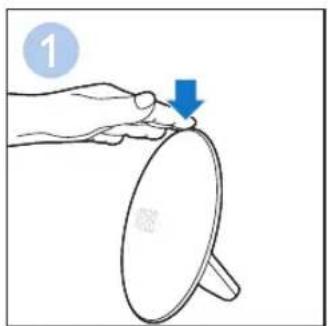

Demonstration mode
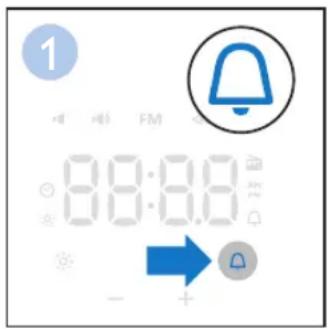
If you want a quick demonstration (90 seconds) of the gradually increasing light intensity and sound level, switch on the test function of the appliance.
- Press and hold the alarm button for at least 3 seconds.
- The appliance starts the demonstration of the alarm.
- To switch off the demonstration, press and hold the previously pressed alarm button for 3 seconds again.

Storage
Clean the appliance with a dry or damp soft cloth. - Do not use abrasive cleaning agents, pads or cleaning solvents like alcohol, acetone, etc., as this may damage the surface of the appliance. If the appliance will not be used for an extended period of time, remove the power cord from the wall outlet and store the appliance in a safe, dry location where it will not be crushed, banged, or subject to damage. - Do not wrap the power cord around the appliance when storing it. - This appliance has no other user-serviceable parts. For assistance, call 1-866-832-4361.
Disposal
Your product is designed and manufactured with high quality materials and components, which can be recycled and reused. For recycling information, please contact your local waste management facilities or visit www-recycle.philips.com

Assistance

For assistance visit our website: www.philips.com/support or call toll free: 1-866-832-4361.

45-Day Money-Back Guarantee
If you are not fully satisfied with your Philips Wake-up Light, send the product back and we'll refund you the full purchase price. The Wake-up Light must be shipped prepaid by insured mail, insurance prepaid, have the original sales receipt, indicating purchase price and the date of purchase, and the money-back guarantee return authorization form enclosed. We cannot be responsible for lost mail.
The Wake-up Light must be postmarked no later than 45 days after the date of purchase. Philips reserves the right to verify the purchase price of the Wake-up Light and limit refunds not to exceed suggested retail price.
To obtain a Money-Back Guarantee Return Authorization form, call 1-866-832-4361.
Delivery of refund check will occur 6-8 weeks AFTER receipt of returned product.

Full Two-Year Warranty
Philips Electronics North America Corporation (USA) and Philips Electronics Ltd (Canada) warrant each new Philips product, model HF3505, HF3506 against defects in materials or workmanship for a period of two years from the date of purchase, and agree to repair or replace any defective product without charge. IMPORTANT: This warranty does not cover damage resulting from accident, misuse or abuse, lack of reasonable care, or the affixing of any attachment not provided with the product.
NO RESPONSIBILITY IS ASSUMED FOR ANY SPECIAL, INCIDENTAL OR CONSEQUENTIAL DAMAGES.
In order to obtain warranty service, simply call toll-free 1-866-832-4361.
In US Manufactured for: Philips Consumer Lifestyle, A division of Philips Electronics North America Corporation, P.O. Box 10313, Stamford, CT 06904.
In Canada Imported for: Philips Electronics LTD, 281 Hillmount Road, Markham, Ontario L6C 2S3.
PHILIPS is a registered trademark of Koninklijke Philips N.V.
© 2016 Philips Electronics North America Corporation All rights reserved.

Troubleshooting
This chapter summarizes the most common problems you could encounter with the appliance. If you are unable to solve the problem with the information below, visit www.philips.com/support or call 1-866-832-4361 for assistance.
| Problem Solution | |
| The appliance does not work at all. | Perhaps the adapter is not inserted properly in the wall outlet. Put the adapter properly in the wall outlet. |
| Perhaps there is a power failure. Check if the power supply works by connecting another appliance. | |
| The appliance does not respond when I try to set different functions. | Remove the adapter from the wall outlet and wait a few minutes before you reinsert it. When you reinsert the adapter, the appliance goes back to the factory settings and you have to set all functions again. |
| The lamp does not go on when the alarm goes off. | Perhaps you set a light intensity level that is too low. Increase the light intensity level. |
| I do not hear the alarm sound when the alarm goes off. | Perhaps you set a sound level that is too low. To set a higher sound level, see 'Setting the alarm' section. |
| Perhaps the radio is not tuned correctly to a channel. Switch on the radio to check if the radio is tuned correctly to a radio channel. | |
| If you selected the radio as the alarm sound, switch on the radio after you switch off the alarm to check if the radio works. If it does not work, call 1-866-832-4361 for assistance. | |
| The radio does not work. | Perhaps you set the volume too low. Increase the volume level. If the radio still does not work, call 1-866-832-4361 for assistance. |
| The radio produces a crackling sound. | Perhaps the broadcast signal is weak. Adjust the frequency (see 'Setting the alarm' section) and/or change the position of the antenna by moving it around. Make sure you have unwound the antenna completely. |
| The alarm went off yesterday, but it did not go off today. | Perhaps you switched off the alarm function. The alarm icon is visible on the display when the alarm function is active. If you do not see the alarm icon on the display, press the alarm button once (see 'Setting the alarm' section). |
| Perhaps you set a sound level and/or light intensity level that is too low. Set a higher sound level and/or light intensity level. | |
| Perhaps there was a power failure that lasted more than a few minutes. In this case, the appliance goes back to factory settings. You need to set all functions again. | |
| The light wakes me too early. | Perhaps the light intensity level you have set is not appropriate for you. Try a lower light intensity level if you wake up too early. If light intensity 1 is not low enough, move the appliance further away from the bed. |
| The light wakes me too late | Perhaps the appliance is positioned at a lower level than your head. Make sure the appliance is located at a height at which the light is not blocked by your bed, comforter/blanket or pillow. Also make sure the appliance is not placed too far away. |
IMPORTANT SAFETY INSTRUCTIONS
Specifications are subject to change without notice.
All rights reserved.


- IMPORTANT SAFETY INSTRUCTIONS
- SAVE THESE INSTRUCTIONS
- GENERAL
- FIRST USE
- BUTTONS
- WHAT'S IN THE BOX
- IMPORTANT INFORMATION
- WARNING
- CAUTION
- FCC INFORMATION
- INTRODUCTION
- THE EFFECTS OF THE WAKE-UP LIGHT
- OVERVIEW
- FIRST USE - PLACING THE WAKE-UP LIGHT
- FIRST USE - SETTING THE CLOCK TIME
- ADJUSTING THE TIME FORMAT
- NOTE
- SETTING THE DISPLAY BRIGHTNESS
- SWITCHING THE LIGHT ON/OFF
- SWITCHING THE FM RADIO ON/OFF
- SETTING THE ALARM
- SETTING YOUR ALARM SOUND
- SNOOZING
- DEMONSTRATION MODE
- STORAGE
- DISPOSAL
- ASSISTANCE
- DAY MONEY-BACK GUARANTEE
- FULL TWO-YEAR WARRANTY
- TROUBLESHOOTING
Brand : PHILIPS
Model : WakeUp Light HF3505
Category : Light therapy