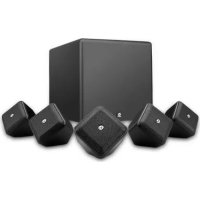
SoundWare XS 5.1 - Speaker BOSTON ACOUSTICS - Free user manual and instructions
Find the device manual for free SoundWare XS 5.1 BOSTON ACOUSTICS in PDF.



| Brand | Boston Acoustics |
| Model | SoundWare XS 5.1 |
| Product Type | 5.1 Surround Speaker System |
| Configuration | 5 satellites + 1 subwoofer |
| Recommended Amplifier Power | 10-100 watts RMS per channel |
| Sensitivity | 85 dB (SPL/2.8V at 1m) |
| Impedance | 8 ohms (estimated) |
| Frequency Response (Satellites) | 100 Hz - 20 kHz (estimated) |
| Frequency Response (Subwoofer) | 40 Hz - 200 Hz (estimated) |
| Dimensions (Satellite) | Approximately 10 x 10 x 10 cm |
| Dimensions (Subwoofer) | Approximately 30 x 30 x 30 cm |
| Weight (Satellite) | Approximately 0.5 kg each |
| Weight (Subwoofer) | Approximately 5 kg |
| Power | Passive (requires external amplifier) |
| Compatibility | Any home theater amplifier with speaker outputs |
| Minimum Ventilation Distance | 50 mm around the device |
| Cleaning | Dry cloth only |
| Safety | Do not expose to rain or moisture |
| Usage Precautions | Avoid heat sources and open flames |
| Wall Mounting | Possible (bracket not included) |
Frequently Asked Questions - SoundWare XS 5.1 BOSTON ACOUSTICS
User questions about SoundWare XS 5.1 BOSTON ACOUSTICS
0 question about this device. Answer the ones you know or ask your own.
Ask a new question about this device
Download the instructions for your Speaker in PDF format for free! Find your manual SoundWare XS 5.1 - BOSTON ACOUSTICS and take your electronic device back in hand. On this page are published all the documents necessary for the use of your device. SoundWare XS 5.1 by BOSTON ACOUSTICS.
USER MANUAL SoundWare XS 5.1 BOSTON ACOUSTICS
5.1 Surround Speaker System
Espanol
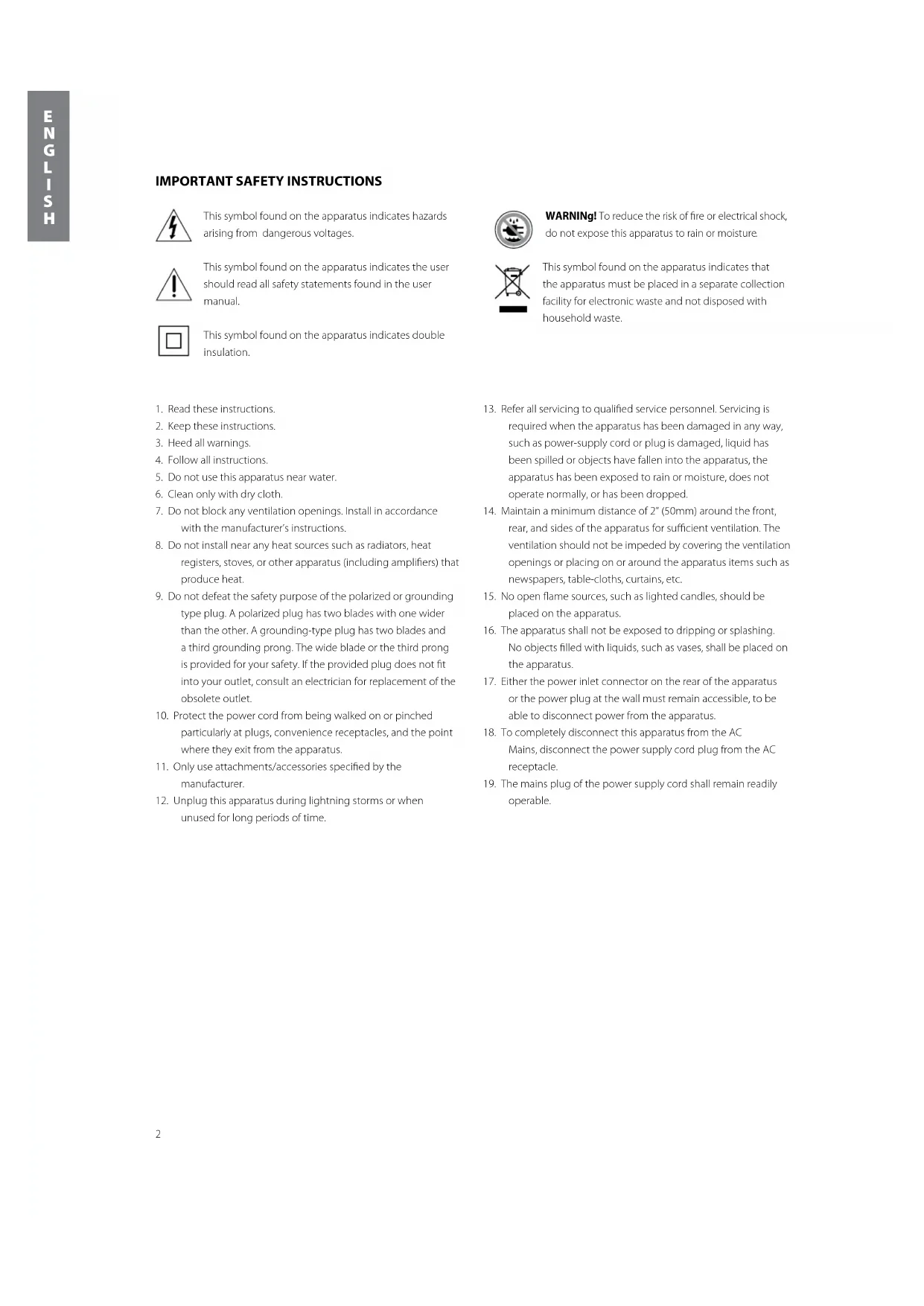
IMPORTANT SAFETY INSTRUCTIONS

This symbol found on the apparatus indicates hazards arising from dangerous voltages.

This symbol found on the apparatus indicates the user should read all safety statements found in the user manual.

This symbol found on the apparatus indicates double insulation.

WARNING! To reduce the risk of fire or electrical shock, do not expose this apparatus to rain or moisture.

This symbol found on the apparatus indicates that the apparatus must be placed in a separate collection facility for electronic waste and not disposed with household waste.
- Read these instructions.
- Keep these instructions.
- Heed all warnings.
- Follow all instructions.
- Do not use this apparatus near water.
- Clean only with dry cloth.
- Do not block any ventilation openings. Install in accordance with the manufacturer's instructions.
- Do not install near any heat sources such as radiators, heat registers, stoves, or other apparatus (including amplifiers) that produce heat.
- Do not defeat the safety purpose of the polarized or grounding type plug. A polarized plug has two blades with one wider than the other. A grounding-type plug has two blades and a third grounding prong. The wide blade or the third prong is provided for your safety. If the provided plug does not fit into your outlet, consult an electrician for replacement of the obsolete outlet.
- Protect the power cord from being walked on or pinched particularly at plugs, convenience receptacles, and the point where they exit from the apparatus.
- Only use attachments/accessories specified by the manufacturer.
-
Unplug this apparatus during lightning storms or when unused for long periods of time.
-
Refer all servicing to qualified service personnel. Servicing is required when the apparatus has been damaged in any way, such as power-supply cord or plug is damaged, liquid has been spilled or objects have fallen into the apparatus, the apparatus has been exposed to rain or moisture, does not operate normally, or has been dropped.
- Maintain a minimum distance of 2^ (50mm) around the front, rear, and sides of the apparatus for sufficient ventilation. The ventilation should not be impeded by covering the ventilation openings or placing on or around the apparatus items such as newspapers, table-cloths, curtains, etc.
- No open flame sources, such as lighted candles, should be placed on the apparatus.
- The apparatus shall not be exposed to dripping or splashing. No objects filled with liquids, such as vases, shall be placed on the apparatus.
- Either the power inlet connector on the rear of the apparatus or the power plug at the wall must remain accessible, to be able to disconnect power from the apparatus.
- To completely disconnect this apparatus from the AC Mains, disconnect the power supply cord plug from the AC receptacle.
- The mains plug of the power supply cord shall remain readily operable.
Specifications Satellite Subwoofer
| Frequency Response: 150Hz - 20kHz 40 - 150Hz | ||
| Recommended Amplifier 10 - 100 watts — Power Range: | ||
| Sensitivity: 85dB [SPL/2.8v at 1m] — | ||
| Nominal Impedance: 8 ohms — | ||
| Crossover Frequency: 5kHz 60Hz - 180Hz 24dB/octave lowpass | ||
| Amplifier Output: — | 100 watts RMS, (250 watts Peak); BassTrac® circuitry eliminates distortion | |
| Woofer: | 21/2" (64mm) | 8" (203mm) |
| Tweeter: | 1/2" (13mm) | — |
| Dimensions: (H x W x D) | 45/16 x 4/2 x 3/4" | 12/4 x 13/16 x 13/16" |
| (108 x 113 x 94mm) | (310 x 284 x 395mm) | |
| Weight: | 1 lb (.45kg) | 20lbs (9kg) |
Introduction
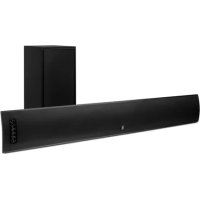
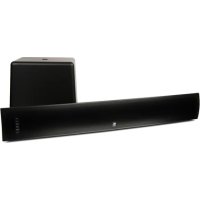
Thank you for purchasing a Boston Acoustics Speaker System. These speakers incorporate high-quality components that produce the famous Boston sound. The SoundWare XS 5.1 is ideally suited for use as a 5.1 channel solution in a high-quality home theater or music system.
The SoundWare XS 5.1 speaker system delivers exceptionally articulate on-screen dialog, music, effects, and room filling bass from a small, sleek package. Compact driver placement and quality, system-specific crossovers assure a wide uniform dispersion for complete coverage of a listening room. All speakers also feature MagnaGuard® magnetic shielding which ensures the speakers' magnetic field does not interfere with the television's picture.
Unpacking the System
Carefully unpack the system. If there is any sign of damage from transit, report it immediately to your dealer and/or delivery service. Keep the shipping carton and packing materials for future use.
Placement Options
The SoundWare speaker can be wall mounted using the supplied hardware or simply placed on a shelf. If it is being placed on a shelf you can simply attach the adhesive-backed rubber feet and connect the speaker wires.
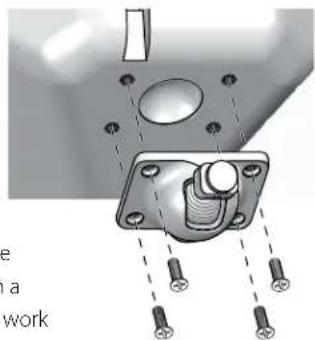
Attaching the Pivoting Ball Mount
If you plan to use the mounting brackets you must attach the pivoting ball mount to the speaker. Use the four supplied flat-head machine screws as shown in the illustration.
Mounting the Wall Bracket
Brackets for mounting the speakers on a flat wall or in a corner are supplied. One thing that is not supplied is hardware to attach the bracket to the wall. Why? Because there are so many different kinds of surfaces on which the speakers could be mounted. It could be basic drywall which may or may not have a stud behind it. It could be a wood panel or even a concrete foundation wall. There is no one type of fastener that we could supply that would work in all the possible situations. So taking into account the surface the speaker is being mounted on
acquire the appropriate type of fasteners. You'll need four for each speaker. If you're not sure what type of fastener to use, take the mounting bracket to a friendly hardware store, tell them about the wall you're mounting the speaker on, and ask them to recommend an appropriate fastener. Keep in mind the weight of the speaker.
Speaker Wires
For short runs of less then 20 feet or so you can use 18 gauge wire. For runs of more than 50 feet use 16 gauge wire.
Speaker Connection Polarity
All the speakers in a system must be hooked up with the same polarity or "in phase." The terminals on the SoundWare speakers are color coded to identify the "+" (red) and "-" (black) connections. All wire is marked in some way so you can tell one conductor from the other. The marking may be a ridge molded into the insulation of one conductor, or it may have a stripe on the insulation, or it may be color coded. Use the marking on the speaker wires to be sure that the "+" terminal of the amplifier is connected to the "+" terminal of the speaker, and "-" is connected to "-" at every connection.
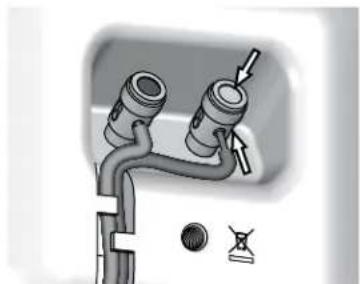
Connecting the Speakers
Separate the two conductors of the wire. Remove about 3/8 of insulation from the end of the wire. Push down on the top of the terminal to open the hole for the wire. Insert the wire and release the terminal to secure it. Be sure there are no loose strands of wire. Note: there is a channel in the back of the speaker for the wire (for wires up to 18 gauge), to keep it neat and out of sight.
Mounting the Speakers
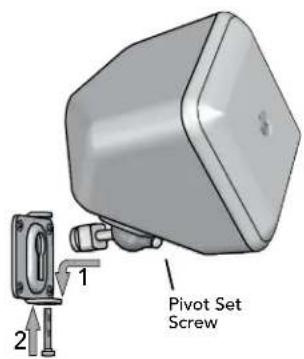
Once you have the bracket mounted and the speaker connected the rest is easy.
1 Put the rounded end of the speaker mount in the bracket and slide it down to lock it in place.
2 Optional - Insert and tighten the screw to secure everything.
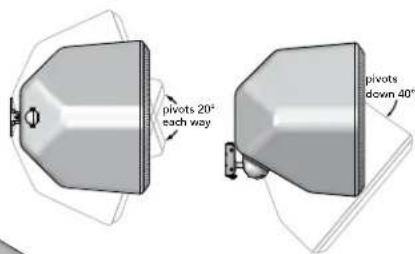
The SoundWare speakers pivot on their mounts. Vertically they can go from facing straight out to being tilted down 40 degrees. When the flat wall mounting bracket is used they can pivot side to side 20 degrees. (Note: Corner mounting will not allow the speaker to pivot side-to-side.) Loosen the pivot set screw on the front of the pivoting ball mount, pivot the speaker into position and retighten the screw.
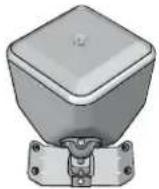
The SoundWare speakers can also be mounted using the supplied corner bracket.
Subwoofer Connections
NOTE: Power is always supplied to the subwoofer electronics unless it is unplugged or switched to the off position using the power switch located on the rear panel. The auto-on circuitry only activates or deactivates the power amplifier. Make sure your subwoofer and receiver are unplugged when making the connection.
Power: When plugging your subwoofer in be sure to use a wall outlet, or dedicated electrical outlet. Some receivers will provide a switched outlet. Do not use this. These on board electrical outlets do not offer the amount of current or proper isolation required by a power amplifier, such as the one in your amplifier.
Select "subwoofer-yes" from your receiver's set-up menu. If the receiver gives a choice of crossover filter frequency, use 150Hz or 120Hz. Hooked up this way, the receiver's amplifier is relieved of having to reproduce the difficult low bass signals that can drive the receiver into audible distortion. In some cases, it can also depend on several other settings within a receiver. We recommend consulting your receiver manual for further assistance in this area.
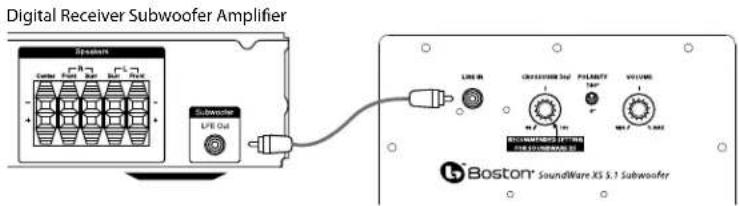
Turn off all power. Use a subwoofer cable, as shown, to connect your digital receiver's LFE subwoofer output to the subwoofer. Connect the other end to the Line In.
Adjusting the Crossover Control
Set the crossover control on the subwoofer to 180Hz. Fine-tune the crossover setting by ear for the smoothest blend with your main speakers. The best setting of the crossover control will depend on speaker placement and personal preference.
Operation
Power On/Off
Plug the subwoofer's AC cord into a wall outlet. Do not use the outlets on the back of the receiver. Set the power switch to the desired setting.
OFF - The subwoofer is off and will not produce any sound. You may want to turn your subwoofer off if you will not be using it for some time or wish to conserve electricity.
ON - The subwoofer is always on.
MUTE - If no signal is detected after several minutes, it will automatically enter the Mute mode.
An LED indicator between the Power switch and the Polarity switch indicates what mode the subwoofer is in.
OFF - The subwoofer is off
RED-MUTE (No signal detected, Audio Off)
gGREEN - ON (Signal detected, Amp On)
The subwoofer will automatically enter the Mute mode after several minutes when no signal is detected from your system. The subwoofer will then power ON instantly when a signal is detected.
Crossover Control
Adjusts the frequency of the low pass filter for the subwoofer. Set the crossover control on the subwoofer to 180Hz.
Volume Control
Turn the subwoofer Volume control to the 11 o'clock position. If the subwoofer makes no sound, check the AC-line cord, Power switch, and input cables. (Are the connectors on the cables making proper contact? Is the AC-line cord connected to a "live" receptacle, is the subwoofer in either the Auto or On position?)
Adjust the subwoofer Volume control until you hear a match between the main speaker and subwoofer. Bass response should not overpower the room but rather be adjusted so there is a natural blend across the entire musical range.
Polarity Control
(0^ or 180^) : Selects regular (0^) or inverted (180^) phase for the subwoofer. Set this switch to provide the fullest, most dynamic bass. The effect of phase will be most audible on low-frequency percussion instruments or music with a continuously repeating bass line.
Maintenance and Service
All wiring connections should be inspected and cleaned or remade at least once a year.
If a problem does occur, make sure that all connections are properly made, secure and clean. If a problem occurs in one loudspeaker, rewire that speaker in a different location within the system. Should the problem persist in this speaker the problem is within the speaker. If the speaker sounds fine in the new position it is a strong indication of a more in depth issue with the electronics in the system. In the event that your SoundWare XS 5.1 ever needs service, contact your local Boston Acoustics dealer or visit bostona.com for a list of dealers in your area.
If your subwoofer does not play, check that all the connectors on the cables are making proper contact and that the AC plug connected to a "live" receptacle.
Limited Warranty
Boston Acoustics warrants to the original purchaser of our SoundWare XS 5.1 system that it will be free of defects in materials and workmanship in its mechanical parts for a period of 5 years from the date of purchase. The warranty period for the electrical components of SoundWare XS 5.1 is 1 year.
Your responsibilities are to install and use them according to the instructions supplied, to provide safe and secure transportation to an authorized Boston Acoustics service representative, and to present proof of purchase in the form of your sales slip when requesting service.
Excluded from this warranty is damage that results from abuse, misuse, improper installation, accidents, shipping, or repairs/ modifications by anyone other than an authorized Boston Acoustics service representative.
This warranty is limited to the Boston Acoustics product and does not cover damage to any associated equipment. This warranty does not cover the cost of removal or reinstallation. This warranty is void if the serial number has been removed or defaced. This warranty gives you specific legal rights, and you may also have other rights which vary from state to state.
If Service Seems Necessary
First, contact the dealer from whom you purchased the product. If that is not possible, write to:
Boston Acoustics, Inc.
100 Corporate Drive
Mahwah, NJ 07430 USA
Or contact us via e-mail at:
US: support@bostona.com
Japan: ba_info@dm-holdings.com
Asia Pacific: service@dm-singapore.com
We will promptly advise you of what action to take. If it is necessary to return your SoundWare XS 5.1 to the factory, please ship it prepaid. After it has been repaired, we will return it freight prepaid in the United States and Canada.
Boston Acoustics continually strives to update and improve its products. The specifications and construction details are subject to change without notice.
Boston Acoustics, Inc. 100 Corporate Drive Mahwah, NJ 07430 US

- Surround Speaker System
- Espanol
- IMPORTANT SAFETY INSTRUCTIONS
- Specifications Satellite Subwoofer
- Introduction
- Unpacking the System
- Placement Options
- Attaching the Pivoting Ball Mount
- Mounting the Wall Bracket
- Speaker Wires
- Speaker Connection Polarity
- Connecting the Speakers
- Mounting the Speakers
- Subwoofer Connections
- Adjusting the Crossover Control
- Operation
- Power On/Off
- Crossover Control
- Volume Control
- Polarity Control
- Maintenance and Service
- Limited Warranty
- If Service Seems Necessary
Brand : BOSTON ACOUSTICS
Model : SoundWare XS 5.1
Category : Speaker