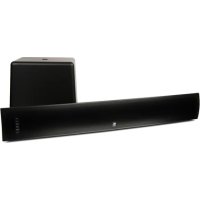
TVee Model 25 - Speaker BOSTON ACOUSTICS - Free user manual and instructions
Find the device manual for free TVee Model 25 BOSTON ACOUSTICS in PDF.



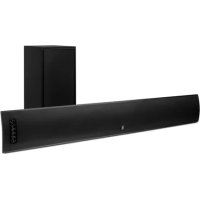
| Product type | Soundbar with wireless subwoofer |
| Brand and model | Boston Acoustics TVee Model 25 |
| Dimensions (soundbar) | 112 x 800 x 112 mm (H x W x D) |
| Dimensions (subwoofer) | 241 x 266 x 277 mm (H x W x D) |
| Weight (soundbar) | 2.3 kg |
| Weight (subwoofer) | 5.4 kg |
| Maximum power | 150 watts |
| Audio technology | Dolby Digital, Virtual Surround, Music/Movie modes |
| Inputs | Optical digital, analog RCA, AUX mini-jack |
| Subwoofer connectivity | Wireless (2.4 GHz, range 8 m) |
| Main functions | Volume control, mute, input selection, Music/Movie switching, remote programming |
| Cleaning | With a dry cloth only |
| Power supply | AC mains, power adapter included |
| Standby consumption | Not specified, auto-standby after inactivity |
| Safety | Do not expose to moisture, keep ventilation distances (50 mm), disconnect during storms |
| Compatible devices | TVs, set-top boxes, media players, portable devices |
| Warranty | 5 years mechanical parts, 1 year electrical components |
| After-sales service | Contact the dealer or email support@bostona.com (United States) |
| Included accessories | Optical digital cable, RCA audio cable, power adapter, wall mounting guide |
Frequently Asked Questions - TVee Model 25 BOSTON ACOUSTICS
User questions about TVee Model 25 BOSTON ACOUSTICS
0 question about this device. Answer the ones you know or ask your own.
Ask a new question about this device
Download the instructions for your Speaker in PDF format for free! Find your manual TVee Model 25 - BOSTON ACOUSTICS and take your electronic device back in hand. On this page are published all the documents necessary for the use of your device. TVee Model 25 by BOSTON ACOUSTICS.
USER MANUAL TVee Model 25 BOSTON ACOUSTICS
Programming your soundbar

Press and hold the Power and the Volume Up buttons on the soundbar for 3 seconds until light flashes orange
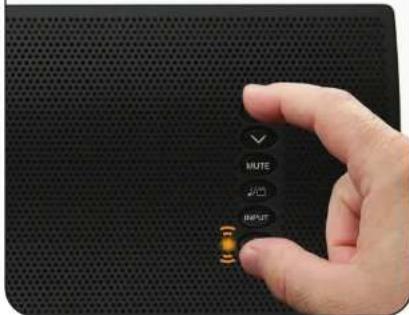

Press Volume Up button on soundbar until light turns solid orange
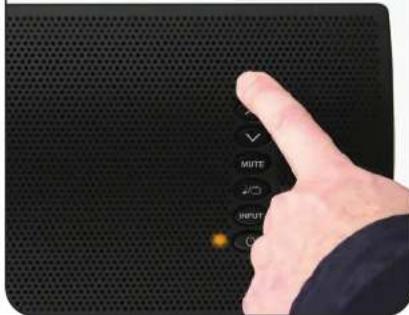

Press Volume Up button on your Remote 4 times until light flashes green
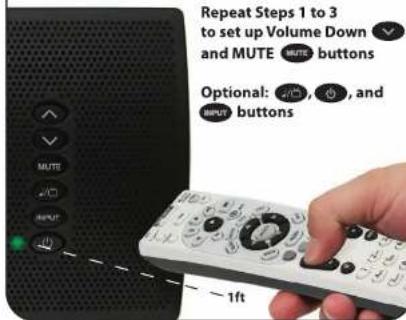
Attention cable/satellite users: if you use a universal remote supplied with your cable/satellite box to operate your television, that universal remote may not work to program TVee. Instead, use the original remote control supplied with your television to program TVee. Following programming, TVee will respond normally to your cable/satellite box's own remote.
Programmer donne soundbar

Connecting your soundbar
Soundbar Connection Panel
Panneau de Connexion Soundbar
Soundbar Connection Panel
Panneau de Connexion Soundbar
© 2011 All rights reserved. Boston, Boston Acoustics, and the R/A all rights symbol are registered trademarks of Boston Acoustics, Inc. 142-003960-0
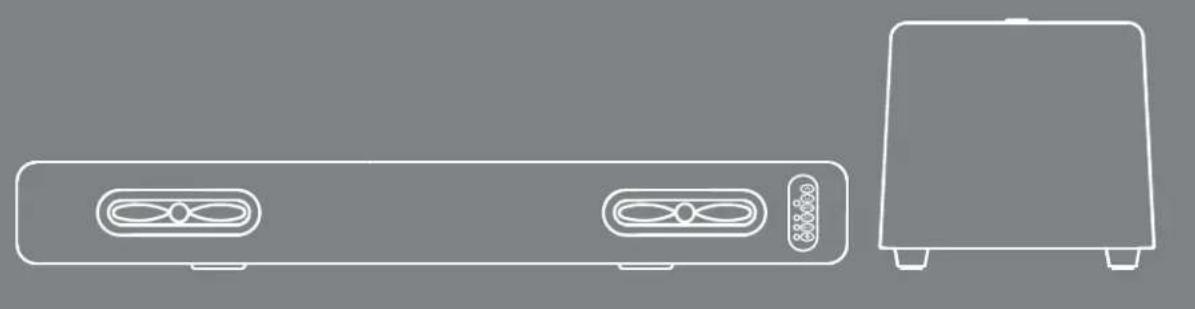
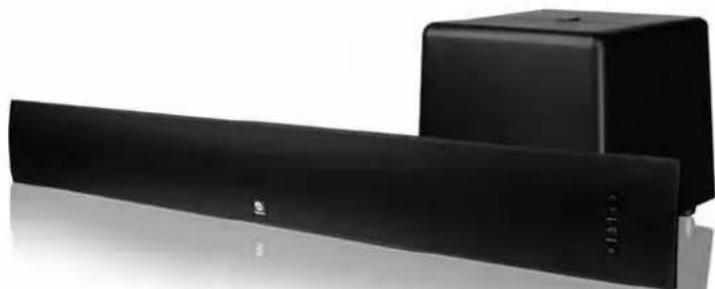
TVee® Model 25
Television Entertainment Enhancement System
Espanol
IMPORTANT SAFETY INSTRUCTIONS

This symbol found on the apparatus indicates hazards arising from dangerous voltages.

This symbol found on the apparatus indicates the user should read all safety statements found in the user manual.

This symbol found on the apparatus indicates double insulation.

Warning! To reduce the risk of fire or electrical shock, do not expose this apparatus to rain or moisture.
- Read these instructions.
- Keep these instructions.
- Heed all warnings.
- Follow all instructions.
- Do not use this apparatus near water.
- Clean only with dry cloth.
- Do not block any ventilation openings. Install in accordance with the manufacturer's instructions.
- Do not install near any heat sources such as radiators, heat registers, stoves, or other apparatus (including amplifiers) that produce heat.
- Do not defeat the safety purpose of the polarized or grounding-type plug. A polarized plug has two blades with one wider than the other. A grounding-type plug has two blades and a third grounding prong. The wide blade or the third prong is provided for your safety. If the provided plug does not fit into your outlet, consult an electrician for replacement of the obsolete outlet.
- Protect the power cord from being walked on or pinched particularly at plugs, convenience receptacles, and the point where they exit from the apparatus.
- Only use attachments/accessories specified by the manufacturer.
- Unplug this apparatus during lightning storms or when unused for long periods of time.
- Refer all servicing to qualified service personnel. Servicing is required when the apparatus has been damaged in any way, such as power-supply cord or plug is damaged, liquid has been spilled or objects have fallen into the apparatus, the apparatus has been exposed to rain or moisture, does not operate normally, or has been dropped.
- Maintain a minimum distance of 2^ (50mm) around the front, rear, and sides of the apparatus for sufficient ventilation. The ventilation should not be impeded by covering the ventilation openings or placing on or around the apparatus items such as newspapers, table-cloths, curtains, etc.
- No open flame sources, such as lighted candles, should be placed on the apparatus.
- The apparatus shall not be exposed to dripping or splashing. No objects filled with liquids, such as vases, shall be placed on the apparatus.
- Either the power inlet connector on the rear of the apparatus or the power plug at the wall must remain accessible, to be able to disconnect power from the apparatus.
- To completely disconnect this apparatus from the AC Mains, disconnect the power supply cord plug from the AC receptacle.

American Users:
Note: This equipment has been tested and found to comply with the limits for a Class B digital device, pursuant to part 15 of the FCC Rules. These limits are designed to provide reasonable protection against harmful interference in a residential installation. This equipment generates, uses, and can radiate radio frequency energy and, if not installed and used in accordance with the instructions, may cause harmful interference to radio communications. However, there is no guarantee that interference will not occur in a particular installation. If this equipment does cause harmful interference to radio or television reception, which can be determined by turning the equipment off and on, the user is encouraged to try to correct the interference by one or more of the following measures:
Reorient or relocate the receiving antenna.
- Increase the separation between the equipment and receiver.
- Connect the equipment into an outlet on a circuit different from that to which the receiver is connected.
- Consult the dealer or an experienced radio/TV technician for help.
Caution: Unauthorized changes or modifications to the receiver could void the user's authority to operate the equipment.

Canadian Users:
RLAN - Radio Local Area Network Equipment
| AT | CZ | FI | IS | LT | PT | SE | FR | ||
| BE | DK | DE | IE | MT | SK | CH | IT | ||
| EE | GR | L | V | NL | SI | TR | LU | CY | |
| HU | PL | ES | GB | NO | |||||
This equipment may only be used indoors in FR. This equipment may only be used in one's own premises in IT. This equipment is for private use only in LU Operation is not allowed within a radius of 20km from the centre of Ny-Alesund in NO.
Hereby, Boston Acoustics, Inc. 300 Jubilee Drive, Peabody, MA 01960 USA, declares that this TVee Model 30 is in compliance with the essential requirements and other relevant provisions of Directive 1999/5/EC. A copy of the Declaration of Conformity (DOC) may be obtained from:
Oliver Kriete
Boston Acoustics, Division of D&M Europe B.V.
Beemdstraat 11
5653 MA Eindhoven
The Netherlands

DOLBY.
DIGITAL
Manufactured under license from Dolby Laboratories.
Dolby and the double-D symbol are trademarks of Dolby Laboratories.
Introduction
Thanks for choosing Boston Acoustics and selecting the TVee Model 25 as your home entertainment system. This manual includes important information on setting up and using your new system, as well as troubleshooting information in case you have any difficulties.
Smart Features:
- Easy one wire hookup & wireless subwoofer
Soundbar learns your existing remote control - Better movies, sports, and games
- Better music with dedicated mode
Additional Smart Features Include:
Boston-engineered with best-in-class performance
- Simple and Functional design to fit with any TV
- Digital input features Dolby Digital decoding for superior surround sound
Boston's Digitally Optimized Virtual Surround processing for pinpoint, theater-like surround effects
Exclusive Boston DSP Control Switch to maximize performance based on soundbar placement
Rear-mounted mini-stereo AUX input to connect your portable media device
Specifications
System Power: 150 watts peak
Soundbar Woofers: Dual 1 12 x 6 HHRT drivers
Subwoofer: 6" woofer
Wireless Technologies: 2.4 GHz frequency hopping (subwoofer)
Dimensions: (H x W x D) Soundbar 4 Subwoofer 912 × 1012 × 10
7/16x311/2x4/16"(112x800x112mm) 15/16" (241x266x277mm
Weight:Soundbar 5 lbs (2.3kg) Subwoofer 11.9 lbs (5.4kg)
Soundbar
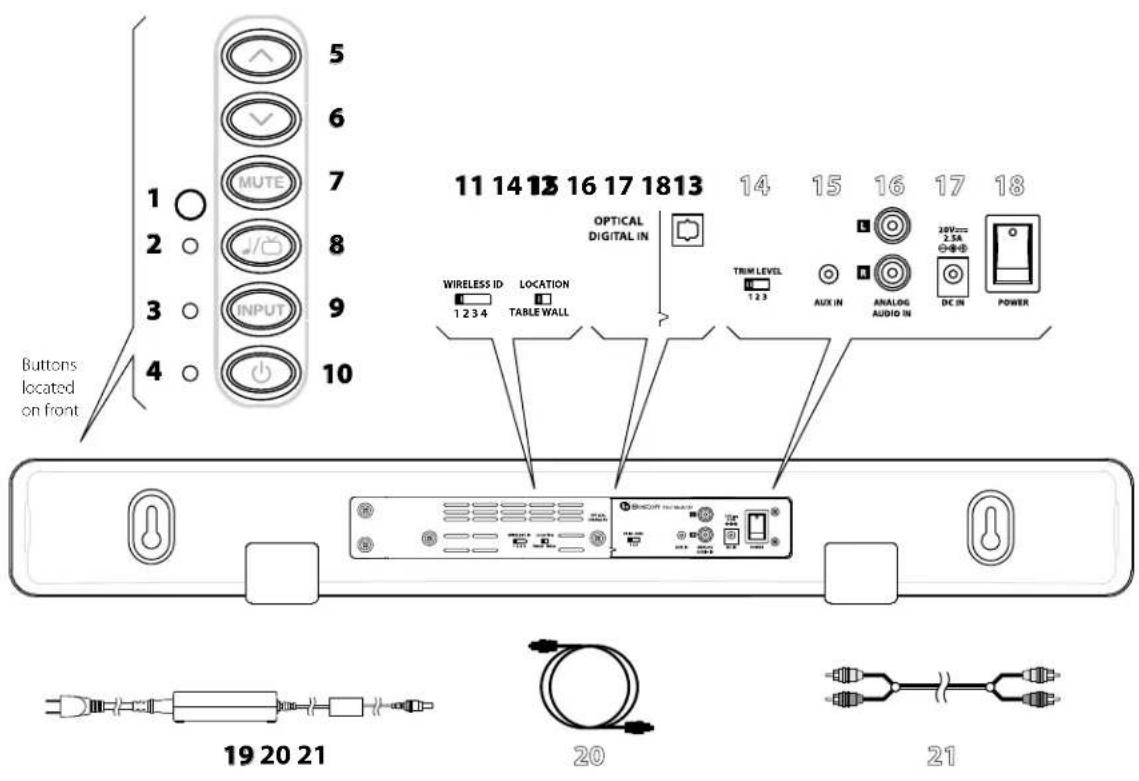
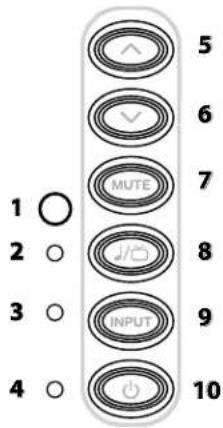
IR Remote Receiver - Receives remote commands to control the system.
2 Music/Movie Mode Light -Lights in various colors to indicate which playing mode is operating.
3 Input Mode Light - Lights in various colors to indicate which input is playing.
4 Power/Remote Mode Light - Lights in various colors to indicate operating status.
5 Volume Up Button - Lets you manually adjust the volume of the TVee.
6 Volume Down Button - Lets you manually adjust the volume of the TVee.
7 Mute Button - Lets you temporarily mute TVee.
8 Music/Movie Button - Selects the style of sound you want to hear. Music mode is for music and Movie Mode is for movies and television.
9 Input Button - Selects which input source is playing.
10 Power Button - Lets you manually activate TVee or put it in standby mode.
11 Wireless ID Switch - Selects the "channel" for the wireless subwoofer signal. Set 22 in the same position (see next page).
12 Location Switch - Use WALL for wall mounting or TABLE for placement on a shelf, cabinet, or table.
13 Optical Digital In - The preferred input for the TVee using the supplied Optical cable 20.
14 Trim Level - Adjusts the input sensitivity of TVee.
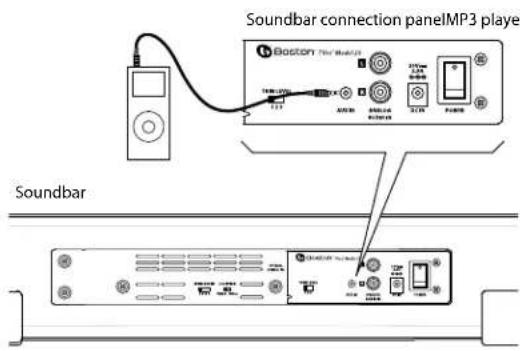
15 Aux In - Mini plug AUX INPUT for connecting to a audio source.
16 Analog Audio In - Receives analog audio inputs through the included Audio Connection Cable 21.
17 Power Input - Connect the power supply 19 here.
18 Power ON/OFF Switch -Turns the TVee soundbar on or off. Normally it is on all the time.
19 Power Supply - Provides power to the soundbar. Plug it into the wall and connect it to the power input 17.
20 Optical Digital Cable - Best choice for connecting digital audio sources to TVee.
21 Audio Connection Cable - Analog cable for connecting to an audio source.
Subwoofer
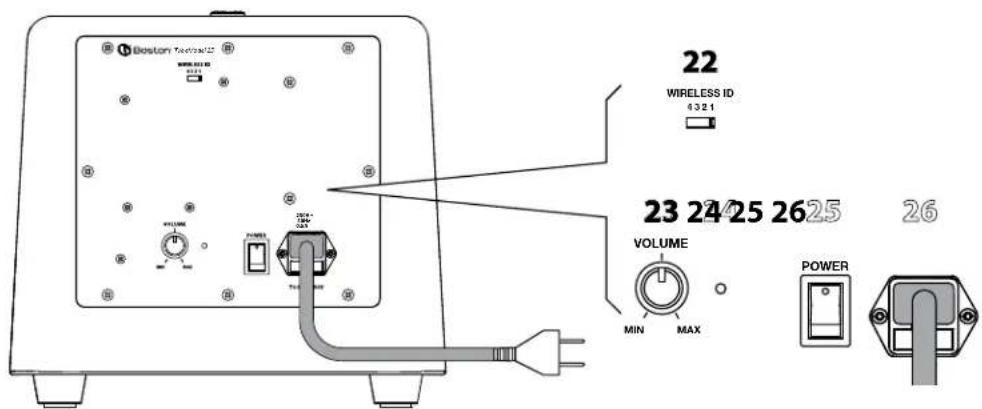
22 Wireless ID Switch - Selects the "channel" for the wireless subwoofer signal. Set in the same position as 11 (see previous page).
23 Volume - Adjusts the volume of the subwoofer for best balance with the soundbar.
24 Status Indicator - Lights green when the subwoofer is active and red when it is standby mode.
25 Power On/Off Switch -Turns the TVee subwoofer on or off. Normally it is left on all the time.
26 Power Cord- Plug it into an AC outlet.
Place Your System
Decide on the location and position of the system before making any connections.
Soundbar Location
Place the soundbar on a table surface or shelf near the television, or wall-mount the soundbar above or below the television.
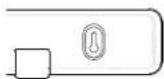
Keyhole mounts on the rear of the soundbar permit wall mounting.*
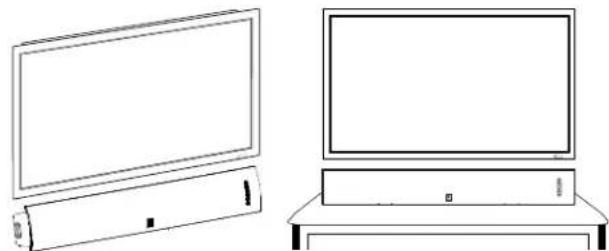
Wall-Mounting
The TVee Model 25 soundbar can be wall-mounted using the integrated keyhole mounts. A mounting template can be found in the inner flap of the product carton. Using a level tool, position and tape the template to the wall in the desired location. The template is designed to allow enough room for the grille and keyhole mounts when the soundbar is mounted below a TV.
Install hardware* using the template as a guide and then remove the mounting template from the wall. Connect your audio and power cables prior to mounting the soundbar on the wall. Place the grille on the soundbar after mounting.
*Consult a person knowledgeable about your wall type to recommend suitable hardware for hanging the speaker. You can remove the rubber feet before hanging the speaker on the wall. Usually it is best to leave soundbar off the wall until connections are made.
Set the rear panel LOCATION 12 switch to match how the soundbar is placed. Use WALL for wall mounting and TABLE for placement on a shelf, cabinet, or table.
LOCATION

Subwoofer Location
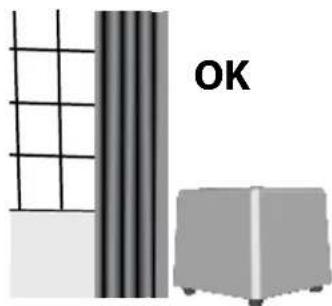
Place the wireless subwoofer anywhere in the room. For the best sound, place the subwoofer near a wall or corner within 20 feet (6 meters) of the soundbar on the same side of the room as the soundbar. The wireless subwoofer range is 25 feet (8 meters).
The subwoofer may be placed vertically or horizontally under a bed or other furniture, or on a shelf.
Also, avoid placing the subwoofer in a position where curtains or blankets obstruct airflow around the rear panel.
Connect your system
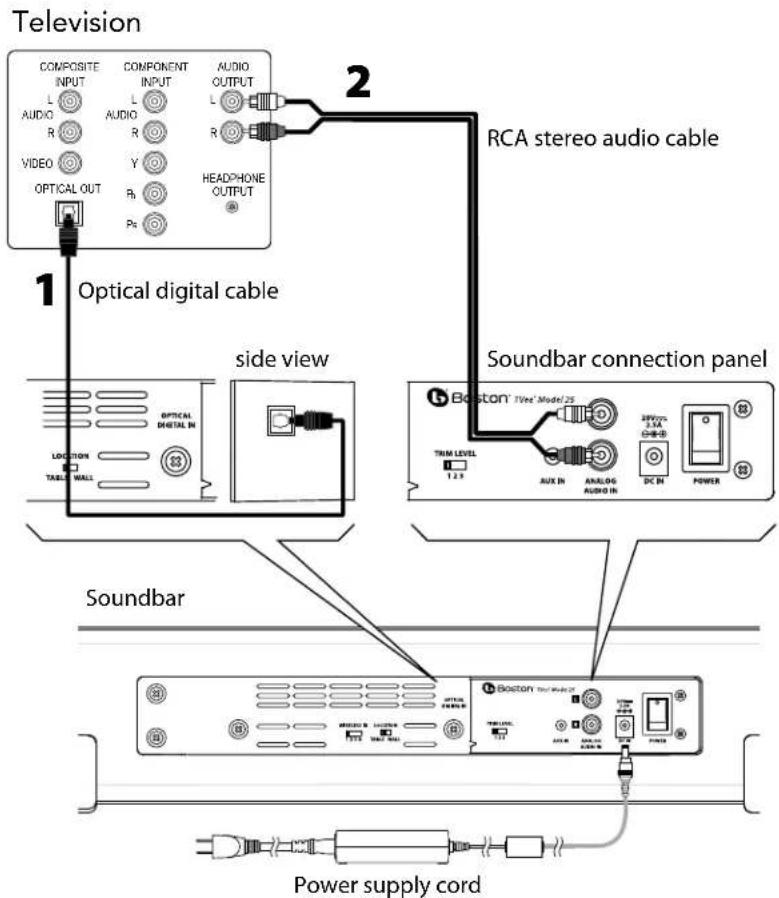
Next you need to get an input signal from your TV into the TVee soundbar.
Option 1
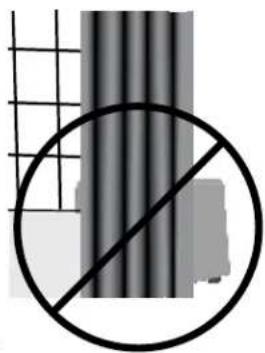
Optical digital cable. Note: The optical cable is a glass fiber; be careful to avoid kinking the cable.
Option 2
RCA stereo audio cable.
Using the rear panel Auxiliary Input
Use the rear panel mini plug AUX INPUT to connect a portable media device.
Connect Power
-
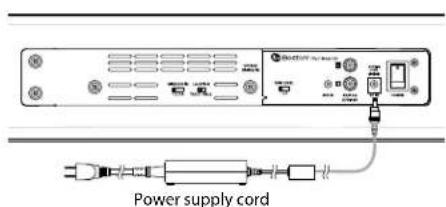
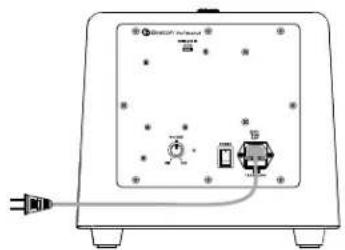
Connect the soundbar power supply and power cord to the soundbar.
Connect the subwoofer power cord to the subwoofer.
Plug both into AC power outlets. -
Turn ON the rear panel power switches on the soundbar and subwoofer. The wireless subwoofer connects to the soundbar automatically.
If you plan to use more than one TVee system, please refer to the Wireless ID section on page 9.
Turn on the system

Use the front panel Power Button 10 to turn on the system. The system will automatically turn on when audio is playing the analog or optical digital input. The Power/Remote light indicates green when the system is turned on, and red when the system is turned off.
Power/Remote Light (4)
Green: Power on.
Red: Power off.
Note: The lights only illuminate temporarily to show a mode or function change.
How do I watch TV?
Select an input

Use the front panel Input Button 9 to choose an input. Each time the button is pressed, the input changes in sequence from optical digital input to analog RCA audio input to Analog Aux Input back to optical digital. The color of the Input Mode Light indicates which input is selected.
Input Mode Light (3)
Green: Optical Digital Input is selected.
Red: Analog RCA Input is selected.
Orange: Analog aux input is selected.
Adjust the Volume


Use the front panel volume up and down buttons to adjust the volume. Use the mute button to mute the audio. To cancel audio muting, push the mute, volume up, or volume down buttons.
Power/Remote Mode Light
Green Blinking: Mute mode is on.
Music / Movie selection

Use the front panel music/movie button to choose the style of sound you want to hear. Movie Mode is a like a movie theater or surround sound system and has a wide, spacious sound. For enhanced playback of music, the Music mode is like a traditional stereo music system, optimized for pure audio accuracy. Either mode can be used for any type of input or audio.
The system will remember whatever mode was last chosen for each input. This is convenient, because you can use Movie Mode for the digital audio input (television) and music mode for Aux Input (music from a portable device).
Music/Movie Mode light:
Green:Playing in Movie Mode. Orange:Playing in Music Mode
Adjusting the subwoofer sound level
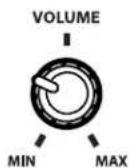
Use the volume knob on the rear of the subwoofer to adjust its sound output level. In many rooms, setting between 10 and 2 o'clock will sound good. Once set, you typically won't need to adjust this control.
Programming your Soundbar


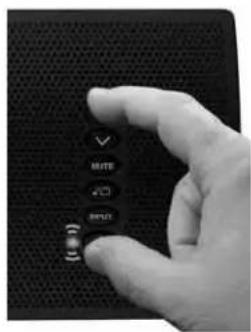
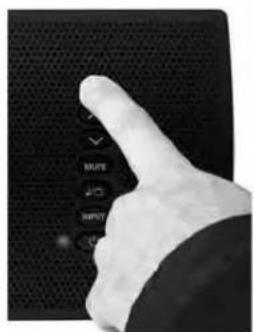
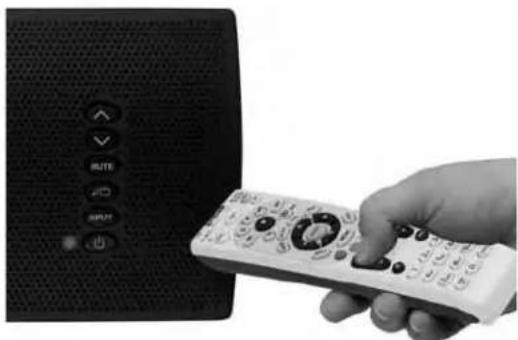
A Press and hold Power and Volume Up buttons simultaneously on the soundbar for 3 seconds until the Power/Remote Mode light 4 flashes orange.
B Press Volume Up button on soundbar until light turns solid orange.
Hold your remote 1 ft (30cm) pointing to soundbar's button area, Press Volume Up button on your remote 4 times until light flashes green.
Repeat Steps A to C to set up Volume Down, MUTE, Power, Input, and Music/Movie buttons.
Attention cable/satellite users: If you have trouble programming, some cable/satellite remotes may require you to initiate programming using your original television remote. After programming is complete using your original television remote you can begin using your cable/satellite remote to control your soundbar.
ABC
Wireless ID Switch
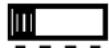
The wireless subwoofer connects to the soundbar automatically. Both the soundbar and the wireless subwoofer have a Wireless ID switch located on the back panel. These switches need to be set to the same number. If you are using more than one TVee system in your home, change the second system to a different ID number to keep the wireless transmissions separate.
WIRELESS ID
1234
The subwoofer must be placed within 50 feet (15m) of the soundbar to connect wirelessly. Closer placement ensures the most reliable connection.
The subwoofer light is green when switched on and connected wirelessly. The subwoofer enters standby mode if it does not play sound for several minutes, and in standby mode the light is red. If the light blinks green, the wireless link is not connected, and the subwoofer is attempting to reconnect. Check to make sure the subwoofer wireless ID switch is set to the same number as the soundbar wireless ID switch, and see the troubleshooting section of this manual for other suggestions.
Troubleshooting TVee
Soundbar does not power on.
- Is the power supply plugged into a live wall outlet?
- Is the power supply properly connected to the soundbar power input?
Is the rear panel power switch in the "on" position? - Is the fuse blown? Replace it with the same type. If it quickly blows again the unit may need service.
No sound from TVee Soundbar.
- Is the soundbar connected to an audio source that is playing audio through its output?
Is the soundbar set to the correct input source? - Are the soundbar and subwoofer receiving power and turned on?
- Turn up the volume of the TVee soundbar.
- Turn up the volume of the television or cable box TVee is connected to.
- Check Mute status - is the status indicator blinking green? Press the Mute button on the soundbar.
- For digital TVs or other digital sources, make sure the output format is set to "Dolby Digital." (See the source product's set-up menu)
- For digital sources, make sure the optical cable is not kinked or broken. (This stops the digital light signal)
No Sound from the Subwoofer.
- Check the points in the "Soundbar does not power on," section above.
- Turn up the volume control.
- Check that the wireless ID setting is the same on the soundbar.
- Move the subwoofer closer to the soundbar.
Distorted sound from the Soundbar.
- Change the Trim Level switch setting to a higher number. (Analog input only)
- Check the signal source to be sure the distortion is not originating there.
Bass not loud enough.
- Turn up the subwoofer Volume control.
- Place the subwoofer closer to a corner in the room.
- Check that the wireless ID setting is the same on the soundbar.
Some televisions and cable boxes have a mode that limits the bass. Check that product's audio set-up menu and set the audio mode to "wide" rather than "normal" or "narrow."
TVee won't learn my remote control commands.
- Carefully follow the programming instructions.
- Hold the remote steady and 12 inches from the front of the soundbar.
- Press and release the remote control buttons slowly!
- Check the remote control's batteries.
Note: TVe e learns almost all IR commands, but some IR protocols cannot be programmed.
There is a "pop" noise when I turn off my television.
- Program TVee to be turned on and off with the power button on your television remote control.
Volume of my television speakers gets louder than my TVee system over time.
- When the remote control volume button is held down your television may change volume levels faster than TVee.
- Use the buttons on the soundbar to adjust the volume of the TVee to the correct balance with the television speakers.
- If possible, use the television's set up menu to mute the television's own speakers.
The woofer seems to have interference with its wireless signal.
Try changing settings of the Wireless ID switches on both the soundbar and subwoofer.
The subwoofer could be too far from the soundbar to get a good signal. Try moving it closer.
Limited Warranty
Boston Acoustics warrants to the original purchaser of our TVee system that it will be free of defects in materials and workmanship in its mechanical parts for a period of 5 years from the date of purchase. The warranty period for the electrical components of TVee is 1 year.
Your responsibilities are to install and use them according to the instructions supplied, to provide safe and secure transportation to an authorized Boston Acoustics service representative, and to present proof of purchase in the form of your sales slip when requesting service.
Excluded from this warranty is damage that results from abuse, misuse, improper installation, accidents, shipping, or repairs/ modifications by anyone other than an authorized Boston Acoustics service representative.
This warranty is limited to the Boston Acoustics product and does not cover damage to any associated equipment.
This warranty does not cover the cost of removal or reinstallation. This warranty is void if the serial number has been removed or defaced. This warranty gives you specific legal rights, and you may also have other rights which vary from state to state.
If Service Seems Necessary
United States
First, contact the dealer from whom you purchased the product. If that is not possible, send an email to: support@bostona.com or write to:
Boston Acoustics, Inc.
100 Corporate Drive
Mahwah, NJ 07490 USA
Canada
First, contact the dealer from whom you purchased the product. If that is not possible, send an email to: support@dmcanada.ca or write to:
D&M Canada
5-505 Apple Creek Blvd
Markham, ON L3R 5B1
All Other Countries
Contact the dealer from whom you purchased the product or contact your local distributor.
For more information, please visitBostonacoustics.com/support
10
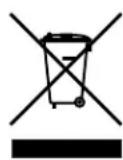
This symbol found on the product indicates that the product must not be disposed of with household waste. Instead, it may be placed in a separate collection facility for electronic waste or returned to a retailer when purchasing similar product. The producer paid to recycle this product. Doing this contributes to reuse and recycling, minimizes adverse effects on the environment and human health and avoids any fines for incorrect disposal.
Boston Acoustics, Inc.
100 Corporate Drive
5-505 Apple Creek Blvd
Markham, ON L3R 5B1
Otros Paises
Voyant Alimentation/Distance (4)
Boston Acoustics, Inc.
100 Corporate Drive
5-S05 Apple Creek Blvd
Markham, ON L3R SB1

- Programming your soundbar
- Programmer donne soundbar
- Connecting your soundbar
- TVee® Model 25
- Television Entertainment Enhancement System
- Espanol
- IMPORTANT SAFETY INSTRUCTIONS
- American Users:
- Canadian Users:
- DOLBY.
- DIGITAL
- Introduction
- Smart Features:
- Additional Smart Features Include:
- Specifications
- Soundbar
- Subwoofer
- Place Your System
- Soundbar Location
- Wall-Mounting
- Subwoofer Location
- Connect your system
- Option 1
- Option 2
- Using the rear panel Auxiliary Input
- Connect Power
- Turn on the system
- Power/Remote Light (4)
- How do I watch TV?
- Select an input
- Input Mode Light (3)
- Adjust the Volume
- Power/Remote Mode Light
- Music / Movie selection
- Music/Movie Mode light:
- Adjusting the subwoofer sound level
- ABC
- Wireless ID Switch
- Troubleshooting TVee
- Soundbar does not power on.
- No sound from TVee Soundbar.
- No Sound from the Subwoofer.
- Distorted sound from the Soundbar.
- Bass not loud enough.
- TVee won't learn my remote control commands.
- Limited Warranty
- If Service Seems Necessary
- Voyant Alimentation/Distance (4)
Brand : BOSTON ACOUSTICS
Model : TVee Model 25
Category : Speaker