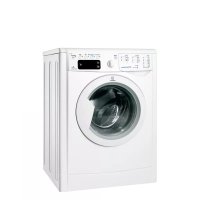
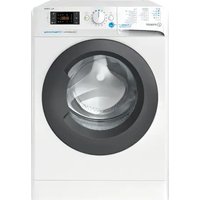
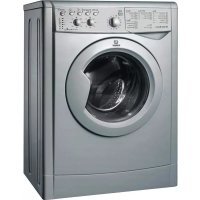
IWE 71451B ECO (EU) - Washing machine INDESIT - Free user manual and instructions
Find the device manual for free IWE 71451B ECO (EU) INDESIT in PDF.



| Product Type | Washing Machine |
| Brand | Indesit |
| Model | IWE 71451B ECO (EU) |
| Dimensions (W x H x D) | 59.5 x 85 x 53.5 cm |
| Wash Capacity | 7 kg |
| Maximum Spin Speed | 1400 rpm |
| Water Pressure | 0.05 - 1 MPa (0.5 - 10 bar) |
| Drum Capacity | 52 liters |
| Power Supply Voltage | 220-240 V ~ 50 Hz |
| Number of Programs | 14 (daily, special, partial) |
| Special Features | EcoTime, Energy Saver, Super Rinse, Easy Iron, Delay Start |
| Standby Consumption | 1 W (off-mode and left-on) |
| Noise Level (wash/spin) | Not specified |
| Maintenance | Cleaning the detergent drawer, pump and water inlet hose |
| Safety | Door lock, protection against accidental opening |
| Manual door opening | Possible in case of power failure (procedure described in the manual) |
| Energy Class | Not specified (conforms to EU directives) |
Frequently Asked Questions - IWE 71451B ECO (EU) INDESIT
User questions about IWE 71451B ECO (EU) INDESIT
0 question about this device. Answer the ones you know or ask your own.
Ask a new question about this device
Download the instructions for your Washing machine in PDF format for free! Find your manual IWE 71451B ECO (EU) - INDESIT and take your electronic device back in hand. On this page are published all the documents necessary for the use of your device. IWE 71451B ECO (EU) by INDESIT.
USER MANUAL IWE 71451B ECO (EU) INDESIT
Unpacking and levelling
Connecting the electricity and water supplies
The first wash cycle
Technical data
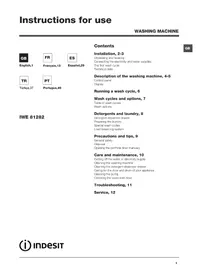
GB

Nederlands,37

Cesky,49

BbIrapckn,61
Description of the washing machine, 4-5
Control panel
Display
Running a wash cycle, 6
Wash cycles and options, 7
Table of wash cycles
Wash options

Romana,73
Detergents and laundry, 8
Detergent dispenser drawer
Preparing the laundry
Special wash cycles
Load balancing system
IWE 71451
Precautions and tips, 9
General safety
Disposal
Opening the porthole door manually
Care and maintenance, 10
Cutting off the water or electricity supply
Cleaning the washing machine
Cleaning the detergent dispenser drawer
Caring for the door and drum of your appliance
Cleaning the pump
Checking the water inlet hose
Troubleshooting, 11
Service, 12

INDESIT
This instruction manual should be kept in a safe place for future reference. If the washing machine is sold, transferred or moved, make sure that the instruction manual remains with the machine so that the new owner is able to familiarise himself/herself with its operation and features.
! Read these instructions carefully: they contain vital information relating to the safe installation and operation of the appliance.
Unpacking and levelling
Unpacking
- Remove the washing machine from its packaging.
- Make sure that the washing machine has not been damaged during the transportation process. If it has been damaged, contact the retailer and do not proceed any further with the installation process.
-
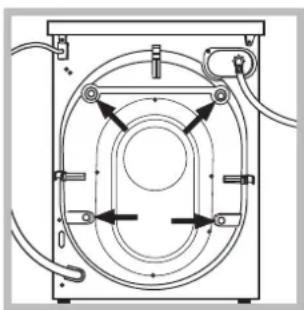
Remove the 4 protective screws (used during transportation) and the rubber washer with the corresponding spacer, located on the rear part of the appliance (see figure).
-
Close off the holes using the plastic plugs provided.
- Keep all the parts in a safe place: you will need them again if the washing machine needs to be moved to another location.
! Packaging materials should not be used as toys for children.
Levelling
- Install the washing machine on a flat sturdy floor, without resting it up against walls, furniture cabinets or anything else.
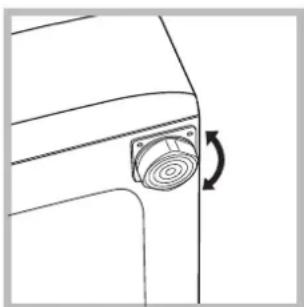
- If the floor is not perfectly level, compensate for any unevenness by tightening or loosening the adjustable front feet (see figure); the angle of inclination, measured in relation to the worktop, must not exceed 2^ .
Levelling the machine correctly will provide it with stability, help to avoid vibrations and excessive noise and prevent it from shifting while it is operating. If it is placed on carpet or a rug, adjust the feet in such a way as to allow a sufficient ventilation space underneath the washing machine.
Connecting the electricity and water supplies
Connecting the water inlet hose
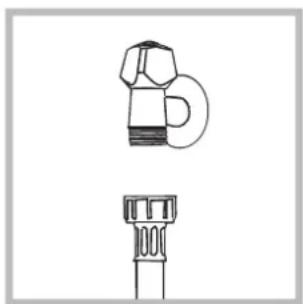
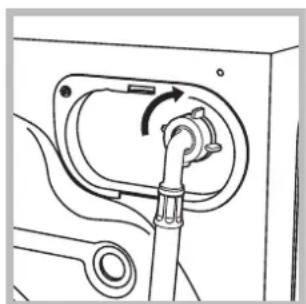
- Connect the supply pipe by screwing it to a cold water tab using a 3 / 4 gas threaded connection (see figure).
Before performing the connection, allow the water to run freely until it is perfectly clear.
-
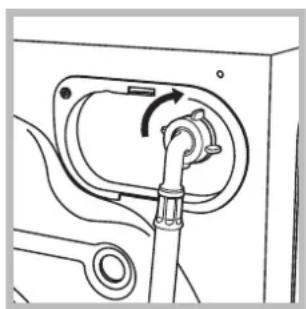
Connect the inlet hose to the washing machine by screwing it onto the corresponding water inlet of the appliance, which is situated on the top right-hand side of the rear part of the appliance (see figure).
-
Make sure that the hose is not folded over or bent.
The water pressure at the tap must fall within the values indicated in the Technical details table (see next page).
If the inlet hose is not long enough, contact a specialised shop or an authorised technician.
! Never use second-hand hoses.
! Use the ones supplied with the machine.
Connecting the drain hose
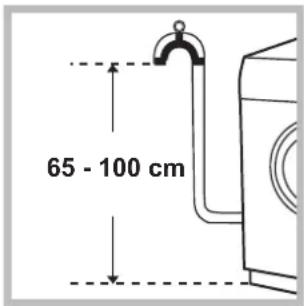
Connect the drain hose, without bending it, to a drainage duct or a wall drain located at a height between 65 and 100cm from the floor;
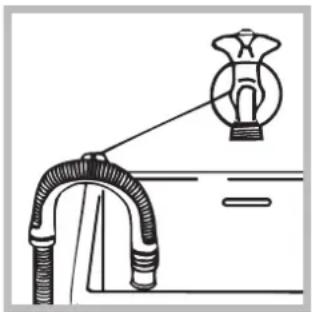
alternatively, rest it on the side of a washbasin or bathtub, fastening the duct supplied to the tap (see figure). The free end of the hose should not be underwater.
We advise against the use of hose extensions; if it is absolutely necessary, the extension must have the same diameter as the original hose and must not exceed 150~cm in length.
Electrical connections
Before plugging the appliance into the electricity socket, make sure that:
- the socket is earthed and complies with all applicable laws;
- the socket is able to withstand the maximum power load of the appliance as indicated in the Technical data table (see opposite);
- the power supply voltage falls within the values indicated in the Technical data table (see opposite);
- the socket is compatible with the plug of the washing machine. If this is not the case, replace the socket or the plug.
The washing machine must not be installed outdoors, even in covered areas. It is extremely dangerous to leave the appliance exposed to rain, storms and other weather conditions.
! When the washing machine has been installed, the electricity socket must be within easy reach.
! Do not use extension cords or multiple sockets.
The cable should not be bent or compressed.
The power supply cable must only be replaced by authorised technicians.
Warning! The company shall not be held responsible in the event that these regulations are not respected.
The first wash cycle
Once the appliance has been installed, and before you use it for the first time, run a wash cycle with detergent and no laundry, using the wash cycle 3.
| Technical data | |
| Model | IWE 71451 |
| Dimensions | width 59.5 cm height 85 cm depth 53,5 cm |
| Capacity | from 1 to 7 kg |
| Electrical connections | please refer to the technical data plate fixed to the machine |
| Water connection | maximum pressure 1 MPa (10 bar) minimum pressure 0.05 MPa (0.5 bar) drum capacity 52 litres |
| Spin speed | up to 1400 rotations per minute |
| Test wash cycles in accordance with directives 1061/2010 and 1015/2010. | Programme 3: Cotton standard 60°C; Programme 4: Cotton standard 40°C. |
| CE | This appliance conforms to the following EC Directives: - 2004/108/EC dated 03/05/89 (Electro-magnetic Compatibility) - 2002/96/EC - 2006/95/EC Low Voltage) |
Description of the washing machine
GB
Control panel
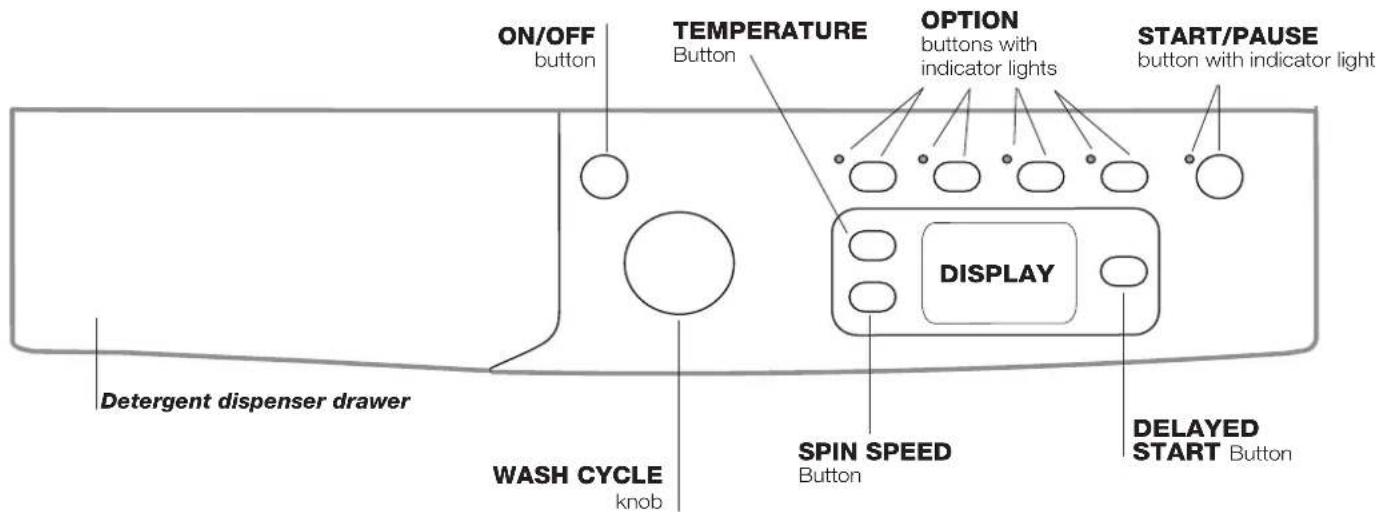
Detergent dispenser drawer: used to dispense detergents and washing additives (see "Detergents and laundry").
ON/OFF button press this briefly to switch the machine on or off. The START/PAUSE indicator light, which flashes slowly in a green colour shows that the machine is switched on. To switch off the washing machine during the wash cycle, press and hold the button for approximately 2 seconds; if the button is pressed briefly or accidentally the machine will not switch off. If the machine is switched off during a wash cycle, this wash cycle will be cancelled.
WASH CYCLE knob: used to set the desired wash cycle (see "Table of wash cycles").
OPTION buttons with indicator light: used to select the available options. The indicator light corresponding to the selected option will remain lit.
SPIN button @press to reduce or completely exclude the spin cycle - the value is indicated on the display.
TEMPERATURE button to press to decrease or completely exclude the temperature: the value will be shown on the display.
DELAYED START button to set a delayed start time for the selected wash cycle. The delay time will be shown on the display.
START/PAUSE button>with indicator light: when the green indicator light flashes slowly, press the button to start a wash cycle. Once the cycle has begun the indicator light will remain lit in a fixed manner. To pause the wash cycle, press the button again; the indicator light will flash in an orange colour. If the symbol is not illuminated, the door may be opened. To start the wash cycle from the point at which it was interrupted, press the button again.
Standby mode
This washing machine, in compliance with new energy saving regulations, is fitted with an automatic standby system which is enabled after about 30 minutes if no activity is detected. Press the ON-OFF button briefly and wait for the machine to start up again.
Consumption in off-mode: 1 W
Consumption in Left-on: 1 W
Display
GB
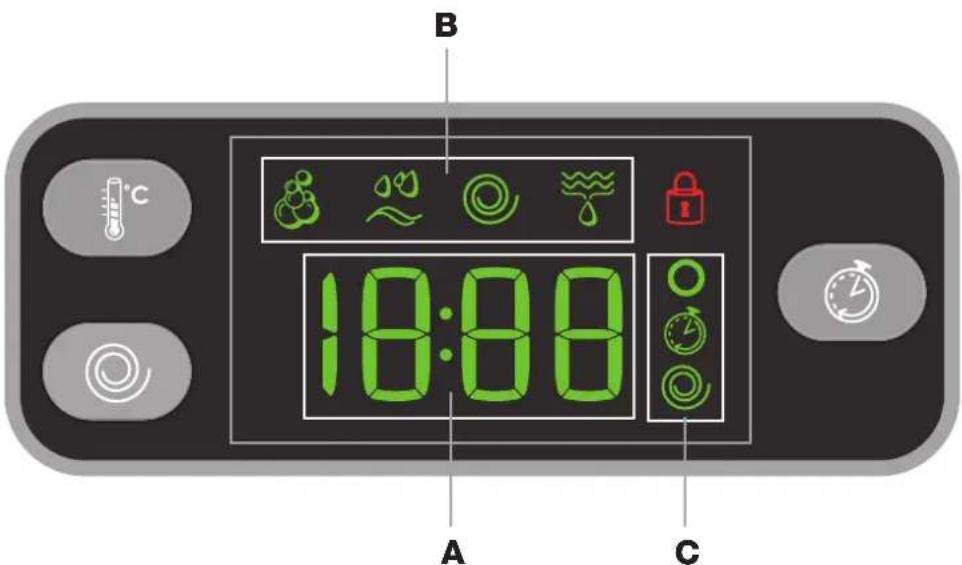
The display is useful when programming the machine and provides a great deal of information.
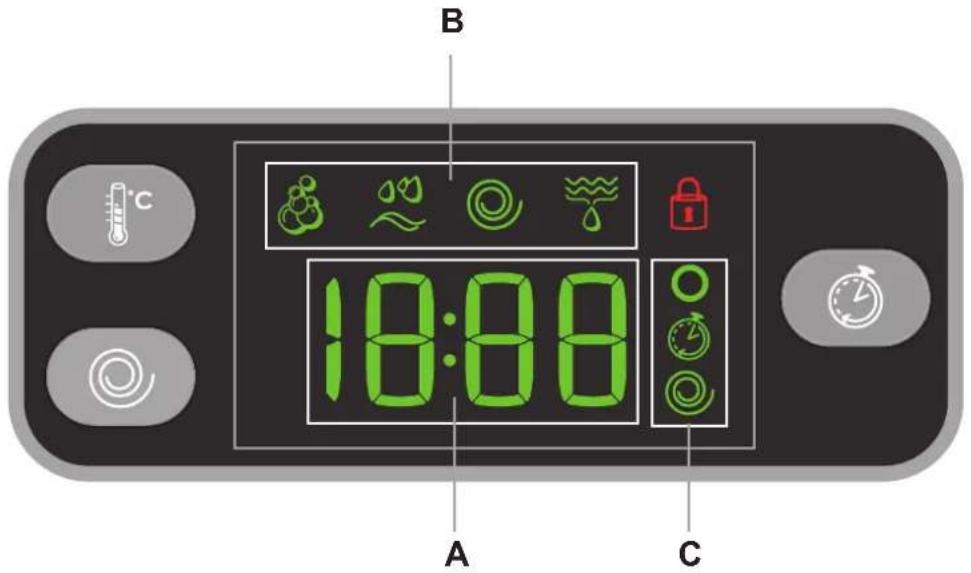
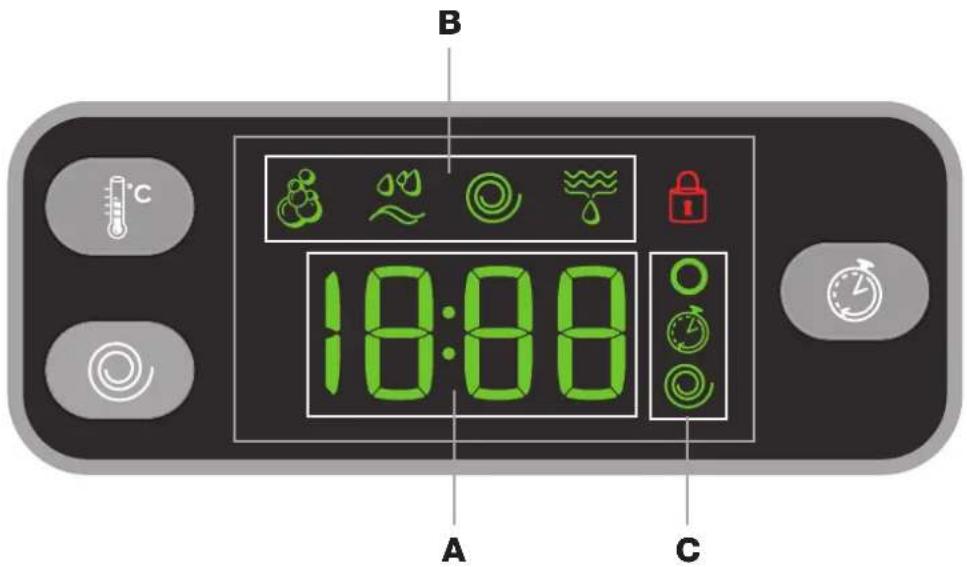
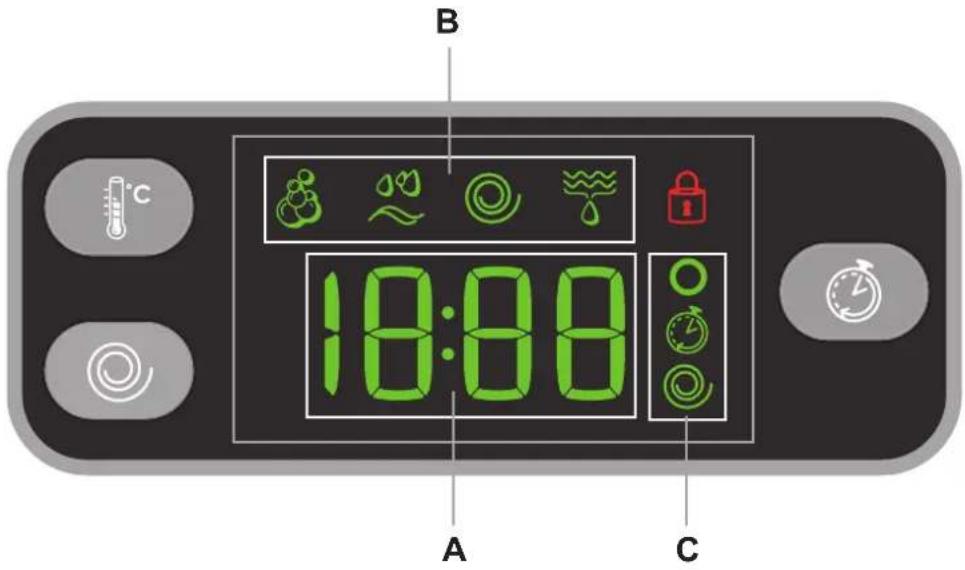
The duration of the available programmes and the remaining time of a running cycle appear in section A; if the DELAY START option has been set, the countdown to the start of the selected programme will appear. Pressing the relative button, the machine automatically displays the maximum temperature and spin speed values set for the selected cycle, or the most recently-used settings if they are compatible with the selected cycle.
The "programme phases" relative to the selected programme and the "programme phase" of the running programme appear in section B:
Wash
Rinse
Spin
Drain
The icons corresponding to "temperature", "Programmed start", and "spin" appear in section C from top to bottom: If the symbol lights up, the display will visualise the set "temperature" value.
When a "delayed start" has been set, the symbol lights up.
If the symbol lights up, the display will visualise the set "spin" value.
Door locked symbol
The lit symbol indicates that the door is locked. To prevent any damage, wait until the symbol turns off before opening the door. To open the door while a cycle is in progress, press the START/PAUSE button; if the DOOR LOCKED symbol is switched off the door may be opened.
GB
- SWITCH THE MACHINE ON. Press the button; the START/PAUSE indicator light will flash slowly in a green colour.
- LOAD THE LAUNDRY. Open the porthole door. Load the laundry, making sure you do not exceed the maximum load value indicated in the table of programmes on the following page.
- MEASURE OUT THE DETERGENT. Pull out the detergent dispenser drawer and pour the detergent into the relevant compartments as described in "Detergents and laundry".
4. CLOSE THE DOOR.
- SELECT THE WASH CYCLE. Set the WASH CYCLE knob to the desired programme; a temperature and spin speed is set for each wash cycle; these may be adjusted. The duration of the cycle will appear on the display.
- CUSTOMISE THE WASH CYCLE. Use the relevant buttons:
Modifying the temperature and/or spin speed. The machine automatically displays the maximum temperature and spin speed values set for the selected cycle, or the most recently-used settings if they are compatible with the selected cycle. The temperature can be decreased by pressing the button, until the cold wash "OFF" setting is reached. The spin speed may be progressively reduced by pressing the button, until it is completely excluded (the "OFF" setting). If these buttons are pressed again, the maximum values are restored.
Setting a delayed start.
To set a delayed start for the selected programme, press the corresponding button repeatedly until the required delay period has been reached. When this option is enabled, the symbol lights up on the display. To remove the delayed start option press the button until the text "OFF" appears on the display.
Eco Time Energ Modifying the cycle settings.
- Press the button to enable the option; the indicator light corresponding to the button will switch on.
- Press the button again to disable the option; the indicator light will switch off.
If the selected option is not compatible with the programmed wash cycle, the indicator light will flash and the option will not be activated.
If the selected option is not compatible with another option which has been selected previously, the indicator light corresponding to the first option selected will flash and only the second option will be activated; the indicator light corresponding to the enabled option will remain lit.
The options may affect the recommended load value and/or the duration of the cycle.
7. START THE PROGRAMME. Press the START/ PAUSE button. The corresponding indicator light will become green, remaining lit in a fixed manner, and the door will be locked (the DOOR LOCKED symbol will be on). To change a wash cycle while it is in progress, pause the washing machine using the START/PAUSE button (the START/PAUSE indicator light will flash slowly in an orange colour); then select the desired cycle and press the START/PAUSE button again.
To open the door while a cycle is in progress, press the START/PAUSE button; if the DOOR LOCKED symbol is switched off the door may be opened. Press the START/PAUSE button again to restart the wash cycle from the point at which it was interrupted.
8. THE END OF THE WASH CYCLE. This will be indicated by the text "END" on the display; when the DOOR LOCKED symbol switches off the door may be opened. Open the door, unload the laundry and switch off the machine.
If you wish to cancel a cycle which has already begun, press and hold the button. The cycle will be stopped and the machine will switch off.
Table of wash cycles
| Wash cycles | Description of the wash cycle | Max.temp.(°C) | Max.speed(rpm) | Detergents | Max. load (kg) | Residual dampness % | Energy consumption KWh | Total water it | Cycle duration | ||
| Prewash | Wash | Fabric softener | |||||||||
| Daily | |||||||||||
| 1 | Cotton with prewash: extremely soiled whites. 90° 1400 | ● | ● | ● | 7 53 | 2,21 78 | 170' | ||||
| 2 | Cotton: extremely soiled whites. | 90° | 1400 | - | ● | ● | 7 53 | 2,16 72 | 160' | ||
| 3 | Cotton Standard 60° (1): heavily soiled whites and resistant colours. | 60° | 1400 | - | ● | ● | 7 53 | 1,23 58 | 195' | ||
| 4 | Cotton Standard 40° (2): lightly soiled whites and delicate colours. | 40° | 1400 | - | ● | ● | 7 53 | 0,99 82 | 190' | ||
| 5 | Coloured Cottons: lightly soiled whites and delicate colours. | 40° | 1400 | - | ● | ● | 7 53 | 0,66 54 | 90' | ||
| 6 | Synthetics: heavily soiled resistant colours. | 60° | 800 | - | ● | ● | 3 44 | 0,93 47 | 110' | ||
| 6 | Synthetics (3): lightly soiled resistant colours. | 40° | 800 | - | ● | ● | 3 44 | 0,57 46 | 95' | ||
| 7 | Cotton Standard 20°: lightly soiled whites and delicate colours. | 20° | 1400 | - | ● | ● | 7 | - | - | - 170' | |
| Special | |||||||||||
| 8 | Wool: for wool, cashmere, etc. | 40° 800 | - | ● | ● | 1,5 | - | - | - | 70' | |
| 9 | Silk/Curtains: for garments in silk and viscose, lingerie. | 30° | 0 | - | ● | ● | 1 | - | - | - 55' | |
| 10 | Jeans | 40° | 800 | - | ● | ● | 3,5 | - | - | - | 70' |
| 11 | Outwear | 30° 400 | - | ● | ● | 2 | - | - | - 60' | ||
| Sport | |||||||||||
| 12 | Sport Intensive | 30° | 600 | - | ● | ● | 2,5 | - | - | - | 85' |
| 13 | Sport Light | 30° | 600 | - | ● | ● | 2,5 | - | - | - | 60' |
| 14 | Special Shoes | 30° | 600 | - | ● | ● | Max. 2 pairs | - | - | - 60' | |
| Partial wash cycles | |||||||||||
| Rinse | - | 1400 | - | - | ● | 7 | - | - | - 36' | ||
| Spin + Drain | - | 1400 | - | - | - | 7 | - | - | - | 16' | |
The length of cycle shown on the display or in this booklet is an estimation only and is calculated assuming standard working conditions. The actual duration can vary according to factors such as water temperature and pressure, the amount of detergent used, the amount and type of load inserted, load balancing and any wash options selected.
1) Test wash cycle in compliance with directive 1061/2010: set wash cycle 3 with a temperature of 60^ .
This cycle is designed for cotton loads with a normal soil level and is the most efficient in terms of both electricity and water consumption; it should be used for garment which can be washed at 60^ . The actual washing temperature may differ from the indicated value.
2) Test wash cycle in compliance with directive 1061/2010: set wash cycle 4 with a temperature of 40^ .
This cycle is designed for cotton loads with a normal soil level and is the most efficient in terms of both electricity and water consumption; it should be used for garments which can be washed at 40^ . The actual washing temperature may differ from the indicated value.
For all Test Institutes:
2) Long wash cycle for cottons: set wash cycle 4 with a temperature of 40^ .
3) Long wash cycle for synthetics: set wash cycle 6; with a temperature of 40^ .
Wash options
Eco Time
Selecting this option enables you to suitably adjust drum rotation, temperature and water to a reduced load of lightly soiled cotton and synthetic fabrics (refer to the "Table of wash cycles"). "E" eales you to wash in less time thereby saving water and electricity. We suggest using a liquid detergent suitably measured out to the load quantity.
! This function may not be used in conjunction with wash cycles 1, 2, 7, 8, 9, 10, 11, 12, 13, 14,
Energy Saver
The Energy Saving saves energy by not heating the water used to wash your laundry - an advantage both to the environment and to your energy bill. Instead, intensified wash action and water optimisation ensure great wash results in the same average time of a standard cycle. For the best washing results we recommend the usage of a liquid detergent.
! This function may not be used in conjunction with wash cycles 1, 7, 8, 9, 12, 13, 14,
gExtra rinse
By selecting this option, the efficiency of the rinse is increased and optimal detergent removal is guaranteed. It is particularly useful for sensitive skin.
! This function may not be used in conjunction with wash cycle
Easy iron
By selecting this function, the wash and spin cycles will be modified in order to reduce the formation of creases. At the end of the cycle the washing machine will perform slow rotations of the drum; the indicator lights for the EASY IRON and START/PAUSE options will flash (the first one green, the second orange). To end the cycle, press the START/PAUSE button or the EASY IRON button. For the 9,11 wash cycles, the machine will end the cycle while the laundry is soaking and the EASY IRON and START/PAUSE indicator lights will flash. To drain the water so that the laundry may be removed, press the START/PAUSE button or the EASY IRON button.
This function may not be used in conjunction with wash cycles 8, 12, 13, 14,
Detergent dispenser drawer
Good washing results also depend on the correct dose of detergent: adding too much detergent will not necessarily result in a more efficient wash, and may in fact cause build up on the inside of your appliance and contribute to environmental pollution.
! Do not use hand washing detergents because these create too much foam.
! Use powder detergent for white cotton garments, for prewashing, and for washing at temperatures over 60^
! Follow the instructions given on the detergent packaging.
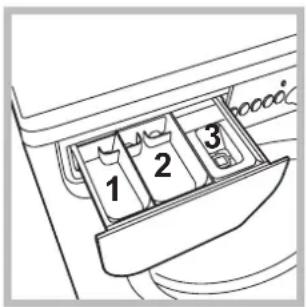
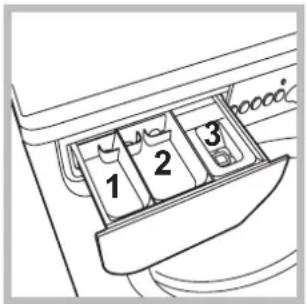
Open the detergent dispenser drawer and pour in the detergent or washing additive, as follows.
compartment 1: Pre-wash detergent (powder) compartment 2: Detergent for the wash cycle (powder or liquid)
Liquid detergent should only be poured in immediately prior to the start of the wash cycle.
compartment 3:Additives (fabric softeners, etc.)
The fabric softener should not overflow the grid.
Preparing the laundry
- Divide the laundry according to:
- the type of fabric/the symbol on the label
- the colours: separate coloured garments from whites.
- Empty all garment pockets and check the buttons.
- Do not exceed the values listed in the "Table of wash cycles", which refer to the weight of the laundry when dry.
How much does your laundry weigh?
1 sheet 400-500 g
1 pillow case 150-200 g
1 tablecloth 400-500 g
1 bathrobe 900-1200 g
1 towel 150-250 g
Special wash cycles
Cotton Standard 20^ (wash cycle 7) ideal for heavily soiled cotton loads. The effective performance levels achieved at cold temperatures, which are comparable to washing at 40^ , are guaranteed by a mechanical action which operates at varying speed, with repeated and frequent peaks.
Wool: all wool garments can be washed using programme
8, even those carrying the "hand-wash only" label. For best results, use special detergents and do not exceed 1,5 kg of laundry.
Silk: use special wash cycle 9 to wash all silk garments. We recommend the use of special detergent which has been designed to wash delicate clothes.
Curtains: fold curtains and place them in a pillow case or mesh bag. Use wash cycle 9.
Jeans: Turn garments inside-out before washing and use a liquid detergent. Use programme 10.
Outwear (wash cycle 11): is studied for washing water-repellent fabrics and winter jackets (e.g. Gore-Tex, polyester, nylon); for best results, use a liquid detergent and dosage suitable for a half-load; pre-treat necks, cuffs and stains if necessary; do not use softeners or detergents containing softeners. Stuffed duvets cannot be washed with this programme.
Sport Intensive (wash cycle 12): is for washing heavily soiled sports clothing fabrics (tracksuits, shorts, etc.); for best results, we recommend not exceeding the maximum load indicated in the "Table of wash cycles".
Sport Light (wash cycle 13): is for washing lightly soiled sports clothing fabrics (tracksuits, shorts, etc.); for best results, we recommend not exceeding the maximum load indicated in the "Table of wash cycles". We recommend using a liquid detergent and dosage suitable for a half-load.
Special Shoes (wash cycle 14): is for washing sports shoes; for best results, do not wash more than 2 pairs simultaneously.
Load balancing system
Before every spin cycle, to avoid excessive vibrations and to distribute the load in a uniform manner, the drum rotates continuously at a speed which is slightly greater than the washing rotation speed. If, after several attempts, the load is not balanced correctly, the machine spins at a reduced spin speed. If the load is excessively unbalanced, the washing machine performs the distribution process instead of spinning. To encourage improved load distribution and balance, we recommend small and large garments are mixed in the load.
This washing machine was designed and constructed in accordance with international safety regulations. The following information is provided for safety reasons and must therefore be read carefully.
General safety
- This appliance was designed for domestic use only.
- This appliance is not intended for use by persons (including children) with reduced physical, sensory or mental capabilities, or lack of experience and knowledge, unless they have been given supervision or instruction concerning use of the appliance by a person responsible for their safety. Children should be supervised to ensure that they do not play with the appliance.
- The washing machine must only be used by adults, in accordance with the instructions provided in this manual.
- Do not touch the machine when barefoot or with wet or damp hands or feet.
- Do not pull on the power supply cable when unplugging the appliance from the electricity socket. Hold the plug and pull.
- Do not open the detergent dispenser drawer while the machine is in operation.
- Do not touch the drained water as it may reach extremely high temperatures.
- Never force the porthole door. This could damage the safety lock mechanism designed to prevent accidental opening.
- If the appliance breaks down, do not under any circumstances access the internal mechanisms in an attempt to repair it yourself.
- Always keep children well away from the appliance while it is operating.
- The door can become quite hot during the wash cycle.
- If the appliance has to be moved, work in a group of two or three people and handle it with the utmost care. Never try to do this alone, because the appliance is very heavy.
- Before loading laundry into the washing machine, make sure the drum is empty.
Disposal
- Disposing of the packaging materials: observe local regulations so that the packaging may be re-used.
- The European Directive 2002/96/EC on Waste Electrical and Electronic Equipment, requires that old household electrical appliances must not be disposed of in the normal unsorted municipal waste stream. Old appliances must be collected separately in order to optimise the recovery and recycling of the materials they contain and reduce the impact on human health and the environment.
The crossed out "wheeled bin" symbol on the product reminds you of your obligation, that when you dispose of the appliance it must be separately collected. Consumers should contact their local authority or retailer for information concerning the correct disposal of their old appliance.
Opening the porthole door manually
In the event that it is not possible to open the porthole door due to a powercut, and if you wish to remove the laundry, proceed as follows:
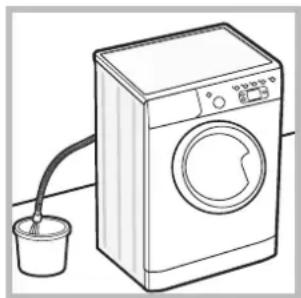
- remove the plug from the electrical socket.
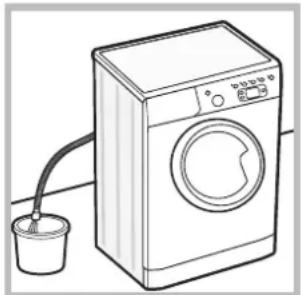
- make sure the water level inside the machine is lower than the door opening; if it is not, remove excess water using the drain hose, collecting it in a bucket as indicated in the figure.
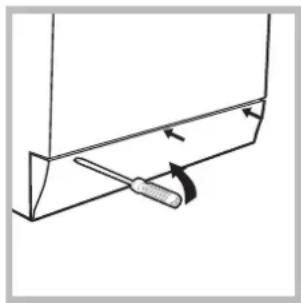
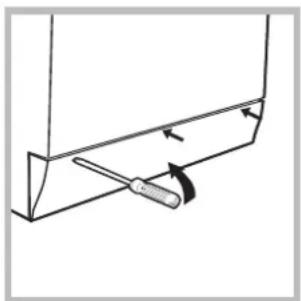
- using a screwdriver, remove the cover panel on the lower front part of the washing machine (see figure).
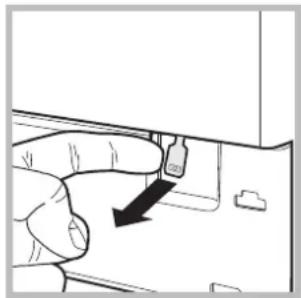
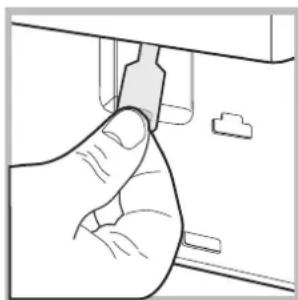
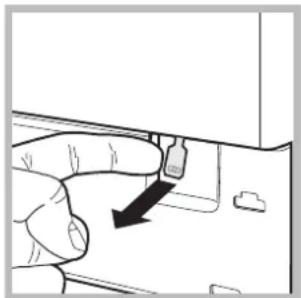
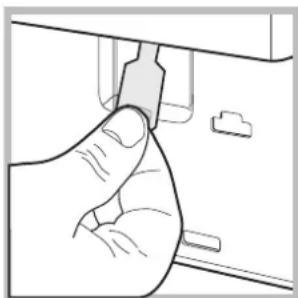
- pull outwards using the tab as indicated in the figure, until the plastic tie-rod is freed from its stop position; pull downwards and open the door at the same time.
- reposition the panel, making sure the hooks are securely in place before you push it onto the appliance.
Care and maintenance
GB
Cutting off the water and electricity supplies
- Turn off the water tap after every wash cycle. This will limit wear on the hydraulic system inside the washing machine and help to prevent leaks.
- Unplug the washing machine when cleaning it and during all maintenance work.
Cleaning the washing machine
The outer parts and rubber components of the appliance can be cleaned using a soft cloth soaked in lukewarm soapy water. Do not use solvents or abrasives.
Cleaning the detergent dispenser drawer
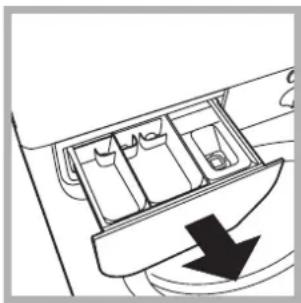
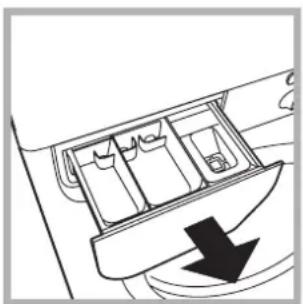
Remove the dispenser by raising it and pulling it out (see figure). Wash it under running water; this operation should be repeated frequently.
Caring for the door and drum of your appliance
Always leave the porthole door ajar in order to prevent unpleasant odours from forming.
Cleaning the pump
The washing machine is fitted with a self-cleaning pump which does not require any maintenance. Sometimes, small items (such as coins or buttons) may fall into the pre-chamber which protects the pump, situated in its bottom part.
! Make sure the wash cycle has finished and unplug the appliance.
To access the pre-chamber:
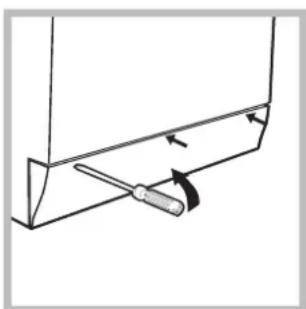
- using a screwdriver, remove the cover panel on the lower front part of the washing machine (see figure);
-
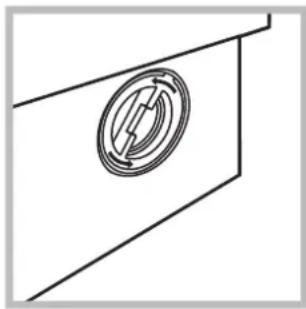
unscrew the lid by rotating it anti-clockwise (see figure): a little water may trickle out. This is perfectly normal;
-
clean the inside thoroughly;
- screw the lid back on;
- reposition the panel, making sure the hooks are securely in place before you push it onto the appliance.
Checking the water inlet hose
Check the inlet hose at least once a year. If there are any cracks, it should be replaced immediately: during the wash cycles, water pressure is very strong and a cracked hose could easily split open.
! Never use second-hand hoses.
Your washing machine could fail to work. Before contacting the Technical Assistance Centre (see "Assistance"), make sure that the problem cannot be not solved easily using the following list.
Problem:
The washing machine does not switch on.
The wash cycle does not start.
The washing machine does not take in water ("H2O" will flash on the display).
The washing machine continuously takes in and drains water.
The washing machine does not drain or spin.
The washing machine vibrates a lot during the spin cycle.
The washing machine leaks.
The "option" indicator lights and the "start/pause" indicator light flash and an error code appears on the display (e.g.: F-01, F-..).
There is too much foam.
Possible causes / Solutions:
- The appliance is not plugged into the socket fully, or is not making contact.
-
There is no power in the house.
-
The washing machine door is not closed properly.
- The ON/OFF button has not been pressed.
- The START/PAUSE button has not been pressed.
The water tap has not been opened. -
A delayed start has been set (see "Running a wash cycle").
-
The water inlet hose is not connected to the tap.
The hose is bent. - The water tap has not been opened.
- There is no water supply in the house.
The pressure is too low. -
The START/PAUSE button has not been pressed.
-
The drain hose is not fitted at a height between 65 and 100cm from the floor (see "Installation").
- The free end of the hose is under water (see "Installation").
- The wall drainage system is not fitted with a breather pipe.
If the problem persists even after these checks, turn off the water tap, switch the appliance off and contact the Assistance Service. If the dwelling is on one of the upper floors of a building, there may be problems relating to water drainage, causing the washing machine to fill with water and drain continuously. Special anti-draining valves are available in shops and help to avoid this inconvenience.
- The wash cycle does not include draining: some wash cycles require the drain phase to be started manually.
- The "Easy iron" option has been activated: To complete the wash cycle, press the START/PAUSE button (see "Wash cycles and options").
- The drain hose is bent (see "Installation").
-
The drainage duct is clogged.
-
The drum was not unlocked correctly during installation (see "Installation").
- The washing machine is not level (see "Installation").
-
The washing machine is trapped between cabinets and walls (see "Installation").
-
The water inlet hose is not screwed on properly (see "Installation").
- The detergent dispenser drawer is blocked (for cleaning instructions, see "Care and maintenance").
-
The drain hose is not fixed properly (see "Installation").
-
Switch off the machine and unplug it, wait for approximately 1 minute and then switch it back on again.
If the problem persists, contact the Technical Assistance Service. -
The detergent is not suitable for machine washing (it should display the text "for washing machines" or "hand and machine wash", or the like).
- Too much detergent was used.
Before calling for Assistance:
- Check whether you can solve the problem alone (see "Troubleshooting");
- Restart the programme to check whether the problem has been solved;
- If this is not the case, contact an authorised Technical Assistance Centre using the telephone number provided on the guarantee certificate.
! Always request the assistance of authorised technicians.
Have the following information to hand:
the type of problem;
the appliance model (Mod.);
the serial number (S/N).
This information can be found on the data plate applied to the rear of the washing machine, and can also be found on the front of the appliance by opening the door.

Français
Sommaire
Installation, 14-15
Causes / Solutions possibles:
Spotbreva off-mode:1W
Spotreba v Left-on: 1W
Displej
CZ
TouncBaHe Ha nepaHaTa MaunHa
IounCTBaHe Na yekMeJKeTo 3a nepiHnTe npenapatN
PondpbXkaHaJIokaHa6apabaHa
IOnuCTBaHe Ha NOMnata
Cbbp3BaHe Ha Mapkyu Ka Bm BoDopnpoBdHaTa Mpeka
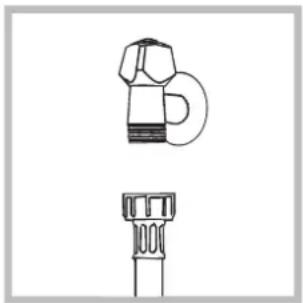
- CbpxKeTe 3axpaHbuaaMapkyu, KaTo rO 3aBnTe KbM KpaHa 3a CTyDeHaTbOa c HakpaHnK c ra3oBa pe36a 3/4 (BuX fuaypama). IpeNi Da ro CbpxKeTe, n3TOueTe BOdaT, DOkato ce n36nCTpn.
-
CbpxkTe Mapkya 3a CTydeHaTa BOda KbM nepalnHaTa MaunHa, KAto rO 3aBnTe KbM cneuaJIHna Uyep, pa3noJoxKeH OT 3aHaTa cTpaHa, rope BdRCHO (6xK fuazpama).
-
Bhimaba Te Mapkya da He ce nperebba n npitnca.
!HaIraHToNo BOOnpOBoHaTa MPexa Tpr6Ba da 6bDe B rpaHnUte, yka3aHN B TabInuata „TexHnueckn daHHN" (ek. cIeDeauama cmpaHuua).
!AkoIbJIkHnHaTaHa3axpaHbuaaMa Mapkyu He e DOctaTbUHa, Ce 06bpHeTe KbM CneuaHn3npaH Mara3nH ININ KBM OTOpu3npaH TexHNK.
!HnKora He n3noJ3BaIe Beue yNoTpe6aBaH Mapkyu.
!N3noJ3BaIe Te3n, KOEtO ca DoCTaBeHc nepaJIHaTaMaUNHa.
Cbpb3BaHe Ha Mapkya 3a Mpbchata Boda
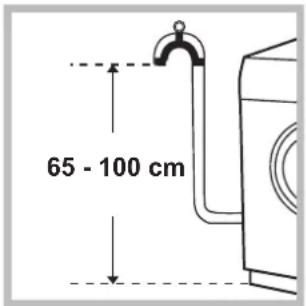
CbpxTe Mapkyua 3a
Mpchata BODa,6e3
da ro npereBbaTe, KbM
KaHaHn3aunOHnTa Tpb6a
nNkMb Tpb6aTa 3a
OTBeXdAHe B CteHata,
pa3noJoxEH Ha BnCOUHa
MeJy 65 n 100 cm ot
nOda, nI r o noDnpTe
Ha p6a Ha MNBkata nNBAhata,
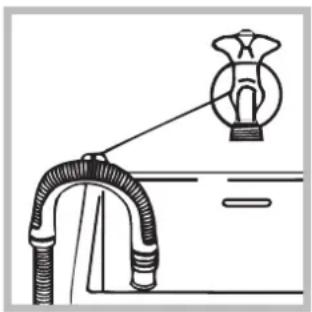
Cbbp3BaMKnIOCTaBeHnB OdauchKbM KpaHa (6x. auypama). Cbo6oHnrt KaHnMaKpya 3aMpchata B0a He Tpr6BaDa 6bnde NOTOEN BBBOdaTa.
!He ce npenopbUba n3noJ3BaHepTo Ha ydbJxKntEnHn Mapkyu.Ako e Heo6xOIMO,ydbJxKnteT rpa6Ba Da HMa CbIa NJaMaTeBp KaTO opINHaJIHnI Na He HauBnIaaba 150 cm.
Cbbp3BaHe KbEm eJEnKtpnueckaTa Mpeka
Ppei Da CbbpkeTe uencela B KOHTaKta, npoBepeTe daH:
- KOHTaKTbTe 3a3EmeH CbflaCHO DeiCTBaIuTe CTaHdapTn;
- KOHTaKTbT MoKe Da NoeMe MaKcImaJIHaTa MoUHocT Ha HATOBaBaHe Ha MaUNHaTa, yKa3aHa B Ta6NtcaTa C TexHnuecknTe daHHn (euk cneDbauama cmpaHuua);
3axpaHbaUTo HAnpExeHne eB rpaHnUte Ha yKa3aHOTo B Ta6Ntata C TexHnuecknte daHHn (6ux cneDeauama cmpaHuza); - KOHTaKTbT OTROBapra Ha ⅢeNcena Ha nepaHaTa MaunHa. B npotuBeH cnyaH 3ameHeTe ⅢeNceLa nnn KOHTaTa.
!NepaHaTaMaunHaHe CeMOHTnpaHaOTKpnto,DOpn NOHaBec,3aOToE MHOrO ONaCHO DaCe OCTaBN Ha BInraHneTO HaatMocepHNte yCIOBn.
!3aMOHTnpaHaTa nepaHa MaunHa eNeKtpnuecknT KOHTaKT Tp8Ba Da 6bDe NecHO DocTbneH.
!He n3noJI3BaIte ydbJnxHtEnn nn pa3KnOHHTeIN.
!Ka6enbT He Tp8Ba da 6bJe orbHaT nnCnneckaH.
!3axpaHbauT Ka6eI Tp8Ba Da ce IOpMeHa cAmO OT OToPn3npaHn TexHn.
BHHMaHHe!ΦnMaTAt OTXbPnB CBAKAKBa OTROBOPHOCT B CInyAnTe, B KOnTo Te3n HOpMn He Ce Cna3BaT.
PbBo npaHe
Cnei HnctaInpaHe n npdeu ynoTpe6a BKnHouTe eDInuKbJHa n3npaHe c nepuJeH npenapat, Ho 6e3 dpexn,3aDaBaKn nporpama 3.
| TexhneyeCKn DaHn | |
| Moden IWE 71451 | |
| Раимери ширINA 59,5 cm ВисочINA 85 cm ДылбочINA 53,5 cm | |
| Вмесимост от 1 до 7 кг. | |
| Ельстрическ Зхранвае Вих табелкatinga c харakтөрүстIKEITE, поставенHa maшинота | |
| Зхранвае с вoda м akсимално налагане 1 MPa (10 b mнимално налагане 0,05 MPa (0, obem на kaазана 52 litра | |
| СкорOST на цentroфугата до 1400 оборotinga/MinHyta | |
| Пэрогами за пэрөрара съласно Perлamentu рогогама 3a памук рп 60 °C. № 1061/2010 и № 1015/2010 на рогогама Комисята рогогама 4; стадерты погогама за памук рп 40 °C. | |
| CE 图 | Пэралната машина сьоветCTBA на следнице Еврегийскпдіректув: - 2004/108/CE (эа е leukтөрмагнITHа съвмостимост) - 2006/95/CE (эа Ниско напlexени) - 2002/96/CE |
Описné на перална машина

Ta6no 3a ynpabJeHne
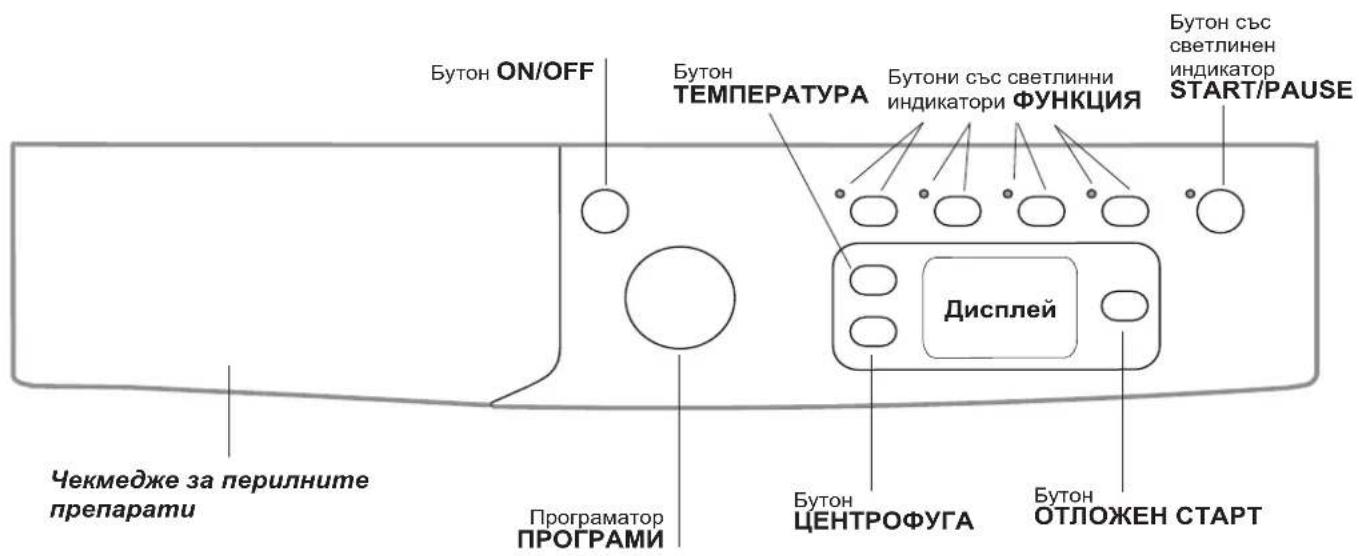
Yekmedxe 3a nepunHume npenapamu: 3a no3npaHe Ha nepuHnTe npenapatn u do6abKnte (ex. "PepunHu npenapamu u dpexu 3a npane).
Blytoh ON/OFFHaTnchete 3a KpaTko 6yToHa 3a BkIIOUBAHe n I3KIOUBAHe Ha nepaHtA MaunHa. CBeTIINHHrT INDkaTOp START/PAUSE, KOITo 6abHO Mrra B 3eJeHo, NOKa3Ba, Ye nepaHtA MaunHa e BkIOUeHa. 3a Da yracnte nepaHtA MaunHa no BpeMe Ha npaHe, e Heo6xOdmo Da HATnCHete 6yToHa No-DbIro BpeMe - Okono 3 cek. KpaTko HnCnyaHn HAtnCKaHe HMa Da DoBede Do cnnpaHe Ha MaunHaTa. N3KIOUBAHeTo Ha nepaHrTa no BpeMe Ha 3anOuHaNo Beue npaHe ro anynpa.
Iporpamatop IPOPAMN: 3a 3aabaHe Ha nporpaMnte.
No BpeMe Ha n3nBHeHne Ha nporpaMaTa KIOUbT
ocTaba HEnoDbXKeH.
EbytoHcBcCBETnHHN INHdkaTopn FyHKU:3a ceJeKtnpaHe Ha Bb3MOxHNte FyHKuN. CBetnHHNRT INHdkaTop 3a n36paHaTa FyHKuN ue npoDbJnx da CBETn.
Ebyon CEHTPOFOHaTnChTe,3a Da HamaHnTe IINN3KIIIOHTe HanbJIHO CEHTPOOpyrata-CTOHOCTTa ce NOKa3Ba Ha DnCnner.
Бутон TEMNEPATYPaHaTnchete,3aДаHamanite HIN N3KJIIOHTe" TemnepaTypata; cToHOCCTTa ce 1306pa3raBa Ha nCnner.
BytOH OTIOXEH CTAPTHaTnCHete,3a Da 3aadaTe OTIOXeH CTapHaN3paHaTa nporpama. BpeMeTo ce noka3Ba Ha dncnne.
ByToH CbC CBtIINHeH INDkATOp START/PAPSE :Korato 3eJIeHNr INDkATOp Mna6abHo, HATnCHte 6yToHa, 3a Da CTapTnpate npaHTo. Pn 3aNoUHaI cIKbl Ha npaHe INDkATOpBcBTn HENpeKBchAto. 3a Da HAnpABNT nay3a npn npaHTo, HATnCHte OTHOB6yToHa.CBtJINHHNr INDkATOp Mna B opaHKeBO.AKO CmMBOJIbT He CBtN, JIOKbT MoKe Da ce OTBOpN. 3a npoDbJIxBaAHe Ha zIKbJa npaHe OT MAcTOTO,B KOEt o 6nI pKeBchat, HATnCHte OTHOB6yToHa.
PeknHa stand by
B cboTBeCTBnE C HOBnTe HOpMaTnBn 3a NecTeHe
Ha eHepnra Ta3n nepaHa MaunHa e Cha6deHa Cbc
CnCTema 3a ABTomaTHUHO N3KNIOuBaHe (stand by), KoTo
ce 3aJeIcTBa CneD 30 MNHyTN B CnyuaN, Ye MaunHaTa
He ce n3NoJ3Ba. Hatnche 3a Kpatko 6yToH ON/OFF n
n3yaKaIte MaunHaT a Da ce 3aJeIcTBA OTHBO.
Pompe6NeHue e pexum,Off" (V3Kn.): 1 W
Pompe6NeHue e pexum,On" (Bkn.) 1 W
Ducnnne
BG
Icnptnert cny3a nporpamnpaHe na nepanHa MaunHa n daBa donbJIHnteHa HOpmauia.
B cektop A ue ce n3o6pa3n npodbIjnxTeHNOCTTa Ha nporpamnte, a npn nychat B deNCTBne uKkbl Noka3Ba BpeMeTo, KOeTO octaba do 3aBbpwbaHeTo My; B cnlya, ye e 6nlo 3aadaheo OTIOXKEH CTAPT noka3Ba BpeMeTo, ocTabaio Do BKIOUbaHe Ha n36paHaTApnporpama. CbIo TaKa C HATNCKaHe Ha CbOTBeTHnB 6yToH ce n3o6pa3raBat MAKCIMANHTE CTOHCTNa CKOPocTTa Ha ueHTPOpyrata" n Ha ,Tempepatpata", KOnTO MaunHaTAMOKe da ocBseCTBn npn 3aadaenHATA nporpama.
B cektop B 1e ce n3o6pa3rT ,fa3nte Ha npaHe", npedBndeHn 3a n36paHn ynkbl, a npn BkIIOueHa nporpama ce noka3Ba Tekyuata ,fa3a Ha npaHe".
8 Ppahe
N3nJaKaBaHe
LcHTpopyra
13TOBaHe Ha BOaTa
B cektop C ca npedctabeHn, kaTo ce 3anoHne OTrope HaDony, cbOTBeTHnte IKOHn 3a ,TemnpaTypa" O, 3a ,OtloXeH CTapT" 3a ,ueHTpoDpyra".
CBeTeuHT CmBOJIOka3Ba, Ye Ha NcNlner ce H3O6pa3Ra CToHocTTHa 3aJaDeHaTa ,TeMnepaTpa".
CBeteunrT CMBON 1oka3Ba, ye e 3aanaen ,OTnoxhen CTapT".
CBeTeuHT CmBOJ Oka3Ba, Ye Ha DnCnJe Ce N3o6pa3ra B cToHocTt Ha 3aJaDeHaTa ,eHTpofoya"
CNMBON3a6nOKpaHIOK
CBeTeUHT CnB0N noka3Ba, Ye IIOKbT e 6IokpHa. 3a n36yRbaHe Ha UeTu Tpr6Ba Da n3yakate CnB0NbT da yraChe, npdi Da OTbOpTe IIOKa.
3a da OTbOpHTe IIOKA no BpeMe Ha zIKbJn Ha npaHe, HATNCHeTe 6yToHa START/PAUSE. Ako CmBOnbT BLOKINPAH JIOK He CBETn, Ue 6bDe Bb3MOxHO da OTbOpHTe BpataTa.
3a6eEka: aKeA kTNbHa cyHKunra OTIOXEH CTAPT, JIOKbT He MoKe da ce OTBOpn. 3a da ro OTBOpnte, nocTabete MaunHata B peKIM Ha nay3a, KaTo HATcHete 6yToHa START/PAUSE.
Kak ce n3BbPwBa eINH cIKbJI Ha npaHe
- BKJIIOUOBAHE HA NEPAJIHRA. HaTnCHeTe 6yToHa CBeTINHHNt INDnKaTOp START/PAUSE mna 6abHO B 3eJeHo.
2.3APEKDAHE HA DPEXNTE 3A IPAHE. OTBOPeTe BpataHa NIOKA. 3apeTe dpexnte 3a npaHe, KaTO BHIMBaTe Da He npeBUNTE KOINueCTBOTo Ha 3apeJdaHe, nocOeHO TBabLIuTaTc nporpaMnte Ha CJIeDbaUcaTc TpaHua. - IO3NPAHE HA IEPUNHINI INPENAPAT. IN3BaIeTe YekMeJxKeTo N 13CnInTe IepunHINI INpEnapat B CneuJaHInTe BaHNUK, KaKTo e O6raChEHO B "IepunHu npenapamu u dpexu 3a IpaHe".
4.3ATBAPRHE HA JIOKA.
5.ИЗБИРАЕHAПОГРAMATA.3aДаиTe ЖеланетапограмасКлючAPОPGPAMN,КояTo e CBbрзансOnpeДeЛeHa TemпepаТураиСКорocT HaцHTpoФуraТ,КоITO MoRТДа ce npOMeHrt.Ha ДиСплЯсе ИЗБбр3ЯВApOДьЛжИтELHOCCTTa Ha UKNblaHa паHe.
6.3ADABAHHE HA NAPAMETPTE HA LUKbJIA HA IPAHE.HaTNCHTe CBTBETHte 6yTOH:

IpomHa Ha TemnepaTpa n/nnuJeHTpoyraTa.
MaunHaata ABtOMaTHNO n3nncBa MaKcMaHnHTe TemnepaTpa nCKoPocT Ha CEHTPOpyuipa, KOINTO Ca npEaBnDEHn 3a 3aAedeHATA npOrpama Hnn NocneHNO n3bpaHnTe TaKnBa NapameTpnu, aKO ca CbBMeCTMmC TOKy-uo n3bpaHATA npOrpama.C HAtNcKaHe Ha 6yToH pOrpeCNBHO ce HaMaJraBA TEMnepaTpya Do npaHe Ha CTyDeHo "OFF". C HAtNcKaHe Ha 6yToH pOrpeCNBHO ce HaMaJraBA ueHTPOpyrata Do nblhoto n3KnIouBahe "OFF". PocNeDbauTo HaNTckaHe Ha 6yToHte Bpbua CTOnHOCTNE Ha MaKcMaHnHO npEbnDehnTe.

3aDaBaHe Ha OTIOKeH CTapT.
3a 3aabahe Ha OTNOXeH CTapHa N36paHata
Iporpama, HATNCHE Te CbOTBeTHn8 6yTOH Do
IOCTnraHe Ha XeNaHTo BpeMe. Korato Ta3n PhyHKun
e AKTNBHa, Ha DNcNPeCe NOBRABa CNMBOJbT 8a
OTka3 OT OTNOXeH CTapHa TnCHTe 6yToHa, DOkato Ha
dncnpee Ce noBn HAdnC OFF.
Eco Time Energia Hua
XapaKTepeNCTNKITEHaUNKBJIa.
- HatncheTe 6yToHa, 3a daakTNBnpaTe cyHKnraTa - cboTBETHnT INnKATOp 3a 6yToHa CBETBa.
- HatncheTe OTHOBO 6yToHa, 3a Da DeakTNBnpaTe yHKUraTa -CBETINHHNt INHnKaTOp YracBa.
!Ako n36paHaTaФyHKnIg He e cBbMeCTMa cbc 3aJaDeHaTa npOrpama,CBeTINHHrT INHdkaTop 3anOvBa da Mura nФyHKnIgTa HMa Da ce AKTNBIPA.
!Ako n36paHata cyHKnna He e cBbMeCTmMa cpyra npedBaPnteHNo 3aJaDeHa, CBETINHHNRT INHnKaTOp, CbOTBeTcTBaH Ha NpBbATA n36paHa cyHKnna, Mira n Ce AKTNbnpa cMo BTOpTa, KATO INHnKaTOpbT Ha AKTNbnpaHaTa cyHKnna CBETBa.
ΦyHKUInTe MOraT Da npOMEHr npenOpbHTeHOTOKoJIuYeCTBO Ha 3apeKdahe n/nnIINpOdbJKNTEJIHOCTTa Ha cIKbJa.
7. CTAPTINPAHE HA IPOPGAMATA. HaTnCHete 6byToHa START/PAUSE. CbOTBETnHT INHnKATOp 3aOnoYBa Da CBeTHn HENpeKbCnA To B 3eJeHO N JIOKbT Ce 6NoKnpa (CmBOJbT BLOKnPAH JIOK CBeTI). 3a Da CMeHnTe npOrpaMaTa, DOKaTO eDHN ZKbI e B DeiCTBne, NoCTaBeTe nepaHnTa MaunHa B pexHM Ha nay3a, HaTnCKaKn 6byToHa START/PAUSE (CBetTnHHnT INDnKaTOp START/PAUSE 3anOyBa 6abHo Da MnRa B opaHKeBO), cNeD KoETo n36epTe JeenAHn YIKbN n HaTnCHete OTHOBo 6byToHa START/ PAUSE.
3a da OTbOpHTe JIOKa NO BpeMe Ha ZIKbHa IpaHe, HATNCHEte 6yToHa START/PAUSE. Ako CmBONbT BLOKINPAH JIOK He CBETn, Ue 6bDe BB3MOXHO da OTbOpHTe BpataTa. HATNCHEte OTHOB 6yToHa START/ PAUSE, 3a Da npOblnKn IpOrpaMaTa OT MxCTOTO, B KOEt e 6nna npekbchata.
8. KPAH HA IPOPAMATA. Yka3Ba ce OT HaIINca "END" Bbpxy DnCnpe N KOraTO CnMBoJbT 3a BLOKIPAH JIOK Ayache, JIOKbT MoKe Ja ce otBopn. OTBopTe JIOKa, INBaJe Te npaHeTo n IN3KnIOye nepaJIHraTa.
!Ako jenaete da aHynipate Beue cTaptnpaHnueKbJ, HATNCHETe npoDbjKnteJIHO 6yToHa LcKbJbT cnnpa n nepaHnata MaunHa ce n3KnOuBa.
Ta6JIuca c nporpamnte
| Погама | Опсане на порамата | Мас. temпорату (℃) | Мас. Скорост (оборот ь минут) | Поглел палу рache | Ов( палу | О: м: х: г: х х х х х х х х х х х х х х х х х х х х х х х х х х х х х х х х х х х х х х х х х х х х х х х х х х х | 34e: х: х х х х х х х х х х х х х х х х х х х х х х х х х х х х х х х х х х х х х х х х х х х х х х х х х x x x x x x x x x x x x x x x x x x x x x x x x x x x x x x x x x x x x x x x x x x x x x x x x x x х х х х х х х х х х х х х х х х х х х х х х х х х х х х х х х х х х х х х х х х х х х х х х х х х x | ||||
| Погама за вescидан(Daily) | |||||||||||
| 1 | ПAMDYK "Праздра:" : Бели, Излоччтелно замьрсян. | 90° 1400 | ● | ● | ● | 753 | 2,21 | 781 | 70' | ||
| 2 | ПAMDYK:Бели,Излоччтелно замьрсян. | 90° 1400 - | ● | ● | 753 | 2,16 | 721 | 60' | |||
| 3 | Стодарта на порама за поу 60°C (1):Бели И сztетни, усточни, сизни Замьбен40° - | ● | ● | 753 | 1,23 | 581 | 95' | ||||
| 4 | Стодарта на порама за поу 40°C (2):Бели И сztетни, несточни, малик Замьбен40° - | ● | ● | 753 | 0,99 | 821 | 90' | ||||
| 5 | ПAMDYK-ЦВETHN:Бели, Малик замьрсян, И сztетни, несточни, mалин Замьр? 40° 1400 - | ● | ● | 753 | 0,66 | 5490 | 90' | ||||
| 6 | СИHTETMчH:ЦВETHN:Усточни, усточни, сизни Замьрсян. | 60° 800 - | ● | ● | 344 | 0,93 | 471 | 10' | |||
| 6 | СИHTETMчH (3):ЦВETHN:Усточни, малик замьрсян. | 40° 800 - | ● | ● | 344 | 0,57 | 4695 | ||||
| 7 | Стодарта на порама за поу 20°C:Бели И сztетни, несточни, малик зamьр? 2001400 - | ● | ● | 7 | -- | - | 170' | ||||
| Спесадны порама(Special) | |||||||||||
| 8 | Вылини ТьКAH:Зы Вын, Кашимир и.T.H. | 40° 800 - | ● | ● | 1,5 | -- | 70' | ||||
| 9 | Кошина/ПERSETA:Зы духи OT кошина, Вискоа, Фино belfo. | 30° 0 | - | ● | ● | 1 | -- | - | 55' | ||
| 10 | JEANS | 40° 800 - | ● | ● | 3,5 | -- | 70' | ||||
| 11 | OUTWEAR | 30° 400 - | ● | - | 2 | - | - | 60' | |||
| Sport | |||||||||||
| 12 | Sport Intensive | 30° 600 - | ● | ● | 2,5 | -- | 85' | ||||
| 13 | Sport Light | 30° 600 - | ● | ● | 2,5 | -- | 60' | ||||
| 14 | Sport Shoes | 30° 600 - | ● | ● | (maks.2 ч): Ф: Ф: Ф: Ф: Ф: Ф: Ф: Ф: Ф: Ф: Ф: Ф: Ф: Ф: Ф: Ф: Ф: Ф: Ф: Ф: Ф: Ф: Ф: Ф: Ф: Ф: Ф: Ф: Ф: Ф: Ф: Ф: Ф: Ф: Ф: Ф: Ф: Ф: Ф: Ф: Ф: Ф: Ф: Ф: Ф: Ф: Ф: Ф: Ф: Ф: Ф Ф Ф Ф Ф Ф Ф Ф Ф Ф Ф Ф Ф Ф Ф Ф Ф Ф Ф Ф Ф Ф Ф Ф Ф Ф Ф Ф Ф Ф Ф Ф Ф Ф Ф Ф Ф Ф Ф Ф Ф Ф Ф Ф Ф Ф Ф Ф Ф Ф Ф | - | - | - | 60' | ||
| Чашины порама | |||||||||||
| 85 | ИзлakBAHE | - | 1400 - | - | ● | 7 | -- | - | 36' | ||
| 95 | ZEHTPOФУГA + ИЗПOMПВАЕ | - | 1400 - | - | - | 7 | - | - | 16' | ||
PnoBnJumHemOnmHa n uKbIa, noKa3aHa n duCnnne Uu npocHe o pKoOcmeO, e npuBnImeHn 3uchena h b3 ocHoeA ha cMaHdapmHume PeanHomo epemMpaHe me Da aepura e 3auucmcm om MNoKeceMe o kAmo Mempepma u Hanae Ha eoda mpu npblhene MemnpemaHa n E3dyxa e nomue Heuemo, konuiecemBo nepunen npenapam, konuiecem, uud u meho Na papaHono DOnblumEno u36paHou onuua.
1)Поррама за поровера съглес стандт 2010/1061:задаite поррама 3 с temпатура 60°C.
Tou kbnu o odxohu 3a nphe a namyuH, hopmno 3ambpcenu bkaH u e ha-eekmuueo 2n0eHa mOka Ha KOM6hupan pa3xo 1 H eepua o oda, noxdohu e 3a dpexu, KoUMo MoAm da ce npam 60°C.
2) Iporpama 3a npoBepka cBrrnacHo cTanhaprt 2010/1061:3aadte nporpama 4 c tempepatya 40^
To3u zukbn e noxdoxoay, 3a npane Ha namyuHn, HopMaHNo 3ambpceHu mkaHn u e Hau-epekmuehen om 2neHa moKa Ha KOMbuHpaH pa3xOd Ha ehepuu u boda, noxdoxoay, e 3a dpexu, koumo mosam da ce nepam Ha 40^
3a BCnUck Test Institutes:
2)Дьлга nporpama 3a namyk;ЗадаутnporpaMA 4 c Tempepatya 40^
3)Дьлга nporpama 3a CnHTeTnHn;ЗадаTe nporpama 6 c TempepaTypa 40°C.
Функции 3a npaHe
EcoTime
Cn36npaHTo Ha Ta3n OOnn MExAHnHTe DnBxKeHH, TempepaTpata N BODaTA ca ONTmN3npaHH 3a npaHe C HamaJeHO 3apeJaHa NEKo 3AmbpcEH nAMyHH nCINTEuHH dpexn (Bux ,TabNuca c npoapumme).EeTwOke da ce nepe 3a No-KpAko BpeMe, C HamaHe pa3XoH Ha BODa n EhePnJr. PpenopbYBa ce Da ce HnON3BA Do3a Tehen nepInen npenapat, noXdoJIua 3a KOINueCTBOTo Ha 3apeHH TOBap.
He moje da ce akTbnpa c nporpaMTe, 2, 7, 8, 9, 10, 11, 12, 13, 14,
Energy Saver
ФункяпаEnonpinnac3a orpaHnUbaHe pa3xoJaHa eNEKtpoeHepn, kato He noDprBa BOdaT, m3non3BaHa 3a nMBAHe Ha bapaBHa - npEIMCTBO 3a OKONHa T cpea N 3a CmTKata 3a eNEKtpoeHepn. Ha npAknka noO6peHaTa pa6oTa n ONtHMnIrpAHnT pa3XoJ Ha BOda rapaHTnpat OTJNUHn pe3yTTaTn 3a cbuata CpeHa npOdbJnxITeINHOCT Ha CTaNapTTHN qKbLn Ha n3nnpaHe. 3a noCturaHe Ha no-dobpn pe3yTTaTn n3noL3BaIte TeueH nepiIne npenapat.
!He moke da ce aKTHBnpa c nporpM8,9,12,13,14


DonbHnHTeHNO n3nnakBaHe
Cn36bopaHa Ta3n OOnuCe yBeInuYabe eFmKacHocCTTa Ha n3nnakBaHeTo N Ce rapaHTnpa MAKcMajHO OTCTpaHraBaHe Ha nepnHn npenapat. IOnxOJa a 3a OcObeHo yBCTBntEnHa KbM nepNJHn npenapatN KOxa.
He moke da ce akTubipa c nporpaMT

Jiecho rnaede He
Pn n36b0p Ha Ta3n FynKnI npaHTo n cHTPOpynpaHTo 9e Ce
n3MeHr TceNcBObpa3HO, Taka Ye da Ce HamaNJ Oba3yBaHTo
Ha TbHKn. Pn3 ZabBpWBae Ha zKbJa nepaHnTa npaBN 6abHN
3abBpTnHa Ha bapa6aHa; CBeTOINDnKATOpBT Ha ONuYTA
JIECHO IJADHE n Ta3n Ha NYCK/AY3A 9e npmIRBAT
(1pbBata-3eNEHO, BTOPAta - opaHKeBO). 3a 3abBpWBae Ha
zKbJa Tpr6Ba Da ce HAtnc He 6yTOH CTAPT/AY3A uNn 6yTOH
JIECHO IJADHE. B nporpaMaTa 9,11 MaunHATA ue npNKIOU
zKbJa C hAKNCato npanE, CneJeunr HnDKaTOp Ha FyHKnra
JIECHO IJADHE. H a CTAPT/AY3A 9e CBeTc mMraa
CBETnHa (B opaHKeB cBrt) nFa3ata "N3IIAKBAHE" 9e
OCTaHe Da CBTe N C NOCToRnHa CBETnHa. 3a Da ce INTOU BODATA
In Da MoKe Da ce IN3BaDN pnaHTo, E Heo6xOAnMo Da CE HA tnc He
6yTOH CTAPT/AY3A uNn 6yTOH JIECHO IJADHE.
! He MoKe Da ce AKTNbIPA c nporpaMnt8, 12, 13, 14,
Переньпpenapatи npexn 3a npaHe
BG
YeKeMeJxke 3a nepnHnTe npenapatn
Iobprr pe3yntat OT npaHTo 3aBnCn IOT npaBnHToTdo3npaHe Ha nepiHnTe npenapatn. C npedo3npaHe He ce nepe no-eFnkacHo, a TOBa BOnD IO TnaraHe Ha HaNenIO BbTpewHaTa CTpaHa Ha nepaHnTa MaunHa N Do 3ambpcaBaHe Ha OKJHnTa Cpea.
He n3no3BaIte npenapatn 3a pBHyo npaHe, 3aIoTO o6pa3yBaT MHO rHa.
!N3no3BaTe npaxoo6pa3Hn nepuHn npenapatn 3a 6eHn naMyuHn TbKaHn 3a npednpaHe n 3a npaHe npu TemnepaTypa Hnd 60^
!YBepTe Ce, Ye CJIeIbTaYe kA3aHnIaTaNOCOueHIN Bbpxy onakOBkata Ha nepuHnI npenapat.
I3TeTne TeekMeJKeTo 3a nepuHnTe npenapatn u n3CInTe npaxa 3a npahe n DoJIHnTe npenapatn no CLeDnHaun.
OTeJenHe 1: Ppenapat 3a npednpahe (Ha npax) OTeJenHe 2: Ppenapat 3a npahe (Ha npax nIn TeueH)
TeuHnT npenapat ce n3cunBa npeIN BkJIouyBaHeTo Ha MaunHaTa.
OTdeneHne 3: DonbHnTeHH npenapatn (omeKoHTeN np
OmeKOTeIaT He Tp8Ba Da n3JIn3a n3BbH peWetKaTa.
IodrotBHe Ha npaHTo
Pa3npedeeneI npaHeTo cbo6pa3Ho:
-TINa HA TbKaHHTe/CnMbOJa Bbpxy eTtKeTa.
- CBETOBeTe: OTdEJIeTe CBETHIeOT 6eJIte DpexN.
- Ⅰзпраэне TeДжхобовete И npоверетe konчета.Ta.
He naBnBaBnte yka3aHnTe cToHocTn B, Ta6nuca c npoaspamume" OTHacuCi 3a TerIto Ha cyxoto npahe.
KoJIko TeKgat dpexnte 3a npane?
1 cepa400-500r
1 KaJIbΦka 150-200r
1 noKpmbka 400-500 r
1 xabn900-1200r
1 Kbpna 150-250 r
Cneunuynn nporpamn
CTaHdapTHa nporpama 3a naMyk npn 20^ (nporpama
7) e nideaHa 3a 3ambpcHe npaHe OT naMyHa TbKaH. Do6pnte pe3yIaTn BkIIOHTeJIHO npn I3npaHe CbC CTydeHa BOa, B cpaBHeHne C Te3n CTeJ npaHe npn 40^ ca rapaHTnpaHI OT MExaHNUHO DeIcTBNE C npOMraHa Ha CKOpocCTTa, MHOrOKpaTHO N YecTo DOCTnRaUo Do NIKOBN CTOnHOCTn.
BbJIHeHn TbKaHn: C nporpama 8 e Bb3MOxHO da ce nepaT B nepaHn BcKaKBN BblHeHn Dpexn, CbIo N Te3n C eTNkET "camo 3a pbuHo npaHn 3a noCTnraHe Ha No-dOpn
pe3yIITaTn 3nON3BaIte CneuIaNen NepIneN npenapat n He NaDbWbAaIte 1,5 kg npahe.
KoPnHa: n3non3BaIte CneuHaHATA nporpama 9 3a npaHe Ha BCNUKn dpexn OT KOnpHa. 3a DeNkATHnTe TBKaHN Ce npenopbUva n3noJ3BaHeTo Ha CneuaJIe HnD nepnIne npenapaT.
Nepdeta: npenopbUba ce da ce cBHaT nNoCTaBt B
IOCTaBeHATA Top6uKa. N3non3BaIte nporpama 9.
Jeans: npedn panae obbpheTe dpexnte n3non3BaIte
cAmo Teueh nepunen npenapaT. N3non3BaIte nporpama 10.
Outwear (nporpma 11) e pa3pa6oTeHa 3a npaHe Ha BODOHENPOMOKAeMn TBKaHN I rpeKn (np. ropeTeKc, NOIneCTep, NaIOH); 3a noCTuRHe Ha no-Do6pn pe3yNTaTn N3noN3BaIne TeUHN nepuHN npenapATn B Do3a, NoDxOJaua 3a NoONBn 3apeXdane; npeDbapntJHO o6pa6oTeTe MaHWeTNe, JaTE He NTHaTa; He N3NoN3BaIne OMeKOTeJI INI npEINH npenapATn C OMeKOTeJI. C ma3u npoapama He Mozam da ce nepam Jkema nbHEnHu c nyx.
Sport Intensive (nporpama 12) pa3pa6oTeHa e 3a npaHe Ha TbKaHn Ha cnIHO 3ambpceHn cnpTHn dpexn (aHcy3n, naHTaIOHn, dp.); 3a noCTnrahe Ha no-Do6pn pe3yIITaTn ce npenopbYBa Da He Ce HaNBIuaba MaKcImaHnTO HATOBapBaHe, yka3aHo B tabNucaTa, TaBnuca c npoapumme".
Sport Light (nporpama 13) pa3pa6oTeHa e 3a npaHe Ha TbKaHn Ha neko 3ambpceHo cnpTHO o6neKNo (aHcy3n, NaHTaJIOHn, dp.); 3a noCTnHa He no-do6pn pe3yIITaTn Ce npenopbYBa Da He ce HAdBnUba MaKcImMaHOTo HATOBapBaHe, yka3aHO B, Ta6Nuca c npo2pAmume".
PnpopbUba ce da ce n3non3Ba TeueH nepuJeH npenapat B IO3a, noXoJa7a 3a noJIOBn 3apeKdaHe.
Sport Shoes (nporpma 14) pa3pa6oTeHa e 3a npaHe Ha cnOpTHN o6yBKn; 3a nocTnraHe Ha no-Do6pn pe3yntTaTn da He ce nepaT nobuee ot 2 uHΦTa.
CnCTema 3a n3MepBaHe Ha ToBapa
PpeiBcRAO cHTPOOyIpaHe, C cEN n368rBaHe Ha npekaJIeHn B6paunu 3a paBHOmeHPO pa3npedeJHHe Ha TObapa, 6apabAHt ce 3aBbPaTc MaIKo NO-BvCoka OT Ta3n npn npaHTo CKoPoCT. Ako cNeH HApBaEHte NocJeIOBaTeHNn ONNT TOBAPbT BCE OUe He e nepFeKTHO pa3npedeJHn, MaUNHaTa N3BbPbWA CEHTPOOyIpaHne npn ckopoCT, No-HNcKa OT npedBnDEHATA. PnH aINuue Ha npkaen De6aJHcnpaHepaHra T3BbPbWA pa3npedeJHHeTO BMeCTO ueHTPOOyrata. 3a yNEChraBaHe Ha no-dOpoto pa3npedeJHne Ha TObapa H npaBnHTo My 6aJANHCpHaHe ce npenOpbYBa da ce cmecBat dpexn 3a npaHe c rOIeMn MAnKn pa3Mepn.
!IepaHaTaMaunHae npoeKtnpaHa n npo3BeDeHa B CbOTBcTCTBnC MExdyHapOHNTE HOpMn 3a 6e0nacHocT. PpeDynpexkdeHnra Tk Ca npoNkTyBaHn no npuHHn 3a 6e0nacHoCT N Tp8Ba da ce yeTaT BHMaTeJHo.
O6u npdeoxpaHnTeHn Mepkn
To3n ypeE npedHa3HaeH n3KnOHTeHNO 3a DOMaUHa ynoTpe6a.
- YpebT He Tp6Ba Da ce n3non3Ba OTnua (BKNIOHTeJIHO Deca) C ORPAHNeH cN3NUeCKN, CETNBHN IIN yMCTBEHN CNOC6HOCTN HEDOCTaTBueH ONIT, OCBEN AKO TOBA He CTABA NOI Ha6NJIOHeHNETo NN No yKa3aHaNA Ta Hnue, OTROBAPrso 3a TExHata 6e3onachocT. Ha6NJIOdaBaTe Deuata, 3a da CE yBepnte, ye He cn irpaTc ypeDa.
- IepaJIHaTa MaunHa Tp6Ba Da ce n3non3Ba cAmO OT Bb3paCTHn Xopa CbIaCHO HNCTpyKUnTe, PpeoctabeHn B Ta3n KHNKKa.
HeDOKOCBaIteMaUHHaTa,KoratoCTe6OcNnInC MOKpNnINBnAChNpBue nNkpaka.
-ИЗкlioчавайе OT KOHTaKa, KaTo XBaUaTe 3a UeNceJa, a He KaTo DbPnate Ka6eJa.
He OTBapaIte YekMeJKeTo C nepuJIHnTe npenapatn, Dokato nepaHaTa MaunHa pa60Tu.
- He doKocBaIte Mapkya 3a Mpbchata B0a, 3aOTo MoKe Da DoCTnHe BnCOKn TEMpepaTpyn.
- Hikora He OTBaprTe JIOka CbC Cnla, 3aIoTO MoKe Da Ce NOBpeDN MEXaHn3Ma 3a 6e3oNaCHOCT, KOITOn PpeDna3Ba OT CNYaHNO TBaprHe.
BcnyaHa nobpea no HkaKbB NOBOd He DoCTnraTe DO BbTpueHNTE MekaHn3Mn B ONHTa peMOHT.
BnHarnKoHTpOJIpaIte DeaTa Da He Ce IobJnxKaBaTdo pa6oTeUaTa MaunHa.
- No Bpeme Ha n3nnpaHTo NIOKbT Ce HapraBa.
-ПпемecтbaheTo Da ce N3BbPbBA BHHMaTeJH0 OTO dBama nIu Tpma duu. HnKora OT cam YOBek, 3aUOTO nepaHaTa MaunHa TeXn MHoro.
- Ppei Da 3apeIte MaunHaTa, npOBepTe daHn6apab6aHbTe npa3eH.
PeunknapaHe
- YHnIoxKaBaHe Ha onaKOBbUHm MaTePnaJI: cna3BaTEmeCTHnTE HOpMn - NO To3N HaUnn ONaKOBbUHnTMaTePnaJ MoKe Da ce peuNKJInpa.
- Ebponenckata dnpkeTbva 2002/96/CE 3a otnaBcnte OT eJektpnuecko n eJektpoHNO o6OpyBaHe npedBnxda DOMaKHNCKNTe eJektpoypedeN da He ce N3XBpIaT 3aeDHO C obuauHnTe TBpI rpaDCN OTnabu. N3BaDeHnTE OT yNoTppe6a ypeNu Tp8b6a Da 6bDat cb6upaHn OTdElnHO C ueJa 6bJeYBeJIuHcN DeJIbT Ha NDnEkaUIne Ha NOBTOPA hynTope6a N peuKInpAne MaTePnAn,OT KOnTO ca HnPaBeHn, KaTO n Da 6bDat n36ErHaTHn EBentyaHn BpeIN 3a 3dpabeTo n OKONHaTa cpeA.CmBOJbT "3aepKHATO KoUe" e NoCTaBeH VBpXy BCNUKN IpOdyTKN, 3a Da HANOMHra 3a 3aBnKInTeJHTo pa3deJHo Cb6pNahe.
3a DonbHnHTeHa HhOpMaun OTHOCH npabHnHO t
N3BaXdaHe OT ynotpe6a Ha DomaknHcKnte
eNEkTPOyPeDu, INTepeCyBaunTe Ce Morat Da ce
06bPnat KbM cnykbata 3a cbbnpaHe Ha OTnaDbuN
INN KbM dInCTpBuTyopnte.
PbUHOOTBapHeHaJIIOKa
B cnyaay e He Heb3MoXHO da ce OTbOpn BpaTaTa Ha IIOka npaDi npeKbCbaHe Ha eNEkTpUcEckaTa eHepnI INCKaTe Da npocTpeTe npaHeTo, pOueDnpaTe No CJIeDNHaHH:
1.ИЗБАДЕТЕ УПЕСЕа OT KOНТAKТа 3a eЛЕКТРИЧЕСКИ TOK.
2.yBepTe ce,Ye HNBOTo Ha BODaTb NepaHnraTe e NoHNCO OT OTBOPa Ha IIOKA; B npOTHBEN CUYaN OTCTpaHete U3JIuHATA BOda Ype3 MapKya 3a Mpbcha BOda, KaTo a cb6epeTe B Kcpa, KaKTo e NocOeyHo Hafozypa.
- cBaIeTe DoHnnaHeJI B npEHaTa Yact Ha nepaHata MaunHa C NOMOHTa Ha OTBepTKa (6K. fuaypa).
- KaTo n3NoJ3BaTe e3nueTo, nocOyeHo Ha fIpypata, DpbHHeTe HABbN DO OCBO6OxJaBaHe Ha IJIaCTMaCobn I3TeTgAAOT HeNODbVHXo NIOXKeHHe; CneD TOBa r N3dbPnaTe HaOny n EINHOBpeMeHHo C TOBa OTBopTe BpataTa.
- 3aTbopeTe OTHOBo nAHeNa, KaTo, npeDn da ro n36yTaTe KbM nepaJIHrTa, Ce yBepnte, Ye cTe NOCTaBUNI npabNJHO 3akpenBaUNTe KykN B CneuaJHInTe BOdaun.
BG
CnnpaHe Ha BOdaTa N n3KJIIOUyBaHe Ha eNeKTpO3axpaHBAHeTo
3aTbapnTe KpaHa 3a BOda CneD BcKaO n3nnpaHe.
No To3n HaunCe OpaHnUaBa N3HOCBaHTo Ha
XnPaBnUHnTa NHCTaJaCnHa Na nepaJHaTa MaUNHa N
ce OpaHnUaBa ONaCHOCTTA OT TeOBe.
- N3KIIIOUBaIte ⅢeNCEJa OT eNEKTPnueCKOTO 3axpaHbAHe, KOraTo NOuNCTBaTe nepaJIHaTa MaUHa H IO BpeMe Ha pa60Tn no NoDpBxKaTa.
NoucTbaHe Ha nepaJHaTa MaunHa
BbHnHaTa qacnt n rymeHnTe qactn Morat da ce nouchTbAT c Kbpna C xnaJaKa Boda n canyH. He n3noJ3BaIte pa3TBopnten nn a6pa3nBn npenapaTn.
IOnuCTBaHe Ha YekMeJxKeTo 3a nepuHnTe npenapatn
I3BaTeYeKMeJxKeTo C NOBdIraHe N I3TeTJIHe HABbH (BuX fuaypama). I3MnIe ro nD Teuasa Boda. Toba nouchTahe Tp6Ba da ce I3BbpUba YecTo.
PndpbkkaHaJIOKaHa6apa6aHa
OCTaBnTe JIOKa BnHaRn OTKpExHaT 3a N36rBaHe 0bpa3yBaHEnTo Ha HENpNrTHMmPn3Mn.
IepaHaTa MaunHa He Ce BKnIOyBa.
Bb3MOxHn npuHH / MepKn 3a OTCpaHRAHeTo m:
- UenceIbT He e BKJIIOUeH KbM eJekTpueckn KOHTaKT IIN He e Do6pe BKNIOUeH, 3a da npabN KOHTaKT.
- HЯmate TOK Bkbu.
UKbIbT Ha n3nnpaHe He 3anOyBa.
- JIOKbT He e 3aTBopeH Do6pe.
- ByToHbT ON/OFF He e 6nHaTncHaT.
- ByToHbT START/PAUSE He e 6nHaTncchat.
KpaHbT 3a BOda He e OTBopeH.
3aandaeho e 3a6abAHe, KOeTO ce e HacloXnIO Bbpxy BpeMeTo 3a nyckaHe.
IepaHaTa MaunHa He ce nbln c Boda (Ha dncnner Ce n3o6pa3raBa npMnRbau HaDnnc ,H2O"
MapkybT 3a CtydeHaTa BOda He e Cbbp3aH KbM KpaHa.
MapkybTe nperebHaT.
KpaHbT 3a BOda He e OTBopeH.
- Hama Boda no BOdo npoBOdHaTa Mpeka.
- HaŋraHTo e HeNoCTaTbUHO.
- ByToHbT START/PAUSE He e 6nHaTncHaT.
IepaHrTa HenpeKbCaTo ce nblnnn H3TOyBa.
MapkybT 3a Mpbchata B0da He e MOHTnpaH MeKdy 65 n 100 cm ot 3emrTa (6k. "MoHmupaHe").
KpaTHa Mapkya 3a Mpbchata B0da e NOTOEN BBB B0da (ex. "MoHmupaHe").
KaHAn3aunOHnA Ta TpbBa CTeHaTa HMa OTduWNK.
Ako cnei Te3n npOBepKn np6nembT He ce peu, 3aTBopTe KpaHa 3a BoDaTa, n3KnIOyTe nepaHATA MaunHa N No3BbHeTe B cepBu3a. AKO XINIeTO BN CE HAMIPA Ha NocNeHNITE eTxKn HA crpaDAta, HANrAHeTo Ha CTyDeHATA BOJa MOKe Da e HNCKO, NopdN KoETo nepaHATA MaunHa HENpeKbCHaTO Ce nblHn N n3ToBa. 3a n36raBeHe H ToBa HeyIo6CTBO B TbproBckaTa MpeKa ce npednaRaT NOxOJaU b3BpaTHN kanaHn.
IepaHaTa He ce n3ToyBa nn He ceHTpoCyrnpa.
- PpOrrpaMaTa He npEiBnKJa n3ToUbaHe: C HЯКо NpOrrpaMn Tpr6Ba Da ce n3BbPbUba pBuHO.
- BknueHa e fynkunra TIECHO IAAEHE: 3a 3abpwahe Ha nporpaMaTa ce Hatacka 6yToH START/PAUSE (ek. "PnozpaMu u fynkuu").
MapkybT 3a Mpbchata Boda e npntchat (ex. "MoHmupahe").
KaHAn3aunOHnTa Tpb6a e 3anyeHa.
IepaHaTa Bn6pnpa Mhoro no BpeMe Ha ueHtpofoynpahe.
-Пи мотраха баразаньт He e 6ин otлokиран правино (ж. "Mонмupahe").
- NepaJIHaTa MaUNHa He e HnBeJInpaHa (6K. "MoHmUpaHe").
- IepaHnHaMaunHa e npTINCHaTe MeKdy Me6eN nCTeHa (8x. "MoHmupaHe").
IepanHaTa mMa Teu.
MapkybT 3a cTyHeHata BOda He e IOp6pe Cbbp3aH (8x. "MoHmupaHe").
- YekmejkeTo 3a nepunHnTe npenapatn e 3anyuHeo (3a nouchTaheTo My EK. "IodpBkka u noucmbeAe).
MapkybT 3a mpbchata B0da He e pKcnpaH do6pe (xK. MoHupaHe).
CBeTINHHIne INHdNkATOpn Ha "OnuHTe" n CBeTINHHnRT INHdkaToPHa "START/PAUSE" Mrrat n DnCnpeT n3nncBa KoD 3a rpeWka (Hanp.: F-01, F-.).
- 1MnHyTa n BKNIOte OTHOBO. Ako Hn3npabHOCTTa He MoKe Da ce OTcTpaHn, NOtpce Tcnyrnte Ha CepBn3a.
06pa3yBa ce TBbpde MHoro nHa.
-Перинггпретанг He e 3a abTomatuHa nepaHa (Tp6Ba Da nMa HndnC "3a abTomatuHa nepaHa", "3a npaHe Ha pbKa n 3a abTomatuHa nepaHa" nIIN noDobEn HndnC).
-ДоЗиранetoe6NIO TBbpeг罗JЯmo.
CepBn3Ho 06cIyXBaHe
BG
Ipei Da ce CbpxKeTc TexHueckn cepBn3:
- PpOBepeTe daJIIM MoKeTe da peuHte camu npObneMa (ek. "PpObeMeu umepku 3a omcmpaHaeHaHemo um);
BknHcTe OTHOB nporpaMaTa, 3a da npoBePeTae annn Henn3npaBHOCTTa e oTcPaHeHa;
B npotnbeH cnuyaH ce o6bphTe KbM OTOpu3npaHn TExHueckn cepBn3 Ha TelefoHHn Homep, yka3aH Ha rapaHNoHHata KapTa.
!Hnkora He non3BaIte ycJyrrnte Ha HeoTOp3npaHn TEXHn.
Cbo6eTe:
TnnaHa npo6JeMa;
- MoDéJa Ha MaùnHaTa (Mod.);
- cepuHnH Homep (S/N).
T3n INHOpMaunca He HAMnpa Ha 6paHHTa Ta6eKka, pa3noJIOKeHa Ha 3aHaTa CtpaHa Ha nepaHata MaHHa N B npedHata Yact, cJe KaTO ce OTBOPN JIOKbT.

Romana
Sumar
Instalare, 74-75
Despachetare sipunere la nivel
Racorduri hidraulice si electrice
Primul ciclu de spalare
Date tehnice
RO
Descrierea masinii de spalat, 76-77
Panoul de control
Display
Cum se desfaçoarau un ciclu de spalare, 78
Programesi functii,79
Tabel de programe
Functii de spalare
IWE 71451
Detergenti rufe albe, 80
Modalitatea de stand by
Aceasta masina de spalat rufe, conform noilor norme legate de economia de current electric, este dotata cu un sistemas de oprire automat (stand-by) care intra in functiune dupa 30 minute de neutilizare. Apasati scurt tasta ON-OFF si asteptati repunerea in functiune a masinii.
Consum in off-mode: 1 W
Consum in Left-on: 1 W
Display
RO
Ecranul esteutilpentruaprogramamaşina sifaurniza numeroase informaţii.
compartment 3: Aditivi
(soluie de inmuat, balsam rufe etc.)
Solutia de inmuiat nu trebuie sa iasa deasupra gratarului.
Pregatirea rufelor
- Description of the washing machine, 4-5
- Running a wash cycle, 6
- Wash cycles and options, 7
- Detergents and laundry, 8
- IWE 71451
- Precautions and tips, 9
- Care and maintenance, 10
- Troubleshooting, 11
- Unpacking and levelling
- Unpacking
- Levelling
- Connecting the electricity and water supplies
- Connecting the water inlet hose
- Connecting the drain hose
- Electrical connections
- The first wash cycle
- Description of the washing machine
- Standby mode
- Display
- Door locked symbol
- GB
- CLOSE THE DOOR.
- Setting a delayed start.
- Eco Time Energ Modifying the cycle settings.
- Wash options
- Eco Time
- Energy Saver
- gExtra rinse
- Easy iron
- Detergent dispenser drawer
- compartment 1: Pre-wash detergent (powder) compartment 2: Detergent for the wash cycle (powder or liquid)
- compartment 3:Additives (fabric softeners, etc.)
- Preparing the laundry
- How much does your laundry weigh?
- Special wash cycles
- Load balancing system
- General safety
- Disposal
- Opening the porthole door manually
- Care and maintenance
- Cutting off the water and electricity supplies
- Cleaning the washing machine
- Cleaning the detergent dispenser drawer
- Caring for the door and drum of your appliance
- Cleaning the pump
- Checking the water inlet hose
- Problem:
- Possible causes / Solutions:
- Before calling for Assistance:
- Have the following information to hand:
- Sommaire
- Installation, 14-15
- Causes / Solutions possibles:
- Displej
- Cbbp3BaHe Ha Mapkyu Ka Bm BoDopnpoBdHaTa Mpeka
- Cbpb3BaHe Ha Mapkya 3a Mpbchata Boda
- Cbbp3BaHe KbEm eJEnKtpnueckaTa Mpeka
- PbBo npaHe
- Описné на перална машина
- Ta6no 3a ynpabJeHne
- PeknHa stand by
- Ducnnne
- CNMBON3a6nOKpaHIOK
- Kak ce n3BbPwBa eINH cIKbJI Ha npaHe
- IpomHa Ha TemnepaTpa n/nnuJeHTpoyraTa.
- 3aDaBaHe Ha OTIOKeH CTapT.
- Eco Time Energia Hua
- XapaKTepeNCTNKITEHaUNKBJIa.
- 3a BCnUck Test Institutes:
- Функции 3a npaHe
- EcoTime
- DonbHnHTeHNO n3nnakBaHe
- Jiecho rnaede He
- Переньпpenapatи npexn 3a npaHe
- BG
- YeKeMeJxke 3a nepnHnTe npenapatn
- OTeJenHe 1: Ppenapat 3a npednpahe (Ha npax) OTeJenHe 2: Ppenapat 3a npahe (Ha npax nIn TeueH)
- IodrotBHe Ha npaHTo
- KoJIko TeKgat dpexnte 3a npane?
- Cneunuynn nporpamn
- CTaHdapTHa nporpama 3a naMyk npn 20°C (nporpama
- CnCTema 3a n3MepBaHe Ha ToBapa
- O6u npdeoxpaHnTeHn Mepkn
- PeunknapaHe
- PbUHOOTBapHeHaJIIOKa
- CnnpaHe Ha BOdaTa N n3KJIIOUyBaHe Ha eNeKTpO3axpaHBAHeTo
- NoucTbaHe Ha nepaJHaTa MaunHa
- IOnuCTBaHe Ha YekMeJxKeTo 3a nepuHnTe npenapatn
- PndpbkkaHaJIOKaHa6apa6aHa
- Bb3MOxHn npuHH / MepKn 3a OTCpaHRAHeTo m:
- CepBn3Ho 06cIyXBaHe
- Ipei Da ce CbpxKeTc TexHueckn cepBn3:
- Cbo6eTe:
- Sumar
- Instalare, 74-75
- Descrierea masinii de spalat, 76-77
- Cum se desfaçoarau un ciclu de spalare, 78
- Programesi functii,79
- Detergenti rufe albe, 80
- Modalitatea de stand by
- compartment 3: Aditivi
- Pregatirea rufelor
Brand : INDESIT
Model : IWE 71451B ECO (EU)
Category : Washing machine