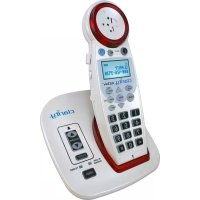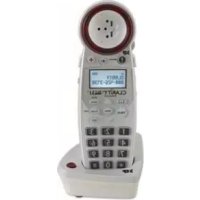
XLC3.1 - Phone Clarity - Free user manual and instructions
Find the device manual for free XLC3.1 Clarity in PDF.


| Product Type | DECT 6.0 Phone |
| Brand | Clarity |
| Model | XLC3.1 |
| Handset Dimensions (L x W x H) | 7.25 x 2 x 1.25 inches |
| Handset Weight | 0.5 lb (approx. 227 g) |
| Charger Base Dimensions (L x W x H) | 3.50 x 2.75 x 2 inches |
| Charger Base Weight | 0.5 lb |
| Handset with Base Dimensions (L x W x H) | 8 x 3.25 x 3.25 inches |
| Handset with Base Weight | 1.10 lb |
| Frequency | 1.9 GHz DECT 6.0 |
| Maximum Amplification | 50 dB |
| Power Supply | AC Adapter (Input 100-240 V AC) |
| Battery Type | 1.2 V 600 mAh Ni-MH |
| Talk Time | 6.5 hours |
| Standby Time | 130 hours |
| Compatibility | XLC3.4 |
| Key Features | 50 dB amplification, BOOST button, speakerphone, volume control, TONE audio profiles, ringer ON/OFF, handset registration |
| Care and Cleaning | Unplug before cleaning, use a damp cloth, do not use liquid or aerosol cleaners |
| Safety Instructions | Do not expose to water, do not disassemble, use only the provided adapter, hearing risk at high volume |
| Spare Parts and Repairability | Replaceable batteries (type 1.2 V 600 mAh Ni-MH), additional XLC3.1 handsets sold separately, repair by Clarity |
| Warranty | 1 year limited |
| Customer Service | 800-426-3738 |
Frequently Asked Questions - XLC3.1 Clarity
User questions about XLC3.1 Clarity
0 question about this device. Answer the ones you know or ask your own.
Ask a new question about this device
Download the instructions for your Phone in PDF format for free! Find your manual XLC3.1 - Clarity and take your electronic device back in hand. On this page are published all the documents necessary for the use of your device. XLC3.1 by Clarity.
USER MANUAL XLC3.1 Clarity
IMPORTANT SAFETY INSTRUCTIONS .....4
CONTENTS & PARTS CHECKLIST 7
OPERATING INSTRUCTIONS 8
TROUBLESHOOTING
TECHNICAL SPECIFICATIONS....13
REGULATORY COMPLIANCE 14
WARRANTY INFORMATION....16
INTRODUCTION
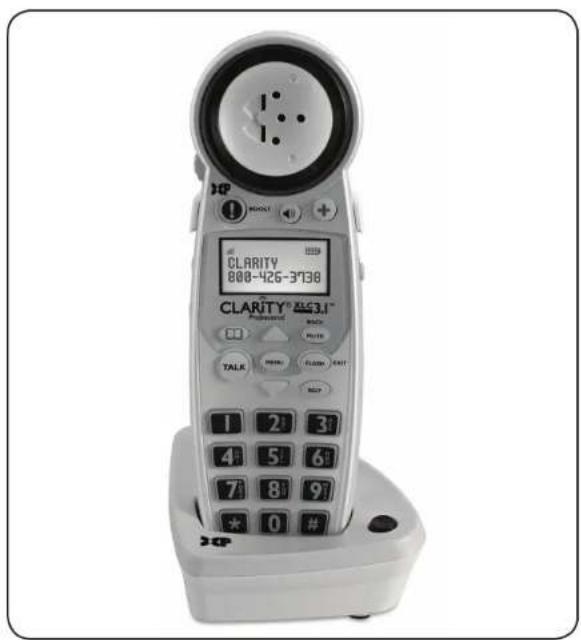
Thank you for purchasing the XLC3.1 amplified cordless handset from Clarity. The XLC3.1 is an additional handset that is compatible to the XLC3.4. In order to use the XLC3.1 handset, you must also purchase and pair this handset with the XLC3.4 telephone.
This User Guide will provide you with the information you need to use your XLC3.1 effectively, easily and safely. Please refer to the XLC3.4 User Guide for further information on the XLC3.1 handset.
XLC3.1 IMPORTANT SAFETY INSTRUCTIONS
When using your telephone equipment, basic safety precautions should always be followed to reduce the risk of fire, electric shock and injury to persons, including the following:
I. Read and understand all instructions.
2. Follow all warnings and instructions marked on the telephone.
3. Avoid contact with liquids. Do not locate base unit or handset near water, for example, near a bathtub, wash basin, sink or laundry tub, in a wet basement or near a swimming pool.
4. Avoid using a telephone (other than a cordless type) during a storm. There may be a remote risk of electrical shock from lightning.
5. Do not use the telephone to report a gas leak in the vicinity of the leak.
6. Unplug this telephone from the wall outlets before cleaning. Do not use liquid cleaners or aerosol cleaners on the telephone. Use a damp cloth for cleaning.
7. Place this telephone on a stable surface. Serious damage and/or injury may result if the telephone falls.
8. Do not cover the slots and openings on this telephone. This telephone should never be placed near or over a radiator or heat register. This telephone should not be placed in a built-in installation unless proper ventilation is provided.
9. Operate this telephone using the electrical voltage as stated on
the base unit or in the owner's manual. If you are not sure of the voltage in your home, consult your dealer or local power company.
- Do not allow anything to rest on the power cord or locate this product in an area where the power cord is likely to be damaged by furniture or foot traffic.
II. Do not overload wall outlets or extension cords as this can increase the risk of fire or electrical shock. - Never push any objects through the slots in the telephone. They can touch dangerous voltage points or short out parts that could result in a risk of fire or electrical shock. Never spill liquid of any kind on the telephone.
- To reduce the risk of electrical shock, do not take this phone apart. Opening or removing covers may expose you to dangerous voltages or other risks. Incorrect reassembly can cause electric shock when the appliance is subsequently used.
- Unplug this product from the wall outlet and refer servicing to the manufacturer under the following conditions: when the power supply cord or plug is frayed or damaged; if liquid has been spilled into the product; if the telephone has been exposed to rain or water; if the telephone has been dropped or the case has been damaged; if the telephone exhibits a distinct change in performance; if the telephone does not operate
XLC3.1 IMPORTANT SAFETY INSTRUCTIONS
normally by following the operating instructions. Adjust only those controls that are covered by the operating instructions. Improper adjustment may require extensive work by a qualified technician to restore the telephone to normal operation if the telephone does not operate normally by following the operating instructions.
- This product should be operated only from the type of power source indicated on the marking label. If you are not sure of the type of power supply to your home, consult your local power company.
- Do not attempt to open the AC adapter. There are potentially dangerous voltages inside, and there are no serviceable parts.
- Discontinue use of product and contact Clarity if the product overheats, has a damaged cord or plug, if the product has been dropped or damaged or if the product has come into contact with liquids.
- Use only the AC adapter provided with this product or a replacement AC adapter provided by Clarity.
- This phone amplifies sound to loud volumes. To prevent hearing damage, all users of the phone should be informed of the high volume capability of the phone and children should only use the phone when
supervised by an adult.
- Exposure to high volume sound levels or excessive sound pressure may cause temporary or permanent damage to your hearing. Although there is no single volume setting that is appropriate for everyone, you should always use your telephone with the volume set at moderate levels and avoid prolonged exposure to high volume sound levels. The louder the volume, the less time is required before your hearing could be affected. If you experience hearing discomfort, you should have your hearing checked by a doctor. To protect your hearing, you should:
A) Set the volume control in a low position and gradually increase the volume as needed. Before pressing the BOOST button, reduce the volume to the lowest level. Use the phone on the lowest volume setting as possible.
B) Limit the amount of time you use the telephone at high volume levels. - If you experience a skin irritation after using this product, discontinue use and contact Clarity.
SAVE THESE INSTRUCTIONS
SAVE THESE INSTRUCTIONS
XLC3.1 IMPORTANT SAFETY INSTRUCTIONS
SAFETY INSTRUCTIONS FOR BATTERIES
Dispose of used batteries according to the instructions.
I. Do not dispose of the battery in a fire as it may explode. Check with local codes for possible special disposal instructions.
2. Do not open or mutilate the battery. Released electrolyte is corrosive and may cause damage to the eyes and skin. It may be toxic if swallowed.
3. Exercise care in handling batteries in order not to short the battery with conducting materials such as rings, bracelets and keys. The battery or conduction material may over heat and cause burns.
4. Remove batteries when they are discharged and when the equipment will not be used for an extended period of time. Dispose of batteries according to local environmental laws.
5. Do not disassemble, heat, crush, deform or puncture batteries.
6. Do not attempt to charge non-rechargeable batteries.
7. Keep batteries out of the reach of children.
WARNING: Risk of explosion if battery is replaced by an incorrect type.
SAVE THESE INSTRUCTIONS
XLC3.1 CONTENTS & PARTS CHECKLIST
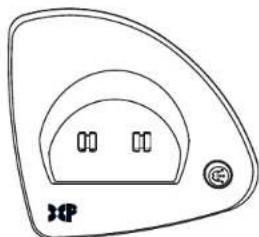
natural_image
Simple line drawing of a triangular device with two internal components and a button (no text or symbols)- Charger Base
I. Charger Base
2. Handset
3. Belt clip
4. AC adapter
5. User Guide

3. Belt clip
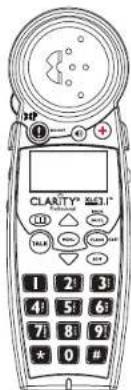
text_image
CLASTY® 5017 1 2 3 4 5 6 7 8 9 ★ 0 #- Handset
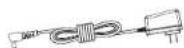
4. AC adapter
XLC3.1
User Guide
- User Guide
XLC3.1 OPERATING INSTRUCTIONS
XLC3.1 INSTALLATION
I. Remove base from package.
2. Hold one end of your phone's white power adapter cord tightly. The correct end to hold should already be plugged into the back of your telephone base unit. Simultaneously pull the other end of the adapter cord away from the phone, unraveling it and allowing you to plug that end of the cord into a wall electrical outlet.
3. Plug white power adapter cord on left rear of the charger base into a wall electrical outlet.
4. Remove handset from package.
5. Pull the handset's battery tab located on the bottom of the device in the direction of the arrow.
6. Place the handset in the base charger. The batteries in the handset must be fully charged for 10 hours before using the telephone for the first time.
HOW TO DIAL OR RECEIVE A CALL
- To receive a call, pick up handset from base and press TALK to answer incoming call.
- When placing a call, press TALK and then dial the number.
- After completing the call, press TALK again to hang up and return handset to base unit.
Additional operating instructions can be found in the XLC3.4 User Guide.
XLC3.1 OPERATING INSTRUCTIONS
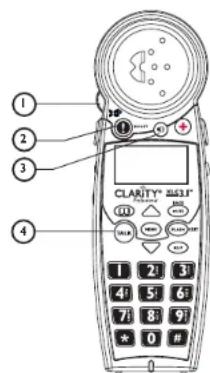
I VOLUME Control
The dial controls the volume level of the handset, headset or neckloop.
2 BOOST
When pressed, an extra level of amplification is added over the entire range of volume control. (Digital Clarity ^® Power ^TM Technology)
3 Speaker
Press to activate handset speaker phone. Press again to switch back to earpiece.
4 TALK
Press TALK button and dial number to make a call. To end call press TALK again.
5 TONE
The XLC3.1 has four (4) AUDIO TONE settings. Pressing the TONE button changes the style of amplification and allows you to customize your hearing experience.
Hearing loss is specific to each individual; therefore, we suggest exploring each setting to find the one you find most comfortable. (See main User Guide for a complete description of available audio profiles.)
6 RINGER ON / OFF
Switch to turn Handset Ringer On or Off.
text_image
① ② ③ ④ CLARITY® 8431® 1 2 3 4 5 6 7 8 9 * 0 #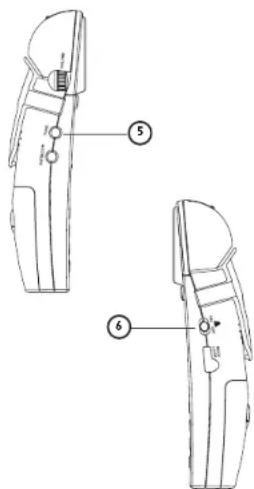
text_image
Technical diagram of a door handle with labeled parts 5 and 6XLC3.1 OPERATING INSTRUCTIONS
REGISTERING THE XLC3.1
The XLC3.1 is compatible to the XLC3.4. In order to use the XLC3.1, you must register it to a XLC3.4 telephone.

Pull the handset's battery tab located on the bottom of the device, and then press MENU to start registering or deregistering your handset from your system.
TO REGISTER AN UNREGISTERED HANDSET
I. Press MENU to enter registration mode. You will see displayed on the screen, "Handset Needs Registration."
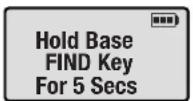
2. Press and hold the FIND key on the XLC3.4 base for five seconds, until the base visual ringer starts flashing. Release FIND key on the XLC3.4 base.
-
Press MENU key on the handset.
-
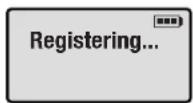
The screen shows "Registering...", then "Registration Successful" (accompanied by five quick beeps).
-
Your handset is now registered to your XLC3.4 system. Your screen will display "Handset X," (where "X" is the number of the actual handset registered, such as the second or fourth handset, etc.).
You can extend the number of handsets by using additional XLC3.1 handsets (sold separately).

TO REGISTER YOUR HANDSET AGAIN (or to register to a different XLC3.4 system)
- In standby mode, press MENU.
- Press DOWN arrow five times to advance the row reading "Phone Setup" to the top of the screen.
-
Press MENU to enter the setup section. The screen displays "Register" on the screen's top row now.
-
Press MENU to enter the Registration section.
-
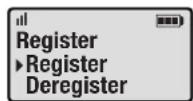
Press MENU again to select "Register."
-
Follow the Registration steps listed above.

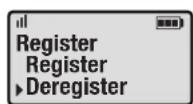
I. See the six steps listed above, then press MENU to select "Deregister."
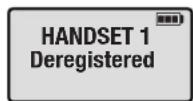
2. Your handset will deregister from your base as soon as you press MENU. The screen will show "Handset X Deregistered"(again, where "X" is the number of the handset registered), then "Handset Needs Registration."
XLC3.1 TROUBLESHOOTING
The unit will not operate/no dial tone:
- Verify the AC Adapter is securely plugged into AC outlet, the base and the telephone.
- Make sure the battery has been placed in the battery compartment correctly. (The circular metal contacts on battery need to touch the metal springs inside battery compartment.)
- Make sure the handset battery is fully charged.
- Verify the telephone is in the correct dialing mode: tone (touch) or pulse (rotary).
- Make sure you are in the usable range of the base station.
The phone does not ring when you receive a call:
- Make sure the RINGER switch on the handset is set to ON.
- Verify the AC Adapter is securely plugged into the AC outlet and the base.
- Verify the telephone line cord is securely plugged into the wall jack and the telephone.
- Make sure you are within the usable range of the base station.
- You may have too many extensions on your line. Try unplugging a few devices.
Noise, interference or other calls heard while using the handset:
- Make sure you are within the usable range of the base station.
• Make sure the handset battery is fully charged. - Try relocating the base unit to another location.
- Make sure the AC Adapter is not plugged into the wall outlet with other appliances.
Phone will not hold charge:
- Make sure the charging contacts on the handset and base are free of dust and dirt. While unplugged, clean the contacts with a soft cloth.
- Make sure CHARGE LED (light) on the base is lit when the handset is in the cradle.
XLC3.1 TROUBLESHOOTING
Difficulty in placing or receiving calls:
- Move closer to the base and try again.
• Make sure you have selected the correct dialing mode, tone or pulse.
• Make sure the handset battery is fully charged.
Screen displays "Battery Low":
- Handset batteries are low on charge; return the handset to the base to recharge the batteries.
TALK button is blinking green (fast pace):
- The base is trying to locate the handset; press TALK to end the FIND paging process and return the handset to the base.
Your handset screen is displaying "Searching...":
- Move closer to the base.
- To register the XLC3.1, place the XLC3.1 handset into the main unit until the screen displays: Handset Registered. It will take approximately 5-10 seconds for the handset to register to the base.
- Verify that the AC adapter is plugged into the base and into the wall outlet.
- The handset is out of range or the power to the base is unplugged.
- Place the handset into the base until the screen returns to standby mode. It will take approximately 5-10 seconds for the handset to register to the base.
- Handset may need to be re-registered to the base manually. Follow the instructions on page 8.
XLC3.1 TECHNICAL SPECIFICATIONS
General
Model Number: XLC3.1
Frequency: 1.9GHz DECT6.0
Amplification: 50dB
Compatibility: XLC3.4
Handset Unit
Product in Inches: (L x W x H): 7.25 x 2 x 1.25
Weight in Pounds: 0.5 lb
Charger Base
Product in Inches: (L × W × H): 3.50 × 2.75 × 2
Weight in Pounds: 0.5 lb
Power Supply: AC Adapter: (Input: 100V-240V AC;
Output: 7.5VDC, 500 mA; Model
T07505U002)
Handset and Charger Base
Product in Inches: (L × W × H): 8 × 3.25×3.25
Weight in Pounds: 1.10 lbs
Battery Information
Battery Type: 1.2V 600mAh Ni-MH, 60AAAHC, GPI
International Ltd.
Battery Life Talk Time: 6.5 Hours
Battery Life Standby: 130 Hours
Contact Clarity customer service for information on purchasing additional handsets or replacement battery.
Clarity contact information
Customer Service: 800-426-3738
Address: 4289 Bonny Oaks Drive
Chattanooga, TN 37406
XLC3.1 REGULATORY COMPLIANCE
Part 15 of FCC Rules Information
This device complies with Part 15 of the FCC Rules. Operation is subject to the following two conditions: (1) This device may not cause harmful interference, and (2) this device must accept any interference received, including interference that may cause undesired operation.
Your equipment has been tested and found to comply with the limits of a Class B digital device, pursuant to Part 15 of FCC rules. These limits are designed to provide reasonable protection against harmful interference in residential installation.
This equipment generates, uses and can radiate radio frequency energy and, if not installed and used in accordance with the instructions, may cause harmful interference to radio communications. However, there is no guarantee that interference will not occur in a particular installation; if this equipment does cause harmful interference to radio or television reception, which can be determined by turning the equipment off and on, you are encouraged to try to correct the interference by one of the following measures:
I. Where it can be done safely, reorient the receiving television or radio antenna.
-
To the extent possible, relocate the television, radio or other receiver with respect to the telephone equipment. (This increases the separation between the telephone equipment and the receiver.)
-
Connect the telephone equipment into an outlet on a circuit different from that to which the television, radio, or other receiver is connected.
- Consult the dealer or an experienced Radio/TV Technician for help.
Privacy of communications may not be ensured when using this phone.
WARNING: To maintain the compliance with the FCC's RF exposure guideline, place the base unit at least 20 cm from nearby persons.
For body worn operation, this handset has been tested and meets the FCC RF exposure guidelines when used with the Clarity and Plantronics accessories supplied or designated for this product. Use of other accessories may not ensure compliance with FCC RF exposure guidelines.
WARNING: Changes or modifications to this equipment not expressly approved by the party responsible for compliance could void the user's authority to operate the equipment.
Industry Canada Technical Specifications
This product meets the applicable Industry Canada technical specifications.
Before installing this equipment, users should ensure that it is permissible to be connected to the facilities of the local telecommunications company. The equipment must also be installed
XLC3.1 REGULATORY COMPLIANCE
using an acceptable method of connection. In some cases, the company's inside wiring associated with a single line individual service may be extended by means of a certified connector assembly (telephone extension cord). The customer should be aware that compliance with the above conditions may not prevent degradation of service in some situations. Repairs to certified equipment should be made by an authorized Canadian maintenance facility designated by the supplier.
Any repairs or alterations made by the user to this equipment, or equipment malfunctions, may give the telecommunications company cause to request the user to disconnect the equipment.
Users should ensure for their own protection that the electrical ground connections of the power utility, telephone lines and internal metallic water pipe system, if present, are connected together. This precaution may be particularly important in rural areas.
WARNING: Users should not attempt to make such connections themselves, but should contact the appropriate electrical inspection authority, or electrician, as appropriate.
The Ringer Equivalence Number is an indication of the maximum number of terminals allowed to be connected to a telephone interface. The termination on an interface may consist of any combination of devices subject only to the requirement that the sum of the Ringer Equivalence Numbers of all the devices does not exceed five.
(The term "IC:" before the certification/registration number only signifies that the Industry Canada technical specifications were met.)
This Class B digital apparatus complies with Canadian ICES-003.
The party responsible for regulatory compliance:
Clarity, a Division of Plantronics, Inc. 4289 Bonny Oaks Drive Chattanooga, TN 37406 Phone: 800-426-3738
XLC3.1 WARRANTY INFORMATION
Incidental or Consequential
Damages: Neither Clarity nor your retailer dealer or selling distributors has any responsibility for any incidental or consequential damages including without limitation, commercial loss or profit, or for any incidental expenses, expenses, loss of time, or inconvenience. Some states do not allow exclusion or limitation of incidental or consequential damage, so the above limitation or exclusion may not apply to you.
Other Legal Rights: This warranty gives you specific legal rights and you may also have other rights which vary from state to state.
To obtain warranty service, please prepay shipment and return the unit to the appropriate facility listed below.
Clarity Service Center
4289 Bonny Oaks Drive
Chattanooga, Tennessee 37406
Tel: 423-629-3500 or 800-426-3738
Fax: 423-622-7646 or 800-325-8871
Plantronics Service Centre
151 Hymus
Pointe Claire, Quebec H9R IE9
Tel: 800-540-8363 or 514-956-8363
Fax: 514-956-1825
Please use the original container, or pack the unit(s) in a sturdy carton with sufficient packing material to prevent damage. Include the following information:
• A proof-of-purchase indicating model number and date of purchase;
- Bill-to address;
- Ship-to address;
• Number and description of units shipped;
- Name and telephone number of person to call, should contact be necessary;
- Reason for return and description of the problem.
Damage occurring during shipment is deemed the responsibility of the carrier, and claims should be made directly with the carrier.
The following warranty and service information applies only to products purchased and used in the U.S. and Canada. For warranty information in other countries, please contact your local retailer or distributor.
Limited Warranty: Clarity, a division of Plantronics, Inc. ("Clarity") warrants to the original consumer purchaser that, except for limitations and exclusions set forth below, this product shall be free from defects in materials and workmanship for a period of one (1) year from the date of original purchase ("Warranty Period"). The obligation of Clarity under this warranty shall be at Clarity's option, without charge, of any part or unit that proves to be defective in material or workmanship during the Warranty Period.
XLC3.1 WARRANTY INFORMATION
Exclusions from Warranty: This warranty applies only to defects in factory materials and factory workmanship. Any condition caused by accident, abuse, misuse or improper operation, violation of instructions furnished by Clarity, destruction or alteration, improper electrical voltages or currents, or repair or maintenance attempted by anyone other than Clarity or an authorized service center, is not a defect covered by this warranty. Telephone companies manufacture different types of equipment and Clarity does not warrant that its equipment is compatible with the equipment of a particular phone company.
Implied Warranties: Under state law, you may be entitled to the benefit of certain implied warranties. These implied warranties will continue in force only during the warranty period. Some states do allow limitations on how long an implied warranty lasts, so the above limitation may not apply to you.
Guide d'Utilisation

text_image
CLARITY® Professional
text_image
XLC3.1™ CORDLESSCombiné
text_image
CLARITY 800-426-3738 CLARITY® 8531™ Professional TALK 1 2 3 4 5 6 7 8 9 * 0 # DCPXLC3.1 TABLE DES MATIÈRES
IMPORTANTES CONSIGNES DE SÉCURITÉ .... 22
CONTENU & LISTE DES PIÈCES 25
CONSIGNES D'UTILISATION ......26
DÉPANNAGE 30
CARACTÉRISTIQUES TECHNIQUES ......32
RESPECT DE LA RÉGLEMENTATION.... 33
INFORMATIONS SUR LA GARANTIE ....35
INTRODUCTION
natural_image
Simple line drawing of a triangular device with two internal components and a button (no text or symbols)I. Base de Chargeur
text_image
Technical diagram of a mechanical device with labeled parts, showing two views and numbered annotations.XLC3.1 CONSIGNES D'UTILISATION
XLC3.1 CONSIGNES D'UTILISATION
ENREGISTREMENT DU XLC3.1
Output: 7.5VDC, 500 mA; Model
T07505U002)
Chattanooga, TN 37406
XLC3.1 RESPECT DE LA RÉGLEMENTATION
Clarity Service Center
4289 Bonny Oaks Drive
Chattanooga, Tennessee 37406
Tel: 423-629-3500 or 800-426-3738
Fax: 423-622-7646 or 800-325-8871
Plantronics Service Centre
151 Hymus
Pointe Claire, Quebec H9R 1E9
Tel: 800-540-8363 or 514-956-8363
Fax: 514-956-1825
text_image
CLARITY® ProfessionalXLC3.1 ^TM CORDLESS Microteléfono
text_image
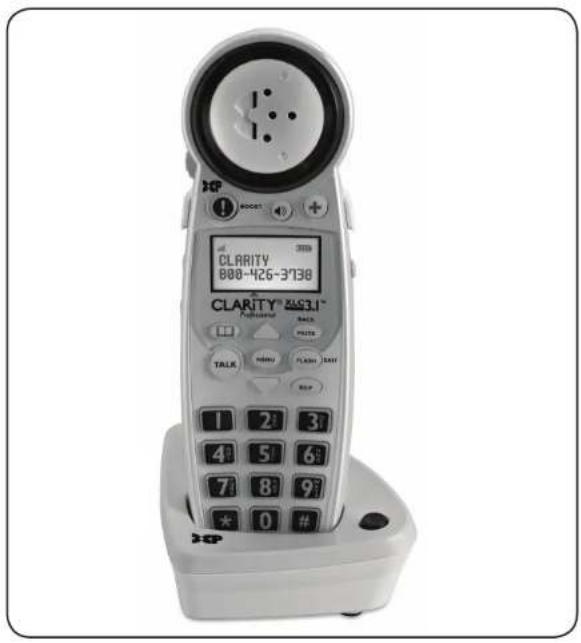
CLARITY 800-426-3738 CLARITY® 203.1™ Professional BACK PLOTS TALK HINDU FLASH 32W HELP 1 2 3 4 5 6 7 8 9 * 0 #XLC3.1 TABLA DE CONTENIDOS
INSTRUCCIONES IMPORTANTES DE
SEGURIDAD 40
natural_image
Simple line drawing of a triangular device with two internal slots and a button, no text or symbols present.I. Cargar Base
text_image
Technical diagram of a mechanical component with labeled parts 5 and 6XLC3.1 INSTRUCCIONES DE FUNCIONAMIENTO
REGISTRAR EL XLC3.1
Chattanooga, TN 37406
XLC3.1 CONFORMIDAD CON LOS REGLAMENTOS
Clarity, a Division of Plantronics, Inc. 4289 Bonny Oaks Drive
Chattanooga, TN 37406
Clarity Service Center
4289 Bonny Oaks Drive
Chattanooga, Tennessee 37406
Tel: 423-629-3500 ó 800-426-3738
Fax: 423-622-7646 ó 800-325-8871
Plantronics Service Centre
151 Hymus
Pointe Claire, Quebec H9R 1E9
Tel: 800-540-8363 ó 514-956-8363
Fax: 514-956-1825
Clarity, a Division of Plantronics, Inc.
4289 Bonny Oaks Drive, Chattanooga, TN 37406
Tel: 800-426-3738 Fax: 800-325-8871
E-mail: claritycs@plantronics.com Website: www.clarityproducts.com
©2010 Clarity, a Division of Plantronics, Inc. All rights reserved.
Clarity, Clarity Professional, XLC3.1, XLC3.4, Digital Clarity Power and the amplified figure are trademarks or registered trademarks of Plantronics, Inc.
Rev. B (11-10)
Printed In China