C1000 - Phone Clarity - Free user manual and instructions
Find the device manual for free C1000 Clarity in PDF.


| Product Type | Cordless phone with amplifier |
| Brand | Clarity |
| Model | C1000 |
| Dimensions (Base) | Approx. 6.3 x 5.5 x 3.5 inches (160 x 140 x 90 mm) |
| Dimensions (Handset) | Approx. 7.5 x 2.0 x 1.2 inches (190 x 50 x 30 mm) |
| Weight (Handset) | Approx. 6.7 oz (190 g) with battery |
| Power Supply | AC adapter (input 100-240V, 50/60Hz output 6V DC 300mA) and rechargeable battery pack (NiMH 2.4V 600mAh) |
| Display | Large backlit LCD with big digits |
| Audio Amplification | Up to 50 dB gain (adjustable) |
| Sound Control | Volume control, tone control, and equalizer presets |
| Caller ID | Yes (name and number, up to 50 entries) |
| Phonebook | Up to 50 contacts |
| Speakerphone | Full-duplex with additional volume boost |
| Ringer | Adjustable volume and tone, visual ringer indicator |
| Hearing Aid Compatibility | HAC rated (T-coil compatible) |
| Range | Up to 1500 feet (450 meters) outdoors |
| Additional Features | Pulse/tone dialing, call waiting, redial, mute, intercom |
| Battery Life | Up to 6 hours talk time, 7 days standby |
| Cleaning | Wipe with a soft, dry cloth; do not use liquids or sprays |
| Safety Warnings | Do not immerse in water; use only supplied AC adapter; replace batteries with same type |
| Spare Parts / Repairability | Replacement handset battery (Clarity #BAT-001), AC adapter (Clarity #PS-006), and handset charging cradle available |
| Warranty | 1 year limited warranty |
Frequently Asked Questions - C1000 Clarity
User questions about C1000 Clarity
0 question about this device. Answer the ones you know or ask your own.
Ask a new question about this device
Download the instructions for your Phone in PDF format for free! Find your manual C1000 - Clarity and take your electronic device back in hand. On this page are published all the documents necessary for the use of your device. C1000 by Clarity.
USER MANUAL C1000 Clarity
Amplified corded telephone
Featuring Clarity® Power™ Technology
CI000 ^TM
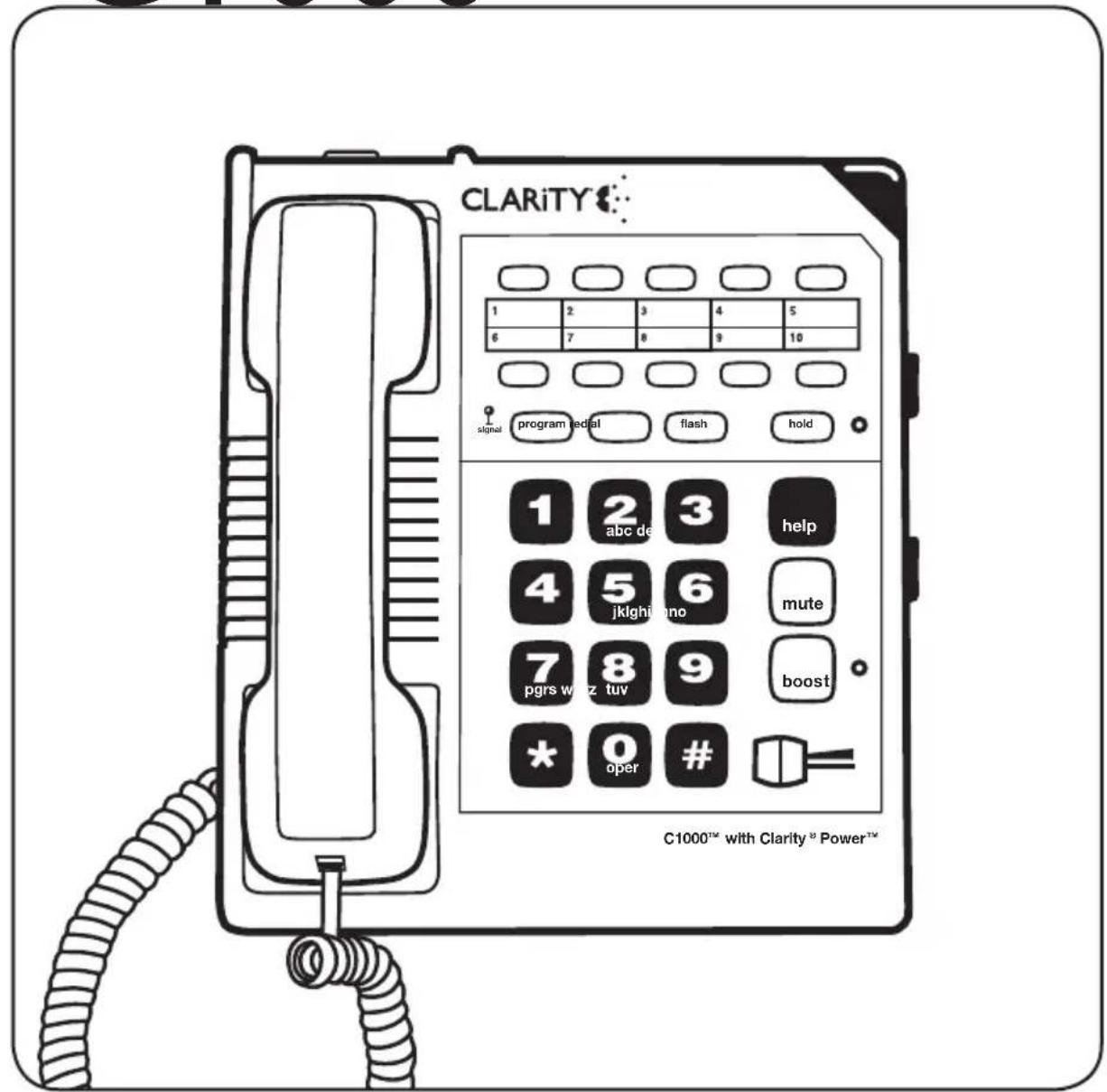
text_image
CLARITY signal program edial flash hold 1 2 3 4 5 6 7 8 9 10 1 2 3 help 4 5 6 mute 7 8 9 boost * 0 # C1000™ with Clarity® Power™TABLE OF CONTENTS
Safety Instructions 4
Installation.... 7
Features...... ||
Clarity ^® Power Control ...... II
Boost Control ...... 11
Clarity Effect ...... II
Boost Override.... 11
Sound Level Indicator 12
Ringer Volume Control 12
Ringer Pitch Control 12
Visual Ringer 12
Tone / Pulse Selection 13
Last Number Redial 13
Flash 13
Hold 14
Mute 14
Surge Protection 15
Neck Loop/Auxiliary 15
Hearing Aid Compatibility 15
Operation 16
To Place or Receive a Call 16
Programming Numbers Into Memory 16
Care 18
Troubleshooting.... 19
FCC Requirements and Regulations 22
Warranty and service 25
SAFETY INSTRUCTIONS
When using your telephone equipment, basic safety precautions should always be followed to reduce the risk of fire, electric shock and injury to persons including the following:
I. Read and understand all instructions.
-
Follow all warnings and instructions marked on the telephone.
-
Do not use this telephone near a bath tub, wash basin, kitchen sink or laundry tub, in a wet basement, near a swimming pool or anywhere else there is water.
-
Avoid using a telephone (other than a cordless type) during a storm. There may be a remote risk of electrical shock from lightning.
-
Do not use the telephone to report a gas leak in the vicinity of the leak.
-
Unplug this telephone from the wall outlets before cleaning. Do not use liquid cleaners or aerosol cleaners on the telephone. Use a damp cloth for cleaning.
-
Place this telephone on a stable surface. Serious damage and/or injury may result if the telephone falls.
-
Do not cover the slots and openings on this telephone. This telephone should never be placed near or over a radiator or heat register. This telephone should not be placed in a built-in installation unless proper ventilation is provided.
-
Operate this telephone using the electrical voltage as stated on the base unit or in the owner's manual. If you are not sure of the
voltage in your home, consult your dealer or local power company.
- Do not place anything on the power cord. Install the telephone where no one will step or trip on the cord.
II. Do not overload wall outlets or extension cords as this can increase the risk of fire or electrical shock.
-
Never push any objects through the slots in the telephone. They can touch dangerous voltage points or short out parts that could result in a risk of fire or electrical shock. Never spill liquid of any kind on the telephone.
-
To reduce the risk of electrical shock, do not take this phone apart. Opening or removing covers may expose you to dangerous voltages or other risks. Incorrect reassembly can cause electric shock when the appliance is subsequently used.
-
Unplug this product from the wall outlet and refer servicing to the manufacturer under the following conditions:
A. When the power supply cord or plug is frayed or damaged.
B. If liquid has been spilled into the product.
C. If the telephone has been exposed to rain or water.
D. If the telephone does not operate normally by following the operating instructions.
Adjust only those controls that are covered by the operating
SAFETY INSTRUCTIONS
instructions. Improper adjustment may require extensive work by a qualified technician to restore the telephone to normal operation.
E. If the telephone has been dropped or the case has been damaged.
F. If the telephone exhibits a distinct change in performance.
15. Never install telephone wiring during a lightning storm.
16. Never install telephone jacks in wet locations unless the jack is specifically designed for wet locations.
17. Never touch uninsulated telephone wires or terminals unless the telephone line has been disconnected at the network interface.
18. Use caution when installing or modifying telephone lines.
19. Use only the power cord and batteries indicated in the manual. Do not dispose of batteries in a fire. They may explode. Check with local codes for possible special disposal instructions.
20. Plug the AC adaptor into the outlet that is nearest and most accessible to the telephone.
Exposure to high volume sound levels may damage your hearing. Although there is no single volume setting that is appropriate for everyone, you should always use the handset with the volume set at moderate levels and avoid prolonged exposure to high volume sound levels. The louder the volume, the less time is required before your hearing could be affected. If you experience hearing discomfort, you should stop using the handset. To protect your hearing, some hearing experts suggest that you:
I. Set the volume control in a low position and then adjust the volume to a comfortable level.
2. Limit the amount of time you use the handset at high volume.
3. Avoid turning up the volume to block out noisy surroundings.
CHILDREN: Never allow children to play with the product – small parts may be a choking hazard and the amplified volume may cause hearing damage.
CONTENTS & PARTS CHECKLIST
Carefully remove all of the contents from the package. If there is any visible damage, or any of the contents are missing, do not attempt to operate this equipment. Please call 1-800-552-3368 to exchange this unit for a factory-fresh replacement.
In addition to the items listed above, you will need one of the following to complete installation of this unit:
- Modular Wall Jack, or
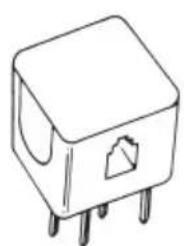
- RJ-IIC Modular Jack Adapter (if you have an older 4-prong jack)
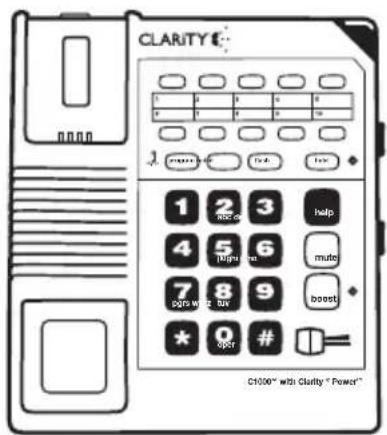
text_image
CLARITY E- 1 2 3 help 4 5 6 mute 7 8 9 boost * 0 # C1000" with Clarity " Power"Base

natural_image
Line drawing of a vintage telephone handset with keypad and buttons (no text or symbols)Handset

Handset line cord (Coiled 10 ft.)
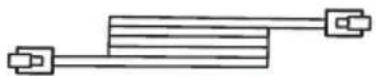
Long phone cord
natural_image
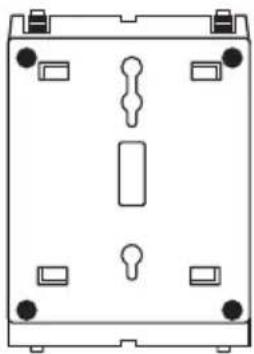
Pure technical diagram of a mechanical housing or enclosure with mounting holes and internal compartments (no text or symbols)Desk/Wall-Mounting Bracket
text_image
User Guide CLARITY Amplifying Your Life Amplified corded telephone Fasturing Clarity® Power™ Technology C1000™User guide
INSTALLATION
Warning: To prevent electrical shock, always remove the telephone line cord from the wall jack before removing the cord from the telephone. Never leave the line cord connected to the wall jack if it is not also connected to the telephone.
Select a Location
• This unit requires a modular phone jack.
- The unit should be located in an area where it is easy to see the lighted ringer.
- The unit can be used as a desk top phone or a wall mount phone.
Connecting the Clarity C1000 Phone
To install as a Desk Unit:
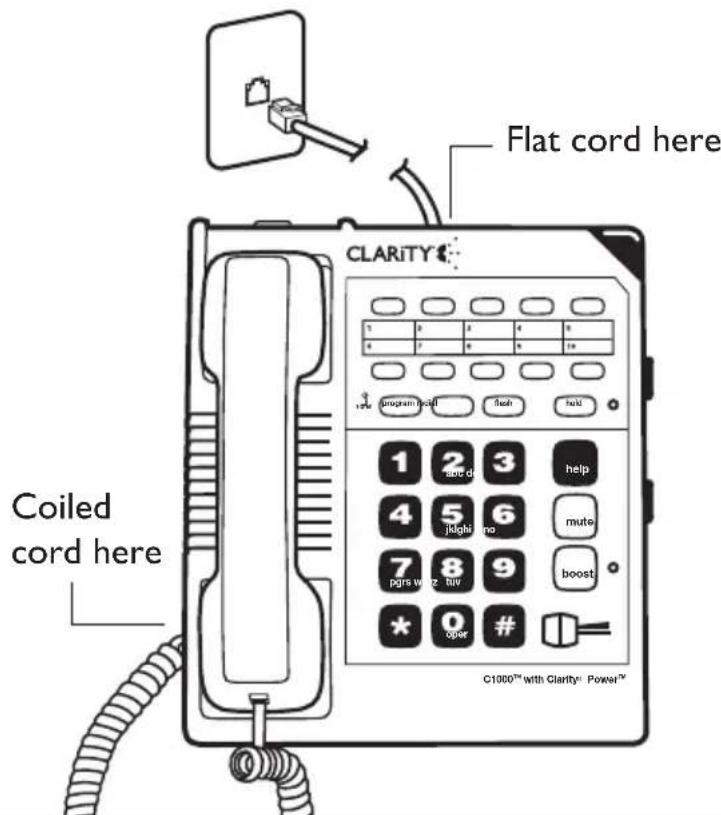
- Plug one end of the telephone line cord (long, flat) into the back of the Clarity telephone.
- Plug the other end of the telephone line cord into the wall jack.
- Plug one end of the handset cord (coiled) into the bottom of the handset.
- Plug the other end of the handset cord into the jack located on the left edge of the Clarity telephone.
- Place the handset in the cradle of the Clarity telephone.
- Avoid placing the unit where it will be exposed to excessive heat or humidity.
natural_image
Line drawing of an electronic component with four pins and a small symbol on the top (no text or labels)Note: If you are plugging the phone into an older 4-prong jack, use an RJ11C adapter.
text_image
Flat cord here CLARITY® Coiled cord here C1000™ with Clarity® Power™INSTALLATION
To Install As a Wall Unit:
Important: A modular wall jack with raised mounting pins is required for installation as a Wall Unit.
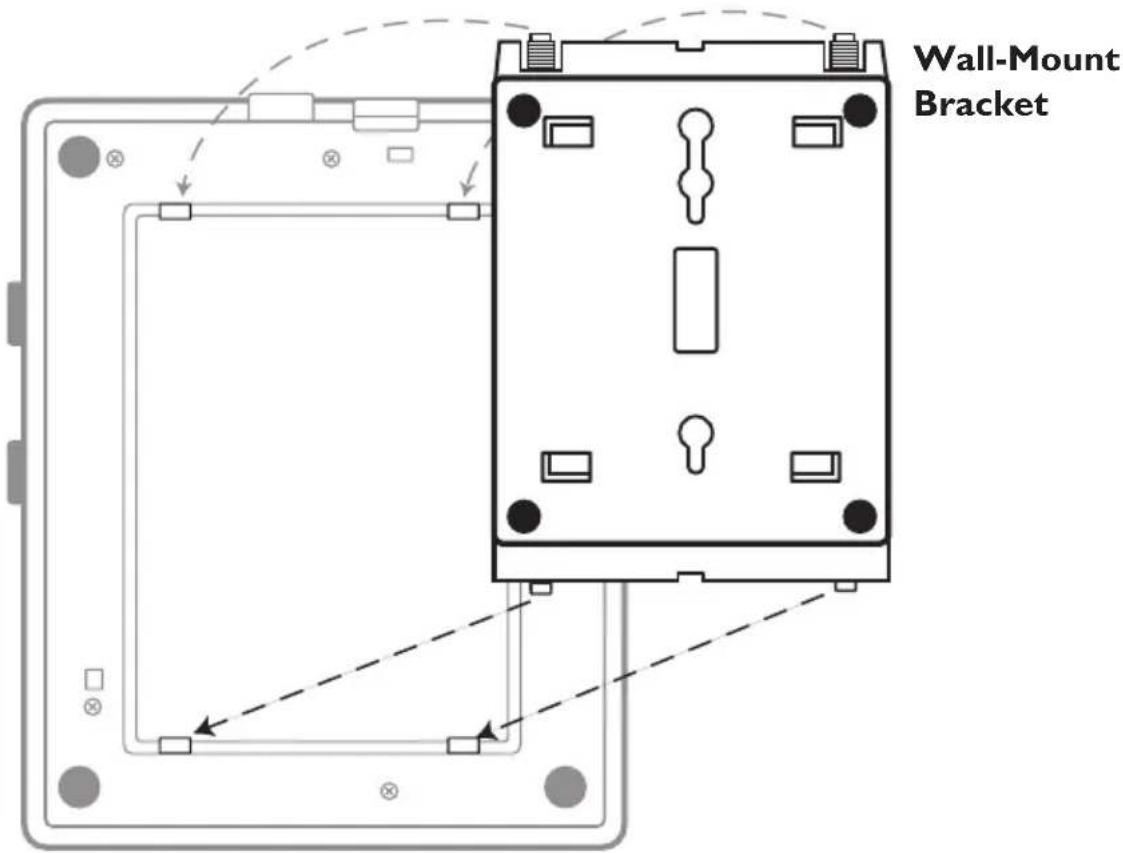
The Clarity C1000 comes assembled with mounting bracket attached in desk mount position. For wall mounting simply remove bracket, rotate 180 degrees and reattach as shown.
- Plug one end of the telephone line cord (long, flat) into the back of the Clarity telephone.
- Attach the wall-mounting bracket to the bottom of the Clarity telephone. It snaps into place. The cord should run underneath the wall mounting bracket.
- Plug the other end of the telephone line cord into the wall jack with raised mounting pins. You can store excess line cord inside the wall mounting bracket.
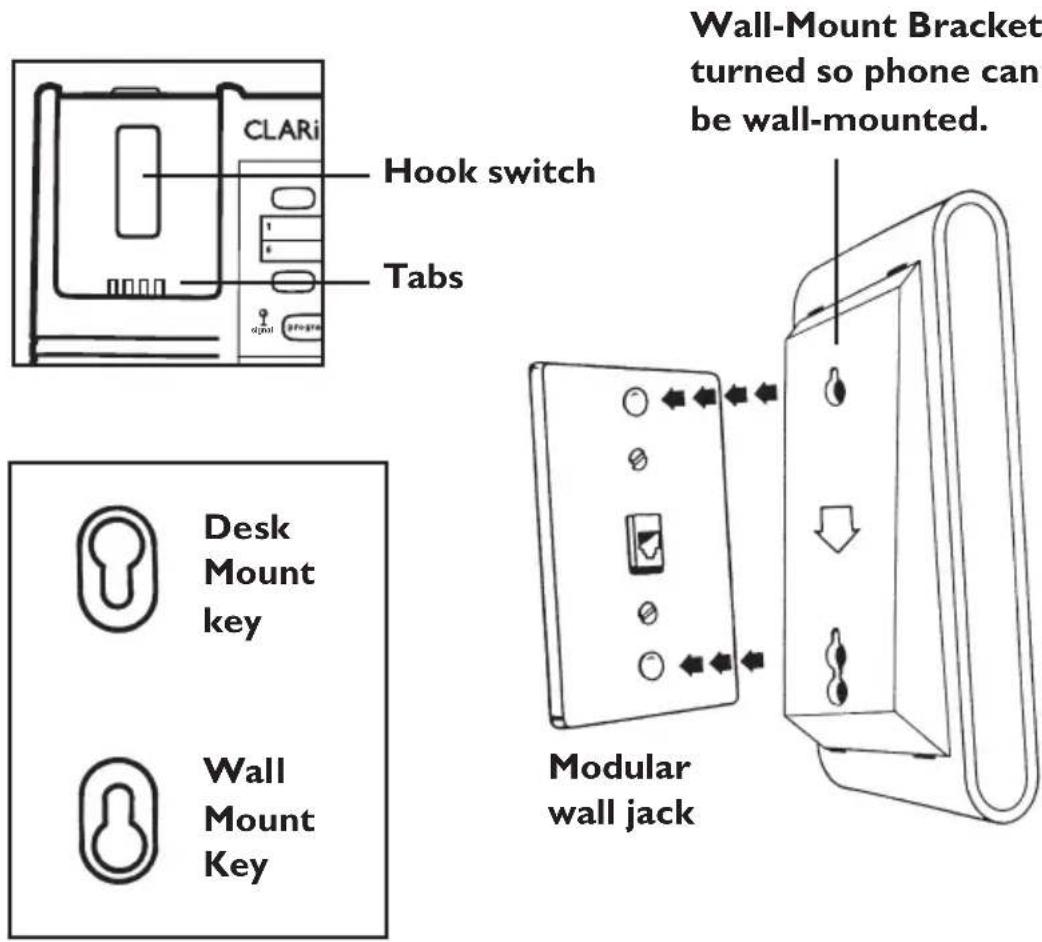
Note: If the wall-mounting bracket is already placed in the desk mount position, remove it by pressing the tabs and turning it 180^ per the key shown for the wall-mount.
text_image
Wall-Mount BracketBack of Phone
INSTALLATION
Warning: To prevent electrical shock, always unplug the telephone line cord from the wall before removing the cord from the telephone. Never leave the cord connected to the wall if it is not also connected to the telephone.
- Hold the Clarity telephone so that the holes on the mounting bracket line up with the raised mounting pins on the modular wall jack. Once the holes are lined up, push the phone in towards the wall jack and then slide the phone downward until it is securely seated on the wall jack.
- Plug one end of the handset cord (coiled) into the bottom of the handset.
- Plug the other end of the handset cord into the jack located on the lower left edge of the Clarity telephone.
- Place the handset in the cradle of the Clarity telephone. The special tabs will hold it in place.
text_image
CLARI Hook switch Tabs Digital Wall-Mount Bracket turned so phone can be wall-mounted. Desk Mount key Wall Mount Key Modular wall jackCI000 FEATURES
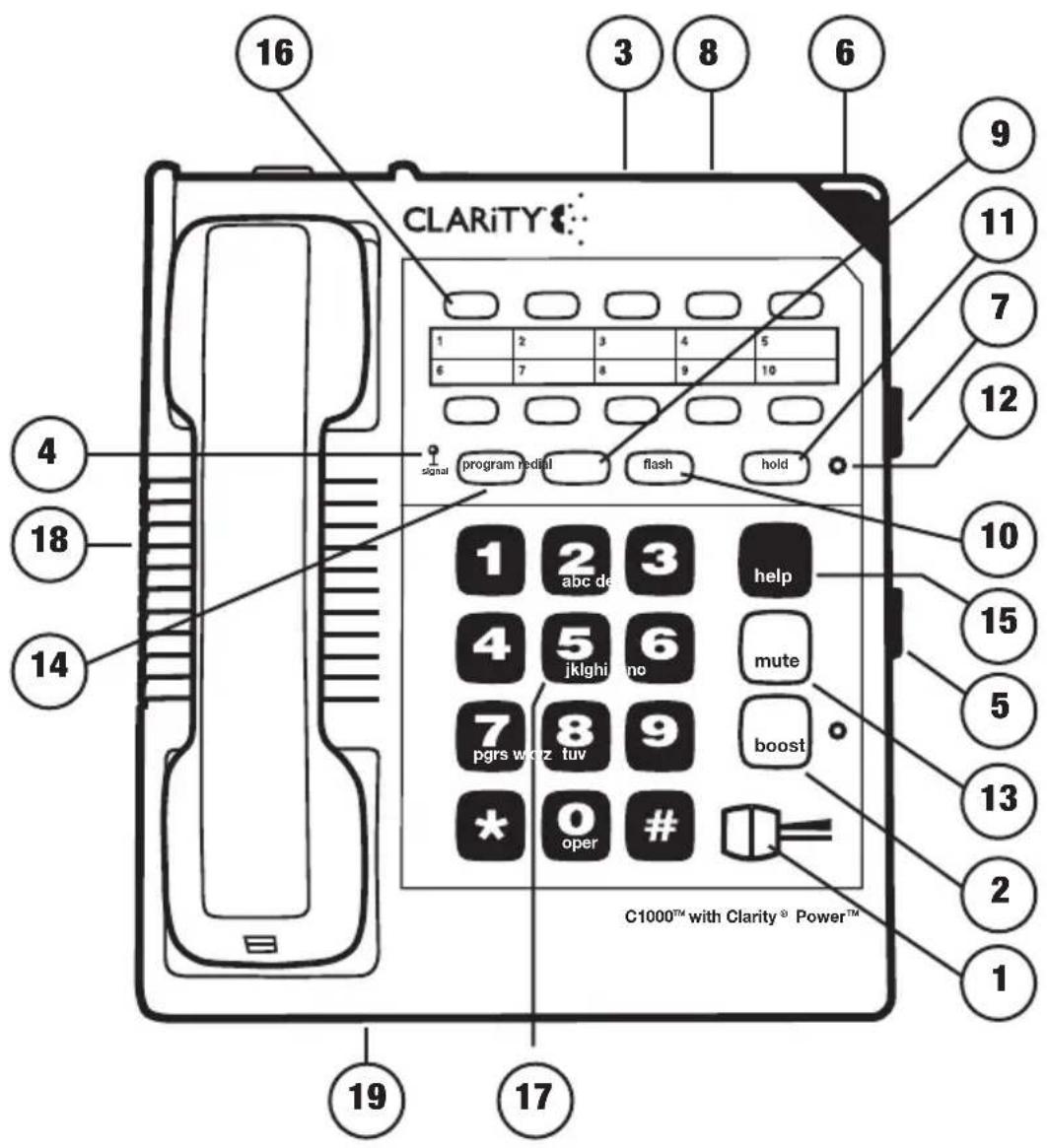
I. Clarity ^® Power ^TM Control
2. Boost Button
3. Clarity ON/OFF Switch
4. Sound Level Indicator
5. Ringer Volume Control
6. Visual Ringer
7. Ringer Pitch Control
8. Tone/Pulse Selector
9. Last Number Redial
10. Flash Button
II. Hold Button
12. Hold Indicator
13. Mute Button
14. Program Button
15. Help Button
16. Memory Location
17. Braille Button #5 Key
18. Neck Loop Auxiliary Port
19. Boost Override Switch
text_image
CLARiTY 16 3 8 6 1 2 3 4 5 6 7 8 9 10 signal program redall flash hold 1 2 3 help 4 5 6 mute 7 8 9 boost pgrs w or z tuv * oper # C1000™ with Clarity® Power™ 19 17 9 11 7 12 10 15 5 13 2 1CI000 FEATURES
Your Clarity C1000 is packed with features that will help you improve your communications over the telephone.
Clarity® Power™ Control
The Clarity Power Control allows you to control the clarity of your phone conversations. It will let you hear clearly phone calls that are normally difficult to understand. The amplification will be increased by more than 26 decibels and the frequency band from 2000 to 3000Hz will be specially enhanced to improve the clarity of your call.
Boost Control
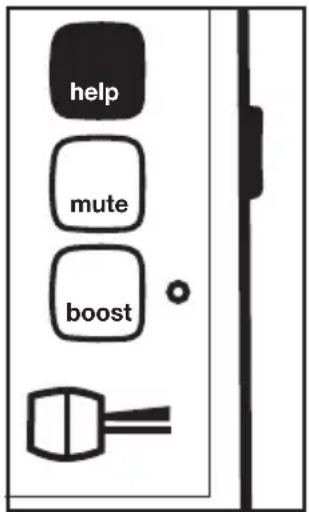
The CI000 has a boost button that controls the loudness of the receiver. Once the boost button is pressed, the volume will jump to the volume level indicated by the Clarity Power Control.
To Increase Clarity Power:
Slide the button marked Clarity Power toward the right.
To Decrease Clarity Power:
Slide the button toward the left. The extreme left is the level of a normal telephone conversation.
Clarity Effect (On/Off Switch) Smart Tone Control
Clarity ON insures the user that the high frequency sounds are being amplified more than lower frequencies so that words are not just louder, but clearer and easier to understand. Clarity OFF provides the loudest output possible.
Boost Override
The C1000 has a boost override switch located on the back of the unit. This switch will disable the reset feature of the boost button upon hang up as follows:
ON-When the Boost override switch is in "on" position volume will remain at the current volume control setting. This eliminates the need to press the boost button with each phone call.
OFF-When the Boost Override switch is in "off" position volume will reset to normal upon hangup. The Boost button will need to be depressed with each phone call to restore settings.
WARNING: When Boost button is lit volume may be at a high level. To protect hearing, lower volume control to minimum.
CI000 FEATURES
Sound Level Indicator
This LED signal indicates if there is speech or sound present on the line. It will be bright and steady when a dial tone is present. It will flash in rhythm with a busy signal and will flicker when the person on the other end is speaking. This feature is designed to assist those individuals with a more profound hearing loss.
Ringer Controls
The Clarity C1000 comes with a Special Low-Frequency Ringer designed to be easily heard by everyone.
The ringer also comes with a volume and pitch adjustment, allowing it to be tailored to each user.
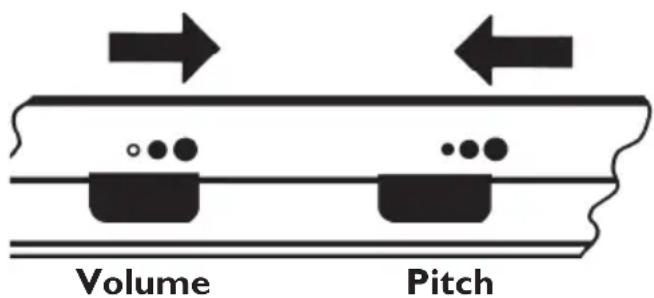
The ringer Volume Control has three settings: OFF, LOW, and HIGH. It is suggested that you set the volume control to high when you first start using your Clarity telephone. To do this, slide the ringer volume control toward the largest dot.
The ringer also has a Pitch Control that has three settings: LOW, MED, and HIGH. The low frequency is typically the easiest for people with partial hearing loss to hear. It is suggested that you set the pitch control to low (the smallest dot) when you start using the phone.
Visual Ringer
A lighted ringer works in conjunction with the low frequency ringer. It sends out a visual flashing alert every time a phone call is coming in. (This ringer will light up regardless of the setting on the ringer volume control.)
Tone/Pulse Selection
The Clarity C1000 can be used as either a TONE (touch dial) or PULSE (rotary dial) phone. Tone dialing is required for using special phone services such as long distance calling. Please check with your local phone company on certain types of service.
For Low Frequency, Loud Ring
Look On Right Edge of Case
text_image
Volume PitchC1000 FEATURES
Note for Users with Pulse/Rotary service only: Many automated answering systems used by banks, stores and government agencies ask you to “Push I for service”, “Push 2 for the operator”, etc. You must switch the tone/pulse switch on the top edge of the phone to tone before responding to these prompts. In summary, dial the phone number you want to call in pulse mode, switch to tone mode to interact with the automated answering system, switch back to pulse mode when your call is done. When switching from Pulse to Tone during a call, there will be a 3 second delay from the time you first push a key in tone mode until the key press is transmitted.
Important: You must have tone signaling service to use the TONE feature on the Clarity telephone. If in doubt, contact your local telephone company.
To Set the TONE/PULSE Switch:
I. Move the switch towards the correct setting.
2. Depress the hookswitch once.
3. The phone will now dial in the mode you selected.
Last Number Redial
Last Number Redial allows you to automatically redial the last telephone number you called. This feature is convenient for redialing numbers which are busy. The phone number stored for redial will be reset with every new call you make.
To Operate Last Number Redial:
I. Depress the hookswitch to get a new dial tone.
2. Press the "Redial" Button once.
3. Stay on the line, and your call will be dialed.
The last number dialed will be stored in the Clarity telephone for you until you dial another number.
Flash
Flash is a special feature that is required to use some calling services provided by your local phone company, such as call waiting. Consult your guide to these services which are available from your local phone company. Flash serves the same purpose as pressing and releasing the hook switch very quickly.
CI000 FEATURES
To Use the Flash Feature:
Simply press the Flash button at the appropriate time as outlined in the guide provided by your local phone company.
Hold
This advanced feature on your Clarity C1000 allows you to put a call on hold, hang up and switch to another extension or have a private conversation that you don't want the person on the other end of the phone to hear.
You will be able to hear the person on the other end, but they won't be able to hear you while the hold indicator light is on. The hold light will be on any time the hold button has been pressed. A call will stay on hold until you pick up a receiver, or press and release the hook switch. Pressing the hold button a second time will not take the call off hold.
To Use the Hold Feature:
-
While a telephone call is in progress, press the hold button once to place the call on hold. The red hold light will turn on.
-
Hang up the receiver.
-
To take the call off hold:
A. Simply lift the Clarity C1000 receiver out of the cradle.
-OR-
B. Pick up another telephone extension in your home.
-OR-
C. If you did not return the handset to the cradle after pushing the hold button, press and release the hook switch once.
- The hold light will turn off.
Mute
The mute button allows the user to conduct a private conversation that you do not want the person on the other end of the phone to hear. While the mute button is depressed, the microphone in the handset will be deactivated, preventing conversation from being transmitted.
CI000 FEATURES
Surge Protection
The unit is equipped with a resettable fuse. The fuse will automatically reset within 30 minutes after activation once the surge condition has subsided.
Neck Loop/Auxiliary Port
The C1000 has a 3.5mm jack to use with a neck loop. The volume to the neck loop is controlled with the Clarity Power Control. When the neck loop is plugged in, the receiver in the handset is disabled.
Hearing Aid Compatibility
The Clarity C1000 is Hearing Aid Compatible with hearing aids that utilize a T-switch or T-coil.
Once you have installed your Clarity C1000 according to the instructions noted previously, it will be ready to use.
TELEPHONE OPERATIONS
To Place or Receive a Call:
I. Adjust the Clarity Power Control to its lowest setting (zero).
2. Pick up the handset and listen for the caller's voice or a dial tone. Watch the green sound level light located on the phone base, next to the program button. It should sign steady.
3. When placing a call, dial as you would any phone and wait for someone to answer.
4. Press the Boost Button
- Adjust the Clarity Power Control upwards to a level where the other party's voice is heard loud and clear, and begin conversation.
- When you complete the call, return the handset to the base unit.
- After hanging up, the sound level will reset to normal level.
- Pressing the Boost Button during subsequent conversations will return the volume to your set sound level.
Note: If you made an error while dialing, just depress the hookswitch, listen for a dial tone, and dial again.
text_image
help mute boostHelp, Mute and Boost Buttons
Programming Numbers into Memory
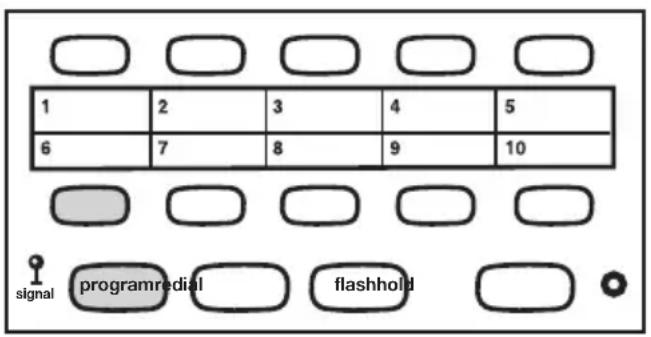
The Clarity C1000 allows you to program in one help number and ten frequently dialed numbers into memory for future use. By doing so, you will only have to press one button to place a call. As a matter of safety, write these important numbers on the quick reference card under the receiver or below the memory storage locations.
Important: Wait at least two hours after installing for the phone to charge before you begin programming.
To Program Numbers into the Clarity Phone:
I. Select the number you wish to store for each memory button. The C1000 will let you store up to 16 digits with each button.
2. Select the correct TONE/PULSE setting you normally dial in. (Remember, some long distance services require TONE dialing.)
3. Pick up the handset from the phone base, press and release the "PROGRAM" button on the base unit.
4. Dial the number you wish to store. The number is not transmitted while you are programming it.
TELEPHONE OPERATIONS
- Press the "PROGRAM" button again.
- Select the appropriate memory storage button. Press and release this button.
- Place handset back into cradle.
- Repeat steps 3 through 7 for all other memory storage locations.
text_image
1 2 3 4 5 6 7 8 9 10 signal programredial flashholdProgramming Frequently-Dialed Numbers
To Dial Programmed Numbers:
I. Pick up the handset and listen for a dial tone.
2. Press the appropriate Memory Storage Button.
3. The number will be dialed automatically.
Change A Stored Number
Replace a stored number by programming a new number its place.
Important: The HELP BUTTON is not pre-programmed for 911. Once programming is completed select the appropriate sticker from the sticker set provided and place on the red button.
Programming Note: During the programming sequence the dial tone MAY NOT break and in some instances an operator intercept may come on the line. This is normal. Continue with the programming sequence to completion.
Note: You can program a pause into the dialing sequence if necessary. Since there is not a pause button on the telephone, the redial button serves this purpose during programming. Programming in a pause will cause the phone to wait 3 seconds before dialing any more numbers. For Example: Pressing a memory button that has 9 (pause) 555-1212 programmed into it will dial the number 9, then wait 3 seconds and dial 555-1212. In most cases, you will not need to use a pause. You can store up to 16 digits and the pause function counts as 1 of those digits.
TELEPHONE CARE
The Clarity C1000 has been designed to give you years of dependable service with a minimum of care.
To ensure the utmost in performance, follow these guidelines in caring for the unit:
- Avoid dropping or knocking the unit.
- Dust the unit regularly. Wipe the unit with a soft, damp cloth. Do not use detergents and avoid excess moisture.
- The Clarity C1000 is an electrical device. Avoid electric shock by keeping the phone away from water. (i.e.: bathroom, kitchen sink, etc.)
TROUBLESHOOTING
Phone Will Not Operate
Disconnect any other equipment that may be attached to the phone. Check your phone cords and connections. Try a different line cord and/or handset cord to determine if the problem is with one of the cords. If problem lies in the cord simply replace the defective cord. If this does not solve the problem, try plugging the phone into a different phone jack.
Can't Dial Out
Make sure that TONE/PULSE switch is set correctly. Phone should be set to TONE if you have touch tone service from your phone company. Phone should be set to PULSE if operating with rotary dial service.
Phone Doesn't Dial Out On First Attempt
Your phone may be at the end of a long line of phones, due to the way the phone company installed the wiring in your neighborhood. In this case, your phone may not get enough power from the phone line. Try waiting 3-5 seconds after lifting the handset before dialing the number. Wait for the sound level indicator to light solid before dialing.
Can't Store Numbers Into Memory
Your new Clarity phone must charge for two (2) hours before you can program any numbers into it.
Loss Of Numbers Programmed Into Memory
Your Clarity phone will maintain its memory for up to 12 hours during a power loss. If you unplug the phone from the telephone line for long periods or lose your phone service for an extended period of time you will need to reprogram the phone.
Programming Personal Access Codes – Difficulty Programming Account Numbers
Your TONE/PULSE selector must be switched to the TONE mode to enter account numbers. This is because most interactive phone systems require TOUCH TONE to operate. If your phone service is rotary service, you must have the switch set to PULSE to dial a number. Once you are connected move the switch to TONE and enter your responses using TOUCH TONE mode. When your call is complete move the switch back to PULSE so you are ready to make your next call.
TROUBLESHOOTING
Static On Line – Interference From Household Appliances
Your Clarity phone may be located near a touch lamp, microwave or refrigerator which may cause interference. Relocating your phone to another area may eliminate the problem.
A cordless phone on your phone line may also cause static. Try disconnecting your cordless phone for several days. This may eliminate the problem.
Disconnect any extra devices which may be attached to the phone. Extra devices may include cord detangler's, caller ID units, and answering machines.
Interference From Malfunctioning, Frayed Or Poorly Connected Telephone Cords
Check your phone cords and connections. Try interchanging cords with another phone to see if the problem is eliminated. Replace any defective equipment.
Feedback Occurs When Handset Is Set Down
Avoid setting receiver on a hard surface or attach a foam receiver pad to earpiece of phone. You can also lay the receiver on its side. This will eliminate feedback also.
A Person On The Other End Cannot Hear You
Too many phones or phone devices on the line may effect your phone's transmission. As a guideline, more than five (5) phones or phone devices may overload the phone line. Disconnect one (1) or two (2) of the devices to see if that eliminates the problem. If not, contact your local phone company for load guidelines.
You may not be speaking directly into the transmitter. Always speak directly into the mouthpiece in your normal tone of voice.
The CI000 is Compatible With Digital PBX Systems
If a standard, single line phone works, your C1000 phone should also work.
- Clarity Phones Are Not Compatible With Key Systems Or AT&T PBX Systems These units have a large electronic box controlling many phones as one unit. These types of units may be found in office buildings and some retirement homes, nursing homes and condos.
TROUBLESHOOTING
Unable To Hear Phone Ringer
Make sure the ringer volume is not set to OFF.
Slide the volume adjustment switch to the large dot and the pitch adjustment switch to the small dot. This will cause the ringer to sound at its loudest and lowest frequency. Typically, low frequencies are easier for people with hearing loss to detect.
Consider purchasing a variable pitch auxiliary ringer such as the Clarity WR-100. These devices are exceptionally loud and can be plugged into any phone outlet in your home.
User Hears Radio or CB Transmissions On The Phone
Contact your local phone company to have your telephone line checked. A Radio Frequency Interference (RFI) filter may be put on the line to minimize this problem.
If you have any telephone service problems, first make sure you have followed all of the installation procedures outlined in this user's guide. Then try to determine if the source of the problem is the Clarity phone itself or your phone service. To do this, disconnect the Clarity C1000 and plug in your standard telephone. If the trouble persists with the standard telephone, inform your telephone company.
If the trouble is related to only the Clarity phone, review the installation procedures and the troubleshooting guide before referring to the Limited Warranty stated later in this user guide.
REGULATORY COMPLIANCE
Part 68 of FCC Rules Information
a) This equipment complies with Part 68 of the FCC rules and the requirements adopted by the ACTA. On the bottom of this equipment is a label that contains, among other information, a product identifier in the format US:AAAEQ##TXXXX. If requested, this number must be provided to the telephone company.
b) A plug and jack used to connect this equipment to the premises wiring and telephone network must comply with the applicable FCC Part 68 rules and requirements adopted by the ACTA. A compliant telephone cord and modular plug, RJ11C USOC, is provided with this product. It is designed to be connected to a compatible modular jack that is also compliant. See installation instructions for details.
c) The REN is used to determine the number of devices that may be connected to a telephone line. Excessive RENs on a telephone line may result in the devices not ringing in response to an incoming call. In most but not all areas, the sum of RENs should not exceed five (5.0). To be certain of the number of devices that may be connected to a line, as determined by the total RENs, contact the local telephone company. For products approved after July 23, 2001, the REN for this product is part of the product identifier that has the format US:AAAEQ##TXXXX.
The digits represented by ## are the REN without a decimal point (e.g., 03 is
a REN of 0.3). For earlier products, the REN is separately shown on the label.
d) If this telephone equipment causes harm to the telephone network, the telephone company will notify you in advance that temporary discontinuance of service may be required. But if advance notice isn't practical, the telephone company will notify the customer as soon as possible. Also, you will be advised of your right to file a complaint with the FCC if you believe it is necessary.
e) The telephone company may make changes in its facilities, equipment, operations or procedures that could affect the operation of the equipment. If this happens the telephone company will provide advance notice in order for you to make necessary modifications to maintain uninterrupted service.
f) If trouble is experienced with this telephone equipment, for repair or warranty information, please contact Clarity, 1-800-552-3368. If the equipment is causing harm to the telephone network, the telephone company may request that you disconnect the equipment until the problem is resolved.
g) This telephone equipment is not intended to be repaired and it contains no repairable parts. Opening the equipment or any attempt to perform repairs will void the warranty. For service or repairs, call 1-800-552-3368.
h) Connection to party line service is subject to state tariffs. Contact the state public utility commission, public service
REGULATORY COMPLIANCE
commission or corporation commission for information.
i) If your home has specially wired alarm equipment connected to the telephone line, ensure the installation of this telephone equipment does not disable your alarm equipment. If you have questions about what will disable alarm equipment, consult your telephone company or a qualified installer.
j) This telephone equipment is hearing aid compatible.
Customer-Owned Coin/Credit Card Phones:
To comply with state tariffs, the telephone company must be given notification prior to connection. In some states, the state public utility commission, public service commission or corporation commission must give prior approval of connection.
Part 15 of FCC Rules Information
This device complies with Part 15 of the FCC Rules. Operation is subject to the following two conditions: (1) This device may not cause harmful interference, and (2) this device must accept any interference received, including interference that may cause undesired operation.
Your equipment has been tested and found to comply with the limits of a Class B digital device, pursuant to Part 15 of FCC rules. These limits are designed to provide reasonable protection against harmful interference in residential installation.
This equipment generates, uses and can radiate radio frequency energy and, if not installed and used in accordance with the instructions, may cause harmful interference to radio communications. However, there is no guarantee that interference will not occur in a particular installation; if this equipment does cause harmful interference to radio or television reception, which can be determined by turning the equipment off and on, you are encouraged to try to correct the interference by one of the following measures:
I. Where it can be done safely, reorient the receiving television or radio antenna.
2. To the extent possible, relocate the television, radio or other receiver with respect to the telephone equipment. (This increases the separation between the telephone equipment and the receiver.)
3. Connect the telephone equipment into an outlet on a circuit different from that to which the television, radio, or other receiver is connected.
4. Consult the dealer or an experienced Radio/TV Technician for help.
CAUTION: Changes or modifications to this equipment not expressly approved by the party responsible for compliance could void the user's authority to operate the equipment.
REGULATORY COMPLIANCE
Privacy of communications may not be ensured when using this phone.
CAUTION: To maintain the compliance with the FCC's RF exposure guideline, place the base unit at least 20 cm from nearby persons.
For body worn operation, this handset has been tested and meets the FCC RF exposure guidelines when used with the (Plantronics) accessories supplied or designated for this product. Use of other accessories may not ensure compliance with FCC RF exposure guidelines.
Industry Canada Technical Specifications
This product meets the applicable Industry Canada technical specifications.
Before installing this equipment, users should ensure that it is permissible to be connected to the facilities of the local telecommunications company. The equipment must also be installed using an acceptable method of connection. In some cases, the company's inside wiring associated with a single line individual service may be extended by means of a certified connector assembly (telephone extension cord). The customer should be aware that compliance with the above conditions may not prevent degradation of service in some situations. Repairs to certified equipment should be made by an authorized Canadian maintenance facility designated by the supplier.
Any repairs or alterations made by the user to this equipment, or equipment malfunctions, may give the telecommunications company cause to request the user to disconnect the equipment.
Users should ensure for their own protection that the electrical ground connections of the power utility, telephone lines and internal metallic water pipe system, if present, are connected together. This precaution may be particularly important in rural areas.
CAUTION: Users should not attempt to make such connections themselves, but should contact the appropriate electrical inspection authority, or electrician, as appropriate.
The Ringer Equivalence Number is an indication of the maximum number of terminals allowed to be connected to a telephone interface. The termination on an interface may consist of any combination of devices subject only to the requirement that the sum of the Ringer Equivalence Numbers of all the devices does not exceed five.
(The term “IC:” before the certification/registration number only signifies that the Industry Canada technical specifications were met.)
This Class B digital apparatus complies with Canadian ICES-003.
The party responsible for regulatory compliance:
Clarity, A Division of Plantronics, Inc. 4289 Bonny Oaks Drive, Suite 106 Chattanooga, TN 37406 Phone: 1-800-552-3368
WARRANTY & SERVICE
The following warranty and service information applies only to products purchased and used in the U.S. and Canada. For warranty information in other countries, please contact your local retailer or distributor.
Limited Warranty
Clarity, a division of Plantronics, Inc. (“Clarity”) warrants to the original consumer purchaser that, except for limitations and exclusions set forth below, this product shall be free from defects in materials and workmanship for a period of one (1) year from the date of original purchase (“Warranty Period”). The obligation of Clarity under this warranty shall be at Clarity’s option, without charge, of any part or unit that proves to be defective in material or workmanship during the Warranty Period.
Exclusions from Warranty
This warranty applies only to defects in factory materials and factory workmanship. Any condition caused by accident, abuse, misuse or improper operation, violation of instructions furnished by Clarity, destruction or alteration, improper electrical voltages or currents, or repair or maintenance attempted by anyone other than Clarity or an authorized service center, is not a
defect covered by this warranty. Telephone companies manufacture different types of equipment and Clarity does not warrant that its equipment is compatible with the equipment of a particular phone company.
Implied Warranties
Under state law, you may be entitled to the benefit of certain implied warranties. These implied warranties will continue in force only during the warranty period. Some states do allow limitations on how long an implied warranty lasts, so the above limitation may not apply to you.
Incidental or Consequential Damages
Neither Clarity nor your retail dealer or selling distributors has any responsibility for any incidental or consequential damages including without limitation, commercial loss or profit, or for any incidental expenses, expenses, loss of time, or inconvenience. Some states do not allow exclusion or limitation of incidental or consequential damage, so the above limitation or exclusion may not apply to you.
Other Legal Rights
This warranty gives you specific legal rights and you may also have other rights which vary from state to state.
WARRANTY & SERVICE
How to Obtain
Warranty Service
To obtain warranty service, please prepay shipment and return the unit to the appropriate facility listed below.
In the United States
Clarity Service Center
4289 Bonny Oaks Drive, Suite 106
Chattanooga, Tennessee 37406
Tel: (423) 622-7793 or
(800) 426-3738
Fax: (423) 622-7646 or
(800) 325-8871
In Canada
Plantronics Service Center
8112 Trans-Canada Hwy.
Please use the original container, or pack the unit(s) in a sturdy carton with sufficient packing material to prevent damage.
Include the following information:
I. A proof-of-purchase indicating model number and date of purchase.
2. Bill-to address.
3. Ship-to address.
4. Number and description of units shipped.
5. Name and telephone number of person to call, should contact be necessary.
6. Reason for return and description of the problem.
Damage occurring during shipment is deemed the responsibility of the carrier, and claims should be made directly with the carrier.
text_image
CLARITY 1 2 3 4 5 6 7 8 9 10 signal program redial flash hold 1 2 3 help 4 5 6 mute 7 8 9 boost * 0 # C1000™ with Clarity © Power™TABLA DE CONTENIDOS
text_image
CLARITY E 1 2 3 help 4 5 6 mute 7 8 9 boost * 0 # C1000 = with Clarity Power ...Base

natural_image
Line drawing of a vintage telephone handset with keypad and buttons (no text or symbols)Unidad Inalámbrica
natural_image
Pure technical diagram of a mechanical component with no text, numbers, or symbolsnatural_image
Line drawing of a four-pin electronic component with a small symbol on its side (no text or labels)text_image
Volumen TonoClarity Service Center
4289 Bonny Oaks Drive, Suite 106
Chattanooga, Tennessee 37406
Tel: (423) 622-7793 o
(800) 426-3738
Fax: (423) 622-7646 o
(800) 325-8871
En Canadá
Plantronics Service Center
8112 Trans-Canada Hwy.
text_image
CLARiTY® Amplifying Your Life™Clarity, a Division of Plantronics, Inc.
4289 Bonny Oaks Drive, Suite 106
Chattanooga, TN 37406
1-800-552-3368
www.clarityproducts.com
© 2007 Clarity, a Division of Plantronics, Inc. All rights reserved. Amplifying Your Life, Clarity, the amplificatin device, Clarity and the amplification device combined, Clarity Power, and C1000 are trademarks or registered trademarks of Plantronics, Inc. FCC Registration complies with part 68 of FCC rules and regulations.
Rev. A (11-07)