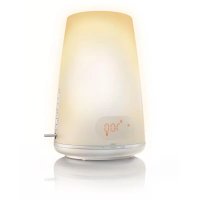
PHILIPS Wakeup Light Plus HF3485 - Light therapy

Wakeup Light Plus HF3485 - Light therapy PHILIPS - Free user manual and instructions

Find the device manual for free Wakeup Light Plus HF3485 PHILIPS in PDF.

English EN Download 💬 AI Question 10 questions ⚙️ Specs
📄

Document temporarily unavailable

The manual is currently being transferred to our new server. It will be accessible again in a few hours. Thank you for your patience.

Pick your language and provide your email: we'll send you a specifically translated version.
Product TypeLight Therapy and Alarm Clock
BrandPhilips
ModelWakeup Light Plus HF3485
Power Supply230 V, 50 Hz
BulbHalogen 100 W, 12 V, GY6.35
Light Intensity20 levels (1-20)
Sunrise SimulationAdjustable duration: 20, 25, 30 or 40 minutes
Sunset SimulationAdjustable duration: 15, 30, 60 or 90 minutes
FM RadioYes, with 3 preset stations
USB PlaybackMP3/WMA files, up to 999 tracks
Alarm SoundsRadio, bird, yoga, chime, forest, USB
Volume20 levels (1-20)
SnoozeFixed 9 minutes
Display Brightness4 levels (1-4)
MaintenanceClean with a dry cloth, do not use harsh detergents
SafetyDouble insulation (class II), do not use in humid environments
Spare PartPhilips halogen bulb 100W/12V GY6.35
WarrantyInternational Philips warranty (see leaflet)

Frequently Asked Questions - Wakeup Light Plus HF3485 PHILIPS

How to set the time on the Wakeup Light HF3485?
When first plugged in or after a power failure, the time flashes. Use the + and - buttons to set the hour, then press SELECT. Then the minutes flash: set them and confirm. You can also access the time via the menu by pressing MENU.
How to set the alarm?
Push the control lever to the middle position for alarm 1 or to the top position for alarm 2. The hours flash: adjust with the + and - buttons, confirm with SELECT. Then adjust the minutes. For light intensity, turn on the lamp and adjust with the increase/decrease buttons. For sound, use the menu to choose between radio, natural sounds, or USB.
How to use the snooze function?
Tap firmly on the surface of the Wakeup Light with your palm. The sound stops, but the lamp stays on. After 9 minutes, the alarm sounds again. The 9-minute interval is fixed and cannot be changed.
What to do if the lamp does not turn on?
First check that the device is plugged in and the power supply works. If the lamp still does not turn on, the bulb may be defective. Replace it with a Philips halogen bulb 100W, 12V, GY6.35. Let the device cool for 15 minutes before changing the bulb.
Why does the alarm not go off?
Make sure the control lever is in Alarm 1 or Alarm 2 position. Check that the light intensity and volume are not set to 0. If using the radio as an alarm sound, test the radio independently. If the power outage lasts more than 15 minutes, factory settings are restored; reprogram the alarm.
How to replace the bulb?
Unplug the device and let it cool for 15 minutes. Press the top cover and turn it counterclockwise to unlock. Remove the used bulb by the pins. Insert the new bulb without touching the glass with your fingers (use a cloth). Replace the cover by turning it clockwise.
How to use the radio as an alarm sound?
In the menu, select the alarm sound function. Choose the radio icon. The display shows P1 (preset station 1). Use the + and - buttons to choose another preset station (P1, P2, P3). Press SELECT to confirm. To change preset stations, turn on the radio, adjust the frequency with +/-, and it will be saved automatically.
How to play music from a USB drive?
Insert the USB drive (FAT12/16/32 format) into the USB connector. Press the radio on/off button twice. The device searches for MP3/WMA files. Use the + and - buttons to select a track. To stop, press the radio button again. Place files in the root directory for faster search.
What to do if the radio crackles?
The signal may be weak. Make sure the antenna is fully extended and move it to find better reception. You can also manually adjust the frequency with the + and - buttons. If the problem persists, check that the device is not near other sources of interference.
How to clean the device?
Unplug the device before cleaning. Use a dry cloth to remove dust. Never use scouring pads, abrasive products, or harsh detergents like gasoline or acetone. Be careful not to let water enter the device.

User questions about Wakeup Light Plus HF3485 PHILIPS

0 question about this device. Answer the ones you know or ask your own.

Ask a new question about this device

The email remains private: it is only used to notify you if someone responds to your question.

No questions yet. Be the first to ask one.

Download the instructions for your Light therapy in PDF format for free! Find your manual Wakeup Light Plus HF3485 - PHILIPS and take your electronic device back in hand. On this page are published all the documents necessary for the use of your device. Wakeup Light Plus HF3485 by PHILIPS.

USER MANUAL Wakeup Light Plus HF3485 PHILIPS

Manual assistant
Powered by Anthropic
Waiting for your message
Product information

Brand : PHILIPS

Model : Wakeup Light Plus HF3485

Category : Light therapy