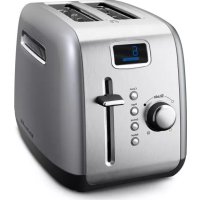
KMT222CU - Toaster KITCHENAID - Free user manual and instructions
Find the device manual for free KMT222CU KITCHENAID in PDF.



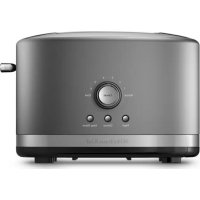
| Product Type | Toaster |
| Brand | KitchenAid |
| Model | KMT222CU |
| Number of Slots | 2 |
| Slot Width | Extra-large (3.8 cm) |
| Browning Settings | 7 levels (1 to 7) |
| Display | Digital with progress bar |
| Special Functions | Bagel, Defrost, Reheat, Cancel |
| Self-Centering Racks | Yes |
| Extra-Lift Lever | Yes |
| Removable Crumb Tray | Yes, dishwasher safe (top rack) |
| Exterior Material | Stainless steel and perforated steel |
| Interior | Steel |
| Power Cord | Retractable under base |
| Voltage | 120 V, 60 Hz |
| Plug Type | 3-prong grounded plug |
| Care | Wipe with a soft damp cloth; crumb tray dishwasher safe |
| Safety | Do not immerse, do not use damaged power cord, automatic shut-off |
Frequently Asked Questions - KMT222CU KITCHENAID
User questions about KMT222CU KITCHENAID
0 question about this device. Answer the ones you know or ask your own.
Ask a new question about this device
Download the instructions for your Toaster in PDF format for free! Find your manual KMT222CU - KITCHENAID and take your electronic device back in hand. On this page are published all the documents necessary for the use of your device. KMT222CU by KITCHENAID.
USER MANUAL KMT222CU KITCHENAID
Models KMT222 and KMT422.6
Special Toasting Functions - Models KMT222 and KMT422.7
KITCHENAID TOASTER FEATURES 8
Models KMT223 and KMT423.8
Special Toasting Functions - Models KMT223 and KMT423.9
KITCHENAID TOASTER USE. 10
Models KMT222, KMT422, KMT223 and KMT423. 10
Special Toasting Functions Use 11
TOASTER CARE. 12
TROUBLESHOOTING. 13
PROOF OF PURCHASE AND PRODUCT REGISTRATION 13
WARRANTY 14 Hassle-Free Replacement Warranty - 50 United States and District of Columbia ....15
Hassle-Free Replacement Warranty - Canada. 15
How to Arrange for Warranty Service in Puerto Rico. 15
How to Arrange for Service after the Warranty Expires - All Locations 16
How to Arrange for Service Outside these Locations. 16
How to Order Accessories and Replacement Parts 16
TABLE DES MATIÈRES
CONSIGNES DE SECURITE DU
GRILLE-PAIN. 18
SPECIFICATIONS ÉLECTRIQUES 19
CHARACTERISTIQUES DU GRILLE-PAIN
KITCHENAID 20
Your safety and the safety of others are very important.
We have provided many important safety messages in this manual and on your appliance. Always read and obey all safety messages.

This is the safety alert symbol.
This symbol alerts you to potential hazards that can kill or hurt you and others.
All safety messages will follow the safety alert symbol and either the word "DANGER" or "WARNING." These words mean:
DANGER
You can be killed or seriously injured if you don't immediately follow instructions.
WARNING
You can be killed or seriously injured if you don't follow instructions.
All safety messages will tell you what the potential hazard is, tell you how to reduce the chance of injury, and tell you what can happen if the instructions are not followed.
IMPORTANT SAFEGUARDS
When using electrical appliances, basic safety precautions should always be followed, including the following:
Read all instructions.
- Do not touch hot surfaces. Use handles or knobs.
To protect against electrical shock, do not immerse cord, plugs, or toaster in water or other liquid.
- Close supervision is necessary when any appliance is used by or near children.
- Unplug toaster from outlet when not in use and before cleaning. Allow to cool before putting on or taking off parts.
■ Do not operate any appliance with a damaged cord or plug or after the appliance malfunctions or has been damaged in any manner. Return appliance to the nearest Authorized Service Facility for examination, repair or adjustment.
The use of accessory attachments not recommended by the appliance manufacturer may cause injuries.
Do not use outdoors.
■ Do not let cord hang over edge of table or counter, or touch hot surfaces.
■ Do not place on or near a hot gas or electric burner, or in a heated oven.
■ To disconnect, turn any control to "OFF," then remove plug from outlet.
- Do not use appliance for other than intended use.
- Oversize foods, metal foil packages, or utensils must not be inserted in toaster as they may involve a risk of fire or electric shock.
A fire may occur if toaster is covered with or touching flammable material, including curtains, draperies, walls and the like, when in operation. - Do not attempt to dislodge food when toaster is plugged in.
This product is designed for household use only.
SAVE THESE INSTRUCTIONS
ELECTRICAL REQUIREMENTS
WARNING

Electrical Shock Hazard
Plug into a grounded 3 prong outlet.
Do not remove ground prong.
Do not use an adapter.
Do not use an extension cord.
Failure to follow these instructions can result in death, fire, or electrical shock.
A short power supply cord (or detachable power supply cord) should be used to reduce the risk resulting from becoming entangled in or tripping over a longer cord.
Longer detachable power supply cords or extension cords are available and may be used if care is exercised in their use.
If a longer detachable power supply cord or extension cord is used:
The marked electrical rating of the cord set or extension cord should be at least as great as the electrical rating of the appliance.
The cord should be arranged so that it will not drape over the countertop or tabletop where it can be pulled on by children or tripped over unintentionally.
If the appliance is of the grounded type, the extension cord should be a grounding-type 3-wire cord.
Volts: 120 Volts AC only.
Hertz: 60 Hz
NOTE: Your toaster has a 3-prong grounded plug. To reduce the risk of electrical shock, this plug will fit in an outlet only one way. If the plug does not fit in the outlet, contact a qualified electrician. Do not modify the plug in any way.
Do not use an extension cord. If the power supply cord is too short, have a qualified electrician or serviceman install an outlet near the appliance.
KITCHENAID® TOASTER FEATURES
Models KMT222 and KMT422
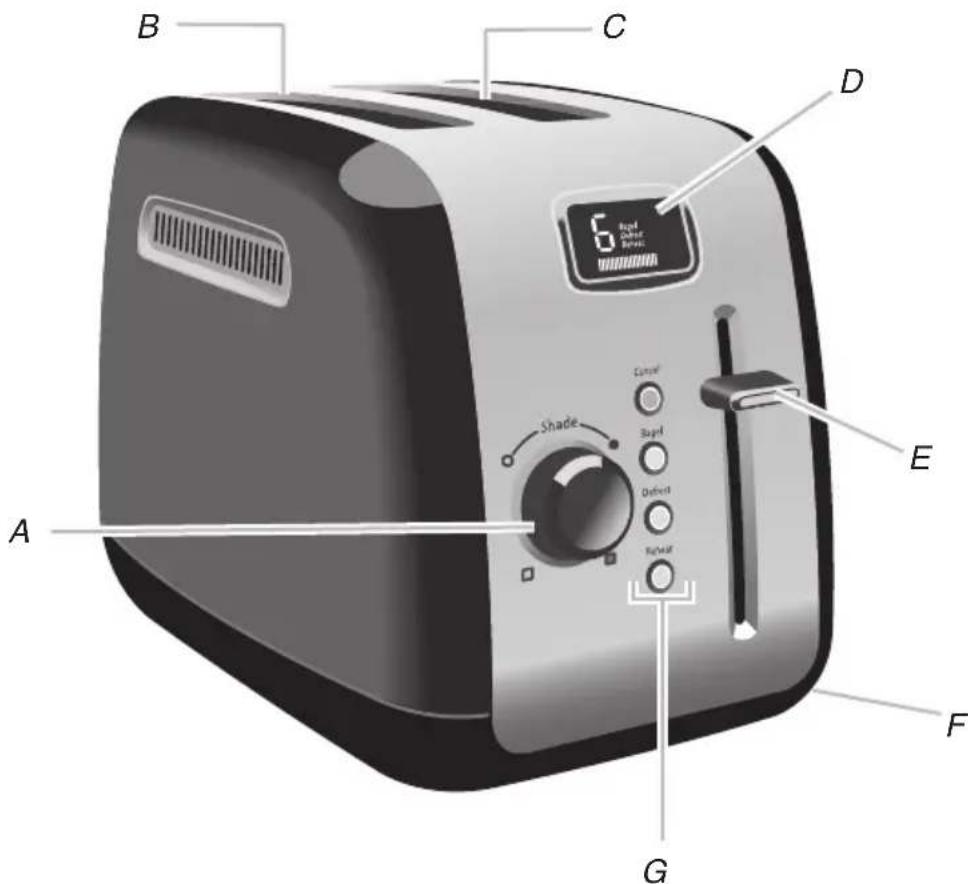
A. Dial shade control (7 settings)
B. Self-centering cage and steel interior
C. Extra-wide slots (1.5" [3.8 cm])
D. Digital display
E. High-lift lever
F. Under base cord wrap
G. Special toasting functions
Feature not shown:
Removable crumb tray
Dual Independent Controls (Model KMT422)
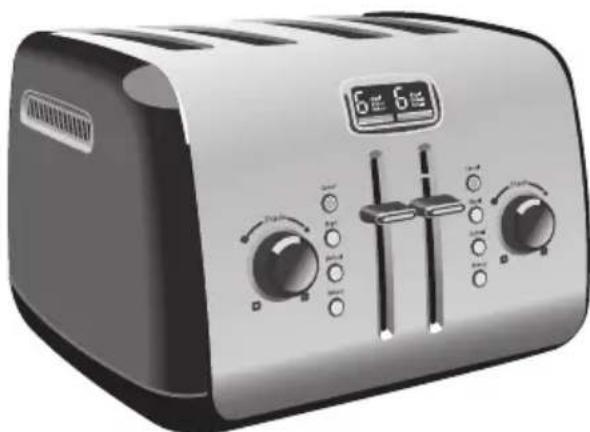
Same great features as Model KMT222 with dual cavities for 2-slice or 4-slice toasting.
One-Touch Buttons and Dial Knobs for each pair of slots work independently of each other, allowing toasting of a bagel or other item in one pair of slots while the second pair of slots could make toast.
Heat System
Heavy gauge heating elements mounted on extra-thick boards are installed in the toaster to ensure even browning.
High Lift Lever
Lever lifts toast above toaster for easy access and removal.
Extra-Wide Slots
Handles bagels, English muffins, and thick breads easily.
Self-Centering Bread Racks
Centers thick or thin breads perfectly for even toasting.
Removable Crumb Tray(s)
Durable, full-width, steel tray (two side-by-side trays on KMT422) can be washed in the top rack of a dishwasher.
Under Base Cord Wrap
Keeps extra cord out of sight and out of the way.
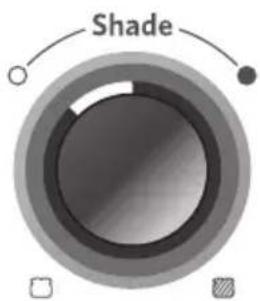
Dial Shade Control (7 settings)
Rotating knobs for precision control. Turn the knob to the right for darker or to the left for lighter toasting.
Stainless Steel and Painted Steel Housing
Stainless steel and painted steel surfaces are constructed for durability and style.
Steel Interior
Durable and deep toasting cavity helps to ensure even browning.
Special Toasting Functions - Models KMT222 and KMT422
Cancel

Bagel

Defrost

Reheat

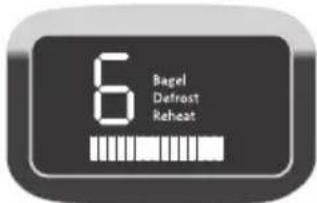
Digital Display
Selected toasting shade and function are displayed.
A toasting progress bar counts down the toasting time.
Cancel Button
Cancels the toasting cycle.
Bagel Button
Toasts the cut-side of a bagel or English muffin while gently warming the outer surfaces.
Defrost Button
Defrost and toasts frozen food.
Reheat Button
Quickly reheats previously toasted food in under a minute.
KITCHENAID® TOASTER FEATURES
Models KMT223 and KMT423
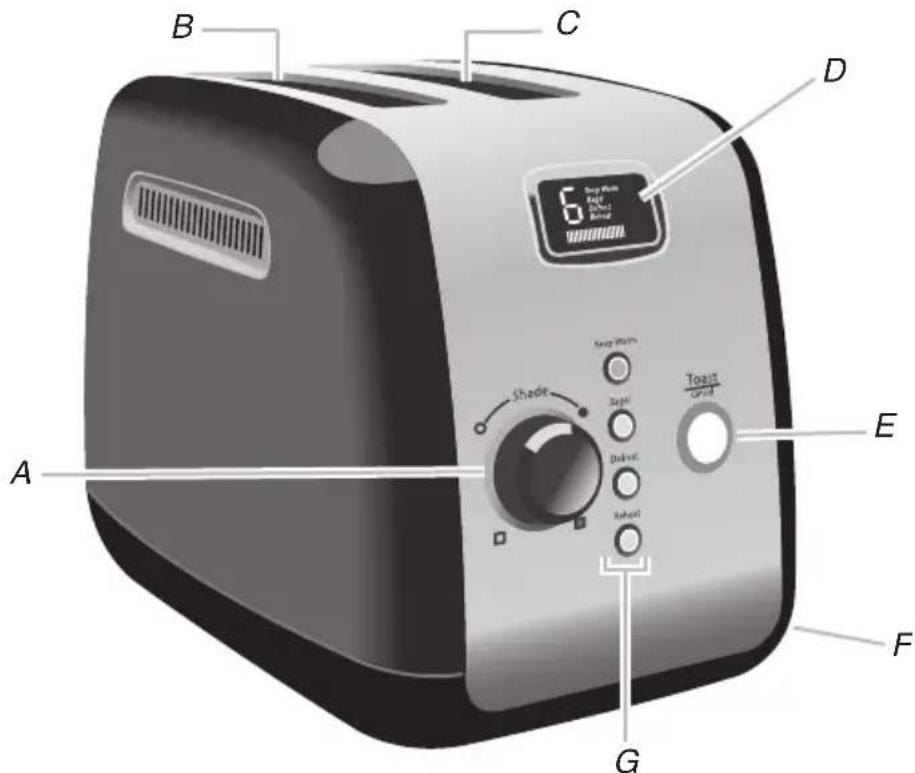
A. Dial shade control (7 settings)
B. Self-centering cage and steel interior
C. Extra-wide slots (1.5" [3.8 cm])
D. Digital display
E. Toast/cancel button
F. Under base cord wrap
G. Special toasting functions Feature not shown:
Removable crumb tray
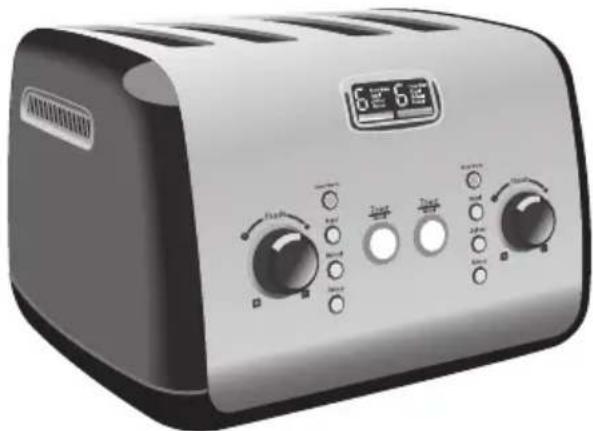
Dual Independent Controls (Model KMT423)
Same great features as Model KMT223 with dual cavities for 2-slice or 4-slice toasting One-Touch Buttons and Dial Knobs for each pair of slots work independently of each other, allowing toasting of a bagel or other item in one pair of slots while the second pair of slots could keep a pastry warm.
Heat System
Heavy gauge heating elements mounted on extra-thick boards are installed in the toaster to ensure even browning.
Extra-Wide Slots
Handles bagels, English muffins, and thick breads easily.
Self-Centering Bread Racks
Centers thick or thin breads perfectly for even toasting.
Removable Crumb Tray(s)
Durable, full-width, steel tray (two side-by-side trays on KMT423) can be washed in the top rack of a dishwasher.
Under Base Cord Wrap
Keeps extra cord out of sight and out of the way.
Dial Shade Control
Rotating knobs for precision control. Turn the knob to the right for darker or to the left for lighter toasting.
Stainless Steel and Painted Steel Housing
Stainless steel and painted steel surfaces are constructed for durability and style.
Steel Interior
Durable and deep toasting cavity helps to ensure even browning.
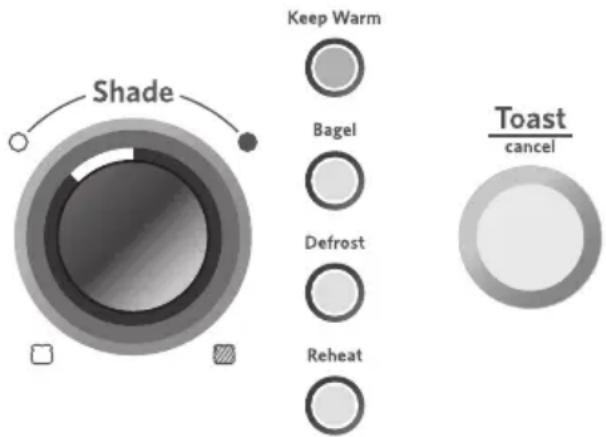
Special Toasting Functions - Models KMT223 and KMT423
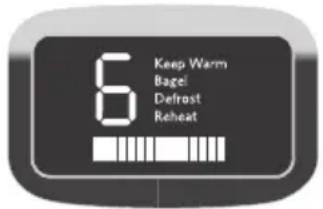
Digital Display
Selected toasting shade and function are displayed.
A toasting progress bar counts down the toasting time.
Keep Warm Button
Select to lower toasted foods to keep warm until you are ready, for up to a minute. The End-of-Cycle signal will beep and the toaster will shut off and raise the food.
Bagel Button
Toasts the cut-side of a bagel or English muffin while gently warming the outer surfaces.
Defrost Button
Defrost and toasts frozen food.
Reheat Button
Quickly reheats previously toasted food in under a minute.
Toast/Cancel Button
Lowers the bread and starts and cancels the toasting cycle. A ring of light around the button illuminates when the heaters are actively toasting.
KITCHENAID® TOASTER USE
Models KMT222, KMT422, KMT223 and KMT423
Before using your toaster, check the ExtraWide Slots and remove any packing or printed material that might have fallen inside during shipping or handling. Do not probe inside the toaster with a metal object.
You may see light smoke the first time you use the toaster. This is normal. The smoke is harmless and will soon disappear.
TO USE:
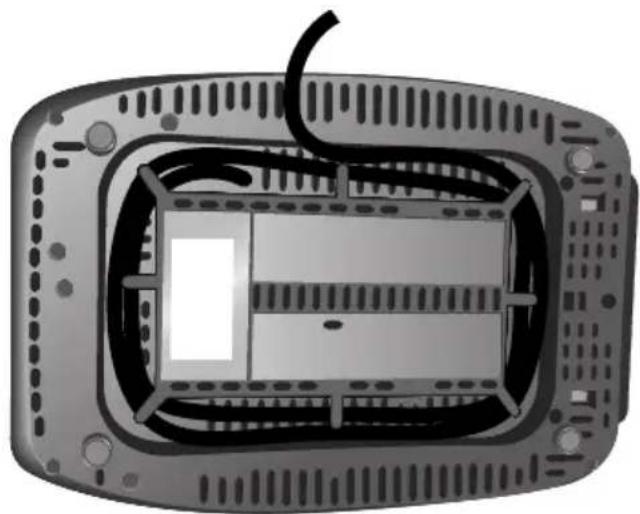
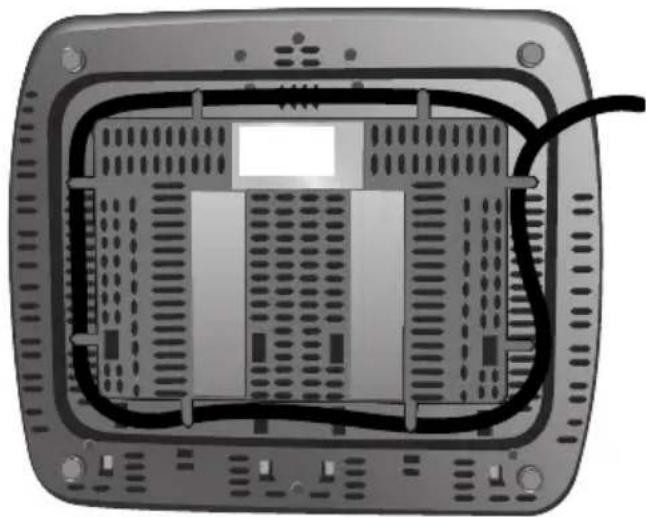
- Shorten cord, if necessary, by wrapping cord under the base. The toaster's feet are tall enough to allow the cord to exit from under any side of the toaster.
WARNING
Electrical Shock Hazard Plug into a grounded 3 prong outlet.
Do not remove ground prong.
Do not use an adapter.
Do not use an extension cord.
Failure to follow these instructions can result in death, fire, or electrical shock.
-
Plug into a grounded 3-prong outlet.
-
Insert bread or other food to be toasted in slot.
NOTE: For even toasting on models KMT222 and KMT223, toast only one bread type and thickness at a time.For 4-slot models KMT422 and KMT423, with Dual Independent Controls, if. toasting of two different breads is desired, be sure to toast only one bread type in each pair of slots.
4. On models KMT222 and KMT422:
Push the lever down until it locks in place. On models KMT223 and KMT423): Press the TOAST/CANCEL button.
The centering racks will adjust slot width automatically to hold food upright for even toasting. When toasting is completed, and End-of-Cycle signal will beep and the toaster will shut off and raise the toast.
- Turn the Dial Shade Control to select the degree of darkness you want. Turn the Shade Control to the right for darker toasting or to the left for lighter. The LCD will display the shade level, from 1 (light) to 7 (dark).
NOTE: Different types of bread and their moisture levels may require different shade settings. For example, dry bread will brown more rapidly than moist bread and will require a lighter setting.
-
(Optional) Press desired special toasting function button. See the "Special Toasting Functions Use" section for more information.
-
To cancel toasting anytime, press CANCEL (on models KMT222 and KMT422) or TOAST/CANCEL (on models KMT223 and KMT423). The toaster will shut off and raise the toast.
Special Toasting Functions Use
After you lower the lever (on models KMT222 and KMT422) or press TOAST/ CANCEL (on models KMT223 and KMT423) to begin toasting, you can select the special toasting functions by pressing the appropriate button. After a toasting cycle is complete, all functions will be cleared.
Bagel Toasting
Selecting the Bagel function will toast the thickest bagels and English muffins evenly, gently warming the bottoms while toasting the sides that are sliced. Bagel Toasting produces perfect results by shutting off power to the heating elements on one side of the toasting cavity.
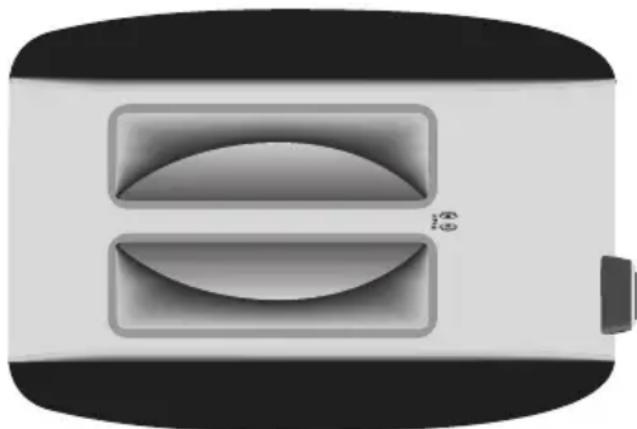
- Insert the bagel so that the flat (sliced) side of the bagel faces the center of the toaster. See illustration.
-
On models KMT222 and KMT422: Push the lever down until it locks in place. On models KMT223 and KMT423): Press the TOAST/CANCEL button.
-
Set the Shade Control to the level you want. English muffins will generally take more time to toast than bagels.
- Press BAGEL.
To cancel, press BAGEL again, or press CANCEL (on models KMT222 and KMT422) or TOAST/CANCEL (on models KMT223 and KMT423). The toaster will shut off and raise the food.
To Defrost Frozen Items
The Defrost function will defrost and toast frozen items quickly.
- Insert the frozen item into bread slot. Use Defrost for frozen foods only.
- On models KMT222 and KMT422: Push the lever down until it locks in place. On models KMT223 and KMT423): Press the TOAST/CANCEL button.
- Set the Shade Control to the level you want.
- Press DEFROST.
To cancel, press DEFROST again, or press CANCEL (on models KMT222 and KMT422) or TOAST/CANCEL (on models KMT223 and KMT423). The toaster will shut off and raise the food.
To Reheat Toasted Items
The Reheat function will reheat toast and other items quickly.
- Insert the previously toasted food into bread slot. Do not place food with butter or any other topping in the toaster. Use Reheat for dry foods only.
- On models KMT222 and KMT422:
Push the lever down until it locks in place. On models KMT223 and KMT423): Press the TOAST/CANCEL button.
- No Shade adjustment is necessary - the Reheat function overrides whatever Shade level you have set.
- Press REHEAT.
To cancel, press REHEAT again, or press CANCEL (on models KMT222 and KMT422) or TOAST/CANCEL (on models KMT223 and KMT423). The toaster will shut off and raise the food.
To Keep Taasted Items Warm (on models KMT223 and KMT423 only)
The Keep Warm function will keep toasted bread warm after toasting.
- Insert the previously toasted food into bread slot. Do not place food with butter or any other topping in the toaster. Use Keep Warm for dry foods only.
- Press TOAST/CANCEL.
- No Shade adjustment is necessary - the Keep Warm function overrides whatever Shade level you have set.
- Press KEEP WARM.
To cancel, press KEEP WARM again, or press CANCEL (on models KMT222 and KMT422) or TOAST/CANCEL (on models KMT223 and KMT423). The toaster will shut off and raise the food.
TOASTER CARE
- Unplug the toaster and let it cool before cleaning.
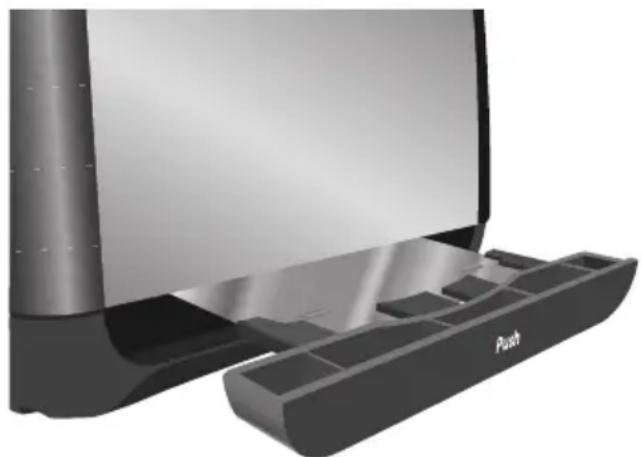
- Press and release the center of the crumb tray then slide it out. Shake the crumbs into a waste container. It is recommended that the crumb tray be emptied after each use. The crumb tray can be washed in the top rack of a dishwasher.
IMPORTANT: The tray will be hot immediately following a toasting cycle.
- Wipe toaster with a soft, damp cotton cloth. Do not use paper towels, abrasive cleansers or liquid cleaning products. Do not immerse toaster in water.
NOTE: If grease or oil splatters on the toaster, wipe splatters away immediately using a clean, damp cotton cloth.
- Return crumb tray to toaster. Press it in firmly until it clicks into position. Do not use the toaster without the crumb tray in proper position.
NOTE: KitchenAid does not recommend the use of a toaster cover.
TROUBLESHOOTING
If your toaster should fail to operate, check the following:
Check that the toaster is plugged into a proper electrical outlet. If it is, unplug the toaster.
WARNING

Electrical Shock Hazard
Plug into a grounded 3 prong outlet.
Do not remove ground prong.
Do not use an adapter.
Do not use an extension cord.
Failure to follow these instructions can result in death, fire, or electrical shock.
Plug in toaster.
If the toaster still does not work, check the household fuse or circuit breaker.
If the problem cannot be corrected:
See the KitchenAid warranty and service sections. Do not return the toaster to the retailer; retailers do not provide service.
PROOF OF PURCHASE AND PRODUCT REGISTRATION
Always keep a copy of the sales receipt showing the date of purchase of your toaster.
Proof of purchase will assure you of in-warranty service.
Before you use your toaster, please fill out and mail your product registration card packed with the unit. This card will enable us to contact you in the unlikely event of a product safety notification and assist us in complying with the provisions of the Consumer Product Safety Act. This card does not verify your warranty.
Please complete the following for your personal records:
Model Number
Serial Number
Date Purchased
Store Name and Location
KITCHENAID® TOASTER WARRANTY
| Length of Warranty: KitchenAid Will Pay For: | KitchenAid Will Not Pay For: | |
| 50 United States, the District of Columbia, Canada, and Puerto Rico: One-year limited warranty from date of purchase. | 50 United States, the District of Columbia and Canada: Hassle-free replacement of your toaster. See the following page for details on how to arrange for replacement. OR In Puerto Rico: The replacement parts and repair labor costs to correct defects in materials and workmanship. Service must be provided by an Authorized KitchenAid Service Center. To arrange for service, follow the instructions in the “How to Arrange for Warranty Service in Puerto Rico.” | A. Repairs when toaster is used in other than normal single family home use. B. Damage resulting from accident, alteration, misuse or abuse or use with products not approved by KitchenAid. C. Replacement parts or repair labor costs for toaster when operated outside the country of purchase. |
DISCLAIMER OF IMPLIED WARRANTY; LIMITATION OF REMEDIES IMPLIED WARRANTYES, INCLUDING TO THE EXTENT APPLICABLE WARRANTYES OF MERCHANTABILITY OR FITNESS FOR A PARTICULAR PURPOSE, ARE EXCLUDING TO THE EXTENT LEGALLY PERMISSIBLE. ANY IMPLIED WARRANTYES THAT MAY BE IMPOSED BY LAW ARE LIMITED TO ONE YEAR, OR THE SHORTEST PERIOD ALLOWED BY LAW. SOME STATES AND PROVINCES DO NOT ALLOW LIMITATIONS OR EXCLUSIONS ON HOW LONG AN IMPLIED WARRANTY OF MERCHANTABILITY OR FITNESS LASTS, SO THE ABOVE LIMITATIONS OR EXCLUSIONS MAY NOT APPLY TO YOU.
IF THIS PRODUCT FAILS TO WORK AS WARRANTED, CUSTOMER'S SOLE AND EXCLUSIVE REMEDY SHALL BE REPAIR OR REPLACEMENT ACCORDING TO THE TERMS OF THIS LIMITED WARRANTY. KITCHENAID AND KITCHENAID CANADA DO NOT ASSUME ANY RESPONSIBILITY FOR INCIDENTAL OR CONSEQUENTIAL DAMAGES. This warranty gives you specific legal rights and you may also have other rights which vary from state to state or province to province.
Hassle-Free Replacement Warranty – 50 United States and District of Columbia
We're so confident the quality of our products meets the exacting standards of KitchenAid that, if your toaster should fail within the first year of ownership, KitchenAid will arrange to deliver an identical or comparable replacement to your door free of charge and arrange to have your original toaster returned to us. Your replacement unit will also be covered by our one year limited warranty. Please follow these instructions to receive this high-quality service.
If your KitchenAid® toaster should fail within the first year of ownership, simply call our toll-free Customer Satisfaction Center at 1-800-541-6390 Monday through Friday, 8 a.m. to 8 p.m. (Eastern Time), or Saturday, 10 a.m. to 5 p.m. Give the consultant your complete shipping address. (No P.O. Box numbers, please.)
When you receive your replacement toaster, use the carton and packing materials to pack up your original toaster. In the carton, include your name and address on a sheet of paper along with a copy of the proof of purchase (register receipt, credit card slip, etc.).
Hassle-Free Replacement Warranty - Canada
We're so confident the quality of our products meets the exacting standards of the KitchenAid® brand that, if your toaster should fail within the first year of ownership, KitchenAid Canada will replace your toaster with an identical or comparable replacement. Your replacement unit will also be covered by our one year limited warranty. Please follow these instructions to receive this high-quality service.
If your KitchenAid® toaster should fail within the first year of ownership, take the toaster or ship collect to an Authorized KitchenAid Service Centre. In the carton include your name and complete shipping address along with a copy of the proof of purchase (register receipt, credit card slip, etc.). Your replacement toaster will be returned prepaid and insured. If you are unable to obtain satisfactory service in this manner, call our toll-free Customer eXperience Centre at 1-800-807-6777.
Or write to us at:
Customer eXperience Centre
KitchenAid Canada
200 - 6750 Century Ave.
Mississauga, ON L5N 0B7
How to Arrange for Warranty Service in Puerto Rico
Your KitchenAid® toaster is covered by a one-year limited warranty from the date of purchase. KitchenAid will pay for replacement parts and labor costs to correct defects in materials and workmanship. Service must be provided by an Authorized KitchenAid Service Center.
Take the toaster or ship prepaid and insured to an Authorized KitchenAid Service Center. Your repaired toaster will be returned prepaid and insured. If you are unable to obtain satisfactory service in this manner, call toll-free 1-800-541-6390 to learn the location of a Service Center near you.
How to Arrange for Service after the Warranty Expires – All Locations
Before calling for service, please review the "Troubleshooting" section.
For service information in the 50 United States, District of Columbia, and Puerto Rico,
call toll-free 1-800-541-6390.
Or write to:
Customer Satisfaction Center
KitchenAid Portable Appliances
P.O.Box 218,St. Joseph,MI 49085-0218
Or contact an Authorized Service Center near you.
For service information in Canada, call toll-free 1-800-807-6777.
Or write to:
Customer eXperience Centre
KitchenAid Canada
200 - 6750 Century Ave.
Mississauga, ON L5N 0B7
How to Arrange for Service Outside these Locations
Consult your local KitchenAid dealer or the store where you purchased the toaster for information on how to obtain service.
For service information in Mexico,
call the KitchenAid line 01-800-002-2767
How to Order Accessories and Replacement Parts
To order accessories or replacement parts for your toaster in the 50 United States, District of Columbia, and Puerto Rico,
call toll-free 1-800-541-6390 Monday through Friday, 8 a.m. to 8 p.m. (Eastern Time), or Saturday, 10 a.m. to 5 p.m.
Or write to:
Customer Satisfaction Center
KitchenAid Portable Appliances
P.O.Box 218
St. Joseph, MI 49085-0218
To order accessories or replacement parts for your toaster in Canada, call toll-free 1-800-807-6777.
Or write to:
Customer eXperience Centre
KitchenAid Canada
200 - 6750 Century Ave.
Mississauga, ON L5N 0B7
To order accessories or replacement parts for your toaster in Mexico,
call the KitchenAid line 01-800-002-2767
CONSIGNES DE SECURITE DU GRILLE-PAIN
Customer Satisfaction Center,
KitchenAid Portable Appliances,
P.O.Box 218
St. Joseph, MI 49085-0218
Sirvase completes the following task.
Numero de modelo
Numero de série
Fecha de compra
Customer eXperience Centre
KitchenAid Canada
200 - 6750 Century Ave.
Mississauga, ON L5N 0B7
Customer Satisfaction Center
KitchenAid Portable Appliances
P.O. Box 218, St. Joseph, MI 49085-0218
Customer eXperience Centre
KitchenAid Canada
200 - 6750 Century Ave.
Mississauga, ON L5N 0B7
Customer Satisfaction Center,
KitchenAid Portable Appliances,
P.O.Box 218
St. Joseph, MI 49085-0218
Customer eXperience Centre
KitchenAid Canada
200 - 6750 Century Ave.
Mississauga, ON L5N 0B7
- TABLE DES MATIÈRES
- Your safety and the safety of others are very important.
- DANGER
- WARNING
- IMPORTANT SAFEGUARDS
- SAVE THESE INSTRUCTIONS
- ELECTRICAL REQUIREMENTS
- KITCHENAID® TOASTER FEATURES
- Models KMT222 and KMT422
- Dual Independent Controls (Model KMT422)
- Heat System
- High Lift Lever
- Extra-Wide Slots
- Self-Centering Bread Racks
- Removable Crumb Tray(s)
- Under Base Cord Wrap
- Dial Shade Control (7 settings)
- Stainless Steel and Painted Steel Housing
- Steel Interior
- Special Toasting Functions - Models KMT222 and KMT422
- Digital Display
- Cancel Button
- Bagel Button
- Defrost Button
- Reheat Button
- Models KMT223 and KMT423
- Dial Shade Control
- Special Toasting Functions - Models KMT223 and KMT423
- Keep Warm Button
- Toast/Cancel Button
- KITCHENAID® TOASTER USE
- TO USE:
- On models KMT222 and KMT422:
- Special Toasting Functions Use
- Bagel Toasting
- To Defrost Frozen Items
- To Reheat Toasted Items
- To Keep Taasted Items Warm (on models KMT223 and KMT423 only)
- TOASTER CARE
- TROUBLESHOOTING
- PROOF OF PURCHASE AND PRODUCT REGISTRATION
- KITCHENAID® TOASTER WARRANTY
- Hassle-Free Replacement Warranty – 50 United States and District of Columbia
- Hassle-Free Replacement Warranty - Canada
- How to Arrange for Warranty Service in Puerto Rico
- How to Arrange for Service after the Warranty Expires – All Locations
- How to Arrange for Service Outside these Locations
- How to Order Accessories and Replacement Parts
- CONSIGNES DE SECURITE DU GRILLE-PAIN
Brand : KITCHENAID
Model : KMT222CU
Category : Toaster