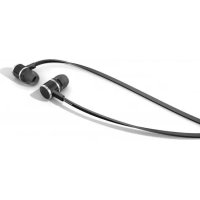
DX 160 iE - Earphones BEYERDYNAMIC - Free user manual and instructions
Find the device manual for free DX 160 iE BEYERDYNAMIC in PDF.


| Product type | In-ear headphone |
| Brand | Beyerdynamic |
| Model | DX 160 iE |
| Category | Headphone |
| Connector type | 3.5 mm stereo mini-jack plug |
| Included accessories | Extension cable, cable clip, adapter plug for two pairs, storage pouch, 7 pairs of silicone ear tips, 1 pair of Comply™ T-400 foam ear tips (size M) |
| Provided ear tips | 7 pairs silicone (various sizes) + 1 pair black Comply™ T-400 foam |
| Maintenance | Clean the ear tips regularly with a soft damp cloth, dry with a soft cloth. Do not use chemicals or solvents. |
| Safety instructions | Set volume to minimum before connecting; do not listen at high volume for long periods; do not use in public traffic; do not open the device yourself. |
| Power supply | Passive (no battery) |
| Procedure for foam ear tips | Compress the ear tip between fingers, pull the ear upward, gently insert, hold until it expands. |
| Replacing ear tips | Remove the old ear tip, clean the sound opening, attach the new ear tip. Replace every 3 months with regular use. |
| Spare parts (silicone ear tips + clip) | Ref. 912.611 |
| Spare parts (extension cable) | Ref. 914.061 |
| Spare parts (adapter plug) | Ref. 913.898 |
| Spare parts (storage pouch) | Ref. 716.073 (DX 160 iE) |
| Replacement foam ear tips | www.complyfoam.com (model T-400) |
| Customer service | service@beyerdynamic.de |
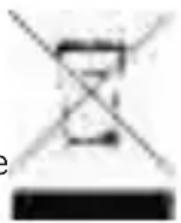
| Disposal | Do not dispose of with household waste; deposit at a WEEE collection point. |
| Intended use | MP3 players, CD players, tablets, mobile phones and other compatible devices |
| Adapter for two pairs | Allows connecting two pairs of headphones to the same source |
Frequently Asked Questions - DX 160 iE BEYERDYNAMIC
User questions about DX 160 iE BEYERDYNAMIC
0 question about this device. Answer the ones you know or ask your own.
Ask a new question about this device
Download the instructions for your Earphones in PDF format for free! Find your manual DX 160 iE - BEYERDYNAMIC and take your electronic device back in hand. On this page are published all the documents necessary for the use of your device. DX 160 iE by BEYERDYNAMIC.
USER MANUAL DX 160 iE BEYERDYNAMIC
Thank you for selecting the DX 160 iE | DX 120 iE in-ear headphone. Please take a few minutes to read these instructions carefully before using the product.
1. Safety Instructions
Warning: When connecting the in-ear headphone, make sure that you have turned the volume down to the minimum. Adjust the volume only after the in-ear headphones are in place. To avoid any potential damage to your hearing, do not use the in-ear headphones at loud volumes for extended periods of time. As a rule of thumb, when you have the in-ear headphones on, set the volume to a level at which you can still hear your own voice when you speak at a normal volume while listening.
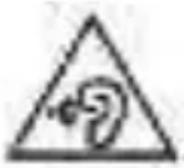
We would like to point out that listening at high volumes over a long period of time may damage your hearing irreversibly.
Make sure that the set volume is not too high. Rule of thumb: The higher the volume, the shorter the time of listening. According to employer's regulations for safety and health the noise exposure should not exceed 85 dB (low volume) when working with an allowed time of listening of 8 hours at maximum. If the volume is increased by 3 dB, the allowed time of listening is halved, i.e. with 88 dB the time of listening is 4 hours, with 91 dB 2 hours and so on.
Danger!
In-ear headphones dramatically reduce your ability to hear ambient noise. Using the in-ear headphones while in road traffic is potentially very dangerous and is therefore prohibited by law. Also, please make sure that you do not use your in-ear headphones when in the vicinity of possibly dangerous machines and tools.
Risk of injury!
When wearing wired in-ear headphones, avoid any sudden movements. You could seriously injure yourself, especially if you have any piercings or wear earrings or glasses, etc. that can get caught in the wire.
Altered auditory perception
Many people need some time to get used to wearing in-ear headphones. Your auditory perception of your own voice and body, and even the sounds in your inner ear while walking, are different from “normal” situations when you are not wearing an in-ear headphone. This strange sensation will usually abate after wearing in-ear headphones for a while.
2. Eartips
Selecting the right eartips
Your in-ear headphone is supplied with different sets of eartips made of silicone or foamed material.
Select the right size of eartips before using the in-ear headphone. You can find out which eartips fit best by trying on each of the different eartips one after another with the headphones, placing the eartips carefully inside your ear. The eartips are the right size if they do not fall out when you move your head moderately quickly and you can hear the low-frequency bass sounds clearly and ambient noises only slightly.
DX 160 iE: When using the T-400 foam eartips from Comply™
- Roll the eartip attached to the in-ear headphone between your fingers into a tight cylinder.
- Pull the ear slightly upward with one hand and insert the rolled eartip deep into the ear canal with the other.
- Use a finger to hold the in-ear headphone in place until the eartip has expanded and is in a secure and comfortable position.
Maintenance of the eartips
- Use a soft, damp cloth to clean the eartips of your in-ear phones regularly, drying them afterwards with a soft cloth.
- Never use chemical agents, such as solvent-based cleaner, to clean your eartips. Such agents can corrode the eartips.
- When you are not using the in-ear headphones, store them in the case provided.
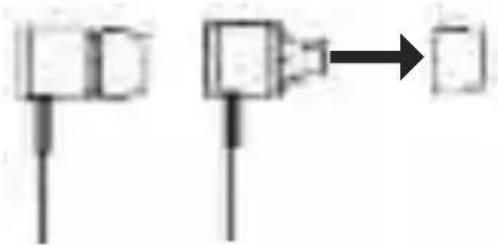
How to change the eartips
flowchart
graph TD
    A["Step 1"] --> B["Step 2"]
    B --> C["→"]
    style A fill:#f9f,stroke:#333
    style B fill:#bbf,stroke:#333
    style C fill:#dfd,stroke:#333
- Remove the eartip from the in-ear headphone.
- Clean the nozzle of the in-ear headphone of any debris by using a soft, damp cloth. Make sure that no liquid will enter the nozzle. Use a soft cloth to dry the nozzle.
- Attach the new eartip to the in-ear headphone.
• We recommend replacing the eartips after 3 months of regular use. - For replacement of silicone eartips, please visit the spare parts store on the beyerdynamic website.
Visit us at http://shop.beyerdynamic.de/ersatzteile. Select your model from the list and complete your purchase online.
- DX 160 iE: For replacement of foam eartips from Comply™, please visit www.complyfoam.com, where shops will be listed to order the eartips. Used types of the eartips: T-400
3. Connection
- Connect the in-ear headphone via the mini stereo jack plug directly to your MP3 player, CD player, tablet PC, mobile phone or other compatible devices.
- If you would like to extend the connecting cable, connect the jack plug of the in-ear headphone to the jack socket of the supplied extension cable.
How to connect the adapter plug for two in-ear headphones
By using the supplied adapter plug you can connect two in-ear headphones to one device.
- Connect the jack plug of the in-ear headphone to the upper jack socket of the adapter plug.
- Connect the appropriate extension cable to the jack plug of the adapter plug.
- Connect another in-ear headphone to the lower jack socket of the adapter plug.
4. Service
If you require service, please contact qualified service personnel or directly: beyerdynamic Service- und Logistik Center E-mail: service@beyerdynamic.de
Dismantling the in-ear headphone yourself will invalidate the guarantee.
5. Supplied accessories
- 1 x extension cable
- 1 x cable clip
- 1 x adapter plug for two in-ear headphones
- Bag
- 7 pairs of silicone eartips in different sizes
- DX 160 iE: 1 pair of Comply™ T-400 foam eartips, size M, black
6. Spare parts
Adapter plug for two in-ear headphones .... Order # 913.898 Extension cable .... Order # 914.061 Bag DX 160 iE .... Order # 716.073 Bag DX 120 iE .... Order # 716.065 Set of 7 pairs of silicone eartips and cable clip .... Order # 912.611 Comply™ T-400 eartips.... www.complyfoam.com
7. Disposal
This symbol on the product, in the instructions or on the packaging means that your electrical and electronic equipment should be disposed at the end of its life separately from your household waste. There are separate collection systems for recycling in the EU. For more information, please contact the local authority or your retailer where you purchased the product.
natural_image
Simple line drawing of a crossed-out square with no text or symbols8. Technical specifications
You will find the technical specifications for this product on the packaging or internet at www.beyerdynamic.com.
natural_image
Pure electrical circuit lines without any symbolsnatural_image
Simple line drawing of a clock with no text or symbolsnatural_image
Blank gray image with no visible content, text, or symbols

natural_image
Blank gray image with no visible content, text, or symbols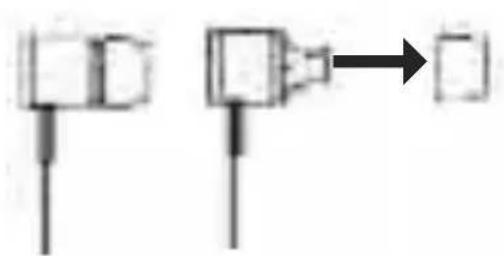
flowchart
graph TD
    A["Step 1"] --> B["Step 2"]
    B --> C["→"]
    style A fill:#f9f,stroke:#333
    style B fill:#bbf,stroke:#333
    style C fill:#dfd,stroke:#333

natural_image
Blank gray image with no visible content, text, or symbols

natural_image
Blank gray image with no visible content, text, or symbolsbeyerdynamic GmbH & Co. KG
Theresienstr. 8174072 Heilbronn – Germany
Tel. +49 (0) 7131 / 617 - 0 | Fax +49 (0) 7131 / 617 - 204
info@beyerdynamic.de | www.beyerdynamic.com
For further distributors worldwide, please go to www.beyerdynamic.com