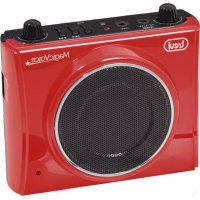
K 755 USB - Docking station Trevi - Free user manual and instructions
Find the device manual for free K 755 USB Trevi in PDF.



| Product Type | Docking Station |
| Brand | Trevi |
| Model | K 755 USB |
| Dimensions | 115 x 100 x 50 mm |
| Power Supply | Rechargeable lithium battery 7.4 V / 1300 mAh; AC charger DC 10 V / 350 mA |
| Radio Frequency Band | FM 87.5 - 108.0 MHz |
| Main Features | FM radio, voice amplifier with headset microphone, MP3 player (USB / TF card), recording, echo function |
| Auxiliary Audio Input | MP3/Line-In jack for external devices |
| Radio Station Memory | Up to 40 preset stations |
| Supported Audio Formats | MP3 |
| Connectivity | USB port, TF card reader, microphone jack (MIC), external DC jack |
| Indicator Lights | Power/charge LED (red/green), playback LED |
| Maintenance and Cleaning | Clean with a soft, dry cloth. Do not use solvents or abrasive products. |
| Safety | Do not expose to moisture. Recharge the battery between 5°C and 35°C. Do not exceed 6 hours of charging. Do not open the device. |
| Recycling | Do not dispose of with household waste. Dispose at a recycling center or return to the retailer. |
Frequently Asked Questions - K 755 USB Trevi
User questions about K 755 USB Trevi
0 question about this device. Answer the ones you know or ask your own.
Ask a new question about this device
Download the instructions for your Docking station in PDF format for free! Find your manual K 755 USB - Trevi and take your electronic device back in hand. On this page are published all the documents necessary for the use of your device. K 755 USB by Trevi.
USER MANUAL K 755 USB Trevi
Dimensioni: 115x100x50mm
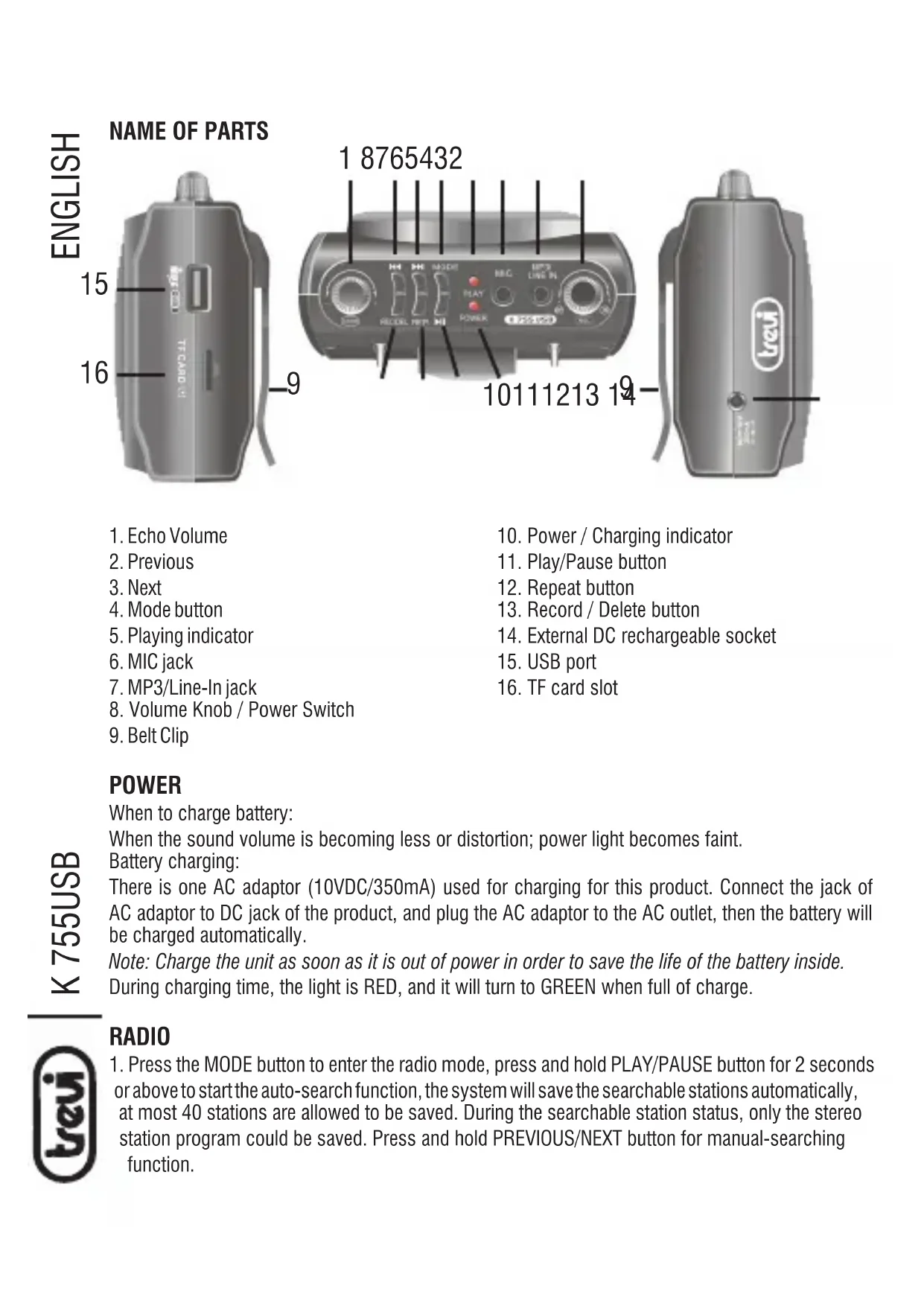
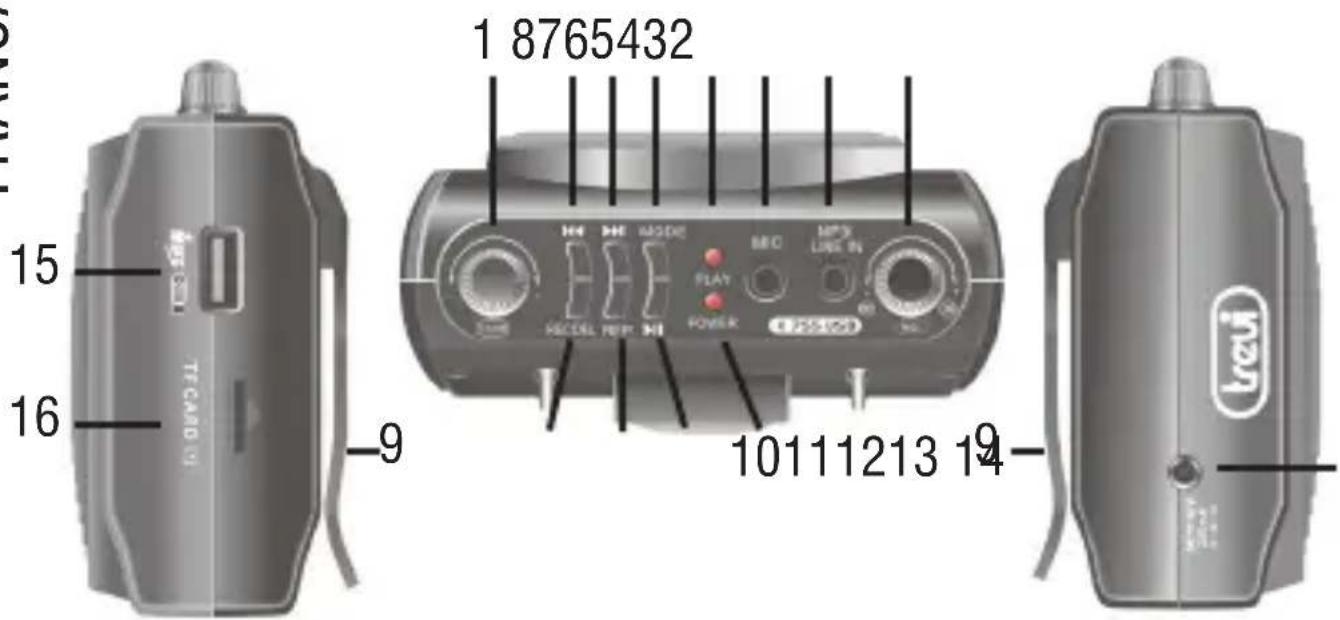
- Echo Volume
- Previous
- Next
4.Mode button - Playing indicator
- MIC jack
- MP3/Line-In jack
- Volume Knob / Power Switch
-
Belt Clip
-
Power / Charging indicator
- Play/Pause button
- Repeat button
- Record / Delete button
- External DC rechargeable socket
- USB port
- TF card slot
POWER
When to charge battery:
When the sound volume is becoming less or distortion; power light becomes faint.
Battery charging:
There is one AC adaptor (10VDC/350mA) used for charging for this product. Connect the jack of AC adaptor to DC jack of the product, and plug the AC adaptor to the AC outlet, then the battery will be charged automatically.
Note: Charge the unit as soon as it is out of power in order to save the life of the battery inside.
During charging time, the light is RED, and it will turn to GREEN when full of charge.
RADIO
-
Press the MODE button to enter the radio mode, press and hold PLAY/PAUSE button for 2 seconds or above to start the auto-search function, the system will save the searchable stations automatically, at most 40 stations are allowed to be saved. During the searchable station status, only the stereo station program could be saved. Press and hold PREVIOUS/NEXT button for manual-searching function.
-
Press PREVIOUS/NEXT button to select any saved station.
- During the playback, press PLAY button to enter mute mode, press it again to resume sound output.
LOUD-SPEAKER
- Turn the Volume Knob / Power Switch to ON position, the power indicator was lighted in green, the speaker should be toward to audience after starting.
- Put headset microphone on head, plug headset microphone's jack into the MIC jack, and adjust the position of microphone accordingly.
- Adjust the volume knob to an appropriate level to start speaking.
- During the playback of USB or TF Card, after connecting the headset microphone, press and hold the PLAY/PAUSE button about 2-3 seconds, then shift to echo status.
MP3/AUDIO INPUT
This unit can be worked as an amplifier for any audio output device (cell phone, MP3 player, cassette player, CD player, radio receiver, etc.) The method is simply using the line-in cord to connect the audio output device to this player, press "MODE" button to switch to AUX function. To listen the external audio device playback.
Play MP3 music by USB stick or TF Card:
- Insert USB stick or TF card in USB port or card slot, then the player will play the MP3 files automatically. Press PLAY/PAUSE button to pause music playback, press it again to resume music playback.
- During playback, press PREVIOUS to play the previous song, press NEXT to play the next song. Press and hold PREVIOUS/NEXT button in few seconds to FAST FORWARD or FAST REWIND the current song.
- Turn Volume Knob to adjust the volume level.
- The system was set to repeat whole songs, press the Repeat button to repeat the current song. (the playing indicator will flash fast)
- Both USB stick and TF card are connecting the unit, press MODE button to select USB or card playback mode.
Note: Please do not take out the USB stick or Memory Card during playback, otherwise or the memory stick will be destroy, it will destroy the memory device.
RECORD/DELETE FUNCTION
The unit can be recorded from RADIO/MIC/MP3/Audio input to USB/CARD, press MODE button to select the desired mode, then press RECORD/DELETE button to start recording, and the playing indicator will be flash fast, press it again to play the recording file. Press and hold the RECORD/DELETE button for 2 seconds, the audio file will be deleted
TECHNICAL FEATURES
Frequency band: FM 87.5-108MHz
Power supply: Lithium battery pack 7.4V 1300mAh rechargeable
Charger: Input AC 100-240 50/60Hz - Output DC10V 350 mA
Size: 115x100x50mm

WARNING FOR A CORRECT USE OF RECHARGEABLE BATTERY
- Recharge the battery in an ambient temperature between 5°C and 35°C .
- When the recharge is complete the device shows a message/signal (check the user's guide).
- Don't recharge more than the suitable period to prevent the risk of overheating and burst.
- Don't recharge the battery for more than 6 hours.
- Recharging the battery over the suitable period or an extended period of inactivity may reduce battery duration.
- Rechargeable battery is liable to wear and tear and its performance will reduce gradually.
- To extend the duration of the battery use it when is completely charged up to the complete discharging, then recharge it fully before use it again. Recharge a battery not completely consumed, will result a reduced duration. In this case, repeat the full charging/discharging cycle many times.
- Avoid recharge the battery for the whole night.
Used batteries should not be disposed of with household waste or thrown into fire or water. Used batteries should be recycled or disposed of in separate waste collection centres.
Information Note on the Removal and Disposal of Batteries
Warning: Only high-qualified personnel should perform this operation!
Battery Removal
The appliance should not be plugged to the mains socket when performing this operation!
- Remove the screws tightening the rear part of the appliance;
- Select the battery;
- Disconnect and remove the battery.
Used batteries should not be disposed of with household waste or thrown into fire or water.
Used batteries should be recycled or disposed of in separate waste collection centres.

Precautions for correct disposal of the product.
The symbol shown on the equipment indicates that waste must be disposed of in "separate collection" and so the product must not be disposed of together with urban waste.
The user must take the product to special "separate waste collection centres" provided by local government, or deliver it to the retailer against the purchase of a new product.
Separate collection of waste and subsequent treatment, recycling and disposal operations promotes the production of equipment with recycled materials and limits negative effects on the environment and on health caused by improper handling of waste.
Illegal disposal of the product leads to the enforcement of administrative penalties.
DESCRIPTION BRANCHEMENTS ET COMMANDES
- POWER
- RADIO
- LOUD-SPEAKER
- MP3/AUDIO INPUT
- RECORD/DELETE FUNCTION
- TECHNICAL FEATURES
- WARNING FOR A CORRECT USE OF RECHARGEABLE BATTERY
- INFORMATION NOTE ON THE REMOVAL AND DISPOSAL OF BATTERIES
- WARNING: ONLY HIGH-QUALIFIED PERSONNEL SHOULD PERFORM THIS OPERATION
- BATTERY REMOVAL
- PRECAUTIONS FOR CORRECT DISPOSAL OF THE PRODUCT
- DESCRIPTION BRANCHEMENTS ET COMMANDES
Brand : Trevi
Model : K 755 USB
Category : Docking station