Sologic B901 Combo - Phone TOPCOM - Free user manual and instructions
Find the device manual for free Sologic B901 Combo TOPCOM in PDF.


User questions about Sologic B901 Combo TOPCOM
0 question about this device. Answer the ones you know or ask your own.
Ask a new question about this device
Download the instructions for your Phone in PDF format for free! Find your manual Sologic B901 Combo - TOPCOM and take your electronic device back in hand. On this page are published all the documents necessary for the use of your device. Sologic B901 Combo by TOPCOM.
USER MANUAL Sologic B901 Combo TOPCOM
This product is in compliance with the essential requirements and other relevant provisions of the FATF directive 96358/ECG The Designation of conformity can be found on :
http://www.topcom.be/cdeclarations.asp
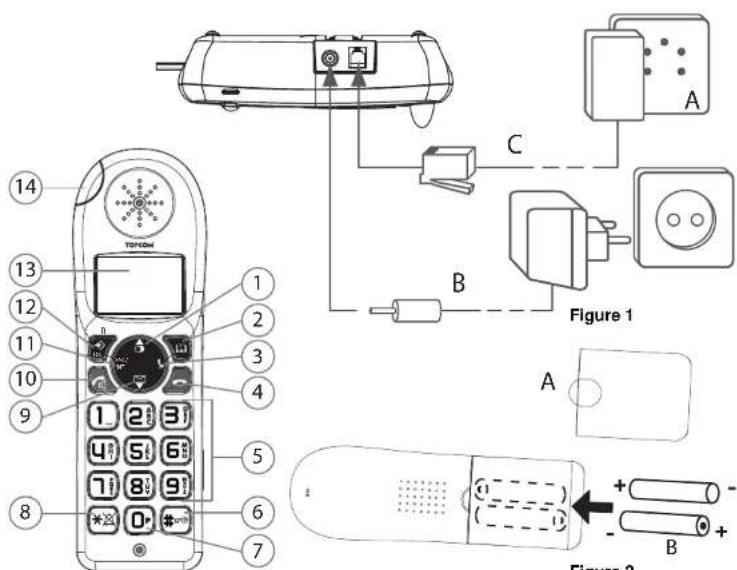
Figure 2
Figure 3
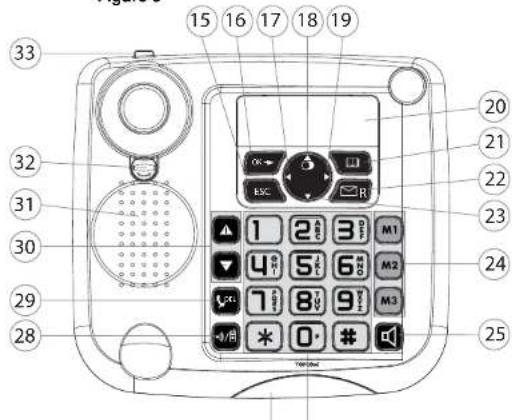
Figure 4
UK The CE symbol indicates that the unit complies with the essential requirements of the R&TTE directive.
NL Het toestel vloodoet aan de basiseisen van de R&TTE-richtijn. Dlt wordt bevestigld door de CE-markering.
FR La conformité de l'appareil avec les exigences fondamentales de la directive européen R&TTE relative aux terminaux, est confirmée par le label CE.
DE Die Ubeineinstimmung des Gerätes mit den grundlegenden Anforderungen der R&TTE-Directive ist durch das CE-Kennzeichen bestätigt.
ES EI sello CE corrobora la conformidad del equipo con los requisimientoslicosos de la directiva R&TE.
SE CE-market bekräftar att apparaten uppyller de grundläggande kraven i R&TTE direktivet.
IT Il symbolo CE indica che l'unite è conforme ai requisiti fondamentali della diretiva R&TTE. PT O symbilo CE indica que esta unidade cumpre con os requisitos essenciais da directiva R&TTE.
CZ Symbol CE znamená, ze jegnotka spnule zakladni požadavy smémlice R&TTE.
GR To ouBoo CE deixyoi n movoda oouppovetai ie tic boikcs aarrnntcngs onnyias R&TTE.
PL Symbol CE oznacza, ze urzadzenie spelina lstotne wymogi dyktrywy R&TTE.

UK This product works with rechargeable batteries only. If you put non-rechargeable batteries in the handset and place it on the base, the handset will be damaged and this in NOT covered under the warranty conditions.
NL Dit product werkkt alleen op herlaadbare batterijen. Als u nied herlaadbare batterijen in de handset slopt en deze op de basis plaatsl, za de handset beschadigd raken. Deze beschadiging worden NIET gedekt door de garantie.
FR Ce produit fonctionnement uniquement avec des piles rechargeables. Si vous mettez des piles non rechargeables dans le combiné et si vous le placez sur la base, le combiné sera endommage et ceci ne sera PAS couvert par la garantie.
DE Dieses Gerat darur mit Akkus betrieben warden. Wenn Sie das Mobilteil mit nicht niederaullabden Batterien besteken und es auf die Basisstation stellen, wird das Mobilteil beschadigt und faltt nicht unter die Garantie.
ES Este produit solo funciona con pilas recargables. Sl pone pilas no recargables en el terminal y lo pone en la base, el Terminal deñana, lo que NO esta incluido en la garantía.
SE Den har produit fungerendast med uppladdningsbara batterior. Om du satter ickeuppladdningsbara batterier i handenheden och placar den pa basenheten,kommen handenheten atskadasadana skador tacks INTE av garantin.
IT Questo prodotto funziona solo con batterile ricarlcabilli. Se si inseriscono batterile non ricaricabili nel ricevitori portale e lo si ripone sulla sua base, il portale subira del datti e questi NON saranno coperti alla garanzia.
PT Este produit travação apenas com bacterias recarregáveis. Se colocar bacterias não recarregáveis no portafí e o colocar sobre a base, este ficará danificado. Estes danos não são cobertos pelas condições da garantía.
CZ Tento vyrobek je 1rroen pro pouzit pouze s dobljecim bateriem. Pokud vlozite do Telefonu nedobijeci baterie a polozte Telefon do zakladny, doje k poskozeni Telefonu na tutu skodu se zaruka NEV2TAHUJE.
GR To mopov npov Aenoupyei mvo e nvaopopnogues pntapie, Eov xpoimonoianeun enanovapopnuees aotpae 0to kauokatko ka totoBtose ot baoi, to kauokatko Ba otoate fbaa n totae DEN kauitmeta atou roo apoc ts yeyuang.
PL Urzadzenia do tzlada lyko z akumulatorkarni nadajacymi sie do现代农业nia. W przypadku wyrozenia do sluchawki zwyklich, niemadajczych sie do现代农业nia bateril, a nausepnie polozenia je na bazie, szechawka ulegnie uszkodzeniu i NIE bedzie zu objekte przygaranje.
1 Getting started
Thank you for purchasing this TOPCOM product. This product has been designed and assembled with utmost care for you and the environment. Because we at TOPCOM like to think of the future of our planet and our children, we aim to do our best to help saving the environment. This is why we decided to reduce the number of pages of our user guides and product manuals. If you keep in mind that it takes up to 24 trees to produce 1 ton of paper, publishing product manuals in 11 languages costs our planet a lot of trees. In this short manual provided with your TOPCOM device you can find a brief explanation of how to install and use your TOPCOM device. If you would still like to discover all the features of your new TOPCOM device, please visit our website (www.topcom.net) where you can download the complete user manual in your language. By doing this TOPCOM hopes to do its share to make our planet a better place, but we can only succeed with your help!
2 First steps
2.1 How to use this User Guide
The following method is used in this User Guide to clarify instructions:

Text......,Display".
Text that appears on the telephone display
Key to be pressed
2.2 Installing the base station
Install the base station as follows:
1Connect the mains adapter to the base station first and then to a socket.
2Connect one end of the telephone cable to the telephone socket on the wall and the other to the connector on the back of the base station.
3 The telephone and power cables should be connected as shown in figure 1.
2.3 Handset charger
1Plug the mains adapter into a power socket.
2.4 Handset
1Open the battery compartment as shown in figure 2.
2 Insert the rechargeable batteries. Make sure the polarity is correct (+ and -).
3 Close the battery compartment.
4 Place the handset in the charger and charge it for 16 hours. The charging LED is illuminated
2.5 Keys/Display
Cordless handset
- Redial / up
- Phone book
- Mute / delete
- Hang up
- Alphanumeric keys
- Key lock
- Pause
- Ringer on/off
Base station
- Escape
- Menu / OK
17.Left - Redial / up
- Right
- Display
- Phone book
- Calls list / flash
- Down
- Abbreviated dialling (M1 - M2 - M3)
- Hands free
- Alphanumeric keys
-
Red LED on the base station, flashes during a call
-
Calls list / down
- Answer call / hands free / call button
- INT / escape
- Menu / OK / flash
- Display
-
Red LED, flashes during a call
-
Paging / call diversion / internal call
- Mute / delete
- Volume control
- Loudspeaker
- Receiver holder for wall mounting
- Lug: for putting down the receiver briefly during a call when the phone is wall-mounted
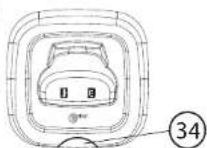
Charger
- LED: handset charging in progress.
2.6 Handset display
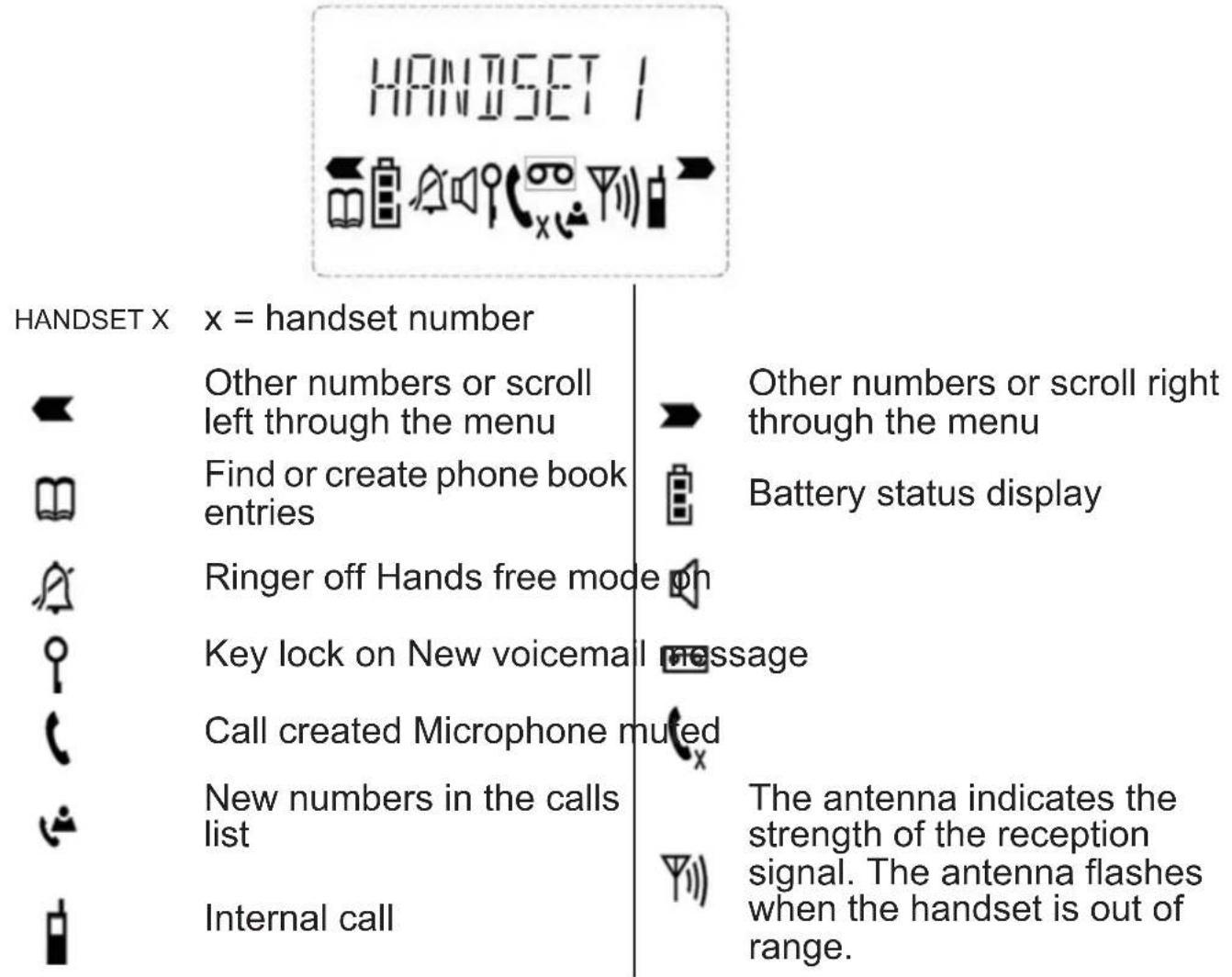
2.7 Base station display



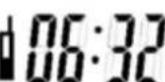

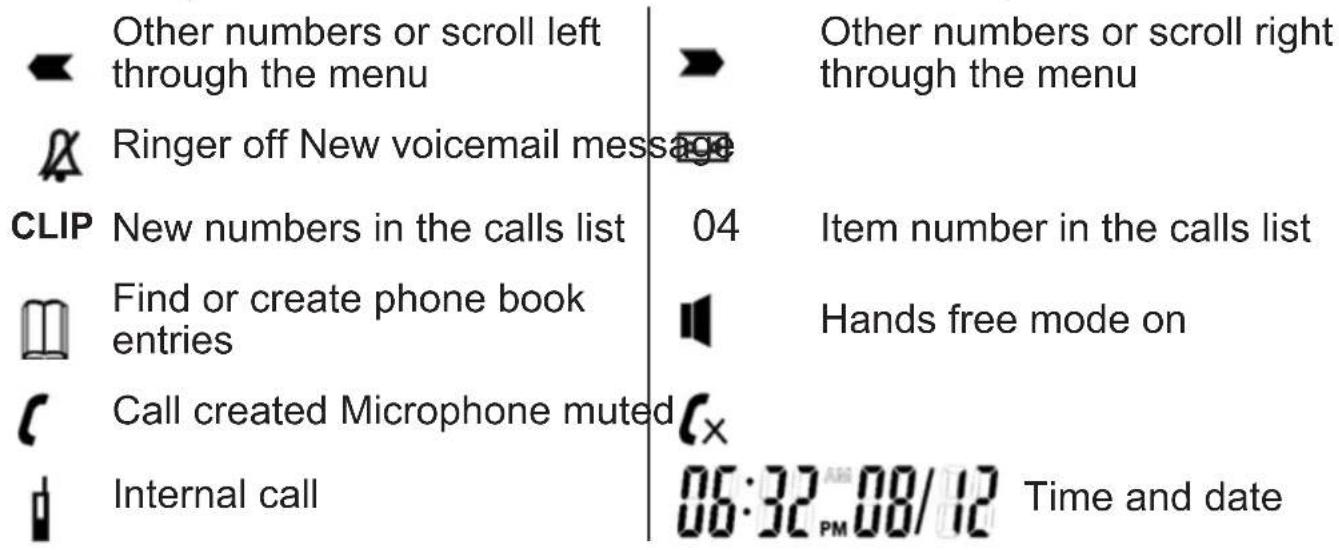
2.8 Navigating through the menu
The Sologic B901 has an easy-to-use menu system. Every menu consists of a series of options.
A summary of the menus on the handset and base station can be found below.
OK
OK
ESC
1Press the Menu/OK key to open the main menu.
2 Scroll to the required menu option.
3 Press the Menu/OK key to open more options or to confirm the displayed setting.
4 Press the Escape key to go back to the previous menu level
2.9 Using the alphanumeric keys
You can use the alphanumeric keys to enter text. Press the
appropriate alphanumeric key to select a letter ② For example, if you press the 5 numeric key, the letter 'j' appears in the display first. Press the key several times to select the other letters.
Press the 2 key once to select the letter "a". If you want to enter the letters "a" and "b" in succession, first press the 2 key once to select the letter "a". Wait 2 seconds until the cursor has moved to the next position. Now press the 2 key twice to select "b". You can use the delete key to delete letters that have been entered incorrectly.
The letter before the cursor is deleted.
Use the Left/Right key / 17 move the cursor.
3 Operating the telephone

Info This section only describes the functions of the base station! Information on using the handset can be found in „4 Using the cordless handset".
3.1 Setting the display language

1Press the Menu / OK key.
2 Select "LANGUAGE" and confirm.
3 Now select the language.
4 Press OK to confirm.
3.2 Setting the date and time

Info
If caller ID (CLIP) is activated on your telephone line and the provider transmits the date and time, the clock is set automatically when an incoming call is received.
When you have set the time, it will be adopted by all handsets registered to the base station.

1Press the Menu / OK key.

2 Select "TIME" and confirm.

3 Select "DATE/TIME" and confirm.

4 Enter the year and confirm.

5 Enter the month and confirm.

6 Enter the day and confirm.

7 Enter the hours and confirm.

8 Enter the minutes.

9 Press OK to confirm.

Important The date and time will be lost in the event of a base station power failure.
3.3 Setting the time format

1Press the Menu / OK key.

2 Select "TIME" and confirm.

3 Select "FORMAT" and confirm.

4 Select the time format as "24 HOUR" or "12 HOUR" and confirm.
3.4 Outgoing calls
Making a call
1 Lift the receiver or press the hands free key.
2 Enter the telephone number.

3 Hang up the receiver or press the hands free key again to end the call.
OR
456
1Enter the telephone number.
2 Lift the receiver or press the hands free key.
3 Hang up the receiver or press the hands free key again to end the call.
Redialling the last telephone number called
1 Lift the receiver or press the hands free key.
0
2 Press the radial key.
The last telephone number is automatically dialled.
Redialling one of the last 3 telephone numbers called
0
1Press the radial key.
2 Select one of the last 3 numbers dialled.
3 Lift the receiver or press the hands free key.
Calling a number in the phone book
1Press the phone book key.
2 Scroll to the required name or enter the initial letters of the name.
456
3 Press the Menu / OK key to display the telephone number.
4 Lift the receiver or press the hands free key.
The telephone number is automatically dialled.
3.5 Activating/deactivating hands free mode
You can use this function to answer a call without having to lift the receiver or if the receiver has already been lifted.
1Press the hands free key to activate the function.
2 Press the hands free key again to switch the call back to the receiver.
3.6 Phone book
50 telephone numbers and names can be stored in the phone book. Names may be up to 16 characters long and numbers up to 24 digits long.
Adding a new name and number
OK
1Press the phone book key.
2 Press OK.
OK
456 OK
456 OK
3 Select "NEW ENTRY" and confirm.
4 Enter the name and confirm.
5 Enter the telephone number and confirm.
6 A confirmation tone is now sounded.
Editing the name and telephone number
OK
OK
DEL5
456 OK
456 OK
1Press the phone book key.
2 Select the name using the up and down keys. OR
Enter the initial letters of the name.
3 Press OK.
4 Select "EDIT ENTRY" and confirm.
Press the delete key to delete the letters.
6 Enter the name and confirm.
7 Enter the telephone number and confirm.
8 A confirmation tone is now sounded.
Deleting one entry or all entries in the phone book
456
OK
OK
OK
ESC
1Press the phone book key.
2 Select the name using the up and down keys. OR
Enter the initial letters of the name.
3 Press OK.
4 Select "DELETE ENTRY" or "DELETE ALL" and confirm.
5 Press OK to confirm or press the Escape key to go back.
3.7 Abbreviated dialling keys
You can store 3 direct abbreviated numbers M1, M2 and M3 (each up to 24 digits) in the base station.
Saving direct abbreviated dialling numbers (M1 - M2 - M3)
M1-M2-M3
OK
OK
456 OK
1Press one of the abbreviated dialling keys.
2 Press OK.
3 Select "NEW ENTRY" and confirm.
4 Enter the name and confirm.
456 OK
5 Enter the telephone number and confirm.
A confirmation tone is now sounded.
Dialling an abbreviated number
M1-M2-M3
1 Lift the receiver or press the hands free key.
2 Press the abbreviated dialling key. The telephone number is automatically dialled.
3 Hang up the receiver or press the hands free key again to end the call.
3.8 The call list
Incoming calls are stored in a call list (max. 30 numbers) on the base station and the handsets.
The number of missed calls is shown by "X MISSED"
(X = number of missed calls) and the flashing CLIP symbol. Briefly press the calls list key to display the last call.

Important The " caller ID" (CLIP) feature is only available if it is activated for your line. Contact your telephone line provider for additional information.
The telephone number and name of the last caller appear in the display. If the telephone number is longer than 12 digits, you can show the remaining digits by pressing the key. If the calls list is empty, the word "EMPTY" appears in the display.
The date and time of the incoming call are displayed at the top right for every call.

1Press the up and down keys to scroll through the list.
The position number of the call in the calls list appears next to the CLIP symbol.
2 Press the left and right keys to display the name or number.

Info The phone reverts to standby mode if neither the up or down key is pressed within 15 seconds. When a call is received, the caller's number is shown in the display for another 5-8 seconds after the last ring.
Calling a number in the call list


1Press the calls list key.
2 Press the up and down keys to scroll through the list.
3 Pick up the receiver or press the hands free key again to make the call.
3.9 Making an internal call to a handset and forwarding a call to the cordless handset
You can forward a call from the base station to the handset or talk to the external subscriber and a second subscriber on the cordless handset at the same time (conference call).

1Hold down the INT key 3 seconds until you hear an audio signal, then release the key. "INT" appears in the display.

2 Enter the number of the handset. Once the call has been set up with the handset, you can talk internally.

3 Put the receiver down to transfer the call to the cordless handset. OR
4 Hold down the INT key for 3 seconds to set up a conference call.
4 Using the cordless handset

Info This section only describes the functions of the cordless handset! Information on using the base station can be found in „3 Operating the telephone".
4.1 Changing the language

1Press the Menu / OK key.

2 Select "HANDSET" and confirm.

3 Select "LANGUAGE" and confirm.

4 Select the desired language and confirm.

5 Press the Esc key to return to standby mode.
4.2 Outgoing calls
Making a call

1Press the call button.
2 Enter the telephone number.
3 Press the hang up key to end the call.
Call preparation
1Enter the telephone number.
You can correct a wrong number using the mute key. If you do not press any key for 10 seconds, the number disappears and the handset reverts to standby mode.

2 Press the call button.
The telephone number is automatically dialled.
3 Press the hang up key to end the call.
Redialling the last telephone number called

1Press the call button.
2 Press the radial button.
The last telephone number is automatically dialled.
3 Press the hang up key to end the call.
4.3 Incoming calls
When an incoming call is received, the handset and the base station ring and the "Visual call signal" LED (see point 14 in figure 3 and point 27 in figure 4) flashes on the handset and base station.

1Press the answer call key to answer the call.
2 Press the hang up key to end the call.
4.4 Activating/deactivating hands free mode
During the call:

1Press the hands free key to activate the function.
2 Press the hands free key again to switch the call back to the handset.
4.5 Key lock
When the key lock is on, pressing any key in standby mode has no effect (with the exception of the key lock key).
W
1Press and hold the key lock key.
The symbol appears in the display.
W
2 Press the key lock key again to deactivate key lock.
When key lock is activated, you can still answer incoming calls by pressing the answer call key. The keypad functions as usual during the call. Key lock is activated again after the call.
4.6 Phone book
You can store 50 entries in the phone book. Names may be up to 16 characters long and telephone numbers up to 24 digits long.
Adding a phone book entry
1Press the phone book key.
OK OK
2 Press the OK key twice.
456 0K
3 Enter the name and confirm.
456 OK
4 Enter the desired telephone number and confirm.
A confirmation tone is now sounded.
Dialling an abbreviated number
1Press the phone book key.
2 Scroll to the required name or enter the initial letters of the name.
3 Press the phone book key to display the telephone number.
4 Now press the call key.
The telephone number is automatically dialled.
5 Press the hang up key to end the call.
Editing a phone book entry
456
1Press the phone book key.
2 Scroll to the required name or enter the initial letters of the name.
3 Press the phone book key to display the telephone number.
4 Press the Menu / OK key.
5 Select "EDIT ENTRY" and confirm.
6 Enter the name and confirm.
7 Enter or edit the telephone number and confirm.
4.7 Caller ID (CLIP)
The Sologic B901 displays the telephone number of incoming calls. This function can only be used if you are registered for this service with your telephone line provider. Contact your provider for more information.
When you receive a call, the telephone number is stored in a calls list. This list can hold up to 30 numbers (each of up to 23 digits).

If the telephone number consists of more than 12 digits, you can scroll to the right in the display to see the other digits.
New calls

When there is a new call received in the calls list, the CLIP symbol flashes in the display.
Opening the calls list

1Press the calls list key.
The last call received is displayed. If the calls list is empty, the word "EMPTY" appears in the display.

2 Press the phone book key to skip the number.

3 Press the phone book key to skip the date and time.

4 Press the up and down keys to scroll through the list.
ESC
5 Press the Esc key to exit the calls list.
Calling a number in the call list

1Press the calls list key.

2 Scroll through the calls list until the telephone number you want is displayed.

3 Press the call key to start the call.
The telephone number is automatically dialled.

4 Press the hang up key to end the call.
Deleting a number from the call list




OK
1Press the calls list key.
2 Scroll through the calls list until the telephone number you want is displayed.
3 Press the Menu / OK key.
4 Select "DELETE" to delete the current telephone number and confirm. OR
5 Select "DELETE ALL" to delete all phone book entries and confirm.
6 Press to confirm or press the Esc key to return.
5 Call forwarding and internal calls from one handset to another
5.1 Call forwarding and conference calls during an external call
INT
456
1 During an external call, press the INT key and then the number of the handset (1-5, select "0" for the base station).
The other handset will ring.
If the call was set up with the other handset, you can talk internally. When you hang up, the external call will be forwarded to the other handset.
INT
2 Hold down the INT key for 3 seconds. You can now talk to the second handset and the external call at the same time (conference call).
INT
3 Press the INT key again to switch back to the external call.
4 Press the hang up key to end the call.
5.2 Internal call (house phone function)

Info You can conduct a call between the base station and the cordless handset.
The base station has the internal number "0".
INT
456
1 In standby mode, press the INT key and then the number of the handset (1-5, select "0" for the base station).

The handset or base station you have called will now ring.
2 Press the call key or pick up the receiver on the base station.
You can now talk internally.
1 Van start gaan
| OK | |
| ▲▼ | OK |
| ▲▼ | OK |
| ▲▼ | OK |
| ESC | |