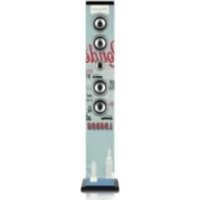
IBT3 - Loudspeaker Ices - Free user manual and instructions
Find the device manual for free IBT3 Ices in PDF.


| Product type | Bluetooth speaker with FM radio and MP3 player |
| Brand | Ices |
| Model | IBT3 |
| Dimensions (approx.) | 150 x 150 x 990 mm |
| Net weight | 5.6 kg |
| Power supply | 100-240 V AC, 50 Hz (power adapter included) |
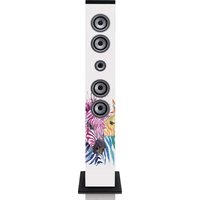
| Speakers | 4 stereo speakers of 3" + 1 speaker of 4.5" (subwoofer) |
| Output power | 2 x 10 W RMS, 60 W PMPO |
| Connectivity | Bluetooth, 3.5 mm auxiliary input, USB (charge and MP3 playback), SD/MMC card, FM radio |
| Bluetooth range | Approximately 10 meters (without obstacles) |
| Display | LED (mode display) |
| Remote control | Yes, with CR2025 battery included |
| MP3 playback formats | USB (max 8 GB) and SD/MMC card |
| FM radio | Yes, with FM antenna and memory for 20 stations |
| Maintenance and cleaning | Unplug before cleaning, use a soft dry cloth |
| Safety | Do not immerse in water, do not open, household use only |
| Included accessories | Stand, screws, 3.5 mm audio cable, remote control, user manual |
| Repairability | Contact local retailer; any opening by an unauthorized center voids warranty |
Frequently Asked Questions - IBT3 Ices
User questions about IBT3 Ices
0 question about this device. Answer the ones you know or ask your own.
Ask a new question about this device
Download the instructions for your Loudspeaker in PDF format for free! Find your manual IBT3 - Ices and take your electronic device back in hand. On this page are published all the documents necessary for the use of your device. IBT3 by Ices.
USER MANUAL IBT3 Ices
www.ices-electronics.com
C E
Bluetooth®towerspeaker
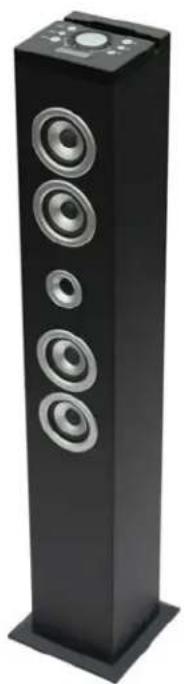
INSTRUCTIONMANUAL
www.ices-electronics.com
C E
ThankyouforpurchasingTowerSpeaker
Gettingstarted
- Removethequipmentfromthebox.
- Remove packaging and place inside the box to store for future reference and/or use
Inthebox
- Towerspeakerunit
- Towerstandandscrewstoattachtheunit
3.5mmAuxcable - Instructionmanual
- Remotecontrol
Features
- 4StereoSpeakers
- Bluetooth® Connectivity
AuxJackIncluded - AuxCableIncluded
USBPortforcharging - USBPortforplayingMP3
SDcardslotforplayingMP3
Fmradio
LEDdisplay
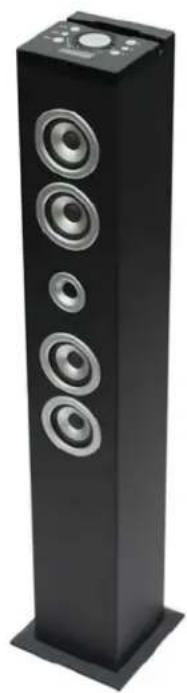
Safetyinstructions
When using electricalequipmentsbasicsafetyprecautionsshouldalwaysbe followed
- This equipment is not intended for use by persons (including children) with reduced physical, sensory or mental capabilities or lack of experience or knowledge. They should begin appropriates supervision and instructionsto use the equipment by apersonresponsiblefortheirsafety.
- Ensure the equipment is not too close to heat emitting appliances or placed in direct sunlight.
- Check that the voltage indicated on the data plate corresponds with that of the localnetworkbeforeconnectingthequipmenttothemainspowersupply.
- Do not leave the equipment unattended while connected to the power supply
- Donotimmersethequipmentinwateroranyotherliquids.
- It is imperative to unplug the power cord after the equipment has been used, before it is cleaned and while being repaired.
- Close supervision is required when using this equipment near children.
- Neverleavethequipmentwithinreachofchildren.
- Repairs to electrical appliances should only be performed by qualified personnel. Improper repairs may place the user and/or equipment at serious risk.
- This equipments intended for household use only and should not be used for industrialorcommercialpurposes.
- Donotoperatethisappliancewithadamagedplugorcord,after malfunctionorafterbeingdroppedordamagedinanyway.
- Do not use this equipment for anything other than its intended use.
- Thisequipmentmustbeplacedonastable.heatresistantsurface.
- Do not push objects into any openings as damage to the equipment and/or electricshockmayoccur.
- Donotusethisproductinwetorbadweatherconditions.
Thisproductisnotatoy. - Donotplaymusicatexcessivelevelsespeciallynearchildren.
Descriptionofparts
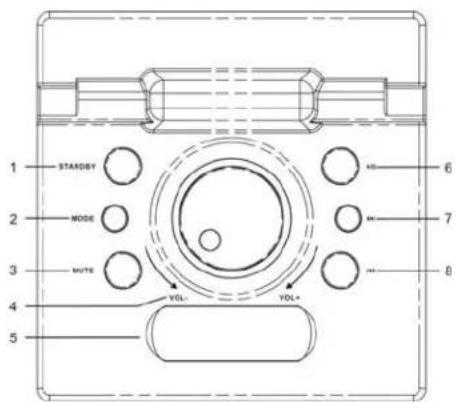
Toppanel
1.STANDBY
2.Mode
3.Mute
4. LEDdisplay
5. Volumecontrol
6.Play/pause
7. Skipforward
8.Skipbackward
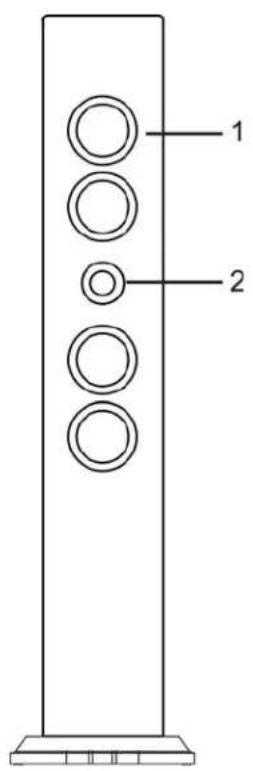
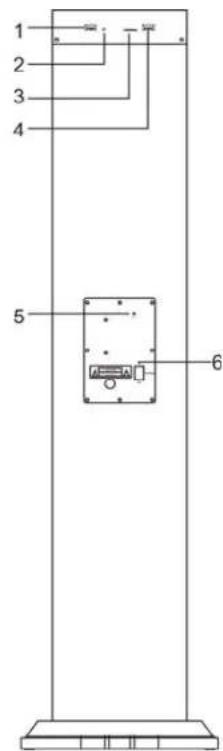
Front
1.Speaker
2.RemoteSensor
(PointremotetotheRemote Sensor)
Backpanel
1.USBportOutputDC5V2.1A(ForChargingonly)
2.3.5mmAux-inJack
3.SDcardslot
4.USBportforplayingMP3
5.FMantenna
6.DCINjackforthepoweradaptor
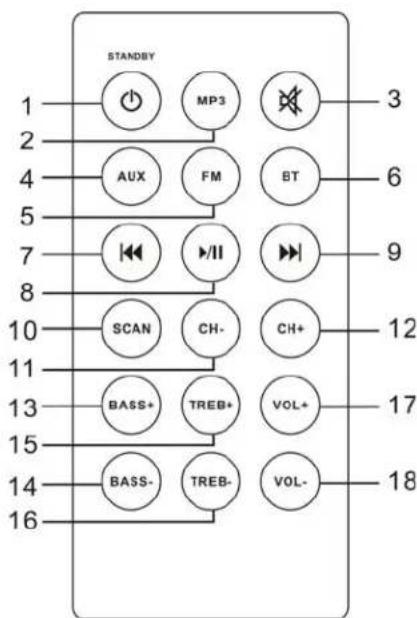
RemoteControl
Pointremoteatmiddleofspeaker
- MP3modebutton
1.STANDBY
3.Mutebutton
4.Auxinbutton
5.FMradiobutton
6. Bluetooth button
7. Skipbackwardbutton
8.Play/Pausebutton
9. Skipforward
10. Scanbutton
11.CH-
12.CH+
13.Bass+effectbutton
14.Bass-effectbutton
15.Treb+effectbutton
16.Treb-effectbutton
17.Volume+button
18.Volume-button
Settingupthespeakertower-Attachingthebase
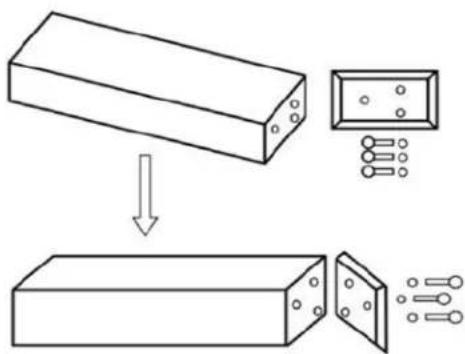
- Takethetowerbodyandbasecarefullyoutofthepackaging.
2.Takethescrewsandwashersout. - Attachthebasetothebodyaligningtheholesonthebasewiththeholeson thetower.
4.Screwthebaseontothermainunit. - Placethetoweruprightontheflooranditisnowreadytouse
Powersetup
ConnecttheAC/DCadaptertotheDCinsocketonthespeakerbackpanel and plughead adaptorintothemainssocket.
Usingtheremotecontrol
Thebattery
Togetyourremotecontrolworkinginitially,pullthecleartabfro thebatterycompartmentlocatedatthebottomoftheremote.
If your remote becomes intermittent you find you have moved closer the unit to operate, then probably batteries need be replaced.
Toreplacebatteries,slidetheholderoutfromthebaseofth remote.Removethebatteryandreplacewitha3voltLithiu CR2025.
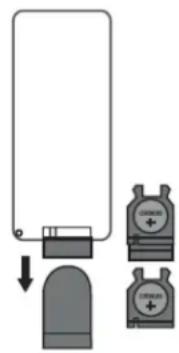
Aux-Inlineintype
Requiresa3.5mmcable(included)
- Whenthe Towerispoweredon,press"STANDBY",thenenteringintothe AUXmodeautomatically.
- Connecta3.5mmcabletotheAux-injackattherearConnecttheotherend ofthe3.5mmcabletoanMP3playerorotheraudiosource.
- Use the controlsonthoppanel to begin playing a sound orated through the unitorpress "AUX" button on the remote.
UsingBluetooth
1.Powerontheunitandpress"MODE"buttonochangetobluethmodeor press"BT"buttonontheremote,theLEDdisplaywilldisplay"BT".
2. The previous paired device will connect to a wireless Bluetooth device automatically when each time changing toBluetooth mode.
3. Pressplay/pausebuttonandholdfor10seconds, afterabeeptone, the tower speaker is prepared to be paired again.
4. Search "ICES IBT-3" and pair it, input the password "0000" if necessary.
5.Ifitstilldoesn'twork,pleaseresettheBluetoothandfollowabovestepagain.
Notes:
-
WhentheBluetoothonthedisplayflashes, meanthespeaker is searching the previous spaired device.
-
Pressplay/pausebuttonandholdfor10seconds, the Bluetoothiconthe displaywillflashfast, whichmeanspeakerisreadyforbeingpaired.
-
After paired successfully, the Bluetooth onthedisplaywillbeon.
USBportforcharging
USBportforcharging, doesnotsupportanymediafeature. USBpoweroutputDC5v2.1A.
USBportforplayingMP3
1.PowerontheunitandinsertaUSBFlashDrive(notsupplied)intotheUSB Port,ensuringtheplugisfullyinsertedatthecorrectway.
2. ThetowerwillplaymusicfromtheUSBBautomaticallyorpress"MP3"button ontheremote.ThemaximumsizeofFlashDrivethatcanbeconnectedis 8GBmax.
SDcardslotforplayingMP3
1.InsertanSDorMMCmemorycard(notsupplied)intohememorycard expansionslot.Makesureitisinsertedatthecorrectway.
2. ThetowerwillplaymusicfromtheSDcardautomaticallyorpress“MP3” buttonattheremote
PlayingtheFMradio
1.Pressthe"STANDBY"buttonoturntheuniton.,
2. EnsuretheFMAntennahasbeenfullyextendedandpress"Mode"toadjust to"FM"modeorpress"FM"buttonontheremote.
- Press the "Skip forward" and "Skip backward" to select the desired FM radio station. Press "Skipforward" or "Skipbackward" and hold, the unit will scan thereadiostation, and stoponcefound one.
Programming&PlayingofFMradiopresetts
1.FollowthestepsforPlayingtheFMRadio.
2. Press"Scan"buttonontheremotetosearchandpresetstationsinmemory, (i.e."P01"-thiswillblinkonthedisplay-andthenthepresetstation frequencynumberwillshowonthedisplay).
3.Note:20FMstationscanbepreset.
4. TplaythepresetRadioStations,pressthe"CH- "or"CH ^+ "buttonstocycle throughthepresetFMradiostations.
Careoftheappliance
Disconnecttheappliancefromthepowersourcewhencleaning. Iftheunitbecomesdusty,wipeitwithasoftanddryduster.Useasoftclothto cleanthisappliance.Donotuseanywax,polishsprays,orabrasivecleanerson theunit.
Caution
Neverallowanywaterorotherliquidstogetinsidetheunitwhilecleaning. Disposeofusedbatteriesinanenvironmental-responsiblemanner.Thisproduct isnotintendedforcommercialuse.Householduseonly.
Troubleshooting
Beforetakingtheunittoberepaired, please check the following table when a problemoccurs.Consultyourdealerorservicecenteriftheproblemcannot besolvedwiththefollowinginformation.
| ProblemRemedy | |
| Power Systemdoesnotturnon ordoesnotrespondto theremotecontrol. | -MakesureAC/DCpowerplugisconnectedtothe wallsocketoutletproperlyandithaspower. -Ifthisdoesnothelp,leavetheunitunpluggedbefore seekingadvice. |
| Remotecontrol Nofunctionsorshort range. | -Insertnewbatteries. -Aim remote directly towards the remote sensor locatedincenterofspeaker |
| Pairingtheproduct Cannotpairsuccessfully | -Check whether the speaker is in Off or searching mode. -CheckwhetherthereareotherBluetoothreceivers aroundyourBluetoothdevice.Turnthemofftoavoid anydisturbance.Attempttopairagain. -Youcantclick"Forgetthisdevice"andthenre-pairit again if required. Search for "Speaker" on the Bluetoothdeviceandpairitagain. |
| Cannotplayproperly,the musicplaysintermittently | Checkwhetherthedistancebetweenthespeakerand yourBluetoothdeviceisoutofitsworkingdistance (10m),orwhethertherearesomeobstaclesblocking thecommunication betweenthespeakerandthe Bluetoothdevice.MovethespeakerortheBluetooth devicetogetthebestreception. |
| Thesoundisdistorted | Checkthevolumessettingonboththespeakerand your Bluetooth device and adjust the volume to a suitablelevel. |
SPECIFICATIONS
| Power100-240VAC~50Hz | |
| Operationtemperature0°Cto+40°C | |
| Speakers4x3"speakers+1x4.5"speaker | |
| Speakeroutput2x10WRMS;60Wp.m.p.o. | |
| SubwooferSpeaker1x25W | |
| Aux-in1/AuxLead3.5mmdia./3.5mmto3.5mmAuxLead | |
| RemoteControlBattery3VCR2025 | |
| UnpackedWeight5.6Kgs | |
| Dimensions(Approx.) | Approx.150x150x990mm |
NOTE:
Asaresultofcontinualimprovements,thedesignandspecificationsoftheproductwithindifferslightlyfromtheunitillustratedonthepackaging.

Thisssymbolontheproductorintheinstructionsmeansthatyourelectrcalendelectronicequipmentsshouldbedisposedattheendofitslifeseparatelyfromyourhouseholdwaste.Thereareseparatecollectionsystemsforrecycling.
Formoreinformation,pleasecontactthelocalauthorityourretailerwhereyou purchasedtheproduct.
Serviceandsupport
Forinformation:http://www.ices-electronics.com/
Forsupport:http://icesupport.zendesk.com
ICEShelpdesk:
Germany0900-1520530(Localcharges)
The Netherlands0900-23553626(Localcharges+1ctP/min)
Belgium02-6200115(Localcharges)
France0170480005(Localcharges)
ThehelpdeskisaccessiblefromMondaytoFridayfrom9AMtill6PM.
Incaseyourdeviceneedsrepair,ourhelpdeskwillredirectyoutoyourlocal dealer.
ICES offers service and warranty in accordance to European law, which means that incaseofrepair(bothduringandafterthewarrantyperiod),youshould contactyourlocaldealer.
Please note: It is not possible to send products directly to ICEsforrepair.
Important note: If this unit will be opened, or accessed in any way by a non-officialservicecenter,thewararrantyexpiresimmediately.
iCES®
Modell:IBT-3
www.ices-electronics.com
www.ices-electronics.com
Graciasporhabercompradoelaltavozdetorre
Iniciación
www.ices-electronics.com
CE
Pourtouteassistance:http://icesupport.zendesk.com
AssistancetechniqueICES:
Allemagne0900-1520530(Tariflocal)
Paysbas0900-23553626(Tariflocal+1ctP/min)
Belgique02-6200115(Tariflocal)
France0170480005(Tariflocal)
L'assistancetechniqueestjoignableduLundiauVendredide9heuresa18
heures.


- ThankyouforpurchasingTowerSpeaker
- Gettingstarted
- Inthebox
- Features
- Safetyinstructions
- Descriptionofparts
- Toppanel
- Front
- Backpanel
- RemoteControl
- Settingupthespeakertower-Attachingthebase
- Powersetup
- Usingtheremotecontrol
- Thebattery
- Aux-Inlineintype
- UsingBluetooth
- Notes:
- USBportforcharging
- USBportforplayingMP3
- SDcardslotforplayingMP3
- PlayingtheFMradio
- Programming&PlayingofFMradiopresetts
- Careoftheappliance
- Caution
- Troubleshooting
- SPECIFICATIONS
- NOTE:
- Serviceandsupport
- ICEShelpdesk:
- iCES®
- Graciasporhabercompradoelaltavozdetorre
- Iniciación
- AssistancetechniqueICES:
Brand : Ices
Model : IBT3
Category : Loudspeaker