
IBT-5 Roma - Loudspeaker Ices - Free user manual and instructions
Find the device manual for free IBT-5 Roma Ices in PDF.


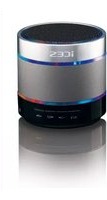
| Product type | Portable Bluetooth speaker |
| Brand | Ices |
| Model | IBT-5 Roma |
| Dimensions (approx.) | 20 x 10 x 10 cm |
| Weight (approx.) | 0.8 kg |
| Power supply | Rechargeable lithium-ion battery, USB-C port |
| Battery life | Up to 10 hours |
| Connectivity | Bluetooth 5.0, 3.5mm AUX input |
| Main functions | Wireless audio playback, hands-free kit, volume controls |
| Care and cleaning | Wipe with a soft, dry cloth. Do not use abrasive products. |
| Safety | Do not expose to water or moisture. Avoid extreme temperatures. |
| Spare parts | USB-C charging cable included |
| Repairability | Not user-repairable. Contact customer service. |
Frequently Asked Questions - IBT-5 Roma Ices
User questions about IBT-5 Roma Ices
0 question about this device. Answer the ones you know or ask your own.
Ask a new question about this device
Download the instructions for your Loudspeaker in PDF format for free! Find your manual IBT-5 Roma - Ices and take your electronic device back in hand. On this page are published all the documents necessary for the use of your device. IBT-5 Roma by Ices.
USER MANUAL IBT-5 Roma Ices
Speaker Tower with Bluetooth ^® , PLL FM Radio, USB

natural_image
Three tall, stylized tower designs with American flag and U.S. flags, featuring circular speakers and a red scooter (no text or symbols)INSTRUCTION MANUAL
www.ices-electronics.com
Thank you for purchasing Speaker Tower
Getting started
- Remove the equipment from the box.
- Remove packaging and place inside the box to store for future reference and/or use.
In the box
- Speaker tower unit
- Tower base plate and screws (with washers) to attach the unit
• 3.5mm-RCA Audio cable - Instruction manual
- Remote control
- Power cable
Features
- Stereo Speakers
- Bluetooth® connectivity
• Audio Cable Included
• USB Port for playing MP3 - PLL FM radio
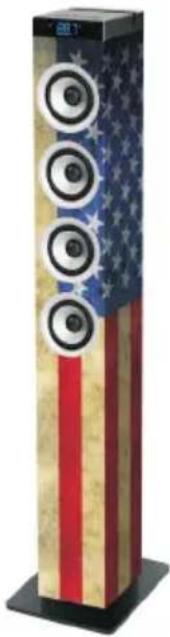
natural_image
Vertical tower with American flag design and four circular speakers, no visible text or symbols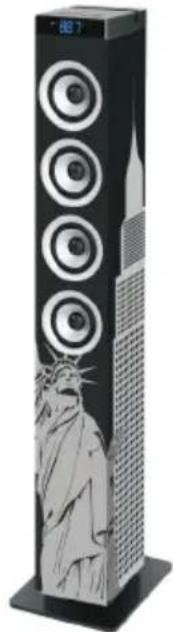
natural_image
Illustration of a tall, multi-tiered tower with circular speakers and a stylized statue on the base (no text or symbols visible)
natural_image
Exterior view of a tall, multi-tiered tower with circular speakers and a red scooter figure (no visible text or symbols)Safety instructions
When using electrical equipments basic safety precautions should always be followed
- This equipment is not intended for use by persons(including children) with reduced physical, sensory or mental capabilities or lack of experience or knowledge. They should be given appropriate supervision and instructions to use the equipment by a person responsible for their safety.
- Ensure the equipment is not too close to heat emitting appliances or placed in direct sunlight.
- Check that the voltage indicated on the data plate corresponds with that of the local network before connecting the equipment to the mains power supply.
- Do not leave the equipment unattended while connected to the power supply.
- Do not immerse the equipment in water or any other liquids.
- It is imperative to unplug the power cord after the equipment has been used, before it is cleaned and while being repaired.
- Close supervision is required when using this equipment near children.
- Never leave the equipment within reach of children.
- Repairs to electrical appliances should only be performed by qualified personnel. Improper repairs may place the user and/or equipment at serious risk.
- This equipments intended for household use only and should not be used for industrial or commercial purposes.
- Do not operate this appliance with a damaged plug or cord, after a malfunction or after being dropped or damaged in any way.
- Do not use this equipment for anything other than its intended use.
- This equipment must be placed on a stable, heat resistant surface.
- Do not push objects into any openings as damage to the equipment and/or electric shock may occur.
- Do not use this product in wet or bad weather conditions.
• This product is not a toy. - Do not play music at excessive levels especially near children.
- The normal function of the product may be disturbed by Strong Electro Magnetic Interference. If so, simply reset the product to resume normal operation by following the instruction manual. In case the function could not resume, please use the product in other location.
Description of parts
Top panel
- Mode
- Play/pause
- Slot
- Volume+ / Next
- Standby
- Volume- / Previous

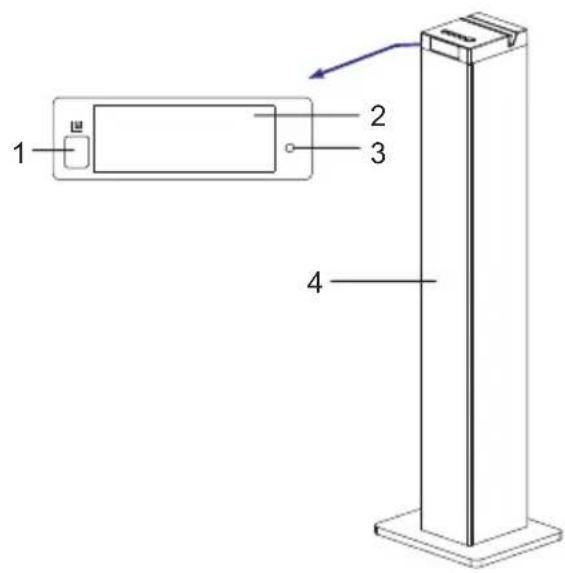
Front
- Remote sensor (Point remote to the Remote sensor)
- Display screen
- Indicator
- Speakers
Back panel
- USB port
- 3.5mm Aux-in Jack
- FM antenna
- R/L Audio-in Jack
- Power input Jack
- Power switch

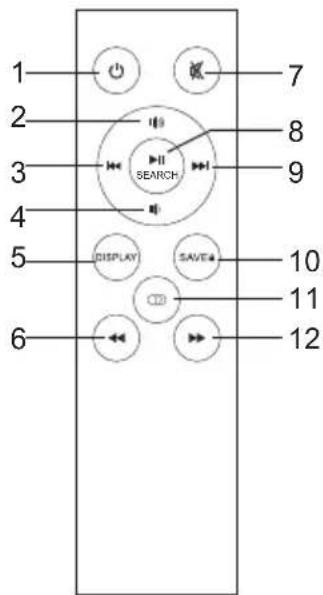
Remote control
(Point remote to the Remote sensor)
- Standby
- Volume+
- Previous
- Volume-
- Display
- Fast rewind
- Mute
- Play/pause / Search
- Next
- Save
- Mode
- Fast forward
Installation
Please install the machine as below (do not connect to power):

General operation
PREPARATION
- Insert the power cable into the power jack and connect to the main power.
- Press the POWER SWITCH on the back panel to power on the unit.
STANDBY MODE
Press the STANDBY button to wake up the unit or turn to standby mode.
SELECT MODE
Press the MODE 🐎 button to switch to one of the modes: Bluetooth (BT), USB, Tuner or Aux.
VOLUME SETTING
Press the VOLUME+/- buttons to turn the volume to a comfortable level.
MUTE THE SOUND
Press the MUTE ✗ button on remote control to mute the sound. Press again or press the VOLUME+/- buttons to resume the volume level.
SKIP TRACKS
Press the PREVIOUS ◀/NEXT▶ button on remote control or press and hold the ◀/▶ button on the unit to skip to the previous or next track.
PLAY/PAUSE
Press the PLAY/PAUSE▶I button to pause the playback, press again to resume. Under the Tuner mode, press this button will perform station search.
DISPLAY
Press the DISPLAY button to turn on or off the display screen.
ACCELERATE THE MUSIC
In USB mode, press and hold the ◀◀ /▶ button on remote control to fast forward or reward the music (only for USB mode).
Bluetooth operation
- Press the MODE button to switch to the Bluetooth mode, the indicator flashes quickly.
- The previous paired device will connect to speaker tower automatically when each time changing to Bluetooth mode.
- Turn on the Bluetooth device (e.g. phone) and enter the Bluetooth search interface.
- Search "ICES IBT-5" and pair it, input the password "0000" if necessary. Then the indicator will light steadily.
- If it still doesn't work, reset the Bluetooth and follow above steps again.
USB operation
- Power on the unit and insert a USB Flash Drive (not supplied) into the USB port, ensuring the plug is fully inserted at the correct way.
- Press the MODE button to switch to the USB mode.
- The tower will play music from the USB automatically.
- The maximum size of Flash Drive that can be connected is 32GB max.
- The supported format for USB play is MP3.
- The USB port also charges the inserted USB device except the tablets. The USB power output is 5V---1A.
Tuner operation
- Adjust the FM antenna to get the best reception.
- Press the MODE button to switch to the Tuner mode.
- Press and hold the ◀◀/▶◀ button on the unit or press the ◀◀/▶◀ button on remote control to skip to the previous or next station.
- Press and hold the ◀◀/▶◀ button on remote control to skip to the previous or next frequency of strongest reception.
- Press the ◀◀/▶ button on remote control to tune the frequency by 0.1MHz.
- Press the ▶ button on the main panel or press the SEARCH button on the remote control to search the stations, press again to stop searching.
- Store stations by buttons on the remote control: Press the ◀◀/▶◀ button to select the station number. Press the ◀◀/▶◀ button to tune to the frequency you would like to save. At last press and hold the SAVE button.
Audio operation
Use the 3.5mm-RCA Audio cable (included) to connect the unit with Disc player/MP3 player/phone/computer or other music device.
- Connect one end of the Audio cable to the R/L Audio-in Jack on the back panel of the unit, then connect the other end to the MP3 player.
- Press the MODE button to switch to Aux mode.
- Control the playback by the MP3 player.
NOTE:
When Audio in and R/L Audio in are connected to music device at the same time, the Audio in socket is priority to play, and the R/L Audio in sockets will have no sound output.

flowchart
graph TD
    A["Disc player"] --> B["USB stick"]
    B --> C["FM antenna"]
    C --> D["MP3 player"]
    D --> E["PC/phone/music player"]
    F["3.5mm-RCA Audio cable"] --> G["USB stick"]
    G --> H["FM antenna"]
    H --> I["MP3 player"]
Trouble shooting
Before taking the unit to be repaired, please check the following table when a problem occurs. Consult your dealer or service center if the problem cannot be solved with the following information.
| Problem Remedy | |
| (Power)System does not turn on or does not respond to the Remote control. | - Make sure AC power plug is connected to the wall socket outlet properly and it has power.- If this does not help, leave the unit unplugged before seeking advice. |
| (Remote control)No functions or short range. | - Insert new batteries.- Aim remote directly towards the remote sensor located in center of speaker. |
| (Pairing the product)Cannot pair successfully. | - Check whether the speaker is in Off or searching mode.- Check whether there are other Bluetooth receivers around your Bluetooth device. Turn them off to avoid any disturbance. Attempt to pair again. |
| Cannot play properly, the music plays intermittently. | - Check whether the distance between the speaker and your Bluetooth device is out of its working distance (10m).- Check whether there are some obstacles blocking the communication between the speaker and the Bluetooth device.- Move the speaker or the Bluetooth device to get the best reception. |
| The sound is distorted. | - Check the volume setting on both the speaker and your Bluetooth device and adjust the volume to a suitable level. |
Specifications
| Power source | AC230V~50-60Hz |
| Operation temperature | 0°C to + 35°C |
| Max. power consumption | 60W |
| Remote control range | 7 meters |
| Bluetooth range | 10 meters |
| Input jack | 3.5mm aux-in jack; R/L audio-in jack; USB |
| USB charge | 5V---1A |
NOTE:
As a result of continual improvements, the design and specifications of the product within differ slightly from the unit illustrated on the packaging.
Service and support
For information: http://www.ices-electronics.com/
For support: http://icessupport.zendesk.com
ICES helpdesk:
Germany 0900-1520530 (Local charges)
The Netherlands 0900-23553626 (Local charges + 1ct P/min)
Belgium 02-6200115 (Local charges)
France 0170480005 (Local charges)
The helpdesk is accessible from Monday to Friday from 9 AM till 6 PM. In case your device needs repair, our helpdesk will redirect you to your local dealer.
ICES offers service and warranty in accordance to European law, which means that in case of repair (both during and after the warranty period), you should contact your local dealer.
Please note: It is not possible to send products directly to ICES for repair.
Important note: If this unit will be opened, or accessed in any way by a non-official service center, the warranty expires immediately.
CE
Products with the CE marking comply with the EMC Directive (2004/108/EC) and the Low Voltage Directive (2006/95/EC) issued by the Commission of the European Community.
Hereby, STL Group BV, Ankerkade 20 NL 5928 PL Venlo, declares that this product is in compliance with the essential requirements and other relevant provisions of Directive 1999/5/EC.
The declaration of conformity may be consulted at https://icessupport.zendesk.com/forums/22810983-CE-Documents
This product operates at 2400 - 2483.5 MHz and is designated only to be used inside a normal household environment. This product is suited for this purpose within all EU counties.

natural_image
Symbol of a trash bin crossed with a diagonal line, no text or numbers presentThis symbol indicates that the relevant electrical product or battery should not be disposed of as general household waste in Europe. To ensure the correct waste treatment of the product and battery, please dispose them in accordance to any applicable local laws of requirement for disposal of electrical equipment or batteries.
In so doing, you will help to conserve natural resources and improve the standards of environmental protection in treatment and disposal of electrical waste (Waste Electrical and Electronic Equipment Directive).
®All rights reserved
iCES®
Modell: IBT-5
www.ices-electronics.com
https://icessupport.zendesk.com/forums/22810983-CE-Documents
natural_image
Simple line drawing of a trash bin with crossed lines indicating no waste or plastic (no text or symbols)www.ices-electronics.com
natural_image
Vertical tower with American flag design and four circular speakers on top (no text or symbols)
natural_image
Illustration of a tall, multi-tiered tower with a stylized Statue of Liberty silhouette and circular design (no text or symbols)
natural_image
Exterior view of a tall, multi-tiered tower with speaker towers and a red scooter figure (no visible text or symbols)https://icessupport.zendesk.com/forums/22810983-CE-Documents
natural_image
Simple line drawing of a trash bin with crossed lines indicating no waste or plastic inside (no text or symbols)www.ices-electronics.com
natural_image
Vertical digital tower with four circular speakers and American flag pattern (no text or symbols)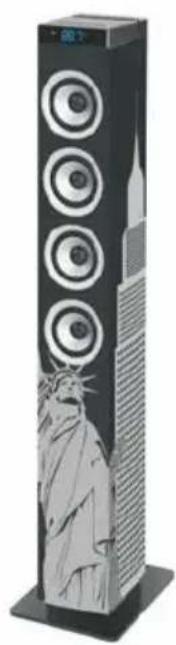
natural_image
Illustration of a tall, multi-tiered tower with a stylized Statue of Liberty design (no text or symbols visible)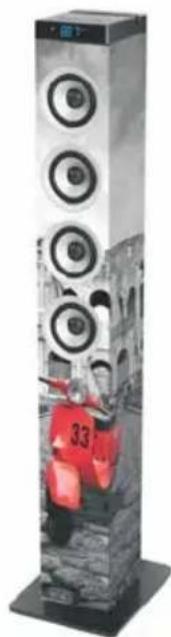
natural_image
Exterior view of a tall, multi-tiered speaker tower with visible sound waves and a person wearing a red vest (no text or symbols)natural_image
Simple line drawing of a trash bin with crossed lines indicating no waste or plastic (no text or symbols)www.ices-electronics.com
https://icessupport.zendesk.com/forums/22810983-CE-Documents
natural_image
Simple line drawing of a trash bin with crossed lines indicating no waste or discharge (no text or symbols)
- INSTRUCTION MANUAL
- Thank you for purchasing Speaker Tower
- Getting started
- In the box
- Features
- Safety instructions
- Description of parts
- Top panel
- Front
- Back panel
- Remote control
- Installation
- General operation
- PREPARATION
- STANDBY MODE
- SELECT MODE
- VOLUME SETTING
- MUTE THE SOUND
- SKIP TRACKS
- PLAY/PAUSE
- DISPLAY
- ACCELERATE THE MUSIC
- Bluetooth operation
- USB operation
- Tuner operation
- Audio operation
- NOTE:
- Trouble shooting
- Specifications
- Service and support
- CE
- iCES®
Brand : Ices
Model : IBT-5 Roma
Category : Loudspeaker