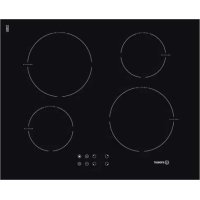
VIB 744 C E - Cooker INDESIT - Free user manual and instructions
Find the device manual for free VIB 744 C E INDESIT in PDF.



User questions about VIB 744 C E INDESIT
0 question about this device. Answer the ones you know or ask your own.
Ask a new question about this device
Download the instructions for your Cooker in PDF format for free! Find your manual VIB 744 C E - INDESIT and take your electronic device back in hand. On this page are published all the documents necessary for the use of your device. VIB 744 C E by INDESIT.
USER MANUAL VIB 744 C E INDESIT
Operating Instructions
HOB
Contents
Operating Instructions,1
WARNING,2
Description of the appliance-Control Panel,3
Installation,3
Start-up and use,5
Precautions and tips, 10
Care and maintenance, 11
Technical description of the models,11
FR
Français
- WARNING: The appliance and its accessible parts become hot during use.
- Care should be taken to avoid touching heating elements.
- Children less than 8 years of age shall be kept away unless continuously supervised.
- This appliance can be used by children aged from 8 years and above and persons with reduced physical, sensory or mental capabilities or lack of experience and knowledge if they have been given supervision or instruction concerning use of the appliance in a safe way and understand the hazards involved. Children shall not play with the appliance. Cleaning and user maintenance shall not be made by children without supervision.
- WARNING: Unattended cooking on a hob with fat or oil can be dangerous and may result in fire.
- NEVER try to extinguish a fire with water, but switch off the appliance and then cover flame e.g. with a lid or a fire blanket.
- WARNING: Danger of fire: do not store items on the cooking surfaces.
- WARNING: If the surface in glass-ceramic is cracked, switch off the appliance to avoid the possibility of electric shock.
- Never use steam cleaners or pressure cleaners on the appliance.
- The appliance is not intended to be operated by means of an external timer or separate remote control system.
- Do not place metal objects (knives, spoons, pan lids, etc.) on the hob as they may become hot.
- After use, switch off the hob element by its control and do not rely on the pan detector.
Description of the appliance
Control panel
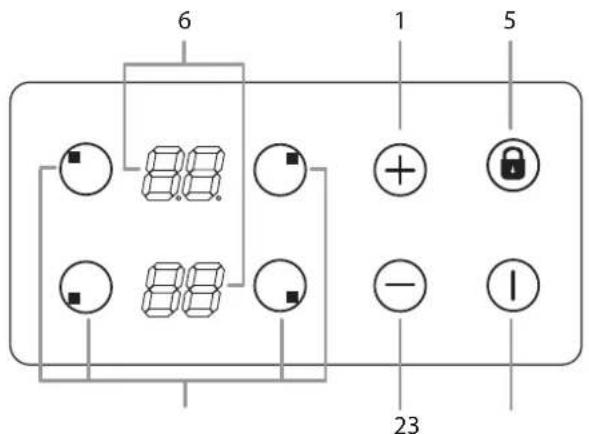
text_image
6 1 5 23The control panel described in this manual is only a representative example: it may not exactly match the panel on your appliance.
When using the touch control panel:
Do not use gloves
Use a clean finger
Touch the glass smoothly
1 INCREASE POWER/TIME button - controls the power and time
2 REDUCE POWER/ TIME button controls the power and time.
3 COOKING ZONE SELECTOR button is used to select the desired cooking zone
4 ON/OFF button switches the appliance on and off.
5 CONTROL PANEL LOCK button prevents accidental changes to the hob settings and shows the control panel has been locked.
6 HEATER DISPLAY -shows the cooking zone selected, power level, preset time of cooking, booster function activated.
! For detailed information on the control panel functions refer to "Start-up and use" section.
! This product complies with the requirements of the latest European Directive on the limitation of power consumption of the standby mode. If no operations are carried out for a period of 2 minutes, after the residual heat indicator lights turn off and the fan stops (if present), the appliance automatically switches to the .off mode.. The appliance resumes the operating mode once the ON/OFF button is pressed.
! Depending on the number of heaters/cooking zones on the hob the COOKING ZONE SELECTOR BUTTONS may vary between 3 and 4
Installation
! Before operating your new appliance please read this instruction booklet carefully. It contains important information concerning the safe operation, installation and maintenance of the appliance.
! Please keep these operating instructions for future reference. Pass them on to any new owners of the appliance.
Positioning
! Keep all packaging material out of the reach of children. It may present a choking or suffocation hazard (see Precautions and tips).
! The appliance must be installed by a qualified professional in accordance with the instructions provided. Incorrect installation may cause harm to people and animals or may damage property.
Built-in appliance
Use a suitable cabinet to ensure that the appliance functions properly.
- The supporting surface must be heat-resistant up to a temperature of approximately 100°C.
- If the appliance is to be installed above an oven, the oven must be equipped with a forced ventilation cooling system.
- Avoid installing the hob above a dishwasher: if this cannot be avoided, place a waterproof separation device between the two appliances.
Ventilation
To allow adequate ventilation and to avoid overheating of the surrounding surfaces the hob should be positioned as follows:
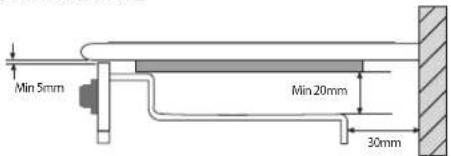
- At a minimum distance of 40 mm from the back panel or any other vertical surfaces.
- So that a minimum distance of 20 mm is maintained between the installation cavity and the cabinet underneath.
- Kitchen cabinets adjacent to the appliance and taller than the top of the hob must be at least 450 mm from the edge of the hob.
Fixing
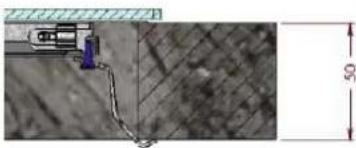
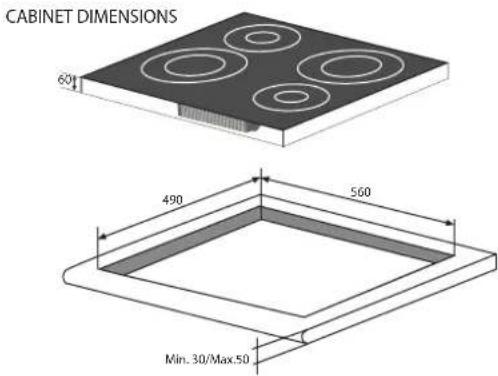
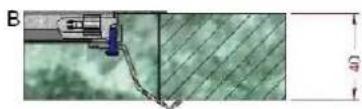
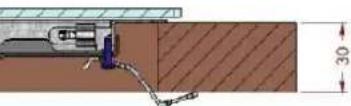
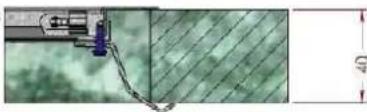
The appliance must be installed on a perfectly level supporting surface. Any deformities caused by improper fixing could affect the features and operation of the hob. The thickness of the supporting surface should be taken into account when choosing the length of the screws for the fixing hooks:
• 3,5 mm thick: 9,5 mm screws
Installation of the safety washer
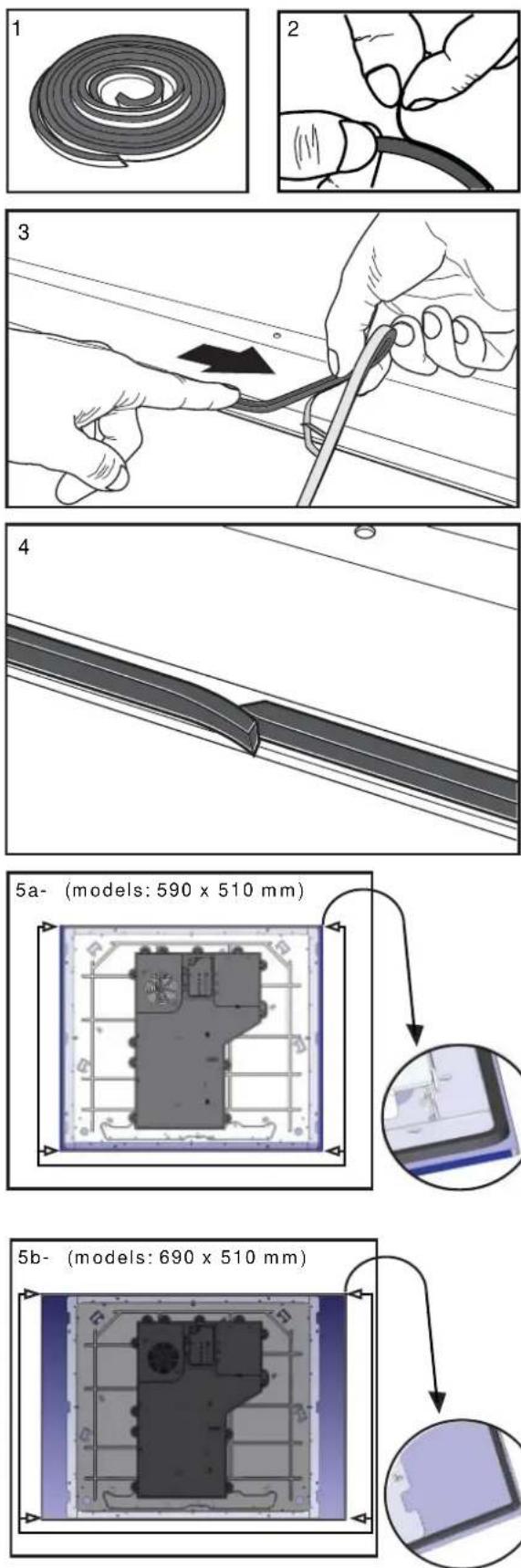
text_image
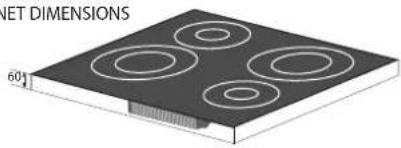
CABINET DIMENSIONS 60 490 560 Min. 30/Max.50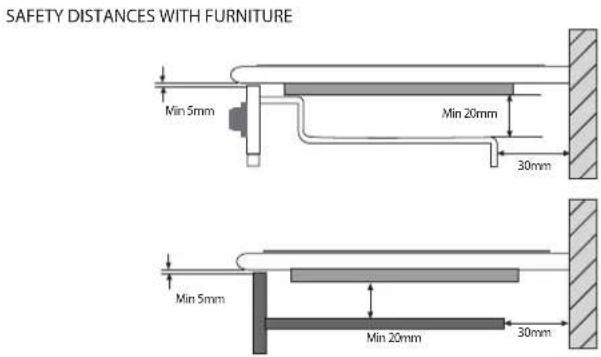
text_image
SAFETY DISTANCES WITH FURNITURE Min 5mm Min 20mm 30mm Min 5mm Min 20mm 30mm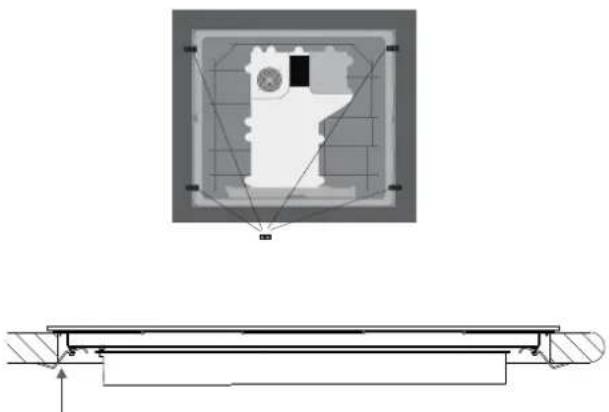
natural_image
Technical diagram showing a mechanical assembly with a central gear and mounting base, no text or symbols present.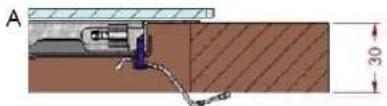
text_image
A 30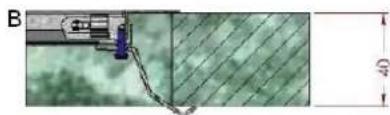
natural_image
Technical diagram showing a mechanical component with a 40-unit dimension label, no readable text or symbols present.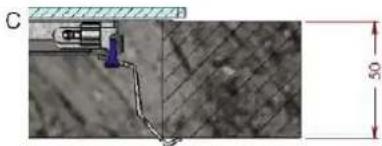
natural_image
Technical diagram showing a mechanical assembly with a blue component and a 50-unit dimension label (no readable text or symbols)Fix the hob as follows:
- Use short flat-bottomed screws to fix the 4 alignment springs in the holes provided at the central point of each side of the hob.
- Place the hob in the cavity, make sure it is in a central position and push down on the whole perimeter until the hob is stuck to the supporting surface.
! The screws for the alignment springs must remain accessible.
! In order to adhere to safety standards, the appliance must not come into contact with electrical parts once it has been installed.
! All parts which ensure the safe operation of the appliance must not be removable without the aid of a tool.
Electrical connection
! The electrical connection for the hob and for any built-in oven must be carried out separately, both for safety purposes and to make extracting the oven easier.
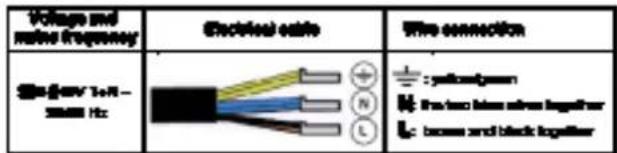
Single-phase connection
text_image
Voltage and noise frequency Electrical cable Wire connection 80-640V T+R - 5000 Hz + - N L ± : yellow/greenthe two blue lines together
boxes and black together
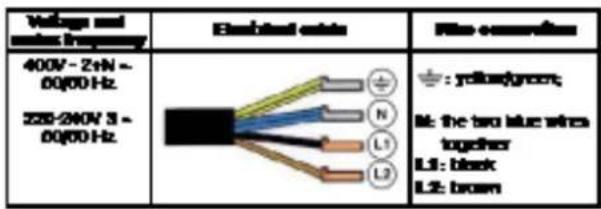
The hob is equipped with a pre-connected electricity supply cable, which is designed for single-phase connection. Connect the wires in accordance with the instructions given in the following table and diagrams:
Other types of connection
text_image
Voltage and VDDI frequency 400V - ZnN - 0Q/60 Hz 225-240V 3 - 0Q/60 Hz Emission line N L1 L2 ± : yellow/green; M: the two blue wires together L1: black L2: brownIf the mains supply corresponds with one of the following: Voltage and mains frequency
- 400V - 2+N \~ 50/60 Hz
• 220-240V 3 \~ 50/60 Hz
Separate the wires and connect them in accordance with the instructions given in the following table and diagrams:
Connecting the electricity supply cable to the mains
If the appliance is being connected directly to the electricity mains an omnipolar switch must be installed with a minimum opening of 3 mm between contacts.
! The installer must ensure that the correct electrical connection has been made and that it is fully compliant with safety regulations.
Start-up and use
GB
Before connecting the appliance to the power supply, make sure that:
- The appliance is earthed and the plug is compliant with the law.
- The socket can withstand the maximum power of the appliance, which is indicated on the data plate located on the appliance itself.
- The voltage falls within the range of values indicated on the data plate.
- The socket is compatible with the plug of the appliance. If the socket is incompatible with the plug, ask an authorised technician to replace it. Do not use extension cords or multiple sockets.
! Once the appliance has been installed, the power supply cable and the electrical socket must be easily accessible.
! The cable must not be bent or compressed.
! The cable must be checked regularly and replaced by authorised technicians only.
! The manufacturer declines any liability should these safety measures not be observed.
! Do not remove or replace the power supply cable for any reason. Its removal or replacement will void the warranty and the CE marking. INDESIT does not assume liability for accidents or damage arising from replacement/removal of the original power supply cable. Replacement can only be accepted when carried out by personnel authorised by INDESIT and using an original spare part.
! The glue applied on the gaskets leaves traces of grease on the glass. Before using the appliance, we recommend you remove these with a special non-abrasive cleaning product. During the first few hours of use there may be a smell of rubber which will disappear very quickly.
! A few seconds after the hob is connected to the electricity supply, a buzzer will sound. The hob may now be switched on.
Types of noise during normal hob operation:
- Buzz: due to the vibration of the metallic parts that make up the induction element and the pot; it is generated by the electromagnetic field required for heating and increases as the power of the induction element increases.
- Soft whistle: heard when the pot placed on the heating zone is empty; the noise disappears once food or water is placed into the pot.
- Crackle: produced by the vibration of materials on the bottom of the pot due to the flow of parasitic currents caused by electromagnetic fields (induction); can be more or less intense depending on the material making up the bottom of the pot, and decreases as the pot dimensions increase.
- Loud whistle: heard when two induction elements of the same group function simultaneously at maximum power and/or when the booster function is set on the larger element while the other is auto-adjusted. Noise is reduced by decreasing the power level of the auto-adjusted induction element; pot bottom layers made of different kinds of materials are among the main causes of this noise.
- Fan noise: a fan is necessary to ensure the hob functions correctly and to safeguard the electronic unit from possible overheating. The fan functions at maximum power when the large induction element is at maximum power or when the booster function is on; in all other cases, it works at average power depending on the temperature detected. Furthermore, the fan may continue to work even after switching the hob off, if the temperature detected is high.
The types of noise listed above are due to induction technology and are not necessarily operational faults.
! If the (-) or (+) button is pressed for an extended period of time, the display scrolls quickly though the power levels and timer minutes.
Initial Light Conditions
When power is initially applied to the Cooktop, the touch control conducts a calibration process for the touch keys, which requires a low level of ambient light in the area of the touch keys.
If during this calibration process excessive ambient lighting is detected the User Interface displays „FL" (Infrared Ambient Light Error) and the control calibration process is suspended. In order to rectify the process any lighting that could effect the calibration process should be switched off (e.g. halogen cooker hood lighting). The error will disappear when satisfactory ambient lighting is detected and the touch control calibration procedure will now complete satisfactorily.
-The „FL" error can only be generated within approx 3s of initial power being applied to the cooktop.
-We recommend that the user switches off all cooker hood lighting and lighting directed towards the cook-top when power is initially applied to the cooktop.
-After the touch control has conducted its initial calibration process, (approx 3s) any cooker hood or other lighting can be switched on as normal and will not affect the operation of the touch control.
Switching on the hob
After connecting the hob to the electricity mains, the touch pannel might be automatically locked. To unclock the pannel press and hold the Control Panel
Loock button
To switch the hob on, press and hold the ⏻ button for approximately one second.
The cooktop is switched On when a beep sound is emmited and all the cooking zones displays show the digit point.
When the cooktop is OFF, after 5 sec the control switches off the KEYLOCK LED to reduce the power consumption.
As soon as we touch a key, the KEYLOCK LED goes ON and we can continue to use the cooktop, unlocking the keyboard.
Switching off the cooktop is signalled by 3 beep sound
Setting the Power Management
The cooktop maximum power limit is 7200W. This power limit can be reduced by the user to 2800W, 3500W or 6000W.
The sequence to set a new Cooktop Power Limit is:
·During the first 30 seconds after plugging the appliance
The Touch has to be unlocked and all Heaters Off
- Press at the same time Heater 1 and Heater 3 selection keys
Once this is done, a beep sounds and the actual Co-oktop Power Limit will be shown in the heater displays.
For selecting a new Power Limit:
With the (+) and (-) keys, the Power Limit is increased. The selectable powers are: 2800W, 3500W, 6000W or 7200W. When the power is 7200W, if the [+] or [-] key is touched the power changes to 2800W.
The sequence to finish recording the new Cooktop Power Limit is:
- Press at the same time Heater 1 and Heater 3 selection keys
- Once this is done, new Cooktop Power Limit is recorded and there is a system reset.
To finish without recording changes:
- If during 60 seconds there is no action, changes are not recorded and there is a system reset.
Switching on the cooking zones
Each cooking zone is controlled using a selector button
and a power adjustment device consisting of a double(-) and (+) button.
- To begin operating a cooking zone, press the corresponding control button and set the desired power level (between 0 and 9) using the buttons (-) or (+)
Press and hold the (-) button to set the power level immediately at "9"
Press and hold (+) and (-) buttons simultaneously to return to power level "0"
If the power level is "0" press and hold the (+) button to increase the power level quickly
The choice of a cooking zone is signalled by a beep sound, and then the power level is shown on the display
If the selection of a heater is not done in 10 seconds, the cooktop will be turned off automatically.
Fast Boil- "Booster" function
The booster function for some of the cooking zones may be used to shorten heating-up times.
It may be activated by pressing the (+) button over level 9. This function boosts the power to 1600 W or 2000 W, depending on the size of the relevant cooking zone.
The activation of of the booster is signalled by a beep sound, and the letter 'P' appearing on the display.
The booster works for max 10 minutes. After these 10 minutes a beep sounds and the cooking zone will return to level "9"
With the heater at Booster level, if the [+] key is Touched an error beep sounds and the cookset doesn't change. With the heater at Booster level, if the [-] key is Touched a beep sounds and the cookset is reduced to 9.
Switching off the cooking zones
To switch off a cooking zone, select it using the corresponding

selector button and:
- Press the (-) button: the power of the cooking zone will progressively decrease until it is switched off.
Once the cooking zone is selected, the heater can also be switched off by touching the [-] and [+] keys simultaneously. A beep
sounds and the corresponding display shows "0".
Using the Timer
! All the cooking zones may be programmed simultaneously, for a duration between 1 and 99 min.
-
Select the cooking zone using the corresponding selector button.
-
Adjust the power level of the cooking zone.
-
When required power level is selected, touching again the corresponding heating zone selector button, a beep sounds and a 't' letter with dot point appears on the heater display. The remaining time will be displayed in the opposite part of timed heater. If timed heating zone is, for example, in the down part, timed time will appear in up displays.
-
Set the cooking duration using the (-) and the(+) buttons
The (-) and the(+) buttons touched simultaneously result in returning to the 0 value.
If the time is not selected before 10 seconds, or if the selected time is 0 after 10 seconds the last touch over the (-)or the (+) button, the timer is switched off.
Starting Timer countdown.
The countdown starts when the timer visualization is finished touching any cooking zone key or automatically 10 seconds after the last touch over the [+] or [-] keys. A beep sounds and the heater display will show the power
level and the dot point showing that the heater is timed.
! To change the time for a timed heater, repeat the process explained above.
!Pressing and holding the + and - keys increases the speed of time selection
End of Timer countdown.
When the remaining time has run out, the timed heater is switched off, the heater display shows a blinking '0' and the timer alarm beeps for one minute
The alarm will be cancelled by pressing any key of the touch control.
Control panel lock
When the hob is switched on, it is possible to lock the oven controls in order to avoid accidental changes being made to the settings (by children, during cleaning, etc.).

Press the button to lock the control panel: -the icon will illuminate and an audible beep sound will be emitted. To use any of the controls (e.g. to stop cooking), you

must switch off this function. Press the button for a few moments, the icon will stop illuminating and the lock function will be removed.
All the keys on the cooking zone selection will be locked if :the cooktop is off,,
if the Control Panel Lock is activated or
if an error on a cooktop occurs.
Switching off the hob

Press the button to switch off the appliance - do not rely solely on the pan sensor.
If the control panel lock has been activated, the controls will continue to be locked even after the hob is switched on again. In order to switch the hob on again, you must first remove the lock function.
Practical advice on using the appliance
! Use cookware made from materials which are compatible with the induction principle (ferromagnetic material). We especially recommend pans made from: cast iron, coated steel or special stainless steel adapted for induction. Use a magnet to test the compatibility of the cookware.
! Do not use adapters, diffusers, or metal plates on the cooking zones. They may have a detrimental effect upon the hob's performance, and might damage the hob's aesthetics.
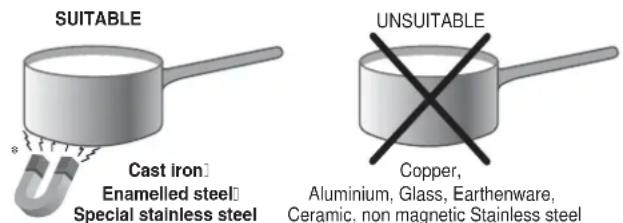
Aluminium, Glass, Earthenware, Ceramic, non magnetic Stainless steel
In addition, to obtain the best results from your hob:
- Use pans with a thick, flat base in order to fully utilise the cooking zone.
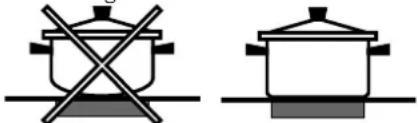
- Always use pans with a diameter which is large enough to cover the hotplate fully, in order to use all the available heat.

- Make sure that the base of the cookware is always clean and dry, in order to fully utilise and extend the life of both the cooking zones and the cookware.
- Avoid using the same cookware which has been used on gas burners: the heat concentration on gas burners may distort the base of the pan, causing it not to adhere correctly.
Safety devices
Pan sensor
Each cooking zone is equipped with a pan sensor device. The hotplate only emits heat when a pan with suitable measurements for the cooking zone is placed on it.
The "u" sign on the display appears if after selecting the cooking zone the pan is not placed on a heater, or in case of:
- An incompatible pan
• A pan whose diameter is too small - The pan has been removed from the hotplate.
After 10 sec. with no pan on the heating zone, a warning beep signal is emitted.
After 60 sec. with no pan on the heating zone,, the heater switches off.
Overheating protection
If the electronic elements overheat, the number signaling the power level starts flashing, and the letter "c" appears on the display. When the temperature has reached a suitable level, this message disappears and the hob may be used again.
Safety switch
The appliance has a safety switch which automatically switches the cooking zones off after they have been in operation for a certain amount of time at a particular power level. When the safety switch has been triggered, the display shows "0".
For example: the right rear hotplate is set to 5 and will switch off after 5 hours of continuous operation, while the front left hotplate is set to 2 and will switch off after 8 hours. When one or more keys are activated for more than 10 sec. the touch control. switches off
A warning beep sounds is emitted every 10 sec., while the key/s is/are activated.
With all heaters at zero power during 10 sec. the Cooktop is switched off.
If the switching off is due to an accidental activation of keys, the touch control actuates as above.
Buzzer
This can also indicate several irregularities:
- An object (a pan, cutlery, etc.) has been placed on the control panel for more than 10 seconds.
- Something has been spilt on the control panel.
- A button has been pressed for too long. All of the above situations may cause the buzzer to sound. Remove the cause of the malfunction to stop the buzzer. If the cause of the problem is not removed, the buzzer will keep sounding and the hob will switch off.
Errors and Alarms
When an error is detected, the whole appliance or the heater/s are switched off, a beep sounds (only if one or more heaters are active) and all displays show a 'F' letter and the error code (an index number or a letter) alternately.
If the problem does not disappear by itself, please contact the Technical Service.
| Power level | Maximum operating time in hours |
| 1 | 9 |
| 2 | 8 |
| 3 | 7 |
| 4 | 6 |
| 5 | 5 |
| 6 | 4 |
| 7 | 3 |
| 8 | 2 |
| 9 | 1 |
Practical cooking advice
| Very high-flame cooking | 8090 |   Pressure cooking FryingPressure cooker Pressure cooking FryingPressure cooker   |
| High-flame cooking | 81 |   Crêpes Cooking on a high flame and browning (roasts, steaks, escalopes, fish fillets, fried eggs) Crêpes Cooking on a high flame and browning (roasts, steaks, escalopes, fish fillets, fried eggs) |
| Medium-flame cookingLow-flame | 76 | 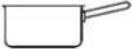 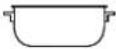 Fast thickening (liquid juices)Boiling water (pasta, rice, vegetables)Milk Fast thickening (liquid juices)Boiling water (pasta, rice, vegetables)Milk |
| 55 | 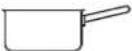  Slow thickening (dense juices) Slow thickening (dense juices) | |
| 54 | 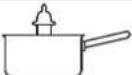  Bain-marie cooking Pressure cooking after whistle Bain-marie cooking Pressure cooking after whistle | |
| cooking | 44 | 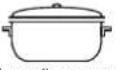 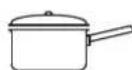 Low-flame cooking (stews) Reheating dishes Low-flame cooking (stews) Reheating dishes |
| Very low-flame cooking | 21 | 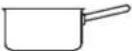  Chocolate sauce Keeping food hot Chocolate sauce Keeping food hot |
! This appliance has been designed and manufactured in compliance with international safety standards. The following warnings are provided for safety reasons and must be read carefully.
CE This appliance conforms to the following European Economic Community directives:
- 2006/95/EEC dated 12/12/06 (Low Voltage) and subsequent amendments;
- 2004/108/EEC dated 15/12/04 (Electromagnetic Compatibility) and subsequent amendments;
- 93/68/EEC dated 22/07/93 and subsequent amendments.
- 1275/2008 stand-by/off mode.
General safety
! Make sure that the air inlet behind the fan grille is never obstructed. The built-in hob should, in fact, be provided with suitable ventilation for the cooling of the electronic components used in the appliance.
! We advise against the installation of an induction hob above an under-the-counter refrigerator (heat) or above a washing machine (vibrations). In fact, there would be insufficient space for the ventilation of electronic components.
- The appliance was designed for domestic use inside the home and is not intended for commercial or industrial use.
- The appliance must not be installed outdoors, even in covered areas. It is extremely dangerous to leave the appliance exposed to rain and storms.
- Do not touch the appliance when barefoot or with wet or damp hands and feet.
- The appliance must be used by adults only for the preparation of food, in accordance with the instructions provided in this booklet. Do not use the hob as a worktop or chopping board.
- The glass ceramic hob is resistant to mechanical shocks, but it may crack (or even break) if hit with a sharp object such as a tool. If this happens, disconnect the appliance from the electricity mains immediately and contact a Service Centre.
- Ensure that power supply cables of other electrical appliances do not come into contact with the hot parts of the hob.
- Remember that the cooking zones remain relatively hot for at least thirty minutes after they have been switched off. An indicator light provides a warning when residual heat is present (see Start-up and use).
- Keep any object which could melt away from the hob, for example plastic and aluminium objects, or products with a high sugar content. Be especially careful when using plastic film and aluminium foil or packaging: if placed on surfaces which are still hot, they may cause serious damage to the hob.
- Always make sure that pan handles are turned towards the centre of the hob in order to avoid accidental burns.
-
When unplugging the appliance, always pull the plug from the mains socket; do not pull on the cable.
-
Never perform any cleaning or maintenance work without having disconnected the appliance from the electricity mains.
- The appliance should not be operated by people (including children) with reduced physical, sensory or mental capacities, by inexperienced individuals or by anyone who is not familiar with the product. These individuals should, at the very least, be supervised by someone who assumes responsibility for their safety or receive preliminary instructions relating to the operation of the appliance.
- For the attention of wearers of pacemakers or other active implants:
The hob complies with all current standards on electromagnetic interference.
Your induction hob is therefore perfectly in keeping with legal requirements (89/336/CEE directives). It is designed not to create interference on any other electrical apparatus being used on condition that the apparatus in question also complies with this legislation.
Your induction hob generates short-range magnetic fields.
To avoid any interference between your induction hob and a pacemaker, the latter must be designed to comply with relevant regulations.
In this respect, we can only guarantee our own product conformity. Please consult the pacemaker manufacturer or your doctor concerning its conformity or any possible incompatibility.
- Do not let children play with the appliance.
- Do not place metal objects (knives, spoons, pan lids, etc.) on the hob as they may become hot.
- The appliance is not intended to be operated by means of an external timer or separate remote-control system.

Disposal

- When disposing of packaging material: observe local legislation so that the packaging may be reused.
- The European Directive 2002/96/EC relating to Waste Electrical and Electronic Equipment (WEEE) states that household appliances should not be disposed of using the normal solid urban waste cycle. Exhausted appliances should be collected separately in order to optimise the cost of re-using and recycling the materials inside the machine, while preventing potential damage to the atmosphere and to public health. The crossed-out dustbin is marked on all products to remind the owner of their obligations regarding separated waste collection.
For further information relating to the correct disposal of exhausted household appliances, owners may contact the public service provided or their local dealer.
Switching the appliance off
Disconnect your appliance from the electricity supply before carrying out any work on it.
Cleaning the appliance
! Do not use abrasive or corrosive detergents (for example, products in spray cans for cleaning barbecues and ovens), stain removers, anti-rust products, powder detergents or sponges with abrasive surfaces: these may scratch the surface beyond repair.
! Never use steam cleaners or pressure cleaners on the appliance.
- It is usually sufficient simply to wash the hob using a damp sponge and dry it with absorbent kitchen towel.
- If the hob is particularly dirty, rub it with a special glass ceramic cleaning product, then rinse well and dry thoroughly
- To remove more stubborn dirt, use a suitable scraper. Remove spills as soon as possible, without waiting for the appliance to cool, to avoid residues forming crusty deposits. You can achieve excellent results by using a rust-proof steel wire sponge - specifically designed for glass ceramic surfaces - soaked in soapy water.
-
If any plastic or sugary substances are accidentally melted on the hob, remove them immediately with the scraper, while the surface is still hot.
-
Once it is clean, the hob may be treated with a special protective maintenance product: the invisible film left by this product protects the surface from drips during cooking. This maintenance task should be carried out while the appliance is warm (not hot) or cold.
- Always remember to rinse the appliance well with clean water and dry it thoroughly: residues can become encrusted during subsequent cooking processes.
Stainless steel frame (only in models with outer frame) Stainless steel can be marked by hard water which has been left on the surface for a long time, or by cleaning products containing phosphorus.
After cleaning, it is advisable to rinse the surface well and dry it thoroughly. If water is spilt on the surface, dry it quickly and thoroughly.
! Some hobs have an aluminium frame which is similar to stainless steel. Do not use any cleaning or degreasing products which are not suitable for use with aluminium.
Disassembling the hob
If it is necessary to disassemble the hob:
- Loosen the screws fixing the alignment springs on each side.
- Loosen the screws holding the fixing hooks in each corner.
- Take the hob out of its installation cavity.
! Do not attempt to repair the appliance yourself. If the appliance breaks down, contact a Service Centre.
Technical description of the models
| Hobs | VIB 644 C EVIB 744 C E | VIB 633 C EIVIA 633 C E |
| Cooking zone | Power (W) | Power (W) |
| Back Left | I 1200 - B1600 | - |
| Back Right | I 1500 - B 2000 | I 1500 - B 2300 |
| Front Left | I 1500 - B 2000 | I 1500 - B 2300 |
| Front Right | I 1200 - B1600 | I 1200 - B1600 |
| Total power | 7200 | 6200 |
The induction system is the quickest existing way of cooking. Unlike traditional hotplates where the cooking zone heats up, with the induction system heat is generated directly inside pans which have ferromagnetic bases.
Key:
I = single induction cooking zone
B = booster: the power level of the cooking zone may be boosted
ATTENTION!
natural_image
Technical diagram showing a mechanical assembly with a central gear and mounting base, no text or symbols present.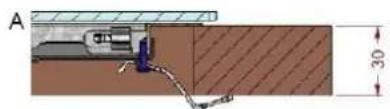
text_image
A 30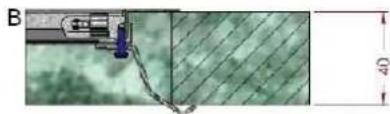
natural_image
Technical diagram showing a mechanical assembly with a 40-unit dimension label (no readable text or symbols)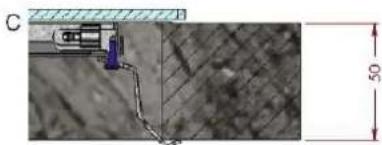
natural_image
Technical diagram showing a mechanical assembly with a 50-unit dimension label (no readable text or symbols)I = foyer à induction simple
natural_image
Pure diagram of a mechanical or architectural component with grid lines and control points (no text or symbols)
natural_image
Technical line drawing of a mechanical assembly with no visible text or symbols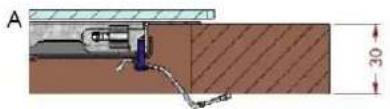
text_image
A 30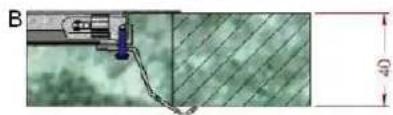
natural_image
Technical diagram showing a mechanical component connected to a green textured surface with a 40-unit dimension label (no readable text or symbols)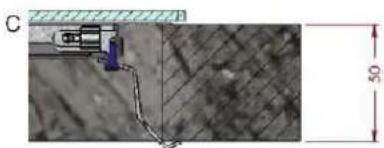
natural_image
Technical diagram showing a mechanical component connected to a textured surface with a 50-unit dimension label (no readable text or symbols)natural_image
Two identical cooking pots with crossed x marks, one plain and one with a lid, placed on a surface (no text or symbols)text_image
Diagram showing three different mechanical or structural configurations with cross-shaped and rectangular components, possibly indicating assembly or assembly steps.natural_image
Abstract geometric diagram with grid lines and a central black square, no text or symbols present
natural_image
Technical line drawing of a mechanical assembly with no visible text or symbols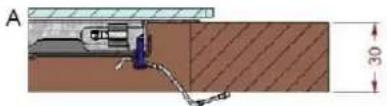
text_image
A 30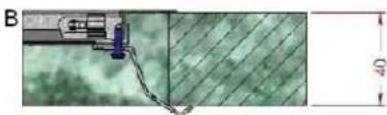
natural_image
Technical diagram showing a mechanical component with a curved wire and a diagonal striped pattern, no visible text or symbols.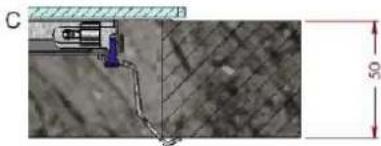
natural_image
Microscopic view of a mechanical component connected to a grid-patterned surface, with a 50-unit scale indicator (no text or symbols present)Fixar a placa como se segue:
Activar as zonas de cozedura
Desactivar as zonas de cozedura
natural_image
Three diagrams showing crossed-out electrical symbols on a surface, no text or labels presentnatural_image
Abstract geometric diagram with grid lines and a central symbol (no text or labels)
natural_image
Pure technical diagram of a beam supported by two supports, without any text, labels, or symbols.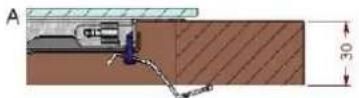
natural_image
Technical diagram showing a mechanical assembly with a green textured background and dimension lines (no readable text or symbols)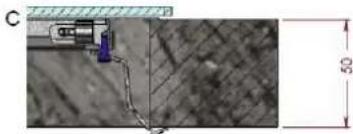
natural_image
Close-up of a mechanical component with a purple clip and blue handle, connected by a wire to a textured surface (no visible text or symbols)natural_image
Two identical cooking pots with crossed x marks, no text or symbols presentnatural_image
Three diagrams showing crossed-out electrical symbols on a surface, no text or labels presentnatural_image
Technical diagram showing a mechanical assembly with a top-down view of a gear and base plate (no text or symbols)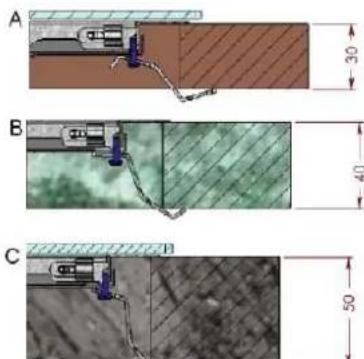
text_image
A 30 B 40 C 50-We recommend that the user switches off all cooker hood lighting and lighting directed towards the cooktop when power is initially applied to the cooktop.
natural_image
Two identical cooking pots with crossed x-bracing, no text or symbols presentnatural_image
Three schematic diagrams showing cross-shaped and rectangular shapes with no text or symbolsThe control panel described in this manual is only a representative example: it may not exactly match the panel on your appliance.
natural_image
3D illustration of a helical coil or spiral structure with no text or symbols
natural_image
Close-up of hands performing a finger manipulation or tooling task (no visible text or symbols)
natural_image
Illustration of hands tying a knot with a rope, showing a black arrow indicating the knot's direction (no text or symbols present)
natural_image
Pure technical diagram of a curved mechanical component with diagonal lines and a circular end (no text or symbols)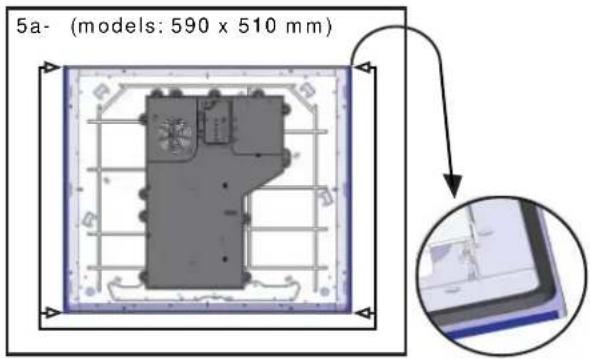
text_image
5a- (models: 590 x 510 mm)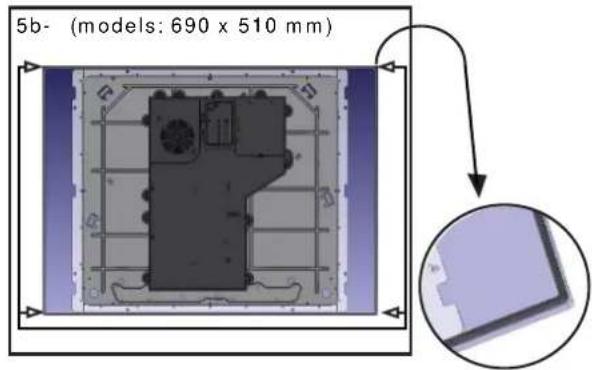
text_image
5b- (models: 690 x 510 mm)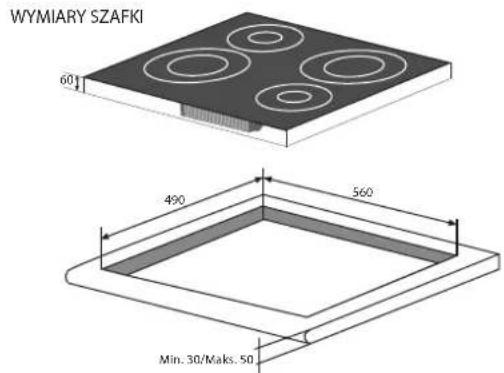
text_image
WYMIARY SZAFKI 60 490 560 Min. 30/Maks. 50BEZPIECZNA ODLEGŁOŚĆ OD MEBLI
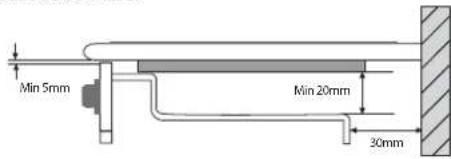
text_image
Min 5mm Min 20mm 30mm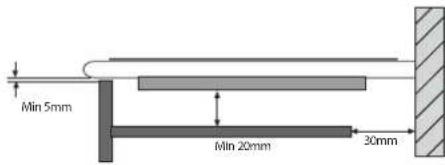
text_image
Min 5mm Min 20mm 30mm
natural_image
Pure technical diagram showing a gear-like component within a square frame, with no text, numbers, or symbols present.
natural_image
Technical line drawing of a mechanical assembly with no visible text or symbols
text_image
A 30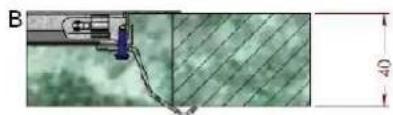
natural_image
Technical diagram showing a mechanical component connected to a green textured surface with a 40-unit dimension label (no readable text or symbols)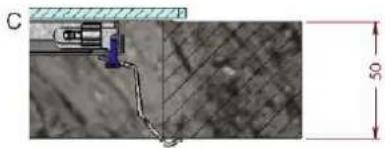
natural_image
Technical diagram showing a mechanical assembly with a 50-unit dimension标注 (no readable text or symbols)PL
natural_image
Two cooking pots with crossed x-bracing, one above and one below, on a flat surface (no text or symbols)text_image
Diagram showing three different mechanical or structural configurations with cross-shaped elements and directional arrows indicating movement or force.natural_image
Spiral coil diagram with no text or symbols
natural_image
Illustration of two hands holding a thin object, possibly a tool or cable (no text or symbols visible)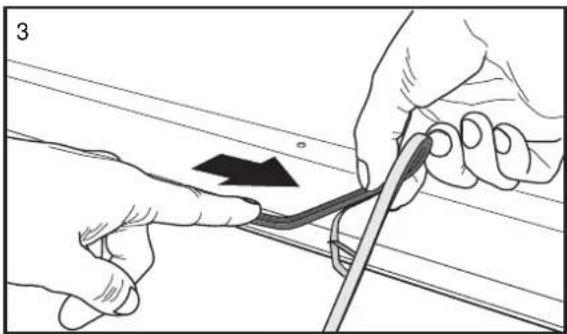
natural_image
Illustration of hands tying a knot with a string, showing a black arrow indicating the knot's direction (no text or symbols present)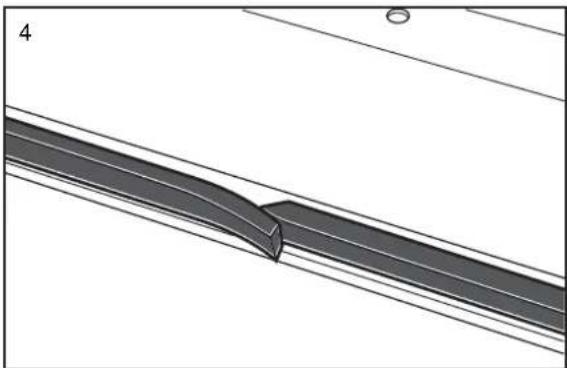
natural_image
Technical diagram of a mechanical component with diagonal lines and a curved cutout (no text or symbols)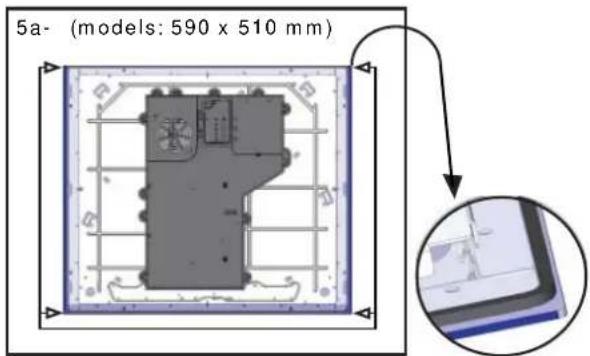
text_image
5a- (models: 590 x 510 mm)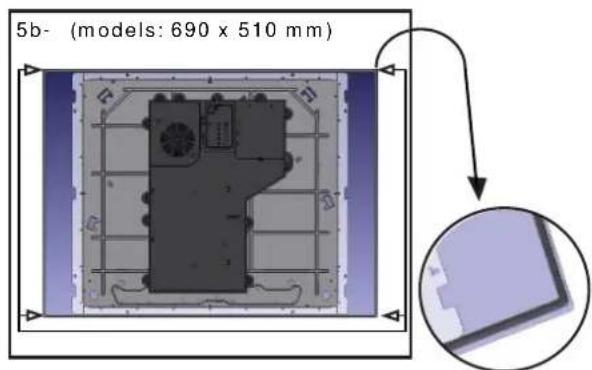
text_image
5b- (models: 690 x 510 mm)CABINET DIMENSIONS
natural_image
3D diagram of a four-circled component with concentric rings, labeled 'NET DIMENSIONS' and '60μm' (no other text or symbols)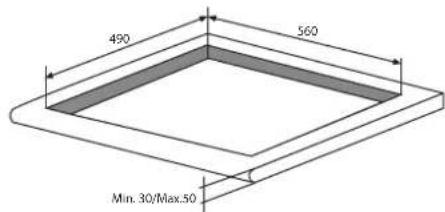
text_image
490 560 Min. 30/Max.50SAFETY DISTANCES WITH FURNITURE
text_image
Min 5mm Min 20mm 30mm
text_image
Min 5mm Min 20mm 30mm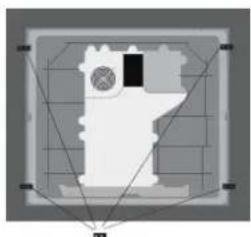
natural_image
Abstract geometric diagram with grid lines and a central black square, no text or symbols present
natural_image
Pure technical line drawing of a structural beam or support structure without any text, numbers, or symbolsA
B
natural_image
Technical diagram showing a mechanical assembly with a 4D dimension label (no readable text or symbols)C