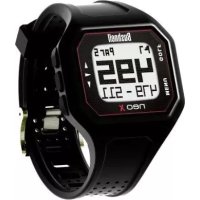
Neo X - Sports Watch BUSHNELL - Free user manual and instructions
Find the device manual for free Neo X BUSHNELL in PDF.


User questions about Neo X BUSHNELL
0 question about this device. Answer the ones you know or ask your own.
Ask a new question about this device
Download the instructions for your Sports Watch in PDF format for free! Find your manual Neo X - BUSHNELL and take your electronic device back in hand. On this page are published all the documents necessary for the use of your device. Neo X by BUSHNELL.
USER MANUAL Neo X BUSHNELL
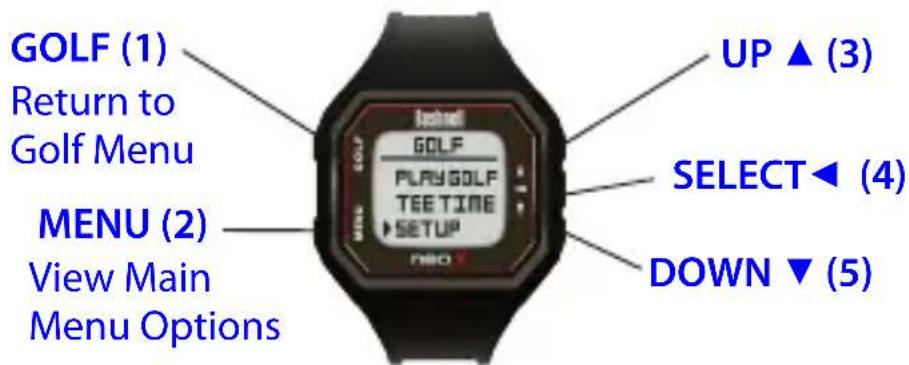
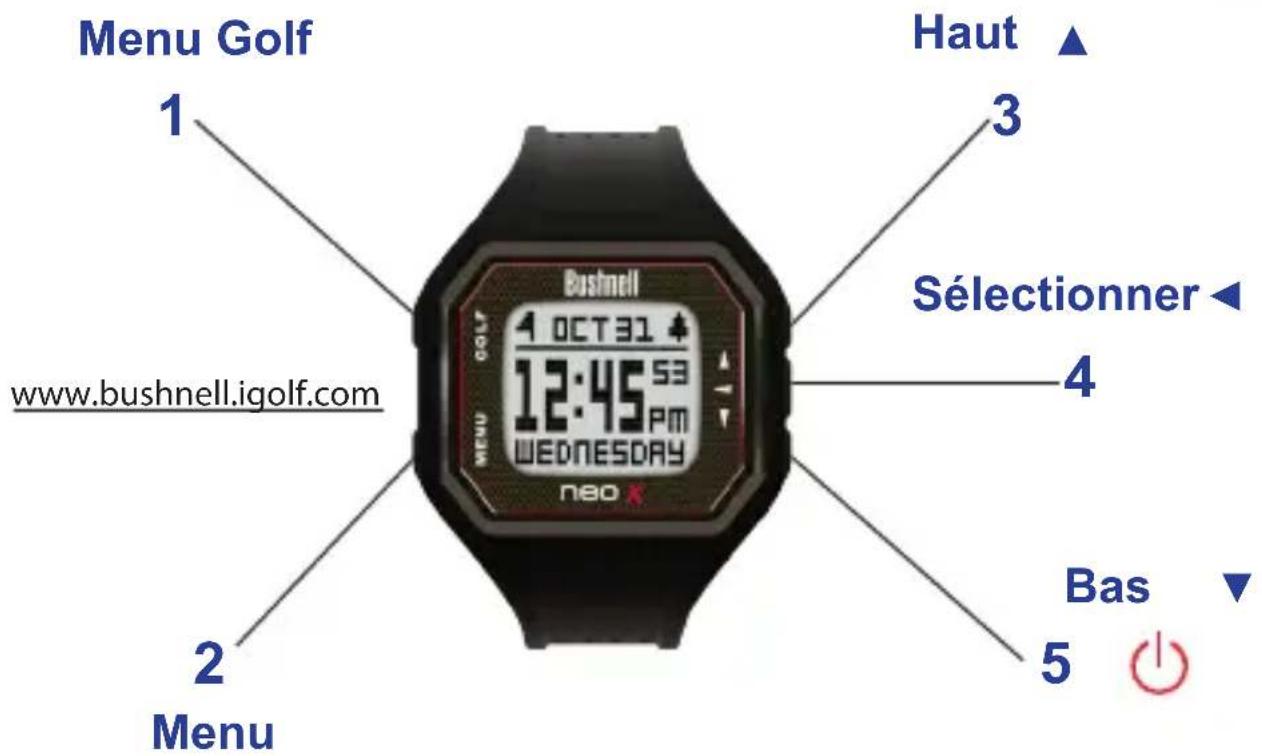
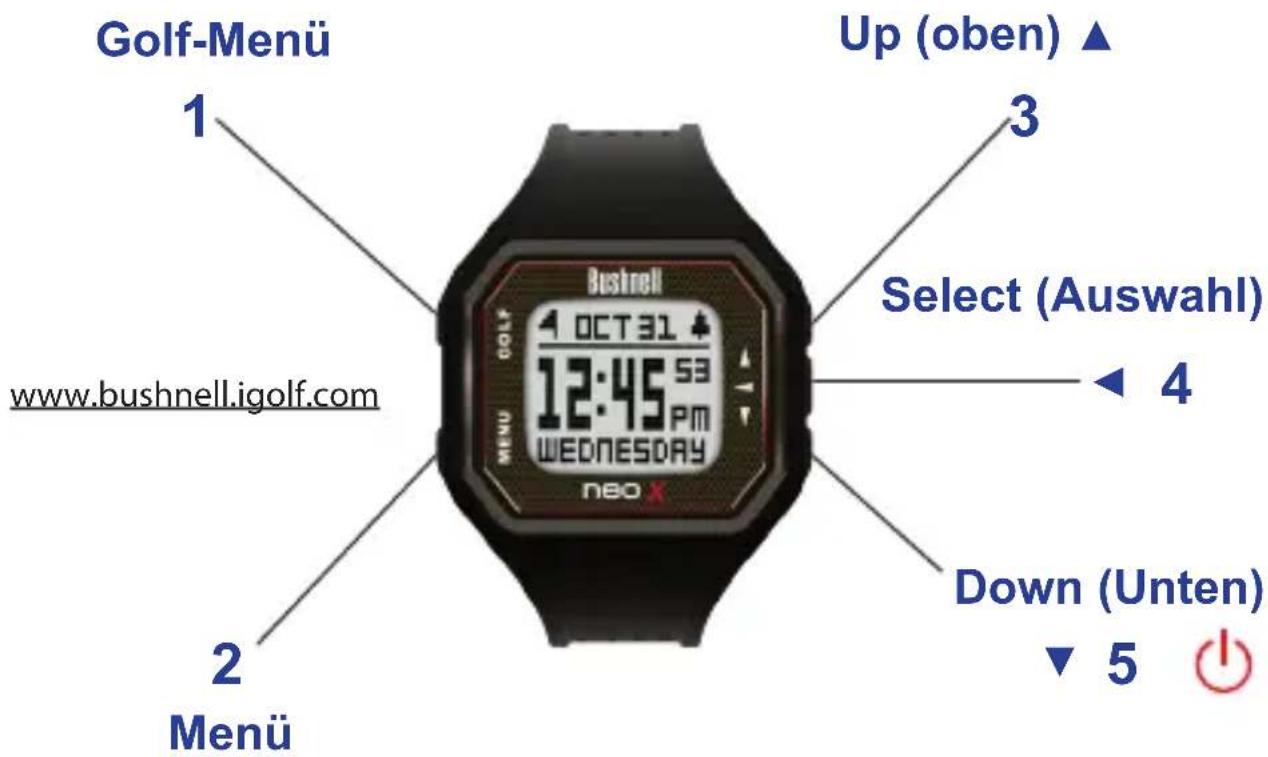
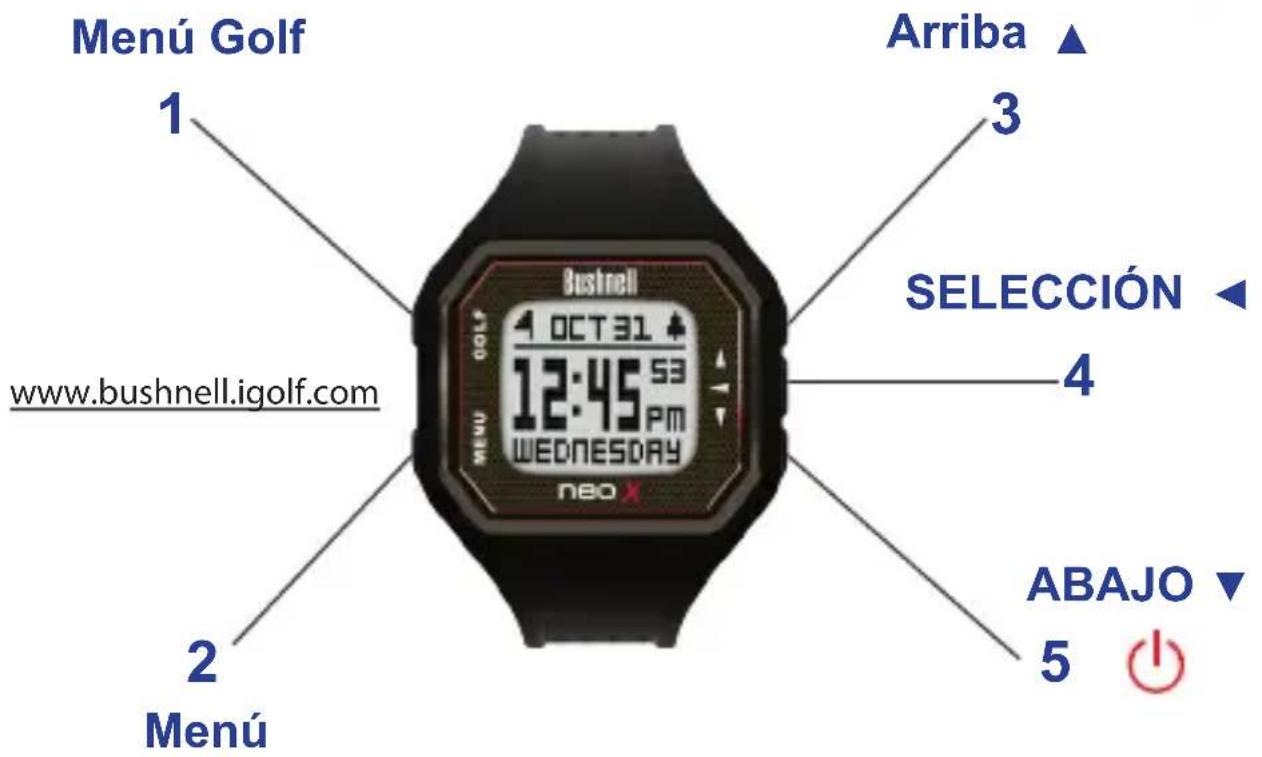
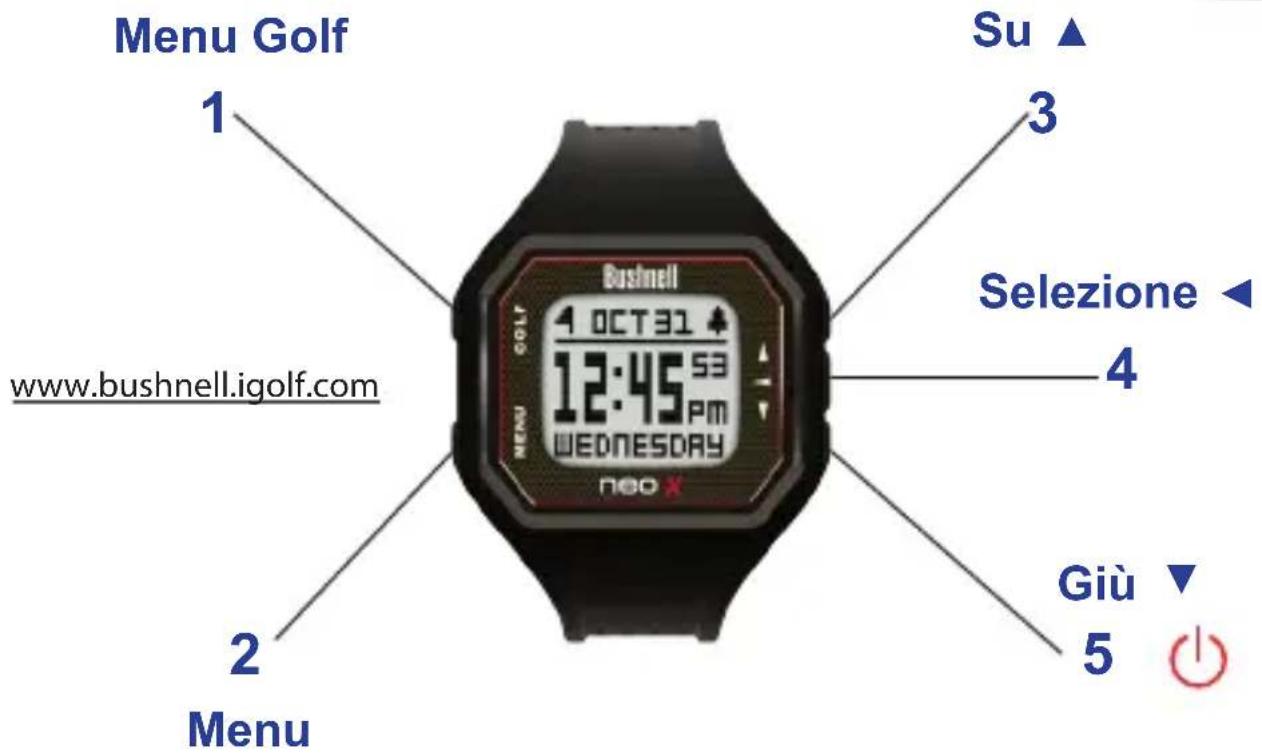
- Golf Menu Button: View Golf Menu
- MENU Button: View Main Menu Options.
- UP Button: Scrolls up through Menu items.
- SELECT Button: Selects from menu items.
- DOWN Button: Scrolls down through menu items. Press & hold (2 seconds) to power on/off.
*Note: Backlight is activated with any button push. The backlight will remain lit for 10 seconds after last button push. Backlight is disabled in Play Golf Mode.
A full user manual detailing the additional features of the Neo X is available for downloading at www.bushnellgolf.com.
Care and Maintenance
The Neo X watch is durable and waterproof. To help ensure reliable operation, the following care and maintenance guidelines are recommended :
- Avoid exposing the watch to extreme environmental conditions for a prolonged period of time.
- Avoid severe impacts on the watch.
You may clean the watch occasionally with a soft, damp cloth. - Brush the clip contacts at the bottom of the watch regularly. Dirt build-up on the surface of the contact points may affect normal charging and data transfer. (*Note: Use a soft-bristled brush. Hard bristles or wire brushes may leave scratches on the watch).
DO NOT expose the watch to strong chemicals such as gasoline and alcohol, as they will damage the watch. - Store the watch in a dry place when it is not in use.
Charging the Battery
4
The rechargeable battery of the Neo X Watch is long lasting and provides up to 15 hours of golf, or two years of use as an everyday (time only) watch. However, battery life may be reduced due to a variety of factors (external temperature, etc). All rechargeable batteries lose their effective charge length over time.
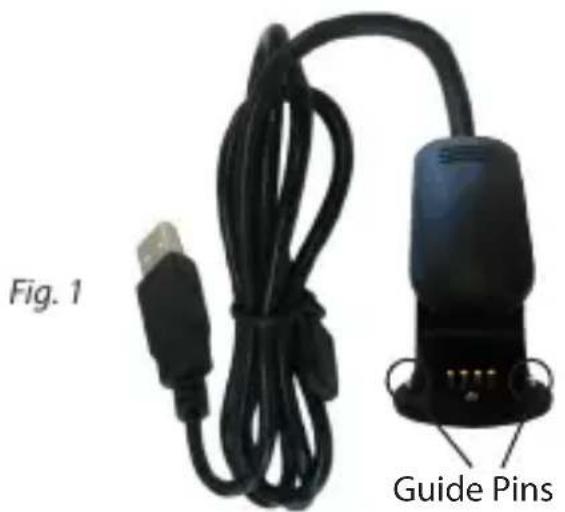
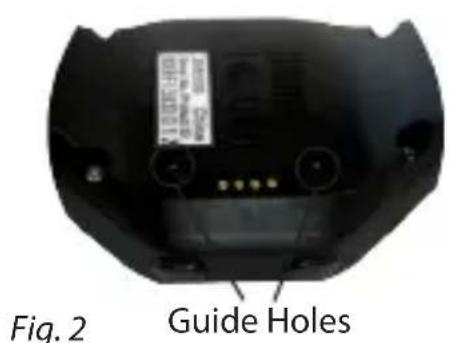
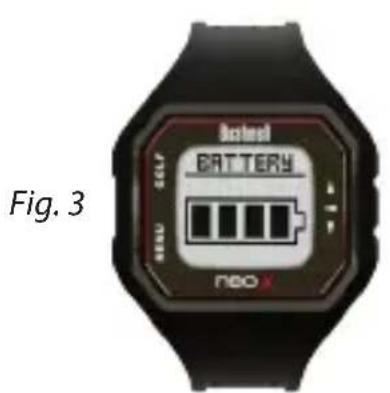
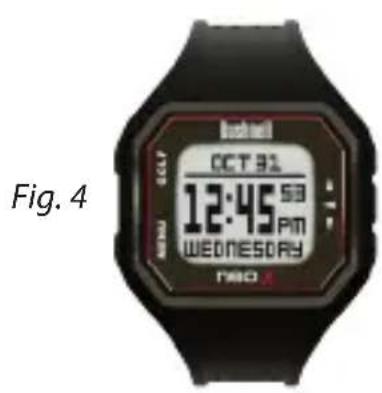
To check your remaining battery life, press the Menu button and select Battery. To recharge the battery, align the 2 guide pins (Fig.1) on the included USB clip with the guide holes on the back of the watch (Fig.2); this will auto-align the charging pins with the receptacles. Then, connect the clip to any USB port (computer, A/C charger, etc.). Look for the scrolling battery icon to indicate that your Neo X watch is charging (make sure to connect from either the Home (Time) screen or from the Battery screen.
Package Contents
1-Bushnell Neo X GPS Rangefinder Watch
1 - USB/Charging Cable
1 - Quick Start Guide
Computer Requirements
USB (1.1 or 2.0) Port
OS: Windows (XP/Vista/7/8), Mac OS X 10.6 or newer
Browser (Course Downloads): Windows: Internet Explorer (32-Bit), Mac: Safari (32-Bit)
Firmware/Software Updates
Please check www.bushnellgolf.com periodically for the latest firmware and software releases.
Set Time by GPS
*To ensure reception, make sure you are outdoors away from tall buildings and trees, with a clear view of the sky.
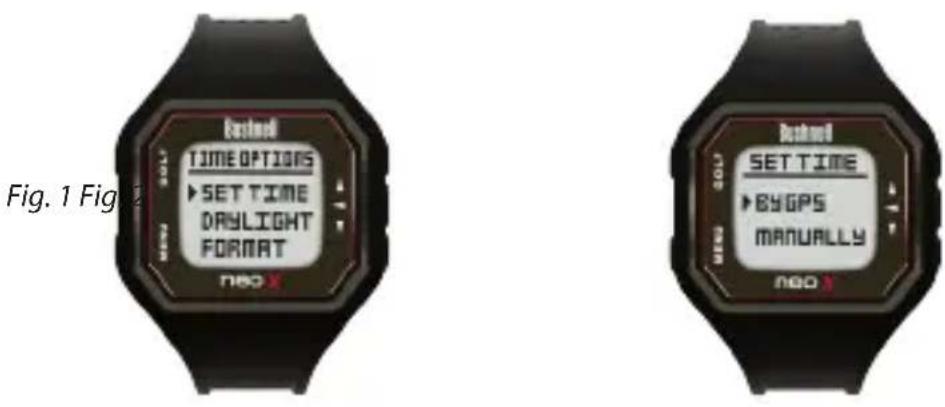
This is the easiest way to set the time. From the Time Options Menu, select Time (Fig. 1), then select By GPS from the Set Time Menu (Fig. 2). The Neo X will acquire GPS signal, and upon GPS Lock, will return to the Home (Time) screen, where the time and the date will be set via your longitude position. When the selection arrow is pointing at By GPS (Fig 2.), other GPS features (Play Golf, Odometer, GPS Status) will update your time via your longitude position as well, which is convenient for the travelling golfer. *Note: In rare instances, time zone boundaries may conflict. In these cases, it may be necessary to manually adjust the time as detailed in the Set Time Manually section.
Set Time Manually
To set the time manually, select Manually from the Set Time Menu (Fig. 2). Use the SELECT Button (4) to cycle between fields. Use the UP Button (3) and DOWN Button (5) to cycle fields Up and Down. After the year, time and date have been set accordingly you can select MENU Button (2) to return to the Time Options Menu.
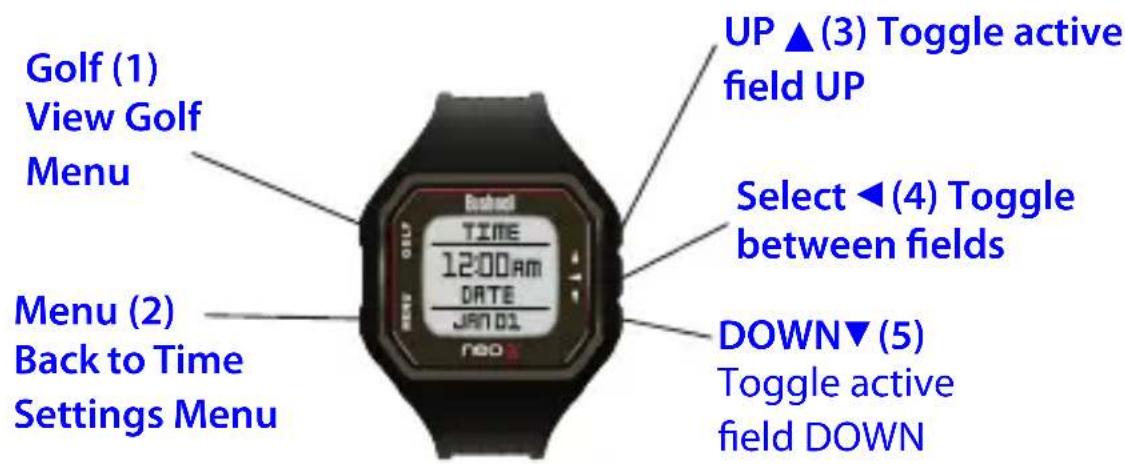
To activate Play Golf Mode, select the Golf button, then select Play Golf. The Neo X will search for satellite signal, and upon acquisition will yield a list of local course results, with the nearest course at the top. Select your course to view the Front, Center, Back (FCB) screen (Fig. 1) for hole 1.
*To ensure reception, make sure you are outdoors away from tall buildings and trees, with a clear view of the sky.
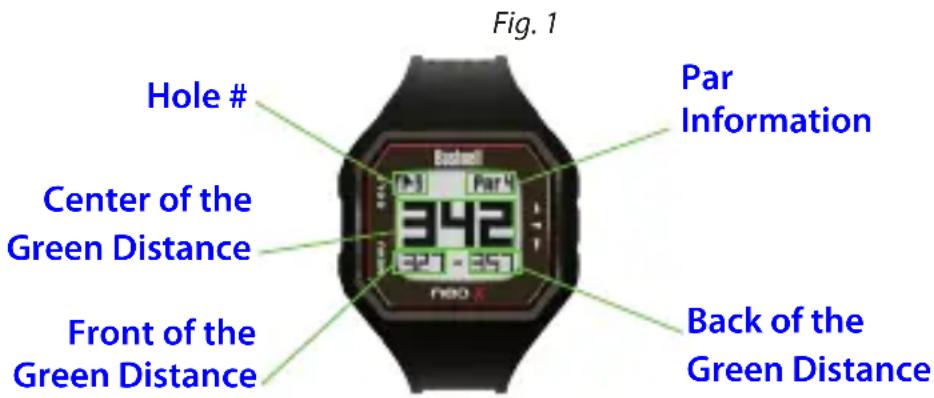
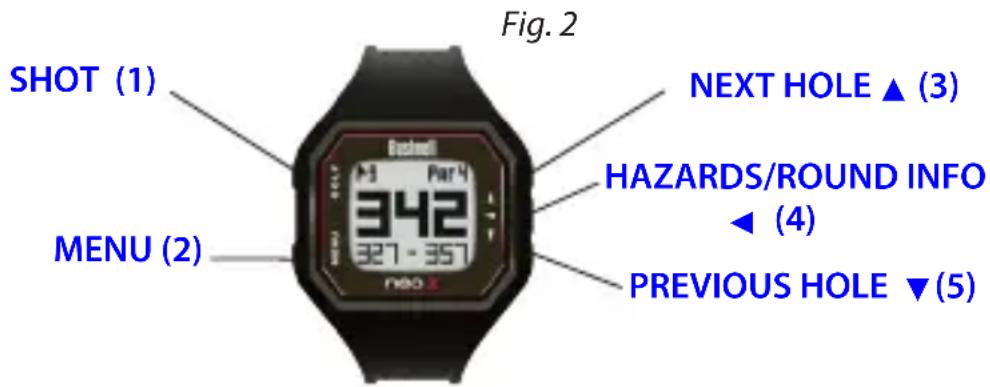
Button Functions in Play Golf Mode (Fig.2)
Track Shot Distance: This feature allows you to easily check the distance between any two points and would normally be used to measure the length of your shot. Press the SHOT button (1) to set Point A (where you are standing) to "0". After walking to your ball (Point B), the Neo X Watch will display the distance between Point A and Point B in a straight line.
View Golf Menu Options: Press the MENU button (2) to view the Golf Menu options (Battery, New Course, or Exit Game). Press MENU again to return to your game.
Manual Hole Advance: Press NEXT HOLE (3) to manually advance to the next hole, or press PREVIOUS HOLE (5) to manually advance to the previous hole. *Note: the Neo X does feature auto-advance; this one button advance feature is very useful for shotgun starts.
View Hazards/Round Information: Pressing the SELECT Button (4) will toggle between Hazards, Round Info, and the FCB (Front, Center, Back) pages. Hazard and Round Info screens will automatically return to FCB after 7 seconds if no other button is pushed. See list on page 7 for a complete glossary of Hazard definitions. Round Info is a Golf Odometer that tracks total round time and distance travelled.
Tee Time
Tee Time is a useful feature that allows you to set a tee time up to 1 week (6 days, 23 hours, 59 minutes) in advance. When a Tee Time is set, the Neo X watch will automatically enter Play Golf mode, and search for local courses 7 minutes prior to the set time. Simply select your course from the list, and enjoy your round of golf!
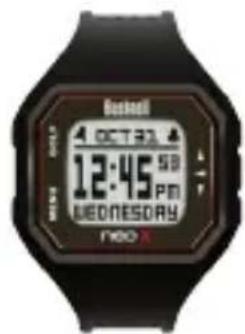
To set a Tee Time, select Tee Time from the Golf Menu (Fig.1). From the set Tee Time screen, press the SELECT Button (4) to activate the Hours field. Use the UP Button (3) and the DOWN Button (5) to toggle the time up and down. Press the SELECT Button (4) after each field is set to toggle to the next field. After the Day field has been set, the Tee Time feature has been activated, and will show ON. A Flag Icon will also appear in the upper left-hand corner of the Home (Time) screen indicating that a Tee Time is set (Fig.2).
*Note: The Tee Time feature is a one-time setting, meaning once the Tee Time has performed it's function, it will not reactivate. To set another Tee Time, follow the steps above. If you play golf at the same time on the same day each week, you can simply select Tee Time from the Golf Menu, then press the UP Button▲ (3) to turn the Tee Time ON again (pressing the UP Button▲ (3) toggles Tee Time ON/OFF based upon the current Time/Day settings).
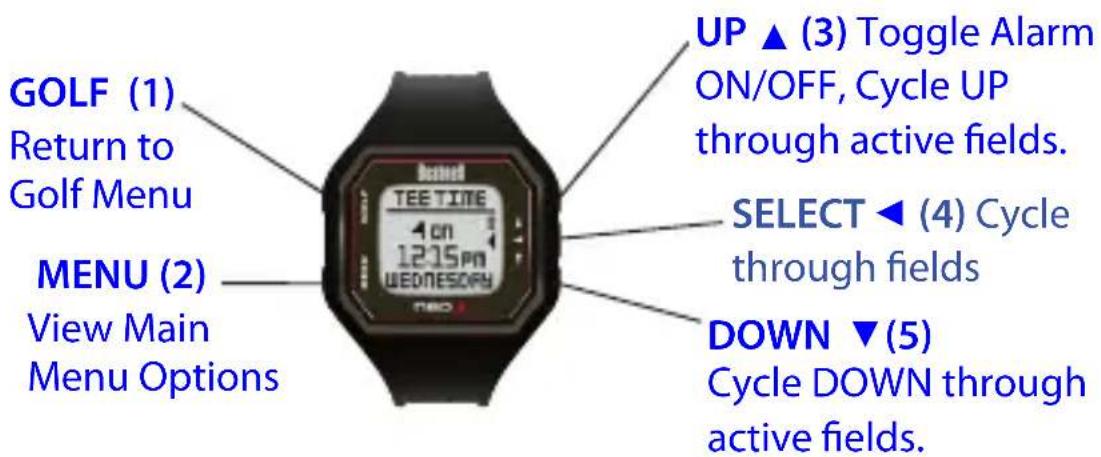
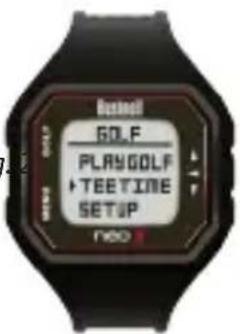
Fig.1 Fig.2
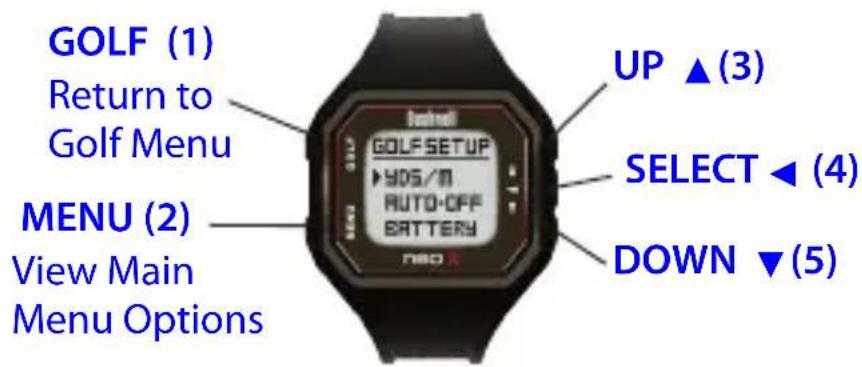
The Setup menu allows you to set your preferences for units of measurement in Play Golf mode (Yards or Meters), set the Auto-Off time, or view Battery life. To access the Setup Menu, select Setup from the Golf Menu. Use the UP Button (3) and the Down Button (5) to scroll between options. Use the Select Button (4) to select the desired option.
Set Yards or Meters (Golf Preference)
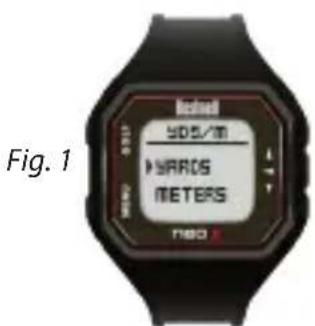
Select YDS/M to set your preference for unit of measurement in Play Golf Mode. Use the UP Button (3) and the Down Button (5) to scroll between options (Fig 1). Use the Select Button (4) to select the desired option.
Auto-Off
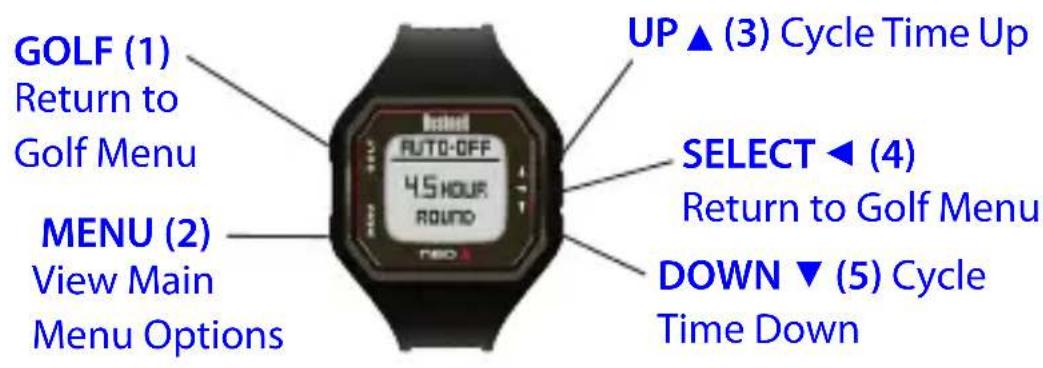
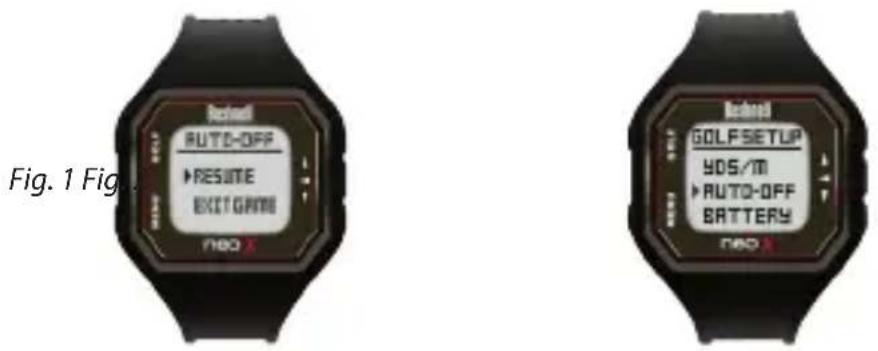
The Auto-Off feature is designed to automatically exit Play Golf mode when the preset time has expired. When in Play Golf mode, after the preset time has expired, an Auto-Off message will appear on the watch (page 7, fig. 1). Select Resume to return to the round; the Auto-Off message will appear again after 1.5 hour. Select Exit Game to immediately exit the round and return to the Home (Time) screen. If no selection is made for 10 minutes, the Neo X will automatically exit the round and
return to the Home (Time) screen, and power down the GPS module to preserve battery.
To set the Auto-Off time, select Auto-Off from the Golf Setup Menu (Fig. 2). From the set Auto-Off screen, use the UP Button (3) and the DOWN Button (5) to toggle the time up and down. Auto-Off is always set to whatever current time is showing on the set Auto-Off page. Time can be set between 1.5 and 9 hours, or select Disable to turn the feature off.
iGolf Hazard Glossary
Hazards within the iGolf application are shown as abbreviations. These abbreviations are defined as follows:
- LFB- Left Fairway Bunker
- MFB- Middle Fairway Bunker
3.RFB-RightFairwayBunker - LFW- Left Fairway Water Layup
- LFWC- Left Fairway Water Carry
- MFW- Middle Fairway Water Layup
- MFWC- Middle Fairway Water Carry
- RFW-Right Fairway Water Layup
- RFWC-Right Fairway Water Carry
- FGB- Front Green Bunker
-
RGB-Right Green Bunker
-
LGB- Left Green Bunker
- BGB-Back Green Bunker
- RGW-Right Green Water
- FGWC- Front Green Water Carry
- FGW- Front Green Water Layup
- LGW- Left Green Water
- BGW- Back Green Water
- CRK-Creek Layup
- CRKC-Creek Carry
- EOF- End of Fairway
Do not attempt to open the Neo X watch.
Risk of explosion if battery is replaced with incorrect type.
- Do not attempt to open, disassemble or service the internal battery. The battery must be replaced by a qualified technician.
- Do not crush, puncture or short the battery's external contacts. Do not expose to temperatures above 140^ F( 60^ C) .
- Properly recycle or dispose of the battery. Do not dispose in fire or water.
Legal Disclaimer
By using this product, you agree that Bushnell Outdoor Products will not be held legally responsible for any injury or damage to you or any person or property caused by the user's improper operation and/or poor judgment while using this product.
Note: See Limited Warranty for other limitations to our liability.
Additional Information
The Global Positioning System (GPS), a network of 32 satellites orbiting Earth, is operated and maintained by the U.S. government. This GPS device requires at least 3 satellites to be acquired to accurately determine your position. Any change made to the system by the government could affect the accuracy and performance of this product.
Bushnell Golf GPS Website
www.bushnellgolf.com is the best online resource for all our Golf GPS product owners, including product support, FAQs, etc. It also serves as a portal to access iGolf.com GPS course files to use with these Bushnell products. Registering your Neo X Watch via www.bushnell.igolf.com is not required, but will ensure you have access to the latest updated GPS course data.
ONE YEAR LIMITED WARRANTY
Your Bushnell product is warranted to be free of defects in materials and workmanship for one year after the date of purchase. In the event of a defect under this warranty, we will, at our option, repair or replace the product, provided that you return the product postage prepaid. This warranty does not cover damages caused by misuse, improper handling, installation, or maintenance provided by someone other than a Bushnell Authorized Service Department.
Any return made under this warranty must be accompanied by the items listed below:
A check/money order in the amount of $10.00 to cover the cost of postage and handling
- Name and address for product return
- An explanation of the defect
- Proof of Date Purchased
- Product should be well packed in a sturdy outside shipping carton, to prevent damage in transit, with return postage prepaid to the address listed below:
IN U.S.A. Send To:
IN CANADA Send To:
Bushnell Outdoor Products
Bushnell Outdoor Products
Attn.: Repairs
Attn.: Repairs
9200 Cody
25A East Pearce Street, Unit 1
Overland Park, Kansas 66214
Richmond Hill, Ontario L4B 2M9
For products purchased outside the United States or Canada please contact your local dealer for applicable warranty information. In Europe you may also contact Bushnell at:
Bushnell Germany GmbH
European Service Centre
Mathias-Bruggen-Str. 80
D-50827 Köln
GERMANY
This warranty gives you specific legal rights.
You may have other rights which vary from country to country.
©2012 Bushnell Outdoor Products
This device complies with Part 15 of the FCC interference limits for Class B digital devices FOR HOME OR OFFICE USE. These limits are designed to provide reasonable protection against harmful interference in a residential installation, and are more stringent than "outdoor" requirements.
Operation of this device is subject to the following conditions; (1) This device may not cause harmful interference, and (2) this device must accept any interference received, including interference that may cause undesired operation.
This equipment generates, uses and can radiate radio frequency energy and, if not installed and used in accordance with the instructions, may cause harmful interference to radio communications. However, there is no guarantee that interference will not occur in a particular installation. If this equipment does cause harmful interference to radio or television reception, which can be determined by turning the equipment off and on, the user is encouraged to try to correct the interference by one or more of the following measures:
Reorient or relocate the receiving antenna.
- Increase the separation between the equipment and receiver.
- Connect the equipment into an outlet on a circuit different from that to which the receiver is connected.
- Consult the dealer or an experienced radio/TV technician for help.
The device does not contain any user-serviceable parts. Repairs should only be made by an Authorized Bushnell repair center. Unauthorized repairs or modifications could result in permanent damage to the equipment, and will void your warranty and your authority to operate this device under Part 15 regulations.
The shielded interface cable which is provided must be used with the equipment in order to comply with the limits for a digital device pursuant to Subpart B of Part 15 of FCC Rules.

Windows is a registered trademark of Microsoft Corporation in the United States and other countries.
Mac and Mac OS are trademarks of Apple Inc., registered in the U.S. and other countries.
Other names may be trademarks of their respective owners.

Customer Service: (800) 423-3537
www.bushnellgolf.com
©2013 Bushnell Outdoor Products
Bushnell Outdoor Products
Attn: Repairs
9200 Cody
Overland Park, Kansas 66214
En CANADÁ enviar a:
Bushnell Outdoor Products
Attn: Repairs
25A East Pearce Street, Unit 1
Richmond Hill, Ontario L4B 2M9
European Service Centre
Mathias-Bruggen-Str.
80
D-50827
Köln
GERMANY
©2013 Bushnell Outdoor Products
Bushnell Outdoor Products
Attn: Repairs
9200 Cody
Overland Park, Kansas 66214
Bushnell Outdoor Products
Attn: Repairs
25A East Pearce Street, Unit 1
Richmond Hill, Ontario L4B 2M9
Bushnell Germany GmbH European Service Centre
Mathias-Bruggen-Str. 80
D-50827 Kohn
GERMANY
©2013 Bushnell Outdoor Products
©2013 Bushnell Outdoor Products
Bushnell Outdoor Products
Attn: Repairs
9200 Cody
Overland Park, Kansas 66214
En CANADÁ enviar a:
Bushnell Outdoor Products
Attn: Repairs
25A East Pearce Street, Unit 1
Richmond Hill, Ontario L4B 2M9
European Service Centre
Mathias-Bruggen-Str. 80
D-50827 Köln
GERMANY
©2013 Bushnell Outdoor Products
©2013 Bushnell Outdoor Products
Bushnell Outdoor Products
Attn: Repairs
9200 Cody
Overland Park, Kansas 66214
Recapito in Canada:
Bushnell Outdoor Products
Attn: Repairs
25A East Pearce Street, Unit 1
Richmond Hill, Ontario L4B 2M9
European Service Centre
Mathias-Bruggen-Str.
D-50827
Köln
GERMANY
©2013 Bushnell Outdoor Products