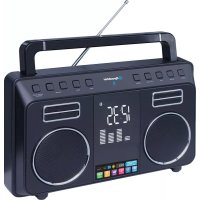
TRA800BT - Radio ROADSTAR - Free user manual and instructions
Find the device manual for free TRA800BT ROADSTAR in PDF.


User questions about TRA800BT ROADSTAR
0 question about this device. Answer the ones you know or ask your own.
Ask a new question about this device
Download the instructions for your Radio in PDF format for free! Find your manual TRA800BT - ROADSTAR and take your electronic device back in hand. On this page are published all the documents necessary for the use of your device. TRA800BT by ROADSTAR.
USER MANUAL TRA800BT ROADSTAR
text_image
Roadstar® AUDIO VIDEO Portable Bluetooth Audio System with PLL FM Radio TRA-800BT Instruction manual Bedienungsanleitung Manuel d'instructions Manuale d'istruzioni Manual de instrucciones Manual de instruções Roadstar Management SA, via Passeggiata 7 CH 6883 Novazzano (Switzerland) Roadstar is a registered Trademark of Roadstar S.A. - Switzerland. All rights reserved
text_image
Roadstar® AUDIO VIDEOPortable Bluetooth Audio System with PLL FM Radio
TRA-800BT
Instruction manual
Bedienungsanleitung
Roadstar Management SA, via Passeggiata 7 CH 6883 Novazzano (Switzerland)
Roadstar is a registered Trademark of Roadstar S.A. - Switzerland. All rights reserved



INDEX
English Page 1
Deutsch Seite 7
Français Page 13
Italiano Pagina 19
Español Página 25
Português Pagina 31
- Your new unit was manufactured and assembled under strict ROADSTAR quality control.
Thank you for purchasing our product for your music enjoyment. Before operating the unit, please read this instruction manual carefully. Keepitalschandy for further future references.
- Votrenouvelappareilselélabri quétromontée stantaumiauxnomerauxkstsROADSTAR. Noussperons queetappareilvoudemmera envière satisfaction.
text_image
Diagram of a portable radio with numbered parts for identification11
English Eng

WARNINGS


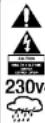
Theexclamationpoint within the triangle is a warning signal alerting the user of important instructions accompanying the product.
Thelighteningflashwitharrowheadsymbolwithin thetriangle isawarningsign alerting the user of "dangerousvoltage" insidetheunit.
Toreducetheriskofelectricshock,donstremovethecover.Nauserserviceable parts insidethe unit. Refer all servicing to qualifiedpersonnel.
Thisunitoperateson230V\~50Hz. If the unit is not used for long period of time, removal the plug from the AC mains.
Thisunitmust notbeexposedtomoistureor rein.
The powerswitchin this unitismountodonthes secondary circuit and does not disconnect the whole unit from themains in OFF position.
Ensure all connections are properly made before operating the unit.
This unit should be positioned so that it is properly ventilated. Avoid piacing it, forexample, closetocurtains, onthecarpel or in a built-in installations such as abopcase.
Donot expose this unit to direct sunlightor heat radiatingsources.
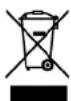
Correct Disposal of This Product
(Waste Electrical & Electronic Equipment)
This marking shown on the product or its literature, indicates that it should not be disposed with other household wastes at the end of its working life. To prevent possible harm to the environment or human health from uncontrolled waste disposal, please separate this from other types of wastes and recycle it responsibly to
promote the sustainable reuse of material resources. Household users should contact either the retailer where they purchased this product or their local government office, for details of where and how they can take this item for environmentally safe recycling.
Business users should contact their supplier and check the terms and conditions of the purchase contract. This product should not be mixed with other commercial wesels for disposal.
2
TRA-800BT
PORTABLE AUDIOSYSTEM WITHFMDIGITALPLL RADIO
TABLE OF CONTENTS
• LOCATION OF CONTROLS
• POWER SUPPLY
• AC POWER
- SPECIFICATIONS
LOCATIONOFCONTROLS
- EXTERNAL AC ADAPTER
- SOURCE BUTTON
- GRAPHIC EQWUALIZER DISPLAY
- BLUETOOTH PAIRING BUTTON
- LCD DISPLAY
- VOLUME BUTTONS
- SCAN / CLOCK SETTINGS
- TUNING BUTTONS
- MEMORY BUTTON
- PLAY / PAUSE BUTTON
- (USB CHARGER ONLY)
- LINE-IN
- STAND-BY ON / OFF BUTTON
POWERSUPPLY
This unit operates with a built-in Li-Po rechargeable battery or from a
English Eng
ish
main supply of 230V \~ 50Hz when connected the external AC Adapter (1). Connect the AC power adapter to the AC household main outlet, the red LED will light up. Ensure that the voltage is as indicated on the rating plate on the rear of the unit.
STATUS BATTERYINDICATOR
NOTE: Charge the unit at least once a month to maintain the internal battery integrity even when not in use.
SETTINGTHECORRECTTIME
- Switch OFF the unit by pressing teh ON / OFF button (13).
- Keep pressed the Scan / Clock button (7) for three seconds.
- Press the TUNE+ or - (8) button to advance hour
- Press shortly the Scan / Clock button (7) again.
- Press the TUNE + or - (8) button to advance MINUTE until the correct time is displayed.
- Press shortly the Scan / Clock button (7) to complete the setting operation.
4
LISTENINGTOTHERADIO
- Press shortly the ON/OFF/AUTO (13) button to switch the Radio ON.
- Press 3 seconds the Scan / Clock button (7) to start the Radio auto-tuning function (the unit will store automatically the strongest stations).
- Adjust the VOLUME Control (15) to a comfortable listening level.
- To listen the desired Radio stations, short press MEMORY button (9) to enter in the stored station, then press TUNE + or - (8) to select the desired Radio station.
- To search manually a Radio station, when in RADIO mode press the TUNE + or TUNE - (8) button sequentially until the desired frequency is displayed. If the TUNE buttons are pressed for more than 2 seconds, the Radio start searching the station automatically.
- To store manually the desired station in the memory, tune the station first then keep pressed the MEMORY button (9) three seconds. The Display show the Memory number, then press the TUNE + or - (8) to select the desired memory number, then press shortly the MEMORY button (9) to store the station.
- To listen the stored stations, refer to the chapter 5.
English Eng
ish
AUX-IN
Connect any external Audio analogue source to the 3,5mm input jack AUX-IN in the rear side (12), then press the Source button to select AUX-IN to listen the Audio.
TUNE+/TUNE-BUTTONS
In RADIO mode, these buttons works as TUNING. During Bluetooth playback, when pressed they change the track of the music played on MP3 Audio source device.
PLAY/PAUSEBUTTON
To be used when the unit is paired to some Bluetooth device. Press this button to put in PAUSE or PLAY the player.
SOURCEBUTTON
Press the SOURCE button to select RADIO / AUX-IN or BLUETOOTH MODE.
BLUETOOTH PAIRING
Before start the pairing process, switch ON the unit by pressing the POWER button (13). Press the SOURCE button (2) to select Bluetooth
6
until teh bluetooth symbols appear in the display.
Switch ON the Bluetooth function of your player, then start searching the Bluetooth name "TRA-800BT".
If the above name is not sieplayed in your Bluetooth device, press the Pair button (4) until it compare. In case if the player ask the Password number, enter "0000".
NOTE: This unit has a "Energy Saving Circuit" that switch OFF automatically after 120 minutes when has no sound from Bluetooth or AUX-In mode.
SPECIFICATIONS
FM Band: 87.5 to 108 MHz
Power Supply: Internal Li-Ion Battery or 230VAC, 50 Hz
Consumption: 6W
Design and specifications are subject to change without notice.

natural_image
Color palette bar with grayscale shades and a crosshair for selection (no text or symbols)Deutsch De

SICHERHEITSHINWEISE

natural_image
Color palette bar with grayscale shades and a crosshair for selection (no text or symbols)Italiano Ital
10
ATTENZIONE