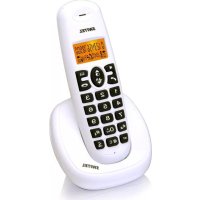
DE 331 - Phone SWITEL - Free user manual and instructions
Find the device manual for free DE 331 SWITEL in PDF.



| Product type | DECT cordless telephone |
| Brand | Switel |
| Model | DE 331 |
| Base power supply | 6 V DC, 500 mA |
| Charger power supply | 7 V DC, 420 mA |
| Battery type | AAA Ni-MH 1.2 V / 400 mAh |
| Maximum number of handsets | 5 |
| Display | Yes, with icons and call duration |
| Hands-free | Yes |
| Phonebook | 10 entries |
| Call list | Last 10 calls |
| Redial | Last 3 numbers |
| Mute key | Yes, to mute the microphone |
| Keypad lock | Yes, long press # |
| Adjustable ringer | Yes, multiple melodies and volume (5 levels) |
| Internal communication | Yes (between handsets) |
| Call transfer | Yes |
| Conference | Yes (up to 3 participants) |
| Indoor range | Approximately 50 m |
| Outdoor range | Approximately 300 m |
| Base consumption (standby) | 0.5 W |
| Base consumption (charging) | 1.0 W |
| Safety | Do not open, avoid proximity to medical devices |
| Cleaning | Soft lint-free cloth, without solvents |
| Warranty | 24 months |
Frequently Asked Questions - DE 331 SWITEL
User questions about DE 331 SWITEL
0 question about this device. Answer the ones you know or ask your own.
Ask a new question about this device
Download the instructions for your Phone in PDF format for free! Find your manual DE 331 - SWITEL and take your electronic device back in hand. On this page are published all the documents necessary for the use of your device. DE 331 by SWITEL.
USER MANUAL DE 331 SWITEL
COMMUNICATIONPRODUCTS
Schnurlostelefon • Telefono sans fil • Telefono sanza fili • Cordless telephone
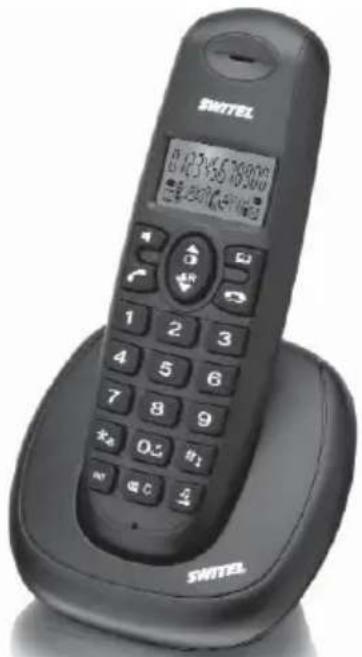
DE 331
Bedienungsanleitung • Mode d'emploi • Istruzioni per l'uso • Operating Instructions
Please read this operating instruction manual thoroughly.
Intended use
The telephone is suitable for telephoning within a public telephone network system. Any other use is considered unintended use. Unauthorized modification or reconstruction is not permitted. Under no circumstances open the device or complete any repair work yourself.
Installation location
Prevent excessive exposure to smoke, dust, vibration, chemicals, moisture, heat and direct sunlight.
Do not use the handset in potentially explosive areas.
Power adapter plug
Attention: Only use the power adapter plug supplied because other power supplies could damage the telephone. Ensure access to the power adapter plug is not obstructed by furniture or such.
Rechargeable batteries
Attention: Never throw batteries into a fire. Only use batteries of the same type. Pay attention to the correct polarity. Incorrect polarity of the batteries represents a risk of explosion during charging.
Power failure
The telephone cannot be used to make calls in the event of a power failure. Always keep a cord connected telephone which operates without an external power supply available in case of emergency situations.
Low-radiation operation (ECO mode)

In talk mode, radiation is reduced (depending on the distance between the handset and base station).
Low-radiation operation by MAXI ECOmode

In "MAXI ECOmode", the radiation (DECT transmission power) of both base station and handset is turned off in stand-by. This will also work if multiple handsets are connected, given that they all support "MAXI ECOmode".
Medical equipment
Attention: Never use the telephone in the vicinity of medical equipment. Effects on such equipment cannot be fully ruled out.
DECT telephones can cause an unpleasant humming sound in hearing aids. DECT: Digital Enhanced Cordless Telecommunication = Standard for cordless telephones.
Disposal
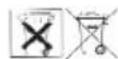
In order to dispose of your device, take it to a collection point provided by your local public waste authorities (e.g. recycling centre). The adjacent symbol indicates that the device must not be disposed of in normal domestic waste! According to laws on the disposal of electronic and electrical devices, owners are obliged to dispose of old electronic and electrical devices in a separate waste container.
Batteries must be disposed of at the point of sale or at the appropriate collection points provided by the public waste authorities.
Packaging materials must be disposed of according to local regulations.


2 Preparing the Telephone
Safety information
Attention: It is essential to read the Safety Information in Chapter 1 before starting up.
Connecting the base station
Attention: Position the base station at least 1 m away from other electronic devices, otherwise there is a risk of mutual disturbance.
Connect the base station as illustrated in the diagram. For reasons of safety, only use the power adapter plug and telephone connection line supplied.
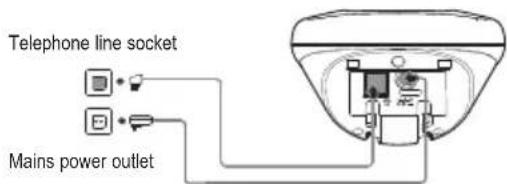
Attention: Use only the power adapter plug supplied with the base station!
GB
Connecting the charging station
Connect the charging station to the mains. Ensure access to the power adapter plug is not obstructed by furniture or such.
2 Only applies to telephone sets with at least two handsets
Inserting the batteries
Open the battery compartment cover. Put in the batteries. Close the battery compartment cover.
Attention: Use only type AAA NiMH 1.2 V / 400 mAh rechargeable batteries. Never use normal batteries / primary cell batteries. Observe the correct polarity!
Charging the batteries
Before the handset is used for the first time, insert it in the base station / charging station for at least 16 hours.
The handset warms up during the charging process. This is normal and does not represent a risk. The battery status is shown on the display. When the battery capacity is nearly exhausted, the battery symbol will flash in the display. End your call and place the handset into the base or charging station for charging.
After a short time, the battery symbol will appear to be fully charged but this is actually not the case. The battery capacity will decrease rapidly. We advise you to put the handset on the base unit for 16 hours so that it can be recharged completely.
Electrical consumption
The electrical consumption of the base (6 V, 500 mA DC) is:
-
in operation mode (idle/call): approx. 0.5 / 0.65 W.
-
during charging of the handset: approx. 1.0 W.
The adaptor input power without load is approx. 0.1 W. The average efficiency is approx. 72% .
The electrical consumption of the charger (7 V, 420 mA DC) is:
-
without handset charging: approx. 0.1 W.
-
during charging of the handset: approx. 0.6 W.
The adaptor input power without load is approx. 0.1 W. The average efficiency is approx. 72.5% .
3 Operating elements (front coverage)
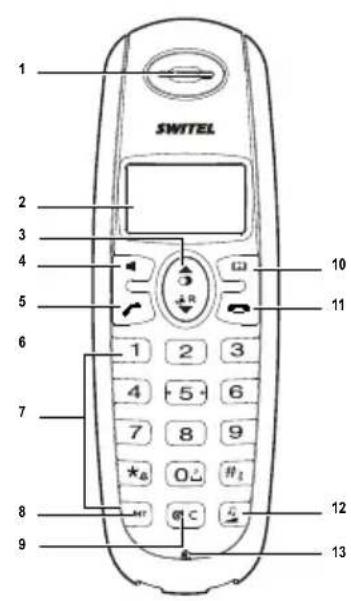
Handset
1 Earpiece
2 Display
3 Redial key/Pause
4 Hands-free
5 Off Hook key
6 Call list / Flash key (R)
7 Digit keys
8 Internal key
9 Mute key (microphone off) / Delete
10 Phonebook
11 On Hook key
12 Volume key / ringtone melody, ringtone volume
13 Microphone
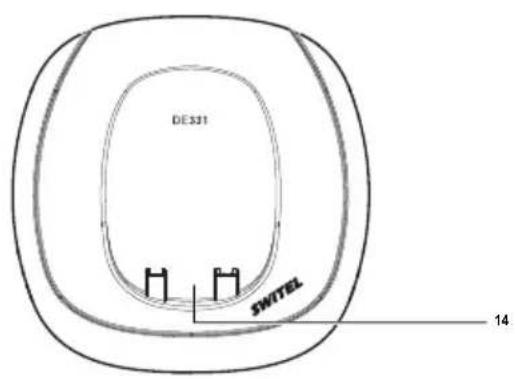
Base station
14 Charging contacts for handset
4 Telephoning
Taking a call

Your phone is ringing.
Press the Off Hook key or the hands-free key.
Making a call

Enter the phone number.

Delete wrong characters by pressing
The phone number is being dialled.
You can also press the Off Hook key and you will hear the dialling tone. The entered number will be dialled immediately. It is not possible to correct wrong digits individually using this dialling procedure.
Ending a call

Press the On Hook key or replace the handset in the base station.
Call timer
Your handset automatically times the duration of every call.
Setting the earpiece/LOUDspeaker volume

During a call you can adjust the volume in 5 levels (if telephoning "normally" ->earpiece volume, with hands-free ->loudspeaker volume).
Muting the microphone

During a call you can switch your handset's microphone off. The dis
play shows
To unmutepress again.
Redial
3 Your handset saves the last 3 dialled telephone numbers.
Viewing/dialling telephonenumbers

The handset is in idle state.
... press repeated (if necessary) until the desired telephone number is displayed.

... the phone number is being dialled.
Did you already pressed the Off Hook key and can hear the dialling tone, the very last dialled telephone number is dialled by pressing the redial key.
Storing telephone numbers

... the desired telephone number is displayed (see above).
... press and hold for about 2 seconds. You can edit the telephone number. Press briefly to delete the last character or press and hold to delete the whole entry. You can enter a dialling pause (approx.
3s) by pressing

... press again and enter the memory location (0...9).
... press again to return to idle state.
Call list
13 Your handset saves the numbers of the last 20 incoming calls in the call list. Saving can only take place if the function "Phone number transmission (CLIP)" is available at your connection and caller ID is not suppressed by the caller or was not transmitted for any other reason. If the list is empty, nO is shown on the display.
New calls are signalled with the flashing

Viewing/dialling telephonenumbers

The handset is in idle state.
Open the call list. The telephone number of the very last call is displayed. For numbers longer than 12 digits press to display the hidden digits.
Press to view date and time of the call (Only when the network sends the time/date together with the telephone number / depending on your network provider).
... press repeated, to get to other entries.

... the displayed telephone number is being dialled.
Deleting telephone numbers

... the desired telephone number is displayed (see above).
... press and hold for about 3 seconds. The entry will be deleted.
Storing telephone numbers

... the desired telephone number is displayed (see above).
... press and hold for about 2 seconds. You can edit the telephone number. Press bently to delete the last character or press and hold to delete the whole entry. You can enter a dialling pause (approx. 3 s) by pressing
... press again and enter the memory location (0...9).
... press again to confirm.
GB
Phonebook
You can store up to 10 entries in the phonebook.
Storing an entry
The handset is in idle state. ... press and hold for about 2 sec. The icon appears in the display.

... press and hold for about 2 sec. The icon appears in the display.
Enter the telephone number. Press briefly to delete the last character or press and hold to delete the whole entry. You can enter a dialling pause (approx. 3 s) by pressing
... press again.
... enter the memory location (0...9).
... press again to confirm.
For storing more entries please refer to the steps mentioned above.
Dialling a telephone number

The handset is in idle state.
... press briefly.
... enter the memory location (0...9). The respective entry will be displayed.

... the displayed telephone number is being dialled.
Editing an entry

The handset is in idle state.
... press briefly.
... enter the memory location (0...9). The respective entry will be displayed.

...press and hold for about 2 sec. Press briefly to delete the last character or press and hold to delete the whole entry. You can enter a dialling pause (approx. 3 s) by pressing ..press again to store the edited entry..

I calls.
Internal calls, transfers and conference calls are only possible if multiple handsets are registered.
Making an internal call

... press INT and enter the internal telephone number (1...5) of the desired handset.

For taking the call on the other handset press the call key or the hands-free key. End the call as usual.
Transferring an external call

During an external call . . .
... press INT and enter the internal telephone number (1...5) of the desired handset. The external call is put on hold.

When the called handset answers you can announce the call transfer.
Press the On Hook key. The call will be transferred.
3-Party conference

During an external call . . .
... press INT and enter the internal telephone number (1...5) of the desired handset. The external call is put on hold.
When the called handset answers you can announce the call transfer.

Press and hold INT for approx. 3 seconds. The conference is established.
Any subscriber hangs up during a conference call will leave the other subscribers still in connection.
5 Other features
Key lock
The key lock prevents functions assigned to buttons being activated inadvertently. Incoming calls can still be taken in the normal way even when the key lock function is activated.

... press and hold until the icon appears in the display. For unlocking the keypad press and hold the #key until the icon disappears.
Switching the handset ringer on/off
You can turn off the handset ringer via a procedure as well (refer to chapter "Ringtone").

... press and hold until the icon appears in the display. For turning the ringer on again press and hold the star-key until the icon disappears.
Registering a handset
Five handsets can be registered to a base station. The handsets deli
vered with your telephone are already registered. To register a "foreign" handset please refer to it's user manual. First of all disconnect the base station from the mains and re-connect it. After this the base station will be in registration mode for 3 minutes.. press and hold for approx. 3 seconds until and flash... press and hold for approx. 3 seconds. Enter a number for the base station (1 ... 5) to subscribe to. Enter the PIN for the base station (default setting for DE 331 base sta
tion 0000 - If the handset is registered the display will show HS and the handset's internal telephone number.
Deleting a handset
You can delete a handset from a base to allow another handset to be registered. Note: you can only remove other handset in your system but you are not able to remove the handset you are using.. ...press and hold for approx. 3 seconds... press and hold for approx. 3 seconds. Enter the PIN for the base station (default setting for DE 331 base sta tion "0000"). Enter the internal telephone number (1...5) of the handset you want to remove. The handset will go back to standby is the removal is successfully.
Ringtone melody (handset)
...press and hold for approx. 3 seconds. The current melody sounds.. ..select the desired melody.. Press to confirm the setting.
Ringtone volume (handset)
...press briefly.The handset will ring in the current volume. ..select the desired volume.When the volume is "0" (ringer off), appears in the display. Press to confirm the setting.
Setting the flash time
You can set the flash time to 100 ms (usually for special services of your telephone provider/delivery state) or 300 ms (e.g. for a telephone exchange). In case of questions please contact your telephone provider or the system administrator of your PBX.

... press and hold for approx. 3 seconds. S (100 ms) or L (300 ms) appears in the display. For switching the flash time press and hold again for approx. 3 seconds.
Setting the dial mode (tone / pulse)
You can switch the dial mode. In most situations the TONE option should be selected.

... press and hold for approx. 3 seconds. t (tone) or P (pulse) appears in the display. For switching the dial mode press and hold again for approx. 3 seconds.
Appendix
Declaration of Conformity
CE This device fulfils the requirements stipulated in the EU directives: 1999/5/EU directive on radio equipment and telecommunications terminal equipment and the mutual recognition of their conformity. 2005/32/EU directive "Energy-using products". Regulation 1275/2008 "Electric power consumption in standby- and off-state". Regulation 278/2009 "External power supplies without load and their average efficiency in use". Conformity with the above mentioned directives is confirmed by the CE symbol on the device. To view the complete Declaration of Conformity, please refer to the free download available on our web site www.switel.com
Maintenance
Clean the housing surfaces with a soft, fluff-free cloth.
Do not use any cleaning agents or solvents.
Guarantee
SWITEEL equipment is produced and tested according to the latest production methods. The implementation of carefully chosen materials and highly developed technologies ensure trouble-free functioning and a long service life. The terms of guarantee do not apply where the cause of equipment malfunction is the fault of the telephone network operator or any interposed private branch extension system. The terms of guarantee do not apply to the batteries or power packs used in the products. The period of guarantee is 24 months from the date of purchase.
All deficiencies related to material or manufacturing errors within the period of guarantee will be redressed free of charge. Rights to claims under the terms of guarantee are annulled following tampering by the purchaser or third parties. Damage caused as the result of improper handling or operation, normal wear and tear, incorrect positioning or storage, improper connection or installation or Acts of God and other external influences are excluded from the terms of guarantee. In the case of complaints, we reserve the right to repair defect parts, replace them or replace the entire device. Replaced parts or devices become our property. Rights to compensation in the case of damage are excluded where there is no evidence of intent or gross negligence by the manufacturer.
If your device shows signs of defect during the period of guarantee, please return it to the sales outlet in which you purchased the SWITEL device together with the purchase receipt. All claims under the terms of guarantee in accordance with this agreement can only be asserted at the sales outlet.
No claims under the terms of guarantee can be asserted after a period of two years from the date of purchase and hand-over of the product.
SWITEL
Declaration of conformity
This equipment complies with the European R&TTE directive.
To view the complete Declaration of Conformity, please refer to the free download available at our web site: www.switel.com.
Service Hotline
In the event of technical problems, you can contact our hotline service, Tel. 0900 00 1675 within Switzerland (cost via Swisscom at time of going to print: CHF 2.60/min).

Version 1.1 - 12.10.2011