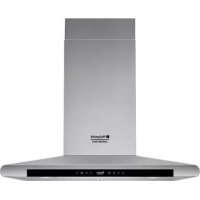
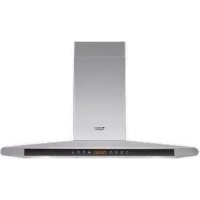
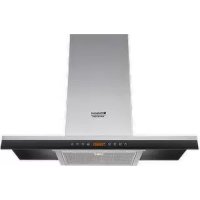
HLC 6.8 AT XHA - Range hood HOTPOINT-ARISTON - Free user manual and instructions
Find the device manual for free HLC 6.8 AT XHA HOTPOINT-ARISTON in PDF.



| Product type | Extractor hood |
| Brand | HOTPOINT-ARISTON |
| Model | HLC 6.8 AT XHA |
| Height (min-max) | 61 - 82 cm |
| Width | 59.8 cm |
| Depth | 50 cm |
| Air outlet diameter | 150 mm (12/15 cm convertible) |
| Lighting | 2 halogen bulbs 20 W (G4, 12 V) |
| Total absorbed power | 290 W |
| Number of speeds | 3 speeds + booster |
| Timer | Yes (programmable) |
| Grease filter | Washable metal (dishwasher safe) |
| Charcoal filter | Optional (for recirculation version) |
| Installation type | External extraction or recirculation (optional kit) |
| Supply voltage | 230 V ~ 50 Hz |
| Minimum distance (gas) | 65 cm |
| Minimum distance (electric) | 55 cm |
| Grease filter maintenance | Every month |
| Charcoal filter replacement | Every 20 months (recirculation version) |
| Spare parts | Halogen bulbs G4 20 W, grease filters, charcoal filters |
Frequently Asked Questions - HLC 6.8 AT XHA HOTPOINT-ARISTON
User questions about HLC 6.8 AT XHA HOTPOINT-ARISTON
0 question about this device. Answer the ones you know or ask your own.
Ask a new question about this device
Download the instructions for your Range hood in PDF format for free! Find your manual HLC 6.8 AT XHA - HOTPOINT-ARISTON and take your electronic device back in hand. On this page are published all the documents necessary for the use of your device. HLC 6.8 AT XHA by HOTPOINT-ARISTON.
USER MANUAL HLC 6.8 AT XHA HOTPOINT-ARISTON
Operating Instructions
COOKER HOOD
Contents
Operating Instructions,1
Warnings,10
Assistance,21
Installation,29
CHIMNEY-LUCE controls,30
Maintenance and care,32
Troubleshooting,33
PT
Portuges
! Keep this manual for reference. If you sell, transfer or move the unit to another location, make sure to keep the manual with the product.
! Read the instructions carefully - they contain important installation, user and safety information.
! Do not tamper with the electrical or mechanical equipment of the product or its exhaust ducts.
General safety information
- The distance between the cookware support surface on top of the cooking appliance and the lowest part of the cooker hood must be at least:
65 cm if the hood is installed over a gas cooktop
55 cm if the hood is installed over an electric cooktop.
If the installation instruction manual for the gas cooking appliance specifies a greater distance, this measurement should be taken into account.
- The cooker hood comes with anchor plugs which are suitable for use with most walls/ceilings.
However, you must contact a qualified technician to check the suitability of the materials in relation to the type of wall/ceiling, which must be strong enough to support the weight of the unit.
-
Caution! Do not hook the unit up to its electrical power supply until the installation has been completed.
-
Before cleaning or servicing the unit, disconnect it from the mains by pulling the power plug or disconnecting the main circuit breaker.
- Always wear work gloves when installing and servicing the unit.
- It is not intended for use by children or persons with sensory or mental disability and lack of experience or familiarity, except under the supervision or instruction of a person responsible for their safety.
- Make sure children do not play with the unit.
- Never operate the unit without its grease filter installed!
- NEVER use the hood as a support, unless expressly instructed to do so.
- The room must be adequately ventilated if the hood is used at the same time with other equipment burning gas or other fuels.
- Extracted air must not be conveyed into a duct used for exhausting combustion fumes from gas or other fuel-fired equipment.
- Observe all regulations in relation to air extraction.
-
NEVER cook food with an open flame under the hood; open flames will damage the filters and may cause fires. Never do this.
Always supervise frying to make sure the heated oil does not catch fire. -
Strictly observe all local regulations in relation to the technical and safety measures to be employed in fumes extraction.
- Clean the product frequently, inside and out (AT LEAST ONCE A MONTH, and in observance of the maintenance instruction given in this manual).
- Failure to observe the hood cleaning and filter cleaning/replacement instructions can result in fires.
- Never use the hood without its bulbs properly installed - electrocution hazard.
- The manufacturer is not liable for any inconvenience, damage or fire caused by the unit as a result of failure to observe the instructions given in this manual.
- Caution! The unit's accessible parts can get very hot when used with cooking equipment.
FR
Avertissements
! Never use the services of an unauthorised technician.
Please have the following information to hand:
- The type of problem encountered.
The appliance model (Mod.).
The serial number (S/N).
The latter two pieces of information can be found on the data plate located on the appliance.
FR
Assistance
HLC 9.5S AT X/HA - HLC 6.8 AT X/HA





T1T2T3T4T5T6T7T8
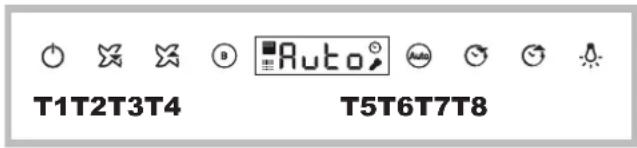
T1 ON/OFF motore
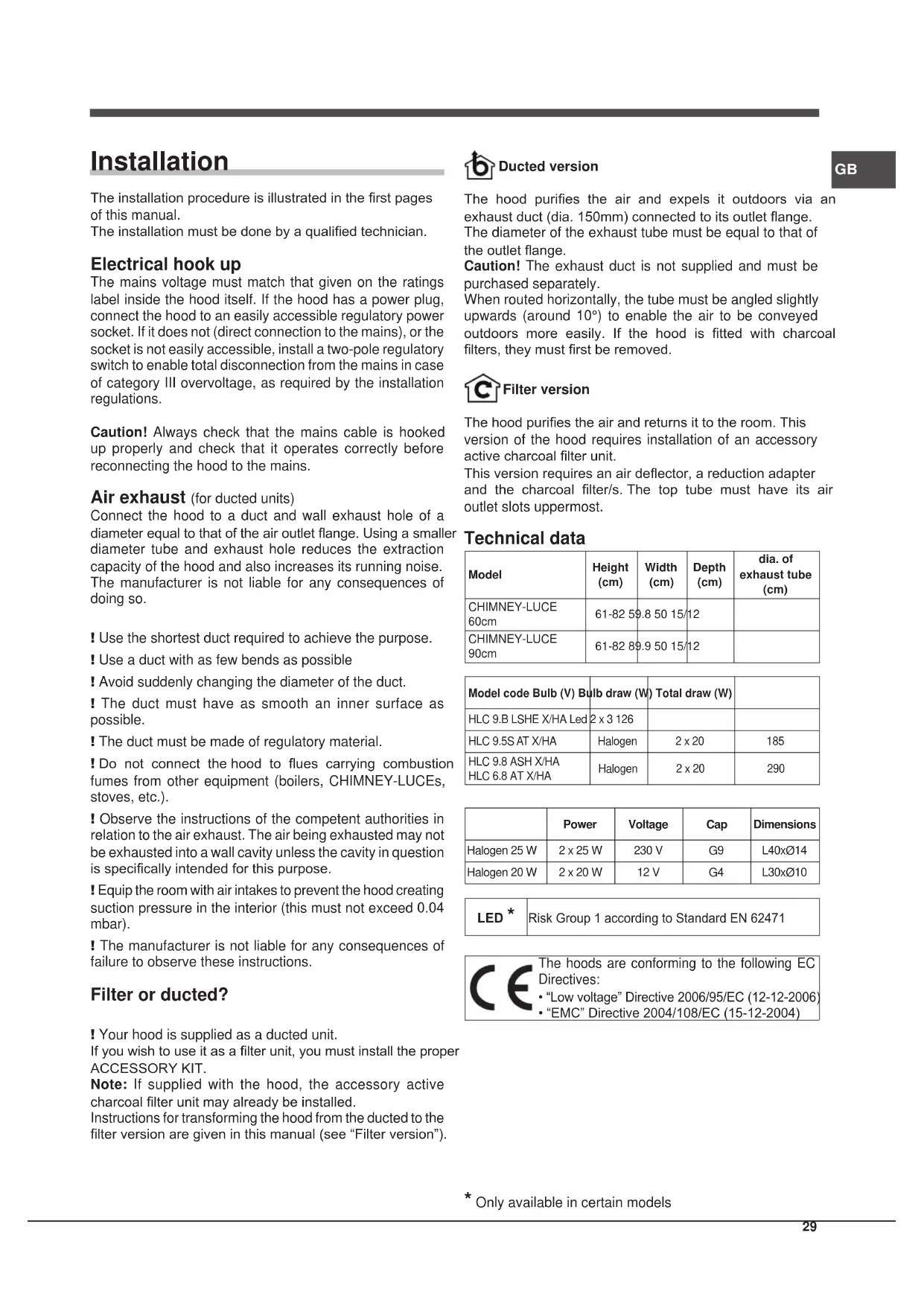
The installation procedure is illustrated in the first pages of this manual.
The installation must be done by a qualified technician.
Electrical hook up
The mains voltage must match that given on the ratings label inside the hood itself. If the hood has a power plug, connect the hood to an easily accessible regulatory power socket. If it does not (direct connection to the mains), or the socket is not easily accessible, install a two-pole regulatory switch to enable total disconnection from the mains in case of category III overvoltage, as required by the installation regulations.
Caution! Always check that the mains cable is hooked up properly and check that it operates correctly before reconnecting the hood to the mains.
Air exhaust (for ducted units)
Connect the hood to a duct and wall exhaust hole of a diameter equal to that of the air outlet flange. Using a smaller diameter tube and exhaust hole reduces the extraction capacity of the hood and also increases its running noise. The manufacturer is not liable for any consequences of doing so.
I Use the shortest duct required to achieve the purpose.
! Use a duct with as few bends as possible
I Avoid suddenly changing the diameter of the duct.
The duct must have as smooth an inner surface as possible.
! The duct must be made of regulatory material.
! Do not connect the hood to flues carrying combustion fumes from other equipment (boilers, CHIMNEY-LUCEs, stoves, etc.).
! Observe the instructions of the competent authorities in relation to the air exhaust. The air being exhausted may not be exhausted into a wall cavity unless the cavity in question is specifically intended for this purpose.
! Equip the room with air intakes to prevent the hood creating suction pressure in the interior (this must not exceed 0.04 mbar).
! The manufacturer is not liable for any consequences of failure to observe these instructions.
Filter or ducted?
! Your hood is supplied as a ducted unit.
If you wish to use it as a filter unit, you must install the proper ACCESSORY KIT.
Note: If supplied with the hood, the accessory active charcoal filter unit may already be installed.
Instructions for transforming the hood from the ducted to the filter version are given in this manual (see "Filter version").

Ducted version
GB
The hood purifies the air and expels it outdoors via an exhaust duct (dia. 150mm) connected to its outlet flange.
The diameter of the exhaust tube must be equal to that of the outlet flange.
Caution! The exhaust duct is not supplied and must be purchased separately.
When routed horizontally, the tube must be angled slightly upwards (around 10° ) to enable the air to be conveyed outdoors more easily. If the hood is fitted with charcoal filters, they must first be removed.

Filter version
The hood purifies the air and returns it to the room. This version of the hood requires installation of an accessory active charcoal filter unit.
This version requires an air deflector, a reduction adapter and the charcoal filter/s. The top tube must have its air outlet slots uppermost.
Technical data
| Model | Height (cm) | Width (cm) | Depth (cm) | dia. of exhaust tube (cm) |
| CHIMNEY-LUCE 60cm | 61-82 59.8 50 15/12 | |||
| CHIMNEY-LUCE 90cm | 61-82 89.9 50 15/12 |
| Model code Bulb (V) Bulb draw (W) Total draw (W) |
| HLC 9.B LSHE X/HA Led 2 x 3 126 |
| HLC 9.5S AT X/HA Halogen 2 x 20 185 |
| HLC 9.8 ASH X/HA Halogen 2 x 20 290 |
| HLC 6.8 AT X/HA |
| Power | Voltage | Cap | Dimensions | |
| Halogen 25 W | 2 x 25 W | 230 V | G9 | L40xØ14 |
| Halogen 20 W | 2 x 20 W | 12 V | G4 | L30xØ10 |
| LED* | Risk Group 1 according to Standard EN 62471 |
| CE | The hoods are conforming to the following EC Directives: ·“Low voltage” Directive 2006/95/EC (12-12-2006) ·“EMC” Directive 2004/108/EC (15-12-2004) |
- Only available in certain models
CHIMNEY-LUCE controls
Models with Touch control glass (basic)
HLC 9.5S AT X/HA - HLC 6.8 AT X/HA

2
!

图
T1T2T3T4T5T6T7T8
T1 motor ON/OFF
When the button is pressed with the hood off, the first speed is set. When the button is pressed during operation, the hood switches OFF.
T2 Speed 1
When the button is pressed the hood switches from the previous status to speed 1.
T3 Speed 2
When the button is pressed the hood switches from the previous status to speed 2.
T4 Speed 3
When the button is pressed the hood switches from the previous status to speed 3.
T5 Booster
When the button is pressed the hood switches from the previous status to intense speed. The setting is limited by time; when the time elapses the hood goes back to the speed set previously; when a speed button is pressed (T2, T3 or T4), the selected speed is set as you leave the booster mode.
T6 Timer
By pressing T6 once, a timer setting can be associated to each speed V) [v1 - 30 min, v2 - 20 min, v3 - 10 min], after which the hood turns OFF automatically. The timer can be set for manual speeds only and not for the booster.
T7 Antigrease and odour filter signal
The antigrease (A) and odour (B) filters need cleaning/ replacing after a certain number of hours of use (the latter for filtering hoods only).
The time for cleaning/replacement is signalled by the flashing of the coloured LED associated to the filter (white for antigrease filters, red for odour filter).
The LED is turned off by pressing the T7 button after cleaning/replacing the filters.
T8 lights ON/OFF
It turns the work lights of the hood on and off.
Hood configuration
The configuration menu is accessed with the product off by pressing T5 and T6 for 6 seconds. T7 turns on at this point to indicate the type of installation through two colours of the LED: white for extractor installation (default), red for filtering installation. The installation type can be changed by pressing T7 cyclically with the consequent alternation of the LED colours.
Hood off
The hood can be turned off manually by pressing the T1 button (ON/OFF). If the timer is set, the hood turns off automatically when the set time runs out.
Models with Touch control glass + display (medium)
(Only available in certain models)
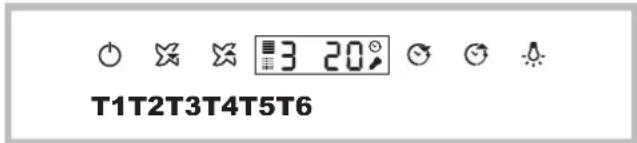
T1 motor ON/OFF
When the button is pressed with the hood off, the first speed is set. When the button is pressed during operation, the hood switches OFF.
T2 Speed -
When the button is pressed the hood switches to the previous speed.
T3 Speed +
If the hood is set to speed 3, the intensive speed activates when this button is pressed
The setting is limited by time; when it elapses the hood goes back to the speed set previously.
T4 Timer“-”
Set a time to turn OFF the hood with the timer; if the timer is set and the speed is subsequently changed by pressing T2, T3 or T4, the timer is deactivated.
Press T4 to decrease the timer by 5 minutes.
T5 Timer“+”
When the button is pressed for the first time, the timer is set to 5 minutes; this value is increased by 5 additional minutes every time the button is pressed after that.
T6 lights ON/OFF
It turns the work lights of the hood on and off
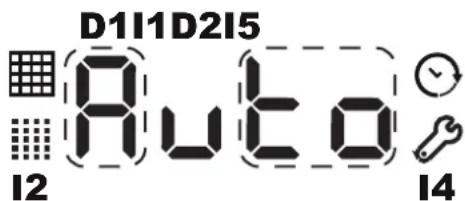
D1: DGT Speed
D2: Assembly of 2 DGT Time
11: Grease Filter Indicator
12: Carbon Filter Indicator
14: Menu Indicator
15:Timer Indicator
Antigrease and odour filter signal
The antigrease (A) and/or odour (B) filters need cleaning/ replacing after a certain number of hours of use (the latter for filtering hoods only).
The indicator light 11 on indicates that the antigrease filter is saturated, while the indicator light 12 on indicates that the odour filter is saturated (for hoods in filtering mode only).
Press T5 + T4 for 3 seconds with the hood on to reset the counter.
Hood type setting
The hood can be set to the ventilation (default) or filtering mode. To change the setting proceed as follows:
with the hood OFF, the menu is accessed by pressing the T4 e T5 buttons for a prolonged time; this is signalled by a sound emitted by the hood and by the I4 icon lighting up and the writing C1-0 appearing on the display;
- use the buttons T4 and T5 to go through the menu. Use T4 to go through the various menu items (C1, C2, C3, C4, etc) and T5 to select them (0, 1 or 0, 1, 2);
- to set the hood type, access the menu, select the item C6 with T4 and set the value 0 with T5 to set the hood on ventilation mode or 1 for the filtering mode. Press T1 at the end.
Hood off
The hood can be turned off manually by pressing the T1 button (ON/OFF). If the hood stays on in manual mode, it turns off automatically after a certain "safety" time. If the timer is set, the hood turns off automatically when the set time runs out.
Models with Touch control glass + display (high)
HLC 9.8 ASH X/HA - HLC 9.B LSHE X/HA

T1T2T3T4T5T6T7T8
T1 motor ON/OFF
When the button is pressed with the hood off, the first speed is set. When the button is pressed during operation, the hood switches OFF.
T2 Speed -
When the button is pressed the hood switches to the previous speed.
T3 Speed +
When the button is pressed the hood switches to the next speed. If the hood is off, speed 1 is set when pressing this button.
T4 Booster
When the button is pressed, the hood switches from the previous status to the intensive speed; the letter "b" will flash slowly on the display. The setting has a limited timeframe; when the time elapses the hood goes back to the speed set previously; when a speed button is pressed (T2, T3 or T4), the selected speed is set as you leave the booster mode.
T5 AUTO
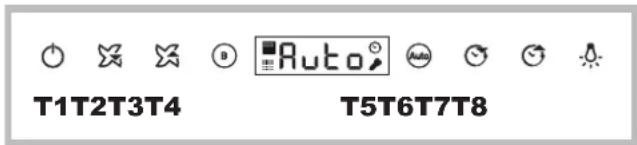
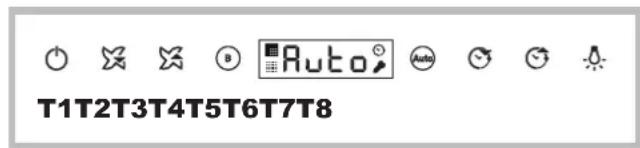
Press the T5 button to activate the automatic mode, which turns the hood on based on the steam level detected. While in normal operation the sensor regulates the motor speed within the admitted values (0,1,2,3 or booster). The hood switches from automatic to manual mode when the Booster or Speed button is pressed.
The sensor needs calibrating before use; for more information please refer to paragraph "Calibration procedure"
T6 Timer“-”
With the timer, a time can be set, after which the hood turns OFF; if the timer is set and the speed is subsequently changed by pressing T2, T3 or T4, the timer is deactivated.
Press the T6 button to decrease the previously set value by 5 minutes.
T7 Timer“+”
When the button is pressed for the first time, the timer is set to 5 minutes; this value is increased by 5 additional minutes every time the button is pressed after that.
T8 lights ON/OFF
It turns the work lights of the hood on and off.
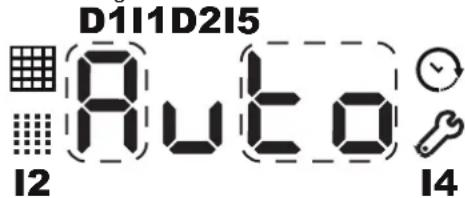
D1: DGT Speed
D2: Assembly of 2 DGT Time
11:Grease Filter Indicator
12: Carbon Filter Indicator
14: Menu Indicator
15: Timer Indicator
Antigrease and odour filter signal
The antigrease (A) and odour (B) filters need cleaning/ replacing after a certain number of hours of use (the latter for filtering hoods only).
The indicator light 11 on indicates that the grease filter is saturated, while the indicator light 12 on indicates that the odour/carbon filter is saturated (for hoods in filtering mode only).
Press T5 + T6 for 3 seconds with the hood on to reset the counter.
Automatic sensor calibration procedure
- Calibration: the calibration procedure must be carried out in a clean environment to be effective; therefore, the hob must be off during the calibration.
During the calibration procedure the AUTO button is on and the AUTO writing flashes on the display.
The sensor calibration may be automatic or manual ("upon request"). In both cases the calibration lasts:
about 1 minute for gas hobs;
about 13 minutes for induction and electric hobs.
Automatic calibration: occurs when the hood is power supplied or after selecting the plan from the configuration menu.
GB
- Manual calibration: (or upon request) is set in the configuration menu. This procedure is advised, and may be started, in case of malfunctioning of the sensor (which, for example, may occur in case of blackout while cooking or after a long time since the use).
For the manual calibration, proceed with the steps below:
- with the hood OFF or in standby, the menu is accessed by pressing the T6 and T7 buttons for a prolonged time; this is signalled by a sound emitted by the hood and by the I4 icon lighting up and the writing C1-0 appearing on the display;
- use the buttons T6 and T7 to go through the menu. Use T6 to go through the various menu items (C1, C2, C3, C4, etc) and T7 to select them (0, 1 or 0, 1, 2);
- for the manual calibration, access the menu, select item C4 with T6 and set value 1 with T7. Then press T1 and wait for the time suggested for the calibration.
Selecting the hob type: the type of hob (electric, induction, gas) present under the hood is select upon installation. A complete automatic calibration procedure is carried out immediately after selecting the hob.
Important: do not force the calibration "upon request" after selecting the hob as this activates automatically.
To select the hob, proceed as follows:
- with the hood OFF or in standby, the menu is accessed by pressing the T6 and T7 buttons for a prolonged time; this is signalled by a sound emitted by the hood and by the I4 icon lighting up and the writing C1-0 appearing on the display;
- use the buttons T6 and T7 to go through the menu. Use T6 to go through the various menu items (C1, C2, C3, C4, etc) and T7 to select them (0, 1 or 0, 1, 2);
- to select the hob, access the menu, select item C3 with T6 and set the value with T7 to 0 if you have a gas hob, 1 if you have a radiant hob and 2 if you have an induction hob. Press T1 to leave the menu mode and wait the time needed for the sensor calibration.
Hood type setting
The hood can be set in the ventilation (default) and filtering operating mode. To change the type proceed as follows:
with the hood OFF or in standby, the menu is accessed by pressing the T4 and T5 buttons for a prolonged time; this is signalled by a sound emitted by the hood and by the I4 icon lighting up and the writing C1-0 appearing on the display;
- use the buttons T4 and T5 to go through the menu. Use T4 to go through the various menu items (C1, C2, C3, C4, etc) and T5 to select them (0, 1 or 0, 1, 2);
- to set the hood type, access the menu, select the item C6 with T4 and set the value 0 with T5 to set the hood on ventilation mode or 1 for the filtering mode. Then press T1.
Hood off
The hood can be turned off manually by pressing the T1 button (ON/OFF). If the hood stays on in manual mode, it turns off automatically after a certain "safety" time. If the timer is set, the hood turns off automatically when the set time runs out.
The Automatic mode activates after 10 minutes from the sensor turning off the hood motor.
Configuration table
| Regulation code | Meaning Explanation | on |
| C1 Grease filter timer | It resets the grease filter timer | |
| C2 Odour filter timer | It resets the odour filter timer | |
| C3 Hob type | It changes the hob type for the AUTO sensor. It may be gas, electric or induction | |
| C4 Sensor calibration | It calibrates the sensor. If item 1 is select, the sensor carried out the calibration the next time the hood is turned on | |
| C5 Audio levels | If mute, no FB audio is emitted (not even when turning ON) | |
| C5 Hood type | Ventilation/Filtering (Ventilation by default) | |
| C6 | Reset to Factory default | It resets the DGT menu values to default values (including installation) |
General notes
If the display buttons become locked, unplug and plug in again the hood from the mains before contacting the Assistance Service.
Maintenance and care
Caution! Before cleaning or servicing the unit, disconnect it from the mains by pulling the power plug or disconnecting the main circuit breaker.
First cleaning
- Remove the protective film
- Clean with a damp sponge and a little neutral soap
- Rinse off with a damp cloth
- Dry with a soft cloth; if the hood is stainless steel, dry along the metal's grain
Periodic cleaning
The hood must be cleaned frequently (at least as often as you service the grease filter), inside and out. Use a damp cloth and a neutral liquid detergent with lukewarm water. Do not use abrasive or corrosive products.
Warning: Failure to observe the hood cleaning and filter cleaning/replacement instructions can result in fires. Follow the instructions carefully. The manufacturer is not liable for any damage to the motor or fires caused by incorrect care or failure to follow the above instructions.
Servicing the grease filter (A)
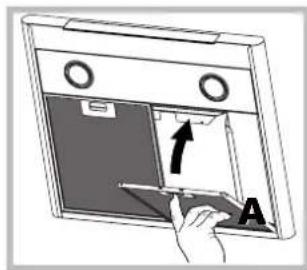
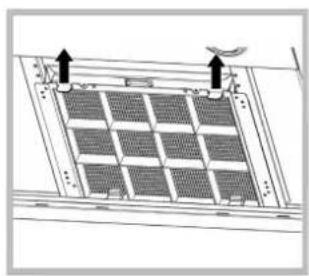
The grease filter retains the particles of grease produced during cooking; it must be cleaned at least once a month with a non-aggressive detergent, either by hand or with a low temperature, short dishwasher cycle. To extract the grease filter, pull the spring loaded handle.
If washed in a dishwasher, the metal filter may change colour, but this does not affect its performance.
Servicing the charcoal filter (B)
The charcoal filter retains unpleasant cooking odours. The filter saturates after a variable time, depending on the type of cooking and how often the grease filter is cleaned. The cartridge must be replaced at least once every twenty months.
This filter can NOT be washed or regenerated
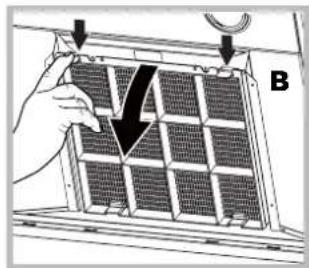
Disassembly: Remove the activated-carbon filter by pressing the two front levers which secure it to the hood.
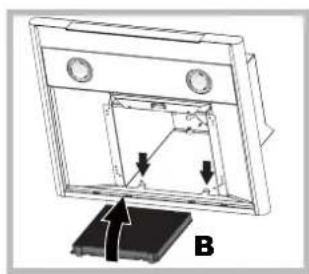
Assembly: Secure the activated-carbon filter first in the back using the hood's metal tabs and then in the front by pressing the two levers.
Replacing the lights LED
The hood is fitted with a lighting system based on LED technology. The LEDs ensure optimal lighting, longer life and lower consumption compared with traditional lights. To replace them please contact the assistance service.
* Only available in certain models
Replacing the bulbs
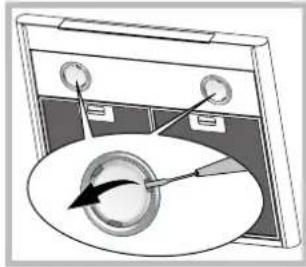
Disconnect the unit from the mains and remove the grease filter. Caution! Make sure the bulbs are cool before touching them.
GB
- Extract the guard by prising it out with a small flat head screwdriver or something similar.
-
Replace the faulty bulb. Use only bulbs of the same type (for details, see the technical data in the following manual).
-
Refit the guard (push it in).
Electrical cable
If the power cable is damaged, it can be replaced by the manufacturer or his technical service, to prevent any attendant risks.
SCRAPPING
The unit is marked for conformity with European Directive 2012/19/EC, Waste Electrical and Electronic Equipment (WEEE). By ensuring that the unit is scrapped properly, the user contributes to safeguarding the environment and public health.


symbol on the product or on its accompanying marks indicates that the product may not be treated as plastic waste but must be handed over to a sorting unit or electrical and electronic waste. Disposse of it is in accordance with local waste disposal regulations. For information on the handling, recovery and recycling of product, contact the local authority, domestic waste service or the reseller from whom you purchased it
Troubleshooting
If something does not work, make the following simple checks before contacting Technical Service:
If the hood does not operate:
Check that:
the unit is powered up.
- a speed has been set.
If the hood is not working effectively:
Check that:
- the selected motor speed is sufficient to handle the amount of smoke and steam being produced.
- the kitchen is adequately ventilated for the unit to take air in.
the charcoal filter is not exhausted (filter version).
If the hood turns off during normal operation:
Check that:
the unit is powered up.
- the circuit breaker has not tripped.
In case of faulty operation, before contacting Technical service, first disconnect the machine from the mains for at least 5 seconds by pulling its plug, then reconnect it. If the fault persist, contact Technical Service.
FR
Installation
HLC 9.5S AT X/HA - HLC 6.8 AT X/HA




T1T2T3T4T5T6T7T8
HLC 9.8 ASH X/HA - HLC 9.B LSHE X/HA
Modelos con Touch control glass (basic)
HLC 9.5S AT X/HA - HLC 6.8 AT X/HA

E
图3


T1T2T3T4T5T6T7T8
T1 ON/OFF motor
HLC 9.8 ASH X/HA - HLC 9.B LSHE X/HA
T1 ON/OFF motor
HLC 9.5S AT X/HA - HLC 6.8 AT X/HA

23
2

图

T1T2T3T4T5T6T7T8
1 ON/OFF motor
HLC 9.5S AT X/HA - HLC 6.8 AT X/HA


T1T2T3T4T5T6T7T8
T1 ON/OFF motor
HLC 9.8 ASH X/HA - HLC 9.B LSHE X/HA

T1T2T3T4T5T6T7T8
T1 ON/OFF motor
Modele z Touch control glass (basic)
HLC 9.5S AT X/HA - HLC 6.8 AT X/HA


T1T2T3T4T5T6T7T8
T1 ON/OFF silnika
HLC 9.8 ASH X/HA - HLC 9.B LSHE X/HA
T1 ON/OFF silnika
HLC 9.5S AT X/HA - HLC 6.8 AT X/HA





T1T2T3T4T5T6T7T8
T1 Motor ACIK/KAPALI
- OPERATING INSTRUCTIONS
- COOKER HOOD
- FR
- AVERTISSEMENTS
- ASSISTANCE
- T1T2T3T4T5T6T7T8
- T1 ON/OFF MOTORE
- ELECTRICAL HOOK UP
- AIR EXHAUST (FOR DUCTED UNITS)
- FILTER OR DUCTED
- DUCTED VERSION
- FILTER VERSION
- CHIMNEY-LUCE CONTROLS
- MODELS WITH TOUCH CONTROL GLASS (BASIC)
- T1 MOTOR ON/OFF
- T2 SPEED 1
- T3 SPEED 2
- T4 SPEED 3
- T5 BOOSTER
- T6 TIMER
- T7 ANTIGREASE AND ODOUR FILTER SIGNAL
- T8 LIGHTS ON/OFF
- HOOD CONFIGURATION
- HOOD OFF
- MODELS WITH TOUCH CONTROL GLASS + DISPLAY (MEDIUM)
- T2 SPEED
- T3 SPEED
- T4 TIMER
- T5 TIMER
- T6 LIGHTS ON/OFF
- ANTIGREASE AND ODOUR FILTER SIGNAL
- HOOD TYPE SETTING
- MODELS WITH TOUCH CONTROL GLASS + DISPLAY (HIGH)
- T4 BOOSTER
- T5 AUTO
- T7 TIMER
- AUTOMATIC SENSOR CALIBRATION PROCEDURE
- GB
- IMPORTANT: DO NOT FORCE THE CALIBRATION "UPON REQUEST" AFTER SELECTING THE HOB AS THIS ACTIVATES AUTOMATICALLY
- GENERAL NOTES
- MAINTENANCE AND CARE
- FIRST CLEANING
- PERIODIC CLEANING
- SERVICING THE GREASE FILTER (A)
- SERVICING THE CHARCOAL FILTER (B)
- REPLACING THE LIGHTS LED
- REPLACING THE BULBS
- ELECTRICAL CABLE
- SCRAPPING
- TROUBLESHOOTING
- IF THE HOOD DOES NOT OPERATE
- CHECK THAT
- IF THE HOOD IS NOT WORKING EFFECTIVELY
- IF THE HOOD TURNS OFF DURING NORMAL OPERATION
- INSTALLATION
- MODELOS CON TOUCH CONTROL GLASS (BASIC)
- T1 ON/OFF MOTOR
- 1 ON/OFF MOTOR
- MODELE Z TOUCH CONTROL GLASS (BASIC)
- T1 ON/OFF SILNIKA
- T1 MOTOR ACIK/KAPALI
Brand : HOTPOINT-ARISTON
Model : HLC 6.8 AT XHA
Category : Range hood