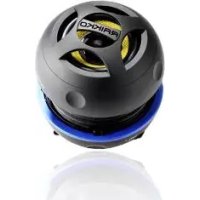
Dance BT - Docking station Raikko - Free user manual and instructions
Find the device manual for free Dance BT Raikko in PDF.



| Product Type | Bluetooth Docking Station |
| Brand | Raikko |
| Model | Dance BT |
| Dimensions (closed) | 66 mm (diameter) x 52 mm (height) |
| Weight | 100 g |
| Speaker | 45 mm membrane, 3 W (4 Ω) |
| Frequency range | 150 Hz - 16 kHz |
| Battery type | Lithium polymer |
| Battery capacity | 550 mAh |
| Charging voltage | 5 V ± 0.5 V |
| Charging time | Approximately 2.5 hours |
| Wireless connection | Bluetooth (A2DP 1.2, AVRCP 1.0, Headset 1.1, Hands-Free 1.5) |
| Wired connection | 3.5 mm jack |
| Functions | Volume control, track skipping, call management |
| Package contents | Speaker, power cable (microUSB), fabric pouch, user manual |
| Maintenance | Clean with a dry cloth |
| Safety | Do not expose to moisture or heat, do not disassemble |
| Warranty | Register at www.RAIKKO.com/register |
Frequently Asked Questions - Dance BT Raikko
User questions about Dance BT Raikko
0 question about this device. Answer the ones you know or ask your own.
Ask a new question about this device
Download the instructions for your Docking station in PDF format for free! Find your manual Dance BT - Raikko and take your electronic device back in hand. On this page are published all the documents necessary for the use of your device. Dance BT by Raikko.
USER MANUAL Dance BT Raikko
DANCE BT Vacuum Speaker

BEDIENUNGSCANLEITUNG OPERATING INSTRUCTIONS MODE D'EMPLOI MANUALE DI ISTRUZIONI INSTRUCCIONES DE MANEJO GEBRUIKSAANWIJZING
CONTENTS
Language: Page:
Deutsch 4
English 12
Francais 20
Italiano 28
Espanol 36
Nederlands 44
Copyright 2012 by RAIKKO*
All trademarks shown are for reference purposes only.
Bluetooth ^念 and the Bluetooth ^念 logo are registered trademarks of Bluetooth SIG,
Inc. iPhone™, iTunes™, iPod™ and the Apple logo are registered trademarks of
Apple Computer, Inc. Cupertino, Calif., U.S.
Copyright 2012 by RAIKKO
Einleitung
Thank you for choosing RAIKKO. We ask you to carefully read the instructions and safety and warning information in order to ensure the correct use of your new product.
Delivery Contents
1 Dance BD speaker
- 1 Charging cable
-1Clothbag
- 1 User's Manual
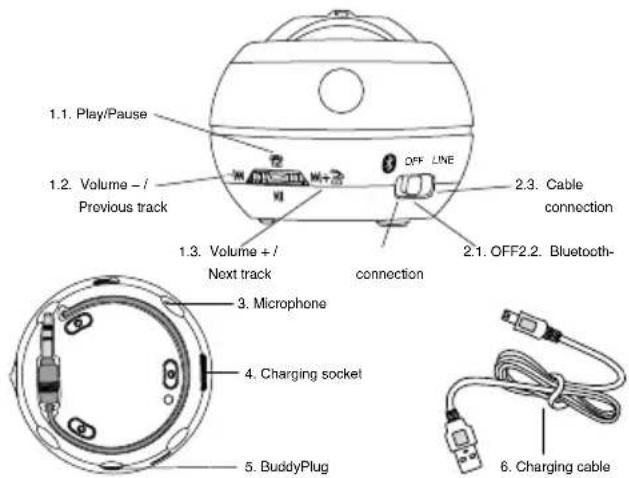
Overview
Opening the Dance BT
Turn the speaker cover counter-clockwise until the locking mechanism fully releases. Hold the speaker with both hands to prevent the sound box from falling out.
Connect the Dance BT to the headphone jack (3.5 mm) of an audio source with the connection cable in the base or establish a Bluetooth connection.
Attention! Don't take apart the speaker while it is open. The built-in spring maintains an adequate volume for the sound box.
Power On
Select the desired connection type with the slide switch 2.
When set to BT, the LED display will blink. In cable mode the display will remain on.
If you select "Bluetooth" for the connection type, the speaker will start in pairing mode. It will search for a device with an activated BT interface. The device can then be connected to the Dance BT. For more information on Bluetooth connections, please read the user's manual for your audio device.
If a Bluetooth-ready device that has already been paired with the speaker is in range, a connection will automatically be made between the speaker and the device.
The speaker cannot be connected to multiple devices at the same time. The speaker can only play music from one device at a time.
Volume
Adjust the volume with the volume control on your audio device. You can also adjust the volume on the speaker. Increase the volume by moving the slide switch 1 to the right. Lower the volume by moving it to the left. You must hold the slide switch in order to adjust the volume in BT mode. Press (do not hold) to switch to the next/ previous track.
Attention! Setting the speaker to a signal level that is too high can lead to overmodulation. Select a volume level that does not cause distortion in the sound quality.
A high signal level can cause hearing damage. Do not place the speaker directly next to your ear, the ear of another person or of an animal.
Bluetooth Mode
You can control your audio device with the Dance BT, provided it supports the Bluetooth standards A2DP1.2, AVRCP1.0, Headset profiles 1.1/Hands-Free Profiles 1.5.
Press the spring button 1 once to play or pause a track.
Move the button 1 to the right once to switch to the next track.
Move the button 1 to the left once to restart the current track or several times to switch to a previous track.
You can accept incoming calls when using a Bluetooth-ready m telephone by moving the control 1 to the right and (indicated by symbol of a telephone that has been picked up). End the call by pressing the button (marked by a telephone symbol).
Charing the Integrated Power Pack Battery
Connect the speaker to the USB port of a PC/Mac or a USB adapter to charge the battery. Use the connection cable that was delivered with the speaker. Connect one end to the Dance BT (micro USB) and the other end to a USB port. The LED display will turn red while the battery charges.
The LED display will turn blue once the battery is fully charged. The charging process will take 2-4 hours depending on the battery level at the start of charging.
Combining Multiple Speakers
Multiple speakers can be connected in series for increased output and better sound. Use the connection cable for one of the speakers with the BuddyPlug on the Dance BT (3.5mm) If you wish to connect multiple Dance BT speakers, make sure the other speakers are set to cable mode.
Specifications
Dimensions (closed): 66 mm (Ø) x 52 mm(H)
Weight: 100 g
Speaker: 45 mm Membrane - 3.5 W (4 Ω)
Frequency range: 150 Hz-16 kHz
Battery type: Lithium-polymer
Battery capacity: 550 mAh
Charging voltage: 5V± 0,5V
Charging time: 2.5h (5 V)
Charging connection: Universal Serial Bus (USB)
Declaration of Conformity
The CE Declaration of Conformity and all other mandatory information can be viewed at http://www. RAIKKO.com/cert/.
Warranty
To activate the warranty period and for further information about new products, please register your purchase at http://www. RAIKKO.com/register/. To do this, you will need the serial number, which is normally located on the underside of the product.
Safety Instructions:
- To ensure safety, please carefully read the operating instructions, as well as the safety instructions and warnings. The manufacturer does not accept any damage to products as a result of improper use.
- Keep the product out of the reach of children - it is not for consumption and must not be placed in the mouth.
Clean the product with a dry cloth only. - Only use the product with designated power sources and/or audio equipment
- Do not take the product apart or damage it.
- Do not attempt to change the integrated battery.
- Do not use the product in humid rooms or at high temperatures, e. g. bathrooms, saunas, swimming pools, etc.
- Should any irregularities or unusual odours occur or if there are any other problems when using the product, switch it off immediately and disconnect it from any power supply or any other devices it may be connected to. Contact Manufacturer Support immediately.
Warning:
- To avoid injury, beware of edges and rough surfaces when removing the packaging.
- Only use the designated power supply or USB connection to charge the product.
- Store the product in a dry, dust-free environment away from direct sunlight. Never leave it in your vehicle, including in the glove compartment or boot, when temperatures outside are high.
- Never take the product apart.
- Only charge the product using the designated power supply cables and through
the designated sockets (identified on the product).
- Do not short circuit the product.
- After charging the product, disconnect it immediately from the power supply or USB connection.
- Do not handle the product with wet hands.
- Do not subject the product to heavy mechanical stress
- Do not expose the device to excessive voltage or similar (see technical details).
If fluid from the integrated battery gets into your eyes, never rub your eyes. Rinse them immediately with fresh water and promptly seek medical advice - Keep the product out of the reach of children.
- Please note the charging times and safety instructions as specified.
Your product has been produced with the greatest care using high quality materials.
At the end of its useful life, please dispose of your product at your local collection point for waste electrical and electronic equipment. Do not throw it away with your household waste. Please consider the environment.

WARNING: cannot be held liable for any damage, loss of data or any other problems that may arise as a result of using this product.
Customer Service
You can contact our Customer Service:
Mon-Fri 9 a.m.-6 p.m. (Central European Time)
by internet at www. RAIKKQ.com
by email at service@ RAIKKO.com
by our telephone hotline
(calls from inside Germany) 0180 333 7 555 01
(teleword, 0.09 EUR per minute from a landline network)
or from outside Germany please call +49 7144 88 76 41.
Présentation
Raccordement: Universal Serial Bus (USB)
Declaratio de conformite
DANCE BT Vacuum Speaker
www.RQOMKO