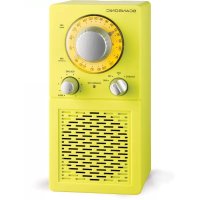
P2501 - Radio SCANSONIC - Free user manual and instructions
Find the device manual for free P2501 SCANSONIC in PDF.


| Product Type | Portable mono AM/FM radio with rechargeable battery |
| Brand | Scansonic |
| Model | P2501 |
| FM Frequencies | 87.5 - 108 MHz |
| AM Frequencies | 540 - 1600 kHz |
| Power Supply | 220-240 V ~ 50 Hz via mains adapter (included) |
| Battery | Built-in rechargeable battery, battery life ~7-8 h (at 50% volume) |
| Charging Time | Minimum 8 hours |
| Speaker Output Power | 4 W RMS / 40 W PMPO |
| Speaker | Built-in 3-inch |
| Auxiliary Input | AUX in socket (3.5 mm) for external sources |
| Headphone Output | 3.5 mm headphone jack, disables the speaker |
| FM Antenna | Telescopic and adjustable for better reception |
| AM Antenna | Built-in, optimized reception by turning the device |
| LED Indicators | Red (charging), Green (full battery) |
| Mode Switch | Positions: CHARGE, OFF, FM, AM |
| Cleaning and Maintenance | Wipe with a soft cloth, avoid abrasive products |
| Safety | Do not open, use original parts, beware of condensation |
| Repairability | Entrust any intervention to a qualified technician |
Frequently Asked Questions - P2501 SCANSONIC
User questions about P2501 SCANSONIC
0 question about this device. Answer the ones you know or ask your own.
Ask a new question about this device
Download the instructions for your Radio in PDF format for free! Find your manual P2501 - SCANSONIC and take your electronic device back in hand. On this page are published all the documents necessary for the use of your device. P2501 by SCANSONIC.
USER MANUAL P2501 SCANSONIC
Locations of controls and indicators:
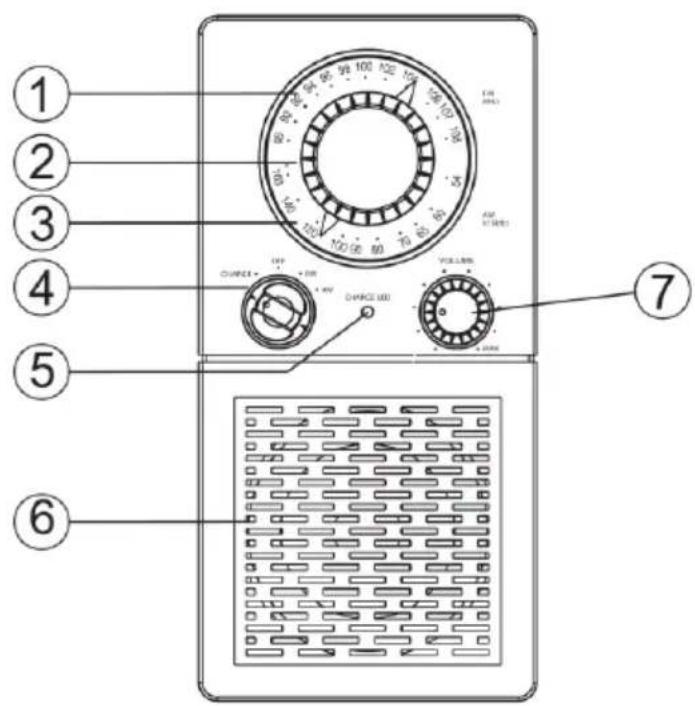
Features at the front:
-
FM Frequency Indicator - Shows the FM range.
-
The orange backlight will glow once the radio has been turned on to FM.
-
Frequency Tuning Knob - Rotate clockwise to tune FM from 88-108 MHz.
-
Rotate clockwise to tune AM from 540-1600 KHz.
-
AM Frequency Indicator - Shows the AM range.
-
The orange backlight will glow once the radio has been turned on to AM.
-
Mode Switch - CHARGE – In this position the battery charge is
activated.
- OFF - In this position the radio is turned off.
- FM - In this position the FM band is switched on.
-
AM - In this position the AM band is switched on.
-
LED Indicator - Red light indicates that the battery is being
charged.
- Green light indicates that the battery is fully charged.
-
No light indicates that charging has been disconnected.
-
Speaker - Built-in 3" drive.
-
Volume knob - Rotate clockwise to increase volume.
-
Rotate counter-clockwise to decrease volume.
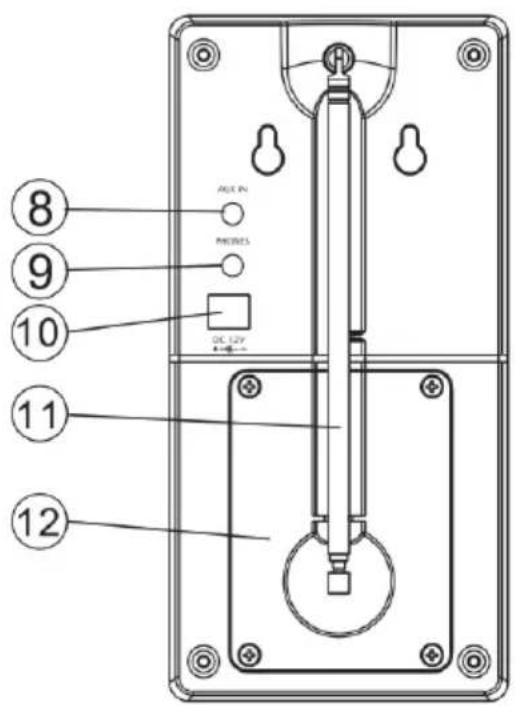
Features at the back:
- AUX in - Input socket for connection of audio. sources, i.e.
MP3 Player, iPod, CD Player or TV.
- Headphone out - Socket for connection of separate headphone.
This will mute the primary speaker.
- AC/DC input - For plug-in of power adaptor (included) and con
nction to power source for AC operation or battery charge.
- FM antenna - Adjust the length of the telescopic antenna and
rotate until the best FM reception has been achieved. This adjustment does not affect the AM reception. The AM antenna has been built-in to the radio and for the best reception of this band area just rotate the unit. Keep the FM antenna retracted in its locked position when not being used to avoid damage.
- Battery compartment - For installation of rechargeable batteries.
Operating instructions
- For AC operation plug in the power adaptor into the AC/DC input socket at the back of the unit and then connect to AC main socket (AC 230V-50Hz).
- Prior to battery operation make sure that battery has been fully charged.
-
Disconnect the power adaptor from main socket when not using the unit.
-
Switch on the unit by turning the Mode Switch to FM or AM.
- Now the orange backlight at the Frequency Window will glow.
- Adjust to the desired station in the selected band by rotating the Frequency Tuner to the frequency and fine tune to best reception.
- Adjust the volume to the desired level.
- Turn the Mode Switch to OFF to switch of the unit.
Battery operation
This unit has built-in rechargeable battery.
Normal battery charge (Radio switched off):
- Turn the Mode Switch to CHARGE.
-
Plug in the power adaptor into the AC/DC input socket at the back of the unit and then connect to AC main socket (AC 230V-50Hz).
-
Red light in the LED indicator will flash when batteries are charged.
- Green light in the LED indicator will glow after full charging.
- Unplug the power supply when LED is green.
- LED turns off.
- With fully charged battery (min. 8 hours) the unit can be operated for approximately 7-8 hours by DC at 50% volume output.
- Note that the radio reception becomes weak and the sound may be distorted when the battery requires recharge.
Trickle charge (Radio switched on):
- Turn the Mode Switch to OFF.
- Plug in the power adaptor into the AC/DC input socket at the back of the unit and then connect to AC main socket (AC 230V-50Hz).
- Switch on the unit by turning the Mode Switch to FM or AM.
- Red light in the LED indicator will flash when battery is being charged.
- Green light in the LED indicator will glow after full charging.
- Unplug the power supply when LED is green.
- LED turns off.
- With fully charged battery (min. 8 hours) the unit can be operated for approximately 7-8 hours by DC at 50% volume output.
- Note that the radio reception becomes weak and the sound may be distorted when the battery requires recharge.
Important Safety Notes:
Cleaning
Wipe the unit with a soft dust cloth if it becomes dusty. Never use wax, polish sprays or abrasive cleaners.
Replacement Parts / Battery
When replacement parts / battery are required, be sure the service technician uses replacement parts as specified by the manufacturer or have the same characteristics as the original part. Unauthorized substitutions may result in fire, electric shock or other hazards.
Warning
Never allow water or other liquid to get inside the unit.
Condensation
In the following cases, condensation may occur in the unit:
When bringing the unit from outdoors into a warm room or if it is in a cold room which is heated quickly.
In the summer, if the unit is moved suddenly from an air-conditioned room or car to a hot or humid location.
This unit may not operate properly if condensation develops. In case of condensation wait 1 or 2 hours before using the unit.
Do not attempt to service this product yourself. Refer all servicing to qualified service personnel.
Specifications:
Model: Casino 2500
Type: AM/FM transportable mono radio with rechargeable battery.
FM Frequency: 87.5 - 108 MHz.
AM Frequency: 540 - 1600 KHz.
Speaker Output: 4 W RMS / 40 W PMPO.
Power Supply: 220 - 240V 50Hz.
Specifications and design are subjects to changes without notice.
This product is in compliance with the Waste Electrical and Electronic Equipment Directive 2002/96/EC (WEEE). Do NOT dispose this equipment as unsorted municipal waste, but use the return and collection systems available.