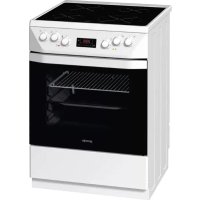
EC65320BW - Cooker GORENJE - Free user manual and instructions
Find the device manual for free EC65320BW GORENJE in PDF.


| Brand | Gorenje |
| Model | EC65320BW |
| Product type | Electric cooker |
| Category | Cooker |
| Dimensions (W x D x H) | 60 x 60 x 85 cm (standard estimate) |
| Weight | Approx. 60 kg (standard estimate) |
| Power supply | 230 V, 50 Hz (estimate) |
| Control type | Touch controls with electronic programmer |
| Display | LED with icons for duration, end of cooking, alarm, clock, child lock |
| Programmer functions | Cooking duration (max 10 h), End of cooking time, Programmed end (up to 24 h in advance), Audible alarm (max 10 h) |
| Sound volume adjustment | 4 levels (from "o" to "oooo") |
| Child safety | Programmer lock when a function is activated |
| Display intensity variation | Automatic dimming after 1 minute of inactivity |
| Settings cancellation | By pressing keys B and C simultaneously for 3 seconds or setting to 0.00 |
| Reaction after power cut | Shows "META" or "GLAS" then flashes, requires clock reset |
| Maintenance and cleaning | Clean with a soft damp cloth, avoid abrasive products |
| Spare parts and repairability | Parts available via Gorenje after-sales service |
| General information | Manual available in 22 languages, PDF format, 92 pages |
Frequently Asked Questions - EC65320BW GORENJE
User questions about EC65320BW GORENJE
0 question about this device. Answer the ones you know or ask your own.
Ask a new question about this device
Download the instructions for your Cooker in PDF format for free! Find your manual EC65320BW - GORENJE and take your electronic device back in hand. On this page are published all the documents necessary for the use of your device. EC65320BW by GORENJE.
USER MANUAL EC65320BW GORENJE
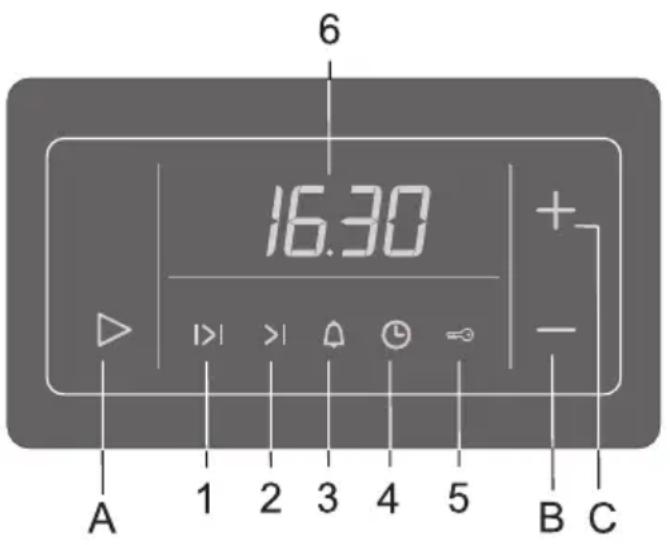
A Settings selection and confirmation sensor key
B Value decease (minus) sensor key
C Value increase (plus) sensor key
Display:
1 Oven operation duration
2 Oven operation stop time
3 Countdown alarm timer
4 Time of day
5 Child lock
6Clock-time display
- Select the type of setting you wish to make by pressing the (A) sensor key. The selected symbol on the display flashes quickly, indicating the function that you can set or change. After five seconds, the symbol starts flashing more slowly and the time set is displayed. The symbols that are lit are selected, but not currently shown on the display (6). The most recent setting made is always displayed.
Each press / activation of a sensor key is acknowledged by a beep. - If one of the value settings sensor keys (B) or (C) is touched and kept pressed, the rate at which the value being set is changing will increase.
- When the appliance is connected to the power supply or after a power failure, the word "META" or "GLAS" is first displayed for a short while; then, the display flashes for some time. In order to enable the operation of the oven, use the B and C sensor keys to set the time of day.
- In case of a power failure which lasts less than two minutes, all settings are kept.

To improve the response of the sensor keys, touch them with a larger surface of your finger.
Setting the time of day (clock)
- Set the clock to the current time of day by pressing the settings selection sensor key (A). Then, select the symbol (4).
- Use the (B) and (C) sensor key to set the exact time of day.
- Confirm the setting by pressing the (A) sensor key again; if the (A) key is not pressed, the setting is automatically confirmed after a few seconds.
The program timer can be used to program the oven operation in three ways:
- Cooking time setting - immediate start of oven operation; after a set period of time, the oven is turned off automatically.
- Cooking end time setting - the time at which oven operation is to end is set.
- Delayed start setting - automatic start and end of oven operation at a selected time.
Setting the cooking time
With this program mode, the duration of oven operation is set (cooking time). Maximum setting allowed is 10 hours.
- Press the (A) sensor key to select the symbol (1). Use the (B) and (C) sensor keys to set the duration / cooking time.
- Turn on the oven (use the corresponding oven knobs to set the operation mode and temperature). After the expiration of the set time, the oven will automatically stop operating (end of cooking time). An intermittent beep will sound, which can be stopped by pressing any key; if no key is pressed, the beep stops after one minute.
- The symbol (1) and the sign (_ _ _) will flash. If you wish to resume cooking, press the (A) sensor key and set a new duration if necessary.
Setting the cooking end time
This mode allows you to set the time at which the oven should stop operating. Maximum setting allowed is 10 hours relative to the current time of day.
- Make sure the current time of day is set correctly.
- Use the (A) sensor key and select the symbol (2). The current time of day is indicated on the display. Press the (B) and (C) sensor keys to set the cooking end time.
- Turn on the oven (use the corresponding oven knobs to set the operation mode and temperature). The oven starts to operate immediately and stops operation at the set time. An intermittent beep will sound, which can be stopped by pressing any key; if no key is pressed, the beep stops after one minute.
- The symbol (1) and the sign (_ :_ _ will flash. If you wish to resume cooking, press the (A) sensor key and set a new duration if necessary.
Setting the oven delayed start
With this operation mode, two settings have to be made: cooking time (duration of oven operation) and cooking end time (tie at which the operation should stop).
Cooking end time can be delayed by a maximum of 24 hours relative to the current time of day.
- Make sure the current time of day is set correctly.
- First, set the cooking time: Press the (A) sensor key to select the symbol (1). Use the (B) and (C) sensor keys to set the duration / cooking time.
- Then, set the cooking end time: Use the (A) sensor key and select the symbol (2). (A sum of the current time of day and the oven operation time is automatically shown on the display). Press the (B) and (C) sensor keys to set the cooking end time.
- The timer will wait for the start of the cooking - both symbols (1 and 2) are lit.
-
Turn on the oven (use the corresponding oven knobs to set the operation mode and temperature). At the corresponding time, the oven starts operating automatically (the symbol (2) goes off upon the start of operation), and switches off when the set cooking time has elapsed. An intermittent beep will sound, which can be stopped by pressing any key; if no key is pressed, the beep stops after one minute.
-
The symbol (1) and the sign (_ _ _) will flash. If you wish to resume cooking, press the (A) sensor key and set a new duration if necessary.
Setting the alarm timer
The clock can also be used independently of the oven operation, as an alarm timer that sounds an alarm after the expiration of a preset time.
- Use the (A) sensor key to select the symbol (3). Then, use the (B) and (C) sensor keys to set the time before the alarm sounds. Maximum setting allowed is 10 hours.
- When the set time has elapsed, an intermittent beep will sound, which can be stopped by pressing any key; if no key is pressed, the beep stops after one minute. The symbol (3) will go off.

The last minute of the timer countdown is displayed in second intervals.
Setting the beep volume (loudness)
The alarm volume can be set when no timer function is activated (only current time of day is displayed).
- Press the (B) sensor key and hold it approximately three seconds; a volume indicator will appear, and the corresponding sample sound will sound. "ooo" indicates maximum volume, and "o" indicates minimum volume. Use the (B) sensor key to select among the four loudness levels.
- Confirm the selected volume level by pressing the (A) sensor key; if the (A) sensor key is not pressed, the setting will be confirmed and stored automatically after a few seconds.
Setting the child lock
The clock may be locked only after one of time functions had been previously set (period of operation, end of operation, or alarm). The oven will function normally, but you will not be able to change settings.
Activation: Press the (A) sensor key to select the symbol (5). Use the (B) and (C) sensor keys to activate the child lock; the display will read "ON". Confirm the setting by pressing the (A) sensor key.
Deactivation: Press the (B) or (C) sensor to deactivate the child lock; "OFF" is displayed.
The setting must be confirmed by pressing the (A) sensor key.
Display dimmer
One minute after the appliance is turned off, the display will be dimmed.
Deleting the timer settings
- All timer settings can be deleted any time by pressing the (B) and (C) sensor keys simultaneously and holding them for three seconds. The set programs are automatically interrupted and the timer switches to display of the current time of day.
- Any timer setting can also be deleted in the following way: selecting it using the (A) sensor key, then press the (B) and (C) sensor keys simultaneously. Another way to delete a setting is by setting the timer value to "0.00".

Aioθntnpia πλnktpa:
A Aioθntnpio πλκτpo επiλoγns kai επiβεβαiωσn ρuθμiσεωv
B Aioθntnpio πλκτpo μεiωσnc TIPWV (μεiov)
C Aioθntnpio πλnktpo αuεησnε tiμωv (ouv)
EvEiEIGoOovns:
1 Diapkeia aeitoupyiaq oupvou
2 Xpovoc Anngs Aetoupyiaq ooupvou
3 Xpovobiaokottnc avtiotpopnC Etpno
4 Opa TnG nepac
5 Kλεδωμα ασραλείαγ γι τα παιδία
6 PoAoI -EvOeIg nTnG wpaC
Stille inn forsinket start
CnmboJ (1) i 3naK ( ) noHyTb CBiHTncra. JaKIO Bam Tpe6a noHOBtN npOuec roTyBaHHa, HATNCHITb ceHCOP (A) Ta BCTaHOBtB HOBn iHTepBaI yacy.
BcTaHOBJIeHHa 6yDnJIbHnKa
ToDHHNKOM TAKOX MOXHa KOpNCTyBaTnCra He3aJIeXHOb BiD pO6OTn DyXOBKn, JaK 6yDiNbHnKOM, JaKn HaDCnJaE 3ByKObN CnHaN nICnTaTOrO, JaK BCTaHOBHeH N ac CnPiHe.
- HaTnCHiB ceHcOp (A) ta o6epiTb cImbOJ (3). Notim 3a donomoroIO ceHcOpIB (B) ta (C) BCTaHOiTB yac 6ydnIbHnka. MakcImaIbHa yctaHOBka cknaIae 10 roDInH.
KoIN BCTaHOBHeH yac cPiHHe, LyHaTHe 3ByKObN CnHApI, kIn MoXHa 3yHNHTn, kUO HATNCHy 6yDb-ky KhoNkY. JkUO JxOHa KHOJa He HaTNCHyTa, 3ByKObN CnHApI BuxxHe Ype3 OdHy XBNIHy. CmBOJ (3) 3HnKHe.

OcTaHnXBnInHa 3BOpOTHoro BiDnIky yacy 3'YBnEeTbc3 iHTepBaIOM B OndHy cekyHdy.
BcTaHOBJIeHHrIyHocTi 3ByKOBOrO cnHaJy
TyuHicTb 3BykoBOrO cnHaNy MoKe 6byTu BCTaHOBNeHa, KOJI XoJHa 3 cyHKui TaIMepy He AKTINBOBaHa (dEMOHCTpyEcTBcra TInbKn NToOuHn Yac).
DyXOBka npaIOBaTmHe HopMaJIbHO, aJIe BN He 3MOXKeTe 3MiHIny yCTaHOBKn.
AknBaui: HATnCHiTb ceHcop (A) Ta oBepiTb CmB0n (5). 3a donomoroTO ceHCopIB (B) i (C) aKTHByIte 6nOKyBaHH BID nITEe; nucPiNei NOBIOMNTb "ON". IIO6 nIITBepdntu yCTaHOBky HATnCHiTb ceHcop (A).
IeaktnBaucia: 606 BiKnOHTN 6NoKYBaHHaBnH aD iTeiHaTNCiHcHcOp (B) a6o (C); nncnnei NObiOMtB "OFF".
YcTaHObky Tpe6a nIITBepdntn HATNCHyBUn ceHcop (A).
OcbItIeHHaDnCnJIeIO
Yepe3 xbuniny nicra toro, k npna BmKHeTbcra, dinne norache.
CkacyBaHHy yCTaHOBok TaMepy
- Yci yctaHOBKn 6ynde cKacOBAHO y 6yd-b-akn qac, kkuo CnHXPOHNO hATNCHTN ceHCOPn (B) Ta (C) ta ytpmByatn ix npotraom Tpbox cekynd. BcTaHOBHeHHn porpam ABTomTuHo nepepnaeTbca i taMep dEmOHCTpye TiNbKn noTOHn qac.
- Byd-b-ky yctaHOBky TaImepy TAKoX MoKHa cKacyBaTu HaCTyNHm YHOM: o6epiTb II 3a DonomoroIO ceHCopa (A), notim cnHXPOHHO HATNCHTb ceHCopn (B) i (C). IInsni cnoci6 ckacyBaTu yCTaHOBky, BCTaHOBtN TaImep Ha 3HaueHHI «0.00».
3neKmpoHbI npoaspMaMop
Iocne nepBoro NOdkJIOUeHn np6opa K 3JIeKTPoCetn B Cnyae OTKIOUeHn 3JIeKtpo3Heprn Heo6xOIMO yCTaHOBTb Tekyuee Bpemr.

Бe3 yctaHOBKN TeKyuIero BpeMeH NOnb3OBAHne DyXOBKO HEB03MOxHO.
HarpeBaTeIbHbIe 3IeMeHTbI MoryT pa6oTaTb npn OTKpbITOn DBepue dYxOBKn, ecnn npnbOp He obopyObaH BCTpoEHbIM BbIKIOuATEIeM dYxOBKn. OnaChocTb oxora!
Cechopby:
A CeHcOp BbIbopa n IoTBepeKdEHHa yHKuN
B CeHcop «-»
C CeHcop +
HdNkaTopbI:
1 PpOdoJXKInTeJIbHOCTb npIroTOBJeHnA
2 OkOHuaHne npNFOTOBJeHnA
3 ByuHbHK (yHKnOOnBeueHn)
4 Yacbi
5 3aunTHa6noknpOBka
6 LnpoBoi DnCpnei
-Дя Вьбopa Heo6xOdImoH cyHKuH haxmMaIte Ha ceHcop A. CmB0J BbIbpaHHoH cyHKuH Na DnCnIee HauHET 6bICTpo MIRaTb, TeNEpb Bbl MOKeTe yCTaHOBt bNIN N3MeHHTb napaMeTpby cyHKuH. Yepe3 5 cekyHd CmB0J HauHET MIRaTb MeDJIeHHee, Ha DnCnIee BBICBeHuBaETcay yCTaHOBJIeHHoe BpemA cyHKuH.
- Понсветка симь�юнoka3ыаet,чToФункцяВьбраHA,Ho ee Врем He ИндануETсЯ на диспee.Ha dincпee BBicBceuNBaETcЯ NOcneHЯФункця,KOTopyU Bbl yCTaHabnBaII.
Kakdoe haxatne Ha ceHcop noTBepkJaetcKoPOTKIM 3ByKObblm CnHaJIOM.
- Ecni ceHcop B «-» nII C «+» ydepxnBaTb, To 3naueHne 6ydet MeHrbc8 bictpee (yBENuHBaTbCra nIyMeHbWAtbCRA COOTBeTCTBeHHO).
- Послne подкюченя духовки к салуае откюченя салуае На диспee Heckoько секунд ВсicbeчиBaetся надпсь META ии GLAS, посne зтоу диспee HekOTOpoe BpemЯ мгael. Дя рабы dуховки Heobxodmo yctahOBNTb Tekyuee Bpemя ceHCOPamn Bи C.
- Пи OTКлioуени злесгоги MeHee Yem Ha 2 МнHyтbl BCE yctaHOBKn nporpaMaTopa coxpaHЯOTcR, И духовka aBtOMaTnueckn npodJXHT pa6Oty (ecnв BKlIOUeHa).

OkoHuaHne npnroTOBJeHna
Данна Функця NO3BOJЯET 3anporpaMMNPOBaT bpeM OTKIQUeHn AYXOBKn (OKOHuaHne npiroTOBNeHn).
OkoHuaHne npiroTOBHeNMAoHO 3aInporpaMMnpoBaTb He no3xe yem yepe3 10 cAcOB C MomeHTa yCTaHOBKn yHKuH!
- Поберп, установлень Лин тонhoe Врем стOK.
- Cechopom A Bblbepnte cunboJ 2. Ha dincnnee BbICBETnTcR Tekyuue BpeM cyTOK. CeHcopamn B «-» n C «+» yCTaHOBNTe BpeM OKOHuaHnI nprirotOBneHnI.
BkIIOHTe DyXOBky (BbI6epnte pexnH HArpeBa n TemnepaTpy).DyXOBka cpa3y BKIOHTcny ABTOMaTHueCKN BbIKIOHTcB yCTaHOBNeHHoe Bpemr. Pa3dactc npepbIBNCtby 3ByKOBoi CnHaJI, KOTOpBI MOxHO BbIKIOHTb HaKaTneM Ha IIOboi CeHCop, INI Ype3 1 MmHyTu CnHaJI BbIKIOHTcABTOMATueCKN.
Ha dincnpie MrraIOT cIMB0n 1 n HndnkaunrA «:_». Ecnn npriroTOBneHne Heo6xOdmo npoJOnKntb, haxMnte ceHcOp A n npn Heo6xoDmOCtN yCTaHOBNTe HOBOE Bpemn npoJOnKnteJIbHOCTn npriROToBHeHn.
OTcpoUka cTapTa
Hactpoika Ha Kpai Ha pa6oTaHa Ha cypHaTa
C Ta3n OIunna IMaTe Bb3MOxHocT Da 3aJaTe Te Yac, B KOInTo cypHaTa Ue cnpe da pa6oTu. MakcImaJIHoTO BpeMe 3a H3bOp e 10 Yaca CHTaHO OT TekuOTo BpeMe.
- YbepTe ce, che yacobnka e hactpoeh c KopeKTHO TekyuO BpeMe.
- I3no3IbaiTe ceH3opa (A) n H36epeTe cIMBOJa (2). TeKyIoTo BpeMe ce BN3yaJIIN3npa Ha dncnner. DOKoCHete ceH3Opnte (B) n (C) 3a hactpoiKa Ha yaca, B KOITo fypHaTa da cnpe pa6ota.
BkIIOUeTe cyphata (N3noJ3BaIte cBoTBeTHnTE KOJIeTa, 3a Da N36epTe peKIM n TempepaTpa). Cyphata 3anoYbDa pa6OTn He3a6BaHO n ige CnPRe B 3aJaDeHnA yac. ToBa ce ONOBecTBA CbC 3ByKOB CnHaJI, KOIto MoKe Da 6bJe CnpRn CdoKocBaHe Ha KOITo I da e CeH3Op, aKO He CnHaHa cInpap aBtOMaTHnO cIeD eHnMHyTa.
Cnmbonnte (1) n (:_) ue cbetHaT. Ako jkeJaTe da npoDbJxKnte rotBeHeto, DOKOCHete ceH3opa (A) n 3aadte HOBa npoDbJxKnteHNoCT, aKO e Heo6xOIMO.
HactpoKa Ha OTIOKeH cTapT
3a da n3noJ3BaTe Ta3n OIun e Heo6xOJMo Da ce 3aJaT DBe HAcTpoKn: HAcTpoKHa BpeMe Ha pa6Ota N HAcTpoKHa KpaH Ha pa6Otata Ha φypHa.
CTapTnpaHTo Ha pa6oTa Ha cypHaTa MoKe Da 6bJe OTIOKeHo C MaKcMym 24 Yaca ot CBTBeTHOTe KUso BpeMe B MOMeHa Ta Ha 3aDaBaHe Ha HAcTpOiKaTa.
- Ybepete ce, che yacobnka e hactpoeh c KopekTHo Tekyio BpeMe.
- Пьрв, Настопг Врме на paбота на Фурнатa. First, set the cooking time: Докочеcehenзopa (A) и n3беретe сиmbол (1). Изпалзваite (B) и (C) за n3бор на пюдьлжинhoct - Врме за rotbehс.
CneT OBa HacToe BpeMe 3a KpaH a pa6oTaHa 4yPHaT. N3no3nBaTe ceH3Opa (A) n 36epTe cIMBOJa (2). TekuTo BpeMe ce BN3yaJIIN3npa Ha DnCpIe. DoKoChTe ceH3OpTe (B) n (C) 3a HacToiKa Ha Yaca, B KOITo 4yPHaTa da cnpe pa6oTa.
TaMepbT 1e N3yaka BKNIOUbaHETo Ha cyphaT -DbTa CmBOJa (1 n 2) ce ocBETBaT.
BkIIOHTe cyphata (N3noJ3BaIte cBoTBETHITe KOYeTa, 3a da n36epTe peKIM N TemnepaTpa. B cBTBETHO BpeMe (TaMepa n3UncJIyBa Yaca, B KOITo cyphata Tp6Ba da ce BKIOH) cyphata Ce BKIOUBA aBTOMATNUHO (CMBOla(2) ce n3KIOUBA B MOMHTa Ha
CTapTnpaHe) n CbTBetHO ige cnpe pa6ota B npedBapntEnHO 3aeneHna Yac. Toba ce ONOBecTBA CbC 3ByKOB CNHaJI, KOITo MoKe da 6bJe cnpn C dOKOCBaHe Ha KOITo n Da e ceH3Op, aKO He CNHaJa.
CIMBOJNTe (1) n (:_) ue cBeTHaT. Ako jeenaete da npoDbJxNte roTbeHTo, Dokochete ceH30pa (A) n 3aadTe HOBa npoDbJxNteJIHoCT, aKO e Heo6XoDnmo..
Hac troponka Ha aapanma
YacOBHnKbT MoKe Da 6bDe N3NoJ3BaH, He3aBnCmO OT pa6oTaHa Ha fypHaTa, KaTo aIapMeH TaMep, KOIT O3DaBA 3ByKOB CnHaN CNeD N3TnUaHe Ha ONpeJeH nepNOd OT BpeMe.
- I3noI3BaIte ceH3opa (A) and n36epeTe cIMBOIa (3). CneTToBa, n3noI3BaIte ceH3OpNTe (B) and (C) 3a da n36epeTe nepnoDa ot Bpeme npedn BKIOUbaHe Ha aJIapMaTa. MaKcImaJIHOTo Bpeme e 10 yaca.
Korato 3aadaeHOTOBpeMe n3Teue Ce BkNHOUBa 3ByKOBCnHaJI, KOITOMOKe da 6bJe cnpaHcdoKocBaHe Ha KOITo Ida e ceH3Op, aKO He CNHaJa CnIPA aBTOMaTHo CneJ edHa MNHyTa. CmBolT (3) n3ye3Ba OT dncnpeJ.

IocneHaTa MNHyTa OT BpeMeBn IHTepBaI Ce Bu3yaJN3Hpa B INHTepBn OTeKyHda.
HactoKa Ha cnJaTa Ha 3yKOBn CnHaJ
Cunata Ha 3BykoBna CnHaJ MoKe Da 6bJe peRyInpaHa, cAmO KOraTo HMa aKTUBnpaHn DpyrN HAcTpoiKn Ha YacBOHnKa (Bn3yaIIN3npa Ce cAmO TeKyuTo BpeMe).
-Дokochete ceH3Op (В)иЗадрьхTe 3a OkOTo TprceKcYHdN;HaДИспIe ige ce NOBn INHdNKaTOp 3a CInIaTa Ha 3Bykaи ZeчYeTe npOMepHN 3BykOBn CInHaJI. "OOOO" INHdNKpa MaKcIMMaJIHa cnJa Ha 3Byka,a "O" INHdNKupa MmMmaJIHa cnJa Ha 3Byka.N3poJ3BaIte ceH3opa (B) 3a da n36epeTe n3MeJdy YeTnpn HnBa Ha cnJaTa Ha 3Byka.
- ПOTВьрдete ИЗбразно НИВО на сила на 3БУКа КАТДOKОСHTe ceH3Opa (A); ako He ro HaprabNTe HabtpoRkaTa ige 6bde NOTBbPdEHa ABTOMATUHNo CJIeD HЯКОЛKO cEKyHdN.
Hactpoika Ha 3aKJIIOUbaHe
YacOBHKnBT MoKe Da 6bDe 3aKlNoeH CaMo, CNeI KaTo BeYe e 3aJaDeHa HraKOr OT BpeMeBnTe NaCTpoiKn (IpOaBJIaXHTeNHOCT Ha RotBeHeTO, KpaI Ha RotBeHe NII aIapMa).ΦypNaTae ΦyHKUOHIPA HopMaIHO, HO HЯMa Da IMaTe Bb3MOxHOCt Da IpOmeHrte HAcTPOknte.
AKTUBPAne: DOKOCHTe cEH30pa (A) u n36epTe cIMBOJa (5). N3no3JIbaIte ceH3Opnte (B) u (C) 3a da aKTHBnPaTe 3aKJIIOUBAHeTo, Ha dncnpe C eBN3yaIIuN3npa "ON". IOTbbpTe hAcTpoiKaTa KaTO DOKOCHTe cEH30pa (A)
ДeakTNBupahe: ДOKОСHTe ceH3OpUte (В) ИИ (С) 3a Да DeakTNBupaTe 3akIIOuBHeTO; Bn3yaJIIN3npa ce "OFF". ПOTьрдTe KaTo ДOKОСHTe ceH3Opa (A).
Perynnaphe cnlaTa Ha cBeTnnHnHTe HnDnKaTOPn
EHa MHyTa CneI KaTo ypeBbT 6bIe N3KnIOueH, DnCnPeT Ie N3rache.
N3TpmbaHe Ha HactpoKnte Ha YacOBHnka
BcnKn HacTpoiKn Ha yacOBHnKa Morat Da 6bDaT n3TpNTn NO BCaKO BpeMe KaTO DOKoCHeTe eHOBpeMeHHO ceH3OpHTe (B) n (C) n 3aDpBXknte 3a Tprn CeKyHn. BcnKn 3aJaDeHn nporpaMn ABTomATuHO 6bDaT npeKbcHaTn Ha dncnpeJe Ce BV3yaJIIm3npa TekyIto BpeMe.
- Bсяка Habc troponka Ha TaHmepa MoKe Da 6bde n3TpNTa NO cIeHNy HauN:: n36epTe Hactrokata Cbc ceH3Opa (A), cIeD KoETo DoKoCHe Tce HcH3OpNTe (B) n (C) eHOBpeMeHHo. Dpyr NaHIN 3a n3TpNBaHe Ha Habc troponka e KaTO npOrpAmnPaTe TaHmepa cbc cToHocT "0.00".