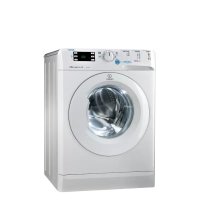
XWE61451WEU - Washing machine INDESIT - Free user manual and instructions
Find the device manual for free XWE61451WEU INDESIT in PDF.



| Product Type | Washing Machine |
| Brand | Indesit |
| Model | XWE61451WEU |
| Dimensions (W x H x D) | 59.5 cm x 85 cm x 54 cm |
| Maximum Capacity | 6 kg |
| Maximum Spin Speed | 1400 rpm |
| Water Pressure | 0.05 - 1 MPa (0.5 - 10 bar) |
| Drum Capacity | 52 liters |
| Wash Programs | 14 programs including Sportswear, Dark, Anti-odor, Delicates, Wool, Duvet, Cotton, Synthetics, Rapid, etc. |
| Options | Rapid, End of rapid cycle, Anti-stain, Delayed start, Temperature and spin control |
| Push & Wash Function | Rapid wash at 30°C, 1200 rpm, max load 3.5 kg |
| Automatic Cleaning | AUTO CLEAN program (every 40 cycles) |
| Child Safety | Door safety lock |
| Noise Level | Not specified in the manual |
| Energy consumption (program 8, 60°C) | 1.05 kWh |
| Standby Consumption | 0.5 W (off-mode), 8 W (left-on) |
| Power Supply | See rating plate (230V typical) |
| Water Connection | 3/4 gas hose, pressure 0.05-1 MPa |
| Drain Connection | Height 65-100 cm, max hose length 150 cm (extension not recommended) |
| Weight | Not specified in the manual |
| Maintenance | Exterior cleaning with damp cloth, cleaning of drawer, pump, filter |
| Manual Door Opening | Possible in case of failure (procedure described) |
| Disposal | Compliant with WEEE Directive 2012/19/EU - separate collection |
| Manual Languages | FR, DE, EN, NL, PL, RO |
Frequently Asked Questions - XWE61451WEU INDESIT
User questions about XWE61451WEU INDESIT
0 question about this device. Answer the ones you know or ask your own.
Ask a new question about this device
Download the instructions for your Washing machine in PDF format for free! Find your manual XWE61451WEU - INDESIT and take your electronic device back in hand. On this page are published all the documents necessary for the use of your device. XWE61451WEU by INDESIT.
USER MANUAL XWE61451WEU INDESIT
Unpacking and levelling
Connecting the electricity and water supplies
The first wash cycle
Technical data
Care and maintenance, 4
Cutting off the water and electricity supplies
Cleaning the washing machine
Cleaning the detergent dispenser drawer
Caring for the door and drum of your appliance
Cleaning the pump
Checking the water inlet hose
Precautions and tips, 5
General safety
Disposal
Opening the porthole door manually
Description of the washing machine, 6-7
Control panel
Display
Running a wash cycle, 8
Wash cycles and options, 9-10
Table of wash cycles
Wash options
Push & Wash
Detergents and laundry, 11-12
Detergent dispenser drawer
Bleach cycle
Preparing the laundry
Special wash cycles
Load balancing system
Troubleshooting, 13
Service, 14

INDESIT
! This instruction manual should be kept in a safe place for future reference. If the washing machine is sold, transferred or moved, make sure that the instruction manual remains with the machine so that the new owner is able to familiarise himself/ herself with its operation and features.
! Read these instructions carefully: they contain vital information relating to the safe installation and operation of the appliance.
Unpacking and levelling
Unpacking
- Remove the washing machine from its packaging
- Make sure that the washing machine has not been damaged during the transportation process. If it has been damaged, contact the retailer and do not proceed any further with the installation process.
-
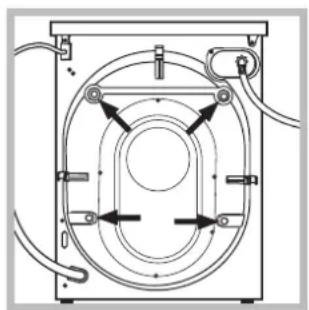
Remove the 4 protective screws (used during transportation) and the rubber washer with the corresponding spacer, located on the rear part of the appliance (see figure).
-
Close off the holes using the plastic plugs provided.
- Keep all the parts in a safe place: you will need them again if the washing machine needs to be moved to another location.
! Packaging materials should not be used as toys for children.
Levelling
- Install the washing machine on a flat sturdy floor, without resting it up against walls, furniture cabinets or anything else.
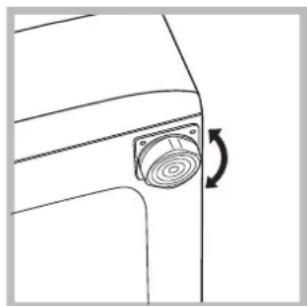
not exceed 2^ .
- If the floor is not perfectly level, compensate for any unevenness by tightening or loosening the adjustable front feet (see figure); the angle of inclination, measured in relation to the worktop, must
Levelling the machine correctly will provide it with stability, help to avoid vibrations and excessive noise and prevent it from shifting while it is operating. If it is placed on carpet or a rug, adjust the feet in such a way as to allow a sufficient ventilation space underneath the washing machine.
Connecting the electricity and water supplies
Connecting the water inlet hose
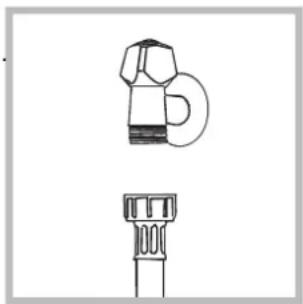
- Connect the supply pipe by screwing it to a cold water tap using a 3/4 gas threaded connection (see figure). Before performing the connection, allow the water to run freely until it is perfectly clear.
-
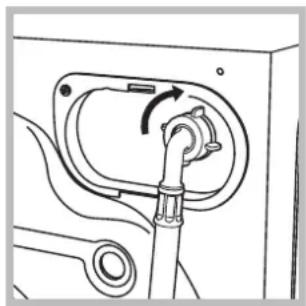
Connect the inlet hose to the washing machine by screwing it onto the corresponding water inlet of the appliance, which is situated on the top right-hand side of the rear part of the appliance (see figure).
-
Make sure that the hose is not folded over or bent.
! The water pressure at the tap must fall within the values indicated in the Technical details table (see next page).
! If the inlet hose is not long enough, contact a specialised shop or an authorised technician.
! Never use second-hand hoses.
! Use the ones supplied with the machine.
Connecting the drain hose
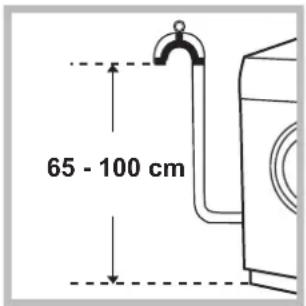
Connect the drain hose, without bending it, to a drainage duct or a wall drain located at a height between 65 and 100cm from the floor;
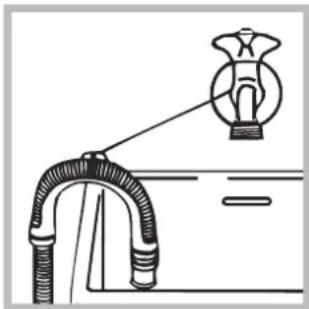
alternatively, rest it on the side of a washbasin or bathtub, fastening the duct supplied to the tap (see figure). The free end of the hose should not be underwater.
! We advise against the use of hose extensions; if it is absolutely necessary, the extension must have the same diameter as the original hose and must not exceed 150 cm in length.
Electrical connections
Before plugging the appliance into the electricity socket, make sure that:
- the socket is earthed and complies with all applicable laws;
- the socket is able to withstand the maximum power load of the appliance as indicated in the Technical data table (see opposite);
- the power supply voltage falls within the values indicated in the Technical data table (see opposite);
- the socket is compatible with the plug of the washing machine. If this is not the case, replace the socket or the plug.
! The washing machine must not be installed outdoors, even in covered areas. It is extremely dangerous to leave the appliance exposed to rain, storms and other weather conditions.
When the washing machine has been installed, the electricity socket must be within easy reach.
! Do not use extension cords or multiple sockets.
The cable should not be bent or compressed.
The power supply cable must only be replaced by authorised technicians.
Warning! The company shall not be held responsible in the event that these regulations are not respected.
The first wash cycle
Once the appliance has been installed, and before you use it for the first time, run a wash cycle with detergent and no laundry, using the wash cycle "Auto Clean" (see "Cleaning the washing machine").
| Technical data | |
| Model | XWE 61451 |
| Dimensions | width 59.5 cm height 85 cm depth 54 cm |
| Capacity | from 1 to 6 kg |
| Electrical connections | please refer to the technical data plate fixed to the machine |
| Water connections | maximum pressure 1 MPa (10 bar) minimum pressure 0.05 MPa (0.5 bar) drum capacity 52 litres |
| Spin speed | up to 1400 rotations per minu |
| Test wash cycles in accordance with directives 1061/2010 and 1015/2010 | Programme 8: Cotton Standard 60°. Programme 9: Cotton Standard 40°. |
| CE | This appliance conforms to the following EC Directives: - 2004/108/EC (Electromagnetic Compatibility) - 2006/95/EC (Low Voltage) - 2012/19/EU |
Care and maintenance
GB
Cutting off the water and electricity supplies
- Turn off the water tap after every wash cycle. This will limit wear on the hydraulic system inside the washing machine and help to prevent leaks.
- Unplug the washing machine when cleaning it and during all maintenance work.
Cleaning the washing machine
- The outer parts and rubber components of the appliance can be cleaned using a soft cloth soaked in lukewarm soapy water. Do not use solvents or abrasives.
- The washing machine has a "Auto Clean" programme for its internal parts that must be run with no load in the drum.
For maximum performance you may want to use either the detergent (i.e. a quantity 10% the quantity specified for lightly-soiled garments) or special additives to clean the washing machine. We recommend running a cleaning programme every 40 wash cycles.
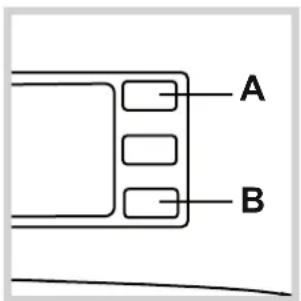
To start the programme press buttons A and
B simultaneously for 5 seconds (see figure). The programme will start automatically and will last approximately 70 minutes. To stop the cycle press the START/PAUSE button.
Cleaning the detergent dispenser. dryer
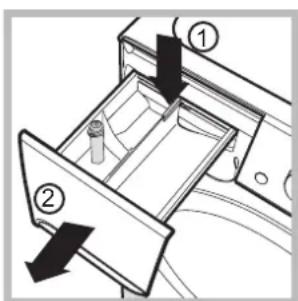
To remove the drawer, press lever (1) and pull the drawer outwards (2) (see figure).
Wash it under running water; this procedure should be repeated frequently.
Caring for the door and drum of your appliance
- Always leave the porthole door ajar in order to prevent unpleasant odours from forming.
Cleaning the pump
The washing machine is fitted with a self-cleaning pump which does not require any maintenance. Sometimes, small items (such as coins or buttons) may fall into the protective pre-chamber at the base of the pump.
! Make sure the wash cycle has finished and unplug the appliance.
To access the pre-chamber:
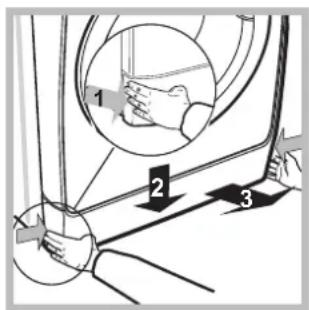
- Take off the cover panel on the front of the machine by first pressing it in the centre and then pushing downwards on both sides until you can remove it (see figures).
-
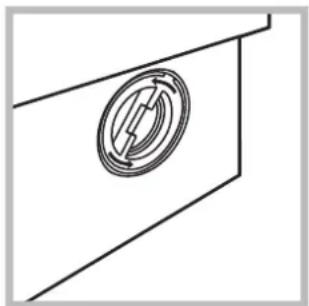
Unscrew the lid by rotating it anticlockwise (see figure): a little water may trickle out. This is perfectly normal.
-
Clean the inside thoroughly.
- Screw the lid back on.
- Reposition the panel, making sure the hooks are securely in place before you push it onto the appliance.
Checking the water inlet hose
Check the inlet hose at least once a year. If there are any cracks, it should be replaced immediately: during the wash cycles, water pressure is very strong and a cracked hose could easily split open.
! Never use second-hand hoses.
This washing machine was designed and constructed in accordance with international safety regulations. The following information is provided for safety reasons and must therefore be read carefully.
General safety
- This appliance was designed for domestic use only.
- This appliance can be used by children aged from 8 years and above and persons with reduced physical, sensory or mental capabilities or lack of experience and knowledge if they have been given supervision or instruction concerning use of the appliance in a safe way and understand the hazards involved. Children shall not play with the appliance. Cleaning and user maintenance shall not be made by children without supervision.
- The washing machine must only be used by adults, in accordance with the instructions provided in this manual.
- Do not touch the machine when barefoot or with wet or damp hands or feet.
- Do not pull on the power supply cable when unplugging the appliance from the electricity socket. Hold the plug and pull.
- Do not open the detergent dispenser drawer while the machine is in operation.
- Do not touch the drained water as it may reach extremely high temperatures.
- Never force the porthole door. This could damage the safety lock mechanism designed to prevent accidental opening.
- If the appliance breaks down, do not under any circumstances access the internal mechanisms in an attempt to repair it yourself.
- Always keep children well away from the appliance while it is operating.
- The door can become quite hot during the wash cycle.
- If the appliance has to be moved, work in a group of two or three people and handle it with the utmost care. Never try to do this alone, because the appliance is very heavy.
- Before loading laundry into the washing machine, make sure the drum is empty.
Disposal
- Disposing of the packaging materials: observe local regulations so that the packaging may be re-used.
- The European Directive 2012/19/EU on Waste Electrical and Electronic Equipment, requires that old household electrical appliances must not be disposed of in the normal unsorted municipal waste stream. Old appliances must be collected
separately in order to optimise the recovery and recycling of the materials they contain and reduce the impact on human health and the environment. The crossed out "wheeled bin" symbol on the product reminds you of your obligation, that when you dispose of the appliance it must be separately collected.
Consumers should contact their local authority or retailer for information concerning the correct disposal of their old appliance.
Opening the porthole door manually
In the event that it is not possible to open the porthole door due to a powercut, and if you wish to remove the laundry, proceed as follows:
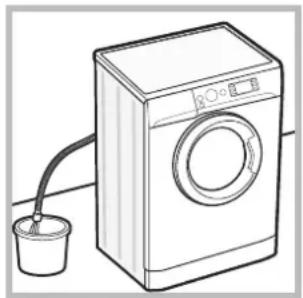
- remove the plug from the electrical socket.
- make sure the water level inside the machine is lower than the door opening; if it is not, remove excess water using the drain hose, collecting it in a bucket as indicated in the figure.
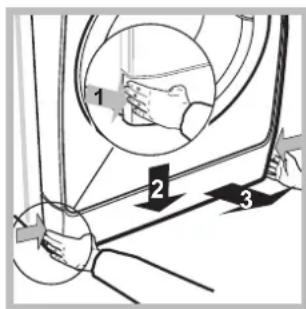
- remove the cover panel on the lower front part of the washing machine (see figure).
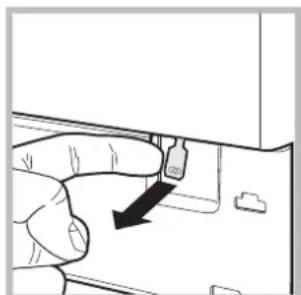
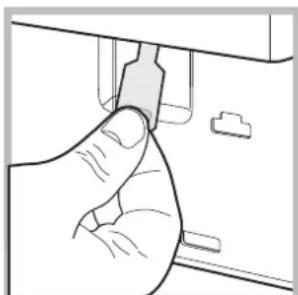
- pull outwards using the tab as indicated in the figure, until the plastic tie-rod is freed from its stop position; pull downwards and open the door at the same time.
- reposition the panel, making sure the hooks are securely in place before you push it onto the appliance.
Description of the washing machine
GB
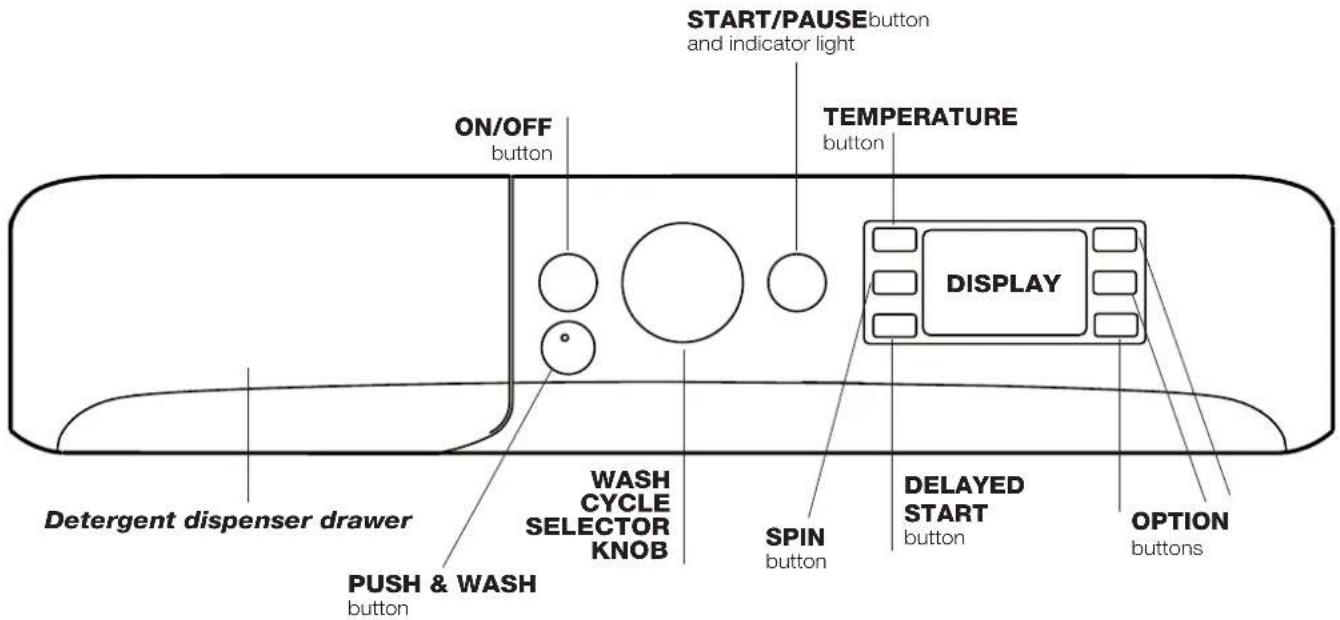
Control panel
Detergent dispenser drawer: used to dispense detergents and washing additives (see "Detergents and laundry").
ON/OFF button: press this briefly to switch the machine on or off. The START/PAUSE indicator light which flashes slowly in a green colour shows that the machine is switched on. To switch off the washing machine during the wash cycle, press and hold the button for approximately 3 seconds; if the button is pressed briefly or accidentally the machine will not switch off.
If the machine is switched off during a wash cycle, this wash cycle will be cancelled.
PUSH & WASH button: (see "Wash cycles and options").
WASH CYCLE SELECTOR KNOB: used to set the desired wash cycle (see "Table of wash cycles").
OPTION buttons: press to select the available options. The indicator light corresponding to the selected option will remain lit.
TEMPERATURE button: press to reduce or completely exclude the temperature; the value appears on the display.
SPIN button: press to reduce or completely exclude the spin cycle; the value appears on the display.
DELAYED START Button: press to set a delayed start for the selected wash cycle; the delay period appears on the display.
START/PAUSE button and indicator light: when the green indicator light flashes slowly, press the button to start a wash cycle. Once the cycle has begun the indicator light will remain lit in a fixed manner. To pause the wash cycle, press the button again; the indicator light will flash in an amber colour. If the symbol is not illuminated, the door may be opened. To start the wash cycle from the point at which it was interrupted, press the button again.
Standby mode
This washing machine, in compliance with new energy saving regulations, is fitted with an automatic standby system which is enabled after about 30 minutes if no activity is detected. Press the ON-OFF button briefly and wait for the machine to start up again.
Consumption in off-mode: 0,5 W
Consumption in Left-on: 8 W
Display

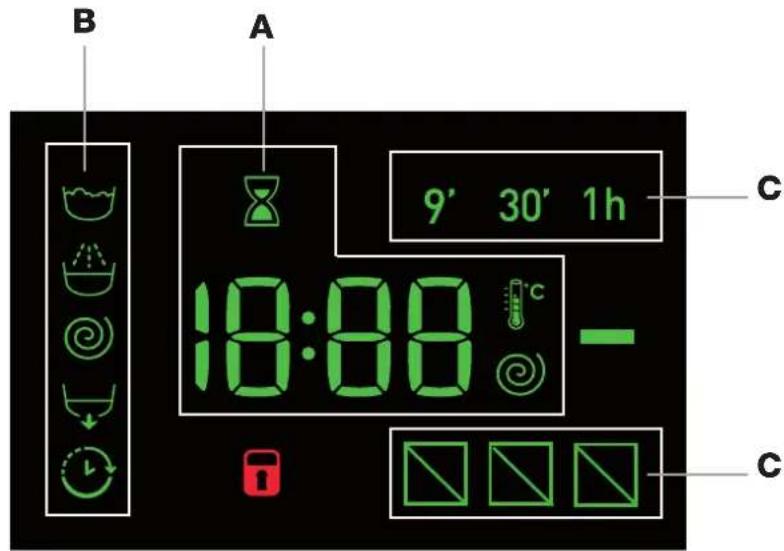
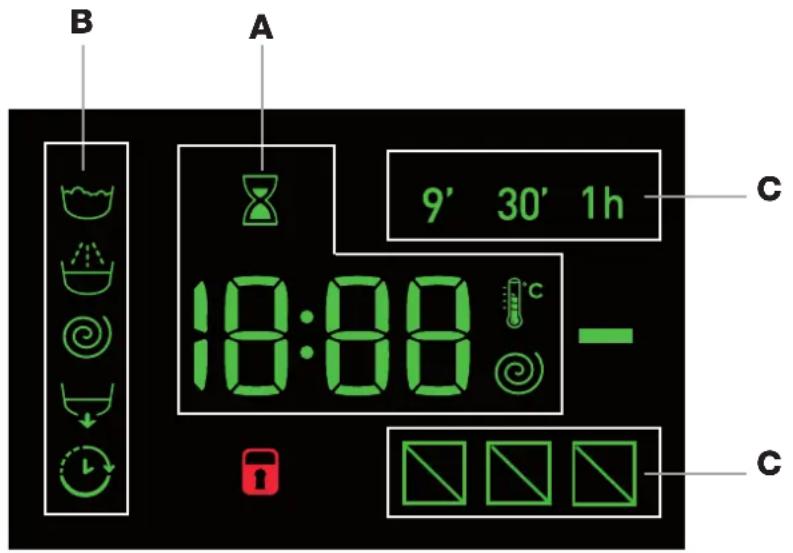
The display is useful when programming the machine and provides a great deal of information.
The duration of the available wash cycles and the remaining time of a running cycle appear in section A; if the DELAYED START option has been set, the countdown to the start of the selected wash cycle will appear.
Pressing the corresponding button allows you to view the maximum spin speed and temperature values attained by the machine during the set wash cycle, or the values selected most recently, if these are compatible with the set wash cycle.
The hour-glass flashes while the machine processes the data on the basis of the selected programme. After a maximum of 10 minutes, the icon remains lit in a fixed manner and the final amount of time remaining is displayed. The hour-glass icon will then switch off approximately 1 minute after the final amount of time remaining has appeared.
The "wash cycle phases" corresponding to the selected wash cycle and the "wash cycle phase" of the running wash cycle appear in section B:
Main wash
Rinse
Spin
Drain
The "delay" symbol when lit, indicates that the set "delayed start" value has appeared on the display.
There are three levels in section C concerning the washing options.
DOOR LOCKED indicator light:
The lit symbol indicates that the door is locked. To prevent any damage, wait until the symbol turns off before opening the door.
To open the door while a cycle is in progress, press the START/PAUSE button; if the DOOR LOCKED symbol is switched off the door may be opened.
Rapid programming
3. CLOSE THE DOOR.
- LOAD THE LAUNDRY. Open the porthole door. Load the laundry, making sure you do not exceed the maximum load value indicated in the table of programmes and wash cycles on the following page.
- ADD THE DETERGENT. Pull out the detergent dispenser drawer and pour the detergent into the relevant compartments as described in "Detergents and laundry".
- Press the "PUSH & WASH" button to start the wash programme.
Traditional programming
4. CLOSE THE DOOR.
- SWITCH THE MACHINE ON. Press the button; the START/PAUSE indicator light will flash slowly in a green colour.
- LOAD THE LAUNDRY. Open the porthole door. Load the laundry, making sure you do not exceed the maximum load value indicated in the table of programmes and wash cycles on the following page.
- ADD THE DETERGENT. Pull out the detergent dispenser drawer and pour the detergent into the relevant compartments as described in "Detergents and laundry".
- SELECT THE WASH CYCLE. Use the WASH CYCLE SELECTOR knob to select the desired wash cycle. A temperature and spin speed is set for each wash cycle; these values may be adjusted. The duration of the cycle will appear on the display.
- CUSTOMISE THE WASH CYCLE. Use the relevant buttons:
the temperature and/or spin
speed. The machine automatically displays the maximum temperature and spin speed values set for the selected cycle, or the most recently-used settings if they are compatible with the selected cycle. The temperature can be decreased by pressing the button, until the cold wash "OFF" setting is reached. The spin speed may be progressively reduced by pressing the button, until it is completely excluded (the "OFF" setting). If these buttons are pressed again, the maximum values are restored.
!Exception:if the 8 programme is selected, the temperature can be increased up to a value of 90^
Setting a delayed start.
To set a delayed start for the selected cycle, press the corresponding button repeatedly until the required delay period has been reached. When this option has been activated, the symbol lights up on the display. To remove the delayed start setting, press the button until the text "OFF" appears on the display.
Modify the cycle settings.
- Press the button to enable the option; the indicator light corresponding to the button will switch on.
- Press the button again to disable the option; the indicator light will switch off.
If the selected option is not compatible with the set wash cycle, the indicator light will flash and the option will not be activated.
If the selected option is not compatible with another previously selected option, the indicator light will flash accompanied by a buzzer (3 beeps), and only the latter option will be activated; the indicator light corresponding to the activated option will turn on.
! The options may affect the recommended load value and/or the duration of the cycle.
- START THE WASH CYCLE. Press the START/ PAUSE button. The corresponding indicator light will turn green, remaining lit in a fixed manner, and the door will be locked (the DOOR LOCKED symbol will be lit). To change a wash cycle while it is in progress, pause the washing machine using the START/PAUSE button (the START/PAUSE indicator light will flash slowly in an amber colour); then select the desired cycle and press the START/PAUSE button again.
To open the door while a cycle is in progress, press the START/PAUSE button; if the DOOR LOCKED symbol is switched off the door may be opened. Press the START/PAUSE button again to restart the wash cycle from the point at which it was interrupted.
- THE END OF THE WASH CYCLE. This will be indicated by the text "END" on the display; when the DOOR LOCKED symbol switches off the door may be opened. Open the door, unload the laundry and switch off the machine.
If you wish to cancel a cycle which has already begun, press and hold the button. The cycle will be stopped and the machine will switch off.
Table of wash cycles
| Wash cycles | Description of the wash cycle | Max.temp.(°C) | Max.speed(rpm) | Detergents | Max. load (kg) | Residual dampness % | Energy consumption kWh | Total water It | Cycle duration | |||
| Prewash | Wash | Fabric softener | Bleach | |||||||||
| Special | ||||||||||||
| 1 | Sport | 30° 600 - | ● | ● | -3 | 5 - - - | 55' | |||||
| 2 | Dark | 30° 800 - | ● | ● | -4 | - - - | 70' | |||||
| 3 | Anti-odour (Cotton) 60° 1000 - | ● | ● | -3 | 5 - - - | 110' | ||||||
| 3 | Anti-odour (Synthetic) 40° 1000 - | ● | ● | -3 | 5 - - - | 100' | ||||||
| 4 | Delicate | 30° | 0 - | ● | ● | -1 | - - - | 80' | ||||
| 5 | Wool: for wool, cashmere, etc. | 40° 800 - | ● | ● | -1 | 5 - - - | - | 70' | ||||
| 6 | Duvet: for down-stuffed garments. | 30° 1000 - | ● | ● | -2 | - - - | - | 110' | ||||
| Standard | ||||||||||||
| 7 | Cottons with Pre-wash: extremely soiled whites. | 90° 1400 - | ● | ● | ● | - | 6 | 53 | 2,15 | 77 | 170' | |
| 8 | <60°C Cotton Standard 60° (1): heavily soiled whites and resistant colours. | 60° (Max. 90°) | 1400 - | ● | ● | - | 6 | 53 | 1,05 | 50 | 195' | |
| 9 | <40°C Cotton Standard 40° (2): lightly soiled whites and delicate colours. | 40° 1400 - | ● | ● | - | 6 | 53 | 0,86 | 69 | 180' | ||
| 10 | Synthetic: heavily soiled resistant colours. | 60° 800 - | ● | ● | -3 | 5 46 | 0,79 | 46 | 110' | |||
| 10 | Synthetic (3): lightly soiled resistant colours. | 40° 800 - | ● | ● | -3 | 5 46 | 0,56 | 46 | 100' | |||
| 11 | Coloured | 40° 1400 - | ● | ● | - | 6 | 53 | 0,89 | 70 | 100' | ||
| Eco & Rapid | ||||||||||||
| 12 | Cotton Standard 20°: lightly soiled whites and delicate colours. | 20° | 1400 - | - | ● | ● | -6 | - - - | - | 170' | ||
| 13 | Eco Synthetic | 20° 800 - | ● | ● | -6 | - - - | - | 120' | ||||
| 14 | Rapid | - | 800 - | - | ● | -1 | 5 - - - | - | 9' | |||
| 14 | Rapid | 30° | 800 - | ● | ● | - | 3 | 80 | 0,22 | 34 | 30' | |
| 14 | Rapid | 60° | 1000 - | ● | ● | -6 | - - - | - | 60' | |||
| Partials | ||||||||||||
| Rinse/Bleach | - | 1400 - | - | ● | ● | 6 - - - | - | 50' | ||||
| Spin + Drain | - | 1400 - | - | - | - | - | 6 | - | - | - | 25' | |
The length of cycle shown on the display or in this booklet is an estimation only and is calculated assuming standard working conditions. The actual duration can vary according to factors such as water temperature and pressure, the amount of detergent used, the amount and type of load inserted, load balancing and any wash options selected.
1) Test wash cycle in compliance with directive 1061/2010: set wash cycle 8 with a temperature of 60^ .
This cycle is designed for cotton loads with a normal soil level and is the most efficient in terms of both electricity and water consumption; it should be used for garments which can be washed at 60^ . The actual washing temperature may differ from the indicated value.
2) Test wash cycle in compliance with directive 1061/2010: set wash cycle 9 with a temperature of 40^ .
This cycle is designed for cotton loads with a normal soil level and is the most efficient in terms of both electricity and water consumption; it should be used for garments which can be washed at 40^ . The actual washing temperature may differ from the indicated value.
For all Test Institutes:
2) Long wash cycle for cottons: set wash cycle 9 with a temperature of 40^ .
3) Synthetic program along: set wash cycle 10 with a temperature of 40^ .
Wash options

Rapid
When this button is pressed the first time, the 9' icon will light up, when pressed the second time the 30' icon lights up and the third time the 1h icon lights up. When pressed the fourth time the 9' icon lights up again.
It cannot be used in conjunction with wash cycles 1-2-3-4-5-6-7-8-9-10-11-12-13.
Fast Forward
During a wash programme and under certain conditions, pressing this button allows for ending the wash programme after only 20^ if necessary, by performing a brief rinse cycle followed by a spin cycle at maximum 800 rpm or lower, if reduced manually during the programme customisation phase. In this case, washing and rinsing performance will be reduced. After pressing the button, the relative indicator light turns on together with the indicator light of the rinse phase. If the selected temperature is equal to 40^ and/or the button is pressed during the initial phase of the programme, the "Fast Forward" option lasts
longer so that the detergent can dissolve properly and avoid damaging the fabrics. In this case, the rinse phase indicator light flashes while the wash indicator light remains fixed until the necessary activation conditions are fulfilled. If less than 20' remain of the wash programme, the option will be disabled.
It cannot be used in conjunction with wash cycles 2-4-5-6-14

Stain removal
This option allows for selecting the type of dirt so as to optimally adjust the cycle for removing the stains. The following types of dirt can be selected:
- Food, for stains caused by foodstuffs and beverages, for example.
- Work, for grease and ink stains, for example.
- Outdoor, for mud and grass stains, for example.
! The wash cycle duration varies according to the type of selected dirt.
It cannot be used in conjunction with wash cycles 1-2-3-4-5-6-7-11-12-13-14
Push & Wash
This function allows for starting a wash cycle even when the machine is switched off without having to press the ON/OFF button in advance, or after switching on the machine, without having activated any button and/or selector (otherwise, the Push & Wash function will be deactivated). To start the Push & Wash cycle press and hold the relative button for 2 seconds. The lit indicator light indicates that the cycle has started. This wash cycle is ideal for cotton or synthetic fabrics, as it washes at a temperature of 30^ and a maximum spin speed of 1200 rpm. Maximum load 3,5 kg. (Cycle duration 50' ).
How does it work?
- Load the laundry (cotton and/or synthetic garments) and close the door.
- Pour the detergent and additives.
- Start the programme by pressing and holding the Push & Wash button for 2 seconds. The relative indicator light turns green and the door will lock (the DOOR LOCKED symbol turns on).
N.B.: starting the wash cycle through the Push & Wash button activates an automatic non-customisable cycle recommended for cotton and synthetic fabrics. This programme does not allow for setting any additional options. To open the door while an automatic cycle is under way, press the START/PAUSE button; if the DOOR LOCKED symbol is switched off the door may be opened. Press the START/PAUSE button again to restart the wash cycle from the point at which it was interrupted.
- Once the programme is finished, the END indicator light turns on.
Detergent dispenser drawer
Successful washing results also depend on the correct dose of detergent: adding too much detergent will not necessarily result in a more efficient wash, and may in fact cause build up on the inside of your appliance and contribute to environmental pollution.
! Do not use hand washing detergents because these create too much foam.
Use powder detergent for white cotton garments, for prewashing, and for washing at temperatures over 60^
! Follow the instructions given on the detergent packaging.
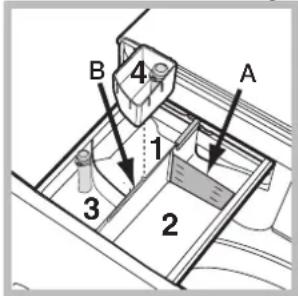
Open the detergent dispenser drawer and pour in the detergent or washing additive, as follows.
Compartment 1: Pre-wash detergent (powder)
Before pouring in the detergent, make sure that extra compartment 4 has been removed.
Compartment 2: Washing detergent (powder or liquid)
If liquid detergent is used, it is recommended that the removable plastic partition A (supplied) be used for proper dosage. If powder detergent is used, place the partition into slot B.
Compartment 3:Additives (fabric softeners, etc.)
The fabric softener must not exceed the "max" level indicated on the central pin.
Extra compartment 4: Bleach
Bleach cycle
Insert the additional compartment 4 (provided) into compartment 1. In pouring the bleach do not exceed the "max" level indicated on the central pin.
Perform bleaching by pouring the bleach into additional compartment 4 and set the programme
! Traditional bleach should be used on resistant white fabrics, and delicate bleach for coloured and synthetics fabrics and for wool.
Preparing the laundry
-
Divide the laundry according to:
-
the type of fabric/the symbol on the label
- the colours: separate coloured garments from whites.
- Empty all garment pockets and check the buttons.
- Do not exceed the values listed in the "Table of wash cycles", which refer to the weight of the laundry when dry.
How much does your laundry weigh?
1 sheet 400-500 g
1 pillow case 150-200 g
1 tablecloth 400-500 g
1 bathrobe 900-1.200 g
1 towel 150-250 g
Special wash cycles
Sport (programme 1) is designed for washing lightly soiled sports clothing (tracksuits, shorts, etc.); for best results, we recommend not exceeding the maximum load indicated in the "Table of wash cycles". We recommend using liquid detergent, and adding the amount suitable for a half-load.
Dark: use programme 2 to wash dark-coloured garments. This programme is designed to maintain dark colours over time. We recommend using a liquid detergent for the best results when washing dark-coloured garments.
Anti-odour: use programme 3 for washing garments with bad odours (e.g. smoke, sweat, fried food). The programme is designed to remove bad odours while preserving the fabric fibres. Synthetics fabrics or mixed loads should be washed at 40^ , and resistant cotton fabrics at 60^ .
Delicate: use programme 4 to wash very delicate garments. It is advisable to turn the garments inside out before washing them. For best results, use liquid detergent on delicate garments.
Wool: the wool wash programme of this machine has been tested and approved by The Woolmark Company for the washing of wool containing garments labelled as "hand wash" provided that the garments are washed according to the instructions on the garment label and those issued by the manufacturer of this washing machine.
(M1126)


In UK, Eire, Hong Kong and India the Woolmark trade mark is a Certification trade mark.
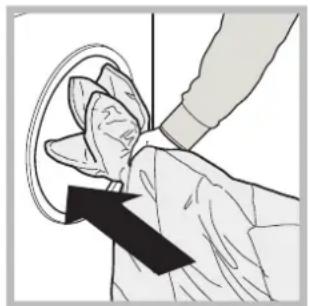
Duvet: to wash single duvets (the weight of which should not exceed 2kg ), cushions or clothes padded with goose down such as puffa jackets, use the special wash programme number 6. We recommend that duvets are placed in the drum with their edges folded inwards (see figure) and that no more than 3/4 of the total volume of the drum is used. To achieve the best results, we recommend that a liquid detergent is used and placed inside the detergent dispenser drawer.
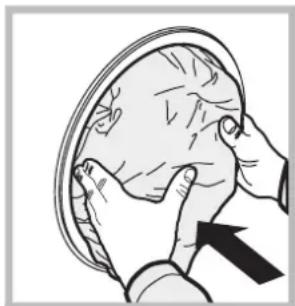
Coloured: use this programme 11 to wash bright coloured clothes. The programme is designed to maintain bright colours over time.
Cotton Standard 20^ (programme 12) ideal for lightly soiled cotton loads. The effective performance levels achieved at cold temperatures, which are comparable to washing at 40^ , are guaranteed by a mechanical action which operates at varying speed, with repeated and frequent peaks.
Eco Synthetic (programme 13) ideal for mixed loads (cotton and synthetics) with a normal soil level. The effective performance levels achieved at cold temperatures are guaranteed by a mechanical action which operates at varying speed, across set average intervals.
Rapid (programme 14) allows for varying the garment treatment duration from 9^ to 1h . Pressing the corresponding "Rapid" button allows for varying the cycle duration between 9^ (refresh), 30^ (wash), 1h (wash). The 9^ cycle refreshes garments using fabric softener only; it is advisable not to add any detergent into the machine. The 30^ programme is designed to wash lightly soiled garments at 30^ (excluding wool and silk) with a 3kg maximum load in a short time: it only lasts 30 minutes and allows for saving time and energy. The "1h" cycle is designed to wash moderately soiled resistant cotton garments at 60^ in an hour, with good washing performance. For synthetic or mixed garments, we recommend lowering the temperature down to 40^ .
Load balancing system
Before every spin cycle, to avoid excessive vibrations before every spin and to distribute the load in a uniform manner, the drum rotates continuously at a speed which is slightly greater than the washing rotation speed. If, after several attempts, the load is not balanced correctly, the machine spins at a reduced spin speed. If the load is excessively unbalanced, the washing machine performs the distribution process instead of spinning. To encourage improved load distribution and balance, we recommend small and large garments are mixed in the load.
Your washing machine could occasionally fail to work. Before contacting the Technical Assistance Service (see "Service"), make sure that the problem cannot be solved easily using the following list.
Problem:
The washing machine does not switch on.
The wash cycle does not start.
The washing machine does not fill with water (the text "H2O" on the display).
The washing machine continuously takes in and drains water.
The washing machine does not drain or spin.
The washing machine vibrates a lot during the spin cycle.
The washing machine leaks.
The "option" and START/PAUSE indicator lights flash rapidly and an error code appears on the display (e.g.: F-01, F-..).
There is too much foam.
Push & Wash does not activate.
The programme lasts a lot less than expected.
Possible causes / Solutions:
-
The appliance is not plugged into the socket fully, or not enough to make contact.
There is no power in the house. -
The washing machine door is not closed properly.
- The ON/OFF button has not been pressed.
- The START/PAUSE button has not been pressed.
- The water tap has not been opened.
-
A delayed start has been set.
-
The water inlet hose is not connected to the tap.
The hose is bent.
The water tap has not been opened. - There is no water supply in the house.
The pressure is too low. -
The START/PAUSE button has not been pressed.
-
The drain hose is not fitted at a height between 65 and 100cm from the floor (see "Installation").
- The free end of the hose is under water (see "Installation").
- The wall drainage system is not fitted with a breather pipe.
If the problem persists even after these checks, turn off the water tap, switch the appliance off and contact the Technical Assistance Service. If the dwelling is on one of the upper floors of a building, there may be problems relating to water drainage, causing the washing machine to fill with water and drain continuously. Special antidraining valves are available in shops and help to prevent this inconvenience.
- The wash cycle does not include draining: some cycles require the draining process to be enabled manually.
-
The drain hose is bent (see "Installation").
The drainage duct is clogged. -
The drum was not unlocked correctly during installation (see "Installation").
- The washing machine is not level (see "Installation").
-
The washing machine is trapped between cabinets and walls (see "Installation").
-
The water inlet hose is not screwed on properly (see "Installation").
- The detergent dispenser drawer is blocked (for cleaning instructions, see "Care and maintenance").
-
The drain hose is not fixed properly (see "Installation").
-
Switch off the machine and unplug it, wait for approximately 1 minute and then switch it back on again.
If the problem persists, contact the Technical Assistance Service.
- The detergent is not suitable for machine washing (it should display the text "for washing machines" or "hand and machine wash", or the like).
-
Too much detergent was used.
-
After switching on the machine a control other than Push & Wash was activated. Switch the machine off and press the Push & Wash button.
The "Fast Forward" option was activated.
Before contacting the Technical Assistance Service:
- Check whether you can solve the problem alone (see "Troubleshooting").
- Restart the wash cycle to check whether the problem has been solved.
- If this is not the case, contact an authorised Technical Assistance Centre.
! Always request the assistance of authorised technicians.
Have the following information to hand:
the type of problem;
the appliance model (Mod.);
the serial number (S/N).
This information can be found on the data plate applied to the rear of the washing machine, and can also be found on the front of the appliance by opening the door.

Français
Sommaire
Installation, 16-17
Traditionele programming
Modalitatea de stand by
Aceastama sina de spalat rufe, conform noilor norme legate de economia de curent electric, este dotata cu un system de oprire automat (stand-by) care intrainfunctiune dupa 30 minute de neutilizare. Apasati scurt tasta ON/OFF si asteptati repunerea in functiune amasinii.
Consum in off-mode: 0,5 W
Consum in Left-on: 8 W
Display
RO
Ecranul esteutilpentruaprogramamaşina sifaurniza numeroase informatii.
sertar additional 4: Decolorant
Ciclul de albire
- Care and maintenance, 4
- Precautions and tips, 5
- Description of the washing machine, 6-7
- Running a wash cycle, 8
- Wash cycles and options, 9-10
- Detergents and laundry, 11-12
- Troubleshooting, 13
- Unpacking and levelling
- Unpacking
- Levelling
- Connecting the electricity and water supplies
- Connecting the water inlet hose
- Connecting the drain hose
- Electrical connections
- The first wash cycle
- Care and maintenance
- GB
- Cutting off the water and electricity supplies
- Cleaning the washing machine
- Cleaning the detergent dispenser. dryer
- Caring for the door and drum of your appliance
- Cleaning the pump
- Checking the water inlet hose
- General safety
- Disposal
- Opening the porthole door manually
- Description of the washing machine
- Standby mode
- Display
- DOOR LOCKED indicator light:
- Rapid programming
- CLOSE THE DOOR.
- Traditional programming
- CLOSE THE DOOR.
- the temperature and/or spin
- Setting a delayed start.
- Modify the cycle settings.
- 1) Test wash cycle in compliance with directive 1061/2010: set wash cycle 8 with a temperature of 60°C .
- For all Test Institutes:
- Wash options
- Rapid
- Fast Forward
- Stain removal
- Push & Wash
- How does it work?
- Detergent dispenser drawer
- Compartment 1: Pre-wash detergent (powder)
- Compartment 2: Washing detergent (powder or liquid)
- Compartment 3:Additives (fabric softeners, etc.)
- Extra compartment 4: Bleach
- Bleach cycle
- Preparing the laundry
- How much does your laundry weigh?
- Special wash cycles
- Load balancing system
- Problem:
- Possible causes / Solutions:
- Before contacting the Technical Assistance Service:
- Have the following information to hand:
- Sommaire
- Installation, 16-17
- Traditionele programming
- Modalitatea de stand by
- Ciclul de albire
Brand : INDESIT
Model : XWE61451WEU
Category : Washing machine