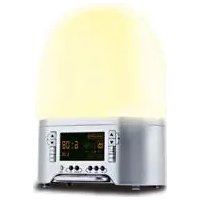
SAC - Light therapy MEDISANA - Free user manual and instructions
Find the device manual for free SAC MEDISANA in PDF.



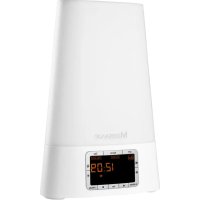
| Product type | Light therapy alarm clock |
| Brand | Medisana |
| Model | SAC |
| Dimensions (L x W x H) | 19 x 13 x 25.5 cm |
| Weight | 770 g |
| Power supply | 230 V~, 50 Hz |
| Maximum power | 10 W |
| Maximum brightness | 300 lumens (at 40 cm) |
| Recommended usage distance | 40 to 50 cm from the head |
| Time accuracy | ± 6 seconds/day (without RDS signal) |
| Alarm functions | FM radio, nature sounds (8 sounds) |
| Number of alarm sounds | 8 nature sounds |
| Number of relaxation colors | 7 colors + automatic cycles |
| Snooze function (Zizz) | Yes, adjustable from 15 to 90 minutes |
| Display type | Digital display with green/yellow backlight |
| Display brightness adjustment | 5-level dimmer (strong/weak green, strong/weak yellow, off) |
| Automatic time update | Via RDS (Radio Data System) |
| Integrated radio | FM with RDS |
| Gradual lighting function (dawn simulation) | Yes, 30 minutes before the alarm |
| Power cord length | 1.95 m |
| Care and cleaning | Antistatic or slightly damp cloth; no harsh chemicals |
| Safety conditions | Do not immerse; use on a stable surface; unplug if damaged |
| Warranty | 3 years |
| EAN code | 40 15588 45100 3 |
| Article number | 45100 |
| Included accessories | Light alarm clock, instruction manual |
| Intended use | Household, indoor dry |
Frequently Asked Questions - SAC MEDISANA
User questions about SAC MEDISANA
0 question about this device. Answer the ones you know or ask your own.
Ask a new question about this device
Download the instructions for your Light therapy in PDF format for free! Find your manual SAC - MEDISANA and take your electronic device back in hand. On this page are published all the documents necessary for the use of your device. SAC by MEDISANA.
USER MANUAL SAC MEDISANA
Please read carefully!
Please fold out this page and leave it folded out for quick reference.
text_image
Labeled diagram of a remote control device with numbered parts and function buttonsCE
DE
1 Leuchtkörper
② Display
4 Light button (light on/off)
⑤ Relax button (set light colour)
6 Zizz button (short time alarm)
7 Demo/Snooze/Quick Check button
8 Off button (deactivate alarm)
9 Alarm button (activate alarm)
10 ▶ button (settings forward)
11 Set button (make/confirm settings)
12 ▶ button (settings backwards)
13 Dimmer button (set display illumination)
14 Sound/Radio button (set radio station/sounds of nature)
15 Set volume
FR
1 Elément lumineux
2 Affichage
natural_image
Simple line icon of an open book with a lowercase 'i' in the center, no text or symbols present.Thank you for your confidence in us and congratulations!
By purchasing the SAC sunrise alarm clock, you have acquired a high-quality product by MEDISANA.
To derive the most success and to enjoy your device for a very long time, we recommend that you read the following information on the use and care of the device carefully.

natural_image
Simple line icon of an open book with a lowercase 'i' in the center, no text or symbols present.IMPORTANT INFORMATION! RETAIN FOR FUTURE USE!
Read the instruction manual carefully before using this device, especially the safety instructions, and keep the instruction manual for future use.
Should you give this device to another person, it is vital that you also pass on these instructions for use.
You will find the following symbols in the operating manual:

This instruction manual belongs to this device. It contains important information about starting up and operation.
Read the instruction manual thoroughly.
Non-observance of these instructions can result in serious injury or damage to the device.

WARNING
These warning notes must be observed to prevent any injury to the user.

CAUTION
These notes must be observed to prevent any damage to the device.

NOTE
These notes give you useful additional information on the installation or operation.

1.1 Safety Information
- Before connecting the device to your power supply, please ensure that the supply voltage stated on the rating plate is compatible with your mains supply.
- Only use this unit according to the intended purpose and as directed in the instructions for use.
- If misused, all guarantee rights shall become null and void.
- The device is designed for use in private households only.
- Do not use the device if it is not working correctly, if it has been dropped or has fallen into water or has been damaged.
- Never touch an appliance that has fallen into water. Unplug the unit from the mains outlet immediately.
- You must not continue to use the unit if the lead or the mains adaptor are damaged.
- Do not use the unit in the vicinity of high-frequency electromagnetic transmitters, as this could damage the functions on the device.
- Do not expose the device to direct sunlight.
- Protect the device from moisture.
- You must never submerge the unit, the lead or the mains adaptor in water or hold them under running water.
- Only handle the mains adaptor when your hands are dry.
- Do not lay the cable near sources of heat or pull it over any sharp edges.
- Never carry, pull or turn the unit by the mains lead and do not let the lead get tangled.
- Protect the device from impact and shocks.
- If a fault occurs, do not attempt to repair the unit yourself. Repairs must only be carried out by an authorized specialist dealer or other suitably qualified personnel.
- Place the device on a solid and flat surface for use, to ensure that it cannot tip over or fall down.
2 Operation
2.1 Items supplied and packaging
Please check first of all that the unit is complete and is not damaged in any way. If in doubt, do not use the appliance. Send it to a service point.
The following parts are included as standard:
• 1 MEDISANA sunrise alarm clock SAC
• 1 Instructions for use
The packaging can be reused or recycled. Please dispose properly of any packaging material no longer required.
If you notice any transport damage during unpacking, please contact your dealer without delay.

WARNING
Please ensure that polybag packing is kept away from reach of children! Risk of suffocation!
2.2 Positioning and setup
- Place the device on a solid and flat surface for use to ensure that it cannot tip over or fall down.
- Position the device about 40 - 50 cm away from your head, for example, on a bedside table.
- Connect the power supply to the power point.

NOTES
Your MEDISANA Sunrise Alarm Clock SAC is equipped with R.D.S. (Radio Data System). The device receives its time information via the R.D.S. signal. If no R.D.S. signal is available, the time is not set automatically.
The abbreviation of the radio station is displayed in letters. If the radio station does not send a signature, only the digital frequency of the radio station is displayed.
The time (12:00) in the display ② starts blinking, the R.D.S icon and the writing TIME SETTING appear on the display to the automatic time setting. After a few minutes, the current time is accepted and displayed on the display. The text SET SUCCESS runs through the bottom of the display. If the radio signal of the R.D.S. sender is not received, the R.D.S. icon disappears after about 60 seconds and the text SET FAIL appears. In this case you set the time manually using the Set button ⑪ and the buttons ⑩ ▶ and ⑫ ▶.
2.3 Button functions
Setting the time and the alarms manually
Press the Set button 11 for about 3 seconds; the time on the display 2 flashes every 0.5 seconds. You can now set the time manually.
Press the buttons 10 ▶ or 12 ▶. Press the Set button 11 again to confirm the time and get to your settings for alarm 1 (AL1) / alarm 2 (AL2) / Zizz (short-time alarm).
Use the buttons 10 ▶ or 12 ▶ to choose the desired alarm and confirm your selection with the Set button 11 (take AL1 for example). Set the alarm time by pressing the buttons 10 ▶ or 12 ▶. Whilst you are setting the alarm, the AL1 icon and alarm time flash every 0.5 seconds. Confirm the set alarm time with the Set button 11. The selection menu for the chosen alarm appears immediately afterwards. The radio (FM) or sound icon appears on the display.
Use the buttons 10 ▶ or 12 ◀ to choose between radio (FM) or sound and confirm your choice by pressing the Set button 11 again.
If you have selected radio (FM) you can use the buttons 10 ▶ or 12 ▶ to choose a radio station with which you would like to be woken up. Again, confirm your selection with the Set button 11.
If you have selected sounds of nature, you can use the buttons 10 or 12 to choose between eight different sounds of nature whereby you hear the sound briefly and a pictogram appears on the display. Again, confirm your selection with the Set button 11.
The setting for the volume follows. On the display 2 the digits under the icon reflect the set volume. Use the buttons 10 ▶ or 12 ▶ to set the desired volume. Press the Set button 11 again to confirm your entry. You can now set the brightness here. On the display the digits under the ★ icon reflect the set brightness. Use the buttons 10 ▶ or 12 ▶ to set the desired brightness. Confirm your selection with the Set button 11 again. If you need only light or sound function, set the other at 0.
If you did not press buttons for 10s during setting, it will quit all setting automatically.
After setting to record your choose, you still need to use Alarm button ⑨ and Zizz button ⑥ to activate the function.
Proceed in the same way to set up alarm 2 (AL2) or Zizz (shot-Time alarm). If an alarm is activated, the buttons for radio 14, light 4 and relax 5 are not available.
Sound/Radio button 14
If you press the Sound/Radio button 14 once, the Sound icon appears, the broadcast signal blinks also. Use 10 ▶ or 12 ▶ to select the sound of your choice. Use the ● buttons 15 ▼ or ▲ to set the desired volume.
If you press the Sound/Radio button 14 a second time, the Radio (FM) icon appears, the broadcast signal blinks also. Use the buttons 10 ▶ or 12 ▶ to choose a radio station. Use the ● buttons 15 ▼ or ▲ to set the desired volume. To press the Sound/Radio button 14 the third time or Off button 8 to quit.
Dimmer button 13
If you press the Dimmer button 13 the display lights up and changes from High green – Low green – High yellow – Low yellow - off. Press the Dimmer button 13 at your brightness and light colour of choice to make your selection.
Relax button 5
Pressing the Relax button 5 allows you to choose from different light settings. If you press the Relax button 5 once you get to option A (relax A), in which the colour of the light changes about every 8 seconds. Red, blue, green and mixtures thereof are displayed in sequence (relax 1 - 7).
If you press the Relax button ⑤ a second time you get to option C (relax C), in which the light color changes automatically according to certain time of day:
0:00 - 4:00 am -> relax 5 = blue-green
4:00 - 8:00 am -> relax 1 = red only
8:00 -12:00 am -> relax 4 = red-blue
12:00 - 16:00 pm -> relax 2 = blue only
16:00 -20:00 pm -> relax 6 = green-red
20:00 -24:00 pm -> relax 3 = green only
By pressing the Relax button 5 several times, you get to the other positions for selecting the colour of the light: Option 1 (relax 1) = only red, option 2 (relax 2) = blue only, option 3 (relax 3) = green only, option 4 (relax 4) = red-blue, option 5 (relax 5) = blue-green, option 6 (relax 6) = green-red, option 7 (relax 7) = red-blue-green. If you press the Relax button 5 a 10th time you quit settings of relax function. You can press Off button 8 any time to quit.
Light button 4
By pressing the Light button ④ you activate the luminous element ①, the ⚙️ icon appears on the display ②. Instead of the time, numbers appear reflecting the level (0 - 20) of brightness. The level of brightness increases in increments from 0 to 20. Press the ⚙️ buttons ③ ▼ or ▲ to adjust the brightness as desired.
If you press the Light button ④ a second time, the light dark down gradually from setting number to 0, and the 📞 on disappears. For reading, we recommend brightness level 20. You can press Off button ⑧ any time to quit.
Alarm button 9
With the Alarm button ⑨ you activate alarm 1 and/or alarm 2. If you press the Alarm button ⑨ once, the AL1 icon appears, and AL1 is activated. If you press the button ⑨ a second time, the AL2 icon appears, and AL2 is activated. If you press the Alarm button ⑨ a third time, both icons AL1 and AL2 appear, and both alarms are activated. The alarm time is displayed. If AL1 and AL2 were set down and have been activated, the time display will show the alarm time which is most close to present time. If you press the button ⑨ a fourth time, the alarm function is turned off.
In setting the alarm time, you have also selected a radio station or sound of nature, a level of brightness for the illumination and a volume. In the last 30 minutes before an activated alarm starts, the brightness slowly adjusts to the brightness set for the alarm time. The volume selected for the alarm time, increases from the start of the alarm (when the alarm time is reached) to the set value within 60 seconds. The regular alarm is only activated, if there are more than 30 minutes between the time when the alarm is set and the time at which the alarm is supposed to be triggered. If there is less than 30 minutes between the time when the alarm is set and the time at which the alarm is supposed to be triggered, the alarm function will start 60 seconds before the setting time.
Off button 8
If you have activated an alarm but wake up before the set time, you can press the Off button 8 to turn off the alarm function. The settings of the alarm function are kept for the next day. If you do not press the Off button 8 e.g. if you wake up before the alarm time and forget to press the Off button 8 the alarm function is turned off automatically after about 30 minutes.
You can use Off button 8 to close any activated function.
Zizz button 6
If you are taking a short break or what to take a little nap, you can set a short-time alarm. Press the Zizz button ⑥, on the display ② the Zizz icon appears. Pressing the Zizz button ⑥ once sets an alarm to go off in 15 minutes. Every time you press the button, the time until the alarm is extended by 15 minutes. The maximum alarm time that can be set for a short-time alarm is 90 minutes. By pressing the Set button ⑪ you confirm your entry and start the countdown to the alarm at the same time.
In the Zizz function, the setting for sound is preset. If you need to change the sound, use Set button 11 to change the setting (see "Setting the time and alarms manually" section, page 11-12).
Demo/Snooze/Quick Check button 7
If you are not using the alarm function, that is, if no alarm was activated by Alarm button ⑨, the button ⑦ can be used for the demo function. Press the Demo button ⑦. The light gets brighter in 5 second intervals (displayed levels of brightness 0 – 20). Following that, four sounds of nature are introduced. The entire demo process takes about one minute.
If an alarm has been set but the alarm is not active, you can use the button ⑦ to check the settings of the alarm function. Press the Quick Check button ⑦, and the entered values appear on the display. Press the button ⑦ again, to end the Quick Check function.
If you have activated an alarm time, the countdown for it has already started but the maximum level of brightness has not been reached, you can use the button ⑦ for the snooze function. Press the Snooze button ⑦ during 30 minutes and before setting time, the wake up function (including light and sound) will stop until the setting time. Then it takes only 1 minute for light and sound to reach the setting degree. If you press the Snooze button ⑦ within 30 minutes after the setting time, the unit will wake up after 5 minutes, and repeat operation works within 30 minutes. Every time pressing the Snooze button ⑦ stops the wake up function for further 5 minutes. The maximum to extend the alarm time is 30 minutes.
2.4 Reset function
If the device is not working correctly, pull the plug from the power point, wait 10 seconds and then plug it in again. Set the time and the other functions again as described in the "Setting the time and alarms manually" section, page 11-12.

NOTE
The device does not have storage batteries. Once the plug has been pulled and plugged in again, the device has been reset to its original state. All settings except the alarm and zizz function must be made again.
If the radio signal of the R.D.S. sender cannot be received, the time must be set manually. If you are setting the time manually, the time information can deviate by ± 6 seconds/day.
3.1 Cleaning and maintenance
- Dust the device regularly using an antistatic cloth. You can also used a slightly damp cloth.
- Do not use any aggressive detergents or abrasives.

text_image
3.2 DisposalThis product must not be disposed together with the domestic waste.
All users are obliged to hand in all electrical or electronic devices, regardless of whether or not they contain toxic substances, at a municipal or commercial collection point so that they can be disposed of in an environmentally acceptable manner.
Consult your municipal authority or your dealer for information about disposal.
3.3 Specifications
Name and model : MEDISANA Sunrise Alarm Clock SAC
Power supply : 230 V\~ 50 Hz
Power : max. 10 W
Precision : ± 6 seconds/day (if R.D.S. is not available)
Brightness : 300 lumen (40 cm away from device)
Operating conditions : Only use in dry rooms as described in the operating instructions
Dimensions : approx. 19 (l) x 13 (w) X 25,5 (h) cm
Weight : approx. 770 g
Mains lead length : approx. 1,95 m
Article No.: 45100
EAN Code : 40 15588 45100 3

In accordance with our policy of continual product improvement, we reserve the right for technical and design changes without notice.
4.1 Warranty and repair terms
Please contact your dealer or the service centre in case of a claim under the warranty. If you have to return the unit, please enclose a copy of your receipt and state what the defect is.
The following warranty terms apply:
- The warranty period for MEDISANA products is three years from date of purchase. In case of a warranty claim, the date of purchase has to be proven by means of the sales receipt or invoice.
- Defects in material or workmanship will be removed free of charge within the warranty period.
- Repairs under warranty do not extend the warranty period either for the unit or for the replacement parts.
-
The following is excluded under the warranty:
a. All damage which has arisen due to improper treatment, e.g. non-observance of the user instructions.
b. All damage which is due to repairs or tampering by the customer or unauthorised third parties.
c. Damage which has arisen during transport from the manufacturer to the consumer or during transport to the service centre.
d. Accessories which are subject to normal wear and tear. -
Liability for direct or indirect consequential losses caused by the unit are excluded even if the damage to the unit is accepted as a warranty claim.
MEDISANA AG
Itterpark 7-9
40724 Hilden
Germany
Tel.: +49 (0) 2103 / 2007-60
Fax: +49 (0) 2103 / 2007-626
The service centre address is shown on the last page.
Merci !
natural_image
Simple line icon of an open book with a lowercase 'i' in the center, no text or symbols present.REMARQUE IMPORTANTE! TOUJOURS CONSERVER!
natural_image
Simple line icon of an open book with a lowercase 'i' inside, no text or symbols present.NOTE IMPORTANT! UCONSERVARE IN MANIERA SCRUPOLOSA!
natural_image
Simple line icon of an open book with a lowercase 'i' inside, no text or symbols present.natural_image
Simple line icon of an open book with a lowercase 'i' inside, no text or symbols present.NOTAS IMPORTANTES! GUARDAR SEM FALTA!
natural_image
Simple icon of an open book with a lowercase 'i' in the center, no text or symbols present.Demo/snooze/quick check-toets 7
natural_image
Simple line icon of an open book with a lowercase 'i' in the center, no text or symbols present.Demo/Snooze/Quick Check-painike 7
natural_image
Simple line icon of an open book with a lowercase 'i' in the center, no text or symbols present.OBSERVERA! SPARA!
Sound/Radio-knapp 14
natural_image
Simple line icon of an open book with a lowercase 'i' inside, no text or symbols present.City Business Centre 41 St.
Olav's Court Surrey Quays
London SE16 2XB
Tel.: +44/207-237 88 99
Fax: +44 / 207 - 252 22 99
eMail: info@medisana.co.uk
Internet: www.medisana.co.uk
BE / FR / IT / LU / NL
MEDISANA Benelux N.V.
Euregiopark 30
6467 JE Kerkrade
Nederland
Tel.: 0031 / 45 547 0860
Fax : 0031 / 45 547 0879
eMail: info@medisana.nl
ES
MEDISANA HEALTHCARE, S.L.