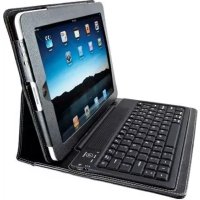
K39294US - Keyboard KENSINGTON - Free user manual and instructions
Find the device manual for free K39294US KENSINGTON in PDF.



User questions about K39294US KENSINGTON
0 question about this device. Answer the ones you know or ask your own.
Ask a new question about this device
Download the instructions for your Keyboard in PDF format for free! Find your manual K39294US - KENSINGTON and take your electronic device back in hand. On this page are published all the documents necessary for the use of your device. K39294US by KENSINGTON.
USER MANUAL K39294US KENSINGTON
KeyFolio Bluetooth Wireless Keyboard
| QUICK START GUIDE | GYORSKALAUZ |
| GUIDE DE DEMARRAGE RAPIDE | PRIRUČKA ZACÍNÁME |
| KURZANLEITUNG | SZYBKI START |
| SNELSTARTGIDS | KPATKOE PYKOBODCTBO |
| GUIDA RAPIDA | ПОЛБОВATEЛЯ |
| GUIA RAPIDA | MANUAL DE INICIO RAPIDO |
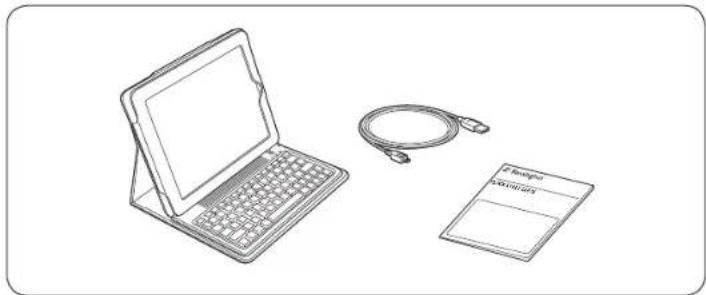
Contents / Contenu / Inhalt / Inhoud / Contenuto / Contenido / Tartalomjegyzek / Obsah / Zawartosc opakowania / Coepzhanie / Conteudo
901-2480-00 KL
English
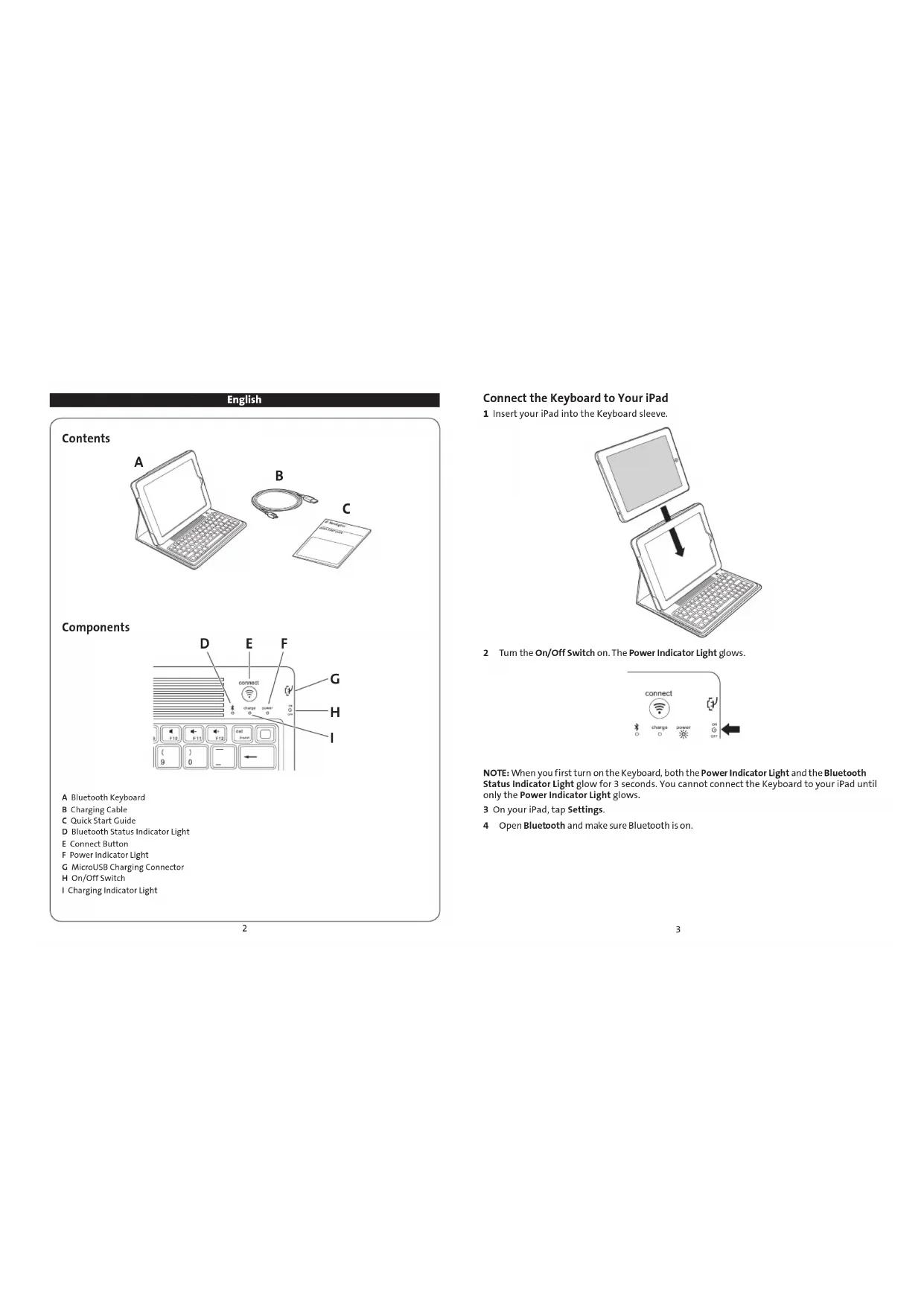
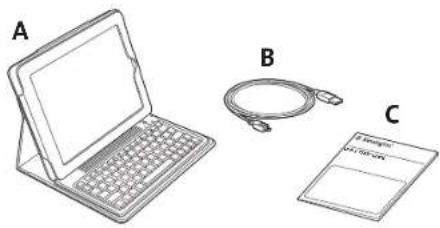
Contents
Components
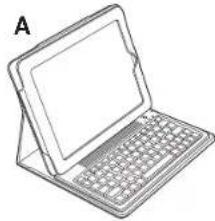
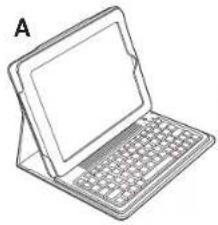
A Bluetooth Keyboard
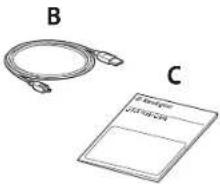
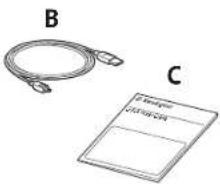
B Charging Cable
Quick Start Guide
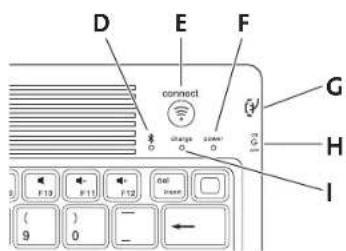
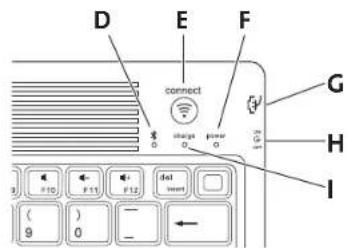
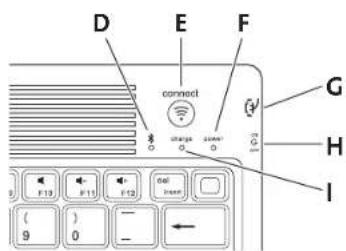
D Bluetooth Status Indicator Light
Connect Button
F Power Indicator Light
G MicroUSB Charging Connector
H On/Off Switch
Charging indicator Light
Connect the Keyboard to Your iPad
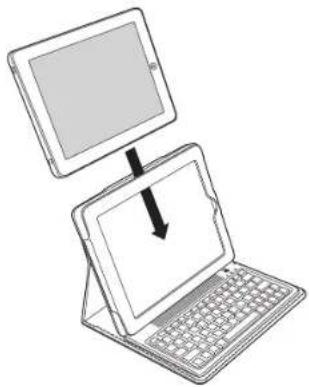
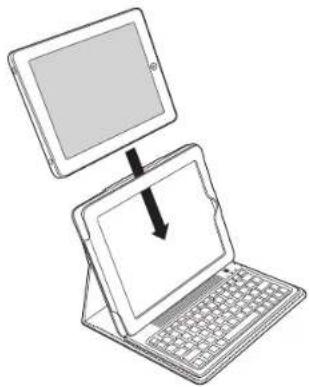
1 Insert your iPad into the Keyboard sleeve.
2 Tum the On/Off Switch on. The Power Indicator Light glows.
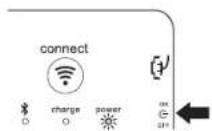
NOTE: When you first turn on the Keyboard, both the Power Indicator Light and the Bluetooth Status Indicator Light glow for 3 seconds. You cannot connect the Keyboard to your iPad until only the Power Indicator Light glows.
3 On your iPad, tap Settings.
4 Open Bluetooth and make sure Bluetooth is on.
5 On the Keyboard, press the Connect Button. The Bluetooth Status Indicator Light starts blinking.
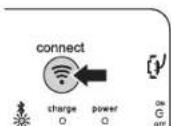
6 The Keyboard now appears on your iPad screen. Tap Kensington Bluetooth Wireless Keyboard.
7 Your iPad screen displays a passkey. Enter the passkey on the Keyboard, and press Enter.
8 Your iPad screen shows the Keyboard as Connected. On the Keyboard, the Bluetooth Status Indicator Light turns off.
9 You can now use your Keyboard to type in any app.
Note the following about the Bluetooth connection between the keyboard and your iPad:
- If the devices are connected and you turn the Keyboard off, the devices are still connected when you turn the Keyboard back on. You can simply begin typing to use the Keyboard.
- Likewise, if the devices are connected and you turn your iPad off, the devices are still connected when you turn your iPad back on. You can simply begin typing to use the Keyboard.
- If the devices are connected and you turn Bluetooth off on your iPad, when you turn Bluetooth back on, you need to connect the devices again by following the steps above. NOTE: If the Keyboard sits idle for 15 minutes when it is connected to your iPad, the Keyboard goes into a dormant state, and the Power Indicator Light turns off. To wake up the Keyboard, press and hold the Connect Button for 3 seconds.
Charge the Battery
When the Charging Indicator Light glows yellow, you need to charge the Keyboard battery.
1 Insert the small end of the Charging Cable into the microUSB Charging Connector on the Keyboard.
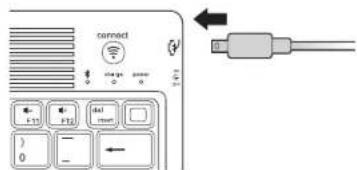
2 Insert the other end of the Charging Cable into your iPad charger.
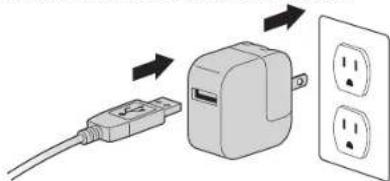
3 Plug your iPad charger into a working outlet. The Charging Indicator Light glows red.
4 When the Keyboard is fully charged, the Charging Indicator Light turns off.
Troubleshooting
I can't connect the Keyboard to my iPad.
Try the following in sequence. You can stop when the problem is fixed.
1 Make sure you have installed and set up Bluetooth correctly on your iPad. Check the documentation that came with your iPad for instructions.
2 Make sure that the Keyboard is within range of your iPad. Maximum Bluetooth range is about 10 meters/33 feet.
3 If your iPad is connected to other Bluetooth devices, you may need to disconnect some devices before you can connect to the Keyboard.
4 If you changed any Bluetooth settings on your iPad, try connecting the Keyboard to your iPad again.
5 Make sure that both your iPad battery and the Keyboard battery are sufficiently charged. If this does not solve the problem, please contact Kensington Support at kensington.com.
Technical Support
Technical support is available to all registered users of Kensington products. Technical Support contact information can be found on the back page of this manual.
Web Support
You may find the answer to your problem in the Frequently Asked Questions (FAQ) section of the Support area on the Kensington Website: www.support.kensington.com.
Telephone Support
There is no charge for technical support except long-distance charges where applicable. Please visit www.kensington.com for telephone support hours. In Europe, technical support is available by telephone Monday to Friday 09:00 to 21:00 (Central European time). Please note the following when calling support:
- Call from a phone where you have access to your device.
- Be prepared to provide the following information:
- Name, address, and telephone number
Name of the Kensington product
Make and model of your computer
System software and version
- Symptoms of the problem and what led to them
FEDERAL COMMUNICATIONS COMMISSION RADIO FREQUENCY INTERFERENCE STATEMENT
This device has been tested and found to comply with the limits for a Class B digital device, pursuant to Part 15 of the FCC Rules. These limits are designed to provide reasonable protection against harmful interference in a residential installation. This equipment generates, uses, and can radiate radio frequency energy and, if not installed and used in accordance with the instructions, may cause harmful interference to radio communications.
However, there is no guarantee that interference will not occur in a particular installation. If this equipment causes harmful interference to radio or television reception, which can be determined by turning the equipment off and on, the user is encouraged to try to correct the interference by one or more of the following measures:
Reorient or relocate the receiving antenna.
- Increase the separation between the equipment and receiver.
Connect the equipment into an outlet on a circuit different from that to which the receiver is connected.
- Consult the dealer or an experienced radio/TV technician for help.
MODIFICATIONS: Modifications not expressly approved by Kensington may void the user's authority to operate the device under FCC regulations and must not be made.
SHIELDED CABLEs: In order to meet FCC requirements, all connections to equipment using a Kensington input device should be made using only the shielded cables.
FCC DECLARATION OF CONFORMITY COMPLIANCE STATEMENT
This product complies with Part 15 of the FCC rules. Operation is subject to the following two conditions: (1) This device may not cause harmful interference, and (2) This device must accept any interference received, including interference that may cause undesired operation. As defined in Section 2.909 of the FCC Rules, the responsible party for this device is Kensington Computer Product Group, 333 Twin Dolphin Drive, Redwood Shores, CA 94065, USA.
INDUSTRY CANADA CONFORMITY STATEMENT
This Class [B] digital apparatus complies with Canadian ICEs-003.
CE DECLARATION OF CONFORMITY
Kensington declares that this product is in compliance with the essential requirements and other relevant provisions of applicable EC directives. For Europe, a copy of the Declaration of Conformity for this product may be obtained by clicking on the Compliance Documentation Link at www.support.kensington.com.
INFORMATION FOR EU MEMBER-STATES ONLY
The use of the symbol indicates that this product may not be treated as household waste. By ensuring this product is disposed of correctly, you will help prevent potential negative consequences for the environment and human health, which could otherwise be caused by inappropriate waste handling of this product. For more detailed
information about recycling of this product, please contact your local city office, your household waste disposal service, or the shop where you purchased the product.
Kensington and the ACCO name and design are registered trademarks of ACCO Brands. The Kensington Promise is a service
mark of ACCO Brands. KeyFolio is a registered trade mark of ACCO Brands. iPod is a trademark of Apple Inc, registered in the U.S. and other countries. iPhone is a trademark of Apple Inc. "Made for iPod" means that an electronic accessory has been designed to connect specifically to iPod and has been certified by the developer to meet Apple performance standards. "Works with iPhone" means that an electronic accessory has been designed to connect specifically to iPhone and has been certified by the developer to meet Apple performance standards. Apple is not responsible for the operation of this device or its compliance with safety and regulatory standards. All other registered and unregistered trademarks are the property of their respective owners.
© 2010 Kensington Computer Products Group, a division of ACCO Brands USA LLC. Any unauthorized copying, duplicating, or other reproduction of the contents hereof is prohibited without written consent from Kensington Computer Products Group. All rights reserved. 9/10
Français
Contenu
Composants
A Clavier Bluetooth
Assistance technique
INDUSTRY CANADA CONFORMITY STATEMENT
DEKLARACJA ZGODNOSCI WE
IopknHouHe NkLabnAtpybK yctpoCTBy iPad
1 BCTabte ye cTpoiCtBO iPad b yexon nnn KnaBnAtpyb.
2 BkIOHTe NITAHNE.3arOpNTcN HmIKaTOp NITAHNA
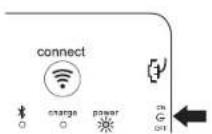
PIMPMEAHHE. PnepBOM BKNIOHENKNAIbATpyb INHkAtoP NITAHN INHkAtoP COCTOARBLtey ToT BTeeHN Tpex CekHyN KNaBAtypa MoKer 6bBy nNOkHOHe Ka YcptOybyiIPad noCneToR, KOc octAHTeRTOpeR TObIKo HNkOToPnTnHaAs
3 Ha yctpoIcTbe IPad KOCHNTecb nyHKTA(HaCtpoKn)
4 Bb6epnTe nyHKT«Bluetooth» n y6eNTecb TOM, TTO TexHONrna Bluetooth BkIIOueHa.
5 Ha KaJIaJIbAInyPeHaXIMTeKhONkY Conect.HaHHTMaTb HmKAtop coCToRnHb Bluetooth.
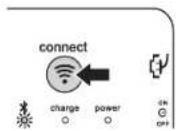
6 Ha kpahe yCTPOINCTBa iPad doJXHa NOBITcK JIbAHTa.Po. KocHITecB 'Kensington Bluetooth Wireless KeyBoard).
7 Ha ekpahe yctroptca I pad Oto6pkaetaet cooouene, Tpe6yioee BEECTn npabon. BBeDnte npabon Na KnaBAtye N HAKMATE KNABNU Enter.
8 Ha kpahe yctpoiTa iPad oTo6paKaTa eT noKnIbOHeHne K KnIaBnAtype. MInIknatop CoocHTNnBleutho NaKnaBnAType rachet.
9 KnabnAtpa rotobakncnonb3oBAHIO.
06Patate BHNAMHNe HA kya3hNHe Hnke pekOMHeaauin no pa6ote cTexHONrEe Bluetooth, nOcBbIeMnn DIn NpKnIOHeHn KNaBAtpyB kCTPOCTBy iPad.
EcnKnabNAtpyoKTNIOHcTnPiHNaHINnCOeINHeHHMeXyCTPOITBAMTOpnn ee NOBTOPHOM BKNIOHcHcOeINHeHHcYcTAbHNBaAEcABTOMATHECKn.TakIMOBpa3OM, KNaBbAtpya YXke TOTORA KHCNOB3OBAHNIK.
- Ecn yctpoCTBO iPad OKIIOUaTc npn HAIINH COeINHEH MEXy UcTPOCTBaMn, To npn erO NOPTOBHOM KUNCHENCOeHNHEHcY cTAHANBNAeTc aBTOMATVNECKN. TAKM Obpa30n, KNaBAHTyPAye rTOBtA KNCNIOB3oAHNIO.
- EcnbluTooth OTHIOHOCTA HAYTOPOBCTEIPAD npn HAIHINm COeHNHEH MEXNy UCTPOCTBAAM, Tpno NOBTOPOMBKNIOHENH BluTooth COeHNHEO JONKHO 6bIbT bYCTAHOBHE ZAHOO (CM. NOPIDOK NOIKIOHENH BIIue).
PIMMEAHHE. Ecnn KnaBnATpya, noKnKIOENHAA KCTPOINCTBy IPad, he IcNObnbEyTcBA TceHNMe 15 MHyT, To OHa nepeXoJNT B pEXMOnOxNDAHAN, a HmNkAtopt nunHanraR cachET. YroBb BocONI3OBASCH KNABnATpyo, HAKMNTEyIeDpKNNBeHKOHNy Cnct B TceHNMe TpeX cekyHd.
3apka6atapen
Kenbui HndkaTOp 3apra yka3bIbaeHa To, qTo 6aTpe KnaBnAtypb pa3pKaHe.
1 BctabBeMeHbwn KOHeu Ka6en pyaepK bpaebem Micro-USB Ha knabnAtype.
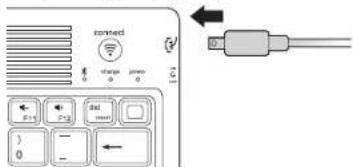
2 BCTaBbTe pyroKoHeu Ka6eN B 3apAHOe yCtpoIcTBO nIiPad.
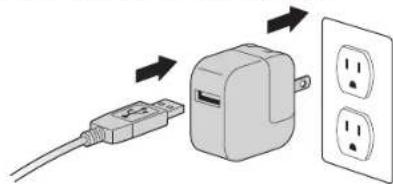
3 PnKIOHTe3apHHOyeCTPOIcTBO Kpo3eK. Hmikatop 3apra 3aropntcKpaChbIMUBetOM
4 INIKATop 3apraNnAorachET TOrda, KOrda KnaBmAtypa6yET NOnHOCTbO 3apRKeHa.
YcTpaHHeH HeNcnpaBHOCTe
He ydaemcn nooknouumb kabaumpy Kympoocmey iPad. 4mo denamb?
BbONNHNTy Kya3AHBE HNKe JcETCBTBA. ECNu ydaIaONb cYtpaAHnTB HeCNPTPAHBOCTb, To daJIbHeHIMe DECTBA BRIIOCTBa HeOB3aTeBbHIM.
1Y6eHNTecbTomTOTEXHOHnBLteothOCTynHa HnPabMbHO HAcTPOeHa Ha yctpoCTBeIPad.Co0TBETCByUmeHnCTpyKmC.BDOKyMeHTaunKyctpoCTByIPad.
26eHTcBbTom,TOKnlaBnAtypaHaxOuTcB30HeJeCTBnYcTPOIcTBaIPad. MakmamblpaDmyCJeCTBnBluTeothcoCTBaIepnImepHo10MeTpoB.
3 Ecn yctpOCTbIa Ipd noKIOHKeIO KpyrIMy cTpyoCTbAM Blueoth, oTKIOHHTe HEKOTOpBe yctpOCTBa neped NOKIOHKeHnEM KJIABATyPb.
4 B cnyuae n3MeHnHa HAcTpoe BluTooth Ha yCtpoiCTBe iPad, BbInOnHHe NOBTOPHO eNOKnIOUeHne KJIaBAtypbl KiPad.
5 Y6dntcB b TOM, c0 Taapen yctpoCTBa iPad n KnaBnATpyb zapRKeHb.
Ecn He yanoLpewIb pOoNemy CAMoTOrTeBHO, oOpaTIteCb B CnykBy NOpeKKNs Henskng HA caire www. kensington.com
TexHueckn noDepKka
TexMHueckanDopepkDaocTINHdIeBCEXapERVCPTPPOBAHHNNoJIb3OBaTeENIeN KOMnAHNNKensington.KoHTAKTHAINHΦOpMaJuaO TexMHuecko NODeppKe IMeTeHa ObaPATHO CTOPOE60NOKnnDAHNOrPOKOBCTBa
Be6-noDpejka
Bb MOKETe HAIOTOBH A BA BONPOC HA CTPAHNIe OTBETOB HA CTo3aIaBaEMbIe BOIPOCBI (FAQ) paIaJIe TExNHueCKo NIOAdepKcKn caita: www. support.kensington.com.
Tepeonha noepkka
3B0HOK B Cnyk6y noDeyepKKn 6ecnnaThb, 3a NckIouHeHm MekJyropOHNx MekJyHaPOnDbHX 3B0HOB. Yc06b y3Hb TaCb paOobTy cnyk6b noDeyepKKn no TenefoHy, nocetite www.kensington.com. B Ebpone Cnyk6aTexMuecko noDeyepKKn no TenefoHy paObaTa c noHeJIbHnKa no nTnHcy, c09:00 da 21:00.
Ponanynta,yuTne cndyiooee,koTa 6yTe 3BOHnTB Cnyk6y noDnepKkn:
3BOHNTe CTeNEoHa, pacNoLoXeHHOro pAOM cyCTpoiCTBOM.
- Bydte roTOBbl npedocTaNb TcneDyUOuyu INHOpMaunIO:
-IMRA,APPECHNOHOMEPTepeHa
- Ha3BaHnE n3dennKOMnAHnKensington
- N3rotobntenb moDenb Bawero KOMnbIOTepa
BaWe CnCTeMHoe nporpaMMHoe oecneueHne n ero Bepcn
-mpn3HAKI HEMCPBABHOCTN ITO NOCLNYKINO pnpuHIOE BO3HKHOBEHH
PNOIOKEHNE O PAPNOMEXAX ΦEDEPAJIbHOI KOMCCM NO CBA3M
PIMMMAHHE,DAHNOCTOCHB60NnpoROBEPHOINHMAOHCOOTBCTCYMOHMORAPHNHEMHRPAUKPOBBAXYCTPOCTB KNACCA B COOTCTBHCCNTC HCTBOI 15 npaHNI EoepaONHOMKAMCNIO CNB3H. DAnHbUE ORPHANCHN PAsOBOTAH,HTO6bI O6eNEHTI PA3yHNO 3AHTIOT BpEHOI BANNNB I NMOENHIXN. JAnHO HOOPOBNHAE BnHOATCAHET, NcHtONyETJH MOKET HAYTOBAPAOACTHOY EeHN CYTAHOHNO HACNONBETCAH C HHTPCYKNHMI,MOKET CO2ABADNPOKCNVPMADPOBCN8D. DAHKO HET NIKAKO RAPAHNT, VTO NOXMEH BYEEDT CO2ABATCBN B OOPENENHOB CTOBAHKE.EcN DAHNO HOOPOBDHME COHNCNPOKNNNHNNDNHNNHNNHNNNNNNNNNNNNNNNNNNNNNNNNNNNNNNNNNNNNNNNNNNNNNNNNNNNNNNNNNNNNNNNNNNNNNNNNNNNNNNNNNNNNNNNNNNNNNNNNNNNNNNNNNNNNNNNNNNNNNNNNNNNNNNNNNNNNNNNNNNN
-
P08EPHYTHAONDPESCHINDPENMHNGATHTHIV
-
yBmHHTb paccTcHHe MEKdy o6pOyDaaHem m IpnemHHKm.
-
PnoknHbObOpDaaHne KpoTeK, KOtpan He MeeT Oaux cenE C ToB. B KOTopy BKnueH en pnhmHK.
-
PpokohcynbTbpoBaTcN y dInepa nnOnbTHoro paDnToExHka da nanyueHnn nomouh.
MMEHHEK: KAMEHHEK, Ke opoepbHeHH KOMaHHeHH KENsGt. MTy JIaJIbTHIOBaTHeA B0MAOxHOCTH IHCNOBcOBAHT BAHoe YcOCTHO TCOBCTEOH C TePbOaBHnIM HdEpepHaON KOMaCIN No CBNH, N HcNBoHnHbI 3KPAHPoABHHeY KAEEM; pRn COBCTEOH TpebOaBHmH DedepepHaON KOMaCIN No CBNH, BCE NOAeHnHek HcNBOHnHbI 3KPAHPoABHHeY KAEEM; pRn COBCTEOH TpebOaBHmH DedepepHaON KOMaCIN No CBNH, BCE NOAeHnHek HcNBOHnHbI 3KPAHPoABHHeY KAEEM; pRn COBCTEOH TpebOaBHmH OVAOY B0HAOxHOCTH IHCNOBcOBAHT BAHoe YcOCTHO TCOBCTEOH C TePbOaBHnIM HdEpepHaON KOMaCIN No CBNH, N HcNBoHnHbI 3KPAHPoABHHeY KAEEM; pRn COBCTEOH TpebOaBHmH DedepepHaONKOMaCIN No CBNH, BCE NOAeHnHek HcNBOHnHbI 3KPAHPoABHHeY KAEEM; pRn COBCTEOH TpebOaBHmH OVAOY B0HAOxHOCTH IHCNOBcOBAHT BAHoe YcOCTHO TCOBCTEOH C TePbOaBHmH HcNBOHnHbI 3KPAHPoABHHeY KAEEM; pRn COBCTEOH TpebOaBHmH DedepepHaON KOMaCIN No CBNH, N HcNBoHnHbI 3KPAHPoABHHeY KAEEM; pRn COBCTEOH TpebOaBHmH OVAOY B0HAOxHOCTH IHCNOBcOBAHT BAHoe YcOCTHO TCOBCTEOH C TePbOaBHmH HcNBOHnHbI 3KPAHPoABHHeY KAEUM YcOCTHO TCOBCTEOH C TePbOaBHmH HcNBOHnHbI 3KPAHPoABHHeY KAEUM YcOCTHO TCOBCTEOH C TePbOaBHmH HcNBOHnHbI 3KPAHPoABHHeY KAEUM YcOCTHO TCOBCTEOH C TePbOHOBuHH HcNBOHnHbI 3KPAHPoABHHeY KAEUM YcOCTHO TCOBCTEOH C TePbOHOBuHH HcNBOHnHbI 3KPAHPoABHHeY KAEUM YcOCTHO TCOBCTEOH C TePbOHOBuHH HcNBOHnHbI 3KPAHPoABHBeY KAEUM YcOCTHO TCOBCTEOH C TePbOHOBuHH HcNBOHnHbI 3KPAHPoABHoY KAEUM YcOCTHO TCOBCTEOH C TePbOHOBuHH HcNBOHnHbI 3KPAHPoABHoY KAEUM YcOCTHO TCOBCTEOH C TePbOHOBuHH HcNBOHnHbI 3KPAHPoABHoY KAEUM YcOCTHO TCOBCTEOH C TePbOaBHmU HcNBOHnHoT 3KPAHPoABHoY KAEUM YcOCTHO TCOBCTEOH C TePbOaBHmU HcNBOHnHoT 3KPAHPoABHoY KAEUM YcOCTHO TCOBCTEOH C TePbOaBHmU HcNBOHnHoT 3KPAHPoABHoY KAEUM YcOCTHO TCO8TTOV HcNBOhHoT 3KPAHPoABHoY KAEUM YcOCTHO TCO8TTOV HcNBOhHoT 3KPAHPoABHoY KAEUM YcOCTHO TCO8TTOV HcNBOhHoT 3KPAHPoABHoY KAEUM YcOCTHO TCO8TTOV HcNBOhHoT 3KPAHPoABMoY KAEUM YcOCTHO TCO8TTOV HcNBOhHoT 3KPAHPoABMoY KAEUM YcOCTHO TCO8TTOV HcNBOhHoT 3KPAHPoABMoY KAEUM YcOCTHO TCO8TTOV HcNBOhHoT 3KPAHPoABMoY KAEUM YcOCTHO
3AABHEHNE O COBIOJEHN N DEKJIAPALUN COOTBETCTBNA FDEPAJIbHOI KOMNCCNI NO CBA3N (ΦKC)
JANHIOI PYNQI CTNTAYCTBY PASTY 15 PNAOKC. IPIA KCNPAATAUAM JONKHO BIB60KOBHNJBA ycnBHOI: (1) JANHOE YTOPOACTBO H NAOHKO BHTO XNHOHKM BPEHOI KNOHMOHHE (2) PAHOHOY TYPCOPTBCO pNOHOHIMATB CNE NOVAAEMOE HanyueHHe, ANHOHAI HUYENH, MORYUEe npIECTN K HENAKENTBLH OABOTe Ka ONpEDPBO HnAParpe 29097 PUNIK HOK, CTOPOHOI, AADHOLOE YTOPOCTBO, ANHETRcKNSKINGT Compuerntes Progo. 333 Twin Dolphin Drive, Redwood Shores, CA 94065, USA (CIIIA).
COOTBETCTBME TPE6OBAHNRMMHNCETPCTBA POMbiIeHHOCHTKAHADbl
ДИПИЗМ UNIPOBENI ANIPIK KIIKA [O OUICETYERT BANKACKOMY TANHADY HA BBUBAOWEC HOMEXH OOBZOBAHANE ICES-003, DEJIAPLAPIA O COOTBETCTBNI DIPERKTMBI CBOTA EBPOBI
KOMHNNKNSONK 3AANRHT,HTO DAHNHNPPOADKTCCOTBCTCTAYCTOCBOBHMMTPOOBHBMN HDPYTHBAKHHM YCOBHMBMOAETC7BQHMSNPAEKN3E53
KoJIeIe KApEaERoi o CoOTBCTBnHn IaE BpOHa N a DaHbN pnoyT MokTe bMbI no CbIaKe'Compliance Documentatlon (DIOkymenTaIoo o CoOTBCTBnHn A cBaIe www. support.kensington.com).
HHOPMAU TOnbKO DIAIROCYAPCTB-HEOBEC
3Tb 100000000000000000000000000000000000000000000000000000000000000000000000000000
Haahaneh m dhaaHn Kensington n ACCO abmKt sapeHCTPPOAHMM ToBapHMn 3hakam Koman HACCO Brand.
Kensington Promic haeHcT hAekom 6bnykHAAACCCA BDOs. KeyFoloc haeHcT 3aprncHTPOAHMM ToaepHMn 3hakom
Komann HACCO Brand. IpO hBaeHcT ToBAPHMn 3hakom Koman HApplle I, 3apeHCTPOAHBMn 1CILU A npyiv CTpHX.
IpO hBaeHcT ToBAPHMn 3hakom Koman HApplle I, Nometka CzepiHaI pOds Oaehayat, Yto aekpnHOe yctpoacto TBO
paPab070 h cncuHaHn Dn oNkOgHcHn KI IpO cTePN PPOAHoA HO pab070 h CoaTOBCTBn CTaHdAMTOMaHOM
Applle I, Nometka XpPoTaE t IPOnHe 3xHaAe, YTO EKKTPOHNOOY CTOPTIOBO PpAsb070 h CnueaHbHn I KIPhoE
mepTHCuVPAHOBO ppa070 h Ma COToBCTBn CTAHdAMTOMaHOM Applle KOMAn HApplle I Hece HET oBCTBnHECHOn 3a
po8y doy TaHBO rOyTOBBA NIN eOcoBTABNT PpBaHn M n CTaHdAMT Eze bpoee apep HcTPOAHBBHne H
HC3aPcTTOPOAHBBN TOAHPNc 3XhAHIOTC BoCTBnCTBO ToCCTOBCTYbQHX INDABeLbC.
© 2010 Kensington Computer Products Group, Nooppaedienhe KOMHANH ACCO Brands. Zanpeaetra HecahuaonHPOAHHOKONHPOHANHE, yDcHPOAHANEHN PAMHOKENHNEHN CTOEUMC OeepmNHOHACTOJEO DOKMHTEA G3E NACBMHORO cornacna KOMHANH Kensington Computer Products Group, Bce npbaa aauuiehne, 9/10
Portugués
Contudo
Components
A Teclado Bluetooth
B Cabo de carregamento
C Guia de Iniciacao Rapaia
D Luz indicadora de estado do Bluetooth
E Botao Connect (Ligar)
F Luz indicadora de Ligado/Desligado
G Conector de carregamento micro-USB
H Interruptor On/Off (Ligado/Desligado)
Luz indicadora de carregamento