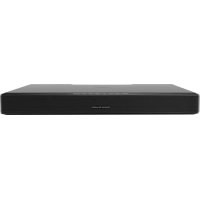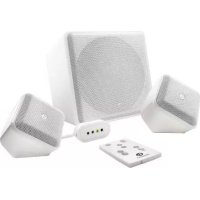
SoundWare XS Digital Cinema - Home Theater System BOSTON ACOUSTICS - Free user manual and instructions
Find the device manual for free SoundWare XS Digital Cinema BOSTON ACOUSTICS in PDF.


| Product type | Home theater system |
| Brand | Boston Acoustics |
| Model | SoundWare XS Digital Cinema |
| Total power | 250 watts |
| Frequency response | 39 Hz – 20 kHz |
| Satellite speakers | Woofer 2½" (64 mm), Tweeter ½" (13 mm) |
| Subwoofer | Woofer 8" (203 mm) |
| Crossover frequencies | 4 kHz satellites, 180 Hz subwoofer |
| Wireless connectivity | Bluetooth v2.1 + EDR, profile A2DP |
| Satellite dimensions (H×W×D) | 108 × 113 × 94 mm |
| Subwoofer dimensions (H×W×D) | 251 × 240 × 288 mm |
| Satellite weight | 0.5 kg |
| Subwoofer weight | 5 kg |
| Power supply | Mains via power cord |
| Main functions | Dolby Digital decoder, virtual surround sound, Movie/Music modes, BassTrac circuit, remote learning, wall mount included |
| Care and cleaning | Clean with a dry cloth |
| Safety | Double insulation, do not expose to water, maintain a distance of 50 mm around for ventilation |
| Spare parts and repairability | Contact a qualified technician; limited warranty (5 years mechanical, 1 year electrical) |
| General information | Complies with FCC/ICES-003 standards, class B; indoor use only |
Frequently Asked Questions - SoundWare XS Digital Cinema BOSTON ACOUSTICS
User questions about SoundWare XS Digital Cinema BOSTON ACOUSTICS
0 question about this device. Answer the ones you know or ask your own.
Ask a new question about this device
Download the instructions for your Home Theater System in PDF format for free! Find your manual SoundWare XS Digital Cinema - BOSTON ACOUSTICS and take your electronic device back in hand. On this page are published all the documents necessary for the use of your device. SoundWare XS Digital Cinema by BOSTON ACOUSTICS.
USER MANUAL SoundWare XS Digital Cinema BOSTON ACOUSTICS
SoundWare XS Digital Cinema Surround Sound Speaker System
Espanol
IMPORTANT SAFETY INSTRUCTIONS
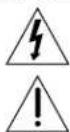
This symbol found on the apparatus indicates hazards arising from dangerous voltages.
This symbol found on the apparatus indicates the user should read all safety statements found in the user manual.

This symbol found on the apparatus indicates double insulation.

Warning!
To reduce the risk of fire or electrical shock, do not expose this apparatus to rain or moisture.
- Read these instructions.
- Keep these instructions.
- Heed all warnings.
- Follow all instructions.
- Do not use this apparatus near water.
- Clean only with dry cloth.
- Do not block any ventilation openings. Install in accordance with the manufacturer's instructions.
- Do not install near any heat sources such as radiators, heat registers, stoves, or other apparatus (including amplifiers) that produce heat.
- Do not defeat the safety purpose of the polarized or grounding-type plug. A polarized plug has two blades with one wider than the other. A grounding-type plug has two blades and a third grounding prong. The wide blade or the third prong is provided for your safety. If the provided plug does not fit into your outlet, consult an electrician for replacement of the obsolete outlet.
- Protect the power cord from being walked on or pinched particularly at plugs, convenience receptacles, and the point where they exit from the apparatus.
- Only use attachments/accessories specified by the manufacturer.
- Unplug this apparatus during lightning storms or when unused for long periods of time.
- Refer all servicing to qualified service personnel. Servicing is required when the apparatus has been damaged in any way, such as power-supply cord or plug is damaged, liquid has been spilled or objects have fallen into the apparatus, the apparatus has been exposed to rain or moisture, does not operate normally, or has been dropped.
- Maintain a minimum distance of 2^ (50mm) around the front, rear, and sides of the apparatus for sufficient ventilation. The ventilation should not be impeded by covering the ventilation openings or placing on or around the apparatus items such as newspapers, table-cloths, curtains, etc.
- No open flame sources, such as lighted candles, should be placed on the apparatus.
- The apparatus shall not be exposed to dripping or splashing. No objects filled with liquids, such as vases, shall be placed on the apparatus.
- Either the power inlet connector on the rear of the apparatus or the power plug at the wall must remain accessible, to be able to disconnect power from the apparatus.
- To completely disconnect this apparatus from the AC Mains, disconnect the power supply cord plug from the AC receptacle.

DIGITAL
Manufactured under license from Dolby Laboratories. Dolby and the double-D symbol are trademarks of Dolby Laboratories

American Users:
Note: This equipment has been tested and found to comply with the limits for a Class B digital device, pursuant to part 15 of the FCC Rules. These limits are designed to provide reasonable protection against harmful interference in a residential installation. This equipment generates, uses, and can radiate radio frequency energy and, if not installed and used in accordance with the instructions, may cause harmful interference to radio communications. However, there is no guarantee that interference will not occur in a particular installation. If this equipment does cause harmful interference to radio or television reception, which can be determined by turning the equipment off and on, the user is encouraged to try to correct the interference by one or more of the following measures:
Reorient or relocate the receiving antenna.
- Increase the separation between the equipment and receiver.
- Connect the equipment into an outlet on a circuit different from that to which the receiver is connected.
- Consult the dealer or an experienced radio/TV technician for help.
Caution: Unauthorized changes or modifications to the receiver could void the user's authority to operate the equipment.
RF exposure warning This equipment must be installed and operated in accordance with provided instructions and the antenna(s) used for this transmitter must be installed to provide a separation distance of at least 20cm from all persons and must not be co-located or operating in conjunction with any other antenna or transmitter. End-users and installers must be provided with antenna installation instructions and transmitter operating conditions for satisfying RF exposure compliance.

Canadian Users:
This device complies with Industry Canada license-exempt RSS standard(s). Operation is Subject to the following two conditions: (1) this device may not cause interference, and (2) this device must accept any interference, including interference that may cause undesired operation of the device.
Radio Frequency (RF) Exposure Information The radiated output power of the Wireless Device is below the Industry Canada (IC) radio frequency exposure limits. The Wireless Device should be used in such a manner such that the potential for human contact during normal operation is minimized.
This device has also been evaluated and shown compliant with the IC RF Exposure limits under mobile exposure conditions. (antennas are greater than 20cm from a person's body).
This device has been certified for use in Canada. Status of the listing in the Industry Canada's REL (Radio Equipment List) can be found at the following web address:
http://www.ic.gc.ca/app/sitt/relett/srch/nwRdSrch.do?lang eng Additional Canadian Information on RF exposure also can be found at the following web address: http://www.ic.gc.ca/eic/site/smtgst.nst/eng/sf08792.html

European Users:
RLAN - Radio Local Area Network Equipment
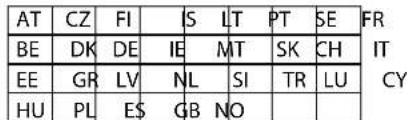
This equipment may only be used indoors in FR. This equipment may only be used in one's own premises in IT. This equipment is for private use only in LU Operation is not allowed within a radius of 20~km from the centre of Ny-Alesund in NO.
Hereby, Boston Acoustics, Inc. 300 Jubilee Drive, Peabody, MA 01960 USA, declares that this SoundWare XS Digital Cinema is in compliance with the essential requirements and other relevant provisions of Directive 1999/5/EC. A copy of the Declaration of Conformity (DOC) may be obtained from:
Oliver Kriete
Boston Acoustics, Division of D&M Europe B.V.
Beemdstraal 11
5653 MA Eindhoven
The Netherlands
Introduction
Thanks for choosing Boston Acoustics and selecting the SoundWare XS Digital Cinema as your home theater speaker system. This manual includes important information on setting up and using your new system, as well as troubleshooting information in case you have any difficulties.
Key Features:
- Incredibly small speakers provide big, high performance sound
- Dolby Digital decoding and Boston's Digitally Optimized Virtual Surround for theater-like surround sound
Dedicated music and movie playback settings - Sound is optimized for your content - Included wall brackets can be positioned any almost any angle
- Bluetooth enabled for music streaming (no docking needed, keep your smartphone with you)
BassTrac circuitry for deep, powerful bass
Additional Features:
Control Pod learns your existing TV remote control
- Unique SoundWare shape and ultra-compact size allow for maximum placement flexibility
- Durable high-gloss finish for a modern look
- Satellite speakers feature 1/2 -inch tweeter and 2- 1/2 -inch woofer
- Easy-guide wire channels for fast hook-up
- Front-firing subwoofer features 8-inch woofer
- Two AUX inputs for connection to iPod or other sources
Specifications
Total System Power: 250 watts
Frequency Range: 39Hz to 20kHz
Satellite Drivers: 212'' (64mm) woofers 112'' (13mm) tweeters
Subwoofer: 8^ (203mm) woofer
Crossover Frequencies: 4kHz Satellite, 180Hz Subwoofer
Wireless Technologies: supports Bluetooth v2.1 + EDR, A2DP v1.2
Dimensions: (H × W × D) Satellite 4
Weight:Satellite 1 lb (5kg)
Subwoofer
11 lbs (5kg)
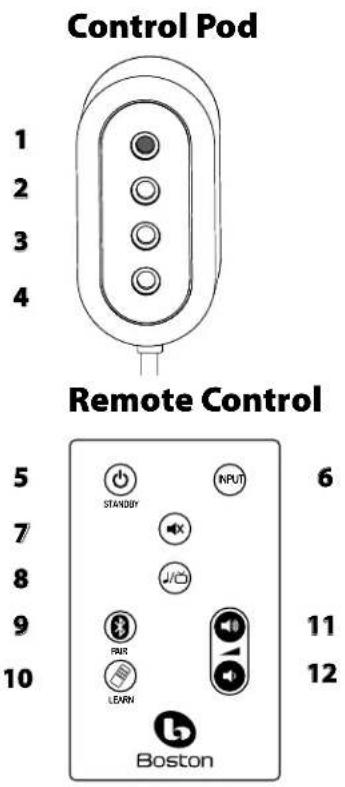

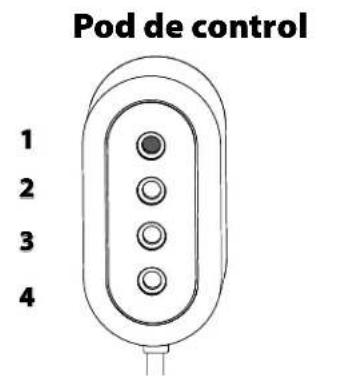
Control Pod
1 IR Sensor - Receives remote commands to control the system.
2 Input Mode - Lights in various colors to indicate which playing mode is operating.
3 Music/Movies-Lights in various colors to indicate operating status.
4 Power/Remote - Lights in various colors to indicate power status.
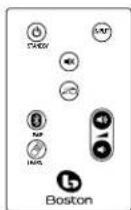
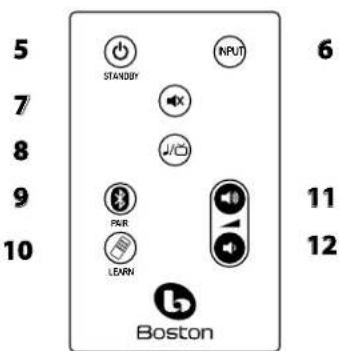
5 Standby Button - Switches the system from standby to active.
6 Input Button - Selects which input source is playing.
7 Mute Button - Lets you temporarily mute system.
Music/Movie Button - Selects the style of sound you want to hear. Music mode is for music and Movie mode is for movies and television.
9 Bluetooth Pairing Button - Use this button to pair with a Bluetooth source device.
10 Learn Button - Activates remote control learning mode.
11 Volume Up Button - Lets you adjust the volume of the system.
12 Volume Down Button - Lets you adjust the volume of the system.
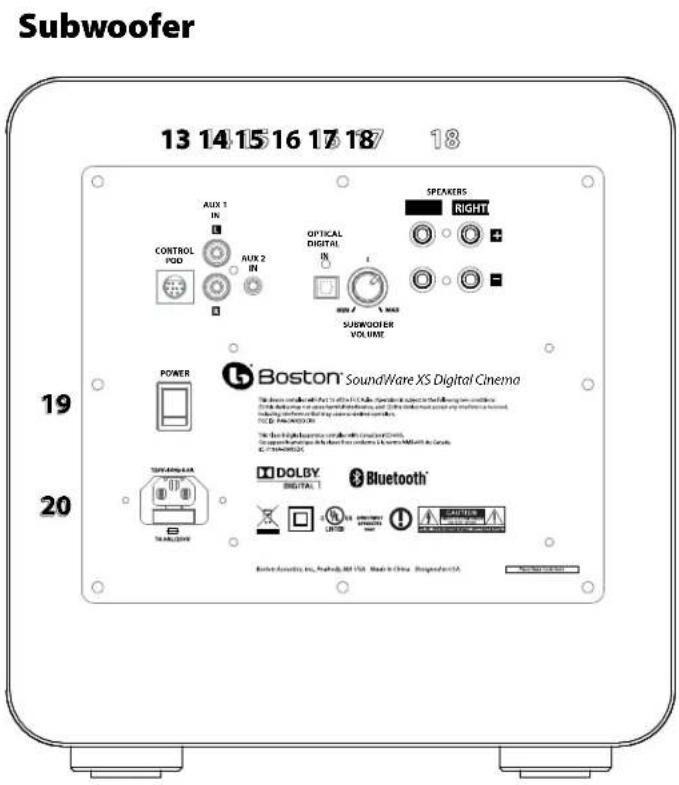
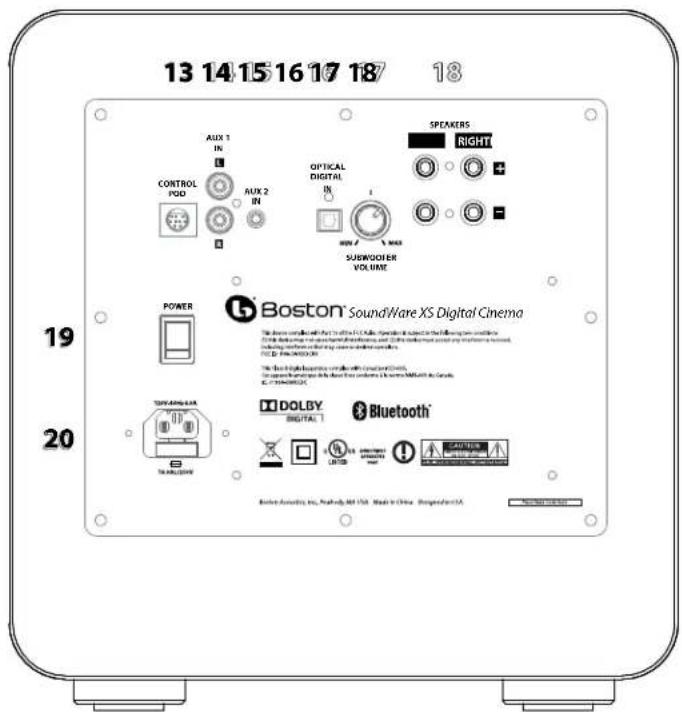
13 Control Pod Input Connects the Control Pod here.
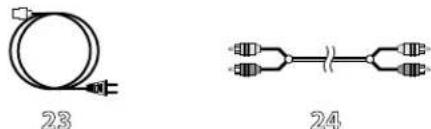
14 AUX 1 (RCA Jacks) - Receives analog audio inputs through the included Audio Connection Cable 24.
15 AUX 2 (3.5mm Miniplug) - Receives analog audio inputs through a 3.5mm miniplug cable (not included).
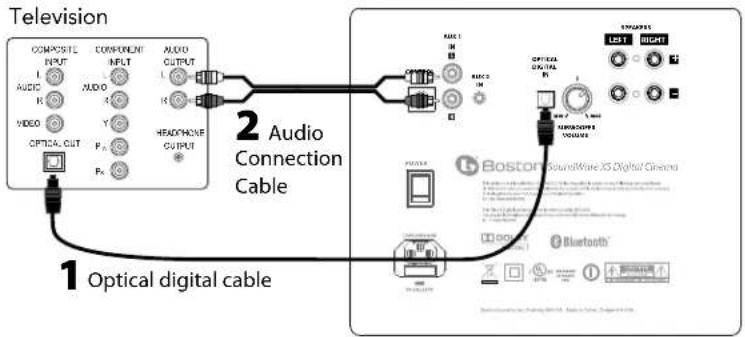
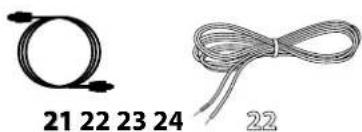
Optical Digital In - The preferred input for the system using the supplied Optical cable 21.
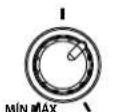
17 Subwoofer Volume - Adjust volume of subwoofer for best balance with the satellites.
18 Speaker Terminals - Connect the satellites to the output speaker terminals on the subwoofer.
19 Power ON/OFF Switch - Turns the system on or off. Normally it is on all the time.
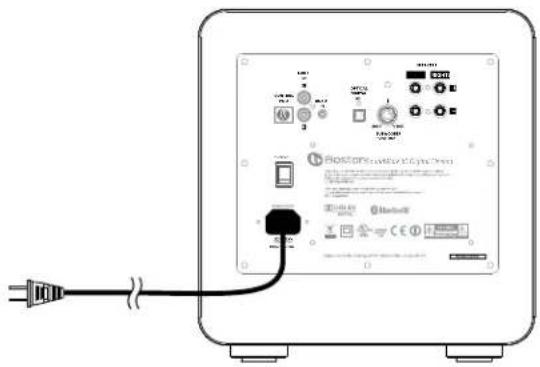
20 Power Input - Connect the power supply 23 here.
21 Optical Digital Cable - Best choice for connecting your TV to the system.
22 Speaker Wire (2) - For connecting satellites to subwoofer.
23 Power Cord - Plug it into the wall and connect it to the power input 20.
24 Stereo Audio Cable - Analog cable for connecting to the TV, or other source.
Place Your System
Decide on the location and position of the system before making any connections.
Speaker Location
Place the speakers to the left and right of the television. For best performance, place each speaker no farther than 4 ft (1.2m) from side of the television.
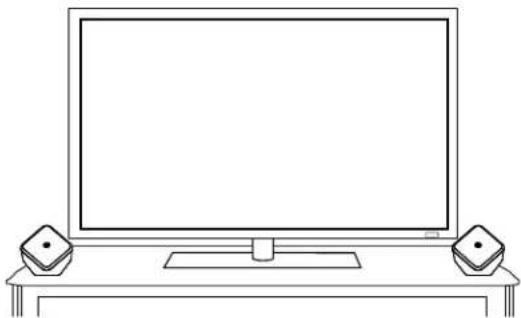
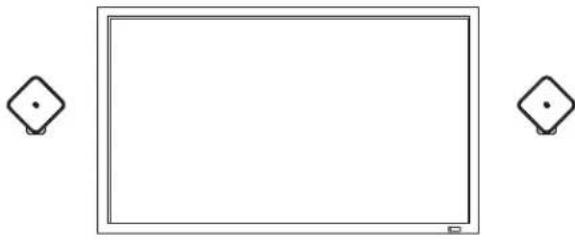
On table, cabinet, or shelf On wall
Placement Options
The SoundWare speaker can be wall mounted using the supplied hardware or simply placed on a shelf. If it is being placed on a shelf you can simply attach the adhesive-backed rubber feet and connect the speaker wires.
Attaching the Pivoting Ball Mount
If you plan to use the mounting brackets you must attach the pivoting ball mount to the speaker. Use the four supplied flat-head machine screws as shown in the illustration.
Mounting the Wall Bracket
Brackets for mounting the speakers on a flat wall or in a corner are supplied. One thing that is not supplied is hardware to attach the bracket to the wall. Why? Because there are so many different kinds of surfaces on which the speakers could be mounted. It could be basic drywall which may or may not have a stud behind it. It could be a wood panel or even a concrete foundation wall. There is no one type of fastener that we could supply that would work in all the possible situa
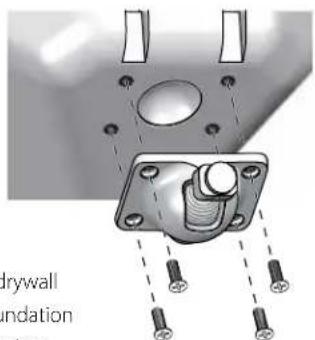
tions. So taking into account the surface the speaker is being mounted on, acquire the appropriate type of fasteners. You'll need four for each speaker. If you're not sure what type of fastener to use, take the mounting bracket to a friendly hardware store, tell them about the wall you're mounting the speaker on, and ask them to recommend an appropriate fastener. Keep in mind the weight of the speaker.
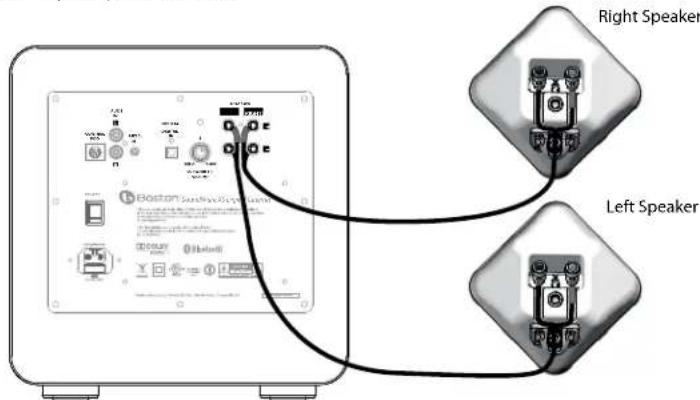
Connecting the Speakers (22)
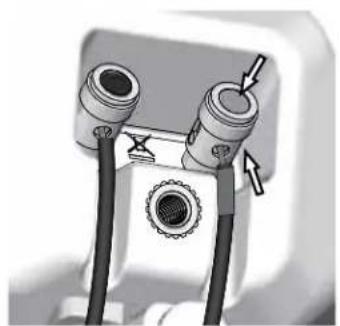
Use the supplied speaker wire 22 to connect the speakers to the subwoofer. If you need longer wire – for example if you are running wires through the wall – use 18 gauge wire as it will simplify connection to the speaker terminals. All the speakers in a system must be hooked up with the same polarity or "in phase." The terminals on the SoundWare speakers and subwoofer are color coded to identify the "+" (red) and "-" (black) connections.
Connecting the Speakers (Continued)
Push down on the top of the terminal to open the hole for the wire. Insert the wire and release the terminal to secure it. Be sure there are no loose strands of wire. Note: there is a channel in the back of the speaker for the wire (for wires up to 16 gauge), to keep it neat and out of sight.
Mounting the Speakers
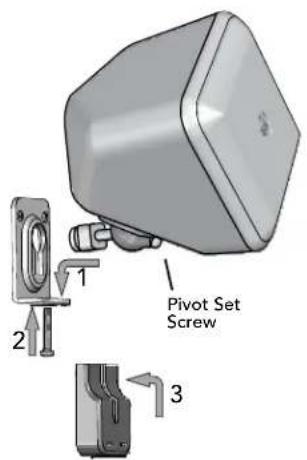
Once you have the bracket mounted and the speaker connected the rest is easy.
- Put the rounded end of the speaker mount in the bracket and slide it down to lock it in place.
- Optional - Insert and tighten the screw to secure everything.
- Snap the cover over the bracket.
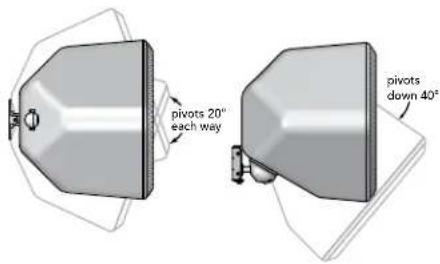
The SoundWare speakers pivot on their mounts. Vertically they can go from facing straight out to being tilted down 40 degrees. When the flat wall mounting bracket is used they can pivot side to side 20 degrees. (Note: Corner mounting will not allow the speaker to pivot side-to-side.) Loosen the pivot set screw on the front of the pivoting ball mount, pivot the speaker into position and retighten the screw.
Subwoofer Location
Place the subwoofer on the floor near the television.
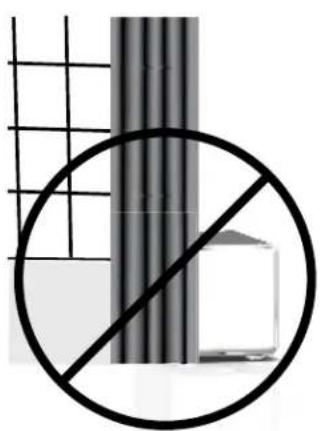
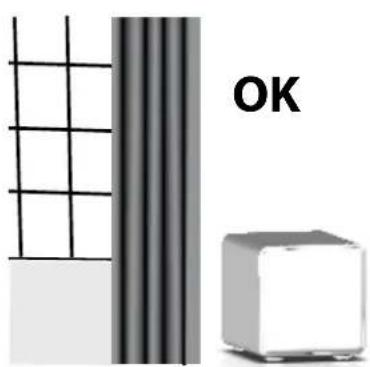
Be careful to avoid obstructing the grille, where the sound comes out. Also, avoid placing the subwoofer in a position where curtains or blankets obstruct airflow around the rear panel.
Placing the Control Pod
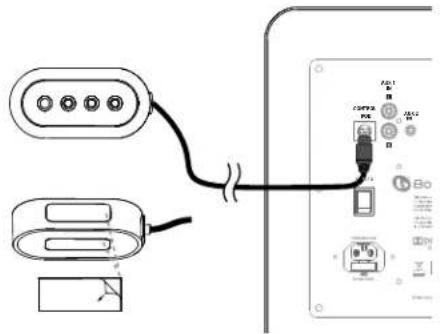
The Control Pod includes status lights and also the sensor for the remote control. Place the Control Pod above or below your television. If you wish, use the included double-sided tape to make the placement more secure. Make sure you can see the Control Pod clearly from your listening position. Plug the Control Pod into the back of the subwoofer.13
Connect your system
Next you need to connect the subwoofer to your television.
Option 1(For Best Results)
Optical digital cable (included). Note: The optical cable is a glass fiber; be careful to avoid kinking the cable.
-Or-
Option 2
Stereo audio cable (included).
Connect Power
-
Connect the subwoofer power cord to the subwoofer. Plug into an AC power outlet.
-
Turn ON the rear panel power switch on the subwoofer. 19
Power/Remote Light 4
Green: Power on.
Note: The lights only illuminate temporarily to show a mode or function change.
Subwoofer
How do I watch TV?
Select an input (INPUT)
Use the supplied remote Input Button 6 to choose an input. Each time the button is pressed, the input changes in sequence from Optical Digital Input to analog audio Aux 1 input to analog audio Aux 2 input to Bluetooth input, back to optical digital. The color of the Input Mode Light indicates which input is selected.
Input Mode Light 2
Green: Optical Digital Input is selected.
Red: RCA Analog Input is selected.
Orange: 3.5mm Analog Input is selected.
Blue: Bluetooth Input is selected.
Control Pod
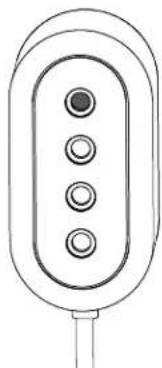
1 IR Sensor - Receives remote commands to control the system.
2 Input Mode - Lights in various colors to indicate which playing mode is operating.
3 Music/Movies—Lights in various colors to indicate operating status.
4 Power/Remote - Lights in various colors to indicate power status.
Adjust the Volume


Use the supplied remote volume up and down buttons to adjust the volume. Use the mute button to mute the audio. To cancel audio muting, push the mute, volume up, or volume down buttons.
Power/Remote Mode Light 4
Green Blinking: Mute mode is on.
Music / Movie selection

Use the music/movie button to choose the style of sound you want to hear. Movie mode is like a movie theater or surround sound system and has a wide, spacious sound. We recommend Movie Mode for both TV and movie playback. For enhanced playback of music, the Music mode is like a traditional stereo music system, optimized for pure audio accuracy. Either mode can be used for any type of input or audio. The system will remember whatever mode was last chosen for each input. This is convenient, because you can use Movie Mode for the digital audio input (television) and music mode for Bluetooth (music from a portable device).
Music/Movie Mode Light 3
Green: Playing in Movie Mode.
Orange: Playing in Music Mode.
Adjusting the subwoofer sound level
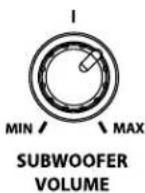
Use the volume knob on the rear of the subwoofer to adjust its sound output level. In most rooms, setting between 10 and 2 o'clock will sound good. Once set, you typically won't need to adjust this control.
Programming your TV Remote

Your system can learn to respond to your own television's remote control, or the remote for a cable box or DVR. However, please note that the learning process works best with the original television remote. Also the supplied remote will continue to work even after your system learns a new remote command.
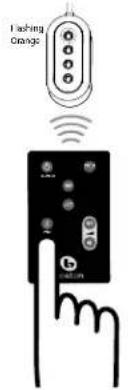
A Press and hold Learn button on the supplied remote for 3 seconds until the Power/Remote Mode light 4 light flashes orange.
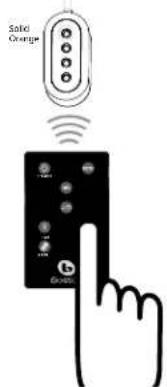
B Press Volume Up button on the supplied remote until Power/Remote Mode light 4 turns solid orange.
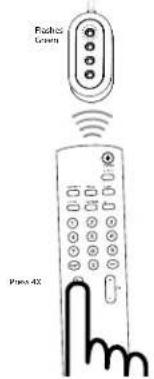
C Hold your television remote 1 ft (30cm) pointing at the front of the Control Pod, Press Volume Up button on your television remote 4 times with a brief pause (about 1 - 2 seconds) until Power/Remote Mode light 4 flashes green.
Repeat Steps A to C to set up Volume Down, MUTE, Input, Music/Movie buttons, and Standby.
Attention cable/satellite users: If you have trouble programming, with a cable/satellite universal remote, you may have better results to initiate programming using your original television remote. After completing programming with your original television remote you can begin using your cable/satellite remote to control your system.
ABC
Using Bluetooth
Use the Bluetooth wireless input to receive music or any audio from a compatible Bluetooth device, such as a smartphone or computer. The device must be capable of transmitting audio with the Bluetooth A2DP (Advanced Audio Distribution Profile).
Pairing the system to a Compatible Bluetooth Device
Use the Input Button on the supplied remote to select the Bluetooth input, indicated by the Input Mode 2 light being blue. If no device has been previously paired, the SoundWare XS Digital Cinema will automatically enter the pairing mode, and the Input Mode light will blink blue.
Set the Bluetooth device to pairing or discovery mode (check device's user manual for instructions). On your Bluetooth device, SoundWare XS Digital Cinema will be listed as "XS Digital Cinema." If your device requests a pairing code, enter the number 0 0 0 0. Once paired, the Input Mode light will be solid blue for several seconds.
Your system can be paired to more than one device (although only one such device can play music via Bluetooth at a time).
To pair additional devices, first use the Input Button to select the Bluetooth input. Then press and hold Bluetooth Pairbutton for 3 seconds. Pairing mode will be started as above, indicated by a blinking blue light.

PAIR
Using Your Compatible Bluetooth Device with the system
After at least one device has been paired to the system, it will automatically search for available paired devices when you choose the Bluetooth input (indicated by a slow flashing blue light). Typically a smartphone or computer will need to be in a music-playing mode (like the iPod or iTunes mode) before your system will link and play the music. Once linked to one Bluetooth source, your system will stay linked to that device until the device is turned off, moved out of range, or Bluetooth is disabled on the device. If you want to change to another Bluetooth source device, you will need to stop the Bluetooth link (by changing to a non-Bluetooth input on your system AND disabling Bluetooth on the connected device). Then you can select the Bluetooth input on system again, and link to the second device.
Note: If the system loses its connection with a source Bluetooth device while in Bluetooth mode, the system will try to reconnect for 5 minutes, indicated by a slow flashing blue light. Typically this will allow a smartphone user to move out of range and then return, and have your system re-link and continue to play music.
The typical receiving range for Bluetooth is 40 ft. (12 meters) or less. This depends on the source Bluetooth device, as well as other devices that share the same broadcast frequencies such as Wi-Fi and microwave ovens.
Troubleshooting the SoundWare XS Digital Cinema
System does not power on.
Is the power cord plugged into a live wall outlet?
Is the power cord properly connected to the subwoofer?
- Is the rear panel power switch in the "on" position?
Note: The control Pod lights are normally off. Press Volume up to illuminate the lights and confirm the system is on.
No sound from the system.
Is the system connected to an audio source that is playing audio through its output?
Is the system set to the correct input source?
Is the system receiving power and turned on?
- Turn up the volume of the system.
- Turn up the volume of the television or cable box the system is connected to.
- Check Mute status - is the status indicator blinking green?
- For digital TVs or other digital sources, make sure the output format is set to "Dolby Digital." (See the source product's set-up menu)
- For digital sources, make sure the optical cable is not kinked or broken. (This stops the digital light signal)
Bass not loud enough.
- Turn up the subwoofer Volume control.
-
Place the subwoofer closer to a wall or corner in the room.
-
Some televisions and cable boxes have a mode that limits the bass. Check that product's audio set-up menu and set the audio mode to "wide" rather than "normal" or "narrow."
The system won't learn my remote control commands.
- Carefully follow the programming instructions (page 8).
- Hold the remote steady and 12 inches (30cm) from the front of the Control Pod.
- Press and release the remote control buttons slowly!
- Check the remote control's batteries.
Note: The system learns almost all IR commands, but some IR protocols cannot be programmed.
Volume of my television speakers gets louder than my SoundWare XS Digital Cinema over time.
- When the remote control volume button is held down your television may change volume levels faster than the system.
- If possible, use the television's set up menu to mute the television's own speakers.
Bluetooth input will not pair with a source Bluetooth device.
Make sure the SoundWare XS Digital Cinema is in Bluetooth pairing mode. (See instructions on the previous page.)
- Make sure your Bluetooth source device is in Bluetooth pairing mode. (See instructions for that product.)
- Make sure your Bluetooth source device supports A2DP (Advanced Audio Distribution Profile). Note that some products with Bluetooth only work with Bluetooth keyboards or headsets but may not have A2DP.
Make sure your Bluetooth source is within 10ft (3m) during the pairing process.
- Turn the Bluetooth device off and on (complete power off and reboot) and try to pair again.
Bluetooth input will not play a Bluetooth source that has already been paired.
Make sure the system is not linked to a different Bluetooth source device.
- Make sure your desired Bluetooth source device is playing music or some audio source.
Note that some programs and apps may not support Bluetooth audio broadcast out of your source device. (If you are unsure, consult the instructions for the program or app.)
- Move possible sources of interference, particularly those operating at 2.4 GHz (Wi-Fi, microwave ovens, cordless phones.)
Limited Warranty
Boston Acoustics warrants to the original purchaser of our SoundWare XS Digital System that it will be free of defects in materials and workmanship in its mechanical parts for a period of 5 years from the date of purchase. The warranty period for the electrical components of the system is 1 year.
Your responsibilities are to install and use them according to the instructions supplied, to provide safe and secure transportation to an authorized Boston Acoustics service representative, and to present proof of purchase in the form of your sales slip when requesting service.
Excluded from this warranty is damage that results from abuse, misuse, improper installation, accidents, shipping, or repairs/ modifications by anyone other than an authorized Boston Acoustics service representative.
This warranty is limited to the Boston Acoustics product and does not cover damage to any associated equipment.
This warranty does not cover the cost of removal or reinstallation. This warranty is void if the serial number has been removed or defaced. This warranty gives you specific legal rights, and you may also have other rights which vary from state to state.
If Service Seems Necessary
United States
First, contact the dealer from whom you purchased the product. If that is not possible, send an email to: support@bostona.com or write to:
Boston Acoustics, Inc.
100 Corporate Drive
Mahwah, NJ 07490 USA
Canada
First, contact the dealer from whom you purchased the product. If that is not possible, send an email to: support@dmcanada.ca
All Other Countries
Contact the dealer from whom you purchased the product or contact your local distributor.
For more information, please visitBostonacoustics.com/support
This symbol found on the product indicates that the product must not be disposed of with household waste. Instead, it may be placed in a separate collection facility for electronic waste or returned to a retailer when purchasing similar product. The producer paid to recycle this product. Doing this contributes to reuse and recycling, minimizes adverse effects on the environment and human health and avoids any fines for incorrect disposal.
Subwoofer 11 lbs. (5kg)
Controlremoto
Subwoofer
Pod de control
VOLUME NEL DEL SUBWOOFER
Boston Acoustics, Inc.
100 Corporate Drive
Mahwah, NJ 07490 USA
Canada
Boston Acoustics, Division of D&M Europe B.V.
Beemdstraat 11
5653 MA Eindhoven
Pays-Bas
Introduction
Boston Acoustics, Inc.
100 Corporate Drive
Mahwah, NJ 07490 USA
Canada
http://www.ic.gc.ca/eic/site/smt-gst.nsf/eng/sf08792.html

Uenti eu
RLAN - Radio Local Area Network Equipment
| AT | CZ | FI | S | LT | PT | SE | FR | |
| BE | DK | DE | IE | MT | SK | CH | IT | |
| EE | GR | LV | NL | SI | TR | LU | CY | |
| HU | PL | ES | GB | NO | ||||
CY
A Anything, e necessary college is subwoofer al televisore.
Boston Acoustics, Inc.
100 Corporate Drive
Mahwah, NJ 07490 USA
Canada
http://www.ic.gc.ca/eic/site/smt-gst.nsf/eng/sf08792.html

Europeiska anvandare:
RLAN - Radio Local Area Network Equipment
| AT | CZ | FI | IS | LT | PT | SE | FR |
| BE | DK | DE | IE | MT | SK | CH | IT |
| EE | GR | LV | NL | SI | TR | LU | CY |
| HU | PL | ES | GB | NO |
Denna utrusting far endast anvandas inomhus i FR.
Denna utrusting far endast anvandas i nagons enskilda lokaler i IT.
Denna utrusting ar endast for privat bruk i LU.
Anvandning ar inte tillaten inom en radié av 20 km fran Ny-Alesunds centrum i NO.
Boston Acoustics, Division of D&M Europe B.V.
Beemdstraat 11
5653 MA Eindhoven
Nederländerna
Introduktion
Total systemkraft: 250 watts
Frekvensomrade: 39Hz till 20kHz
Satellithogtalare: 212'' (64 mm) woofers 12'' (13 mm) tweeters
Subwoofer: 8" (203 mm) woofer
Overgangsfrekvenser: 4 kHz Satellit, 180 Hz Subwoofer
Boston Acoustics, Inc.
100 Corporate Drive
Mahwah, NJ 07490 USA
Kanada
Boston Acoustics, Division of D&M Europe B.V.
Beemdstraat 11
5653 MA Eindhoven
Niederlande
Einleitung
Boston Acoustics, Inc.
100 Corporate Drive
Mahwah, NJ 07490 USA
Kanada