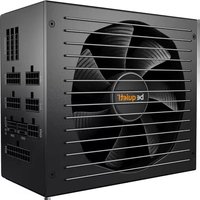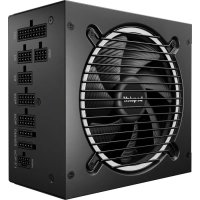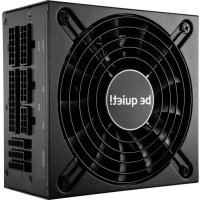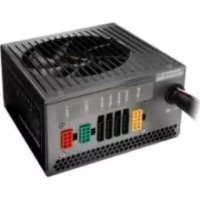
Straight Power E7 680W - Power Supply (PC) Be Quiet! - Free user manual and instructions
Find the device manual for free Straight Power E7 680W Be Quiet! in PDF.



| Product Type | PC Power Supply (ATX) |
| Brand | Be Quiet! |
| Model | Straight Power E7 680W |
| Rated Power | 680 W |
| Maximum Efficiency | 87% |
| Input Voltage | 100 - 240 V~ (universal) |
| Frequency | 50 / 60 Hz |
| Dimensions (L x W x H) | 150 x 86 x 140 mm (standard ATX) |
| Weight | Approx. 2 kg |
| Motherboard Connector | 20 / 24 pin (detachable) |
| CPU Connector | 4+4 pin (P4) and 8 pin EPS |
| PCI Express Connectors | 2 x (6+2) pin |
| SATA Connectors | 7 |
| 12 V Rails | 4 separate rails |
| Cooling | Silent fan with thermal control |
| Safety Protections | OCP, UVP, OVP, SCP, OTP, OPP |
| Compatibility | ATX12V v2.3, BTX v1.0a, EPS12V v2.92, Energy Star 5 |
| Manufacturer Warranty | 3 years (on-site replacement 12 months in France and Germany) |
| Certifications | RoHS, WEEE |
| Maintenance and Cleaning | Unplug and clean the outside with a dry cloth |
| Safety | Do not open the casing – internal high voltages |
| Spare Parts and Repairability | Repair by qualified personnel only; replacement under warranty |
Frequently Asked Questions - Straight Power E7 680W Be Quiet!
User questions about Straight Power E7 680W Be Quiet!
0 question about this device. Answer the ones you know or ask your own.
Ask a new question about this device
Download the instructions for your Power Supply (PC) in PDF format for free! Find your manual Straight Power E7 680W - Be Quiet! and take your electronic device back in hand. On this page are published all the documents necessary for the use of your device. Straight Power E7 680W by Be Quiet!.
USER MANUAL Straight Power E7 680W Be Quiet!
- Introduction 14
2.Warnings and safety notes 14 - Advantages and specifics of your new Power supply 15
- Compatibility 17
- Installation of your new Power supply 17
- Safeguard function 17
- Troubleshooting 18
- Accessories 19
- Notes on disposal 19
10.Guarantee, manufacturer specifications and copyright 20 - Technical data 62
FRANÇAIS
1.Label 62
2. Voltage regulation 62
3. Operating conditions 62
4. Minimal load 62
5. Dimensions 63
6. Distribution and pin assignment 63
7. Connectivity and cable lengths 64
1. EINLEITUNG
We are pleased about your decision to use a be-quiet! power supply out of our Straight Power series in your computer. In order to be able to answer your initial questions in advance, we have summarized the advantages and specifics of the Straight Power series in this comprehensive manual.
The latest generation of the Straight Power series offers you many experiences and is a consequent further development of the very successful pilot production.
Should you have any further question, please contact our customer service. See contact information under item 9.
PC Systems are always becoming more and more capable and require more electricity as a result of the high performance graphic cards and quicker processors, especially on the +12V cables. The power supplys provided in the Straight Power CM series are an ideal supplement in reference to the reserve capacities, even for the operation of PCI Express graphic cards in the SLI or Crossfire networks.
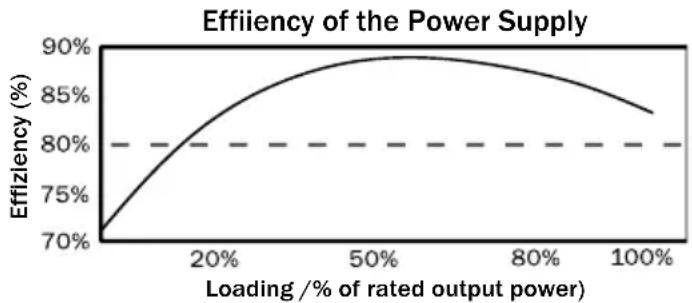
The power supplys featured in the Straight Power series dispose of an extremely high rate of efficiency of up to 87% , which makes it peerless on the market. For a permanent usage intensity of your computer, the lower consumption of electricity can possibly be noticed in the next electricity bill.
2. WARNINGS AND SAFETY NOTES
Before conducting the start-up procedure, please carefully read and observe all of the points in this instruction manual. Only then can a correct operation of the power supply be ensured and as a result, you'll be able to enjoy this product for a long period of time.
Never open the cover of the power supply. The electronic components sheeted there create a high voltage that is dangerous to humans. After the separation from the network, the construction parts are often continue to harness a high voltage. As such, a power supply may only be opened by authorized personnel.
In addition, the guarantee is deemed null and void once the power supply has been opened, thus damaging the official guarantee seal.
Never operate the device with wet or moist hands.
Never place items in the openings/fanner of the power supply.
Please observe that the start-up procedure is only intended for interiors. The exterior usage can lead to heavy damages. Do not conduct any work on the power supply when it is in a phase of line voltage. (In this situation, always place the power switch to "0" and if necessary, pull out the power plug).
Should there be a short circuit in the device, remove the power cable and do not bring the device back into operation. Power supplys without a universal alternating current (AC) cannot be used in the countries where, for example, there's a line voltage of 100V. The power supply can be destroyed if used with an incorrect or false AC voltage portal.
This power supply is designed for a voltage range between 100 - 240V~ and thus, universally versatile.
Make sure that your PC is not situated directly next to a heater or another heat source because this can cause a decrease in the lifespan of all components and thus,
lead to failures/casualties.
Make sure that there is a sufficient amount of ventilation in your computer case, for example, with an additional fan, because a current ATX power supply is not solely responsible for the evacuation of the complete warmth produced in the PC case.
Should you want to clean your power supply, separate it completely from the power supply system and do not use damp towels or cleaning agents. Only clean the power supply from the exterior using a dry towel.
Only start the operation of the power supply after an hour within the room air environment, because otherwise, condensation can build up in the power supply.
3. ADVANTAGES AND SPECIFICS OF YOUR NEW POWER SUPPLY
High efficiency:
The power supply series from Straight Power dispose of a very high degree of efficiency. This helps them to reduce the costs of electricity that accumulate within a year when there's a high rate of operation.

A high efficiency means that the power supply can convert the incoming alternative current into direct current with a lower level of losses. This leads to a lower amount of warmth loss, which then has a positive effect on cooling the power supply. Power supplies that feature as high a rate of efficiency as is exhibited by the Straight Power series, can thus be operated with an extremely slow moving and thus, very quiet fan. An extremely low development of noise is the result of this continually technical advancement.
Economical:
The power supplys of the Straight Power series corresponds to the current guidelines 2002/95/EG (RoHs and WEEE directives) issued by the European Union.
An environmentally conscious manner of production and the usage of materials that do not include harmful substances that are dangerous for the environment are guaranteed with be quiet! products. In this way, both we the manufacturer and you the consumer actively help in making an important contribution to the protection of our environment.
Voltage stability:
The power supply from the Straight Power series dispose of a first-class stability in supplying your valuable components with electricity. This is also created by the usage of high quality components. As such, output voltages are kept very close to the optimal nominal value, which is very important for a higher demand on performance.
Warmth-dependent air velocity control:
be quiet! power supplys from the Straight Power series make use of a very precise air velocity control. This automatic control not only controls the fan in the power supply, but can also control the case fan that can be connected to the power supply. The application is rather simple: only the case fans that are usually equipped with a 3 pole and/or 4 pole connector must be connected with the respective connections onto the power supply
The speed of the fan is regulated depending on the warmth development in the power supply. If the temperature increases, the fans automatically begin to turn faster in order to ensure a quick and effective cooling within the case. The cooling that is quickly created then contributes to the longer lifespan of its components and the power supply.
When connecting individual fans to the power supply, please ensure that these fans do not have their own thermal sensors or potentiometers.
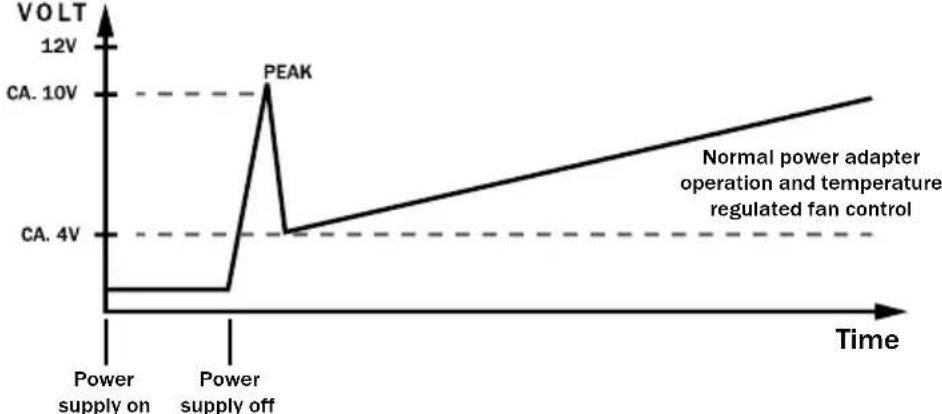
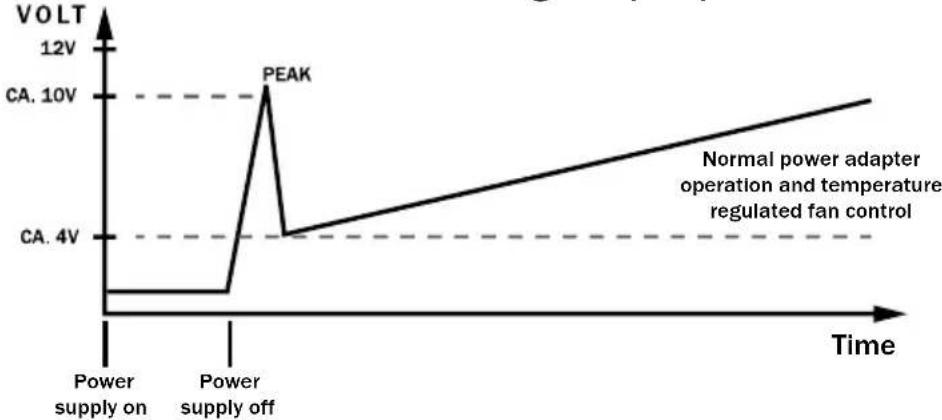
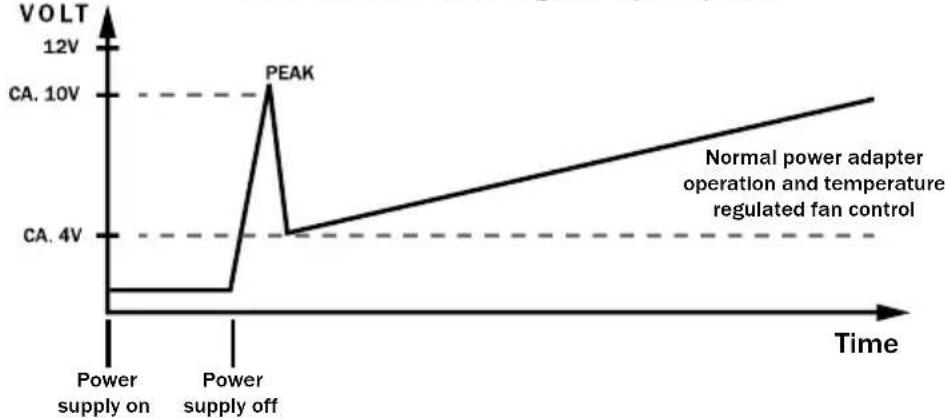
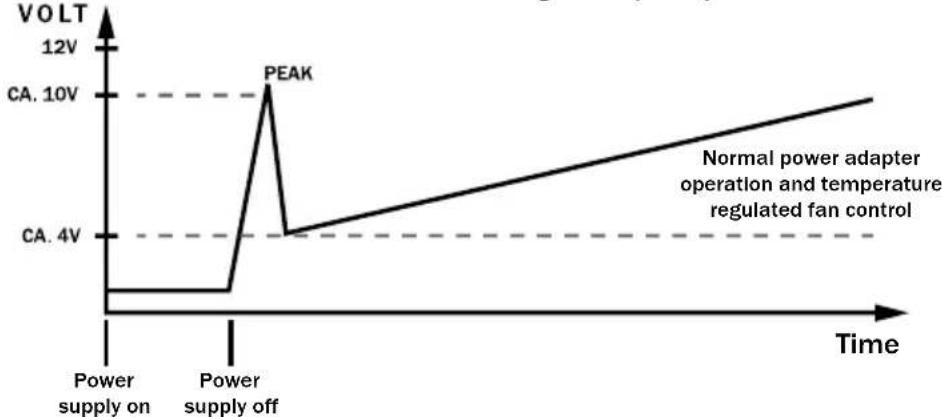
The air velocity control disposes of an gear-up impulse. This ensures that all connected case fans are brought into gear in that a short impulse with a high level of voltage starts the fan.
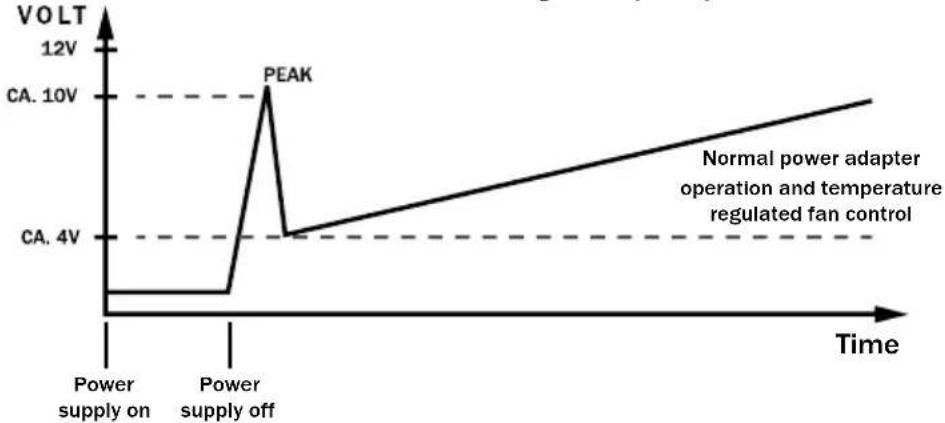
Fan control with a gear-up impulse
Important
Only connect one fan with every cable.
Ultra Silent concept
Encompasses a variety of electrical and mechanical optimisations to provide more silent operation, optimum air flow and very low noise production
Technical advantages
ATX12V version 2.3:
With the Straight Power CM series, be quiet! offers a power supply that corresponds to the latest ATX 12V specifications. It offers 4 separate 12V rails that have an advantageous effect on the dependable function of the system.
PCI express connectors:
The power supply from the Straight Power series dispose of up to four 6 or 8 pin connectors that are necessary for the usage of PCI express graphic cards. In its basic form, every connector is a 6 pole connector that can be converted into an 8 pole connector by adding two additional pins. (varies by model)
Where possible please always follow the plug numbering to connect to the same graphic card. (PCIe 1 to VGA 1 and PCIe 2 to VGA 2)
20/24 pin mainboard connectors:
With an expandable main connector that features from 20 to 24 pins, the Straight Power series is also downward compatible with all current specifications. The following standards are supported:
-ATX Specification V2.2 and older
-BTX V1.0a
Serial ATA (SATA) connectors:
Power supply from the Straight Power series are equipped with a sufficient amount of SATA connectors. The plug count ranges from 4 SATA electrical connectors for the 480W model to 7 SATA electrical connectors at 680W
4. COMPATIBILITY
The be quiet! power supplys featured Straight Power series are compatible with current popular power supplys and mainboard
specifications such as:
- Intel ATX12V Power Supply Design Guide Version 2.2 (as well as downwards compatible for V2.2, V2.01, V 2.0)
-ATX System Design Guide Version 2.2 and Version 2.1 - BTX Version 1.0a
-E-ATX Server Dual Mainboards via 8-Pin Connector
EPS12V Version 2.92
Intel C6 Status for the new processor generation
Energie Star 5 Guidelines (see item 10)
5. INSTALLATION OF YOUR NEW POWER SUPPLY
- Please read the point „Warnings and safety notes" before you begin the installation.
- To install the power supply in your PC, you will require a screwdriver. Only use the screws delivered with the adapter because they have the provide the correct thread
You must first remove you old power supply. For this, proceed as follows:
- Separate your PC from all available sources of electricity and carefully remove all cables attached to the PC.
- Open the PC case and if necessary, observe the manufacturer instructions.
- Remove all connectors from the mainboard and all additional components such as FDD, HDD or optical drives. Please make sure that no connectors from the old power supply are connected to a component.
- Now unscrew the screws on the backside of the power supply and carefully remove them. When doing this, make sure that no cables get caught on components and thus, become damaged.
The Installation of your new be quiet! Straight Power power supply:
- Place the new power supply in the space provided in the case and screw it into the backside with the four screws included with the delivery. Do not use excessive force to do this.
- Place the 20/24 pin into the intended connector on the mainboard. If you have a 24 pin connection, then place the remaining 4 pins in the correct position before you stick the connector in the socket. When using a 20 pin connector, fit the additional 4 pins right into the side.
- Now stick the 4 pin connector, also called the P4 connector, into the provided socket on the mainboard. This connector is will provide your CP in the future with additional electricity.
- If you have a mainboard with several processors, you will require the additional 8 pin EPS connectors. You connect these into the socket on the mainboard.
Remarks: Please observe the your mainboard manufacturer instructions when connecting the EPS connector. Not all mainboards dispose of these connections.
FAN
The two fan connections are indicated with FAN. The fan connections are to be attached at these junctions. The attached fans are later controlled by the internal automatic controls.
Attention: only one fan per connection cable!
Maximum load for all connections in sum 0.8A/9.6W!
6. SAFEGUARD FUNCTION
All be quiet! power supplys are equipped with numerous safeguard functions. They protect the user as well as the power supply and the connected components. When one of these safeguards is triggered, then a rebooting or deactivation of the system is the consequential result. Should this happen, the PC should be immediately checked for possible errors. In order to systematically detect such errors, please read the chapter „Troubleshooting" on the following pages. The Straight Power series disposes of the following safety functions:
OCP (Over Current Protection)
When the load on the individual circuits consists of more than the specified limit, the power supply automatically deactivates
UVP (Under voltage protection)
This safeguard triggers when the voltage in the circuits falls below a certain limit. In this case, the power supply is then automatically deactivated.
OVP (Over voltage protection)
The over voltage safeguard is triggered when the voltage in the circuits is too high and the power supply deactivates.
SCP (Short circuit fuse)
The safeguard during a short circuit in the secondary section of the power supply prevents a defect to the power supply and its components.
OTP (Temperature safeguard)
If the temperature within the power supply rises to a level where the hardware might be damaged the power supply will automatically turn off. When the temperature falls the power supply can be used again. Always make sure that your system receives enough cooling.
OPP (Over power protection)
This safeguard is triggered when the entire performance demanded of the power supply is higher than the specified peak load. This can happen if the power supply doesn't dispose of enough performance ability.
7. TROUBLESHOOTING
Please observe!
In ATX systems, the power supply receives the signal from the connected mainboard in order to be started up. For this reason, please check whether - with the help of the mainboard or the case manual - the activation/deactivation is connected correctly.
Attention:
Work with the electrical sources can lead to life-threatening injuries. In cases of trails of smoke, damaged cables and the effects of fluids, the power supply is to be immediately unplugged from its source of electricity and after that, no longer brought into operation.
Never unscrew the power supply. The are components in the interior that can contain high amounts of voltage when not used for a long period of time. Please have any and all necessary repairs be conducted by an authorized expert!
If the system for an installed power supply does not function properly, you must first check for these possible sources of error:
A. Make sure the electrical cable is plugged into both the socket and the power supply correctly and tightly. Ideally, you use a separate can only for the computer power supply.
B. Check to make sure that all connections are correctly connected to each other and correct them if necessary, for example, in the case of polarity.
C. Inspect the connection of the on and off switch from the case to the mainboard. If necessary, consult your mainboard instruction manual! Switch on the power supply by placing the switch on position "l" and activating the on/off switch on the case. If the power supply doesn't allow itself to be turned on, continue with the next point.
D. Check your system for possible short circuits or defective hardware in that you turn off your computer and separate all of the devices from the system that are not required for starting your computer. Turn the computer back on. Repeat this step and after each re-start, close one of the devices until you have found the supposed defect. If the power supply does not react due to a short circuit, wait at least 5 minutes until you re-start your computer because the device is equipped with overload protection.
Frequent problems:
Problem: The selected voltages (via BIOS) are to low/high
When you check the voltage of the power supply in the BIOS of the mainboard or in the operating system, it is possible that these are displayed incorrectly. This results from the non-precise dimension of the mainboard and does not necessarily have to correspond to reality.
Problem: After installing a new graphics card, the PC can no longer be turned on or crashes with practically every opportunity:
You have installed a new higher performance graphics card in your system and now your PC no longer starts or it seems to crash immediately with the first workload. The power supply is too weakly dimensioned for your graphics card. Before making a purchase, please take a look at our watt configurator at www.be-quiet.net. Here you'll find the right be quiet! power supply from our assortment
Important note:
Should the power supply not work, please ensure that you have thoroughly read this instruction manual and can preclude the problem causes listed here. Should the problems continue to exist, please contact our customer service immediately.
All incoming returns are checked by our RMA service. Should we determine that a power supply is indeed free of error, it will be sent back to the customer. In addition, an all-included inspection for the occurring expense is levied.
Should a defect arise in your be-quiet! power supply within the first twelve months from the date of purchase, then please call our toll-free hotline to clarify the technical details and questions.
For smooth processing we require the following from you, submitted via fax, email or by post:
One copy of the purchase receipt
A brief description of the error
The serial number for the power supply
- Your delivery address
Once your documents have been received we will send you a replacement power supply via DHL, packaged in a post box. Please provide the DHL courier with the power supply you suspect is defective. Please retain the cable management, accessories and original packaging yourself. These elements do not need replacement.
THE ON-SITE EXCHANGE SERVICE IS AVAILABLE IN GERMANY AND FRANCE PLEASE STORE YOUR PURCHASE RECEIPT IN A SAFE PLACE; WE CANNOT PROCESS GUARANTEE CLAIMS WITHOUT A RECEIPT!
8. ACCESSORIES
As part of the scope of delivery for the power supply, the following accessories are contained:
- Cooling device cable
-Operating handbook
Wire ties - Screws for mounting the power supply
9. NOTES ON DISPOSAL
Used electrical and electronic devices may, in accordance with European specifications*, no longer be placed in unsorted municipal solid waste. The must be collected separately. The symbol crossed out wheelie bin with a bar implicates the necessity of the separated collection.
Please help in protecting the environment and make sure that once you've decided to no longer make use of this device, that it is placed in the systems of separate collection that are intended for it.
In Germany, you are legally** required to take an old device to such a place of separate collection instead of placing it in unsorted municipal solid waste. The responsible waste management parties (communities) subject to public law have set-up collection stations at which old device from private households in your area can be turned in free of cost.
It is possible that the legal responsible waste management parties pick up the old devices themselves, even from private households. Please read your local household refuse collection calendar or visit your city or community administration in order to inform yourself about the opportunities for turning in or collecting old devices in your area.
- Guideline 2002/96/EG of the European Parliaments and the Council from January 27th, 2003 on used electrical and electronic devices.
** Law on market introduction, withdrawal and the environmentally compatible disposal of Electrical and Electronic Equipment Act (electrical and electronic device law - The German ElektroG) from March 16th, 2005.

10. GUARANTEE, MANUFACTURER SPECIFICATIONS AND COPYRIGHT
- 3 years manufacturer guarantee for consumers (original purchase from authorised be-quiet! dealers only)
- On-site replacement service in the first 12 months following purchase date from authorised be-quiet! dealer.
-
Guarantee work can only be processed with information on the serial number as well as an included copy of the purchase receipt from an authorised be-quiet! dealer.
-
On-site exchange within Germany only.
-
Opening of the device, manipulation of any kind, structural changes of any kind as well as damages through external mechanical forces lead to a complete voiding of the guarantee.
- The complete guarantee terms and conditions can be viewed on the Service/Guarantee Conditions on the homepage www.be-quiet.de.
Listan GmbH & Co.KG . Biedenkamp 3a . 21509 Glinde . Germany
For further information, you can contact us in Germany
Mon - Fri 09:00 - 17:30
Phone +49 40 736 7686-44 Fax + 49 40 7367686-69
e-mail: info@be-quiet.de www.be-quiet.com
Our General Warranty Conditions apply, which can be viewed on the Internet on http://www.be-quiet.net/service/en/warranty. The following numbers will have to be provided in the event of service. You will find them on the power supply name plate:
| Model description | Article Number Serial Number | |
| BQT E7-CM-480W | BN121 S/N (see nameplate for number) | |
| BQT E7-CM-580W | BN122 S/N (see nameplate for number) | |
| BQT E7-CM-680W | BN123 S/N (see nameplate for number) | |
Please observe the following:
- The contents of this documentation may not – partially, in whole or copied – be passed along, propagated or saved in any form without the prior expressed written consent of Listan.
- be quiet! is a registered trademark of the company Listan GmbH & Co. KG. Other products and company names mentioned in this documentation can be the brands or trademarks of their respective owners.
- Listan continually develops its products in correspondence with its policies. Listan reserves the right to make changes and improvements to every product described in this documentation without prior announcement.
- List an is under no circumstances responsible for the loss of data and receipts or for any special, random, direct or indirect damages, however they may arise.
- The contents of this documentation are presented as they hereby appear. Listan does not assume, expressed or implied, any guarantee for the correctness or completeness of the contents of this documentation, including, but not limited to the tacit guarantee of market suitability and the aptitude for a special purpose, unless applicable laws or jurisdiction stringently stipulate a liability. Listan retains the right to make changes to this documentation or to retract the documentation at any time without prior announcement.
1. INTRODUCTION
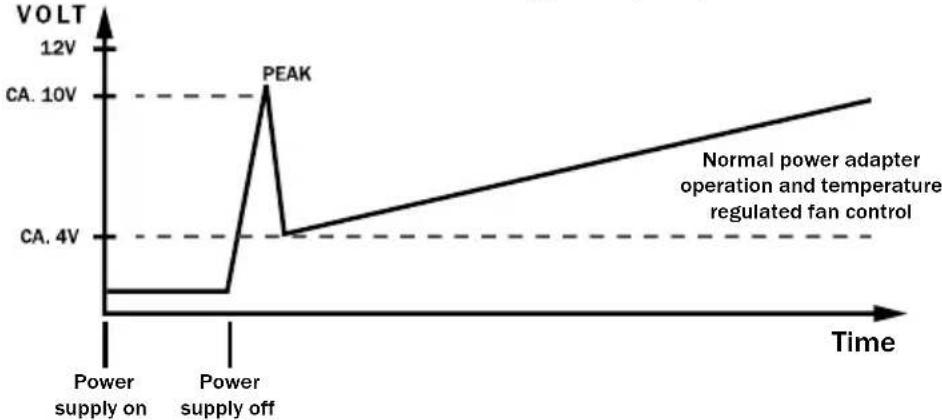
Fan control with a gear-up impulse
Important
Concept Ultra Silent
| Model description | Article Number Serial Number | |
| BQT E7-CM-480W | BN121 S/N (see | nameplate for number) |
| BQT E7-CM-580W | BN122 S/N (see | nameplate for number) |
| BQT E7-CM-680W | BN123 S/N (see | nameplate for number) |
0800469209
Fan control with a gear-up impulse
Importante
| Model description | Article Number Serial Number | |
| BQT E7-CM-480W | BN121 S/N (see | nameplate for number) |
| BQT E7-CM-580W | BN122 S/N (see | nameplate for number) |
| BQT E7-CM-680W | BN123 S/N (see | nameplate for number) |
Listan GmbH & Co. KG . Biedenkamp 3a . 21509 Glinde . Alemania
Fan control with a gear-up impulse
Important
Ultra Silent Concept
| Model description | Article Number Serial Number | |
| BQT E7-CM-480W | BN121 S/N (see nameplate for number) | |
| BQT E7-CM-580W | BN122 S/N (see nameplate for number) | |
| BQT E7-CM-680W | BN123 S/N (see nameplate for number) | |
Listan GmbH & Co. KG Biedenkamp 3a 21509 Glinde Germania
Fan control with a gear-up impulse
Wazne
Ultra Silent Concept
| Model description Article Number Serial Number | ||
| BQT E7-CM-480W | BN121 S/N (see | nameplate for number) |
| BQT E7-CM-580W | BN122 S/N (see | nameplate for number) |
| BQT E7-CM-680W | BN123 S/N (see | nameplate for number) |
Fan control with a gear-up impulse
BAXHO!
POnDoeHNHnTe Ha KaXbI Kα6eAa ToAko OAnH BeHTnAHTOp.
Ultra Silent Concept (cBepxTHXpa60Ta)
KOMNKeKc Mep NO ONTUMH3aunn 3eKtpnuecknx IN MExaHuecknx KOMNOHeTOB OBeCneuBaET MaKcMaIbHyIO PAABHOCTb XOda, ONTUMaBHyU cnpkkyAunu BO3dyxa IN MInHMaIbHbI yPOBEh bIyMOB.
TexHHueckne npenMyeuctBa
Bepcn ATX12V 2.3:
be quiet! npedaaeet 6oK nTahnna cepnn Straight Power, cootBcTByuOnn HOBWe cneunkaaATX12V. OH IMeET OTDeBhIe AHHN 12 B, yTO 6aIopnptno Otpaxaetca Ha HAdexKHOCTn.
Pa3bem PCI Express:
BANOHN HcHnepn Straight Power nMeOT Do ABe 6-HTbIPbKObIX HAN 8-HTbIPbKObIX pa3beMOB, Heo6xoMbIX dA NcnoB3OBAHn BnDEOKapTbI PCI Express. KaXdbpa3bEM B OCHOBHOfOpMe IpeCTaBAreT CO606-KoHTaKTHbIM pa3bEM, KOtOpBI MOxHO nepeo6OpyDoBaTb B 8-KoHTaKThI NyTeM yCTaHOBKN 2 DOONAHITAEhBIX HTbIPbKO. (B 3aBNCIMOCTH OT MoDeA)
Heo6xoAIMO co6AoDaTb HymepaIIO pa3beMoB Bndeokapr (PCIe 1 Ha VGA 1 n PCIe 2 Ha VGA 2).
20/24-ntbipbKObbi pa3beM MaTePHHcKo IaTbI:
Pacuiprembi c 20-1tbpkOBoro do 24-1tbpkOBoro rAaBbI pa3bem cepn Straight Power dOnoAHnteAbHO o6paTHO COBmecTMM CO BCEMN CTAHApTbIMN CNEUHKAqYMaM. IOpdepxHBaOTc CAdyIOUne CTaHApTbI:
CneuΦkaaiaATXV2.2HnHexe
-BTX V1.0a
Pa3bem Serial ATA (SATA):
BLOKINITAHNCEPNStraityPoWerOCHaUeHbIpa3bEmAmN SATABDOCTaTOUHOMKONUeCTBe.
KoAueCTBO pa3bEmOB coCTaBAAET OT 4 pa3bEmOB IHTAHN SATA AAn MoeHn Ha 480 BTo 7 pa3bEmOB HtAHHN SATA AAn MoeHn Ha 680 BTo.
4. COBMECTHMOCTb
Балкп петаимь be quiet! cepи Straight Power no cneцфнkaци COBmecTmbi C AIO6bIMN CTaHapTHbIMN, ИСПОЛБ3уЕмьIMВ H NaCTOJIeE Bpem 6БALOKAMИ ПETAHIMI MaTePnHCKMIMIIAAtAMN, B T.4.:
Intel ATX12V Power Supply Design Guide Version 2.3 (a taKke o6paTHo COBmctHc V2.2, V2.01, V2.0)
CnctemaATX Design Guide Bercn2.2 n Bercn2.1
Bercsby BTX 1.0a
CepBep E-ATX cepBep c B0Hm MaTePnHcKo nAToI uepe3 8-ItbipkoBbIO KOHHeKTOp
BercsnaEPS12V2.92
CocToHnE C6 HOBOro NOKoAeHnI npOecccopoB Intel
-OTbeuayetTrepe6oBaHnMcTaHApTa Energy Star 5.0 (cm. n. 10)
5. MOHTAX HOBOTO BAOKA NITAHNA
| Model description | Article Number | Serial Number |
| BQT E7-CM-480W | BN121 S/N (see nameplate for number) | |
| BQT E7-CM-580W | BN122 S/N (see nameplate for number) | |
| BQT E7-CM-680W | BN123 S/N (see nameplate for number) | |
+49 40 736 76 86 559
nH.-nt.,c9-00do17-30u.
Listan GmbH & Co. KG - Biedenkamp 3a - 21509 Glinde Germany/RepmaHHA
AApEc 3AnEKTPOHHoI NOUbI IIO cepBnCHOMy o6cAyXnBaHnIo: info@be-quiet.de
Co6IIOaIte cIeMyouHne yKa3AHn:
- 3aIpeuetaTcnoHnA nnu cactnHnA nepeDau caOpexHaNn DaHHoJ DOkUMeHTaun 6e3 npEBApuTeBHorO nncbMeHHoro pa3peuHnR Listan B Ano6oN oOpme, a TaKxe ee pa3MHOxHe, pacnpocTaHHe Hne.
- be quiet!Яразетса зерпсгпрованьног_TOPROВ Марков КOMпани Listan GmbH & Co. KG.Дуге уnomяHyтbie B daHHоДOKум entaцин HaIMeHOBaHЯ ПpoDyKTOB И Ha3BaHЯ ФИрMbI MOrY TЯВЯТбСМapКами ИИЮпдунecKMн HaIMeHOBaHЯМN INx COOTBETCTBYUOUX CO6CTBEHNKOB.
- Kompanhna Listan noctoHNO COBepheCTByet npOyKbI B COOTBETCTBne CO CBOe IIOANTIKoI. IooTOMy Kompanhna Listan octabare 3a coboi npabo Ha n3MeHeHne H yAyuWeHne AIObOro, OnHCaHHoro B HactoJeDOKymeHTaun npOyKta, 6e3 PpeDbapntelbHOrO yBeDoMAnHra.
- Kompanhna Listan HN npKaknx 06CTOReTbax He Hecet OTBETCTBeHHOCt b3 a Notepo DaHHbIX HAN CBeDEHNI HN 3a AIO6O, BbI3BaHHbI 3TNM OcO6bI, COYTCTBYUOnu, KOCBEHHbI HN pRMOyUeP6.
- coepaHne 3ToI DOKMeHTaUIN IpuBedeHO B TaKOM BnDE, B KaKOM OHO IpeCTabEHO Ha HAcTOniMOMeHT.Listan He 6epET Ha Ce6ra KaKyO-ANbO rapaHTIO 3a IpaBnAusbHOCTb Hn IOAnOTy COePxaHnE ToIDOKMeHTaUIN B IaAChOH Hn B HeAaCHOH FOme BkAUOHTeABHO, HO He ORpaHnUBAET DeIcTBHe HrAaCHO rapaHTNI Ha IprIOHOCTb DAA pbIHKA n HA IprIOHOCTb DAA ONpeDeAEHHo CEALN, 3a NCKAUOeHNem CAYaE, PnN KOTOpBX BO3AraTeCRA OTBETCTBeHHOCtB B PrHydnteHBOM IopRKe COFAChO COOTBE TCTBYUeMy 3aKHOaTeABCTBy Hn B Cyde6Hom IopRKe. KomnaHria Listan OCTaBIAET 3a Co6oI npBaO B AIO6oe BpemBhOCNTb IN3MeHEnB B DaHHyO DOKMeHTaUIN Hn IN3bIMAtb DOKMeHTaUIO 6e3 IpeDBapNTeHBORO yBeDoMAHEnH.
TECHNISCHE DATEN
Technical data, Données technique, Datos professionnel, Dati technici, dane techniczne, Texhnuecka xapaktepnctu kn
1. LABEL
| AC Input | 100 - 240Vac 50 - 60Hz 7 - 3,5A | ||||||||
| DC Output | 3,3V 5V 12V1 | 12V2 | 12V3 | 12V4 | -12V 5VSB | ||||
| BQT E7-CM-480W 480W | max. current | 25A | 22A | 18A | 18A 18A | 18A | 0,3A 3A | ||
| 35A | |||||||||
| max. combine power | 140W 420W | 3,6W 15W | |||||||
| 480W | |||||||||
| AC Input | 100 - 240Vac 50 - 60Hz 9 - 4,5A | ||||||||
| DC Output | 3,3V 5V 12V1 | 12V2 | 12V3 | 12V4 | -12V 5VSB | ||||
| BQT E7-CM-580W | max. current | 25A | 23A | 18A | 18A 18A | 18A | 0,5A 3A | ||
| 38A | |||||||||
| 580W | max. combine power | 150W 456W | 6W 15W | ||||||
| 580W | |||||||||
| AC Input | 100 - 240Vac 50 - 60Hz 10 - 5A | ||||||||
| DC Output | 3,3V 5V 12V1 | 12V2 | 12V3 | 12V4 | -12V 5VSB | ||||
| BQT E7-CM-680W 680W | max. current | 28A | 28A | 18A | 18A 18A | 18A | 0,5A 3A | ||
| 52A | |||||||||
| max. combine power | 160W 624W | 6W 15W | |||||||
| 680W | |||||||||
2. VOLTAGE REGULATION
| DC Output | 3.3V | 5V | 12V1 | 12V2 | 12V3 | 12V4 | -12V | 5VSB |
| Tolerance | +/- 5% | +/- 5% | +/- 5% | +/- 5% | +/- 5% | +/- 5% | +/- 10% | +/- 5% |
| Ripple/Noise (max.) | 50mV | 50mV | 120mV | 120mV | 120mV | 120mV | 200mV | 50mV |
3. OPERATING CONDITIONS
| Environment | Temperature | Rel. Humidity |
| Operation | 0 ~ 40°C | up to 85% (non-condensing) |
| Storage | -40 ~ 70°C | up to 95% (non-condensing) |
4. MINIMAL LOAD
| 3,3V | 5V | 12V1 | 12V2 | 12V3 | 12V4 | -12V | 5VSB | |
| 480W | 0 | 0,2 | 0,1 | 0 | 0 | 0 | 0 | 0 |
| 580W | 0 | 0,2 | 0,1 | 0 | 0 | 0 | 0 | 0 |
| 680W | 0 | 0,2 | 0,1 | 0 | 0 | 0 | 0 | 0 |
5. DIMENSIONS
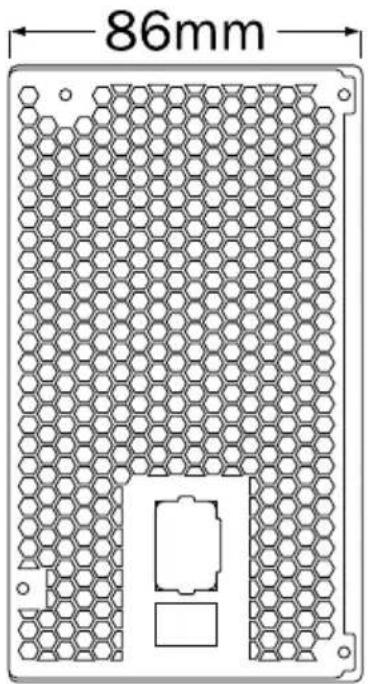
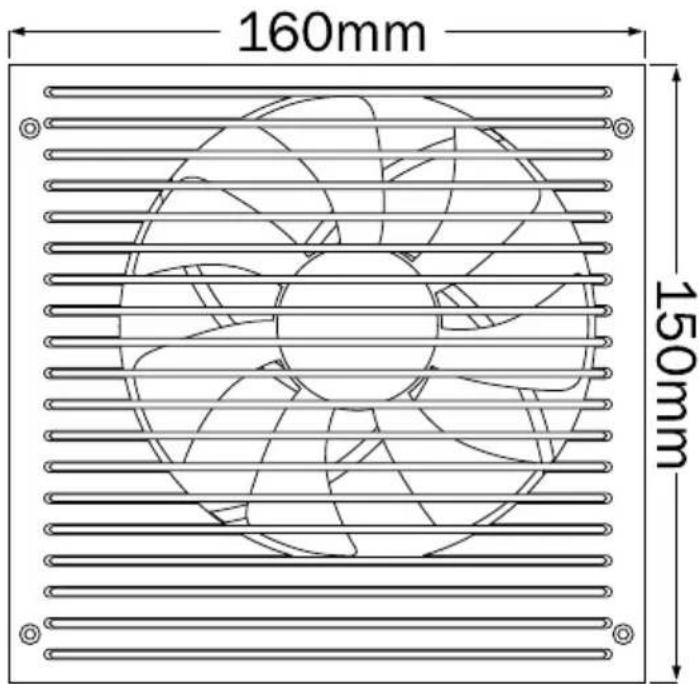
6. DISTRIBUTION AND PIN ASSIGNMENT
24PIN
ATX POWER CONNECTOR
| Pin | Color | Signal | Pin | Color | Signal |
| 1 | Orange | +3.3VDC | 13 | Orange Brown | +3.3VDC +3.3V def. sense |
| 2 | Orange | +3.3VDC | 14 | Blue | -12VDC |
| 3 | Black | COM | 15 | Black | COM |
| 4 | Red | +5VDC | 16 | Green | PS_ON/OFF |
| 5 | Black | COM | 17 | Black | COM |
| 6 | Red | +5VDC | 18 | Black | COM |
| 7 | Black | COM | 19 | Black | COM |
| 8 | Grey | PWR_OK | 20 | ||
| 9 | Violet | +5VSB | 21 | Red | +SVDC |
| 10 | Yellow | +12VDC | 22 | Red | +SVDC |
| 11 | Yellow | +12VDC | 23 | Red | +SVDC |
| 12 | Orange | +3.3VDC | 24 | Black | COM |
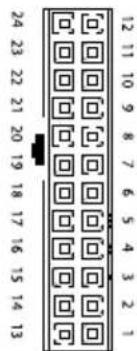
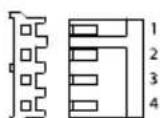
PERIPHERAL DEVICES & FDD POWER CONNECTOR
| Pin | Color | Signal | Pin | Color | Signal |
| 1 | Red | +5VDC | 3 | Black | COM |
| 2 | Black | COM | 4 | Yellow | +12VDC |
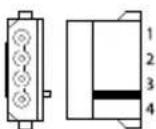
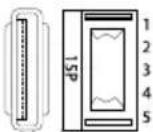
SATA POWER CONNECTOR
| Pin | Color | Signal | Pin | Color | Signal |
| 1 | Orange | 3,3V | 4 | Black | COM |
| 2 | Black | COM | 5 | Yellow | +12VDC |
| 3 | Red | +5VDC |
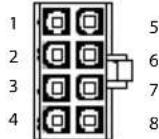
EPS +12 V POWER CONNECTOR
| Pin Co | or Signal | Pin Color Signal | |||
| 1 | Black | COM | 5 | Yellow | +12VDC |
| 2 | Black | COM | 6 | Yellow | +12VDC |
| 3 | Black | COM | 7 | Yellow | +12VDC |
| 4 | Black | COM | 8 | Yellow | +12VDC |
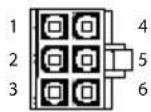
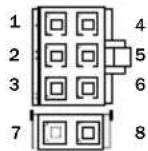
PCI EXPRESS VGA CONNECTOR
| Pin Color Signal Pin Color Signal | |||||
| 1 | Yellow | +12VDC | 4 | Black | COM |
| 2 | Yellow | +12VDC | 5 | Black | COM |
| 3 | Yellow | +12VDC | 6 | Black | COM |
| 7 | Black | COM | 8 | Black | COM |
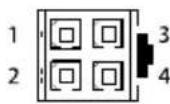
+12 V POWER CONNECTOR
| Pin | Color | Signal | Pin | Color | Signal |
| 1 | Black | COM | 3 | Yellow | +12VDC |
| 2 | Black | COM | 4 | Yellow | +12VDC |
- For P4 motherboard
7. CONNECTIVITY AND CABLE LENGTHS
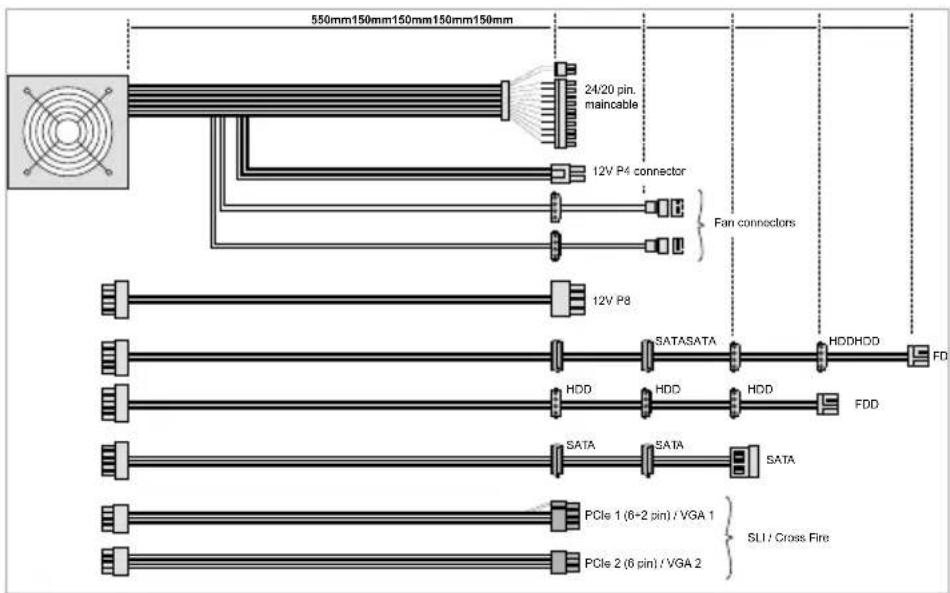
480W
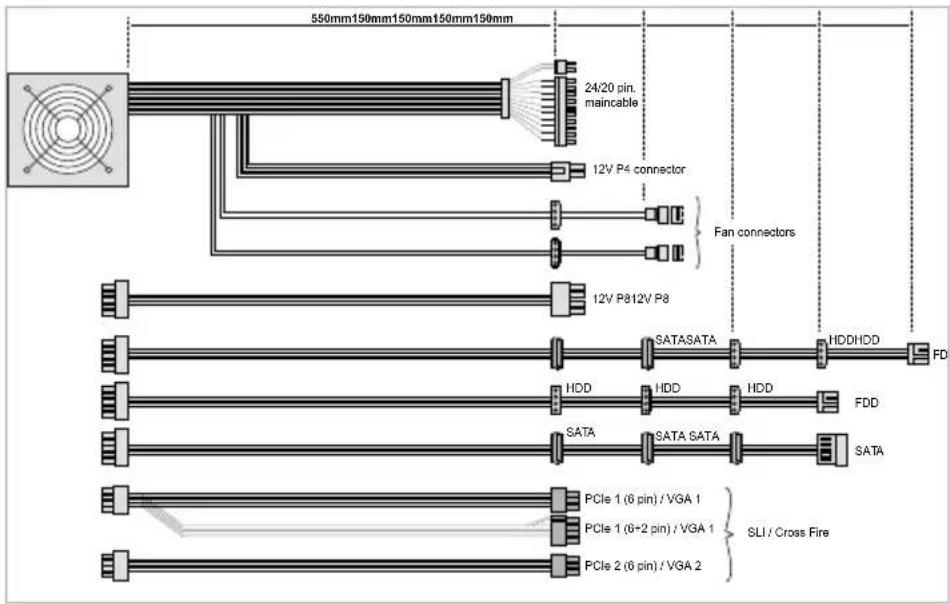
580W
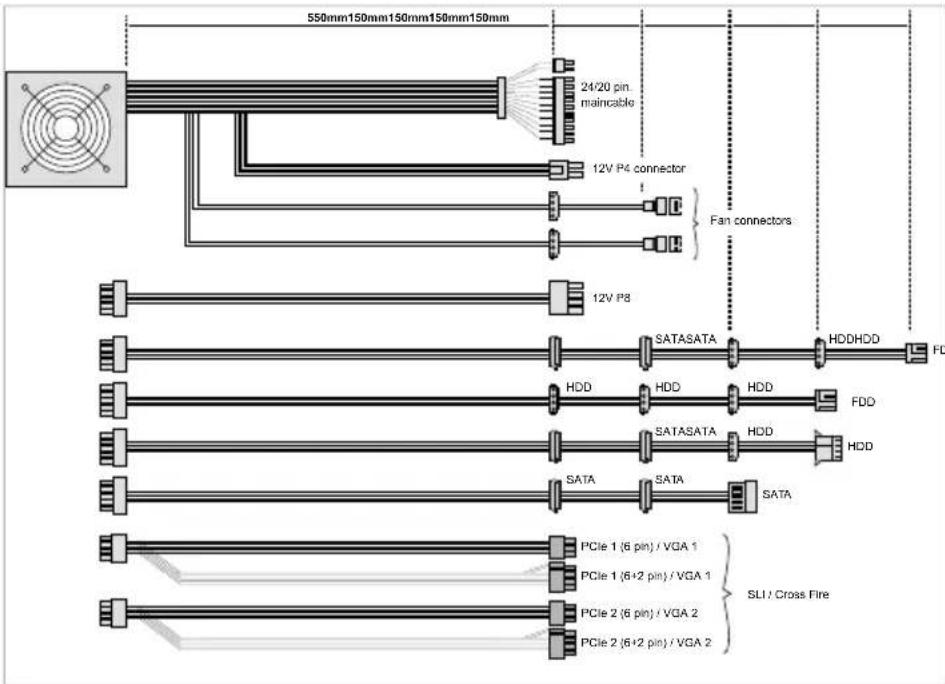
680W