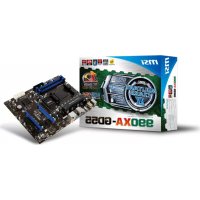
990XAGD55 - Motherboard MSI - Free user manual and instructions
Find the device manual for free 990XAGD55 MSI in PDF.



| Product Type | Motherboard |
| Brand | MSI |
| Model | 990XAGD55 |
| Processor Socket | AM3+ |
| Supported Processors | AMD® FX / Phenom™ II / Athlon™ II / Sempron™ |
| Chipset | North Bridge: AMD® 990X, South Bridge: AMD® SB950 |
| HyperTransport | HyperTransport™ 3.0 up to 5.2 GT/s |
| Memory Type | DDR3 SDRAM |
| Supported Memory Frequencies | 2133*(OC)/1866/1600/1333/1066/800 MHz |
| Maximum Memory Capacity | 32 GB (4 x 8 GB) |
| Memory Slots | 4 x DDR3 DIMM, dual channel |
| SATA Connectors | 6 x SATA 6 Gb/s (SATA1~6) support RAID 0/1/5/10 |
| USB Ports | 8 USB 2.0 (rear) + 2 USB 3.0 (rear) + 2 internal USB 2.0 connectors |
| Audio | Realtek® ALC892, 8-channel HD |
| LAN | Realtek® RTL8111E, 10/100/1000 Mbps |
| Expansion Slots | 2 x PCIe x16 (x16/x0 or x8/x8), 4 x PCIe x1, 1 x PCI |
| Notable Internal Connectors | TPM, serial port, S/PDIF out, chassis intrusion, front audio |
| Form Factor | ATX |
| Dimensions (L x W) | 30.5 cm x 24.4 cm |
| Required Power | ATX 24-pin + 8-pin 12V |
| Special Features | Overclocking, OC Genie Lite, Green Power phases, M-Flash |
| Maintenance and Cleaning | Unplug before cleaning. Use a dry cloth. Avoid moisture. |
| Safety | Be careful of overheating; use a CPU fan. Follow ESD guidelines. |
| Spare Parts and Repairability | Contact MSI after-sales service for parts. Do not attempt unauthorized repairs. |
Frequently Asked Questions - 990XAGD55 MSI
User questions about 990XAGD55 MSI
0 question about this device. Answer the ones you know or ask your own.
Ask a new question about this device
Download the instructions for your Motherboard in PDF format for free! Find your manual 990XAGD55 - MSI and take your electronic device back in hand. On this page are published all the documents necessary for the use of your device. 990XAGD55 by MSI.
USER MANUAL 990XAGD55 MSI

natural_image
Abstract digital globe with glowing network lines and a stylized human figure, no text or symbols present.msi™
990XA-GD55 series
MS-7640 (v4.x) Mainboard
Copyright Notice
The material in this document is the intellectual property of MICROSTAR INTERNATIONAL. We take every care in the preparation of this document, but no guarantee is given as to the correctness of its contents. Our products are under continual improvement and we reserve the right to make changes without notice.
Trademarks
All trademarks are the properties of their respective owners.
MSI® is registered trademark of Micro-Star Int'l Co., Ltd.
■ NVIDIA® is registered trademark of NVIDIA Corporation.
■ ATI® is registered trademark of AMD Corporation.
■ AMD ^® is registered trademarks of AMD Corporation.
Intel® is registered trademarks of Intel Corporation.
■ Windows® is registered trademarks of Microsoft Corporation.
■ AMI® is registered trademark of American Megatrends Inc.
■ Award® is a registered trademark of Phoenix Technologies Ltd.
■ Sound Blaster® is registered trademark of Creative Technology Ltd.
■ Realtek® is registered trademark of Realtek Semiconductor Corporation.
■ JMicron® is registered trademark of JMicron Technology Corporation.
■ Netware® is registered trademark of Novell, Inc.
Lucid® is trademark of LucidLogix Technologies, Ltd.
■ VIA® is registered trademark of VIA Technologies, Inc.
■ ASMedia® is registered trademark of ASMedia Technology Inc.
■ iPad, iPhone, and iPod are trademarks of Apple Inc.
Revision History
| Revision | Revision History Date | Date |
| V4.0 First release for Europe 2011/07 | ||
Technical Support
If a problem arises with your system and no solution can be obtained from the user's manual, please contact your place of purchase or local distributor. Alternatively, please try the following help resources for further guidance.
Visit the MSI website for FAQ, technical guide, BIOS updates, driver updates, and other information: http://www.msi.com/service/download/
Contact our technical staff at: http://support.msi.com/
Safety Instructions
■ Always read the safety instructions carefully.
- Keep this User's Manual for future reference.
- Keep this equipment away from humidity.
■ Lay this equipment on a reliable flat surface before setting it up.
■ The openings on the enclosure are for air convection hence protects the equipment from overheating. DO NOT COVER THE OPENINGS.
■ Make sure the voltage of the power source and adjust properly 110/220V before connecting the equipment to the power inlet.
■ Place the power cord such a way that people can not step on it. Do not place anything over the power cord.
■ Always Unplug the Power Cord before inserting any add-on card or module.
■ All cautions and warnings on the equipment should be noted.
■ Never pour any liquid into the opening that could damage or cause electrical shock.
■ If any of the following situations arises, get the equipment checked by service personnel:
○ The power cord or plug is damaged.
○ Liquid has penetrated into the equipment.
○ The equipment has been exposed to moisture.
The equipment does not work well or you can not get it work according to User's Manual.
○ The equipment has dropped and damaged.
○ The equipment has obvious sign of breakage.
DO NOT LEAVE THIS EQUIPMENT IN AN ENVIRONMENT UNCONDITIONED, STORAGE TEMPERATURE ABOVE 60°C (140°F), IT MAY DAMAGE THE EQUIPMENT.
CAUTION: Danger of explosion if battery is incorrectly replaced.
Replace only with the same or equivalent type recommended by the manufacturer.
警告使用者:
For better environmental protection, waste batteries should be collected separately for recycling special disposal.
FCC-B Radio Frequency Interference Statement
This equipment has been tested and found to comply with the limits for a Class B digital device, pursuant to Part 15 of the FCC Rules. These limits are designed to provide reasonable protection against harmful inter-

N1996
ference in a residential installation. This equipment generates, uses and can radiate radio frequency energy and, if not installed and used in accordance with the instructions, may cause harmful interference to radio communications. However, there is no guarantee that interference will not occur in a particular installation. If this equipment does cause harmful interference to radio or television reception, which can be determined by turning the equipment off and on, the user is encouraged to try to correct the interference by one or more of the measures listed below.
○ Reorient or relocate the receiving antenna.
○ Increase the separation between the equipment and receiver.
○ Connect the equipment into an outlet on a circuit different from that to which the receiver is connected.
Consult the dealer or an experienced radio/television technician for help.
Notice 1
The changes or modifications not expressly approved by the party responsible for compliance could void the user's authority to operate the equipment.
Notice 2
Shielded interface cables and A.C. power cord, if any, must be used in order to comply with the emission limits.
VOIR LA NOTICE D'INSTALLATION AVANT DE RACCORDER AU RESEAU.
This device complies with Part 15 of the FCC Rules. Operation is subject to the following two conditions:
1) this device may not cause harmful interference, and
2) this device must accept any interference received, including interference that may cause undesired operation.
WEEE (Waste Electrical and Electronic Equipment) Statement
ENGLISH
To protect the global environment and as an environmentalist, MSI must remind you that...
Under the European Union ("EU") Directive on Waste Electrical and Electronic Equipment, Directive 2002/96/EC, which takes effect on August 2005, products of "electrical and electronic equipment" cannot be discarded as municipal waste anymore and manufacturers of covered electronic equip ment will be obligated to take back such products at the end of their useful life. MSI will comply with the product take back requirements at the end of life of MSI-branded products that are sold into the EU. You can return these products to local collection points.
DEUTSCH
Technical Support....ii
Safety Instructions ....iii
FCC-B Radio Frequency Interference Statement...... iv
WEEE (Waste Electrical and Electronic Equipment) Statement ...... v
English En-1
Mainboard Specifications ....En-2
Quick Components Guide ....En-4
Screw Holes En-5
CPU (Central Processing Unit) ......En-6
Memory En-9
Power Supply ....En-11
Back Panel En-12
Connectors En-14
Jumpers En-19
Slots En-20
LED Status Indicators ....En-21
BIOS Setup ....En-23
Software Information ....En-32
Deutsch .... De-1
natural_image
Abstract illustration of a globe with orbiting lines and floating elements (no text or symbols)English
990XA-GD55
Series
Mainboard Specifications
Processor Support
■ AMD® FX / Phenom™ II / Athlon™ II / Sempron™ Processors with AM3+ package. (For the latest information about CPU, please visit http://www.msi.com/service/cpu-support/)
HyperTransport
■ HyperTransport™ 3.0, supports up to 5.2 GT/s
Chipset
■ North Bridge: AMD®990X chipset
■ South Bridge: AMD® SB950 chipset
Memory Support
■ DDR3 2133 *(OC)/ 1866/ 1600/ 1333/ 1066/ 800 SDRAM (total 32 GB Max)
■ 4 DDR3 DIMMs, supports Dual-Channel mode *(OC means OverClocking, for more information on compatible components, please visit http://www.msi.com/service/test-report/)
LAN
■ Supports PCIe Gb LAN (10/100/1000) by Realtek® RTL8111E
Audio
■ HD audio codec integrated by Realtek® ALC892
■ Flexible 8-channel audio with jack sensing
SATA
■ 6 SATA 6Gb/s ports (SATA1\~6) by AMD® SB950
■ Supports hot plug & asynchronous notification
USB 3.0
■ 2 USB 3.0 ports (back panel) by NEC D720200
RAID
■ SATA1\~6 support RAID 0/ 1/ 5/ 10 mode by AMD® SB950
Connectors
■ Back panel
- 1 PS/2 keyboard/ mouse port
- 1 Clear CMOS button
- 1 Coaxial S/PDIF-Out port
- 1 Optical S/PDIF-Out port
- 8 USB 2.0 ports
- 2 USB 3.0 ports
- 1 LAN port
- 6 flexible audio ports
■ On-Board
- 2 USB 2.0 connectors
- 1 Serial port connector
- 1 Chassis Intrusion connector
- 1 S/PDIF-Out connector
- 1 Front Panel Audio connector
- 1 TPM Module connector
Slots
■ 2 PCIe x16 slots
- If two graphics cards are installed in both PCIe x16 slots, these two PCIe 2.0 x16 lanes will auto arrange from x16/ x0 to x8/ x8
■ 4 PCIe x1 slots
■ 1 PCI slot, supports 3.3V/5V PCI bus Interface
Form Factor
■ ATX (24.4cm X 30.5 cm)
Mounting
■ 9 mounting holes
If you need to purchase accessories and request the part numbers, you could search the product web page and find details on our web address below
http://www.msi.com/index.php
Quick Components Guide
![JPWR2, En-11 CPU, En-6 CPUFAN1, En-15 Back [Panel, En-12] SYSFAN1, En-15 DDR3, En-9 JPWR1, En-11 PCIe, En-20 SYSFAN2, En-15 JCI1, En-14 SATA1~6, En-14 SYSFAN3, En-15 JCOM1, En-17 JUSB1, JUSB2, En-17 JFP1, JFP2, En-16 JBAT1, En-19 JSP1, En-16 JTPM1, En-18 JAUD1, En-15](/content/2026/02/353126/images/cba104168d0b574ea9aa5bc3e6cb96f43287c99cead6ad5b90042935023a04d3.jpg)
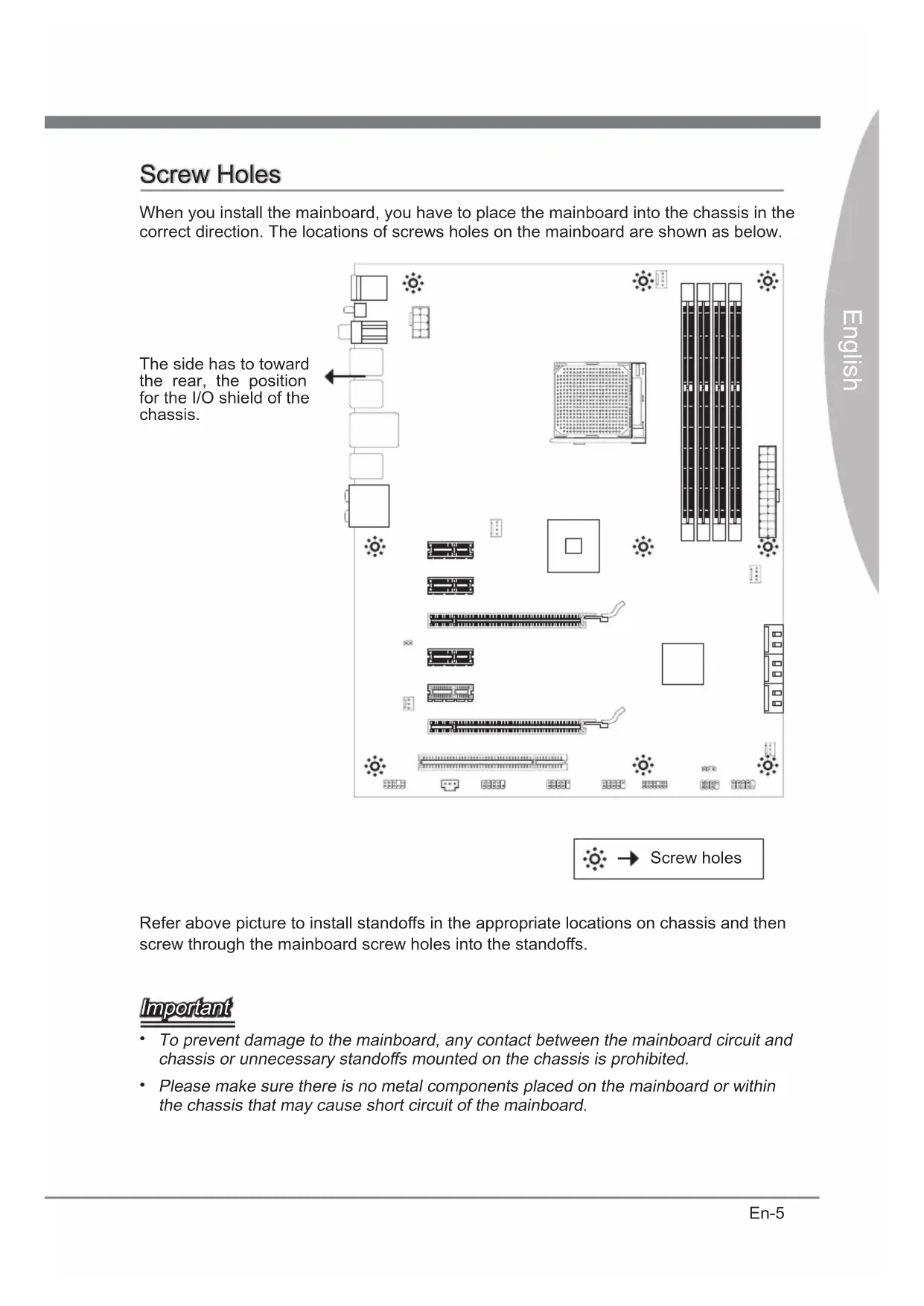
Screw Holes
When you install the mainboard, you have to place the mainboard into the chassis in the correct direction. The locations of screws holes on the mainboard are shown as below.
The side has to toward the rear, the position for the I/O shield of the chassis.
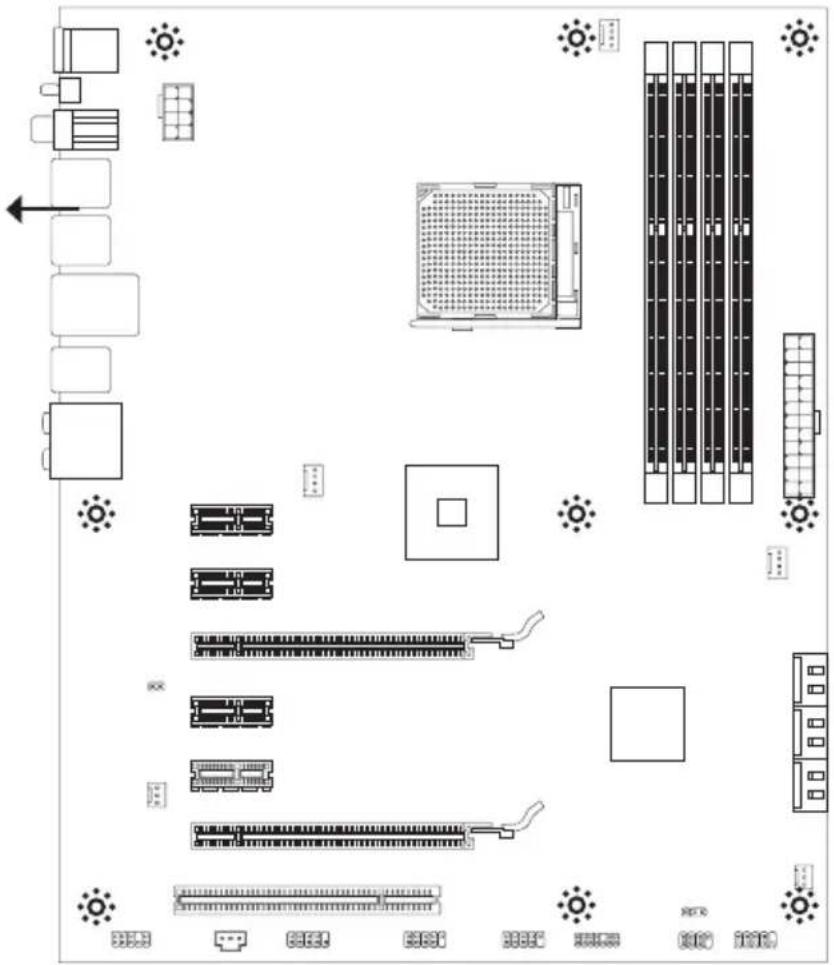
Refer above picture to install standoffs in the appropriate locations on chassis and then screw through the mainboard screw holes into the standoffs.
Important
- To prevent damage to the mainboard, any contact between the mainboard circuit and chassis or unnecessary standoffs mounted on the chassis is prohibited.
- Please make sure there is no metal components placed on the mainboard or within the chassis that may cause short circuit of the mainboard.
CPU (Central Processing Unit)
When you are installing the CPU, make sure to install the cooler to prevent overheating. If you do not have the CPU cooler, consult your dealer before turning on the computer. For the latest information about CPU, please visit http://www.msi.com/service/cpu-support/
Important
Overheating
Overheating will seriously damage the CPU and system. Always make sure the cooling fan can work properly to protect the CPU from overheating. Make sure that you apply an even layer of thermal paste (or thermal tape) between the CPU and the heatsink to enhance heat dissipation.
Replacing the CPU
While replacing the CPU, always turn off the ATX power supply or unplug the power supply's power cord from the grounded outlet first to ensure the safety of CPU.
Overclocking
This mainboard is designed to support overclocking. However, please make sure your components are able to tolerate such abnormal setting, while doing overclocking. Any attempt to operate beyond product specifications is not recommended. We do not guarantee the damages or risks caused by inadequate operation or beyond product specifications.
Introduction to AM3+ CPU
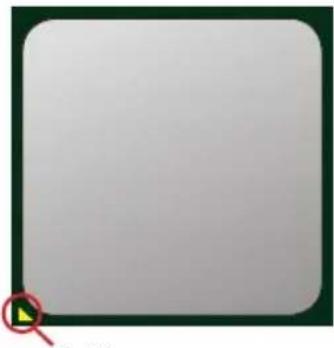
The surface of CPU. Remember to apply some thermal paste on it for better heat dispersion.
natural_image
Blank white square with a dark border and a small red circle highlighting a yellow diamond (no text or symbols)Gold arrow
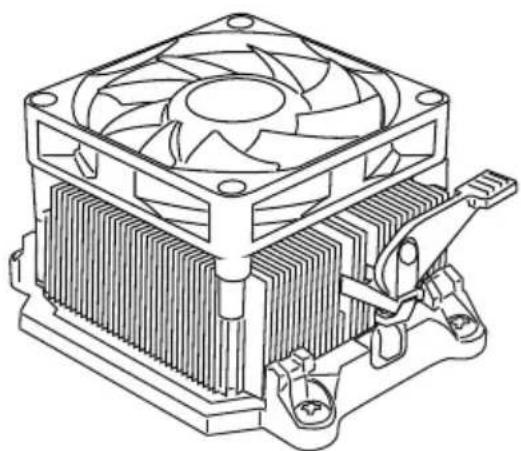
CPU & Cooler Installation
When you are installing the CPU, make sure the CPU has a cooler attached on the top to prevent overheating. Meanwhile, do not forget to apply some thermal paste on CPU before installing the heat sink/cooler fan for better heat dispersion.
Follow the steps below to install the CPU & cooler correctly. Wrong installation will cause the damage of your CPU & mainboard
-
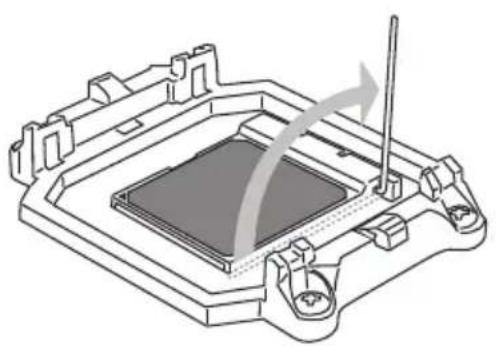
Pull the lever sideways away from the socket. Make sure to raise the lever up to a 90-degree angle.
-
Look for the gold arrow of the CPU. The gold arrow should point as shown in the picture. The CPU can only fit in the correct orientation.
natural_image
Technical line drawing of a mechanical component with no visible text or symbols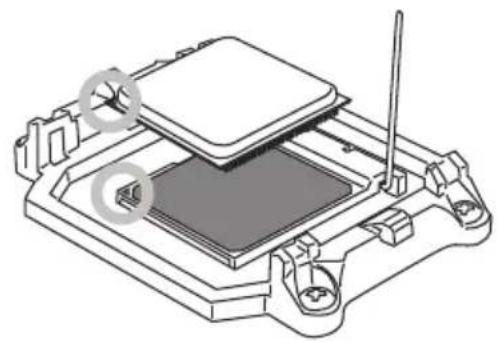
natural_image
Technical line drawing of a mechanical assembly with no visible text or symbols-
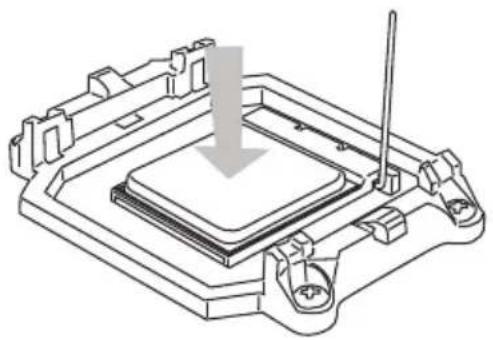
Please set GPCPSJ dowedifyrhysalted the pins should be completely embedded into the socket and can not be seen. Please note that any violation of the correct installation procedures may cause permanent damages to your mainboard.
-
socket and close the lever. As the CPU is likely to move while the lever is being closed, always close the lever with your fingers pressing tightly on top of the CPU to make sure the CPU is properly and completely embedded into the socket.
natural_image
Technical line drawing of a mechanical component with a downward arrow indicating a process or assembly (no text or symbols present)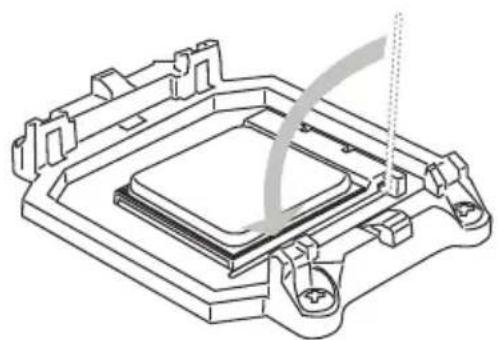
natural_image
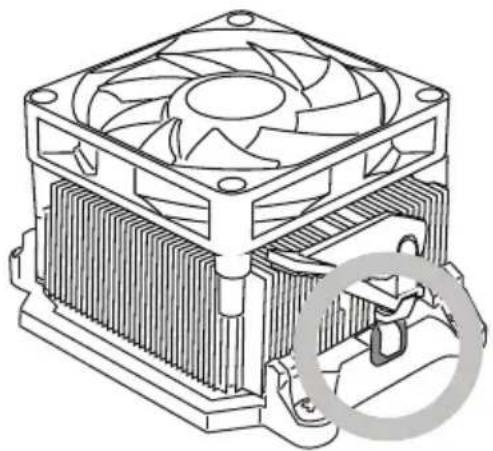
Technical line drawing of a mechanical component with no visible text or symbols5. TIRerspiersstlewooddiegtset and of the retention mechanism.
Hook one end of the clip to hook first.
6.
clip to fasten the cooling set on the top of the retention mechanism.
Locate the Fix Lever and lift up it.
natural_image
Technical line drawing of a computer CPU with heatsink and cooling fan (no text or symbols)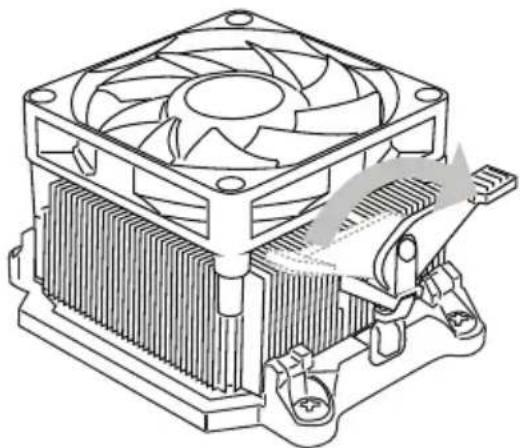
natural_image
Technical line drawing of a computer cooling fan with heatsink and cooling bracket (no text or symbols)Fasten down the lever.7. Attach the CPU 8an cable to the CPU
fan connector on the mainboard.
natural_image
Technical line drawing of a computer CPU with heatsink and cooling fan (no text or symbols)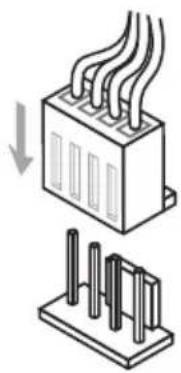
natural_image
Diagram showing a heat exchanger or cooling unit with cooling fins and a base panel (no text or symbols)Important
While disconnecting the Safety Hook from the fixed bolt, it is necessary to keep an eye on your fingers, because once the Safety Hook is disconnected from the fixed bolt, the fixed lever will spring back instantly.
Memory
These DIMM slots are used for installing memory modules. For more information on compatible components, please visit http://www.msi.com/service/test-report/
DDR3
240-pin, 1.5V

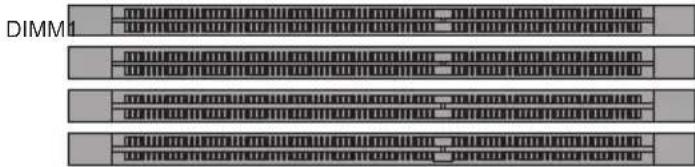
Dual-Channel mode Population Rule
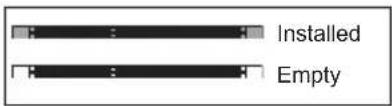
In Dual-Channel mode, the memory modules can transmit and receive data with two data bus lines simultaneously. Enabling Dual-Channel mode can enhance the system performance. The following illustrations explain the population rules for Dual-Channel mode.
①
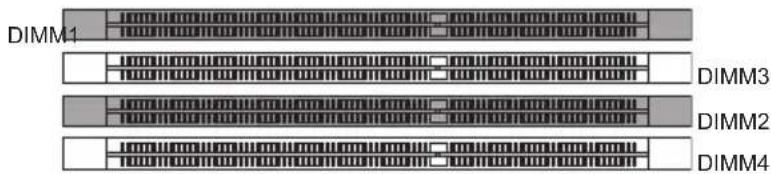
DIMM3
DIMM2
DIMM4
②
Important
• DDR3 memory modules are not interchangeable with DDR2 and the DDR3 standard is not backwards compatible. You should always install DDR3 memory modules in the DDR3 DIMM slots.
- In Dual-Channel mode, make sure that you install memory modules of the same type and density in different channel DIMM slots.
- To enable successful system boot-up, always insert the memory modules into the DIMM1 first.
- Due to the chipset resource deployment, the system density will only be detected up to 31+GB (not full 32GB) when each DIMM is installed with a 8GB memory module.
Installing Memory Modules
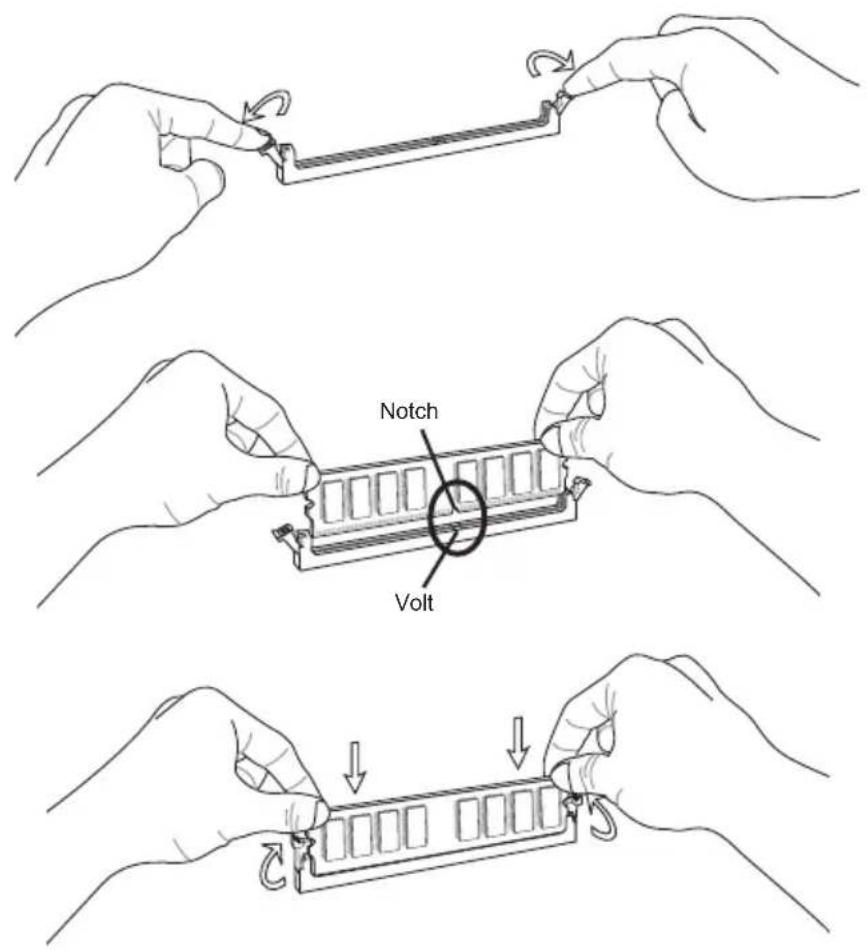
- The memory module has only one notch on the center and will only fit in the right orientation.
- Insert the memory module vertically into the DIMM slot. Then push it in until the golden finger on the memory module is deeply inserted in the DIMM slot. The plastic clip at each side of the DIMM slot will automatically close when the memory module is properly seated.
- Manually check if the memory module has been locked in place by the DIMM slot clips at the sides.
Important
You can barely see the golden finger if the memory module is properly inserted in the DIMM slot.
Power Supply
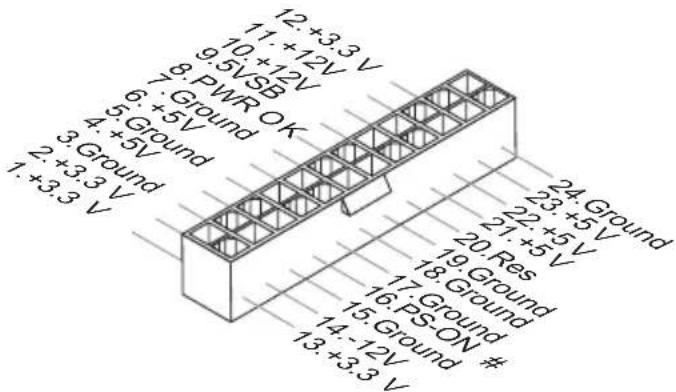
ATX 24-pin Power Connector: JPWR1
This connector allows you to connect an ATX 24-pin power supply. To connect the ATX 24-pin power supply, make sure the plug of the power supply is inserted in the proper orientation and the pins are aligned. Then push down the power supply firmly into the connector.
You may use the 20-pin ATX power supply as you like. If you'd like to use the 20-pin ATX power supply, please plug your power supply along with pin 1 & pin 13.
ATX 8-pin Power Connector: JPWR2
This connector is used to provide +12V power.
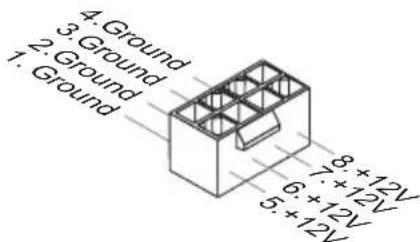
Important
Make sure that all the connectors are connected to proper ATX power supplies to ensure stable operation of the mainboard.
Back Panel
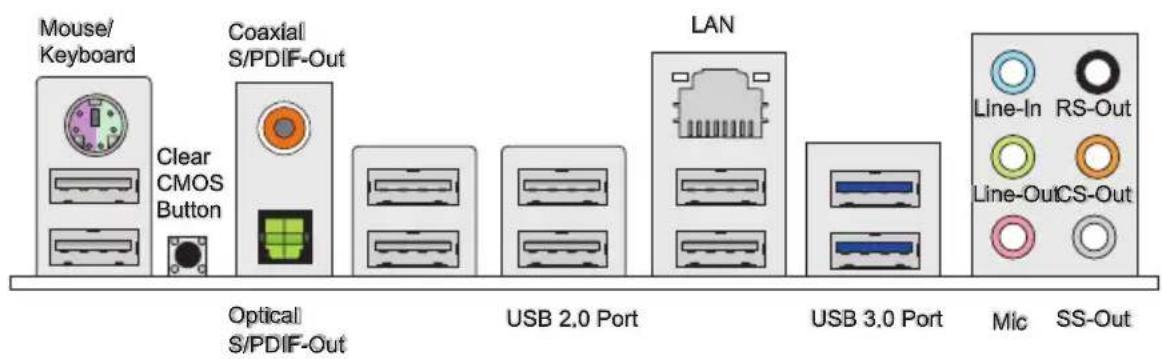
▶ Mouse/ Keyboard
The standard PS/2 ^® mouse/keyboard DIN connector is for a PS/2 ^® mouse/keyboard.
▶ Clear CMOS Button
There is a CMOS RAM on board that has a power supply from external battery to keep the system configuration data. With the CMOS RAM, the system can automatically boot OS every time it is turned on. If you want to clear the system configuration, use the button to clear data. Press the button to clear the data.
Important
• Make sure that you power off the system before clearing CMOS data.
- After pressing this button to clear CMOS data in power off (G3) state, the system will boot automatically.
This SPDIF (Sony & Philips Digital Interconnect Format) connector is provided for digital audio transmission to external speakers through a coaxial cable.
▶ Coaxial S/PDIF-Out
▶ Optical S/PDIF-Out
This SPDIF (Sony & Philips Digital Interconnect Format) connector is provided for digital audio transmission to external speakers through an optical fiber cable.
▶ USB 2.0 Port
The USB (Universal Serial Bus) port is for attaching USB devices such as keyboard, mouse, or other USB-compatible devices. Supports data transfer rate up to 480Mbit/s (Hi-Speed).
▶ USB 3.0 Port
USB 3.0 port is backward-compatible with USB 2.0 devices. Supports data transfer rate up to 5 Gbit/s (SuperSpeed).
Important
If you want to use a USB 3.0 device, you must use the USB 3.0 cable to connect to the USB 3.0 port.
▶ LAN
The standard RJ-45 LAN jack is for connection to the Local Area Network (LAN). You can connect a network cable to it.
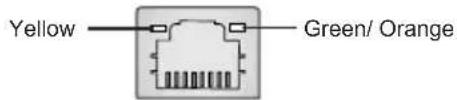
| LED Color LED State Condition | |||
| Left Yellow Off LAN link is not established. | |||
| On(Steady state) LAN link is established. | |||
| On(brighter & pulsing) The computer is communicating with another computer on the LAN. | |||
| Right | Green Off 10 Mbit/sec data rate is selected. | ||
| On 100 Mbit/sec data rate is selected. | |||
| Orange On 1000 Mbit/sec data rate is selected. | |||
▶ Audio Ports
These audio connectors are used for audio devices. It is easy to differentiate between audio effects according to the color of audio jacks.
■ Line-In (Blue) - Line In, is used for external CD player, tape-player or other audio devices.
■ Line-Out (Green) - Line Out, is a connector for speakers or headphones.
■ Mic (Pink) - Mic, is a connector for microphones.
■ RS-Out (Black) - Rear-Surround Out in 4/5.1/7.1 channel mode.
■ CS-Out (Orange) - Center/ Subwoofer Out in 5.1/7.1 channel mode.
■ SS-Out (Gray) - Side-Surround Out 7.1 channel mode.
Connectors
Serial ATA Connector: SATA1\~6
This connector is a high-speed Serial ATA interface port. Each connector can connect to one Serial ATA device.
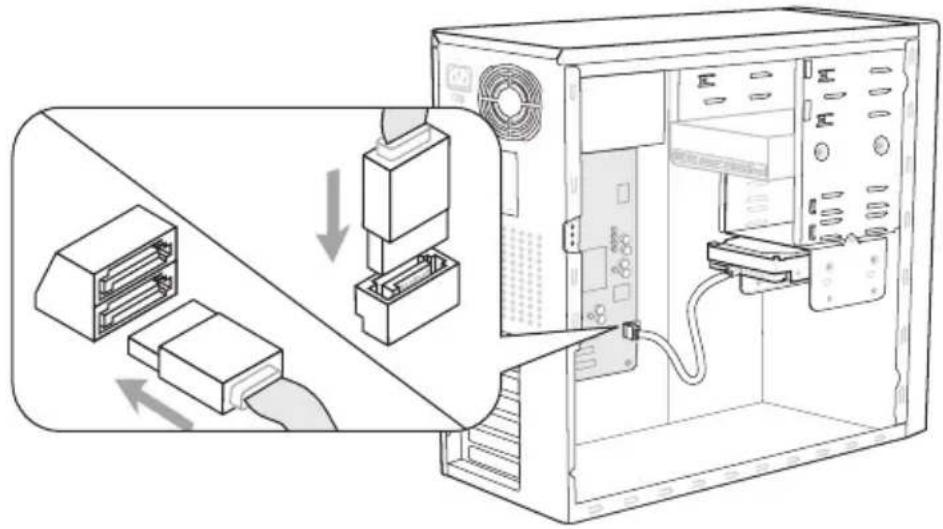
* The MB layout in this figure is for reference only.
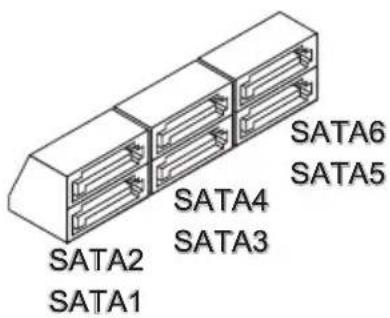
SATA1\~6 (6Gb/s) supported by SB950
Important
Please do not fold the Serial ATA cable into 90-degree angle. Otherwise, data loss may occur during transmission.
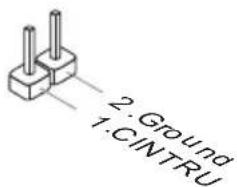
Chassis Intrusion Connector: JCI1
This connector connects to the chassis intrusion switch cable. If the chassis is opened, the chassis intrusion mechanism will be activated. The system will record this status and show a warning message on the screen. To clear the warning, you must enter the BIOS utility and clear the record.
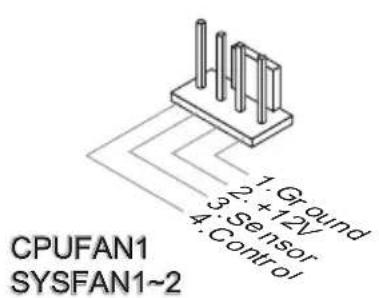
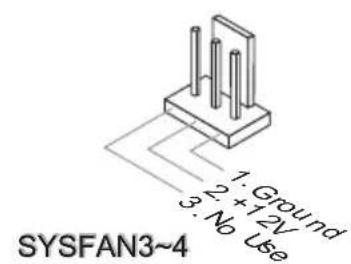
Fan Power Connectors: CPUFAN1, SYSFAN1\~4
The fan power connectors support system cooling fan with +12V. When connecting the wire to the connectors, always note that the red wire is the positive and should be connected to the +12V; the black wire is Ground and should be connected to GND. If the mainboard has a System Hardware Monitor chipset on-board, you must use a specially designed fan with speed sensor to take advantage of the CPU fan control.
Important
- Please refer to the recommended CPU fans at processor's official website or consult the vendors for proper CPU cooling fan.
- CPUFAN1, SYSFAN1, SYSFAN2 support fan control. You can install Control Center utility that will automatically control the fans speed according to the actual temperature.
- Fan cooler set with 3 or 4 pins power connector are both available for CPUFAN1, SYSFAN1, SYSFAN2.
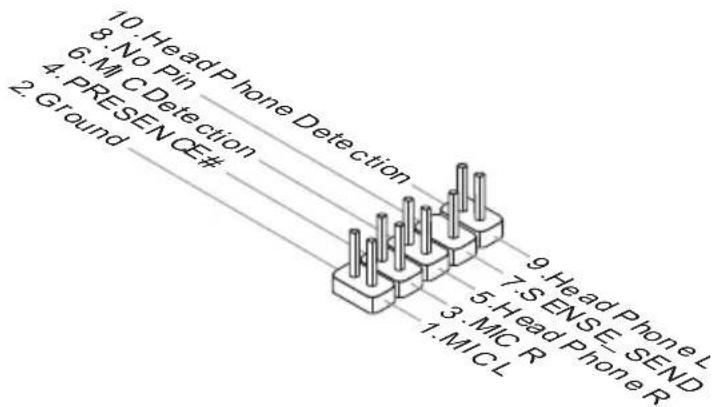
Front Panel Audio Connector: JAUD1
This connector allows you to connect the front panel audio and is compliant with Intel® Front Panel I/O Connectivity Design Guide.
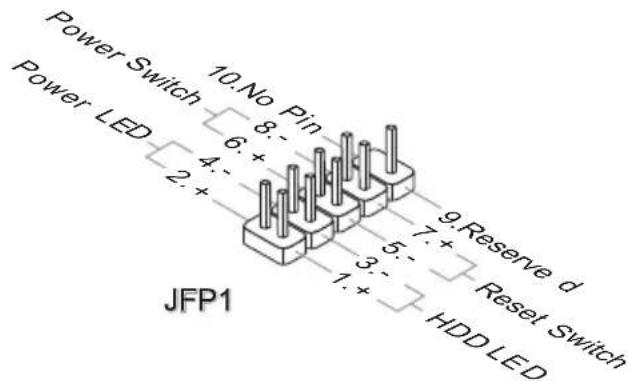
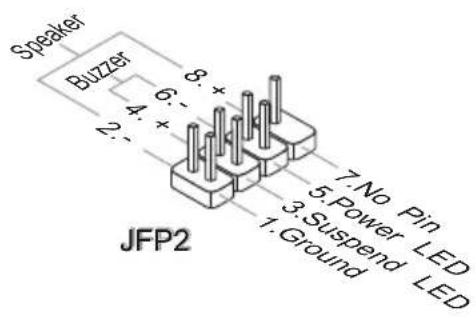
Front Panel Connectors: JFP1, JFP2
These connectors are for electrical connection to the front panel switches and LEDs. The JFP1 is compliant with Intel® Front Panel I/O Connectivity Design Guide.
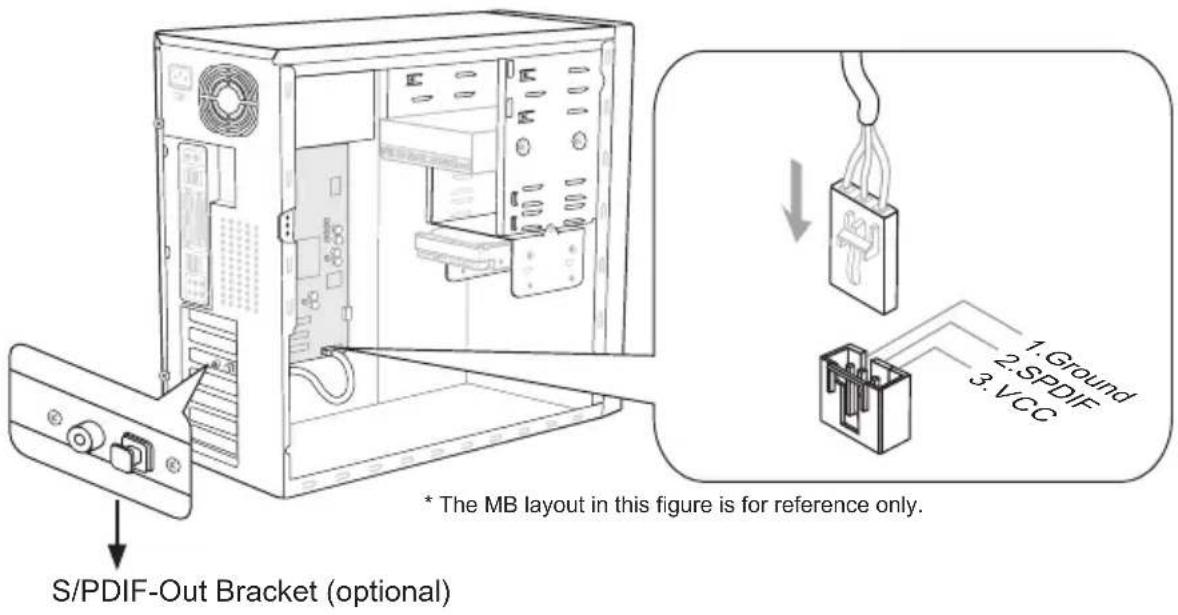
S/PDIF-Out Connector: JSP1
This connector is used to connect S/PDIF (Sony & Philips Digital Interconnect Format) interface for digital audio transmission.
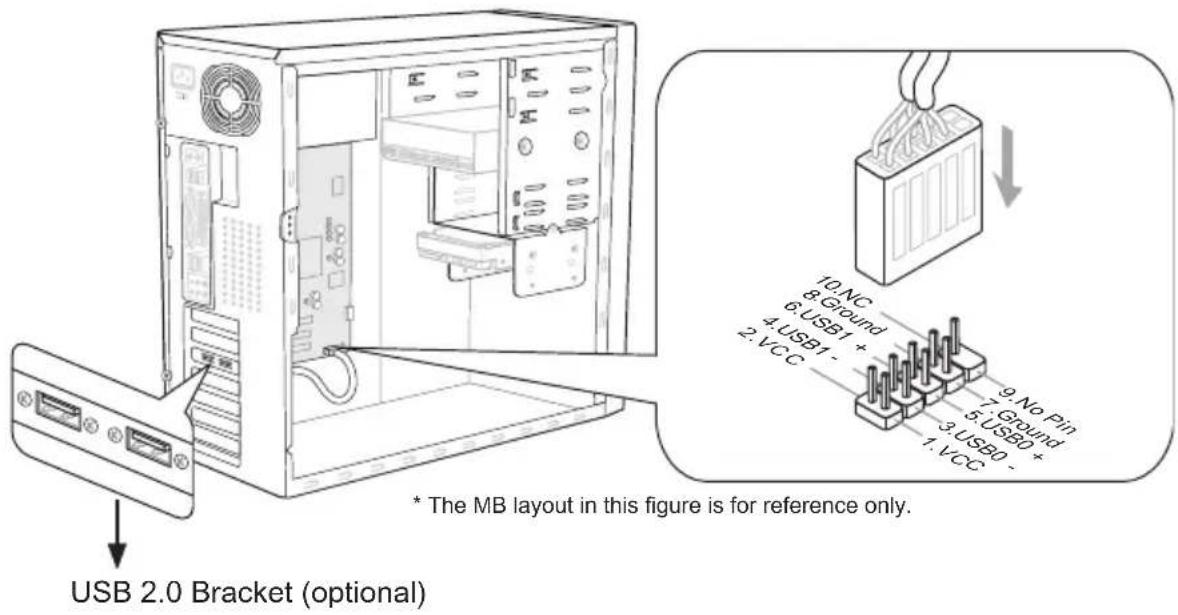
Front USB Connector: JUSB1, JUSB2
This connector, compliant with Intel ^ I/O Connectivity Design Guide, is ideal for connecting high-speed USB interface peripherals such as USB HDD, digital cameras, MP3 players, printers, modems and the like.
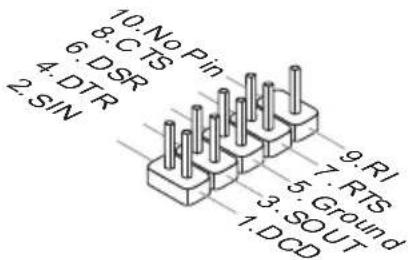
Serial Port Connector: JCOM1
This connector is a 16550A high speed communication port that sends/ receives 16 bytes FIFOs. You can attach a serial device.
TPM Module connector: JTPM1
This connector connects to a TPM (Trusted Platform Module) module (optional). Please refer to the TPM security platform manual for more details and usages.
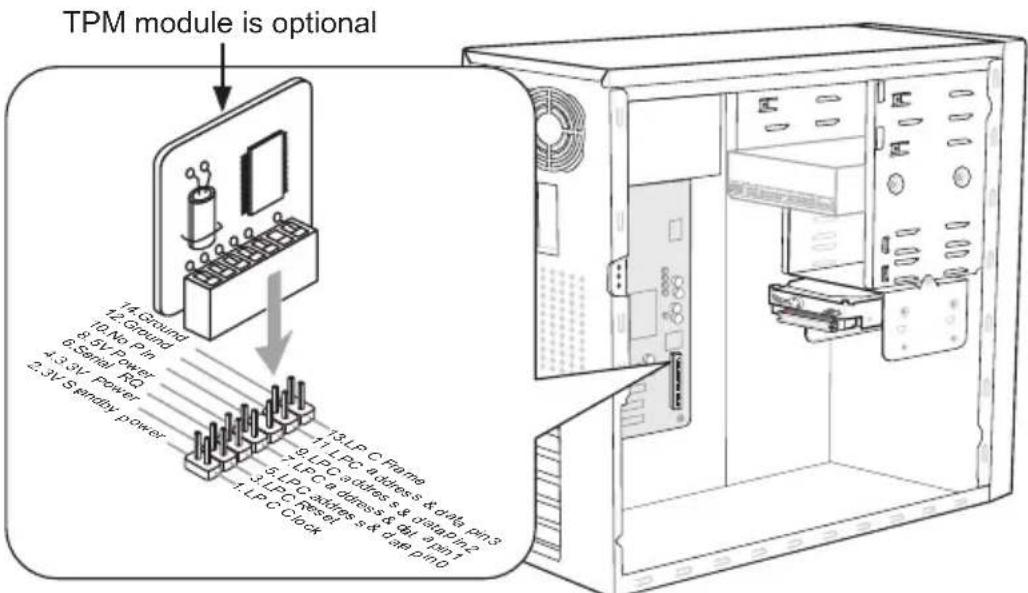
* The MB layout in this figure is for reference only.
Jumpers
Clear CMOS Jumper: JBAT1
There is a CMOS RAM onboard that has a power supply from an external battery to keep the data of system configuration. With the CMOS RAM, the system can automatically boot OS every time it is turned on. If you want to clear the system configuration, set the jumper to clear data.
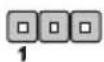
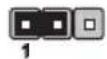
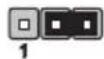
JBAT1 Keep Data Clear Data
Important
You can clear CMOS by shorting 2-3 pin while the system is off. Then return to 1-2 pin position. Avoid clearing the CMOS while the system is on; it will damage the main-board.
Slots
PCIe (Peripheral Component Interconnect Express) Slot
The PCIe slot supports the PCIe interface expansion card.
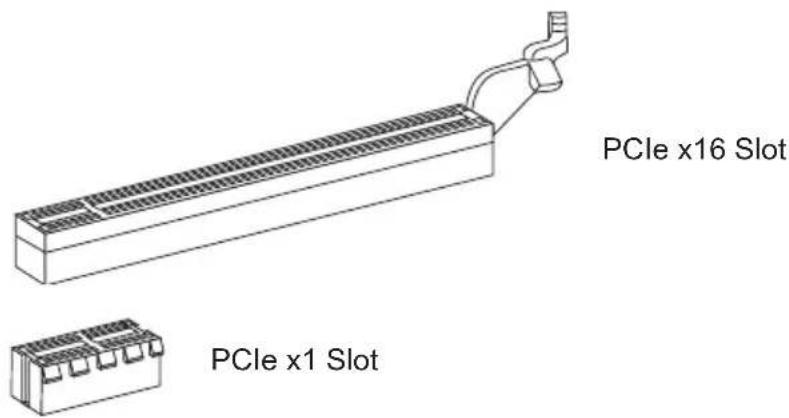
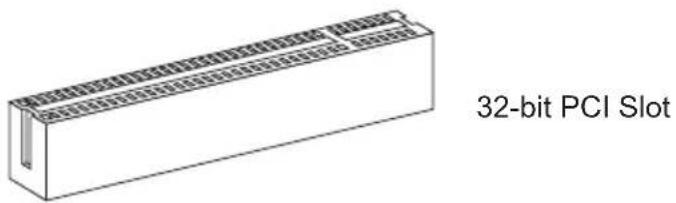
PCI (Peripheral Component Interconnect) Slot
The PCI slot supports LAN card, SCSI card, USB card, and other add-on cards that comply with PCI specifications.
Important
When adding or removing expansion cards, make sure that you unplug the power supply first. Meanwhile, read the documentation for the expansion card to configure any necessary hardware or software settings for the expansion card, such as jumpers, switches or BIOS configuration.
PCI Interrupt Request Routing
The IRQ, acronym of interrupt request line and pronounced I-R-Q, are hardware lines over which devices can send interrupt signals to the microprocessor. The PCI IRQ pins are typically connected to the PCI bus pins as follows:
| Order1 Order2 Order3 Order4 | |
| PCI Slot1 INT | G# INT H# INT E# INT F# |
LED Status Indicators
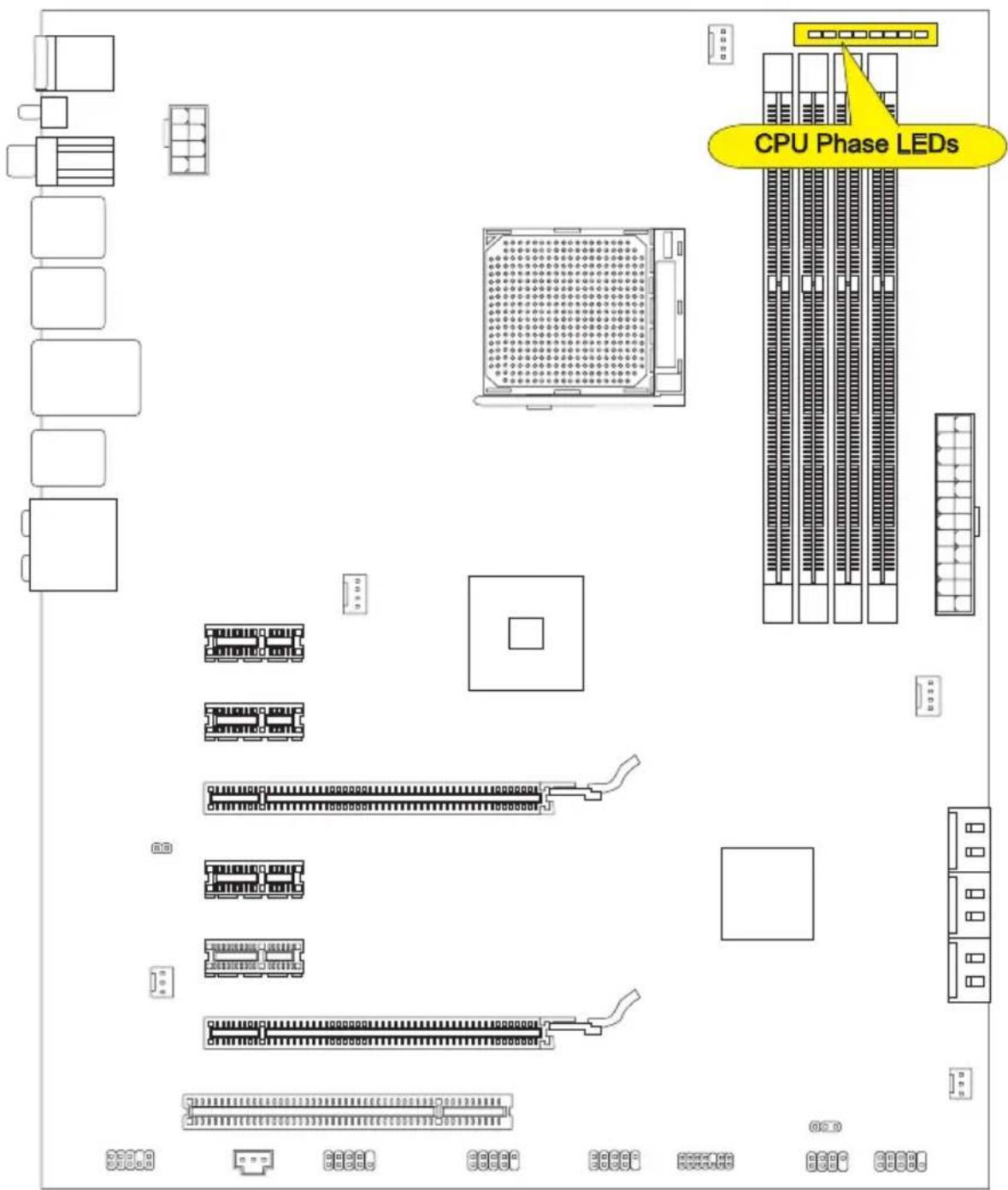
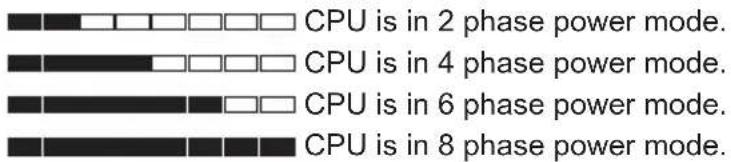
CPU Phase LEDs
These LEDs indicate the current CPU power phase mode. Follow the instructions below to read.
ights Off
BIOS Setup
This chapter provides basic information on the BIOS Setup program and allows you to configure the system for optimum use. You may need to run the Setup program when:
■ An error message appears on the screen during the system booting up, and requests you to run BIOS SETUP.
■ You want to change the default settings for customized features.
Important
- The items under each BIOS category described in this chapter are under continuous update for better system performance. Therefore, the description may be slightly different from the latest BIOS and should be held for reference only.
- Upon boot-up, the 1st line appearing after the memory count is the BIOS version. It is usually in the format:
E7640AMS.xxx 062011 where:
1st digit refers to BIOS type as E = EFI
2nd - 5th digit refers to the model number.
6th digit refers to the chipset as I = Intel, N = nVidia, A = AMD and V = VIA.
7th - 8th digit refers to the customer as MS = all standard customers.
xxx refers to the BIOS version.
062011 refers to the date this BIOS was released.
Entering Setup
Power on the computer and the system will start POST (Power On Self Test) process. When the message below appears on the screen, press key to enter Setup.
Press DEL to enter Setup Menu, F11 to enter Boot Menu
If the message disappears before you respond and you still wish to enter Setup, restart the system by turning it OFF and On or pressing the RESET button. You may also restart the system by simultaneously pressing
Control
| Keyboard | Mouse Description | Description |
| <↑><↓> |  | Select Item |
| <←><→> | Move the cursor | |
 Click/ Double-click the left button Click/ Double-click the left button | Select Icon/ Field | |
 Click the right button Click the right button | Jumps to the Exit menu or returns to the previous from a submenu | |
| <+> Increase the numeric value or make changes | ||
| <-> Decrease the numeric value or make changes | ||
| General HelpSpecifications | ||
| Enter Memory-Zoptimized defaults | ||
| Save Change and Reset | ||
Sub-Menu
If you find a right pointer symbol appears to the left of certain fields that means a sub-menu can be launched from this field. A sub-menu contains additional options for a field parameter. You can use arrow keys (↑↓) or mouse to highlight the field and press
General Help
The BIOS setup program provides a General Help screen. You can call up this screen from any menu by simply pressing
The Main Menu
Once you enter BIOS CMOS Setup Utility, the Main Menu will appear on the screen. The Main Menu allows you to select from the setup functions.
![Aptlo Setup Utility - Copyright (C) 2011 American Megatrends, Inc. Main Advanced Overclocking M-Flash Security Green Power Boot Save & Exit System Date [Mon 05/09/2011] System Time [09:47:05] SATA Port1 Not Present SATA Port2 Not Present SATA Port3 Not Present SATA Port4 Not Present SATA Port5 Not Present SATA Port6 Not Present System Information AMD Phenom(tm) II K4 960T Processor CPUID/MicroCode 100fa0/10000bf BIOS Version E7640AMS V15.0B3 Build Date 05/09/2011 Physical Memory 2048 MB Cache Size 2048 KB L3 Cache Size 6144 KB Set the Date. Use Tab to switch between Data elements. ++: Select Screen ++: Select Item Enter: Select +/-: Change Opt. F1: General Help F4: CPU Specifications F5: Memory-2 F6: Optimized Defaults ESC: Exit F10: Save & Reset Version 2.13.1213. Copyright (C) 2011 American Megatrends, Inc.](/content/2026/02/353126/images/70b7bcd7b664d431aca1c8dd10438469741f9346d47928a441ee0696e5b58d39.jpg)
▶ Main Menu
Use this menu for basic system configurations, such as time, date etc.
▶ Advanced
Use this menu to setup the items of the BIOS special enhanced features, integrated peripherals, power management and PC health status.
▶ Overclocking
Use this menu to specify your settings for frequency/voltage control and overclocking.
▶ M-Flash
Use this menu to read/ flash the BIOS from storage drive (FAT/ FAT32 format only).
▶ Security
Use this menu to set supervisor and user passwords.
▶ Green Power
Use this menu to specify the power phase.
▶ Boot
Use this menu to specify the priority of boot devices.
▶ Save & Exit
This menu allows you to load the BIOS default values or factory default settings into the BIOS and exit the BIOS setup utility with or without changes.
When enter the BIOS Setup utility, follow the processes below for general use.
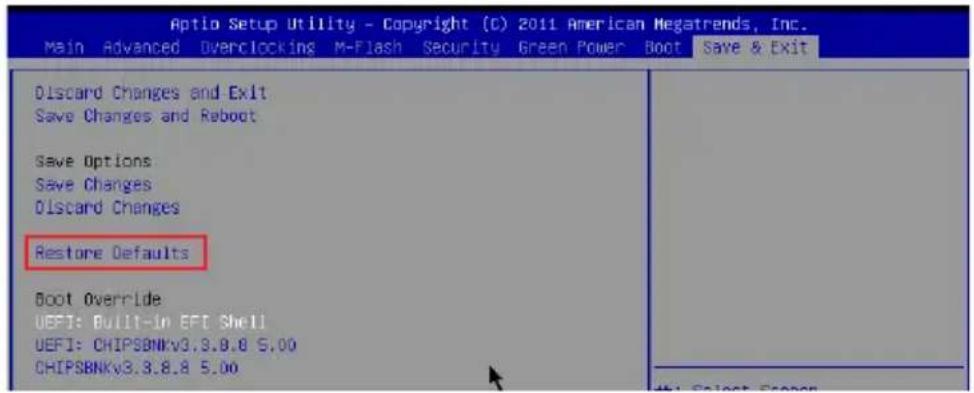
- Load Optimized Defaults: Use the arrow keys (←, →, ↑, ↓) to select the [Restore Defaults] in [Save & Exit] menu, and press
. A pop-up message will appear, please select [Yes] and press to load the default settings for optimal system performance.
- Setup Date/ Time : Use the arrow keys (←, →, ↑, ↓) to select the [System Date]/[System Time] in [Main Menu] menu, and press
. And then, you can set the Date, Time in their respective fields.
![Aptio Setup Utility - Copyright (C) 2011 American Megatrends, Inc. Main Advanced Overclocking M-Flash Security Green Power Boot Save & Exit System Date [Wed 05/04/2011] System Time [17:00:09] Set the Time. Use Tab to switch between Time elements.](/content/2026/02/353126/images/b229a91a7ed46a3b7ac11d598e5a35adbcdf28c0e04fb155accde4e7778ed504.jpg)
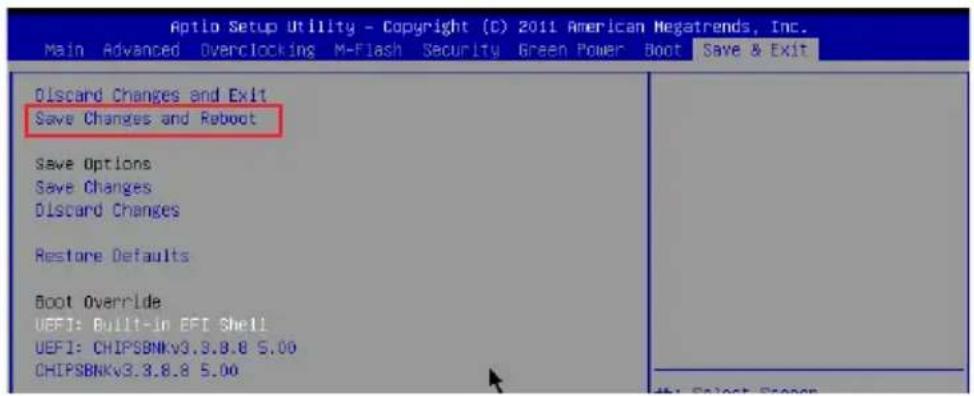
- Save & Exit Setup : Use the arrow keys (←, →, ↑, ↓) to select the [Save Changes & Reboot] in [Save & Exit] menu, and press
. A pop-up message will appear please select [Yes] and press to save the configurations and exit BIOS setup utility.
Overclocking
This menu is for advanced users who want to overclock the mainboard.
![Aptio Setup Utility - Copyright (C) 2011 American Megatrends, Inc. Main Advanced Overclocking M-Flash Security Green Power Boot Save & Exit Current CPU Frequency 200.00 X 15 MHz Current DRAM Frequency 1333 MHz Adjust CPU FSB Frequency 200 Adjust CPU Ratio [Auto] Adjusted CPU Frequency 3000 MHz Adjust CPU-NB Ratio [Auto] Adjusted CPU-NB Frequency 2000 MHz AMD Turbo Core Technology [Auto] Adjust Turbo Core Ratio [Auto] Adjust PCI-E Frequency (MHz) 100 DRAM Frequency [Auto] Adjusted DRAM Frequency 1333 MHz DRAM Timing Mode [Auto] ► Advanced DRAM Configuration HT Link Speed [Auto] Adjusted HT Link Frequency 2000 MHz CPU Core Control [Auto] Unlock CPU Core [Disabled] DC Genie Lite [Disabled] Spread Spectrum [Disabled] DRAM Voltage [Auto] NB Voltage [Auto] CPU Voltage [Auto] CPU-NB Voltage [Auto] ► Overclocking Profiles ► CPU Specifications ► MEMORY-2 ► CPU Features ► HT Link Control Adjust CPU Base Clock Frequency +: Select Screen ↑↓: Select Item Enter: Select +/-: Change Opt. F1: General Help F4: CPU Specifications F5: Memory-2 F6: Optimized Defaults ESC: Exit F10: Save & Reset Version 2.13.1219, Copyright (C) 2011 American Megatrends, Inc.](/content/2026/02/353126/images/cb076af4853813946ec7ad4d6228b0ea7e2f29aac52967c5035fa21c612f8785.jpg)
▶ Current CPU / DRAM Frequency
These items show the current clocks of CPU and Memory speed. Read-only.
▶ Adjust CPU FSB Frequency
This item is used to adjust the CPU FSB frequency (in MHz).
▶ Adjust CPU Ratio
This item is used to adjust CPU clock multiplier (ratio). It is available only when the processor supports this function.
▶ Adjusted CPU Frequency
It shows the adjusted CPU frequency. Read-only.
▶ Adjust CPU-NB Ratio
This item is used to adjust CPU-NB ratio.
▶ Adjusted CPU-NB Frequency
It shows the adjusted CPU-NB frequency. Read-only.
▶ AMD Turbo Core Technology
This technology automatically increases the frequency of active CPU cores to improve performance.
▶ Adjust PCI-E Frequency (MHz)
This field allows you to select the PCI-E frequency (in MHz).
▶ DRAM Frequency
This item is used to adjust the DRAM frequency. Setting to [Auto], the system will detect the DRAM Frequency automatically.
▶ Adjusted DRAM Frequency
It shows the adjusted Memory frequency. Read-only.
▶ DRAM Timing Mode
This field has the capacity to automatically detect the DRAM timing.
▶ Advanced DRAM Configuration
Press
▶ Command Rate
This setting controls the DRAM command rate.
▶ tCL
This controls the CAS latency, which determines the timing delay (in clock cycles) before SDRAM starts a read command after receiving it.
▶ tRCD
When DRAM is refreshed, both rows and columns are addressed separately. This setup item allows you to determine the timing of the transition from RAS (row address strobe) to CAS (column address strobe). The less the clock cycles, the faster the DRAM performance.
▶ tRP
This setting controls the number of cycles for Row Address Strobe (RAS) to be allowed to precharge. If insufficient time is allowed for the RAS to accumulate its charge before DRAM refresh, refreshing may be incomplete and DRAM may fail to retain data. This item applies only when synchronous DRAM is installed in the system.
▶ tRAS
This setting determines the time RAS takes to read from and write to memory cell.
▶ tRTP
Time interval between a read and a precharge command.
▶ tRC
The row cycle time determines the minimum number of clock cycles a memory row takes to complete a full cycle, from row activation up to the precharging of the active row.
▶ tWR
Minimum time interval between end of write data burst and the start of a precharge command. Allows sense amplifiers to restore data to cells.
▶ tRRD
Specifies the active-to-active delay of different banks.
▶ tWTR
Minimum time interval between the end of write data burst and the start of a column-read command. It allows I/O gating to overdrive sense amplifiers before read command starts.
▶ tRFC
This setting determines the time RFC takes to read from and write to a memory cell.
▶ Advanced Channel 1/2 Timing Configuration
Press
▶ tRWTT02/ tWRRD2/ tWRWR2/ tRDRD2
These items is used to set the memory timings for memory channel 1/2.
▶DCT Unganged Mode
This feature is used to Integrate two 64-bit DCTs into a 128-bit interface.
▶ Bank Interleaving
Bank Interleaving is an important parameter for improving overclocking capability of memory. It allows system to access multiple banks simultaneously.
▶ HT Link Speed
This item allows you to set the Hyper-Transport Link speed. Setting to [Auto], the system will detect the HT link speed automatically.
▶ Adjusted HT Link Frequency
It shows the adjusted HT Link frequency. Read-only.
▶ CPU Core Control
This item allows you to select the number of active processor cores.
▶ Unlock CPU Core
This item is used to unlock the CPU core. Please refer to the procedures below for CPU core unlocked in BIOS setup.
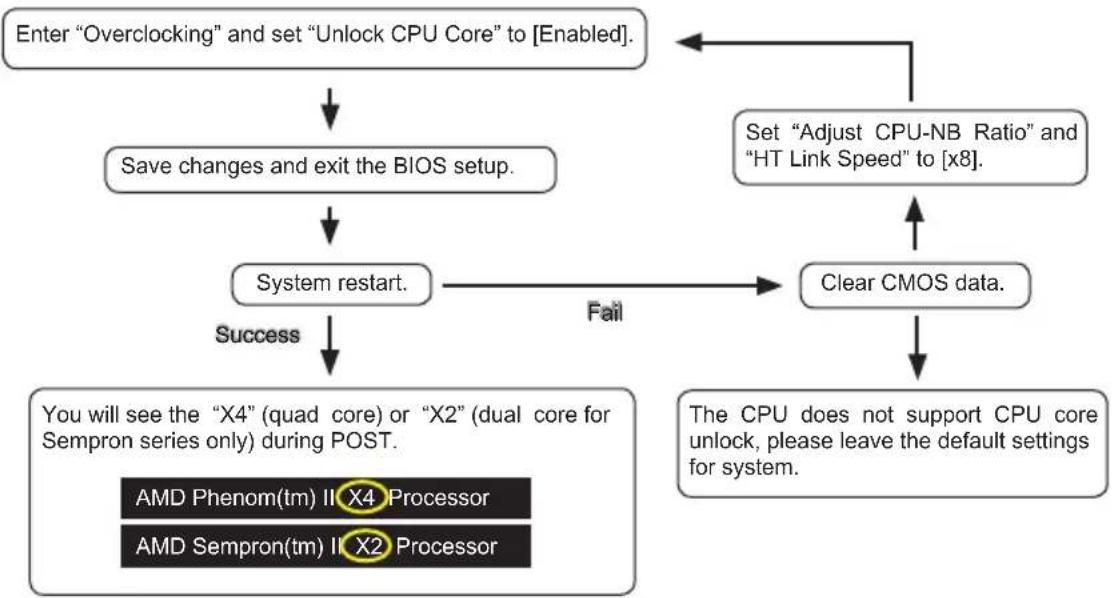
flowchart
graph TD
    A["Enter "Overclocking" and set "Unlock CPU Core" to [Enabled"].] --> B["Save changes and exit the BIOS setup."]
    B --> C["System restart."]
    C -->|Success| D["You will see the "X4" (quad core) or "X2" (dual core for Sempron series only) during POST."]
    C -->|Fail| E["Clear CMOS data."]
    E --> F["Set "Adjust CPU-NB Ratio" and "HT Link Speed" to [x8"].]
    F --> A
    G["The CPU does not support CPU core unlock, please leave the default settings for system."] --> E
    H["AMD Phenom(tm) II X4 Processor"] --> C
    I["AMD Sempron(tm) II X2 Processor"] --> C
Important
- This CPU core unlocked behavior depends on the CPU ability/ characteristic, and it is not guaranteed.
- Depend on CPU's characteristic, once you get instable scenario, please restore the default settings for system.
- You can also check the core numbers in performance tab of Windows task manager.
▶ OC Genie Lite
Setting this item to [Enabled] allows the system to detect the maximum FSB clock and to overclock automatically. If overclocking fails to run, you can try the lower FSB clock for overclocking successfully.
▶ Spread Spectrum
When the mainboard's clock generator pulses, the extreme values (spikes) of the pulses create EMI (Electromagnetic Interference). The Spread Spectrum function reduces the EMI generated by modulating the pulses so that the spikes of the pulses are reduced to flatter curves.
Important
- If you do not have any EMI problem, leave the setting at [Disabled] for optimal system stability and performance. But if you are plagued by EMI, select the value of Spread Spectrum for EMI reduction.
- The greater the Spread Spectrum value is, the greater the EMI is reduced, and the system will become less stable. For the most suitable Spread Spectrum value, please consult your local EMI regulation.
- Remember to disable Spread Spectrum if you are overclocking because even a slight jitter can introduce a temporary boost in clock speed which may just cause your overclocked processor to lock up.
▶ DRAM Voltage/ NB Voltage/ CPU Voltage/ CPU-NB Voltage
These items are used to adjust the voltage of CPU, Memory and chipset.
▶ Overclocking profiles
Press
▶ Overclocking Profiles 1/2/3/4/5/6
Press
▶ OC Retry Count
When overclocking has failed, setting this item as [1, 3] will allow system to reboot 1/3 times with the same overclocked configuration. If overclocking has failed every time, the system will restore the defaults.
▶ CPU Specifications
Press
▶CPU Technology Support
Press
▶ MEMORY-Z
Press
▶DIMM1\~4 Memory SPD
Press
▶ CPU Features
Press
▶AMD Cool'n'Quiet
The Cool'n'Quiet technology can effectively and dynamically lower CPU speed and power consumption.
Important
To ensure that Cool'n'Quiet function is activated and will be working properly, it is required to double confirm that:
- Run BIOS Setup, and select Overclocking Menu. UnderOverclocking Menu, find CPU Feature >AMD Cool'n'Quiet, and set this item to "Enabled".
- Enter Windows, and select [Start]->[Settings]->[Control Panel]->[Power Options]. Enter Power Options Properties tag, and select Minimal Power Management under Power schemes.
▶C1E
Enable this item to reduce the CPU power consumption while idle. Not all processors support Enhanced Halt state (C1E).
▶ SVM Mode
This item allows you to enable/disable the AMD SVM (Secure Virtual Machine) Mode.
▶IOMMU Mode
This item allows you to enable/disable the IOMMU (I/O Memory Management Unit) for I/O virtualization.
▶ HT Link Control
Press
▶HT Incoming/Outgoing Link Width
These items allow you to set the Hyper-Transport Link width. Setting to [Auto], the system will detect the HT link width automatically.
Software Information
Take out the Driver/Utility DVD that is included in the mainboard package, and place it into the DVD-ROM drive. The installation will auto-run, simply click the driver or utility and follow the pop-up screen to complete the installation. The Driver/Utility DVD contains the:
- Driver menu : It provides available drivers. Install the driver by your desire and to activate the device
- Utility menu : It allows you to install the available software applications.
- Service base menu : Through this menu to link the MSI officially website.
- Product info menu : It shows the newly information of MSI product.
- Security menu : It provides the useful antivirus program.
Important
Please visit the MSI officially website to get the latest drivers and BIOS for better system performance.

natural_image
Abstract illustration of a globe with orbiting lines and floating elements (no text or symbols)Deutsch
990XA-GD55
Serie
Spezifikationen
Prozessoren
natural_image
Plain gray square with black border and a small red circle highlighting the corner (no text or symbols)der goldenen Pfeil
CPU & Kühler Einbau
natural_image
Technical line drawing of a mechanical component with no visible text or symbols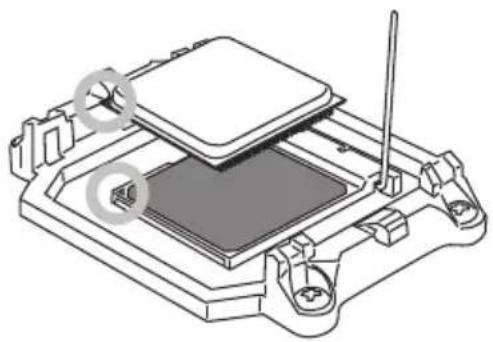
natural_image
Technical line drawing of a mechanical assembly with no visible text or symbolsnatural_image
Technical line drawing of a mechanical component with a downward arrow indicating a process or assembly (no text or symbols present)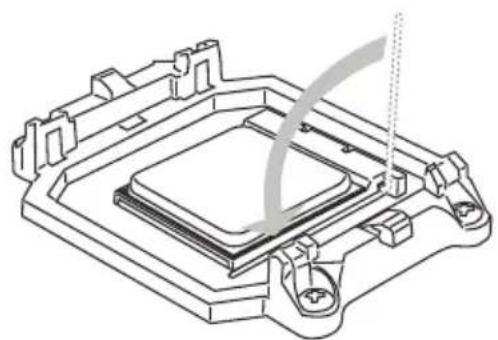
natural_image
Technical line drawing of a mechanical component with no visible text or symbolsnatural_image
Technical line drawing of a CPU cooler with heatsink and cooling fins (no text or symbols)natural_image
Technical line drawing of a computer CPU fan with heatsink and cooling bracket (no text or symbols)6.
natural_image
Technical line drawing of a computer cooling fan with heatsink and cooling bracket (no text or symbols)8.
natural_image
Diagram showing a heat exchanger or cooling unit with cooling fins and a base panel (no text or symbols)Wichtig
Wichtig
Wichtig
Frontpanel Anschlüsse: JFP1, JFP2
natural_image
Isometric line drawing of a rectangular block with internal grid pattern (no text or symbols)CPU Phase LEDs
▶ Main Menu
Overclocking
▶ Current CPU / DRAM Frequency
▶ Adjust CPU FSB Frequency
▶ Adjusted CPU Frequency
▶ Adjust CPU-NB Ratio
▶ Adjusted CPU-NB Frequency
▶ Adjust PCI-E Frequency (MHz)
▶ Adjusted DRAM Frequency
▶ Advanced Channel 1/2 Timing Configuration
▶ Adjusted HT Link Frequency (MHz)
▶ DRAM Voltage/ NB Voltage/ CPU Voltage/ CPU-NB Voltage
▶ Overclocking profiles
▶ Overclocking Profiles 1/2/3/4/5/6
▶ CPU Specifications
▶CPU Technology Support
▶HT Incoming/Outgoing Link Width
natural_image
Abstract illustration of a globe with orbiting lines and abstract light effects (no text or symbols)Français
990XA-GD55
Séries
Spécifications
natural_image
Blank white square with a black border and a small red circle highlighting a yellow triangle (no text or symbols)La flèche d'or
natural_image
Technical diagram of a microchip or integrated circuit package with no visible text or symbols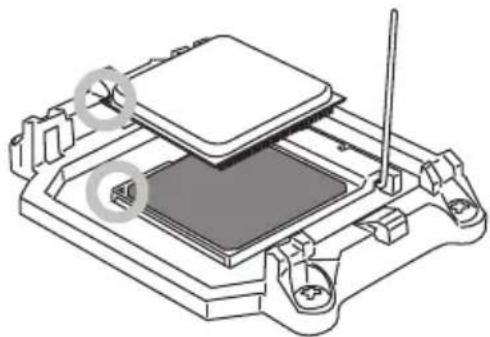
natural_image
Technical line drawing of a mechanical assembly with no visible text or symbolsnatural_image
Technical line drawing of a mechanical component with a downward arrow indicating a process or assembly (no text or symbols present)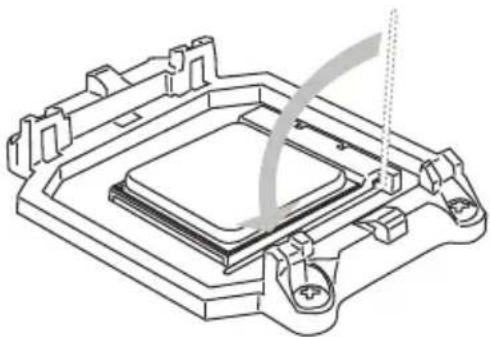
natural_image
Technical line drawing of a mechanical component with no visible text or symbolsnatural_image
Technical line drawing of a CPU cooler with heatsink and cooling fins (no text or symbols)natural_image
Technical line drawing of a computer CPU with heatsink and cooling fan (no text or symbols)natural_image
Technical line drawing of a computer cooling fan with heatsink and cooling bracket (no text or symbols)natural_image
Diagram showing a heat exchanger or cooling unit with cooling fins and a base with vertical connectors (no text or symbols)Important
▶ S/PDIF-Out Coaxial
Emplacement PCIe (Peripheral Component Interconnect Express)
Emplacement PCI (Peripheral Component Interconnect)
natural_image
Isometric line drawing of a rectangular block with internal grid pattern (no text or symbols)Emplacement 32-bit PCI
Important
Panneau LED de phases CPU
▶ Main Menu
▶ Current CPU / DRAM Frequency
▶ Adjust CPU FSB Frequency
▶ Adjusted CPU Frequency
▶ Adjust CPU-NB Ratio
▶ Adjusted CPU-NB Frequency
▶ Adjust PCI-E Frequency (MHz)
▶ Adjusted DRAM Frequency
▶Advanced Channel 1/2 Timing Configuration
▶ Adjusted HT Link Frequency
▶ DRAM Voltage/ NB Voltage/ CPU Voltage/ CPU-NB Voltage
▶ Overclocking profiles
▶ Overclocking Profiles 1/2/3/4/5/6
▶ CPU Specifications
▶CPU Technology Support
▶HT Incoming/Outgoing Link Width
natural_image
Abstract illustration of a globe with orbiting lines and floating spheres (no text or symbols)Русский
Серия
990XA-GD55
Характеристики
Процессоры

natural_image
Blank white square with a black border and a small red circular icon at the bottom left corner (no text or symbols)Золотая стрелка
natural_image
Technical line drawing of a mechanical component with no visible text or symbols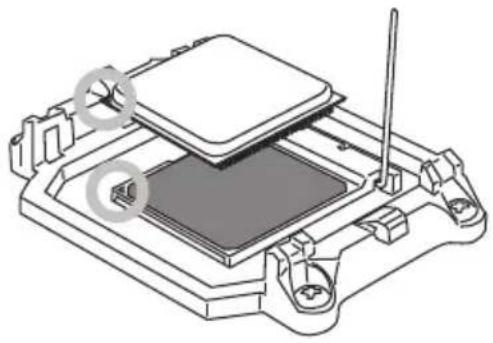
natural_image
Technical line drawing of a mechanical assembly with no visible text or symbolsnatural_image
Technical line drawing of a mechanical component with a downward arrow indicating a process or assembly (no text or symbols present)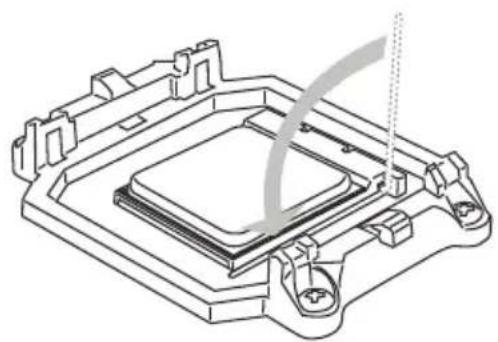
natural_image
Technical line drawing of a mechanical component with no visible text or symbolsnatural_image
Technical line drawing of a computer CPU with cooling fan and heatsink (no text or symbols)natural_image
Technical line drawing of a computer CPU with heatsink and cooling fan (no text or symbols)natural_image
Technical line drawing of a computer cooling fan with heatsink and cooling bracket (no text or symbols)natural_image
Diagram showing a heat exchanger or cooling unit with cooling fins and a base with vertical connectors (no text or symbols)Внимание
Внимание
natural_image
Isometric line drawing of a rectangular block with internal grid pattern (no text or symbols)32-bit PCI слот
Внимание
Панель индикаторов фаз CPU (CPU Phase LED panel)
▶ Main Menu
▶ Current CPU / DRAM Frequency
▶ Adjust CPU FSB Frequency
▶ Adjusted CPU Frequency
▶ Adjust CPU-NB Ratio
▶ Adjusted CPU-NB Frequency
▶ Adjust PCI-E Frequency (MHz)
▶ Adjusted DRAM Frequency
▶ Advanced Channel 1/2 Timing Configuration
▶ Adjusted HT Link Frequency
▶ DRAM Voltage/ NB Voltage/ CPU Voltage/ CPU-NB Voltage
▶ Overclocking profiles
▶ Overclocking Profiles 1/2/3/4/5/6
▶ CPU Specifications
▶CPU Technology Support
▶HT Incoming/Outgoing Link Width