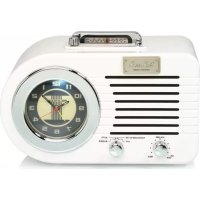
PR220 - Radio Ricatech - Free user manual and instructions
Find the device manual for free PR220 Ricatech in PDF.


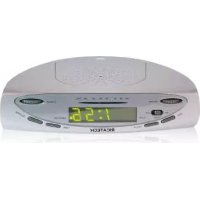
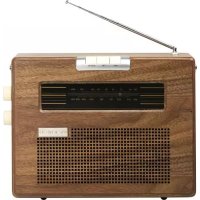
| Product Type | Digital clock radio with MP3 USB/SD player |
| Brand | Ricatech |
| Model | PR220 |
| Main power supply | AC 230 V / 50 Hz adapter, DC 9 V 600 mA output |
| Backup batteries | 2 x AAA (not included) for clock |
| Radio frequencies | AM 530-1600 kHz, FM 88-108 MHz |
| FM antenna | Wire |
| AM antenna | Built-in ferrite rod |
| Audio output power | Max 700 mW |
| Speaker | 1 x 4 inches (3 W) |
| USB port | USB 2.0, compatible with USB keys up to 4 GB (FAT16) |
| SD card reader | SD cards up to 4 GB |
| Supported audio formats | MP3 (MPEG 1/2/2.5, Layer 1/2/3) |
| Alarm functions | Radio, USB/SD, Buzzer with 5-minute snooze |
| Time setting | Rotary knob on the back of the device |
| Clock backlight | Yes, activated by the Snooze/Backlight button |
| Care and cleaning | Soft dry cloth, do not use liquids |
| Safety | Do not expose to water or humidity; do not open the casing |
| Included accessories | Power adapter, user manual |
| Customer service | support@ricatech.com / Tel: +32 3 3265694 |
| Repairability | No user-serviceable parts; refer to qualified personnel |
Frequently Asked Questions - PR220 Ricatech
User questions about PR220 Ricatech
0 question about this device. Answer the ones you know or ask your own.
Ask a new question about this device
Download the instructions for your Radio in PDF format for free! Find your manual PR220 - Ricatech and take your electronic device back in hand. On this page are published all the documents necessary for the use of your device. PR220 by Ricatech.
USER MANUAL PR220 Ricatech
IMPORTANT SAFEGUARDS FOR AUDIO PRODUCTS
PLEASE READ CAREFULLY THE FOLLOWING IMPORTANT SAFEGUARDS THAT ARE APPLICABLE TO YOUR EQUIPMENT.
-
Read Instructions - All the safety and operating instructions should be read before the appliance is operated.
-
Retain Instructions - The safety and operating instructions should be retained for future reference.
-
Heed Warnings - All warnings on the appliance and in the operating instructions should be adhered to.
-
Follow Instructions - All operating and use instructions should be followed.
-
Water and Moisture - The appliance should not be used near water-for example, near a bathtub, washbowl, kitchen sink, laundry tub, in a wet basement, or near a swimming pool and the like.
-
Carts and Stands - The appliance should be used only with a cart or stand that is recommended by the manufacturer.
6A. An appliance and cart combination should be moved with care. Quick stops, excessive force, and uneven surfaces may cause the appliance and cart combination to overturn.
-
Wall or Ceiling Mounting - The appliance should be mounted to a wall or ceiling only as recommended by the manufacturer.
-
Ventilation - The appliance should be situated so that its location or position does not interfere with its proper ventilation. For example, the appliance should not be situated on a bed, sofa, rug, or similar surface that may block the ventilation penings; or, placed in a built-in installation, such as a bookcase or cabinet that may impede the flow of air through the ventilation openings.
-
Heat - The appliance should be situated away from heat sources such as radiators, heat registers, stoves, or other appliances (including amplifiers) that produce heat.
-
Power Sources - The appliance should be connected to a power supply only of the type described in the operating instructions or as marked on the appliance.
-
Grounding or Polarization - Precautions should be taken so that the grounding or polarization means of an appliance is not impeded.
-
Power - Cord Protection - Power-supply cords should be routed so that they are not likely to be walked on or pinched by items placed upon or against them, paying particular attention to cords at plugs, and the point where they exit from the appliance.
13.Cleaning - The appliance should be cleaned only as recommended by the manufacturer.
- This product is designed for use with the antenna attached and should not be connected to any other external antennas.
15.Non-use Periods - The power cord of the appliance should be unplugged from the outlet when left unused for a long period of time.
16.Object and Liquid Entry - Care should be taken so objects do not fall and liquids are not spilled into the enclosure through openings
17.Damage Requiring Service - The appliance should be serviced by qualified service personnel when:
A. The power-supply cord of the plug has been damaged;or
B. Objects have fallen, or liquid has been spilled into the appliance;or
C. The appliance has been exposed to rain;or
D. The appliance does not appear to operate normally or exhibits a marked change in performance; or E.The appliance has been dropped, or the enclosure damaged.
- Servicing - The user should not attempt to service the appliance beyond that described in the operating instructions. All other servicing should be referred to qualified service personnel.

WARNING:
TO PREVENT FIRE OR SHOCK HAZARD, DO NOT EXPOSE THIS APPLIANCE TO RAIN OR MOISTURE. DO NOT REMOVE COVER. PILOT LAMPS SOLDERED IN PLACE. NO USER SERVICEABLE PARTS INSIDE. REFER SERVICING TO QUALIFIED SERVICE PERSONNEL.
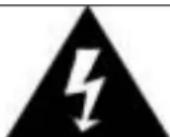
The lighting flash with arrowhead symbol, within an equilateral triangle, is intended to alert user to the presence of uninsulated "dangerous voltage" within the product's enclosure that may be of sufficient magnitude to constitute risk of electric shock to persons.
CAUTION
RISK OF ELECTRIC SHOCK DO NOT OPEN
CAUTION: TO REDUCE THE RISK OF ELECTRIC SHOCK, DO NOT REMOVE COVER (OR BACK). NO USER - SERVICEABLE PARTS INSIDE. REFER SERVICING TO QUALIFIED SERVICE PERSONNEL.

The exclamation point within an equilateral triangle is intended to alert user to the presence of important operating and maintenance (servicing) instruction in the literature accompanying the appliance.
Specifications
Frequency
AM530-1600KHz
FM88-108MHz
Antenna
FM Wire Antenna
AM Built-in Ferrite Bar
Audio output
700mWmax
Power source
:ACAdaptorAC230V/50Hz(DC9V600mA*)
USB 2.0 PORT
The limit of this port is 4GB Max
SD CARD SLOT
The limit of the Card size is 4GB max
Speaker
1× 4 (3W)
Unpacking
- Remove the plastic bag covering the unit.
- Remove the AC/DC ADAPTOR from the packaging.
- Remove the black wire tie from the A/C ADAPTOR.
Power Source
- Plug the small end of the supplied ADAPTOR into the 9V DC INPUT JACK on the back of the unit.
- Insert the 2-pin plug of the AC ADAPTOR into an appropriate 230V AC Mains wall outlet socket.
- Switch the unit ON by turning the power ON-OFF SWITCH/VOLUME CONTROL switch to the ON position and turn the Sound Volume to mid-range position.
- Switch Function Switch to the Radio/SD/USB position.
- Switch the AM/FM/USB/SD Band switch (on the back panel) to select the SD/USB mode.
- Insert an SD Card with stored MP3 songs (size up to 4GB max, not supplied) into the card slot in the direction as indicated below the slot.
- Press the PLAY/PAUSE BUTTON to play the music tracks stored on the SD Card. The green ACC LED will flash whilst the music is playing.
- To pause the music, press the PLAY/PAUSE BUTTON again.
- In Play Mode, press the SKIP + / SKIP - BUTTON once or repeatedly until the desired track has been found.
- To stop playing the music stored on the SD Card, press the PLAY/PAUSE BUTTON. AT THIS STAGE, DO NOT DISCONNECT THE SD CARD yet!
10 Before removing the SD Card from the slot, switch the main unit off first
11 Press the memory card in gently & then release it, the card will be partially ejected and can then be removed by hand.
CAUTION: Connecting a USB device/SD Card upside down or back to front could damage the audio system or USB device/SD Card. Before connecting it, double check to make sure the direction of insertion is correct.
USB Operation:
- Switch the unit ON by turning the power ON-OFF SWITCH/VOLUME CONTROL switch to the ON position and turn the Sound Volume to mid-range position.
- Turn the Function Knob on the front to the "RADIO/SD/USB ON" position.
- Switch the AM-FM-USB/SD Band switch (on the back panel) to select the SD/USB mode.
- Insert an MP3 USB device or a Flash Drive containing MP3 songs (size up to 4GB max, not supplied) into the USB Port on the side panel. Make sure the USB plug is inserted correctly.
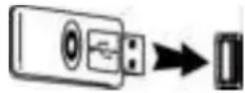
Notes:
- To operate the MP3 device, please refer to its manufacturer's operating manual.
- If both an SD Card and a USB device are connected, press the USB/SD button on the side panel to switch to the preferred device to be played.
5 Press the PLAY/PAUSE BUTTON to play the music on the external device.
6 The green ACC LED will flash whilst the music is playing.
7 To pause the music, press the PLAY/PAUSE BUTTON again.
8 In Play Mode, press the SKIP+/SKIP-B BUTTON once or repeatedly until the desired track has been found.
9 To stop playing the music stored on the USB device/Flash Drive, press the PLAY/PAUSE
BUTTON. AT THIS STAGE, DO NOT DISCONNECT THE USB DEVICE/FLASH DRIVE!
10 Before disconnecting the USB device/Flash Drive, switch the main unit off first. Unplug the device from the USB Socket by pulling it out straight.
WARNING:
1 Do not disconnect the USB/SD device whilst the music is playing, as this may damage the device or the music files stored on it.
2 To disconnect the USB/SD device safely, turn off the unit first or switch to another Mode.
IMPORTANT NOTES:
a) This product may not be compatible with USB devices with multiple USB identifiers (such as a USB HUB + USB Flash Drive), it ONLY works when connected directly to a USB Flash Drive or MP3 Player.
b) If there is no MP3 / USB device / Flash Drive / SD card connected or MP3 file detected, the red ERR LED light will be on.
c) The green ACC LED light will flash during PLAY mode whilst MP3 data is transferring.
d) This unit only plays back MP3 music files, not WMA format music files.
e) If the USB/SD is not functioning, power off the unit to reset.
USB SPECIFICATION
Interface
- USB2.0 Full speed, HOST (a USB HUB is not supported)
Corresponding Flash memory
- USB1.1 Flash memory
- USB2.0 High speed Flash memory
- Minimum memory size: 512MByte
- Maximum memory size: 4GBByte (Only FAT16 corresponds)
NOTES:
a) The USB Port does not support connection with a USB Extension Cable.
b) It is not designed to connect to a Computer.
c) It is not guaranteed that all USB memory devices and SD cards will work on this audio system.
MP3 Decoder
- Compatible with MPEG Audio 1, 2, 2.5
- Compatible with Layer 1, 2, 3
- Compatible with Sampling Rate: 8k, 16k, 32k, 11.025k, 22.05k,
- 44.1k, 12k, 24k, 48 kHz
- Compatible with Bit rate: 8k ~ 320kbps
- Subfolder nest: 8
- Number of maximum files for playback: 9999
- File format for playback: .mp3. .mp2, .mp1.
RADIO OPERATION
- Switch the unit ON by turning the power ON-OFF SWITCH/VOLUME CONTROL switch to the ON position and turn the Sound Volume to mid-range position.
- Turn the Function Knob to the Radio/SD/USB position – the Tuning Dial LED in the handle will light up.
- Switch the AM-FM-USB/SD Band switch (on the back panel) to select the AM (MW) or FM Band.
- Select the Radio Station by turning the TUNING Control on the top panel. The red Station Marker ribbon will mark the desired radio station.
- For FM reception, extend the fitted Wire Antenna so that FM sensitivity will be increased.
- For optimum AM (MW) reception, turn the unit in the direction which gives the best results.
- Ensure the unit is connected to the AC Power source.
- To set the current time, push and turn the TIME SET KNOB on the rear panel in a 'clockwise' direction, whilst facing the clock.
WARNING: Disconnecting the unit from the AC power source or any other power disruption will stop the clock working. Make sure the current clock time is set. Do not expose the Clock to extremes of temperature and humidity as this could damage the electronic mechanism and consequently affect its timekeeping.
SETTING THE ALARM TIME
Push and turn the Alarm Time Setting Knob clockwise (whilst facing the clock) to set the alarm time.
ALARM OPERATION
This unit has an Alarm and Snooze function.
Turn the FUNCTION KNOB on the front of the unit to select wake-up to: RADIO, SD/USB, AUTO or BUZZER.
Important Note: For the Alarm to work, the unit must be turned ON. Do this by turning the power ON-OFF SWITCH/VOLUME CONTROL switch to the "ON" position.
WAKE-UP-TO-RADIO
- Set the desired alarm time by pushing and turning the ALARM SET knob on the rear panel.
- Set the Band Switch to AM (= MW) or FM Band.
- Tune in to the desired Radio Station and adjust the wake-up sound volume - keep the setting.
- Turn the Function Knob to the "AUTO" position. The sound and the Radio Dial LED light will go off.
- The Radio will automatically switch on at the set alarm time.
WAKE-UP-TO-USB/SD
- Set the desired alarm time as described previously.
- Set the AM-FM-USB/SD Band Switch to the SD/USB position.
- Insert an SD Card or USB device with stored MP3 songs, into the Card Slot or USB Port and adjust the sound volume – leave the SD Card or USB device in position and keep the volume level setting.
- Turn the Function Knob on the front to the "AUTO" position.
- The MP3 song on USB or SD will automatically play at the set alarm time.
WAKE-UP-TO-BUZZER ALARM
- Set the desired alarm time as described previously.
- Turn the Function Knob to the "BUZZER" position.
- The Buzzer sound will come on at the set alarm time.
ALARM OFF AND SNOOZE FUNCTION
- To switch the alarm off, press the SNOOZE/BACKLIGHT ON/OFF Button on the top when the alarm sounds.
- When waking up to Radio, USB/SD, or Buzzer, pressing the SNOOZE Button will switch the alarm off immediately, but the alarm will sound again around 5 minutes later.
- To turn the alarm off permanently, turn the front Function KNOB to the "OFF" position.
CLOCK BACKLIGHT
- Press the "SNOOZE/BACKLIGHT ON/OFF" button on the top of the unit to turn the clock backlight 'ON'.
- Press this button again to turn the light "OFF".
BATTERY BACK UP
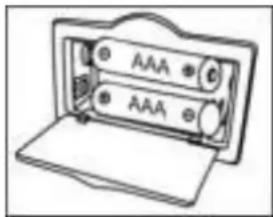
The battery backup system to maintain your clock to keep working, during a power outage. In the event of a power outage, the battery backup will keep you clock continue working (But at this time the alarm clock don't working). To utilize the battery backup, you must install two AAA batteries. The battery backup will not operate unless batteries are installed. To install batteries, follow the instructions below.
- Remove the Battery Compartment cover from the back of the unit.
2 Install two new AAA batteries in the correct position as shown inside the battery cover.
3 Reinstall the Battery Compartment cover.
NOTE:
Do not use different batteries
Do not mix old and new batteries
Troubleshooting
There is no Sound
- Make sure the DC Adaptor pin is fully inserted into the DC Jack on the back of the unit, and that the unit is properly connected to the AC power supply.
- Check if the unit has been switched on.
- Check if the volume has been turned up.
- Check that the Function Switch is set to the Radio/SD/USB position.
USB/SD - There is no music playing
- Check that there are MP3 songs stored on the MP3/USB Device/Flash Drive/SD Card.
- Check the MP3/USB Device/Flash Drive/SD Card is not larger than 4GB as the limit compatible with this unit is 4GB max.
- Try re-setting the USB/SD by powering off and then on again.
- Check if the USB device/SD Card contains MP3 or WMA music files. This unit does not play WMA format, only MP3 format.
The Alarm did not wake me up at the set time
- Make sure the unit is connected to the AC power supply.
- Check if the unit has been switched on.
- The Clock or Alarm will not work or keep its settings when the power is disconnected and the unit is not switched on.
CONTROL LOCATORS
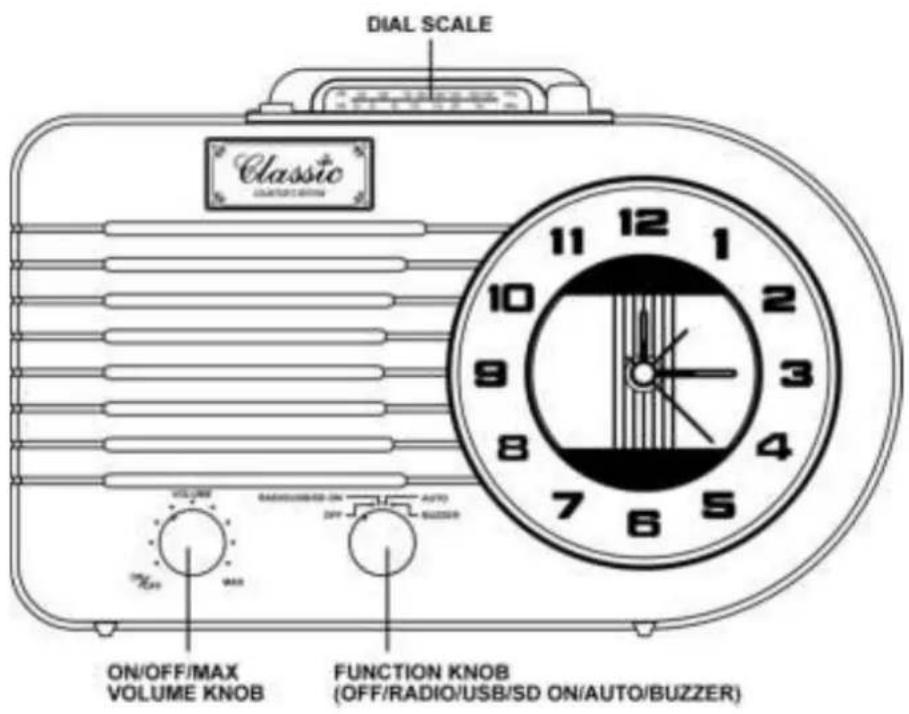
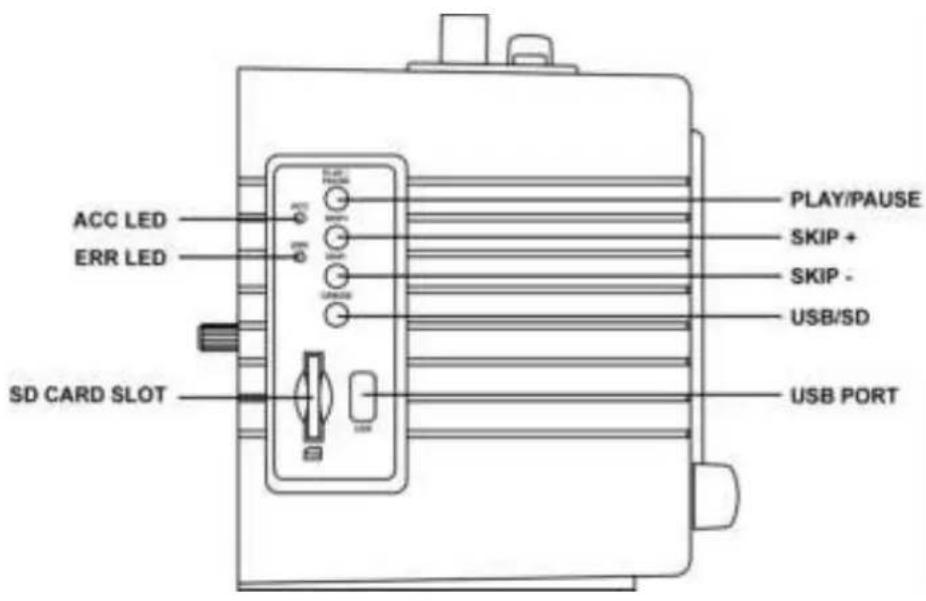
CONTROL LOCATORS
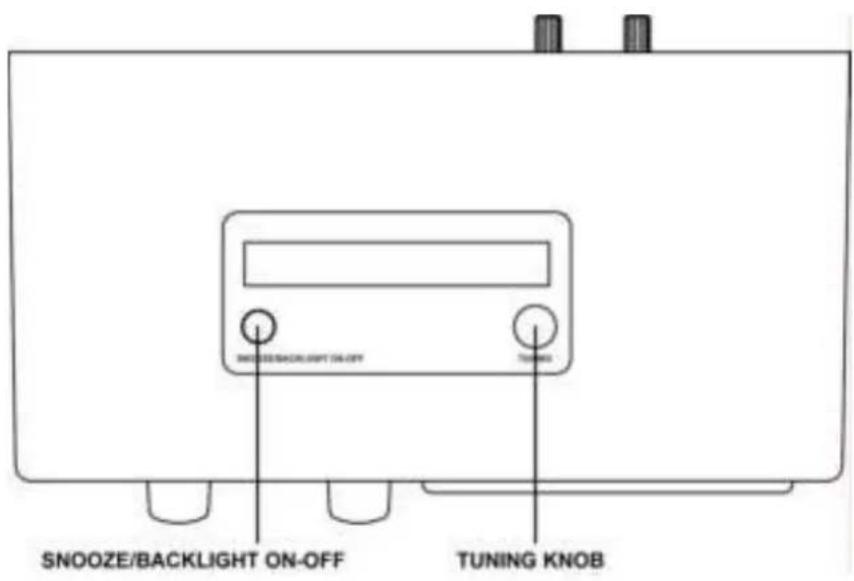
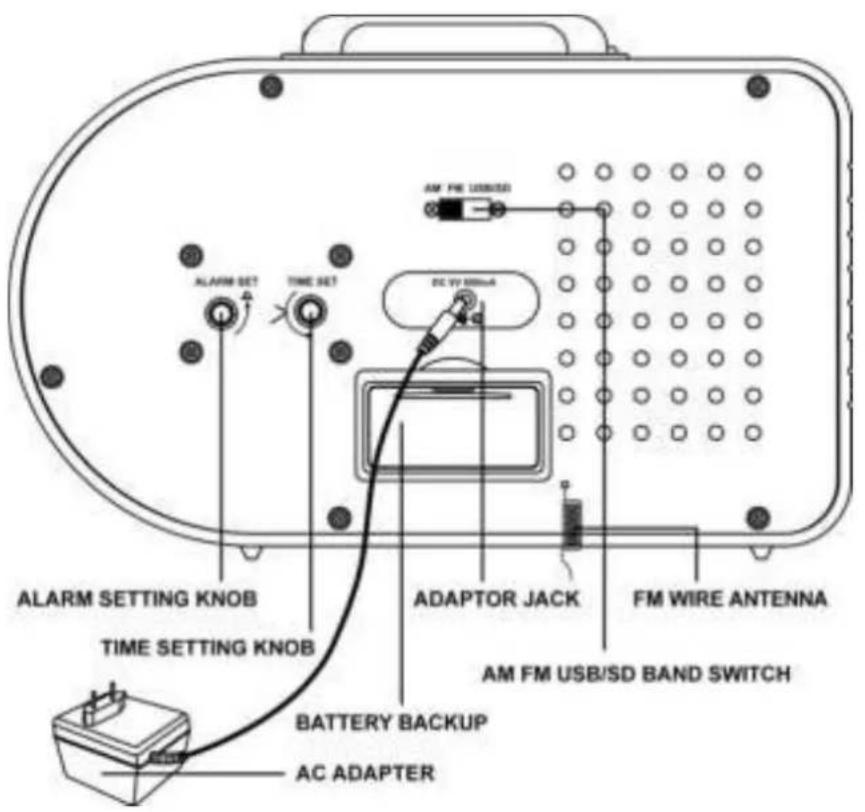
Customer support
You can contact the Ricatech customer service when you have a question or a problem with your Ricatech product. You can contact us by telephone and email.
For customer support by email, please sent a email to support@ricatech.com Please make sure that you mention the model number and serial number of the product, mention your name & address and describe your question or problem clearly.
Telephone
For customer support by telephone, please dial +32 3 3265694. One of our service staff will be ready to serve you. For full procedure please visit the website of Ricatech at: www.ricatech.com
Ricatech B.V.
Cornusbaan 1
2908 KB Capelle a/d IJssel
The Netherlands
Nederlands
BELANGRIJKE VOORZORGSGMAATREGELEN VOOR AUDIOPRODUCTEN
LEES AANDACHTIG DE VOLGENDE BELANGRIJKE VOORZORGSGMAATREGELEN DIE VAN TOEPASSING ZIJN OP UW APPARATUUR.
WORDT-WAKKER-MET-RADIO
WORDT-WAKKER-MET-USB/SD
WORDT-WAKKER-MET-ZOEMER-ALARM


- IMPORTANT SAFEGUARDS FOR AUDIO PRODUCTS
- PLEASE READ CAREFULLY THE FOLLOWING IMPORTANT SAFEGUARDS THAT ARE APPLICABLE TO YOUR EQUIPMENT
- WARNING
- CAUTION
- RISK OF ELECTRIC SHOCK DO NOT OPEN
- SPECIFICATIONS
- UNPACKING
- POWER SOURCE
- USB OPERATION
- NOTES
- IMPORTANT NOTES
- USB SPECIFICATION
- INTERFACE
- CORRESPONDING FLASH MEMORY
- MP3 DECODER
- RADIO OPERATION
- SETTING THE ALARM TIME
- ALARM OPERATION
- WAKE-UP-TO-RADIO
- WAKE-UP-TO-USB/SD
- WAKE-UP-TO-BUZZER ALARM
- ALARM OFF AND SNOOZE FUNCTION
- CLOCK BACKLIGHT
- BATTERY BACK UP
- NOTE
- TROUBLESHOOTING
- THERE IS NO SOUND
- USB/SD - THERE IS NO MUSIC PLAYING
- THE ALARM DID NOT WAKE ME UP AT THE SET TIME
- CONTROL LOCATORS
- CUSTOMER SUPPORT
- TELEPHONE
- RICATECH B.V
- NEDERLANDS
- BELANGRIJKE VOORZORGSGMAATREGELEN VOOR AUDIOPRODUCTEN
- LEES AANDACHTIG DE VOLGENDE BELANGRIJKE VOORZORGSGMAATREGELEN DIE VAN TOEPASSING ZIJN OP UW APPARATUUR
- WORDT-WAKKER-MET-RADIO
- WORDT-WAKKER-MET-USB/SD
- WORDT-WAKKER-MET-ZOEMER-ALARM
Brand : Ricatech
Model : PR220
Category : Radio