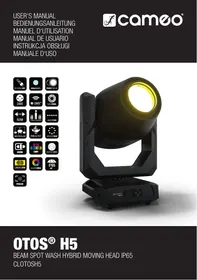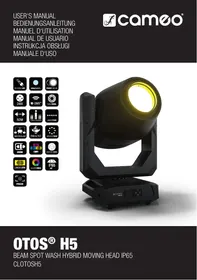
OTOS H5 - Projector Cameo - Free user manual and instructions
Find the device manual for free OTOS H5 Cameo in PDF.



| Product type | Professional outdoor discharge moving head |
| Brand | Cameo |
| Model | OTOS H5 |
| Lamp type | Discharge lamp |
| DMX channels | 26 or 32 channels (selectable) |
| Control modes | DMX, Master/Slave, Stand Alone, W-DMX |
| Power supply | Mains (voltage and frequency as per device label) |
| Delivery contents | OTOS H5 moving head, 1 power cable, 2 omega brackets, user manual |
| Lamp life (recommended) | 1500 hours (max 3000 hours) |
| Minimum distance from flammable materials | 0.3 m |
| Minimum distance to illuminated surface | Indicated on the device |
| Protection class | Class I (mandatory protective earth) or Class II depending on model |
| Ingress protection rating | Not specified, suitable for temporary outdoor use |
| Operating temperature | Ambient temperature, avoid sudden changes, max altitude 2000 m |
| Maintenance and cleaning | Disconnect before cleaning, use a dry cloth, do not cover ventilation openings |
| Spare parts | Replacement lamp, fuse, power cable (original) |
| Repairability | Repair by authorized professional only, no user-replaceable parts |
| General information | Professional use in event technology, not for domestic use |
Frequently Asked Questions - OTOS H5 Cameo
User questions about OTOS H5 Cameo
0 question about this device. Answer the ones you know or ask your own.
Ask a new question about this device
Download the instructions for your Projector in PDF format for free! Find your manual OTOS H5 - Cameo and take your electronic device back in hand. On this page are published all the documents necessary for the use of your device. OTOS H5 by Cameo.
USER MANUAL OTOS H5 Cameo
INFORMATION ON THIS USER MANUAL 6
INTENDED USE 6
DEFINITIONS AND SYMBOL EXPLANATIONS 6
SAFETY INSTRUCTIONS 7
NOTES ON PORTABLE OUTDOOR DEVICES 11
INCLUDED 11
INTRODUCTION 12
CONNECTIONS, OPERATING AND DISPLAY ELEMENTS 12
OPERATION 15
W-DMXTM STATUS 17
SETUP AND INSTALLATION 25
CARE, MAINTENANCE AND REPAIR 26
REPLACING THE LAMP 27
CALIBRATING THE LAMP 29
REPLACING GOBOS 31
DIMENSIONS (mm) 34
TECHNICAL DATA 35
EXPLANATION OF IP PROTECTION CLASS 37
MINIMUM DISTANCE TO ILLUMINATED SURFACE 37
MINIMUM DISTANCE TO NORMALLY FLAMMABLE MATERIALS 37
DISPOSAL 38
MANUFACTURER'S DECLARATIONS 38
DEUTSCH
This device has been developed and manufactured to the highest quality standards to ensure many years of problem-free operation. Please read this user manual carefully to be able to use your new Cameo product quickly and optimally. Further information about Cameo Light is available on our website CAMEOLIGHT.COM.
INFORMATION ON THIS USER MANUAL
- Carefully read the safety instructions and the entire manual before operating the device.
- Observe the warnings on the device and in the user manual.
- Always keep the user manual within reach.
- If you sell or pass on the device, it is important that you also include this user manual, as it is an integral part of the product.
INTENDED USE
The product is a device for event technology!
This product has been developed for professional use in the field of event technology and is not suitable for use as domestic lighting!
Furthermore, this product is only intended for qualified users with specialist knowledge of event technology!
Use of the product outside the specified technical data and operating conditions is considered inappropriate!
Liability for damage and third-party damage to persons and property due to inappropriate use is excluded!
The product is not suitable for:
- Use by persons (including children) with limited physical, sensory or mental abilities or lack of experience and knowledge.
- children (children must be instructed not to play with the device).
DEFINITIONS AND SYMBOL EXPLANATIONS
- HAZARD: The word HAZARD, possibly in combination with a symbol, indicates situations in which there is an immediate danger or risk of potentially fatal injury.
- WARNING: The word WARNING, possibly in combination with a symbol, indicates situations in which there is an immediate danger or risk of potentially fatal injury.
- CAUTION: The word CAUTION, possibly in combination with a symbol, indicates situations or conditions that could result in injury.
- ATTENTION: The word ATTENTION, possibly in combination with a symbol, indicates situations or conditions that could result in damage to property and/or the environment.

This symbol identifies hazards that can cause electric shock.

This symbol identifies hazardous areas or hazardous situations.

This symbol indicates hazards caused by hot surfaces.

This symbol indicates hazards caused by intense light sources.

This symbol indicates a device in which there are no user-replaceable parts.

This symbol indicates additional information on the operation of the product.
SAFETY INSTRUCTIONS

HAZARD:
- Do not open the device and do not perform any modifications.
- If your device no longer functions properly, if liquids or objects get inside it or if it has been damaged in any other way, switch it off immediately and unplug it from the power source. The device may be repaired only by authorised repair technicians.
- For devices of protection class 1, the protective conductor must be connected correctly. Never disconnect the protective conductor. Devices of protection class 2 do not have a protective conductor.
- Ensure that live cables are not kinked or otherwise mechanically damaged.
- Never bypass the device fuse.

WARNING:
- The device may not be operated if it shows obvious signs of damage.
- The device may only be installed in a voltage-free state.
- If the device's power cable is damaged, the device may not be used.
- Permanently connected power cables may only be replaced by a qualified person.

ATTENTION:
- Do not switch on the device if it has been exposed to extreme temperature fluctuations (for example, following transport). Moisture and condensation can damage the device. Switch on the device only when it has reached room temperature.
- Ensure that the voltage and frequency of the mains supply match the values specified on the device. If the device has a voltage selector switch, do not connect the device until it has been set correctly. Use only suitable power cables.
- To disconnect the device from the mains on all poles, it is not sufficient to press the on/off switch on the device.
- Make sure that the fuse used corresponds to the type printed on the device.
- Ensure that suitable measures have been taken against overvoltage (e.g. lightning strikes).
- Observe the specified maximum output current on devices with a Power Out connection. Ensure that the total current consumption of all connected devices does not exceed the specified value.
- Replace plug-in power cables with original cables only.

HAZARD:
- Choking hazard! Plastic bags and small parts must be kept out of reach of persons (including children) with reduced physical, sensory or mental capabilities.
- Risk of falling! Make sure that the device is securely installed and will not fall down. Only use suitable stands or mounts (particularly for fixed installations). Ensure that accessories are properly installed and secured. Ensure that applicable safety regulations are observed.

WARNING:
- Use the device in the prescribed manner only.
- Operate the device using only accessories of the type recommended and supplied by the manufacturer.
- Observe safety regulations applicable in your country during installation.
- After connecting the device, ensure that all cables are routed so as to avoid damage or accidents, such as from tripping.
- Always observe the specified minimum distance to normally flammable materials! Unless explicitly stated, the minimum distance is 0.3m .
- Always observe the minimum distance to the illuminated surface, which can be read on the device!

CAUTION:
- Moving components such as mounting brackets may become jammed.
- In the case of devices with motor-driven components, there is a risk of injury due to the movement of the device. Sudden movement of the device can cause shock reactions.
- The housing surface of the device can become very hot during regular operation. Ensure that accidental touching of the housing is not possible. Always allow the device to cool sufficiently before removal, maintenance work and charging etc.

ATTENTION:
- Do not install or use the device in the vicinity of radiators, accumulators, stoves, or other heat sources. Ensure that the device is always installed in such a way that it is sufficiently cooled and cannot overheat.
- Do not place any ignition sources, such as burning candles, near the device.
- Ventilation openings must not be covered and fans must not be blocked.
- For transport, use the original packaging or packaging provided by the manufacturer.
- Avoid any impacts to or shaking of the device.
- Observe the IP rating and the ambient conditions such as temperature and humidity according to the specifications.
- Devices can be continuously further developed. In the event of deviating information on operating conditions, performance or other device properties between the user manual and the device labelling, the information on the device always has priority.
- The device is not suitable for tropical climate zones or for operation over 2,000 m above sea level.
- Unless explicitly stated, the device is not suitable for operation under marine conditions.
CAUTION! IMPORTANT INFORMATION REGARDING LIGHTING PRODUCTS!

- Never look directly into the beam of light, not even for a short period of time.
- Never look into the beam of light using optical devices such as a magnifying glass.
- Stroboscopic effects may cause epileptic seizures in susceptible individuals!

CAUTION! IMPORTANT INFORMATION REGARDING SPOTLIGHTS WITH DISCHARGE LAMP

Observe the safety instructions in the sections "REPLACING THE LAMP" and "CALIBRATING THE LAMP!"!

SIGNAL TRANSMISSION BY RADIO (e.g. W-DMX or audio radio systems):
The quality and performance of wireless signal transmissions generally depends on the ambient conditions.
The following factors can impact range and signal stability, for example:
- Shielding (e.g. masonry, metal structures, water)
- High volume of radio traffic (e.g. powerful wireless LAN networks)
- Interference
- Electromagnetic radiation (e.g. LED video screens, dimmers)
All range specifications refer to free-field application with visual contact and without interference!
The operation of transmission systems is subject to official regulations. These may vary from region to region and must be checked by the operator before use (e.g. radio frequency and transmission power).

WARNING: Devices with wireless signal transmission are not suitable for use in sensitive areas in which radio operation can lead to potential detrimental effects. These include:
- Hospitals, health centres or other healthcare facilities that provide patient treatment with skilled personnel and equipment.
- Hazardous areas Class I, II and III
- Restricted areas
Military facilities - Aircraft or vehicles
- Areas where the use of mobile phones is prohibited

TRANSMISSION VIA W-DMX
WARNING: In general, wireless DMX transmission must not be used for applications involving safety-related factors that might result in personal injury or property damage in the event of a failure.
This applies in particular to moving scene or traverse structures, DMX-controlled motors/lifts or lifting devices for operating DMX-operated platform lifts, hydraulic systems or comparable moving components.
Furthermore, wireless DMX transmission must not be used to trigger flame or pyrotechnic devices, explosion-driven effects, or to control gas or liquid effects. These include CO_2 cannons, confetti shooters, water effects or similar.

CAUTION! Switching off the lamp shortly after switching on is prevented by a delay circuit to protect the lamp (approx. 1 minute)! Do not disconnect the device from the power supply before the switch-off process is complete!

LAMP
In order to keep the device in perfect working order, it is recommended that the lamp is replaced after 1,500 hours of operation, at the latest, by qualified service personnel. When replacing lamps, use only the model specified in the data sheet!
| Conditions | Operating time |
| Rated output power | 1500 h |
| Max. service life* | 3000 h |
The service life of the lamp is influenced by the number of times it is switched on. It is recommended to run the lamp for at least 15 minutes after switch-on to complete the chemical cycle of the lamp and increase its life.
*Definition of service life: The time at which 50% of the lamps are still in operation and deliver at least 50% of the original light output.
NOTES ON PORTABLE OUTDOOR DEVICES

- Temporary operation! Event equipment is generally only designed for temporary operation.
- Continuous operation or permanent structural installation – particularly outdoors – can impair the function, surfaces and seals and accelerate material fatigue.
- Damage to the surface coating can impair the device's corrosion protection. Damaged surface coating (e.g. scratches) must be promptly repaired by suitable measures.
INCLUDED
Remove the product from the packaging and remove all packaging material.
Please check the completeness and integrity of the delivery and notify your distribution partner immediately after purchase if the delivery is not complete or if it is damaged.
Product includes:
- OTOS H5 moving head
- 1 x power cable
- 2 Omega brackets
- User manual
INTRODUCTION
PROFESSIONAL OUTDOOR DISCHARGE MOVING HEAD
CLOTOSH5
CONTROL FUNCTIONS:
26 and 32-channel DMX control
Master/slave operation
Standalone operation
W-DMXTM
FEATURES:
Protection class IP65. 480 W discharge lamp. DMX512. W-DMXTM. 5-pin DMX connections. 2 x Omega mounting brackets included. Operating voltage: 100–240 V AC.
The spotlight features the RDM standard (Remote Device Management). Remote device management allows the user to view the status and configuration of RDM terminals via an RDM-capable controller.
CONNECTIONS, OPERATING AND DISPLAY ELEMENTS
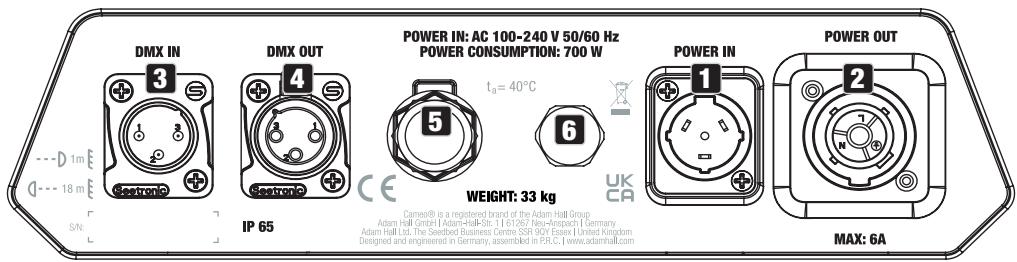
1 POWER IN
IP65 power input socket with rubber sealing cap. Operating voltage 100-240 V AC/50-60 Hz. Connection via supplied power cable (when not in use, always close with rubber sealing cap).
2 POWER OUT
IP65 power output socket with rubber sealing cap. Facilitates power supply to other CAMEO spotlights. Ensure that the total current consumption of all connected devices does not exceed the value specified on the device in amperes (A) (when not in use, always close with the rubber sealing cap).
3 DMX IN
Male IP65 5-pin XLR socket for connecting a DMX control device (e.g. DMX console; when not in use, always close with the rubber sealing cap).
4 DMX OUT
Female IP65 5-pin XLR socket for sending DMX control signal (when not in use, always close with the rubber sealing cap).
5 ANTENNA
Antenna for W-DMXTM control.
6 PRESSURE EQUALISATION ELEMENT
Pressure equalisation element to prevent condensation inside the housing. In order to ensure its proper function, the element must be protected from contamination.

ATTENTION: In order to provide protection from spraying water, in accordance with protection class IP65, special IP65-rated XLR connectors must be used correctly with the DMX input and output sockets, or they must be closed using the rubber sealing caps. When connected correctly, or when sealed correctly with the rubber sealing caps, the POWER IN and POWER OUT sockets are protected from spraying water, as in accordance with IP65.
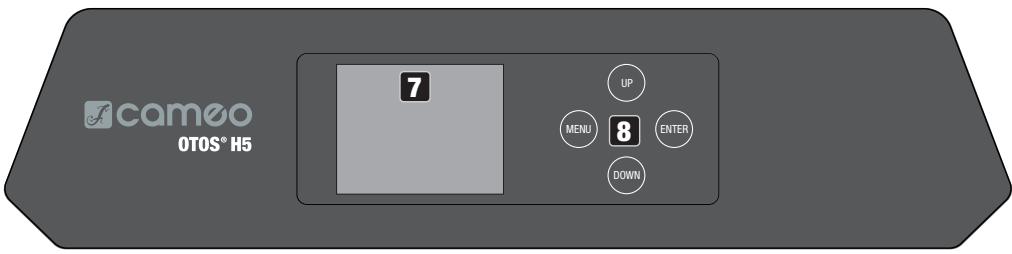
7 LC-DISPLAY
The illuminated display shows the currently activated mode (main display), the menu items in the main menu and sub-menus and the numerical value or status in certain menu items. If there is no control signal to the device, the characters in the centre of the display start flashing; the flashing stops as soon as a control signal is available (W-DMX, DMX and slave operation).
8 TOUCH-SENSITIVE CONTROLS
MENU - Press MENU to access the main menu. Press again or repeatedly to return to the main display.
UP and DOWN - Select the menu items in the main menu (DMX address, operating mode, etc.) and in the sub-menus using UP and DOWN. Change the status or value in a menu item, e.g. DMX address.
ENTER - Press ENTER to access the menu level to make value or status changes, and to access one of the sub-menus. Confirm value or status changes by pressing ENTER.
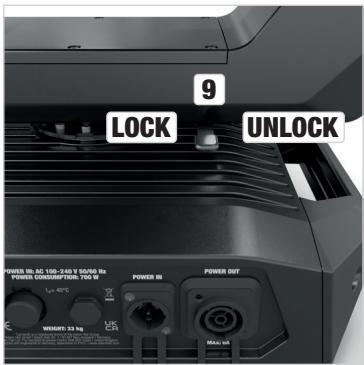
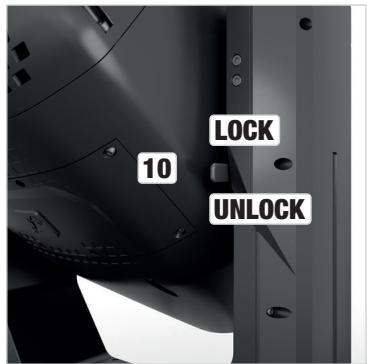
9 PAN LOCK
Mechanical locking device used to prevent the rotation of the head in the horizontal direction during transport. Disconnect the unit from the mains, move the head parallel to the base (4 possible positions) and push the locking lever in the direction of the pan rotation axis (LOCK) to lock it in position. Unlock the device before startup (UNLOCK).
10 TILT LOCK
Mechanical locking device used to prevent rotation of the head in the vertical direction during transport (7 possible positions). Disconnect the unit from the mains and slide the locking lever in the direction of the tilt rotation axis, moving the head of the unit vertically until one of the 7 locking positions is found and the locking lever engages (LOCK). Unlock the device before startup (UNLOCK).
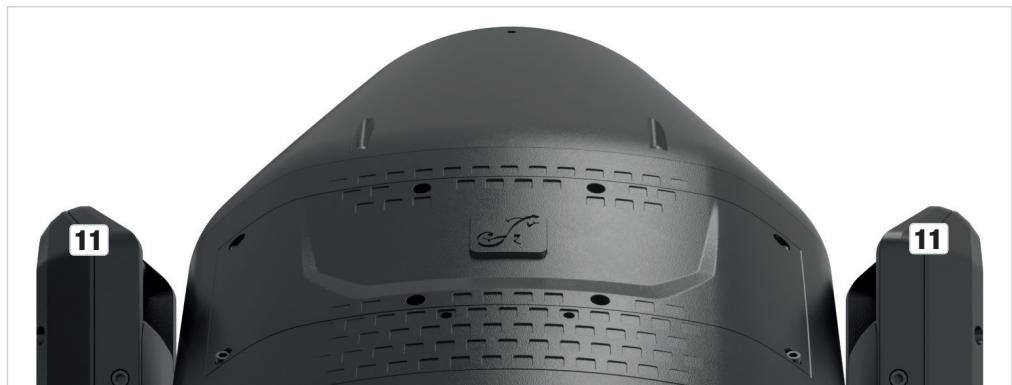
11 RECESSED GRIPS
In addition to the two transport handles on the base of the unit, there are practical recessed grips at the top of the inner sides of the two device arms.
OPERATION
NOTES
As soon as the spotlight is correctly connected to the mains supply, "Welcome to Cameo", the model name and the software version will be displayed in succession during the start process and motor reset. After this process, the spotlight is ready for operation and the previously activated operating mode is launched.
The main display is activated automatically if no input is made within approximately 30 seconds. In the event of a technical fault, the lamp is switched off, the display shows "Lamp Protected" and the warning triangle symbol appears in the bottom right-hand corner.
MAIN DISPLAY
The main display shows different information relevant to the various operating modes.
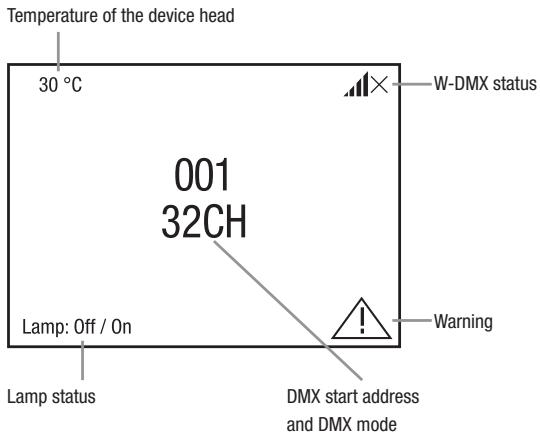
DMX and W-DMX operating modes
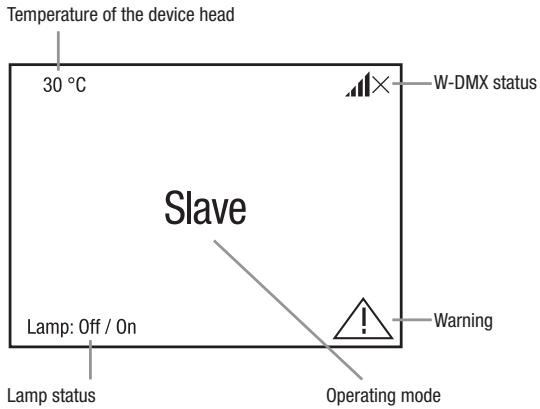
Slave operating mode
Standalone operating mode
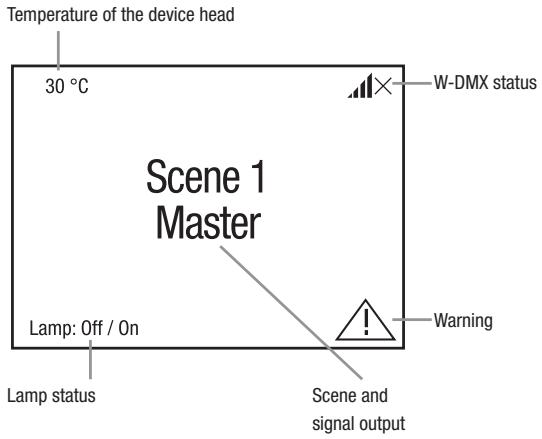
Note regarding the main display in operating modes with external control: As soon as the control signal is interrupted, the characters in the centre of the display begin to flash. The flashing stops when a control signal is present.
Warning: If the warning symbol (triangle with exclamation mark) appears in the display, there is a fault with one or more components in the device. The affected components can be seen in the Info Menu under Error Info. If the error cannot be rectified by a restart or reset, please contact an authorised service centre.
W-DMXTM
To pair a W-DMX receiver with a W-DMX compatible transmitter, the Reset command must be executed in the menu item WDMX under Receiver (select and confirm Reset). The receiver is now in pairing standby and waiting for a pairing request from a transmitter. Start the pairing by selecting Link in the menu of the transmitter and confirming; the pairing now takes place automatically. In the same way, several receivers can be paired simultaneously or one after the other to a transmitter (e.g. for master / slave operation). A W-DMX connection is always maintained until the connection is disconnected by means of the Reset command in the receiver or the Unlink command in the transmitter, regardless of whether a device has been disconnected from the power supply in the meantime.
W-DMXTM STATUS
| ×× | ?↓↓ | ?↓↓ | ×↓↓ | ↓↓ | ↑↑G3 | ↑↑G4S | ×↑↑G3 | ×↑↑G4S |
| W-DMX deactivated | W-DMX as receiver activated, not paired | W-DMX as receiver activated and paired, Transmitter switched off or out of range | W-DMX as receiver activated and paired, no DMX signal | W-DMX as receiver activated and paired, DMX signal is present | W-DMX as trans-mitter with G3 standard activated, DMX signal is present | W-DMX as trans-mitter with G4s standard activated, DMX signal is present | W-DMX as trans-mitter with G3 standard activated, no DMX signal | W-DMX as trans-mitter with G4s standard activated, no DMX signal |
CONTROL MENU (Control)
The control menu enables selection of the various operating modes and their setting options in the relevant sub-menus. DMX address and DMX operating mode are set in each operating mode across all operating modes, if relevant.
Starting from the main display, press MENU to enter the main menu. Use UP and DOWN to select the Control menu and press ENTER. Now select the DMX menu item and confirm again.
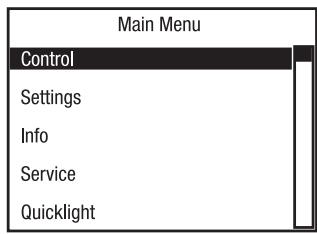
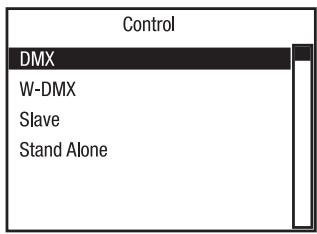
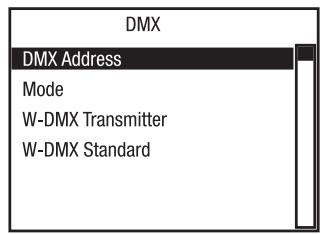
Information on the sub-menu items in the DMX menu and the corresponding setting options can be found in the table below.
| DMX | ||
| DMX Address | Setting the DMX start address | 001-486 |
| Mode | Selecting the DMX mode | 26CH Standard |
| 32CH Extended | ||
| W-DMX Transmitter | Deactivate sending of the DMX control signal via W-DMX | Off |
| Activate DMX control signal forwarding via W-DMX | On | |
| Pairing with ready-to-pair W-DMX devices | Force to pair | |
| Disconnect all W-DMX connections | Unlink All | |
| W-DMX standard | Selection of the W-DMX transmission standard | G3 |
| G4s | ||
Starting from the main display, press MENU to enter the main menu. Use UP and DOWN to select the Control menu and press ENTER. Now select the menu itemW-DMX and confirm again.
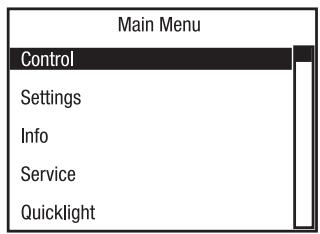
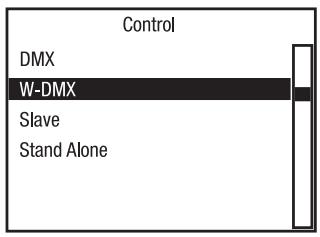
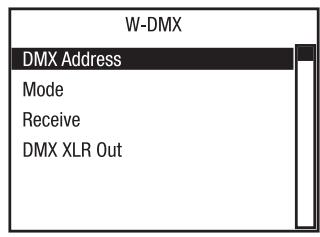
See the table below for information on the sub-menu items in the W-DMX menu and the relevant setting options.
| W-DMX | ||
| DMX Address | Setting the DMX start address | 001-486 |
| Mode | Selecting the DMX mode | 26CH Standard |
| 32CH Extended | ||
| Receive | Deactivate reception via W-DMX | Off |
| Activate reception via W-DMX | On | |
| Disconnect all connections and place in pairing standby mode | Unlink | |
| DMX XLR Out | Do not output incoming W-DMX signal via DMX OUT (XLR) | Off |
| Output incoming W-DMX signal via DMX OUT (XLR) | On | |
SLAVE MODE
Starting from the main display, press MENU to enter the main menu. Use UP and DOWN to select the Control menu and press ENTER. Now select the menu item Slave and confirm again. Connect the slave and the master unit (same model, same software version) with a DMX cable (Master DMX OUT - Slave DMX IN) or via W-DMX (pair both devices), enable the standalone operating mode on the master unit and start a scene (Run Scene). The slave unit will now follow the master unit.
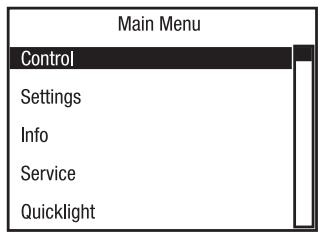
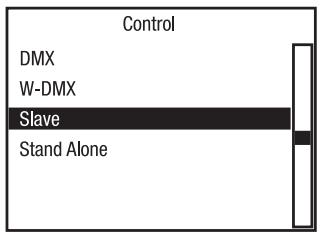
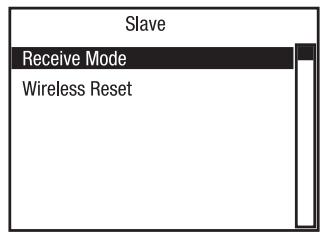
Information on the sub-menu items in the Slave menu and the corresponding setting options can be found in the table below.
| Slave | |||
| Receive Mode | Set reception mode | Signal reception exclusively via DMX IN | XLR Only |
| Signal reception via DMX IN, with signal interruption via W-DMX | XLR First | ||
| Signal reception via W-DMX, with signal interruption via DMX IN | Wireless First | ||
| Signal reception exclusively via W-DMX | Wireless Only | ||
| Wireless Reset | Disconnect all connections and place in pairing standby mode | ||
STANDALONE MODE (Scenes)
Similar to when using a DMX control unit, the standalone operating mode Scenes makes it possible to set pan, tilt, zoom, pan/tilt macros etc. directly on the device with values from 000 to 255. A total of 8 individual scenes (Scene 1-8) can be created, edited, saved and recalled.
Starting from the main display, press MENU to enter the main menu. Use UP and DOWN to select the Control menu and press ENTER. Now select the menu item Stand Alone and confirm again.
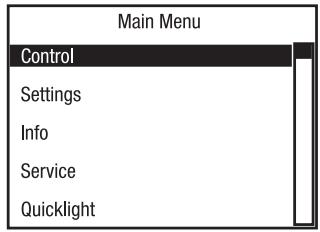
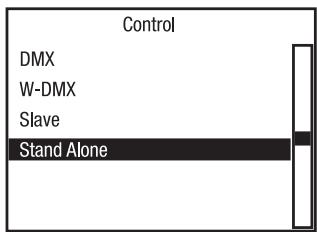
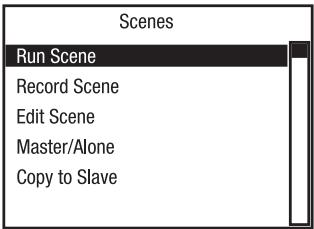
Information on the sub-menu items in the Scenes menu and the corresponding setting options can be found in the table below.
| Stand Alone (Scenes) | ||
| Run Scene | Start Scene | Scene 1-8 |
| Record Scene | Record a scene from an external controller | Scene 1-8 |
| Edit Scene | Edit scene (see table Edit Scene) | Scene 1-8 |
| Master/Alone | Output scene as control signal to one or more slave units | Master |
| Do not output scene as control signal (Alone) | Alone | |
| Copy to Slave | Transfer scenes 1 to 8 via DMX cable to one or more slave units (same model, same software version). Carry out procedure with Yes. The scene memory of the slave units is completely overwritten. Cancel the operation with No. | No |
| Yes | ||
| Edit Scene | ||||
| Pan | 000 | - | 255 | 0% -> 100% |
| Pan Fine: | 000 | - | 255 | 0% -> 100% |
| Tilt | 000 | - | 255 | 0% -> 100% |
| Tilt Fine | 000 | - | 255 | 0% -> 100% |
| Dimmer | 000 | - | 255 | Master dimmer 0% -> 100% |
| Dimmer Fine | 000 | - | 255 | Master dimmer fine 0% -> 100% |
| Strobe | 000 | - | 255 | Multi-functional strobe |
| Cyan | 000 | - | 255 | CMY |
| Cyan Fine | 000 | - | 255 | |
| Magenta | 000 | - | 255 | |
| Magenta Fine | 000 | - | 255 | |
| Yellow | 000 | - | 255 | |
| Yellow Fine | 000 | - | 255 | |
| Colour 1 | 000 | - | 255 | Colour Wheel 1 |
| Colour 2 | 000 | - | 255 | Colour Wheel 2 |
| Colour 3 | 000 | - | 255 | Colour Wheel 3 |
| Gobo 1 | 000 | - | 255 | Gobo Wheel 1 |
| Gobo 1 Rot. | 000 | - | 255 | Gobo 1 Rotation |
| Gobo 1 Rot. F. | 000 | - | 255 | Gobo 1 Rotation Fine |
| Gobo 2 | 000 | - | 255 | Gobo Fix |
| Zoom | 000 | - | 255 | Narrow -> wide |
| Zoom Fine | 000 | - | 255 | Narrow -> wide |
| Focus | 000 | - | 255 | 0% -> 100% |
| Focus Fine | 000 | - | 255 | 0% -> 100% |
| Prism Wheel 1 | 000 | - | 255 | Prism Wheel 1 |
| Prism Wheel 2 | 000 | - | 255 | Prism Wheel 2 |
| Frost | 000 | - | 255 | 0% -> 100% |
| Animation | 000 | - | 255 | 0% -> 100% |
| Animation Rot. | 000 | - | 255 | Animation Wheel Rotation |
| P/T Macro | 000 | - | 255 | Pan/Tilt Macro |
| P/T Speed | 000 | - | 255 | Pan/Tilt Macro Speed |
SYSTEM SETTINGS (Settings)
Starting from the main display, press MENU to enter the main menu. Use UP and DOWN to select Settings and press ENTER.
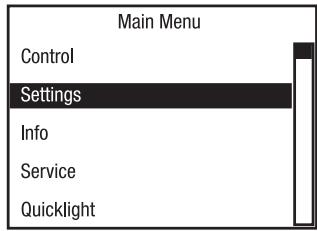
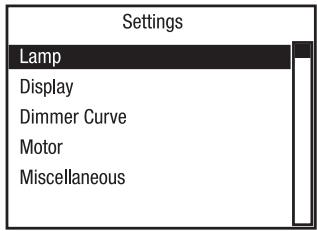
Information on the sub-menu items in the Settings menu and the corresponding setting options can be found in the table below.
| Settings | |||
| Lamp | State | Off | Switching off the lamp ① ATTENTION! Switch- ing off the lamp shortly after switching on is prevented by a delay circuit to protect the lamp (approx. 1 minute)! Do not disconnect the device from the power supply before the switch-off process is complete! |
| On | Switching on the lamp | ||
| Default | On | Lamp switched on after restart | |
| Off | Lamp switched off after restart | ||
| Last | Status before switching off is restored after restart | ||
| Mode | Standard (480 W) | Maximum brightness | |
| Eco mode (380 W) | Reduced maximum brightness in the event of reduced fan speed | ||
| Display | Reverse | Off | No display rotation |
| On | Rotate display by 180° | ||
| Backlight | On | Display lighting permanently on | |
| Off after 60 seconds | Deactivation of display illumination after approx. 1 minute without input | ||
| Dimmer | Curve | Linear | Light intensity increases linearly with DMX value |
| Exponential | Light intensity can be finely adjusted at lower DMX values and broadly adjusted at higher DMX values | ||
| Logarithmic | Light intensity can be broadly adjusted at lower DMX values and finely adjusted at higher DMX values | ||
| S-curve | Light intensity can be finely adjusted at lower and higher DMX values and broadly adjusted at medium DMX values | ||
| Motor | Pan Reverse | Off | Does not reverse pan direction |
| On | Reverses pan direction | ||
| Tilt Reverse | Off | Does not reverse tilt direction | |
| On | Reverses tilt direction | ||
| Feedback | Off | Automatic position correction is disabled | |
| On | Automatic position correction is enabled | ||
| Colour wheel | scroll | Continuous rotation of the colour wheels | |
| snap | Colour wheel jumps directly back to the desired colour filter when the relevant value is reached | ||
| (Gobo wheel) | scroll | Continuous rotation of the gobo wheels | |
| snap | Gobo wheels jump directly back to the desired gobo when the relevant value is reached | ||
| Gobo position | Clockwise | Gobo wheel always turns clockwise | |
| Shortest way | Gobo wheel turns the shortest distance | ||
| Blackout Pan/Tilt | Off | No blackout during head movement | |
| On | Blackout during head movement | ||
| Blackout Wheels | Off | No blackout in the event of value changes in the colour and gobo wheels and prisms | |
| On | Blackout in the event of value changes in the colour and gobo wheels and prisms | ||
| Miscella- neous | Auto Lock | Off | Automatic locking of the controls is disabled |
| On | Automatic locking of the controls after approxi- mately 1 minute without input. Unlock: Press UP and DOWN simultaneously for approx. 5 seconds | ||
| Signal Fail | Hold | Last command is maintained if the control signal is interrupted | |
| Blackout | Instant blackout if the control signal is interrupted | ||
| Temperature unit | °C | Displays temperature in Celsius | |
| °F | Displays temperature in Fahrenheit | ||
| Set Default Values | User A | Save user settings A | |
| User B | Save user settings B | ||
| User C | Save user settings C | ||
SYSTEM INFORMATION (Info)
Starting from the main display, press MENU to enter the main menu. Use UP and DOWN to select Info and press ENTER.
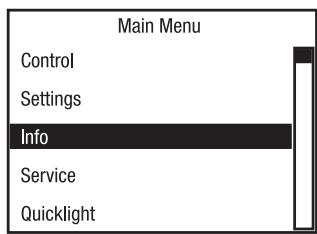
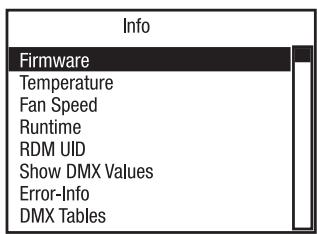
See the table below for information on the sub-menu items in the Info menu.
| Info | |||
| Firmware | Disp: | V1.x.x | |
| CTR1-Motor: | V1.x.x | ||
| CTR2-Motor | V1.x.x | ||
| CTR3-Motor | V1.x.x | ||
| CTR4-Motor | V1.x.x | ||
| Temperature | Head | xxx °C/°F | |
| Base | xxx °C / °F | ||
| Fan Speed | Display of the speed of the correspond-ing fans | xxxx RPM | |
| Runtime | Total | xxxx h : xx m | Total operating time |
| Lamp | xxxx h : xx m | Lamp operating time | |
| Service | xxxx h : xx m | Operating time after service appointment | |
| RDM-UID | RDM Unique Identifier | ||
| Show DMX values | Displays the applied DMX values | ||
| Error Info | Error display in case of malfunction | ||
| DMX Table | Display of DMX mode tables | ||
SERVICE MENU (Service)
Starting from the main display, press MENU to enter the main menu. Use UP and DOWN to select Service and press ENTER.
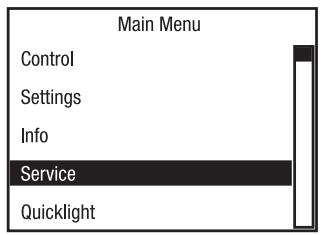
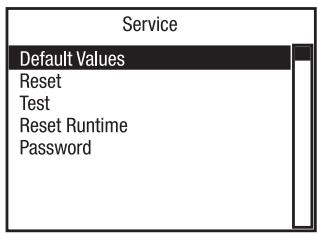
Information on the sub-menu items in the Service menu and the corresponding setting options can be found in the table below.
| Service | |||
| Default values | Factory | Reset to factory setting | |
| User A | Reset to User A values (save user values: Settings -> Set def. values) | ||
| User B | Reset to User B values (save user values: Settings -> Set def. values) | ||
| User C | Reset to User C values (save user values: Settings -> Set def. values) | ||
| Reset | All | Reset all motors | |
| Pan / Tilt | Reset pan / tilt motors | ||
| Head | Reset motors in the device head | ||
| Test | Test Sequence | Pre-programmed sequence to test all components | |
| Stress Test | Pre-programmed sequence to test all components under maximum load | ||
| Run Motor | Activate all motors individually with values of 000 to 255 | ||
| Reset Runtime | Service | No | Do not reset service operation time |
| Yes | Reset service operation time | ||
| Lamp | No | Do not reset lamp operation time | |
| Yes | Reset lamp operation time | ||
| Password | For service purposes only | ||
QUICKLIGHT
Set up a scene quickly and easily using the basic Moving Head functions without an external controller. Starting from the main display, press MENU to enter the main menu. Use UP and DOWN to select Quicklight and press ENTER.
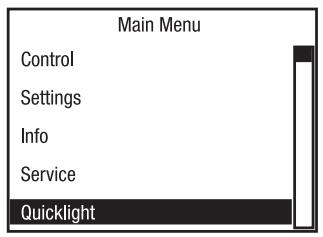
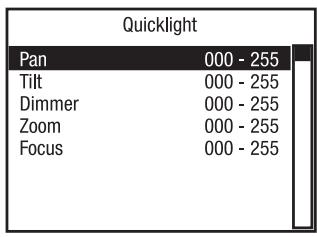
If the Quicklight mode is activated, the display does not automatically change to the main display; when leaving the Quicklight menu, Quicklight mode is automatically terminated. The settings in the Quicklight menu are retained until the next restart of the spotlight; as a result, Quicklight can be accessed repeatedly with the same settings as long as the spotlight remains switched on. After restart, the values in the Quicklight settings are reset (PAN = 000, TILT = 128, DIMMER = 255, ZOOM = 000, FOCUS = 000).
SETUP AND INSTALLATION
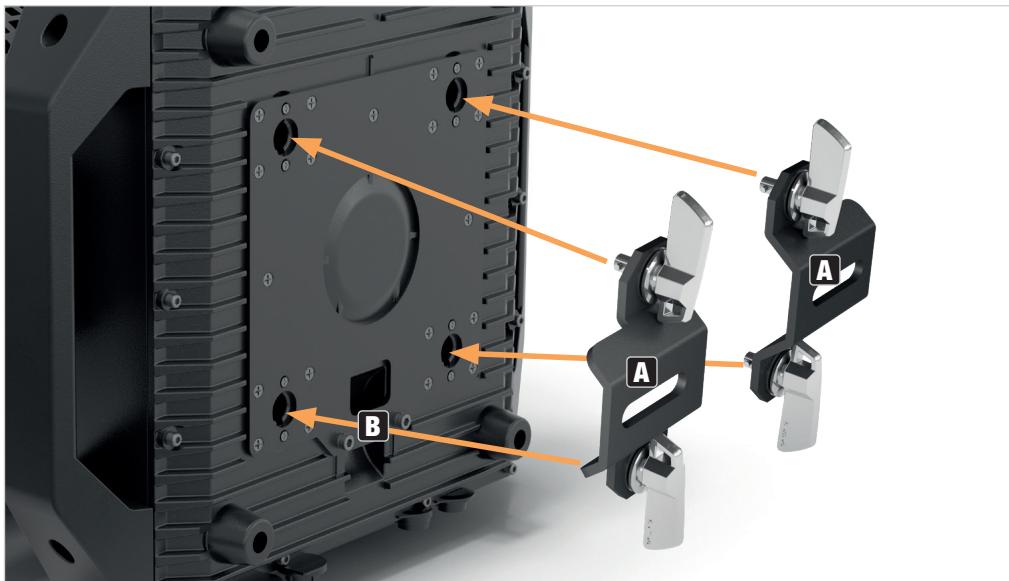
Thanks to its integrated rubber feet, the lamp can be positioned in a suitable location on a level surface. Traverse installation can be achieved with the help of two Omega brackets, which are attached to the base of the device (A). 2 × Omega brackets are included. Suitable beam clamps are available as an option. Ensure firm connections and secure the spotlight to the securing lug (B) with a suitable safety cable.

HAZARD: Overhead mounting requires extensive experience, including the calculation of the limit values for load, the installation materials and regular safety inspection of all installation materials and spotlights. If you do not have these qualifications, do not attempt to perform an installation yourself. Refer instead to a qualified professional. There is a risk that devices that are incorrectly mounted and secured may come loose and fall down. This can cause serious injury or death.
CARE, MAINTENANCE AND REPAIR
In order to ensure the long-term, proper functioning of the device, it must be regularly cleaned and, if necessary, maintained. The maintenance requirement depends on the intensity of use and the environment in which it is used.
We generally recommend a visual inspection before each operation. Furthermore, we recommend carrying out all the applicable maintenance measures specified below once every 500 operating hours or, in the case of a lower intensity of use, at the latest after one year. Warranty claims may be limited in the event of defects resulting from inadequate maintenance.
CARE (carried out by user)

WARNING! Before carrying out any maintenance work, the power supply and, if possible, all device connections must be unplugged.

PLEASE NOTE! Improper care can lead to impairment of the device or even destruction.
- Housing surfaces must be cleaned with a clean, damp cloth. Make sure that no moisture can penetrate the device.
- Air inlets and outlets must be regularly cleaned of dust and dirt. If compressed air is used, make sure that damage to the device is prevented (e.g. fans must be blocked in this case, as they could otherwise over-rev.).
- Lines and plug contacts must be cleaned regularly and dust and dirt must be removed.
- In general, no cleaning agents or abrasive agents may be used, otherwise the surface finish may be damaged.
- Devices must generally be stored dry and protected from dust and dirt.
- To ensure correct and safe operation, all accessible or removable lenses and light-emitting apertures must be cleaned regularly.
MAINTENANCE AND REPAIR (by qualified personnel only)

HAZARD! There are live components in the device. Even after disconnecting the mains connection, there may still be residual voltage in the device, e.g. due to charged capacitors.

PLEASE NOTE! Maintenance and repair work may only be carried out by sufficiently qualified specialist personnel. If in doubt, consult a specialist workshop.

PLEASE NOTE! Improperly performed maintenance work may affect warranty claims.

PLEASE NOTE! For conversion or retrofit sets provided by the manufacturer, it is essential to observe the installation instructions included.
REPLACING THE LAMP

WARNING:
Replacement of the lamp may be carried out by qualified personnel only. If you are not qualified, do not attempt to replace a lamp yourself. Refer instead to a qualified professional.
A hot discharge lamp is under high pressure and can therefore spontaneously explode. Let the spotlight cool for at least 30 minutes before opening it!
When replacing lamps, use only the model specified in the data sheet! The use of unsuitable lamps leads to damage or even destruction of the device and voids the warranty.
Do not touch the glass bulb of the lamp with bare fingers. Contamination, especially from grease, leads to early malfunction of the lamp.

When replacing the lamp, wear protective glasses and protective gloves!

When carrying out any work, make sure that no foreign bodies enter the housing!

The UV filter for protection against UV radiation is located directly in front of the lamp. Take care not to damage the UV filter! The UV filter must not be removed and a damaged UV filter must be replaced immediately! Operation without UV protection or damaged UV protection is prohibited! There is an immediate risk of injury if the device is put into operation with a missing or damaged UV filter!

In order to maintain the seal of the OTOS H5 moving head according to protection class IP65, a new seal must be inserted at the appropriate location after the lamp has been replaced. Carefully follow each step in the instructions below.
- Fully disconnect the spotlight from the mains (pull out the mains plug)! Make sure that the spotlight has cooled down completely!
- Lock the spotlight head to prevent unintentional twisting (pan and tilt locking).
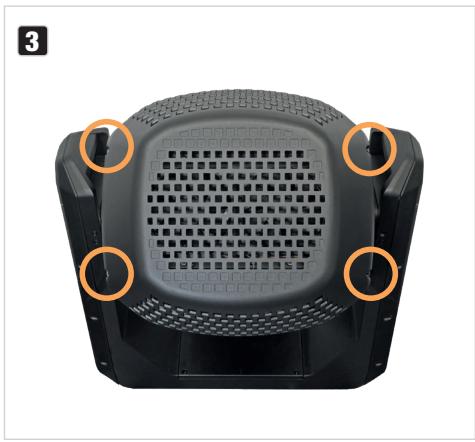
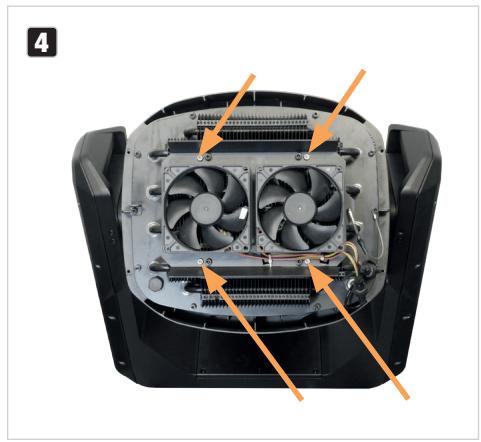
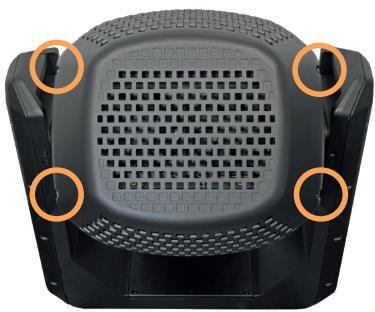
- Loosen the 4 Allen screws of the rear head cover (see markings), remove the cover from the spotlight head, release the safety cable of the cover and place it to one side.
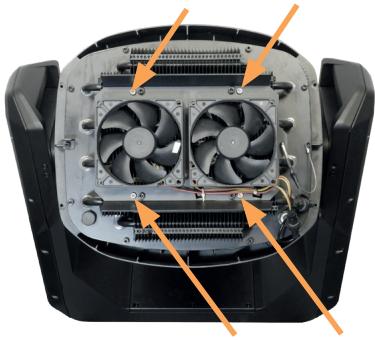
- Loosen the 4 Allen screws holding the fan unit to the spotlight head (see markings) and hang them carefully on the safety cable. Ensure that the supply lines are not damaged.
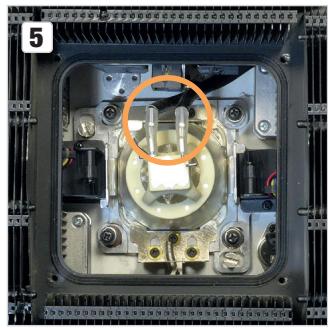
- Disconnect the two cables for power supply to the lamp by disconnecting the plugs at the contacts.
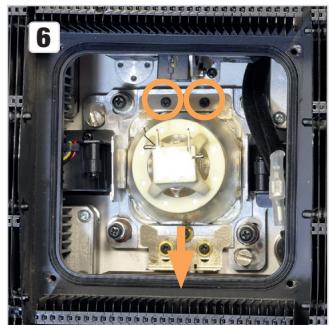
- Loosen the two screws of the upper bracket approximately one turn and push the spring-loaded lower bracket downwards.
- The lamp may now be tilted upwards and pulled downwards out of the retaining frame.
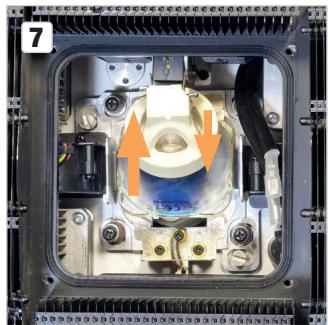
- Place the new lamp in the retaining frame in the same orientation. When doing so, ensure that the spring-loaded lower bracket is back in the holding position and re-tighten the two screws of the upper bracket.
- Plug the cables for the power supply into the contacts (reversal of polarity not possible).
- Remove the old seal from the groove in the lamp compartment surround.
- Thoroughly clean the groove and the contact surface of the fan unit. Make sure that the contact surfaces of the seal are free from foreign objects and dirt.
- Remove the new seal from the packaging and remove any residues of the mould release agent.
-
Now place the seal positively into the groove. Ensure that the seal is not twisted.
-
Place the fan unit flat on the lamp compartment.
- The screws of the fan unit must now first be tightened crosswise with low force.
- The screws of the fan unit must then also be tightened crosswise to 6 (± 0.5) kgf-cm.
- After mounting the fan unit, perform a leak test.
- After the leak test, fasten the safety cable of the rear head cover in the appropriate position, place the head cover on the spotlight head and screw it in place using the previously loosened screws (10 (± 0.5) kgf-cm).
Never operate the spotlight without the fan unit and head cover!
CALIBRATING THE LAMP

WARNING:
Calibration of the lamp may be carried out by qualified personnel only. If you are not qualified to do this, do not attempt to calibrate a lamp yourself. Consult a qualified professional instead.
A hot discharge lamp is under high pressure and can therefore spontaneously explode. Let the spotlight cool for at least 30 minutes before opening it!

When calibrating the lamp, wear protective glasses and protective gloves!

When carrying out any work, make sure that no foreign bodies enter the housing!

In order to maintain the seal of the OTOS H5 moving head according to protection class IP65, a new seal must be inserted at the corresponding location after calibrating the lamp. Carefully follow each step in the instructions below.
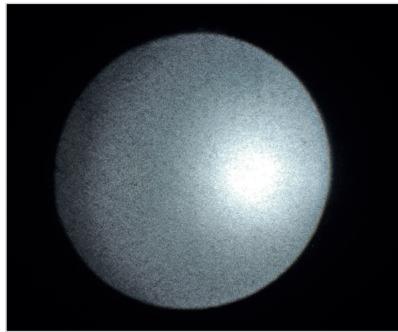
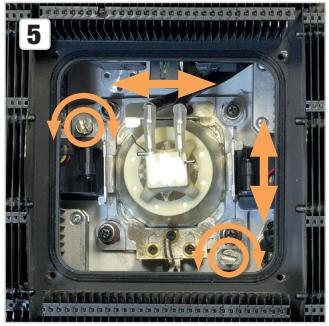
If the hotspot is not in the centre of the projection of the light beam, it can be calibrated by means of two adjustment screws.
Example:
- Fully disconnect the spotlight from the mains (pull out the mains plug)! Make sure that the spotlight has cooled down completely!
- Lock the spotlight head to prevent unintentional twisting (pan and tilt locking).
- Loosen the 4 Allen screws of the rear head cover (see markings), remove the cover from the spotlight head, release the safety cable of the cover and place it to one side.
- Loosen the 4 silver-coloured Allen screws that hold the fan unit to the spotlight head (see markings) and hang them carefully on the safety cable. Ensure that the supply lines are not damaged.
3
4
- Use the two calibration screws to centre the hotspot (see markings).
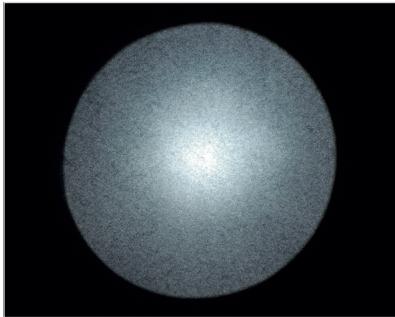
- Remove the old seal from the groove in the lamp compartment surround.
- Thoroughly clean the groove and the contact surface of the fan unit. Make sure that the contact surfaces of the seal are free from foreign objects and dirt.
- Remove the new seal from the packaging and remove any residues of the mould release agent.
- Now place the seal positively into the groove. Ensure that the seal is not twisted.
- Place the fan unit flat on the lamp compartment.
- The screws of the fan unit must now first be tightened crosswise with low force.
- The screws of the fan unit must then also be tightened crosswise to 6 (± 0.5) kgf-cm.
- After mounting the fan unit, perform a leak test.
- After the leak test, fasten the safety cable of the rear head cover in the appropriate position, place the head cover on the spotlight head and screw it in place using the previously loosened screws (10 (± 0.5) kgf-cm).
Never operate the spotlight without the fan unit and head cover!
REPLACING GOBOS

ATTENTION:
Gobos may only be replaced by qualified specialist personnel. If you are not qualified to do this, do not try to replace gobos yourself. Refer instead to professional companies.

When carrying out any work, make sure that no foreign bodies enter the housing!
When replacing the gobos, make sure that the gobos are inserted correctly into the corresponding gobo bracket, otherwise heat damage to the gobos and gobo brackets may occur!

In order to maintain the seal of the OTOS H5 moving head according to protection class IP65, a new seal must be inserted at the corresponding location after replacing a gobo. Carefully follow each step in the instructions below.
- Switch off the lamp (Settings -> Lamp -> State -> Off), then activate a DMX mode and disconnect the spotlight from the DMX control. Before opening the spotlight, perform a normal system start and only remove it from the power supply when the process is complete. When the system is started, the zoom tube is moved all the way forward in the direction of the light-emitting lens, among other things, to enable removal of the colour wheel and gobo wheel module. After fully disconnecting the spotlight from the power supply (pull out the power plug), bring the spotlight head to the maximum horizontal position so that the zoom tube remains in the front position. Now lock the spotlight head.
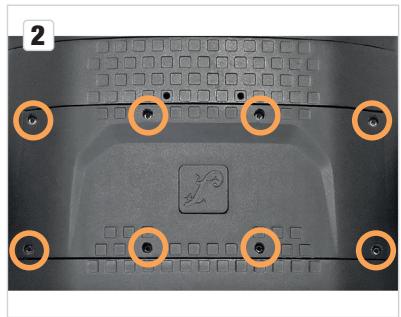
- Loosen the 8 Allen screws of the cover for the installation bay of the colour wheel and gobo wheel module (see markings), remove the cover from the spotlight head, loosen the safety cable of the cover and place it to one side.
- Loosen the 2 Phillips screws that hold the module in the guide rail (see markings) and pull the module out of the spotlight head; cables or plugs do not have to be loosened.
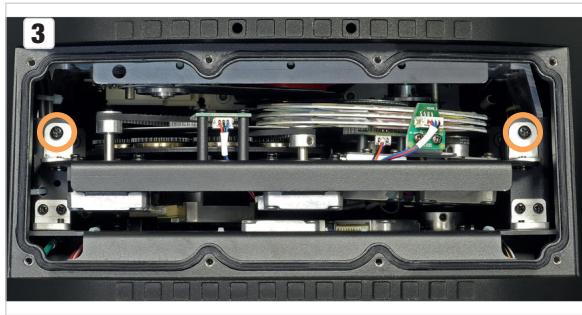
- Place the module on a clean, level surface with the colour and gobo wheels facing upwards. Manually rotate the "Open" section of the gobo wheel with the fixed gobos forward and then the gobo wheel with the interchangeable gobos until the desired gobo appears in the "Open" section of the gobo wheel with the fixed gobos.
- Lift the gobo bracket slightly up on the gear and then pull it out of the gobo wheel.
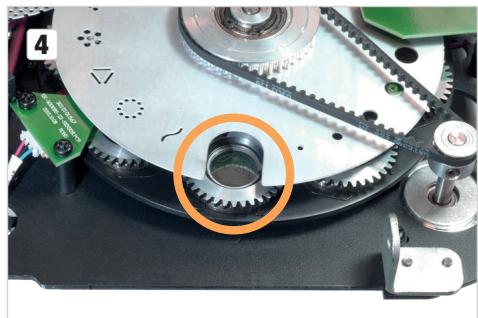
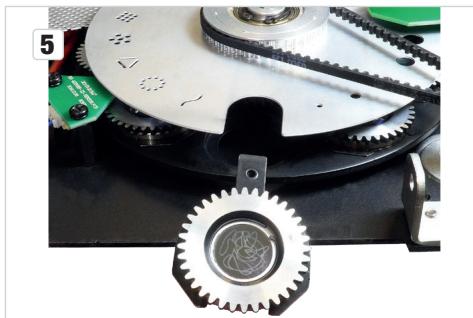
- The gobo can now be removed from the bracket and replaced with another one.
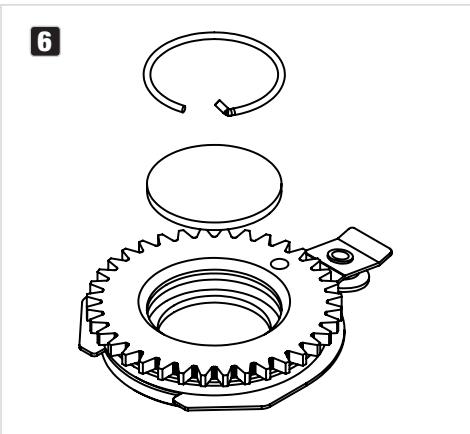
- Then place the gobo bracket back into the gobo wheel, ensuring that the gobo bracket is correctly seated in the corresponding recess. You can check that the gobo is seated correctly by turning the gobo wheel. The gobo must rotate without catching.
- Reinstall the module in the spotlight head, secure it using the two Phillips screws previously loosened and reattach the cover safety cable.
- Remove the old seal from the groove in the installation bay surround.
- Thoroughly clean the groove and the contact surface of the cover. Make sure that the contact surfaces of the seal are free from foreign objects and dirt.
- Remove the new seal from the packaging and remove any residues of the mould release agent.
- Now place the seal positively into the groove. Ensure that the seal is not twisted.
- Place the cover flat on the seal in the installation bay surround.
- First tighten the middle and then the outer screws of the cover crosswise with gentle force.
- Then tighten the middle screws and then the outer screws crosswise to 6 (± 0.5) kgf-cm.
- After mounting the cover, perform a leak test. This requires the removal of the rear head cover. To do this, loosen the 4 Allen screws on the rear head cover, remove the cover from the spotlight, loosen the safety cable of the cover and place it to one side.
- After the leak test, fasten the safety cable of the rear head cover in the appropriate position, place the head cover on the spotlight head and screw it in place using the previously loosened screws (10 (± 0.5) kgf-cm).
Never operate the spotlight without the fan unit and head cover!
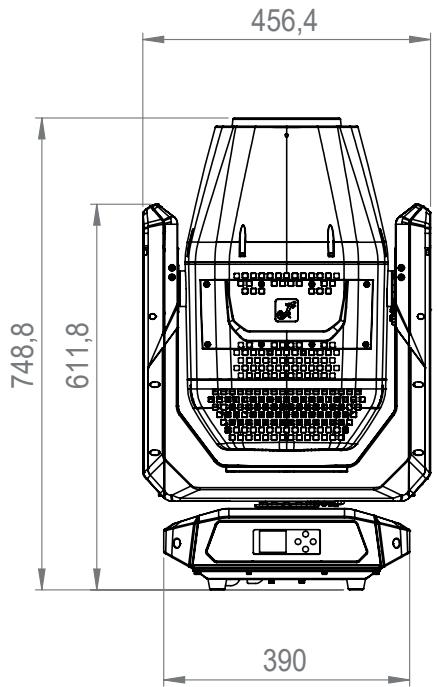
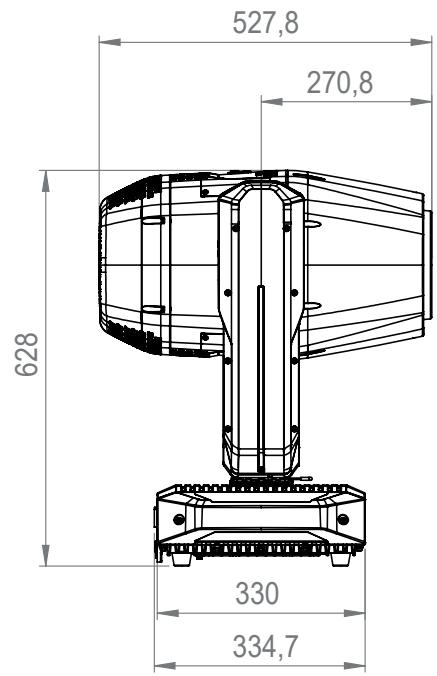
DIMENSIONS (mm)
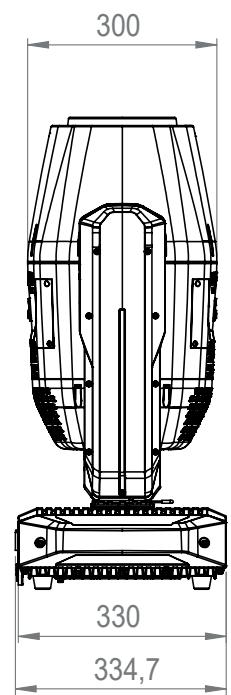
TECHNICAL DATA
| PRODUCT NUMBER: | CLOTOSH5 |
| Product type: | Outdoor Discharge Moving Light |
| Type: | Moving Head |
| Number of lamps: | 1 |
| Type of lamp: | Signify MSD Silver 480 W |
| Lamp operating time at rated output: | Max. 1500 h |
| Maximum lamp service life: | 3000 h* |
| Colour temperature (lamp): | Cool white 6800 K |
| Colour blend function: | CMY |
| Colour reproduction | High CRI Filter ≥80 |
| Number of colours: | 15 + open and continuous positioning |
| Colour wheel: | |
| Number of gobos: | 27 + open (19 fixed + 8 rotating) |
| Effects: | 2 x prism planes (6 x linear + 8 x circular), animation wheel, 5° frost filter |
| Beam angle: | 2° to 42° |
| DMX input: | 5-pin XLR male, IP65 |
| DMX output: | 5-pin female XLR, IP65 |
| DMX mode: | 26-channel standard, 32-channel extended |
| DMX functions: | Pan/Tilt, Pan/Tilt Fine, Dimmer, Dimmer Fine,Multifunctional Strobe, Cyan, Cyan Fine, Magenta, Magenta Fine, Yellow, Yellow Fine, High CRI Filter, Colour Wheel 1, Colour Wheel 2, Colour Wheel 3, Gobo Wheel 1, Gobo 1 Rotation, Gobo 1 Rotation Fine, Gobo 1 Shake, Gobo Wheel 2, Gobo 2 Shake, Zoom, Zoom Fine, Focus, Focus Fine, Prism 1/2, Prism Rotation, Frost, Animation Wheel, Pan/Tilt Macros, Pan/Tilt Speed, System Settings |
| Standalone functions: | Static mode, master/slave operation, Quicklight |
| System settings: | Display Reverse, Lamp ON/OFF, Display Illumination On/Off, Signal Fail, Pan Reverse, Tilt Reverse, Feedback, Movement Blackout, Test, Reset, User Default Values, Blackout Functions, Colour/Gobo Wheel Scroll/Snap, Auto Lock, Pan/Tilt Speed, Lamp Default, Lamp Mode |
| Control: | DMX512, RDM enabled, W-DMXTM (Transceiver) |
| Operating elements: | 4-button navigation (MENU/ENTER/UP/DOWN) |
| Display elements: | Illuminated 2" TFT display |
| Operating voltage: | 100–240 V AC / 50–60 Hz |
| Electrical protection class: | 1 |
| Power consumption: | 700 W |
| Luminous flux of spotlight: | 19,000 lm |
| Power supply connec-tion: | TRUE1-compatible input and output (output max. 6 A) |
| IP protection class: | IP 65 |
| Ambient operating temperature: | -15°C to 40°C |
| Housing material: | Die-cast aluminium alloy |
| Housing colour: | Black |
| Housing cooling: | Temperature-controlled fan |
| Minimum distance to illuminated surface: | 18 m |
| Minimum distance to normal flammable materials: | 1 m |
| Dimensions (W x H x D, without bracket): | 456.4 × 748.8 × 334.7 mm |
| Weight: | 33 kg |
| Additional features: | 1 m mains cable with TRUE1 compatible plug and 2 Omega mounting brackets included with the appliance |
*Definition of service life: The time at which 50% of the lamps are still in operation and deliver at least 50% of the original light output.
EXPLANATION OF IP PROTECTION CLASS
- An IP rating only reflects protection from solid objects and water. It does not describe general weather resistance, such as protection from UV radiation and temperature, etc.
- The first identification digit indicates protection from dust, solid objects and contact:
| IP2X | Protected against solid foreign bodies ≥ 12.5 mm in diameter |
| IP3X | Protected against solid foreign bodies ≥ 2.5 mm in diameter |
| IP4X | Protected against solid foreign bodies ≥ 1.0 mm in diameter |
| IP5X | Protected against dust in harmful quantities and completely protected against contact |
| IP6X | Are dust-tight and completely protected against contact |
- The second identification digit indicates protection from water:
| IPX0 | No protection |
| IPX1 | Protection against dripping water |
| IPX2 | Protection against dripping water when the device is tilted up to 15° |
| IPX3 | Protection against falling spray water up to 60° from the vertical |
| IPX4 | Protection against splashing water on all sides |
| IPX5 | Protection against water jets (nozzle) from any angle |
| IPX6 | Protection against strong water jets |
| IPX7 | Protection against temporary immersion |
- In addition, some device-specific measures, such as covers and sealing caps, are necessary in order to achieve the specified protection class (e.g. protective caps on unused connections).

The IP rating of the product can be found in the technical data and is printed on the device.
MINIMUM DISTANCE TO ILLUMINATED SURFACE
This symbol with distance specification in metres (m) indicates the minimum distance between the light head and the illuminated surface. In this example, the distance is 0.5m .
MINIMUM DISTANCE TO NORMALLY FLAMMABLE MATERIALS
--- D_0.5m This symbol with distance specification in metres (m) indicates the minimum distance between the light head and normally flammable materials. In this example, the distance is 0.5m .
DISPOSAL

Packaging:
- Packaging can be fed into the reusable material cycle using the usual disposal methods.
- Please separate the packaging in accordance with the disposal laws and recycling regulations in your country.

Device:
- This device is subject to the European Directive on Waste Electrical and Electronic Equipment, as amended. WEEE Directive Waste Electrical and Electronic Equipment. Old appliances do not belong in household waste. The old device must be disposed of via an approved disposal company or a municipal disposal facility. Please observe the applicable regulations in your country!
- Observe all disposal laws applicable in your country.
- As a private customer, you can obtain information on environmentally-friendly disposal options from the seller of the product or the appropriate regional authorities.

Batteries:
- Batteries should not be disposed of in household waste. Batteries must be disposed of via an approved disposal company or a municipal disposal facility.
- Observe all disposal laws and regulations applicable in your country.
- As a private customer, you can obtain information on environmentally-friendly disposal options from the seller of the product or the appropriate regional authorities.
- Devices with batteries that cannot be removed by the user must be taken to a collection point for electrical devices.
MANUFACTURER'S DECLARATIONS
MANUFACTURER'S WARRANTY & LIMITATION OF LIABILITY
Adam Hall GmbH, Adam-Hall-Str. 1, 61267 Neu Anspach, Germany / E-mail Info@adamhall.com / +49 (0)6081 / 9419-0.
Our current warranty conditions and limitation of liability can be found at:
https://cdn-shop.adamhall.com/media/pdf/Manufacturers-Declarations-CAMEO DE EN ES FR.pdf.
Contact your distribution partner for service.
UKCA- CONFORMITY
Hereby, Adam Hall Ltd. declares that this product meets the following guidelines
(where applicable)
Electrical Equipment (Safety) Regulations 2016
Electromagnetic Compatibility Regulations 2016 (SI 2016/1091)
The Restriction of the Use of Certain Hazardous Substances in Electrical and Electronic Equipment
Regulation 2012 (SI 2012/3032)
Radio Equipment Regulations 2017(SI 2016/2015)
UKCA-DECLARATION OF CONFORMITY
Products that are subject to Electrical Equipment(Safety)Regulation 2016, EMC Regulation 2016 or RoHS Regulation can be requested at info@adamhall.com.
Products that are subject to the Radio Equipments Regulations 2017 (SI2017/1206) can be downloaded from www.adamhall.com/compliance/
FCC STATEMENT
This equipment has been tested and found to comply with the limits for a Class B digital device, pursuant to part 15 of the FCC Rules. These limits are designed to provide reasonable protection against harmful interference in a residential installation. This equipment generates, uses and can radiate radio frequency energy and, if not installed and used in accordance with the instructions, may cause harmful interference to radio communications. However, there is no guarantee that interference will not occur in a particular installation. If this equipment does cause harmful interference to radio or television reception, which can be determined by turning the equipment off and on, the user is encouraged to try to correct the interference by one or more of the following measures:
Reorient or relocate the receiving antenna.
- Increase the separation between the equipment and receiver.
- Connect the equipment into an outlet on a circuit different from that to which the receiver is connected.
- Consult the dealer or an experienced radio/TV technician for help.
Caution: Any changes or modifications to this device not explicitly approved by manufacturer could void your authority to operate this equipment.
This device complies with part 15 of the FCC Rules. Operation is subject to the following two conditions: (1) This device may not cause harmful interference, and (2) this device must accept any interference received, including interference that may cause undesired operation.
RF EXPOSURE INFORMATION
This equipment complies with FCC radiation exposure limits set forth for an uncontrolled environment. This equipment should be installed and operated with minimum distance 20cm between the radiator and your body.