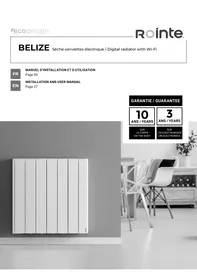
USER MANUAL BELIZE II ROINTE
INSTALLATION AND USER MANUAL
Page 27
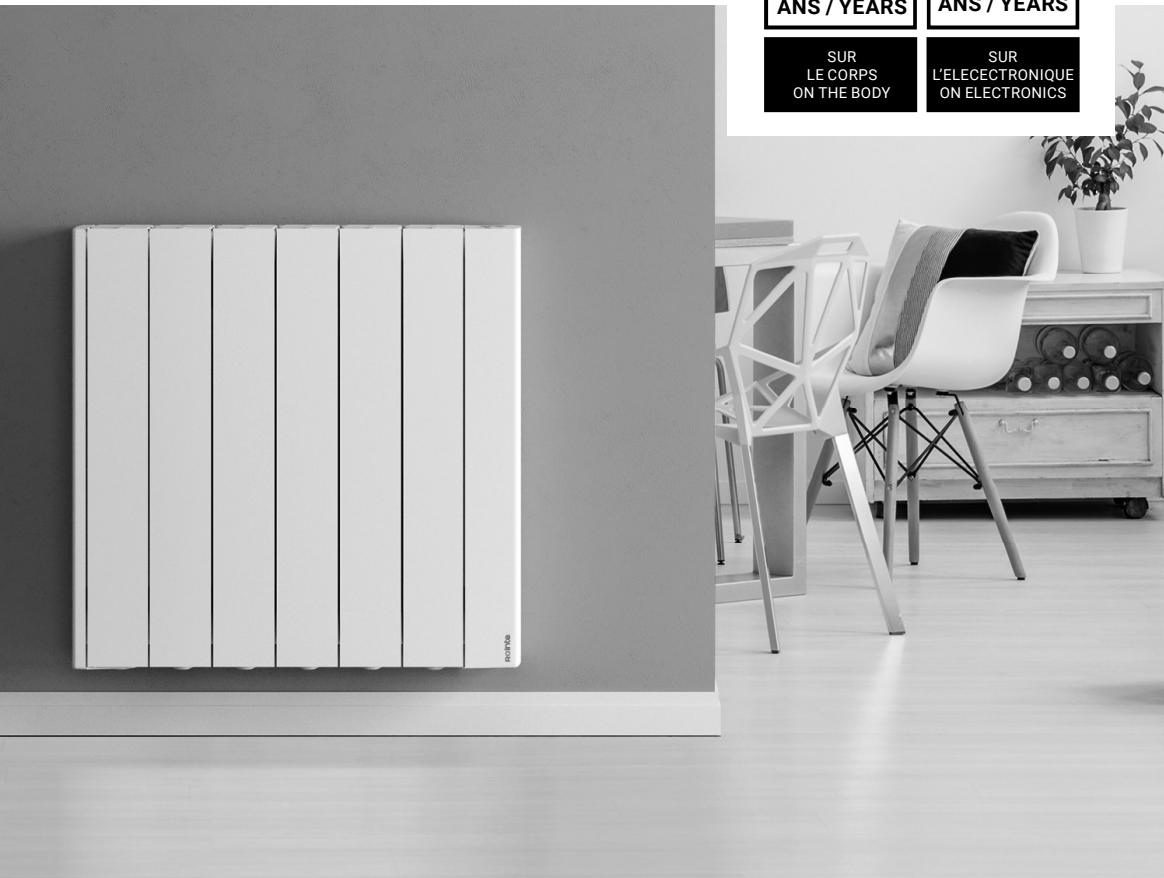
GARANTIE / GUARANTEE
10
ANS/YEARS
3
ANS/YEARS
SUR
LECORPS
ON THE BODY
SUR
L'EALECTRONIQUE
ON ELECTRONICS
SYMBOLES

DANGER. This symbol indicates a medium-high risk hazard which can result in serious injury or even death.

DO NOT COVER. Do not dry or leave clothes or towels on the radiator. Do not leave or place magazines, spray cans, volatile substances, or similar objects within 250~mm of the radiator.

HOT SURFACE. This symbol indicates that your surfaces are hot during and immediately after use. These must not be touched: danger of burns.

OBSERVE THE INSTRUCTIONS IN THE MANUAL. Please read this manual carefully before installing and using the product. Keep it for later use. Read all instructions and safety warnings. Failure to follow these can result in electric shock, fire or serious injuries.
INDEX
- GeneralWarnings 29
- Installation 33
- Technical information 36
- Screen & Keypad 37
- Functionality and programming 38
5.1.ON&OFF 38
5.2. Select the temperature 38
5.3.Temperature control 38
5.4. Lock / unlock button pad 38
5.5.Settings menu 39
5.5.1.Settings submenu 39
5.5.2. Energy submenu 40
5.5.3.Wi-Fi submenu 41
5.5.4.Prog.mode 42
6.Wi-Fi pairing. 46
7. Maintenance and cleaning 46
8. European Regulation (WEEE) 2012/19/EU 46
9.Guarantee 47
10. How to register your product guarantee 50
Directive ERP Commission Regulation 51
Declaration of conformity 52
1. GENERAL WARNINGS

WARNING
This product may be used by children over 8 years of age and by persons with reduced physical, sensory, or mental capabilities, or lack of experience and knowledge under strict supervision or instruction in the safe use of the product and if they understand the hazards involved. Children should not plug, adjust, clean, play with, or perform maintenance on this product.
Children from the age of 3 years and under 8 years should only switch on/off the appliance when it has been placed or installed in its normal intended use position and when they have been given supervision or instruction concerning use of the appliance in a safe way and understand the hazards involved.
Children under the age of 3 should be kept away from the appliance, unless they are under continuous supervision.
Children from 3 years of age and under 8 years of age must not plug in, regulate, clean or service the appliance.
DO NOT use the product in enclosed spaces if the persons present cannot leave the room independently and are not under constant supervision.

DO NOT COVER. To avoid overheating, do not cover the radiator.
DO NOT place spray cans, volatile substances, or similar objects within 250mm of the product.
DO NOT use insecticides, paints, or chemicals on or near the product.

Some parts of this product could reach high temperatures and cause burns. DO NOT touch the external parts of the product when in operation.
DO NOT install near curtains or other flammable materials.
Particular attention should be paid when children and vulnerable people are present.
This appliance must only be connected to the mains supply by an authorised person in accordance with the applicable rules and standards.
The installation must be carried out in accordance with the rules and standards in force in the country of installation (NFC 15-100 for France).
When using electrical appliances, precautions should be taken to reduce the risk of fire, electric shock and injury.
Never insert fingers, body parts or objects inside the product.
Make sure that the voltage indicated on the product's technical information corresponds to the voltage output you have at your socket.
Any repair or maintenance that requires the product to be opened the product must be carried out by personnel authorised by ROINTE, who must also be notified if a leak is observed. Only official spare parts approved by ROINTE should be used. Please observe the current and relevant regulations when disposing of this product and its thermal fluid.
If the power cable is damaged, it must be replaced by personnel authorised by ROINTE to prevent any damage.
To avoid the risk of suffocation, do not leave the packaging including bags and other items within reach of babies or children.
WARNING: The heater must not be placed directly under a power socket.
The appliance must be supplied with 230 V single-phase 50 Hz. The power supply to the appliance must be connected directly to the mains after the circuit breaker and without an intermediate switch.
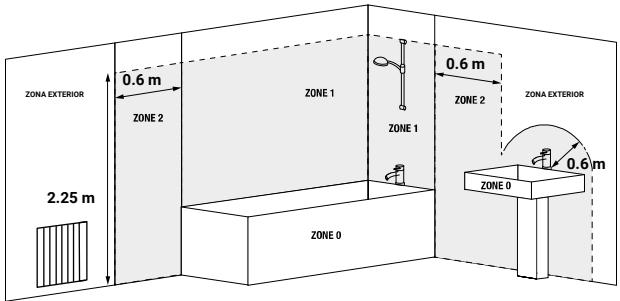
The product has an IP24 degree of protection and can be used in bathrooms, but not in the vicinity of bathtubs, taps, showers, water connections, toilets, swimming pools or other masses of water. The product must never be installed where it, the switches or the control panel are within the reach of people in the water. Never use the product with wet hands. Do not place any water containers (glasses, vases, etc.) on or near the product.
The heater is filled with a specific amount of special oil.
Repairs requiring the opening of the oil tank may only be carried out by the manufacturer or his service department, which should normally be contacted in the event of an oil leak.
When the heater is disposed of, the regulations concerning the disposal of oil must be observed.

IMPORTANT
- Disconnect the product from the power supply and make sure the product is at room temperature before any cleaning or maintenance. Do not use any abrasive substances on the product, such as (but not limited to) chemicals, coarse cloths, brushes, hard bristle, or wire/steel wool.
- To disconnect the product from the power source, remove the mains plug from the socket. Do not pull on the cable.
ROINTE cannot be held responsible for incorrect sizing of the product unless it has been followed by an official ROINTE technical study.
Before the first start-up, or before the start of winter, or when the product has not been used for many days, the appliance should be cleaned (follow the steps in the "maintenance" section of this manual).
- Do not sit or lean on the product.
- Temperature contrasts can generate "clicks" or noises in the device. This is not a fault of the product, but due to the expansion/contraction of the materials.
When disposing of the product, the requirements set out in the legislation for the waste treatment and recycling must be followed. See WEEE in section 8.
2. INSTALLATION
We recommend using a trusted Rointe supplier for installation of the product. Find the nearest one by calling us on 0203 321 5929 or using the locator on www.rointe.co.uk.
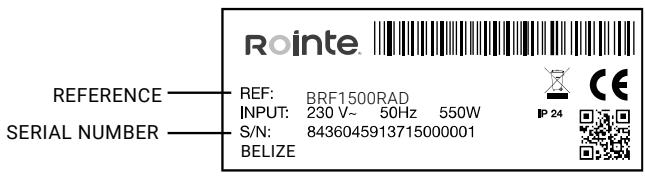
IMPORTANT: Prior to installation, please locate the metal tag located at the back of the product and note the product reference and serial number. You will need this information to register your guarantee. See section 10 for help on how to register the guarantee.
WARNING: Do not install the product directly over an electrical outlet or junction box. Do not install the product or use it outdoors. Do not install directly under a shelf. This product is designed to be installed on an interior wall using the ROINTE template, the installation kit and the fixings supplied. Do not install the product in such a way that it encounters the power cable.
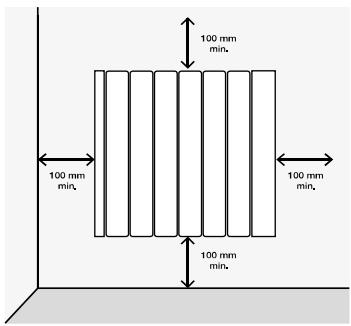
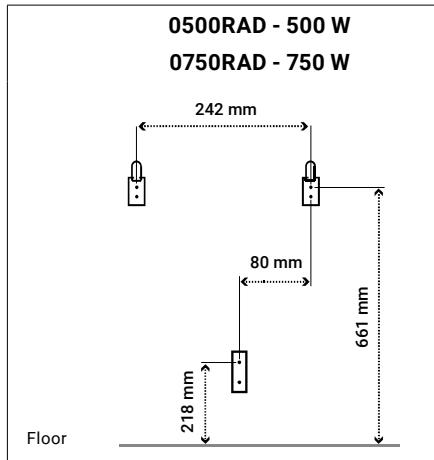
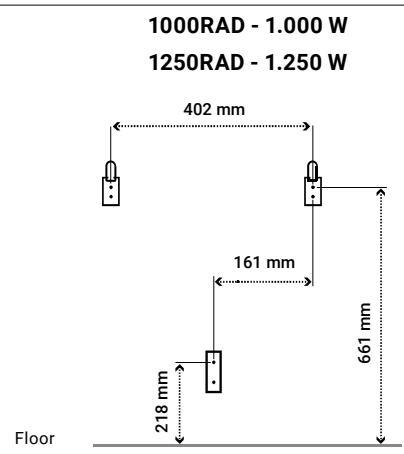
The product must be mounted on the wall in the position shown in the accompanying image using the brackets and with the fixings supplied.
Our products transfer heat through the natural air convection. If the product is covered, this will disrupt the airflow and could cause overheating. It must be positioned in accordance with the minimum distances shown in the accompanying picture.
WARNING: The product has an IP24 degree of protection and can be used in bathrooms, but not in the vicinity of bathtub, taps, showers, water connections, toilets, swimming pools or other masses of water. The product can only be installed in zone 3 of the accompanying picture. The product must never be installed where it, the switches or the control panel are within the reach of people in the water. Never use the product with wet hands. Do not place any water containers (glasses, vases, etc.) on or near the product.
An installation kit is included in the product packaging. You will need a drill, a rubber mallet, a spirit level and a pencil to complete the installation.
WARNING: The weight of some of the products may be heavy. The installation may require two people.
IMPORTANT: Please follow these instructions carefully.

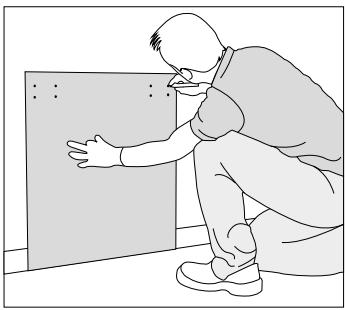
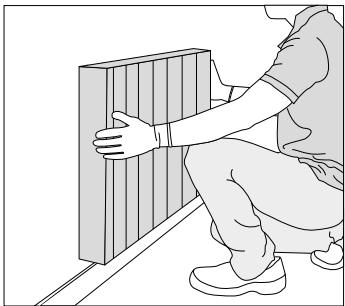
- Remove the packaging and check that the installation contains brackets, screws, rawl plugs and a cardboard template.
- Select a suitable location on the wall. Place the template on the wall and mark the holes for the brackets and screws. Observe the minimum distance requirements from the previous page.
Use the floor as a base for the template, not the skirting board.
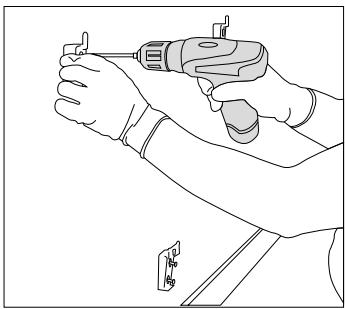
- Remove the template and carefully drill out the marked holes.
- Secure the upper brackets with the rawl plugs and screws provided. Then fix the lower bracket. To distinguish it, the lower bracket has a different design from the top ones.

- Slide the product up and down over the fixed brackets.
- Check the straightness with a spirit level and adjust the supports accordingly if necessary.
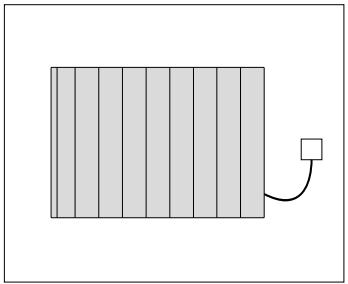
- Connect your product to the power supply and switch it on.
- See section 5 for operating instructions.
IMPORTANT: Installation dimensions depends on the model.
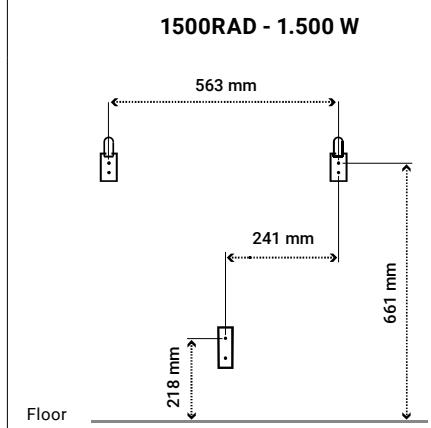
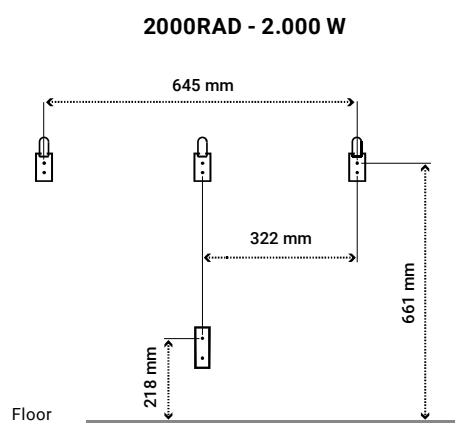
- TECHNICAL INFORMATION
| MODELS | WHITE | BFW0750RAD2 | BRF0750RAD | BRF1000RAD | BRF1250RAD |
| BLACK | BFW0750RAD2 | BRF0750RAD | BRF1000RAD | BRF1250RAD |
| Number of elements | 5 | 5 | 8 | 11 |
| DIMENSIONS, WEIGHTS & FINISHES |
| Width (mm) | 500 | 500 | 740 | 980 |
| Height (mm) | 575 | 575 | 575 | 575 |
| Depth (mm) | 95 | 95 | 95 | 95 |
| Installed depth (mm) | 118 | 118 | 118 | 118 |
| Weight (kg) | 9.7 | 9.7 | 14.2 | 19.9 |
| Finish | White RAL 9016 / Black RAL 9005 |
| ELECTRICAL CHARACTERISTICS |
| PNominal power (W) | 750 | 1,000 | 1,500 | 2,000 |
| Voltage (V) | 230 ~V | 230 ~V | 230 ~V | 230 ~V |
| Amperage (A) | 3.3 | 4.3 | 6.5 | 8.7 |
| SAFETY & INSTALLATION |
| TSafety thermostat | ✓ | ✓ | ✓ | ✓ |
| Template & Installation Kit | ✓ | ✓ | ✓ | ✓ |
| Grade of protection | IP 24 | IP 24 | IP 24 | IP 24 |
| EAN CODE | WHITE | 8435556157328 | 8435556157325 | 8435556157342 | 8435556157359 |
| BLACK | 8435556157380 | 8435556157397 | 8435556157403 | 8435556157410 |
4. SCREEN & KEYPAD
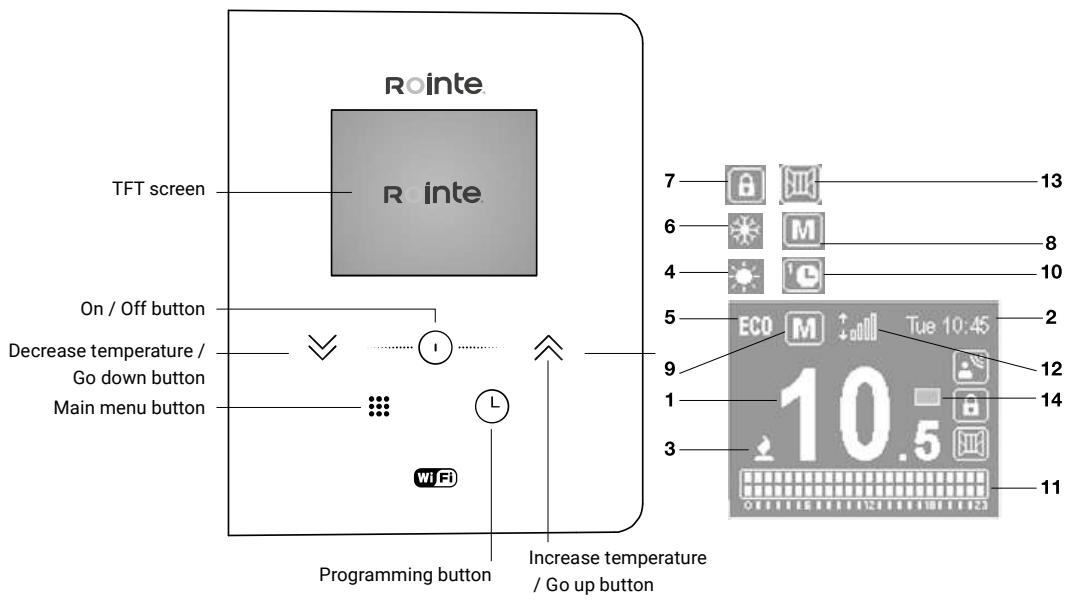
| 1 | Selected temperature | 10.5 |
| 2 | Current time and day | Tue 10:45 |
| 3 | Heating element on | |
| 4 | Comfort mode | |
| 5 | Eco mode | ECD |
| 6 | Anti-Frost mode | |
| 7 | Locked buttonpad | |
| 8 | Manual mode | M |
| 9 | Automatic mode | G |
| 10 | Preset programs mode | E |
| 11 | Hourly programming | |
| 12 | WiFi connection indicator | |
| 13 | Open Windows indicator | |
| 14 | Energy consumption indicator | |
5. FUNCTIONALITY & PROGRAMMING
5.1. ON & OFF
To turn the product on press the ① button once. To turn off press the ① button again. When you turn the product on for the first time, it will ask you to set the date and time. Use the buttons to select the correct time and press the ① button to confirm. Then use the buttons to select the correct minutes and press ① . Use the buttons again to select the correct day and press the ① button to confirm.
5.2. SELECT THE SET TEMPERATURE
You can regulate the set temperature of the radiator by using the buttons. Press the button to increase the product temperature by 0.5^ or the button to decrease the temperature by 0.5^ . The temperature ranges for each mode are as follows:
| COMFORT | 19 - 30 °C |
| ECO | 7.5 - 18.5 °C |
| ANTI-FROST | 7 °C |
5.3. TEMPERATURE CONTROL
When the temperature in the room is lower than the selected one, the heating element is activated and the 2 symbol appears. The temperature control will perform an intelligently to activate and deactivate the electric current through the heating element to heat the fluid in the radiator.
The buttonpad can be locked using the control panel or the Rointe Lite App.
To lock / unlock the buttonpad using the product control panel, press and hold the ※ and ※ buttons together for 3 seconds.
The On/Off button will still work, even if the control panel is locked. Press the button for 3 seconds to switch the product on or off.
| Settings | Set time |
| Backlight |
| Language |
| Firmware |
| Energy | Open windows function |
| Balance mode |
| Adaptative mode |
| Wi-Fi | On/off |
| Link device |
| Wifi info |
| Prog. mode | On/off |
| Preset programs |
| User mode |
| Pilot wire (only available on request) |
Use the buttons to move between the menu options. A box will appear around the option you have selected. Press the button to enter the submenu.
Press the 三 button to access the configuration menu. Then use the buttons to navigate to SETTINGS. Press the button to access.
| • Set the day and time
To set the day or time select the CLOCK option.
Use the✕ buttons to select the correct time and press the按钮 to confirm. Then use the✕ buttons to select the correct minutes and press the按钮 to confirm. Then use the✕ buttons to select the correct day and press the按钮 to confirm. | SET TIME
TIME: 10:45
DAY: Mon |
| • Adjust brightness
This function allows you to adjust the brightness when the product is on or in standby.
To adjust the brightness, select BACKLIGHT. With the✕ buttons you can turn the brightness up or down.
Press the按钮 to confirm. | BACKLIGHT
ON: 50%
STAND-BY: 50% |
| • Language
This function allows you to change the language of the product.
To change the language, select LANGUAGE. Use the✕ buttons to select the correct one and press✕. | LANGUAGE
ENGLISH
ESpañOL
FRANÇAIS
PORTUGUÉS |
| • Firmware
Press the FIMWARE option to see the current software version and the release date. | FIMWARE
VERSION: 0.1-1
DATE: 01/01/2019 |
Press the 三 button to access the configuration menu. Then use the buttons to navigate to ENERGY. Press the button to access.
| ·Open Windows
Use the ≅ buttons to select whether you want this function On / Off and press ⊙ to save.
See section 2 for more information on this function.
When activated, the logo ◎ appears on the home screen, to the right of temperature, indicating that it is active. | ·OPEN
WINDOWS
ON
OFF |
| ·Balance
This function resets your product to a temperature of 19°C in Manual mode.
Use the ≅ buttons to select this option and press ⊙ to confirm. The screen will show 19°C in Manual mode. | ·OPEN WINDOWS
BALANCE MODE
ADAPTATIVE MODE |
| ·Adaptive mode
This function anticipates the product start-up, so that the room temperature at the start of the selected time is equal to the set temperature at the exact time that we have established during programming. This means your product will begin heating before the time set. This ensures the temperature is at the set temperature for the start of the time selected.
To indicate that the algorithm is working, the icon will flash.
Use the ≅ buttons to select whether you want this function On / Off and press ⊙ to save. | ·ADAPTATIVE
MODE
ON
OFF |
Press the 串 button to access the configuration menu. Then use the buttons to navigate to WIFI. Press the 串 button to access.
| ·WiFi status
The WIFI STATUS option allows you to activate or deactivate the product WiFi module.
Use the× buttons to select On / Off and press按钮 to save. | WIFI STATUS
ON
OFF |
| ·Link device
The LINK DEVICE option generates a WiFi network to connect your product.
When you select LINK DEVICE, the following screen will appear where you will be given the name of the network and the password.
For more information on the pairing process, see section 6.
Use the× buttons to select this option and press按钮 to confirm. | NET:NTR80F2
DATABASE:02154867 |
| ·WiFi info
The WIFI INFO option allows you to view information on the network status.
When you select WIFI INFO, the following screen appears where you can see the IP, NM and GW.
Use the按钮 to see more information.
If you keep pressing the On/Off button, two more windows will appear:“Check Firmware Update” (YES/NO) and “Wi-Fi Status” (Enabled/Disabled). | WIFI STATUS
dhcp:assigned
IP, NM, GW:
192.168.0.248
255.255.254.0
192.168.0.205 |
| WIFI STATUS
MAC
CC:50:E3
81:FE:C0 |
5.5.4.PROG.MODE
To change the status of your product from MANUAL to AUTO or vice versa, make a quick press of the button. If you want to start programming your product, make a long press of the button. To see all the options available for programming your radiator, select the option PROG. MODE in the main menu. The screen will show the following options:
Available pre-programs
| Mode
From the MODE menu, select the operating mode you require: MANUAL or PROGRAMMING.
Use the ≅ buttons to select manual or programming and press ⊙ to confirm. | MODE
MANUAL
PROGRAMMING |
| Preset heating programs
From the PRE-PROGRAMS menu you can select a preset heating program to use. There are 4 available. Use ≅ to select between the different programs and press ⊙ to confirm. | PRE-PROGRAMS
PRE-PROG 1
PRE-PROG 2
PRE-PROG 3
PRE-PROG 4 |
| PRE-PROGRAM 1 |
| 0 | 1 | 2 | 3 | 4 | 5 | 6 | 7 | 8 | 9 | 10 | 11 | 12 | 13 | 14 | 15 | 16 | 17 | 18 | 19 | 20 | 21 | 22 | 23 |
| Mon-Fri | | | | | | | | | | | | | | | | | | | | | | | | |
| Sat-Sun | | | | | | | | | | | | | | | | | | | | | | | | |
| PRE-PROGRAM 2 | |
| 0 | 1 | 2 | 3 | 4 | 5 | 6 | 7 | 8 | 9 | 10 | 11 | 12 | 13 | 14 | 15 | 16 | 17 | 18 | 19 | 20 | 21 | 22 | 23 |
| Mon-Fri | | | | | | | | | | | | | | | | | | | | | | | | |
| Sat-Sun | | | | | | | | | | | | | | | | | | | | | | | | |
| PRE-PROGRAM 3 |
| 0 | 1 | 2 | 3 | 4 | 5 | 6 | 7 | 8 | 9 | 10 | 11 | 12 | 13 | 14 | 15 | 16 | 17 | 18 | 19 | 20 | 21 | 22 | 23 |
| Mon-Sun | | | | | | | | | | | | | | | | | | | | | | | | |
| PRE-PROGRAM 4 |
| 0 | 1 | 2 | 3 | 4 | 5 | 6 | 7 | 8 | 9 | 10 | 11 | 12 | 13 | 14 | 15 | 16 | 17 | 18 | 19 | 20 | 21 | 22 | 23 |
| Mon-Fri | | | | | | | | | | | | | | | | | | | | | | | | |
| Sat-Sun | | | | | | | | | | | | | | | | | | | | | | | | |
| ·User program
This mode allows the user to make their own programming. There are 2 ways to start editing the programming:
1. Do a long press on the按钮.
2. Enter thesubmenu USER PROGRAM from the main menu.
Then follow the steps below. | Tue 20:45
7.0 |
| STEP 1 | 1. Select the COMFORT temperature:
Temperature range 19 - 30 °C
Use the arrows buttons to select the desired Comfort temperature.
Press arrows to confirm.
2. Select the ECO temperature:
Temperature range: 7.5 - 18.5 °C
Use the arrows buttons to select the desired Eco temperature.
Press arrows to confirm.
3. Select between ANTI-FROST or OFF:
Temperature range: 7 °C / OFF
Use the arrows buttons to select the ANTI-FROST or OFF.
Press arrows to confirm. | Tue 20:45
7.0 |
| STEP 2 | Select the days to be programmed
Start on Day 1 (Monday).
Press the按钮 to include this day in your programming. Press the按钮 again to exclude.
Use the√× buttons to move to the next day and repeat for all days of the week.
The selected days will be highlighted by a box on the screen.
Once you have reached Day 7, press the button to advance to the next step. | Tue 10:45
28.5 |
| STEP 3 | Select the hour and mode to be programmed
Start on 0h (midnight).
Press the按钮 to select ECO, COMFORT or ANTI-FROST/OFF for that hour. Press to move to the next hour and repeat.
• The upper right of the screen shows the hour you are programming.
• The left side shows the selected days.
• The bottom programming bar indicates:
-Comfort mode: 2 shaded squares
-ECO mode: lower shaded square
-ANTI-FROST/OFF: 2 empty squares
Once you reach 23:00 hours, press to complete the programming. | 06:00
28.5 |

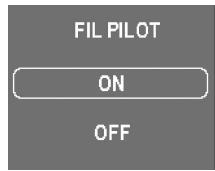
Pilot wire
This option activates the pilot wire mode for those products that are connected to a control panel by means of a pilot wire.
The product will be managed by the external pilot wire control unit to which it is connected.
Use to select this option and press to confirm.
6. WI-FI PAIRING
To pair the device you must first create a zone in the application. Once inside this zone, press the icon to start the pairing wizard. If you need more information, you can consult the complete installation manual from the following QR code:

7. MAINTENANCE AND CLEANING
The product does not require any maintenance. We recommend cleaning the product (back, bottom of the product, etc.). Do not use abrasive substances on the product, clean it with a damp cloth and neutral pH soap and the screen with a dry cloth. Before carrying out any cleaning operation, make sure that the product is switched off and at room temperature.
8. EUROPEAN REGULATION (WEEE) 2012/19/EU
Based on the European regulation 2012/19/EU on Waste Electrical and Electronic Equipment (WEEE), these appliances cannot be thrown in the usual council bins; they must be collected selectively to optimise the recovery and recycling of the components and materials that make them up, and reduce the impact on human health and the environment. The crossedout
wheelie bin symbol on a horizontal bar is marked on all ROINTE products to remind the consumer of the obligation to separate them for separate collection. The consumer should contact the local authority or the retailer for information regarding the correct disposal of their product.
9. GUARANTEE
1. Agreement
1.1. This section describes the guarantee conditions available to the buyer when purchasing a new product of the Rointe brand. These conditions include all the rights that the buyer has in accordance with current national legislation, as well as the guarantee and additional rights offered by the brand. Any incident detected in your Rointe product can be dealt with by the seller of the product or in a more agile way through the manufacturer itself.
1.2. Rointe offers you Technical Assistance from our After-Sales Service by telephone at +44 (0)203 321 5929 or email to support@rointe.co.uk, where we will indicate the steps to follow to solve the incident. You will need the product reference (located on the metal characteristics label), serial number, date of purchase and the nature of the fault when contacting us. In addition, you must have a copy of the proof of purchase of the product.
1.3. ROINTE guarantees there are no material defects of design or manufacture at the time of original purchase. ROINTE guarantees the body for 120 months (10 years) and the electrical plus electronic components for 36 months (3 years) for this product only, from the date of purchase, or delivery if later, provided it has not been modified, and in accordance with the provisions of the following stipulations.
2. Conditions
2.1. If during the guarantee period, the product under normal use, and with proper maintenance, fails to function properly and is found to be defective in design, material, or workmanship, it will be repaired or replaced at the customer's option, in accordance with the provisions of the law, and subject to the following terms and conditions:
2.1.1. The guarantee is only applicable if the original guarantee is issued by the seller and when such guarantee has been registered with Rointe correctly, including the product reference, serial number (marked on the metal label of the product),
date of purchase and proof of purchase. The product guarantee can be registered on our website at www.rointe.co.uk or can be emailed to support@rointe.co.uk within 90 days of installation. ROINTE reserves the right to refuse a guarantee when this information has been removed or modified after the original product purchase.
2.1.2. The guarantee is only applicable if the product has been installed by a competent person in accordance with this installation manual and all regulations in force at the time of installation.
2.1.3. The guarantee is only applicable to those cases that refer to defects in material, design and manufacture, and in no case covers damage to the product for the following reasons:
i) Damage caused by negligence and/or misuse of the product, i.e. used for purposes other than its normal use, or by not respecting the instructions for use, maintenance and cleaning given by RoinTE, as well as by incorrect or inadequate installation or use of the product that may not comply with the technical safety standards in force.
ii) Corrosion of any part of the product caused by direct exposure to saltwater. Where the product is installed within 200m of the coast, the guarantee period for damage caused by corrosion shall be reduced by 50% .
iii) Any unauthorised modifications or repairs to the product carried out by third parties or unauthorised persons, or the opening of the product by third parties or unauthorised persons.
iv) Any accident deemed to be beyond RoinTE's control, such as (but not limited to): lightning, fire, flood, natural disasters, public disorder, atmospheric or geological phenomena, and all those of a similar nature.
v) Failures resulting from incorrect installation. In case of doubt, please contact ROINTE.
2.2. Any repair or replacement carried out as part of this guarantee service does not allow for extension periods or new guarantee periods, i.e. your guarantee will not be extended in the event that a repair or replacement of this product is carried out, but will be suspended until the product is returned repaired or a new one is delivered.
2.3. Any repair or replacement covered by this guarantee must be a functionally equivalent part. Defective parts or parts removed or replaced shall become the property of ROINTE and must be returned as such.
2.4. The product must be installed in such a way as to allow access by ROINTE technicians or authorised persons in the event that they need to access the product for repair or maintenance. The user/customer is responsible for the organisational means necessary to allow access to the products by ROINTE for repair or replacement.
2.5. ROINTE's Technical Support department will advise you if you need to purchase any parts not covered by this guarantee or outside of this guarantee.
2.6. This guarantee will not be valid if the product has been tampered with, modified
and/or repaired in any way and/or by unauthorised persons. This guarantee will also not be valid if the product is not correctly installed.
2.7. This guarantee is not transferable and does not include claims for limescale or frost damage.
2.8. This guarantee does not affect the purchaser's statutory rights under applicable national legislation, nor does it affect any rights contracted with the dealer or installer that may arise in performance of the contract of sale.
2.9. ROINTE, its offices, employees, distributors and installers shall not be liable for any incidental damages arising from the infringement of any rule implied in this product, as well as for its improper or incorrect use.
2.10. Check the EULA conditions (supplied with the product for Wi-Fi connected products) for information on the legal agreement you accept when installing a ROINTE product. For product or guarantee assistance, please contact ROINTE by telephone at +44 (0)203 321 5929 or by email to support@rointe.co.uk.
10. HOW TO REGISTER YOUR PRODUCT GUARANTEE
IMPORTANT: It is important that you register your ROINTE product as part of our guarantee service, in case you wish to make a claim.
You can register your ROINTE product in the following ways:
WEB
- Go to https://rointe.com/uk/register-your-guarantee/
- Log in to your existing account or create a new account if necessary.
- Click on "My products".
- Enter your product reference (alphanumeric and in capital letters).
- Enter your serial number (26 digits located on the metal tag of your product starting with 84).
- Upload your proof of purchase, such as your invoice in PDF, JPEG or PNG format. This is not mandatory, but doing so ensures that your warranty period is accurate.
- Click on "Register".
- Congratulations! Your product is now registered.
EMAIL
-
Send an email to support@rointe.com with the following information:
-
Customer name
Address and postcode
Telephone number and email address
Product reference
Serial number
- The date of purchase of the product and proof of purchase (as described in the WEBSITE section above).
- Our technical support team will confirm product registration and request any additional information needed by email.
POSTAL
- Send the information listed in the EMAIL section to:
INDUSTRIAS ROYAL TERMIC, S.L. - Rointe, C/E Parcela 43, 30140, Santomera (ESPANA).
- Please ensure you obtain proof of postage.
ERP. RÉGLEMENT (UE) 2015/1188 DE LA COMMISSION
| ITEM | SYMBOL | UD. | 0500RADC | 0750RADC | 1000RADC | 1250RADC | 1500RADC | 2000RADC |
| PUISSANCE DE CHAUFFAGE / HEATING POWER / POTENCIACALORÍFICA / PODER DE AQUECIMENTO | |
| Puisance calorifique nominale / Nominal heat output / Potencia calorifica nominal / Produção nominal de calor | Pnom | kW | 0,50 | 0,75 | 1,0 | 1,25 | 1,5 | 2,0 |
| Capacité de chauffage minimale (indicative) / Minimum heating capacity (indicative) / Potencia calorifica minima (indicativa) / Produção minima de calor (indicativo) | Pmin | kW | N.A.* | N.A.* | N.A.* | N.A.* | N.A.* | N.A.* |
| Puisance maximale de chaleur continue / Maximum continuous heat output / Potencia calorifica maior continua / Múxima saía de calor continua | Pmax,c | kW | 0,50 | 0,75 | 1,0 | 1,25 | 1,5 | 2,0 |
| CONSOSSMENT D'ÉLECTRICITÉ AUXILIARY / AUXILIARY ELECTRICITY CONSUMPTION /CONSUMO AUXILIAR DE ELECTRICID / CONSUMO DE ELECTRICID / AUXILIAR | |
| Puisance calorifique nominale / Nominal heat output / Potencia calorifica nominal / Produção nominal de calor | elMAX | kW | 0,50 | 0,75 | 1,000 | 1,250 | 1,500 | 2,000 |
| Capacité de chauffage minimale (indicative) / Minimum heating capacity (indicative) / Potencia calorifica minima (indicativa) / Produção minima de calor (indicativo) | elMIN | kW | 0,50 | 0,75 | 1,000 | 1,250 | 1,500 | 2,000 |
| En stand-by / In stand-by / En modo de espera / Em modo de espera | eSB | kW | 0,0002 | 0,0002 | 0,0002 | 0,0002 | 0,0002 | 0,0002 |
| TYPE DE SORTIE DE CHALEUR/RÉGULATION DE LA TEMPERATURE INTÉRIEURE / TYPE OF HEAT OUTPUT/INDOOR TEMPERATURE CONTROL / TIPO DE CONTROL DE POTENCIÀ CALORIFICA / DE TEMPERATURE INTERIOR / TIPO DE SAIDA DE CALOR/CONTROLDO TEMPERATURE DO AR | |
| Contrôle électronique de la température interieure et minuterie hebdomadaire / Electronic indoor temperature control and weekly timer / Control electrónico de temperatura interior y temporizador seminal / Contrlo electroétrico da temperatura inferior e temporizador seminal | | | ✓ | ✓ | ✓ | ✓ | ✓ | ✓ |
| D'AUTRES OPTIONS DE CONTRôle (PLUSIEURS PEUVENT ÉTRE SÉLECTIONNNÉES) / OTHER CONTROL OPTIONS (SEVERAL CAN BE SELECTED) / OTRAS OPCIONES DE CONTROL (PUEDEN SELECTIONARSE VARIAS) / OUTRAS OPÇões DE CONTROLLO (VÁRIAS PODEM SER SELECTIONADAS) | |
| Régulation de la température interieure avec détection de fenêtre ouverte / Control de temperatura interior con detectión de ventanas abiertas / Controlo da temperatura interior com detectión de janela aberta | | | ✓ | ✓ | ✓ | ✓ | ✓ | ✓ |
| Avec contrôle adaptatif du démarrage / With adaptive start-up control / Con control de puesta en marcha adaptable / Com controlo adaptativo de arranque | | | ✓ | ✓ | ✓ | ✓ | ✓ | ✓ |
| Avec limitation de la durée de fonctionnement / With operating time limitation / Con limitación de tiempo de funciona亏损ido / Com limitação de tempo de funciona;. | ✓ | ✓ | ✓ | ✓ | ✓ | ✓ |
| PERFORMANCE D'EFFICACITÉ ÉNERGÉTIQUE SAISONNIÈRE / SEASONAL ENERGY EFFICIENCY PERFORMANCE/RENDIMIENTO DE EFFICIENCY ENERGÉTICALASTONAL / DESEMPENHO DE EFFICIÊNCIA ENERGÉTICALSAZONAL | ns | | 39% | 39% | 39% | 39% | 39% | 39% |
The company declares that the above equipment has been designed to comply with the relevant sections of the above specifications. The equipment complies with all applicable essential requirements of the Directives.
Hampton Business Park, Club Way,
Peterborough PE7 8JA
T.0203 321 5928
Rointe Ireland
20 Harcourt Street, #247
Dublin 2, D02 H364
T. +44 (0)203 321 5929 / 01 553 0523
Copyright © Rointe Heating 2022.
All rights reserved. As part of our continuous improvement policy, we reserve the right to alter or modify any product or specifications without prior notice. This also applies to products that have already been ordered, provided that such alterations can be made without subsequent changes to the already agreed specifications. We cannot accept responsibility for any errors in catalogues or other printed materials.