VENTURE 35 - Power bank GOAL ZERO - Free user manual and instructions
Find the device manual for free VENTURE 35 GOAL ZERO in PDF.



| Product Type | External Battery |
| Brand | Goal Zero |
| Model | Venture 35 |
| Battery Capacity | 35.52 Wh (9600 mAh) |
| Battery Type | Li-ion NMC (18650 LG Chem) |
| Dimensions | 11.2 x 6.8 x 2.8 cm |
| Weight | 286.9 g |
| IP Protection Rating | IP67 (dust and water resistant up to 1 m / 30 min) |
| Operating Temperature | 0 to 45 °C |
| Input/Output Ports | 1 x USB-C (input/output, 5-12V, 3A max, 18W) + 2 x USB-A (output, 5V, 3A max, 15W each) |
| Charge Time (USB-C) | 3 hours |
| Charge Time (Solar) | 12 to 24 h (Nomad 5), 6 to 12 h (Nomad 10), 4 to 8 h (Nomad 20) |
| Number of Charges (Phone) | Up to 7 charges |
| Integrated Flashlight | 50 lumens, button activation (2 seconds) |
| Features | Charge 3 devices simultaneously, solar compatible (Solar Ready), transport mode with no self-discharge, LED charge indicator (4 levels) |
| Maintenance | Recharge every 3 to 6 months during storage |
| Warranty | 12 months (activate at goalzero.com/warranty) |
| Certifications | CE, RoHS |
Frequently Asked Questions - VENTURE 35 GOAL ZERO
User questions about VENTURE 35 GOAL ZERO
0 question about this device. Answer the ones you know or ask your own.
Ask a new question about this device
Download the instructions for your Power bank in PDF format for free! Find your manual VENTURE 35 - GOAL ZERO and take your electronic device back in hand. On this page are published all the documents necessary for the use of your device. VENTURE 35 by GOAL ZERO.
USER MANUAL VENTURE 35 GOAL ZERO
Venture 35 is in protective shipping mode. Plug it into a USB port before using.
BRANÇEZ-MÖ! :Voté Venture 35 est en mode de transport. Branchez-le sur un port USB avant de l'utiliser. 这を差し入さはい Venture 35は保護モト一出荷負てむ請。此使用前にUSBローナに差し入さはい。 STECK MICH ZUERST EN:Das Venture 35 wird im Schutzmodus gefeligt. Vor dem ersten Gebrauch in einen USB-Port einsteken. CONECTOME:El Venture 35est en modulo protector de envio.ConcteToa un puerto USBantesde uso.
Table of Contents
Get To Know Your Gear 2
Charge Before Use 3
Solar Ready™ 3
Charge Your Gear 4
Flashlight 4
Rugged Design 4
Frequently Asked Questions 5
Technical Specifications 6
François 8
Deutsch 14
Espanol 20
Italiano 26
Portugués 32
日本語 38
Suomalainen 44
Nederlands 50
Svenska 56
GET TO KNOW YOUR GEAR
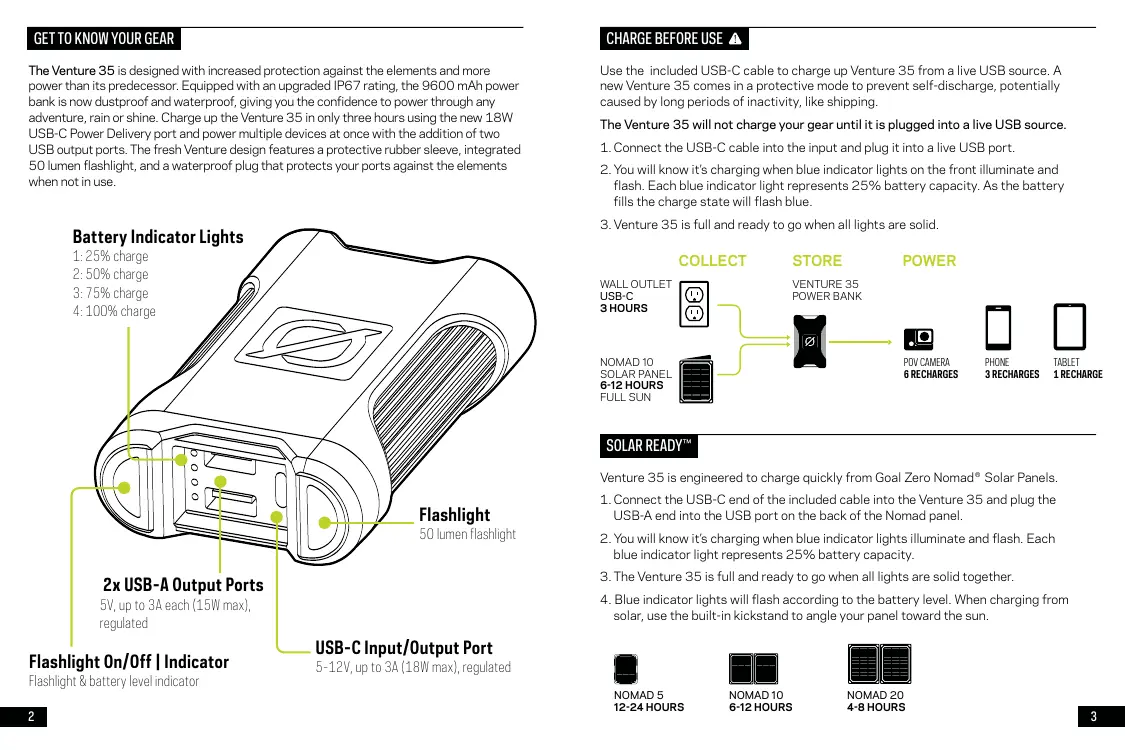
The Venture 35 is designed with increased protection against the elements and more power than its predecessor. Equipped with an upgraded IP67 rating, the 9600 mAh power bank is now dustproof and waterproof, giving you the confidence to power through any adventure, rain or shine. Charge up the Venture 35 in only three hours using the new 18W USB-C Power Delivery port and power multiple devices at once with the addition of two USB output ports. The fresh Venture design features a protective rubber sleeve, integrated 50 lumen flashlight, and a waterproof plug that protects your ports against the elements when not in use.
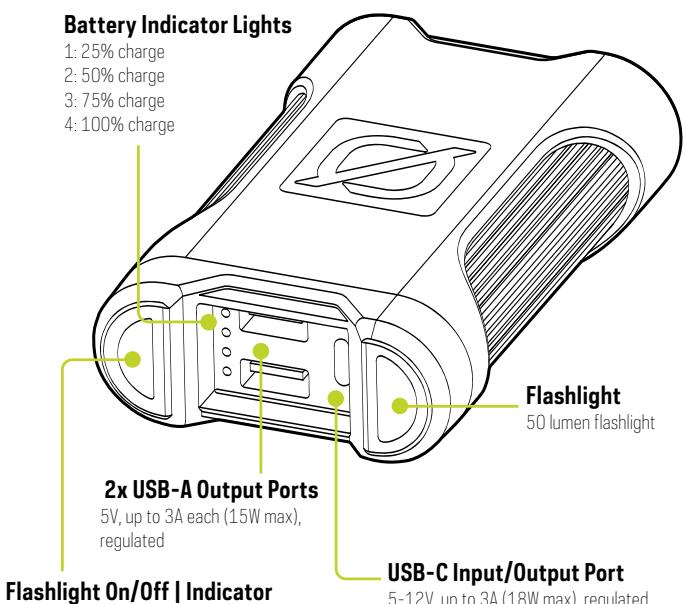
Flashlight & battery level indicator
USB-C Input/Output Port
5-12V, up to 3A (18W max), regulated
CHARGE BEFORE USE
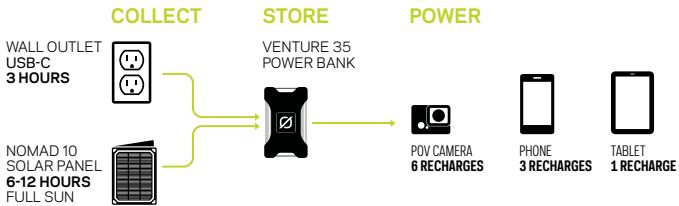
Use the included USB-C cable to charge up Venture 35 from a live USB source. A new Venture 35 comes in a protective mode to prevent self-discharge, potentially caused by long periods of inactivity, like shipping.
The Venture 35 will not charge your gear until it is plugged into a live USB source.
- Connect the USB-C cable into the input and plug it into a live USB port.
- You will know it's charging when blue indicator lights on the front illuminate and flash. Each blue indicator light represents 25% battery capacity. As the battery fills the charge state will flash blue.
- Venture 35 is full and ready to go when all lights are solid.
SOLAR READYTM
Venture 35 is engineered to charge quickly from Goal Zero Nomad® Solar Panels.
- Connect the USB-C end of the included cable into the Venture 35 and plug the USB-A end into the USB port on the back of the Nomad panel.
- You will know it's charging when blue indicator lights illuminate and flash. Each blue indicator light represents 25% battery capacity.
- The Venture 35 is full and ready to go when all lights are solid together.
- Blue indicator lights will flash according to the battery level. When charging from solar, use the built-in kickstand to angle your panel toward the sun.

NOMAD 5
12-24 HOURS

NOMAD 10
6-12 HOURS

NOMAD 20
4-8 HOURS
CHARGE YOUR GEAR
The Venture 35 is designed to charge phones, tablets, POV cameras, and other USB powered devices. Charge up to 3 devices simultaneously.

HEADLAMP UP TO 7 RECHARGES
The Venture 35 comes with a built in 50 lumen flashlight.
TURN ON/OFF
Press the Power Batt/Flashlight button for 2 seconds to turn on and off.
RUGGED DESIGN
The Venture 35's IP67 rating lets you power through any adventure, rain or shine. When waterproof port plug is fully closed, the Venture 35 is protected against dust, sand, and debris, and can withstand submersion up to 1 meter of water for at least 30 minutes.
FREQUently ASKED QUESTIONS
Q: Why is my gear not charging?
A: Check the battery level of the Venture 35 by pressing the power battery indicator button. Make sure to use the certified cables that came with your gear.
Q: Is the Venture 35 fully waterproof?
A: Yes with the waterproof door fully closed, the unit is rated at IP67 and is protected against dust, sand, and debris, and can withstand submersion up to 1 meter of water for at least 30 minutes.
Q: How does the flashlight function?
A: The Venture 35 has a built in 50 lumen flashlight controlled by the Power Battery indicator power button. Simply press the button down for 2 seconds to turn the flashlight on and off.
Q: What if the power from my USB-C devices is not flowing the correct way?
A: The USB-C port on the Venture 35 is bi-directional. Meaning power can flow in and out. If the power is not flowing the way you would like, try to unplug and re-plug the USB-C cable once or twice. This will re-register the direction the power is flowing.
Venture 35 Power Bank
| CHARGE TIMES: | PORTS: | ||
| GOAL ZERO Nomad 5 | 12-24 hrs | USB port (output) | 5V, up to 3A each (15W max), regulated |
| GOAL ZERO Nomad 10 | 6-12 hrs | USB-C port (input/output) | 5-12V, up to 3A (18W max), regulated |
| GOAL ZERO Nomad 20 | 4-8 hrs | ||
| USB-C Source | 3 hrs | ||
| BATTERY: | GENERAL: | ||
| Cell chemistry | Li-ion NMC | IP Rating | IP67 |
| Cell type | 18650 by LG chem | Chainable | No |
| Cell capacity | 35.52Wh (3.7V, 9600mAh) | Weight | 10.12 oz (286.9g) |
| Lifecycles | Hundreds of cycles | Dimensions | 4.4 x 2.7 x 1.1 in (11.2 x 6.8 x 2.8 cm) |
| Shelf-life | Keep plugged in, or charge every 3-6 months | Operating usage temperature | 32-113F (0-45C) |
| Fuses | None | Certifications | © ™ |
| Management system | Charging and low-battery protection built-in | Warranty | 12 months |
Be sure to ACTIVATE YOUR WARRANTY at goalzero.com/warranty
POWER. ANYTHING. ANYWHERE.



BRANCHEZ-MOI
This will be the way you can use the USB port in this device.
APPRENEZ A CONNÉTRE VOITRE ÉQUIPEMENT
LEREN SIE IHR GERÄT KENNEN
AKTIVIEREN SIE IHRRE GARANTIE unbedingtauf Goalzero.com/warranty
CONOZCA SU EQUIPO
GARANTIA em goalzero.com/warranty
あたの半アを知りま
Venture 35 Power Bank
Venture 35 Power Bank
Venture 35 Power Bank
Designed in the U.S.A.
Made in China
1-888-794-6250
Goal Zero Switch and Nomad are trademarks of Goal Zero LLC.
This equipment has been tested and found to comply with the limits for a Class B digital device, pursuant to part 15 of the FCC Rules. These limits are designed to provide reasonable protection against harmful interference in a residential installation. This equipment generates, uses and can radiate radio frequency energy and, if not installed and used in accordance with the instructions, may cause harmful interference to radio communications. However, there is no guarantee that interference will not occur in a particular installation. If this equipment does cause harmful interference to radio or television reception, which can be determined by turning the equipment off and on, the user is encouraged to try to correct the interference by one or more of the following measures:
—Reorient or relocate the receiving antenna.
—Increase the separation between the equipment and receiver.
—Connect the equipment into an outlet on a circuit different from that to which the receiver is connected.
—Consult the dealer or an experienced radio/TV technician for help.
This device complies with part 15 of the FCC Rules. Operation is subject to the following two conditions: (1) This device may not cause harmful interference, and (2) this device must accept any interference received, including interference that may cause undesired operation.

- Table of Contents
- GET TO KNOW YOUR GEAR
- USB-C Input/Output Port
- CHARGE BEFORE USE
- The Venture 35 will not charge your gear until it is plugged into a live USB source.
- SOLAR READYTM
- CHARGE YOUR GEAR
- RUGGED DESIGN
- FREQUently ASKED QUESTIONS
- BRANCHEZ-MOI
- APPRENEZ A CONNÉTRE VOITRE ÉQUIPEMENT
- LEREN SIE IHR GERÄT KENNEN
- CONOZCA SU EQUIPO
- あたの半アを知りま
Brand : GOAL ZERO
Model : VENTURE 35
Category : Power bank