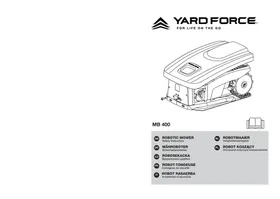
YARDFORCE MB 400 - Robotic mower

MB 400 - Robotic mower YARDFORCE - Free user manual and instructions

Find the device manual for free MB 400 YARDFORCE in PDF.

📄 53 pages English EN Download 💬 AI Question 29 questions ⚙️ Specs
Notice YARDFORCE MB 400 - page 2
Pick your language and provide your email: we'll send you a specifically translated version.
Product type Robot lawn mower
Brand YARDFORCE
Model MB 400
Rated voltage 20 V
Battery type Lithium-ion
Estimated runtime Approximately 60 minutes
Charging time Approximately 120 minutes
Maximum mowing area 400 m²
Cutting width Approximately 18 cm
Cutting height 20 to 60 mm (adjustable)
Maximum slope 25 %
Sound level ≤ 65 dB(A)
Net weight Approximately 8 kg
Dimensions (L × W × H) Approximately 55 × 40 × 25 cm
Power supply 20 V lithium-ion battery, mains charger
Main functions Automatic mowing, return to base, collision and rain sensors
Maintenance and cleaning Clean blades after use, check screws monthly
Safety Automatic stop when lifted, blade lock, lightning protection
Spare parts and repairability Replacement blades recommended by manufacturer, repair by authorized center
General information Domestic use only, do not use on wet grass

Frequently Asked Questions - MB 400 YARDFORCE

How to install the perimeter cable?
The cable must be installed following the instructions in the manual. It defines the mowing area and should be laid flat, without loops, about 30 cm from obstacles. Secure it with the provided pegs.
What to do if the robot does not return to the base?
Check that the charging station is properly connected and that the perimeter cable is intact. Make sure the return path is clear. If the problem persists, clean the charging contacts.
Can the robot be used in the rain?
The robot is equipped with a rain sensor that automatically returns it to the base when it rains. It is not designed for mowing in heavy rain.
How to replace the blades?
Turn off the appliance and remove the battery. Use a screwdriver to unscrew the worn blades. Replace them with identical new blades and tighten the screws to the correct torque. Always replace all blades at the same time.
What is the battery life?
The battery life is about 60 minutes depending on mowing conditions (grass height, slope, etc.). The battery takes about 120 minutes to fully recharge.
Can the robot mow on slopes?
Yes, it is designed for slopes up to 25%. Beyond that, it may lose traction. Install the perimeter cable respecting the slope limits to prevent the robot from getting stuck.
How to program the mowing schedule?
Use the control panel or the mobile app if available. You can set time slots and mowing days. Consult the manual for programming details.
What to do if the robot hits an obstacle?
The robot is equipped with collision sensors. It reverses and changes direction. If the obstacle is stationary, check that the perimeter cable is properly positioned to avoid it.
Is it safe for children and pets?
The robot has safety features: automatic stop when lifted, blades stop within seconds. However, it is not recommended to leave the appliance unattended in the presence of children or pets.
How to store the robot in winter?
Clean it thoroughly, charge the battery to 100%, then store it in a dry, temperate place (around 20°C). Recharge the battery every 6 months to prevent deep discharge.

User questions about MB 400 YARDFORCE

19 questions about this device. Answer the ones you know or ask your own.

Ask a new question about this device

The email remains private: it is only used to notify you if someone responds to your question.

How should the screws of the blades of the YARDFORCE MB 400 lawn mower be tightened?
Frequently Asked Questions - 17 j
Response Notice-Facile

The manual for the YARDFORCE MB 400 specifies that the blade screws must remain well tightened to ensure the safety of the device. However, the documentation does not provide a specific torque value in Newton-meters.

Practical tips for tightening:

  • Tighten the screws firmly but without forcing - the goal is to ensure a good hold without damaging the plastic casing of the robot
  • Check that the screws do not move during a slight shake
  • Regularly check (at least before each significant use) that the screws remain securely in place

Important to note: The manual expressly recommends replacing all worn or damaged blades AND screws simultaneously to maintain the robot's balance and avoid vibrations during mowing.

Respond (be the first)
Why does my YARDFORCE MB 400 robotic mower not mow the upper part of my lawn?
Frequently Asked Questions - 24/04/2026
Response Notice-Facile

Your YARDFORCE MB 400 robotic mower cannot access the upper part of your lawn for several reasons. The robot has a maximum slope capacity of 35%: if the upper part exceeds this gradient, the robot simply cannot climb. Measure the slope of your lawn or observe if the robot backs up when trying to ascend this area. If the slope is well below 35%, the problem lies elsewhere.

The boundary wire is often the culprit. Ensure that the perimeter cable completely surrounds the mowing area, including the upper part. The wire must be positioned at at least 1 meter from any obstacle (trees, walls, posts, furniture) and must lie flat on the ground for the robot to properly detect the signals. Check that no section of the wire is damaged, raised, or improperly inserted. If the wire does not delineate the upper area, the robot will not recognize it as a mowing zone.

Obstacles and debris can block access. Regularly inspect the area where the robot operates and remove any stones, branches, cables, or debris that could prevent the robot from moving freely. Clear the access paths to the upper part of your lawn.

Also check the cutting height: if it is set too low and the grass at the top is very dense or tall, the robot may have difficulties or consider the area inaccessible. Adjust the cutting height between 20 and 60 mm to start with a less aggressive cut.

The battery autonomy (28V lithium-ion) can also be a factor. If your lawn is up to 400 m² and the upper part is far from the charging station, the robot may not have enough energy to cover it before returning to charge (60 to 90 minutes of charging). Position the charging station centrally and on flat ground to optimize access to all areas.

Finally, ensure that the robot is not damaged or worn. Inspect the blades, cutting system, and moving parts before each use. If any parts are missing, worn, or damaged, the robot may refuse to operate correctly or access certain areas.

If after these checks the upper part remains unmowed, manually test the robot by placing it directly in that area and starting it. If it refuses to operate even manually, the problem is mechanical and a repair is necessary.

Respond (be the first)
How to properly install the charging station of the YARDFORCE MB 400 robotic mower?
Frequently Asked Questions - 24/04/2026
Response Notice-Facile

To properly install the charging station of your YARDFORCE MB 400 robotic mower, follow the steps below:

1. Choose the ideal location

  • Place the station on flat and clear ground.
  • Make sure there is enough space around for the robot to maneuver easily.

2. Respect the distance from obstacles

  • Position the station at least 1 meter away from walls, trees, or other obstacles.
  • This distance facilitates the robot's return to the station.

3. Orient the station correctly

  • Orient the front side of the station towards the mowing area.
  • This allows the robot to find its base more easily.

4. Secure the station to the ground

  • Use the screws or anchors provided to securely fix the station.
  • Avoid any movement of the station when the robot returns.

5. Connect the station

  • Connect the station to a suitable electrical outlet.
  • Ensure that the power cable is secured and does not pose a risk of tripping or accidents.

6. Check the operation

  • Check that the indicator lights on the station turn on, indicating that it is ready.
  • Start a mowing cycle to verify that the robot returns to the station to recharge.

By following these tips, you ensure an optimal installation of the charging station for your YARDFORCE MB 400 robotic mower, thus ensuring efficient and uninterrupted operation.

Respond (be the first)
How to properly install the boundary wire for the YARDFORCE MB 400 robotic mower?
Frequently Asked Questions - 24/04/2026
Response Notice-Facile

To properly install the boundary wire for your YARDFORCE MB 400 robotic mower, follow these detailed steps:

1. Preparation of materials

  • Make sure you have the boundary wire provided with the robot.
  • Gather the fixing stakes and a tool to dig a small trench if necessary.

2. Defining the mowing area

  • Clearly define the area to be mowed, avoiding obstacles such as trees, flower beds, or garden furniture.
  • Plan a path for the robot to access the entire surface.

3. Laying the boundary wire

  • Start unrolling the wire from the charging station.
  • Place the wire along the edges of the mowing area, following the desired shape.
  • Ensure that the wire is taut, without loops or knots.

4. Securing the wire

  • Use the stakes to hold the wire in place.
  • Drive the stakes in every 1 to 2 meters approximately to ensure the stability of the wire.
  • If necessary, bury the wire slightly in a shallow trench to prevent movement.

5. Connecting to the charging station

  • Connect the ends of the wire to the charging station according to the product instructions.
  • Ensure that the connections are well secured and protected from moisture.

6. Functionality test

  • Turn on the charging station and the robot.
  • Check that the robot correctly follows the boundary wire without leaving the defined area.
  • In case of problems, check the tension and continuity of the wire.

By following these steps, you ensure an effective and secure installation of the boundary wire for your YARDFORCE MB 400 robotic mower.

Respond (be the first)
Can the charging station of the YARDFORCE MB 400 robotic mower be installed on a flowerbed away from the lawn to be mowed?
Frequently Asked Questions - 22/04/2026 - 1 réponse communauté
Response Notice-Facile

No, it is not recommended to install the charging station of the YARDFORCE MB 400 on a flowerbed. Although technically possible, this location has several disadvantages that compromise the proper functioning of the automatic mowing and charging system. The station should be placed on flat, clear ground, preferably in the heart of the lawn area to be mowed.

The first issue concerns the robot's access to the charging station. The MB 400 must be able to locate and return automatically to the station to recharge once its battery is low. A flowerbed, which by definition is an elevated area or has plantings, creates obstacles that the robot cannot easily overcome. Its sensors and navigation system are optimized for moving on a lawn, not on uneven or damaged ground from the robot's repeated passage.

The second issue is the physical stability of the base. The charging station must be securely fixed on firm, flat ground. A flowerbed, often made up of loose soil, mulch, or planting substrate, does not provide the necessary stability. This instability may slightly shift the station during the robot's support while recharging, which can disrupt the alignment of the charging contacts and create electrical connection problems.

You also risk present on the flowerbed. The robot's regular passages to access the station would trample the plants, reduce the lifespan of flowers or shrubs, and complicate the general maintenance of your garden. This goes against the design of the YARDFORCE MB 400, intended exclusively for autonomous lawn mowing.

Ideal location: Place the station on a flat and stable area of your lawn, preferably in a central or accessible zone. Allow a free space of at least 1 meter around the station so that the robot can reach it without obstacles. Avoid placing it under large trees (risk of damage from lightning) and plug it into an electrical outlet equipped with a residual current circuit breaker of 30 mA maximum. Once properly positioned, secure the station with the provided screws and check that the indicators light up correctly.

J Jean Paul - 20 j

Bonjour, je l'ai mis sur une plate bande en extérieur de la pelouse, c'est compliqué a installer mais ça marche. Le problème si cela est il ne coupe pas la pelouse quand il retourne sur la base, je pense mettre une bande de pelouse synthétique devant pour corriger ce problème. Mais ça marche.

Report this response
Add a response
What should I do if my YARDFORCE MB 400 lawn mower robot displays a 'out of bounds' message while the wire seems to be in good condition?
Frequently Asked Questions - 22/04/2026
Response Notice-Facile

The 'out of bounds' message from the YARDFORCE MB 400 lawn mower robot indicates that the robot detects it is outside the mowing area defined by the perimeter wire. Even if the wire appears to be in good visual condition, several factors can prevent its correct detection. Start by checking each of the following points to resolve the issue.

Checking the perimeter wire: Carefully inspect each segment of the wire along its entire length for cuts, tears, wear, or abrasions. Even a very small break (a few millimeters) or a flattened area can interrupt the electrical signal and make the robot think it is out of bounds. Gently pull on the wire to ensure there are no hidden nicks. Pay particular attention to areas where the wire passes under objects, near metal, or where it may have been stepped on.

Positioning and ground contact: The wire must be laid flat directly on the ground and maintained in continuous contact. Check that it is not twisted, folded, or partially lifted. Weather, animals, or soil compaction can move it. Ensure that the wire is securely fastened every 1 to 2 meters with the provided stakes. A wire that is too loose or suspended will not be detected correctly by the robot's sensors.

Checking electrical connections: Check the connections of the wire to the terminals of the charging station (starting and ending point of the circuit). Ensure that the connectors are fully inserted and that there is no visible corrosion (green or white traces). Corrosion of contacts or poor tightening of screws causes a loss of signal. Unplug and replug the connectors a few times to clean the contacts by friction.

Cleaning the robot's sensors: The perimeter and proximity sensors of the YARDFORCE MB 400 can accumulate dust, dried grass, or dirt that interferes with detection. Regularly clean the base of the robot, especially the sensors located under the chassis and at the front. A damp cloth (not wet) or a soft brush is sufficient. A dirty sensor may misinterpret the wire's signal and generate a false 'out of bounds' alert.

Checking the closed loop: The system works correctly only if the wire forms a complete closed loop. Starting from the charging station, the wire must surround the entire mowing area and return to the same point at the station. Visually check that the wire does not end in the middle of the lawn and that it never crosses another part of itself. An incomplete or crossed loop completely disrupts detection.

Restarting and resetting: After checking, turn off the robot completely for 2 minutes, then turn it back on to reset its sensors and detection system. Move the robot away from the charging station and place it in the center of the mowing area before restarting it. If the 'out of bounds' message persists after all these checks, contact YARDFORCE technical support: an electronic malfunction of the perimeter sensor may require expert diagnosis or part replacement.

Respond (be the first)
How to restart the YARDFORCE MB 400 robotic mower after a safety stop?
Frequently Asked Questions - 21/04/2026
Response Notice-Facile

After a safety stop of your YARDFORCE MB 400 robotic mower, the restart procedure depends on the cause of the stop. The MB 400 has a safety system that automatically cuts off the motor when lifted, in case of obstacles, or abnormal vibrations. To restart your robot, you must first identify and correct the issue that triggered the stop.

Step One: Completely stop the robot

  • Press the STOP button (large red button) to immediately stop the robot
  • The blades will continue to spin for a few seconds after stopping, even after pressing STOP
  • Wait at least 5 seconds for the blades to come to a complete stop before any intervention
  • Set the main power switch to the OFF position, marked by the number 0

Step Two: Diagnose the cause of the stop

  • Visually inspect the robot and its surrounding area to identify obstacles (branches, stones, wires, debris) that may have blocked it
  • Remove any obstructions you find, especially in the cutting area and grass ejection
  • Check that the blades are not damaged or misaligned
  • Check the battery level: a low battery can trigger a safety stop
  • If the robot vibrated abnormally, inspect the bolts, screws, and cutting assembly for any damage
  • Ensure that the safety devices (front bumper, sensors) are not broken

Step Three: Restart the robot

  • Once the issues are corrected, set the main power switch to ON, marked by the number 1
  • The robot should emit a sound or light signal confirming activation
  • Wait a few seconds for the system to reset
  • Start a new mowing cycle normally

Prevention Tips

  • Regularly inspect the mowing area and remove obstacles before each use
  • Keep the blades clean and in good condition; clean the robot after each use
  • Ensure that the battery is sufficiently charged (at least 50%) before starting a cycle
  • Check that the power switch is functioning properly and is not damaged
  • Never use the robot on wet grass, as this increases the risk of blockage

If after these steps the robot still does not restart or stops again shortly after restarting, this may indicate a more serious problem requiring repair. Contact the technical service or an authorized YARDFORCE repair center for a complete diagnosis.

Respond (be the first)
How to reactivate the YARDFORCE MB 400 robotic mower after a winter storage period?
Frequently Asked Questions - 30/03/2026
Response Notice-Facile

To reactivate your YARDFORCE MB 400 robotic mower after winter, start by fully charging the battery. According to the manual, the device should be stored with its battery fully charged at room temperature (around 20 °C). If the battery has been kept discharged, connect it to the provided charger and let it charge completely before any use. Important: during winter storage periods, each complete discharge reduces the battery's capacity. It is recommended to recharge the battery approximately every 6 months during prolonged periods of non-use.

Once the battery is charged, perform a complete visual inspection of the robotic mower. Inspect the entire device for any cracks, worn, or damaged parts due to storage. Carefully clean the robotic mower, especially the blades, wheels, and chassis to remove any debris, grass, or dirt accumulated during winter. Check that the blades are securely attached and in good cutting condition. Replace them if they show signs of wear or damage.

Before starting, also inspect the peripheral cable that defines your mowing area and ensure that no obstacles (stones, sticks, wires) obstruct this area. Unplug the charging station from the electrical outlet before setting the main power button to the OFF position if you are handling the robot. Then plug the charging station into an electrical outlet equipped with a residual current circuit breaker (30 mA maximum) in a dry and sheltered location.

Before each use, visually check the condition of all cables, the length, and the type of extension cords used to detect any damage or signs of aging. Also, check that the main power button works correctly and is not damaged. Ensure that all nuts, bolts, and screws remain tight to guarantee the safety of the device during operation.

Perform a startup test by first pressing the STOP button, then manually starting the robot to check that the wheels turn correctly, that the blades operate without abnormal noise, and that the robot can return correctly to its charging station. Never leave the tool operating automatically without supervision during this initial test. Once these checks are successfully completed, you can program your robot to resume its usual mowing cycle based on grass growth in spring.

Important tip: never place heavy objects on the robotic mower or its charging station when they are stored or in operation. If you need to move the robot from one place to another, first press the large STOP button to stop the tool, then ensure that the main power button is in the OFF position before lifting it by the handle located under the tool at the back, keeping the blade support away from your body.

Respond (be the first)
Where is the switch on the YARDFORCE MB 400 robotic mower and how do I use it?
Frequently Asked Questions - 28/03/2026
Response Notice-Facile

The switch on the YARDFORCE MB 400 robotic mower is located on the top of the device, usually near the battery compartment. It can be identified by a power symbol, often represented by a circle with a vertical line.

To use the switch:

  • On: Toggle the switch to the "ON" position to turn on the robotic mower.
  • Off: Toggle the switch to the "OFF" position to completely stop the device.

Always make sure to turn off the robot before handling or transporting it to ensure your safety.

Respond (be the first)
How to resolve the issue of the "mowing time" indicator flashing and the YARDFORCE MB 400 mower robot not starting after winter storage?
Frequently Asked Questions - 21/03/2026
Response Notice-Facile

If the "mowing time" indicator is flashing on your YARDFORCE MB 400 mower robot after winter storage and the robot does not start, this generally indicates a problem related to the battery, configuration, or a temporary malfunction. Here are the steps to follow to resolve this issue:

1. Checking and recharging the battery

  • Place the robot on its charging station and let it charge for several hours, ideally overnight.
  • Ensure that the charging contacts are clean and properly aligned.

2. Inspecting the connections

  • Check that the battery is correctly installed and that the connectors are not corroded or damaged.
  • Gently clean the contacts if necessary.

3. Resetting the robot

  • Turn off the robot using the main switch.
  • Wait about 5 minutes to allow the system to reset.
  • Turn the robot back on and observe if the indicator stops flashing.

4. Cleaning the sensors

  • Check that the sensors located under the robot are not obstructed by dirt or debris.
  • Clean them with a soft, dry cloth.

5. Checking the mowing settings

  • Check that the programmed settings, including the mowing duration, are correct and suitable for the season.
  • Modify them if necessary to allow for normal starting.

If after these checks the problem persists, it may be a more technical malfunction requiring specialized assistance.

Respond (be the first)
How to resolve the error message 'device already in use' when pairing the YARDFORCE MB 400 robotic mower with the app?
Frequently Asked Questions - 21/03/2026
Response Notice-Facile

The error message 'device already in use' indicates that your YARDFORCE MB 400 robotic mower is already associated with an account in the CloudHawk app. This can happen if the device was previously set up on another user account, another phone, or if you have changed accounts. Here’s how to resolve this issue step by step.

Check existing accounts: Start by checking if you have already set up the robot with another account or on another smartphone. If you have multiple YARDFORCE accounts, log in successively to identify the account to which the MB 400 is linked. You can also check with other household users who may have set up the device.

Factory reset procedure: To completely dissociate the robot from any previous account, perform a factory reset. First, place the robot on a flat and even surface. Turn it off completely by pressing the power button. Hold down the START button, then turn on the device via the main power button. Keep the START button pressed until all LEDs flash. Then release the START button and wait for the reset to complete. The robot will restart and return to its factory settings.

Reinstalling the app: Once the robot is reset, delete the CloudHawk app from your smartphone (go to Settings > Apps > CloudHawk > Uninstall). Then go to the Google Play Store (Android) or the App Store (iOS), search for the official 'CloudHawk' app from YARDFORCE, and reinstall it.

New pairing of the robot: Open the freshly installed CloudHawk app and create a new user account or log in with your credentials. Start the pairing procedure by following the app's instructions to establish the Bluetooth connection with the MB 400. The device should now be detected as a new device available for pairing.

If the problem persists: Contact YARDFORCE France technical support at 01 84 74 88 28 (Monday-Friday, 10am-12:30pm and 1:30pm-4pm) or by email at sumecfrance-sav@sumecfr.com. Technical support can check the status of the account associated with your robot and perform an account unlock if necessary.

Respond (be the first)
How to connect the YARDFORCE MB 400 robotic mower to Wi-Fi?
Frequently Asked Questions - 11/03/2026
Response Notice-Facile

To connect your YARDFORCE MB 400 robotic mower to a Wi-Fi network, follow the steps below:

1. Preparation

  • Make sure the robot is charged and turned on.
  • Check that your Wi-Fi network is active and that you know the password.
  • Prepare a smartphone or tablet with an Internet connection.

2. Downloading the app

  • Download the official YARDFORCE app from the Google Play Store (Android) or the App Store (iOS).

3. Configuring the app

  • Open the app and create a user account or log in if you already have one.
  • In the app, select the option to add a new device or robot.

4. Switching the robot to Wi-Fi mode

  • On the robotic mower, press and hold the Wi-Fi button (or a specific button indicated) for a few seconds until the Wi-Fi indicator light flashes, indicating that the robot is ready to connect.

5. Connecting to the Wi-Fi network

  • In the app, follow the instructions to select your home Wi-Fi network.
  • Enter your Wi-Fi network password when prompted.
  • Wait while the robot connects to the network.

6. Confirmation

  • Once the connection is established, the app will display a confirmation message indicating that the robot is online.
  • You can now control and schedule your robotic mower remotely via the app.

If you encounter difficulties while connecting to Wi-Fi, check that your network is compatible (usually Wi-Fi 2.4 GHz) and that the signal is strong enough at the robot's location.

Respond (be the first)
How does the control panel of the YARDFORCE MB 400 lawn mower work?
Frequently Asked Questions - 08/03/2026
Response Notice-Facile

The control panel of the YARDFORCE MB 400 is the main interface that allows you to control and configure your lawn mower robot. This device is equipped with a 28 V lithium-ion battery and has several essential control elements for optimal operation.

Main buttons:

  • Main power button (ON/OFF): Located on the top of the robot, it allows you to completely turn the device on or off. Make sure to set it to the OFF position before lifting or transporting the lawn mower robot.
  • STOP button: This emergency stop button allows you to immediately stop the mower in case of a dangerous situation. Use it consistently before moving the robot or intervening near the blades.
  • Programming buttons: These controls allow you to configure essential settings such as mowing schedules, cutting height, and operating modes according to your schedule and preferences.
  • Return to charging station button: You can use this button to manually send the robot to its charging station whenever you wish, regardless of the automatic programming.

Built-in features: The MB 400 benefits from intelligent navigation and a rain sensor that automatically interrupts mowing in bad weather. The device can handle slopes up to 35% and has automatic overload protection. It can manage lawns up to 400 m² with its three cutting blades.

Important: When the main power button is in the ON position, keep your hands and feet away from the rotating blades. The rain sensor automatically detects wet conditions and stops the robot for your safety and that of your lawn.

Refer to the programming section of your manual to access the settings menu and configure automatic mowing schedules according to your needs. For any specific questions, technical support is available under the terms of your 2-year warranty.

Respond (be the first)
Why does my YARDFORCE MB 400 lawn mower robot stop and turn in place?
Frequently Asked Questions - 03/03/2026
Response Notice-Facile

If your YARDFORCE MB 400 lawn mower robot stops and turns in place, several causes may explain this behavior:

1. Obstacles or unsuitable terrain

The robot may encounter obstacles (branches, stones, objects) or terrain that is too rough or sloped, preventing it from moving normally. Check and clean the mowing area to facilitate its movement.

2. Dirty or obstructed sensors

The obstacle or position detection sensors may be dirty or blocked. Gently clean the sensors to ensure their proper functioning.

3. Low battery

An insufficiently charged battery can cause the robot to stop and attempt to reposition itself. Make sure the battery is fully charged before use.

4. Mechanical issues

Debris stuck in the wheels or under the blades can hinder movement. Inspect and carefully clean these components.

5. Incorrect settings or programming

A poorly configured mowing program can lead to abnormal behaviors. Check the settings and reset them if necessary.

By applying these checks, you can often resolve the issue. If the behavior persists, it may be helpful to contact a specialized technical service.

Respond (be the first)
What is the charging time required for the YARDFORCE MB 400 lawn mower robot?
Frequently Asked Questions - 02/03/2026
Response Notice-Facile

The YARDFORCE MB 400 lawn mower robot typically requires between 60 and 90 minutes for a full charge of its battery. However, this time may vary depending on several factors:

  • Battery condition: An older or worn battery may require a longer charging time.
  • Usage conditions: Intensive use or specific weather conditions can influence the charging duration.

It is important to allow the robot to charge completely before each use to ensure optimal performance and maximum autonomy.

Respond (be the first)
How to reprogram the YARDFORCE MB 400 lawn mower robot?
Frequently Asked Questions - 11/02/2026
Response Notice-Facile

To reprogram your YARDFORCE MB 400 lawn mower robot, follow these simple steps:

Access the control panel

Turn on your lawn mower robot and locate the control panel, usually found on the top of the device.

Enter programming mode

Press the Menu or Program button to access the programming settings.

Set mowing schedules

  • Select the days of the week when you want the mower to operate.
  • Set the start and end times for mowing for each selected day.

Adjust cutting height

If your model allows, adjust the cutting height according to your preferences via the options available in the menu.

Save and exit

Confirm and save your settings by pressing the OK or Save button. Then, exit programming mode to return to the main screen.

Your lawn mower robot is now reprogrammed according to your new preferences.

Respond (be the first)
Where are the sensors located on the YARDFORCE MB 400 lawn mower robot?
Frequently Asked Questions - 11/02/2026
Response Notice-Facile

The YARDFORCE MB 400 lawn mower robot is equipped with several essential sensors for its safe and efficient operation. Here is where they are generally located:

  • Collision sensors: Located at the front of the robot, these sensors detect obstacles to avoid collisions and protect both the robot and objects in the garden.
  • Lift sensors: Located underneath the robot, they detect if the device is lifted off the ground, which causes the blades to stop immediately for safety reasons.
  • Boundary sensors: Installed on the sides, these sensors allow the robot to detect the limits of the mowing area to avoid going outside the defined zone.

To ensure optimal operation, it is important to keep these sensors clean and free of debris. This allows the robot to operate correctly and safely in your garden.

Respond (be the first)
What does the flashing S1 indicator light on the YARDFORCE MB 400 lawn mower robot mean?
Frequently Asked Questions - 11/02/2026
Response Notice-Facile

The flashing S1 indicator light on your YARDFORCE MB 400 lawn mower robot means that the device has detected an alert or a problem. This light warns you that action is required before you can use the robot normally.

The most common causes of the flashing S1 indicator light are:

  • Low or poorly connected battery: The lithium-ion battery of the MB 400 may be insufficiently charged or not properly installed in its compartment. Check that the battery connector is securely locked and recharge it fully.
  • Obstructed or dirty sensors: The navigation sensors and obstacle detectors of the robot may be blocked by dirt, cut grass, or debris. Gently clean all sensors (optical and infrared) with a dry cloth.
  • Programming or configuration error: An incorrect configuration setting or an incorrect mowing schedule programming can trigger this alert. Check that the time settings and zone parameters are correct.
  • Internal system malfunction: The robot may detect an internal electronic or mechanical issue that requires intervention.

Procedure to resolve the issue:

  • Turn off the robot and wait a few seconds, then turn it back on to see if the alert disappears.
  • Check that the 28 V battery is fully charged and properly connected to the robot.
  • Inspect and clean all sensors of the robot, especially those located at the front and under the chassis.
  • Check the programming settings in the configuration menu of the MB 400 and reset them if necessary.
  • Also clean the charging base to ensure a good electrical connection.

If the S1 indicator light continues to flash after these checks, the robot is likely detecting a more serious malfunction. We recommend contacting YARDFORCE customer service for a thorough diagnosis and professional repair.

Respond (be the first)
What does the blue and red flashing light on the YARDFORCE MB 400 robotic mower mean?
Frequently Asked Questions - 10/02/2026
Response Notice-Facile

The simultaneous blue and red flashing light at the back of your YARDFORCE MB 400 robotic mower generally indicates an alert or a problem that requires special attention. Here are the main possible causes and steps to resolve this issue:

Possible causes of the blue and red flashing

  • Weak or defective battery: The robot may signal a low battery level or a charging problem.
  • Obstruction or issue with the sensors: Dirty or blocked sensors can lead to operational errors.
  • Blocked blades or obstacles: If the blades are hindered by debris, the robot may trigger an alert.
  • System error or need for reset: A temporary malfunction may require a restart.

Steps to resolve the issue

  1. Check the battery: Ensure that the battery is fully charged and properly installed.
  2. Clean the sensors: Inspect and clean the sensors to remove any dirt or obstruction.
  3. Inspect the blades: Remove any debris or obstacles that may block the blades.
  4. Restart the robot: Turn off the device, wait a few minutes, then turn it back on to reset the system.

If the flashing persists after these checks, it is recommended to contact customer service or a qualified technician for a thorough diagnosis.

Respond (be the first)

Download the instructions for your Robotic mower in PDF format for free! Find your manual MB 400 - YARDFORCE and take your electronic device back in hand. On this page are published all the documents necessary for the use of your device. MB 400 by YARDFORCE.

USER MANUAL MB 400 YARDFORCE

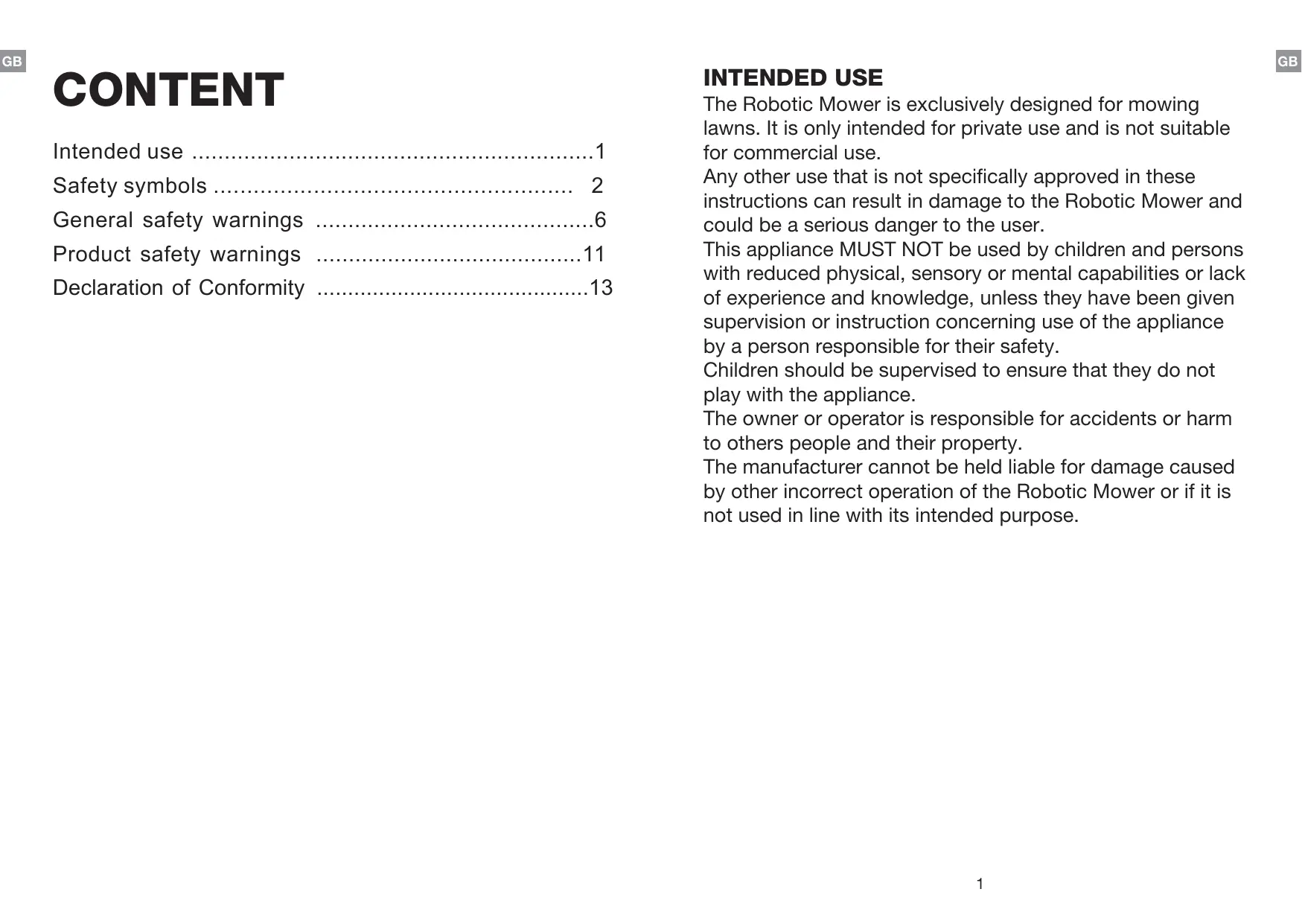
General safety warnings 6

Product safety warnings 11

Declaration of Conformity 13

INTENDED USE

The Robotic Mower is exclusively designed for mowing lawns. It is only intended for private use and is not suitable for commercial use.

Any other use that is not specifically approved in these instructions can result in damage to the Robotic Mower and could be a serious danger to the user.

This appliance MUST NOT be used by children and persons with reduced physical, sensory or mental capabilities or lack of experience and knowledge, unless they have been given supervision or instruction concerning use of the appliance by a person responsible for their safety.

Children should be supervised to ensure that they do not play with the appliance.

The owner or operator is responsible for accidents or harm to others people and their property.

The manufacturer cannot be held liable for damage caused by other incorrect operation of the Robotic Mower or if it is not used in line with its intended purpose.

SAFETY SYMBOLS

The purpose of safety symbols is to attract your attention to any possible dangers. The safety symbols and their explanations deserve your careful attention and full understanding. The symbol warnings do not, by themselves, eliminate any danger. The instructions and warnings they give are no substitute for proper accident prevention measures.

YARDFORCE MB 400 - SAFETY SYMBOLS - 1

WARNING!

Be sure to read and understand all safety instructions within this operator's manual, including all safety alert symbols such as "DANGER", "WARNING", and "CAUTION" before using this tool. Failure to follow all instructions listed below may result in electric shock, fire and/or serious personal injury.

SAFETY ALERT SYMBOLS: Indicate DANGER, WARNING, or CAUTION. May be used in conjunction with other symbols or pictographs.

SYMBOL MEANINGS

This page depicts and describes safety symbols that may appear on this product. Read, fully understand and follow all instructions on the machine before attempting to assemble and operate.

YARDFORCE MB 400 - SYMBOL MEANINGS - 1

Caution!

These instructions must be read.
YARDFORCE MB 400 - Caution! - 1

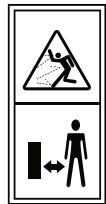
Danger of injury due to flung-out material! Keep bystanders well away from the machine.
YARDFORCE MB 400 - Caution! - 2

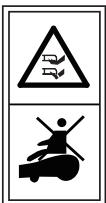
WARNING - Do not ride on the machine. CAUTION - Do not touch rotating blade.
YARDFORCE MB 400 - Caution! - 3

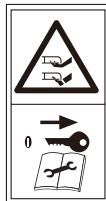
WARNING - Remove the disabling device before working on or lifting the machine.
YARDFORCE MB 400 - Caution! - 4

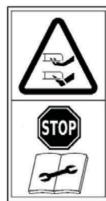
WARNING – Keep your hands and feet away from the rotating blades. Never place your hands or feet close to or under the body when Robotic Mower is in operation.
YARDFORCE MB 400 - Caution! - 5

YARDFORCE MB 400 - Caution! - 6

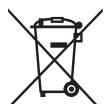
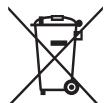
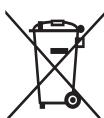
Return any discarded batteries to your local dealer, collector or recycle point. It is not permitted to dispose of this product as normal household waste.

Please recycle where facilities exist. Check with your local authority or retailer for recycling advice.
YARDFORCE MB 400 - Caution! - 7

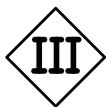
Class III equipment.

YARDFORCE MB 400 - Caution! - 8

A product placed on the United Kingdom market meets the UKCA Marking requirements.

Warning Symbols on the switching power supply

YARDFORCE MB 400 - Warning Symbols on the switching power supply - 1

Before use, refer to the corresponding paragraph in the manual.
YARDFORCE MB 400 - Warning Symbols on the switching power supply - 2

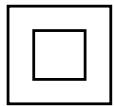
Double insulation.

YARDFORCE MB 400 - Warning Symbols on the switching power supply - 3

Pole orientation.

YARDFORCE MB 400 - Warning Symbols on the switching power supply - 4

YARDFORCE MB 400 - Warning Symbols on the switching power supply - 5

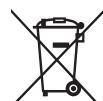
Waste electrical products should not be disposed of with household waste. Recycle where facilities exist. Check your local authority or retailer for recycling advice.

YARDFORCE MB 400 - Warning Symbols on the switching power supply - 6

CE conformity mark

YARDFORCE MB 400 - Warning Symbols on the switching power supply - 7

SMPS (Switch mode power supply unit) incorporating a short-circuit-proof safety isolating switching power supply.

YARDFORCE MB 400 - Warning Symbols on the switching power supply - 8

SMPS (Switch mode power supply unit)

Ta:45 °C Rated maximum ambient temperature 45 °C

YARDFORCE MB 400 - Warning Symbols on the switching power supply - 9

Transformer is for indoor use only.

YARDFORCE MB 400 - Warning Symbols on the switching power supply - 10

A product placed on the United Kingdom market meets the UKCA Marking requirements.

Warning Symbols on battery pack
YARDFORCE MB 400 - Warning Symbols on battery pack - 1

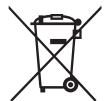
Batteries contain Li-Ion and should not be disposed with general household waste. Contact your local authority for disposal advice.

Li-Ion

YARDFORCE MB 400 - Warning Symbols on battery pack - 2

Do not throw into water.

YARDFORCE MB 400 - Warning Symbols on battery pack - 3

Do not throw on to fire.

YARDFORCE MB 400 - Warning Symbols on battery pack - 4

Do not subject the battery to strong sunlight over long periods and do not leave it in high Temperatures (max. 45^ ).
YARDFORCE MB 400 - Warning Symbols on battery pack - 5

Waste electrical products should not be disposed of with household waste. Recycle where facilities exist. Check your local authority or retailer for

m = 311 ;

recycling advice.

GENERAL SAFETY WARNINGS

YARDFORCE MB 400 - GENERAL SAFETY WARNINGS - 1

WARNING!

This machine can cause serious injuries. Follow instructions below to reduce risk of accident and injury.

IMPORTANT READ CAREFULLY BEFORE USE KEEP FOR FUTURE REFERENCE

PREPARATION

  • Read the instructions carefully and make sure you understand them fully. Be familiar with the controls and the proper use of the machine.
  • Never allow children, persons with reduced physical, sensory or mental capabilities or lack of experience and knowledge or people unfamiliar with these instructions use the machine.
  • Local regulations may restrict the age of the operator. Children should be supervised to ensure that they do not play with the appliance.
  • The operator or user is responsible for accidents or hazards occurring to other people or their property.
  • Ensure the correct installation of the perimeter boundary system as instructed.
  • Periodically inspect the area where the machine is to be used and remove all stones, sticks, wires, and other debris which could cause damage to the machine or be unsafe.

  • Periodically visually inspect to see that the blades, blade bolts and cutter assembly are not worn or damaged. Replace worn or damaged blades and bolts in sets to preserve balance.

  • Never leave the machine to operate unattended, especially while other people such as children and pets are in the area.
  • Never use the machine to level out uneven patches.
  • If the blades no longer cut correctly or if the motor is overloaded, check all the parts of your equipment and replace the worn parts. If a more extensive repair is required, contact the customer service centre.

USE

  • Do not put hands or feet near or under rotating parts.
  • Never pick up or carry the machine while the motor is running.
  • Remove the plug from the mains or remove the disabling device:

  • before clearing any blockages,

  • before checking, cleaning or maintaining the machine,
  • after striking a foreign object to inspect the machine for damage,
  • if the machine starts to vibrate abnormally, and to check for damage before restarting,

  • Start Robotic Mower according to the instructions. When the main power switch is in the ON position, make sure you keep your hands and feet away from the rotating blades.

  • Never lift the Robotic Mower or carry it around with the mains switch is in the ON position.

  • Do not let persons use the mower who do not know how it works or behaves.
  • Do not put anything on top of the Robotic Mower or its docking station.
  • Do not use the Robotic Mower with defective blade discs, body, defective blades, screws, nuts etc.
  • Avoid operating the machine in wet grass. Doing so can cause additional wear and tear, and will increase the amount of cleaning required.

WORK INTERRUPTIONS

  • After the machine has been turned off, the cutting cylinder will continue to rotate for a few seconds. Keep hands and feet well away.
  • Switch off the device. Only remove blockages when the machine is standing completely still.
  • Switch off the power when the machine is transported, lifted or tilted.
  • Never leave the machine unattended. Children should be supervised to ensure that they do not play with the appliance.

CAUTION!

The following below outlines measures to avoid damage and harm to both the Robotic Mower and people using it.

TAKING CARE OF YOUR MACHINE

  • Switch off the power when the machine is to be carried across uneven surfaces, for example steps.

  • Inspect the machine before each use. Never operate the machine if safety devices (e.g. impact protector, parts of the cutting facility or bolts) are missing, worn out or damaged. Check the power cable for damage. To avoid imbalance, all tools and bolts must be changed as complete sets.

  • Only use spare parts and accessories that have been supplied or recommended by the manufacturer. The use of alien parts results in the immediate loss of all guarantee claims.
  • Ensure that all nuts, bolts and screws are firmly tightened and that the machine is in a safe working condition.
  • Never try to repair the machine yourself, unless you have been trained accordingly. All work that has not been listed in these instructions must only be carried out by authorised servicing agencies.
  • Treat the machine with the greatest care. Always keep the tool clean. Follow the maintenance instructions.
  • Never overload the machine. Always work within the specified capacity range. Do not use low-power machines for heavy-duty work. Do not operate the machine for purposes for which it is not intended.

ELECTRICAL SAFETY

CAUTION!

The following states how to avoid accidents and injuries due to electric shock:

  • Before each use, carry out a visual inspection of the power and length and type of extension cords to be used (not lighter than required by Clause 25.7) for any signs of damage or ageing. Damaged mains power cables increase the risk of electric shock.

  • Connect the machine to a power socket with a residual-current circuit breaker that has a rated current of no more than 30 ~mA .

  • Always keep the extension cable well away from the cutting tools. Should the power cable become damaged during work, instantly disconnect the power cable from the mains. DO NOT TOUCH THE POWER CABLE BEFORE IT HAS BEEN DISCONNECTED FROM THE MAINS! Risk of electric shock.
  • The supply cord cannot be replaced. If the cord is damaged the appliance should be scrapped.
  • Keep extension cable away from blades and other moving parts. They may damage the cable and result in contact with live parts.
  • Check that the mains voltage is the same as indicated on the rating plate.

MAINTENANCE AND STORAGE

  • Keep all nuts, bolts and screws tight to be sure the machine is in a safe working condition.
  • Replace worn or damaged parts for safety.
  • Ensure that only the recommended replacement cutting blades are fitted.
  • Ensure that batteries are charged using the charger supplied or recommended by the manufacturer. Incorrect use may result in electric shock, overheating or leakage of corrosive liquid from the battery.
    Servicing of the machine should be carried out according to manufacturer's instructions.
  • In the event of leakage of electrolyte, flush with water/ neutralising agent, seek medical help if it comes into contact with the eyes.

  • Store the appliance with battery pack fully charged at room temperature (around 20^ ).

  • Every deep discharge cycle decreases the capacity of battery pack. To prolong battery life, it is recommended to charge the battery every 6 months over extended periods of time without use.

TRANSPORT

The original packaging should be used when transporting the Robotic Mower over long distances.

To safely move from or within the working areas:

  • Press the STOP button to stop the mower.
  • Move the main switch button to the OFF position if you intended to carry the mower.
  • Carry the Robotic Mower using the handle below at the rear. Carry the mower with the blade disc away from the body.

PRODUCT SAFETY WARNINGS

Not to touch moving hazardous parts before these have come to a complete stop.

Do not store anything heavy on the top of the Robotic Mower or docking station both during storage or when in use.

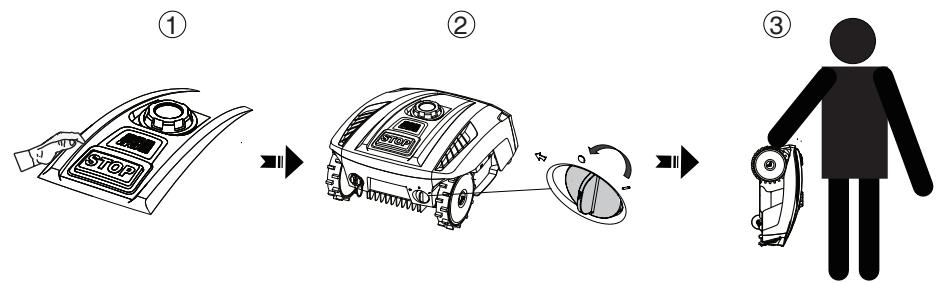
Never use the device if the main power switch is damaged or does not work properly. Never modify the main power switch. Set the main power switch to OFF for storage or when the device is not in use. Use the original packaging when transporting the Robotic Mower, especially for long distances.

If you need to carry the Robotic Mower from or within the working area, first press the STOP button to stop the device.

Secondly, ensure that the main power switch is switched OFF before you lift up your Robotic Mower.

Thirdly, carry the Robotic Mower by the carrying handle at the rear under the mower, keeping the blade disc away from your body as shown.
YARDFORCE MB 400 - PRODUCT SAFETY WARNINGS - 1

LIGHTNING PROTECTION

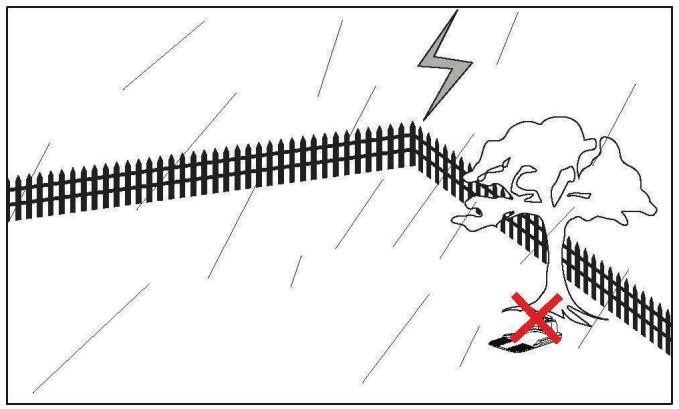
In order to prevent lightning damage to the machine, do not place the docking station under tall trees.
YARDFORCE MB 400 - LIGHTNING PROTECTION - 1

DECLARATION OF CONFORMITY

We

SUMEC UK

Unit A&B Escrick Business Park

Escrick, York YO19 6FD

Declare that the product:

Description: 20V Robotic Mower

Model No. MB 400

Function: Cutting grass

Conforms to the following directives and standards

Supply of Machinery (Safety) Regulations 2008

EN 60335-1: 2012+A11+A13+A1+A14+A2+A15

EN 50636-2-107:2015+A1+A2+A3

EN 62233:2008

Radio Equipment Regulations 2017

NB0123, TUV SUD Product Service GmbH Ridlerstraße 65.80339 Munich.Germany

EU type examination certificate no.: TPS-RED 500307 i02

EN 55014-1:2017

EN 55014-2:2015

EN 301 489-1 V2.2.3

Draft EN 301 489-3 V3.2.4

Draft EN 303 447 V1.3.0

EN 300 328 V2.2.2

EN 50665:2017

EN IEC 61000-3-2:2019

EN 61000-3-3:2013/A1:2019

RoHS Directive 2011/65/EU

Authorized Signatory

Signature: M. Hall

Place:YORK

Name: Mariana Hall

General Manager

Date: 2022.11.12

SUMEC UK

Unit A&B Escrick Business Park

Escrick, York YO19 6FD

YARDFORCE MB 400 - Conforms to the following directives and standards - 1

INHALTSVERZEICHNIS

Verwendung 15

Warnsymbolole 16

EU type examination certificate no.: TPS-RED 500307 i02

EN 55014-1:2017

EN 55014-2:2015

EN 301 489-1 V2.2.3

Draft EN 301 489-3 V3.2.4

Draft EN 303 447 V1.3.0

EN 300 328 V2.2.2

EN 50665:2017

EN IEC 61000-3-2:2019

EN 61000-3-3:2013/A1:2019

RoHS Directive 2011/65/EU

Unterschrift:
YARDFORCE MB 400 - INHALTSVERZEICHNIS - 1

Ort: Willich

Name: Roland Menken

General Manager

Datum: 2022-11-12

MEROTEC GmbH

EU type examination certificate no.: TPS-RED 500307 i02

EN 55014-1:2017

EN 55014-2:2015

EN301489-1V2.2.3

Draft EN 301 489-3 V3.2.4

Draft EN 303 447 V1.3.0

EN 300 328 V2.2.2

EN 50665:2017

EN IEC 61000-3-2:2019

EN 61000-3-3:2013/A1:2019

RoHS Directive 2011/65/EU

Podpis:
YARDFORCE MB 400 - INHALTSVERZEICHNIS - 2

Misto: Willich

type examination certificate no.: TPS-RED 500307 i02

EN 55014-1:2017

EN 55014-2:2015

EN 301 489-1 V2.2.3

Draft EN 301 489-3 V3.2.4

Draft EN 303 447 V1.3.0

EN 300 328 V2.2.2

EN 50665:2017

EN IEC 61000-3-2:2019

EN 61000-3-3:2013/A1:2019

RoHS Directive 2011/65/EU
YARDFORCE MB 400 - INHALTSVERZEICHNIS - 3

Signature:

Lieu: Willich

Nom: Roland Menken

Directrice générale

Date: 2022-11-12

MEROTEC GmbH

YARDFORCE MB 400 - INHALTSVERZEICHNIS - 4
m = 311

YARDFORCE MB 400 - INHALTSVERZEICHNIS - 5
m = 311 ;

47877 Willich / Germany

EU type examination certificate no.: TPS-RED 500307 i02

EN 55014-1:2017

EN 55014-2:2015

EN 301 489-1 V2.2.3

Draft EN 301 489-3 V3.2.4

Draft EN 303 447 V1.3.0

EN 300 328 V2.2.2

EN 50665:2017

EN IEC 61000-3-2:2019

EN 61000-3-3:2013/A1:2019

RoHS Directive 2011/65/EU

Firma:

Luogo: Willich

ALGEMENE VEILIGHEIDSWAARSCHUWINGEN

YARDFORCE MB 400 - ALGEMENE VEILIGHEIDSWAARSCHUWINGEN - 1

WAARSCHUWING!

VEILIGHEIDSWAARSCHUWINGEN VOOR HET PRODUCT

BESCHERMING TEGEN BLIKSEM

47877 Willich / Germany

EU type examination certificate no.: TPS-RED 500307 i02

EN 55014-1:2017

EN 55014-2:2015

EN 301 489-1 V2.2.3

Draft EN 301 489-3 V3.2.4

Draft EN 303 447 V1.3.0

EN 300 328 V2.2.2

EN 50665:2017

EN IEC 61000-3-2:2019

EN 61000-3-3:2013/A1:2019

RoHS Directive 2011/65/EU

Handtekening:

Plaats: Willich

Naam: Roland Menken

Algemeen directeur

Datum: 2022-11-12

MEROTEC GmbH

47877 Willich, Germany
YARDFORCE MB 400 - BESCHERMING TEGEN BLIKSEM - 1

CE

ZAWARTOĆ

KONSERWACJA I PZEECHOWYWAIE

type examination certificate no.: TPS-RED 500307 i02

EN 55014-1:2017

EN 55014-2:2015

EN 301 489-1 V2.2.3

Draft EN 301 489-3 V3.2.4

Draft EN 303 447 V1.3.0

EN 300 328 V2.2.2

EN 50665:2017

EN IEC 61000-3-2:2019

EN 61000-3-3:2013/A1:2019

RoHS Directive 2011/65/EU

Poland Hulcm

Podpis:

Miasto: Willich
Manual assistant
Powered by Anthropic
Waiting for your message
Product information

Brand : YARDFORCE

Model : MB 400

Category : Robotic mower