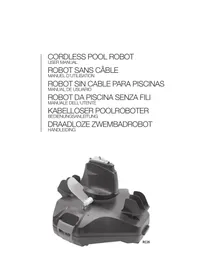
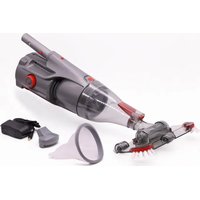
USER MANUAL ROBOT DELTA 200 PLUS RECHARGEABLE KOKIDO
Information contained in this Instruction Manual will help you operate the item safely, protect yourself and others from hazards, and prevent damage to the device and other property.
SAVE THESE INSTRUCTIONS
WARNING!
- This is not a TOY. Children should be kept out of reach from this robot and its accessories.
- Never allow children to operate this product.
- This appliance is not intended for use by persons with reduced physical, sensory, mental capabilities, or a lack of experience and knowledge, unless they are given supervision or instructions concerning the safe use of the appliance and understand the hazards involved by a person responsible for their safety.
- Children must not play with this product.
- Cleaning and maintenance of the robot must not be carried out by children.
- Make sure the robot is fully immersed in the pool before initiating operation. The minimum water level required to operate the robot must reach above the swivel head of the robot. Operating the robot when it is not immersed correctly could damage the unit and void the warranty.
- Maximum operating depth in water is 3 meters (10 ft).
- Operating water temperature: 5^ C ( 41^ F ) -35^ C ( 95^ F )
- DHP Detachable supply unit (external adaptor).
- The robot should only be recharged with the external adaptor and charging plug delivered with this product.
- For the purposes of recharging the battery, only use the detachable supply unit (external adaptor model number: DSS18-0842000-B / DSS18-0842000-C / DSS18-0842000-D/ LX084200) that provided with this robot to charge the battery.
- Connect the external adaptor to a power source through a residential current device (RCD) / a ground fault circuit interrupter (GFCI). If in doubt, consult a qualified electrician.
- Do not use this robot if any damage is detected.
- Replace damaged parts with ones that are certified by the distributor or manufacturer.
- Turn off the robot, disconnect the external adaptor from the power source, and unplug the external adaptor from the charging plug, before detaching the robot from the charging plug.
- Disconnect the robot from the supply mains and make sure the robot is OFF prior to carrying out regular maintenance – such as cleaning the filter, swivel smoothing-ring, and the areas around the water sensors and charging port.
- Do not attempt to replace the installed rechargeable Li-ion battery pack.
- DO NOT handle the robot, external adaptor, and charging plug while it is charging with wet limbs and without shoes.
- You should not operate this robot when people and/or pets are present in the water.
- DO NOT use this robot without an intact filter in place, otherwise your warranty will be voided as a result.
- Suction entrapment hazard: This robot generates suction. Do not allow hair, body, and any loose parts of your clothing to make contact with the suction hole of the robot during its operation.
- Never insert body parts, clothing, and other objects into the openings and moving parts of the robot.
-
DO NOT use this robot to pick up any toxic substance, flammable, and combustible liquids (i.e. gasoline) in the presence of explosive or flammable fumes.
-
Under no circumstances should you disassemble the swivel head to replace its internal components by yourself. Doing so would void the warranty, expose yourself to potential hazards, and possibly damage the device and other properties.
- Never insert fingers or any object to touch the impeller.
- The built-in battery must be removed by a skilled technician before it is scrapped.
- This robot contains a battery that are only to be removed by skilled persons.
- The robot must be disconnected from the supply mains as the battery is removed.
- For details regarding battery recycling/disposal, refer to the section "BATTERY DISPOSAL" in this manual and contact your local authorities for more information.
-
The battery must be disposed safely in accordance with local ordinances or regulations.
-
External adaptor and charging plug:
-
Never use the external adaptor and charging plug for anything other than charging the battery of the robot that is supplied in the same pack.
- The external adaptor and charging plug should not be used outdoors, nor should it be exposed to rain, humidity, and any liquid or heat.
- The transformer ( or external adaptor) is to be located outside zone 1.
- Keep the external adaptor and charging plug out of reach of children.
- Never use the external adaptor and charging plug if any damage is detected.
- DO NOT handle the external adaptor and charging plug with wet hands.
- Keep the external adaptor disconnected from power when it is not in use.
- Never attempt to pry open the external adaptor.
- If the supply cord of the external adaptor is damaged, the external adaptor must be replaced by the manufacturer or its service agent to prevent hazards of any kind.
- Make sure the robot is completely dry before charging.
CAUTION!
- This robot is designed for underwater use only; it is not an all-purpose vacuum cleaner. DO NOT attempt to use it to clean anything other than your pool.
- Use only the original accessories delivered with this product.
- DO NOT use this robot right after pool-shocking. It is recommended to first leave the pool circulating for at least 24-48 hours.
- If you are planning on using the robot in a saltwater pool, make sure all salt are dissolved before deploying the robot.
- DO NOT use this robot with another automatic cleaner/cleaner simultaneously in the pool.
- Remove hard, sharp objects from the pool before deploying the robot to avoid damages to the robot and its filter.
- To avoid damages to the external adaptor and charging plug, do not attempt to carry the robot by the cord of external adaptor / charging plug or pull the cord to disconnect it from the power source and charging plug.
- Charge the robot indoors in a clean, dry area with good ventilation and away from sunlight.
- DO NOT leave the robot charged for over 10 hours.
- If the robot will not be used for an extended period, detach it from the charging plug and use a damp cloth to clean and dry the robot and its accessories. Make sure to charge the robot to about 30% to 50% of the battery capacity before it is stored. Store it in a well-ventilated area away from sunlight, heat, ignition sources, pool chemicals, and children. Recharge the robot every three months.
- All actions concerning the disassembly of the swivel head (ie. battery disposal) should only be carried out by an authorized technician.
Above warnings and cautions are not intended to incorporate all possible instances for risks and / or severe
injuries. Pool / spa owners should always exercise extra caution and common sense when utilizing the product.
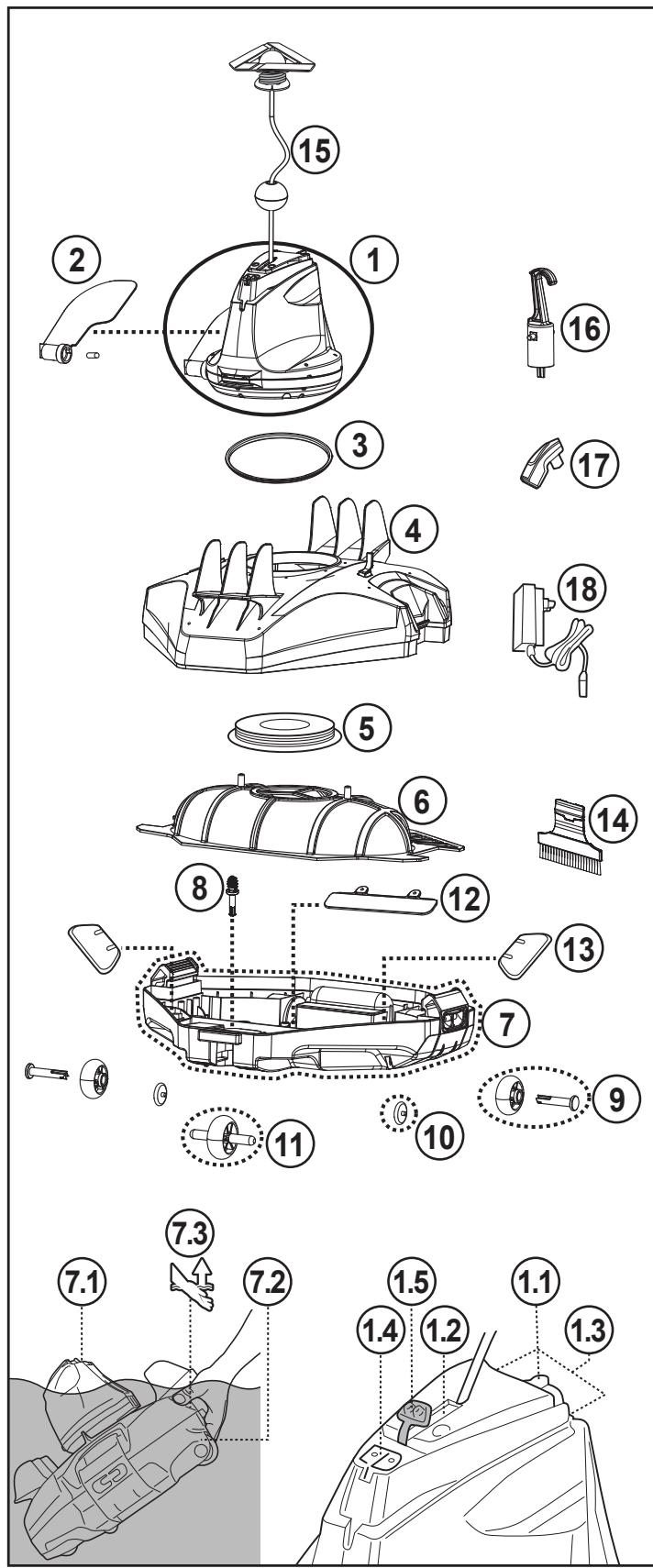
| Replacement
Parts number |
| 1 | Swivel head
(with side flap) | Including float, swivel
smoothening-ring, protective
cap & bottom screw plate:
RC26ASM01
RC26ASM01/US (USA) |
| 1.1 | Sliding switch | -------- |
| 1.2 | Power indicating light | -------- |
| 1.3 | Water sensors | -------- |
| 1.4 | Charging port | -------- |
| 1.5 | Protective cap
(for charging port) | -------- |
| 2 | Side flap
(with side pin) | RC26-07 |
| 3 | Swivel smoothening-ring | RC35-08-004 |
| 4 | Top cover | RC26ASM02 |
| 5 | Swivel head bottom
screw plate | RC30-05-005 |
| 6 | Filter cover | RC26-09 |
| 7 | Complete base | RC26-10
RC26-10/US (USA) |
| 7.1 | Grip
(on swivel head) | -------- |
| 7.2 | Grip
(underneath the base at wider end) | -------- |
| 7.3 | Grip indicator | -------- |
| 8 | Locking pin | RC26-10-015 |
| 9 | Rear wheel (with axle) x 2 | RC26ASM03 |
| 10 | Small wheel x 2 |
| 11 | Front wheel |
| 12 | Suction mouth flap | RC26ASM04 |
| 13 | Draining filter flap x 2 |
| 14 | Brush | RC35-20 |
| 15 | Float | RC26-15 |
| 16 | Hook
(with V-clip) for Telescopic pole | RC30-16 |
| 17 | Charging plug | RC26-17 |
| 18 | Adaptor | RC30-17-002 (EU)
RC30-17-002/US (USA)
RC30-17-002/AU
(Australia/New Zealand) |
The robot has a water-propelling nozzle at the bottom of the swivel head. Water is first sucked in through the suction mouth at the bottom of the robot, which then goes through the filter and is discharged via the propelling nozzle. Water jetting from the nozzle propels the robot forward. Once the robot stops against an obstacle such as the pool wall, its side flap sways and its swivel head turns 180^ , allowing the robot to move in the opposite direction. The robot moves in a generally straight pattern in one direction and in an arc pattern in the other direction. The robot vacuums the pool bottom as it moves, collecting debris in its compartment.
Remark: Product/parts photos/drawings in this manual are for demonstration only. Product/parts in photos/drawings may vary with the model purchased.
Charging The Battery
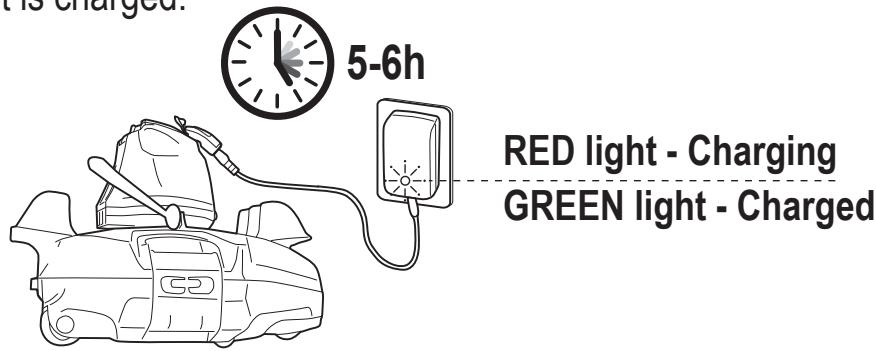
IMPORTANT NOTE: Fully charge the robot (about 6 hrs) before using it for the first time.
WARNING!
- Use only the original external adaptor and charging plug provided.
- Make sure the robot and the charging port are clean and dry before set-up and charging.
(TIPS: Pry open the protective cover and use a cotton bud to dry the charging port and charging pins)
- Pry open the protective cap. Align and attach the charging plug to the charging port.
WARNING! Be sure not to invert the charging plug and ensure both the charging plug and charging port are clean and dry before charging them. TIPS: Use cotton bud to dry the charging port and pins. Plug the charging cable of the external adaptor into the charging plug.

- Connect the external adaptor to the power source. The indicator light on the external adaptor turns red once the charging begins. The indicator light on the external adaptor will turn green when the robot is charged.
-
Immediately disconnect the external adaptor from the power source if you detect any of the following:
-
Offensive or unusual odor
- Excessive heat
- Deformation, cracks, leaks
-
Smoke
-
When charging is complete, disconnect the external adaptor from the power source and unplug the charging plug from the unit and external adaptor.
Normally the robot can operate up to 90 minutes on a full charge.
NOTE: Clean the debris compartment regularly. Excessive debris inside the debris compartment increases the burden to the motor operation and shortens the operating duration as a result.
NOTE: Rechargeable lithium-ion battery is classified as a consumable item. It has a limited life and will gradually lose its capacity to hold a charge. Therefore, the running time of the robot will gradually reduce after repeated charging and discharging throughout its product life.
Once the lifespan of the battery reaches its end, refer to section "BATTERY DISPOSAL" for instructions regarding battery disposal and replacement of swivel head.
NOTE: Let the robot rest for around 30 to 40 minutes before charging it again.
Set- up Before Use
Brush Assembly (attach to the end of the base, above the grip)
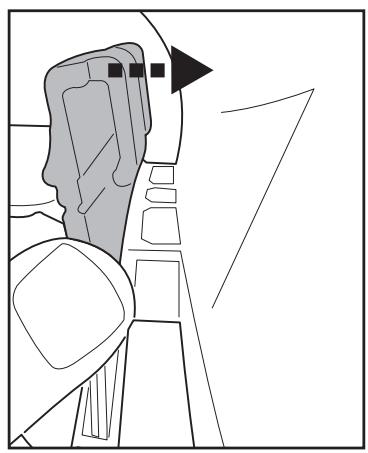
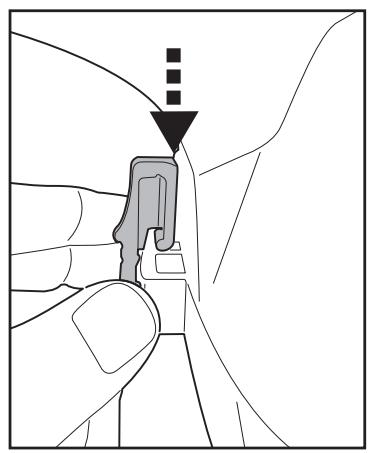
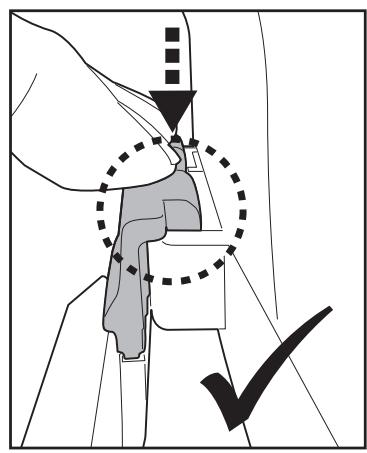
TIPS: Press on the two hook ends to remove the brush.
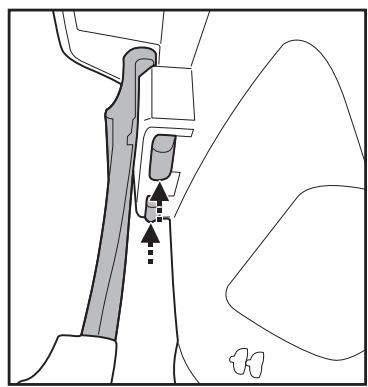
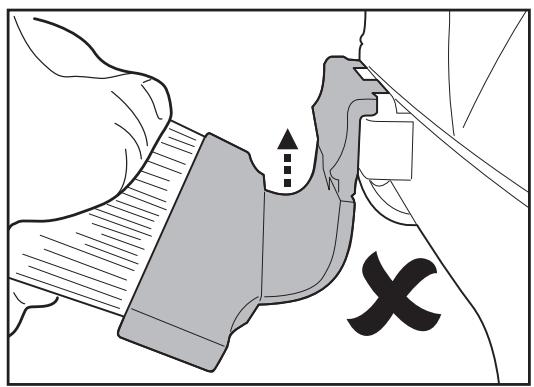
IMPORTANT NOTE:
Detach the brush after use. Otherwise, it may deform due to constant compression, and could interrupt robot movement as a result.
Adjustment of Trajectory
Locking Pin
The trajectory of the robot is dependent on the position of the pin that fixes the axle to a certain angle. There are two pins: the one on the right is fixed and should remain untouched. Alter only the position of the pin on left.
Recommended settings:
NOTE: Wheel axle should be positioned above the locking pin
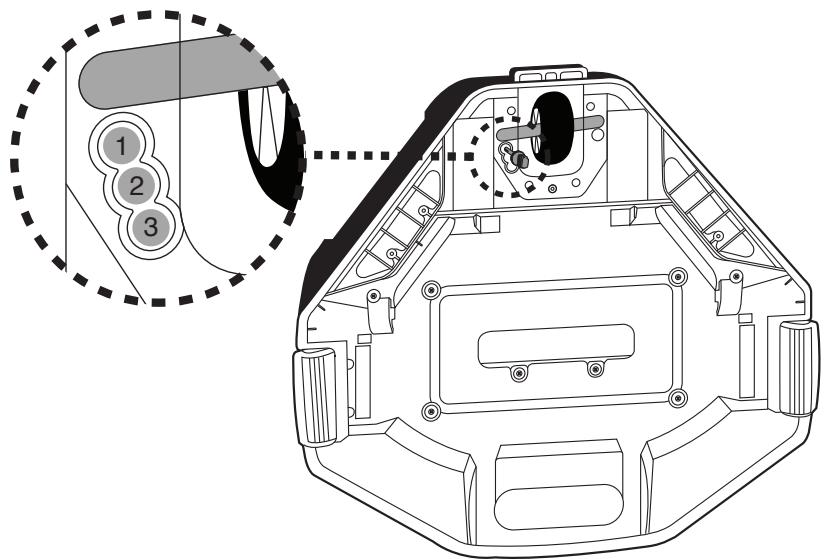
| Pin location | Pool size |
| 1 | For pools where the shortest length is 3 meters or above. |
| 2 | If the robot does not cover the entire pool with either pin position 1 or 3, try below setting.
If the situation persists, deploy the robot from a different location. |
| 3 | For pools where the shortest length is 3 meters or below.
(Factory setting) |
Pool Preparation
- If there are stones, roots or metal corrosion in contact with the underside of the liner, discard them prior to using the robot. If necessary, seek assistance from a qualified professional.
- If the liner is brittle, damaged or wrinkled, contact a qualified professional to perform the necessary repairs or perform a liner replacement prior to using the robot.
- Remove any pool ladder, surface skimmer, and other floating objects from the pool as they may obstruct the movement of the robot's float and, consequently, the movement of the robot also.
- If you are using a saltwater pool, make sure all salt are dissolved before placing the robot into the water.
IMPORTANT NOTE: Turn off the filtration system (as instructed in your filtration manual) at least 15 minutes prior to deploying the robot.
OPERATION
WARNING!
- Make sure the robot is off.
-
Ensure the charging plug is detached and the charging port is plugged with the protective cap before the robot is deployed.
-
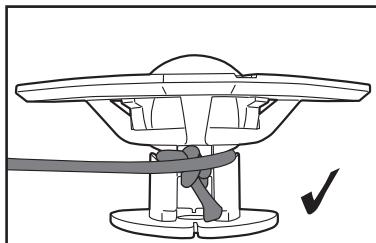
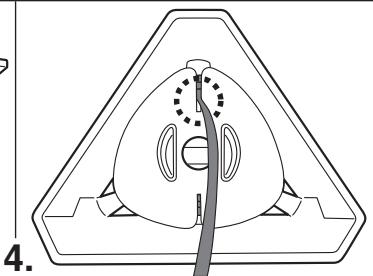
Bring the robot to the side of your pool. NOTE: Only deploy the robot from the pool side (not the pool corner) and ensure it is facing outwards as you do so. Unwrap the retrieval cord from the float (note: there are side notches at the top and bottom of the stem, as well as a narrow slot at the bottom).
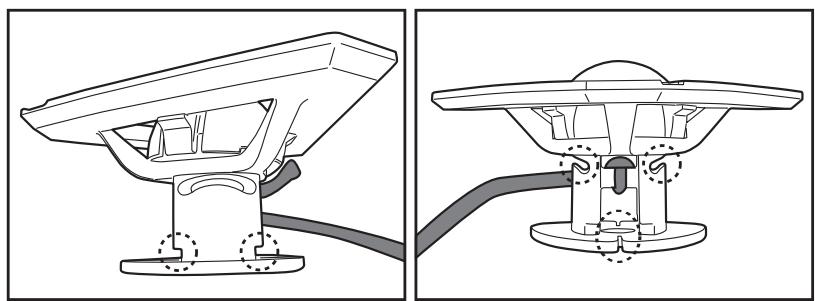
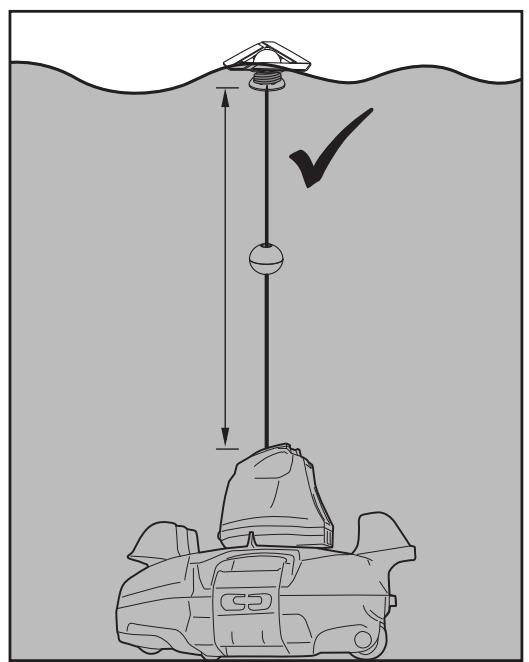
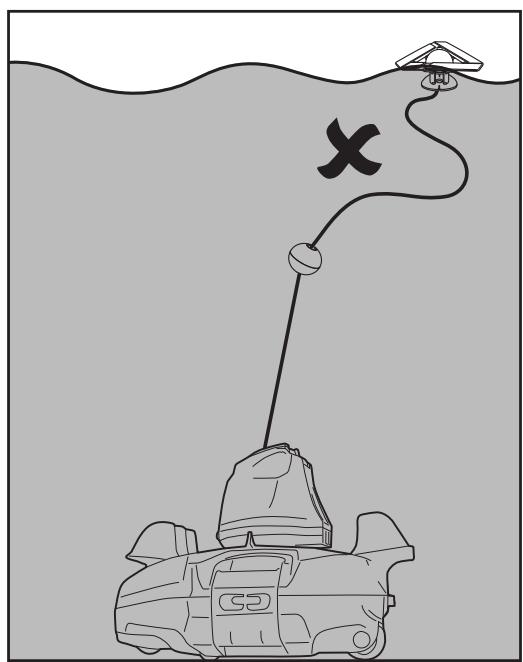
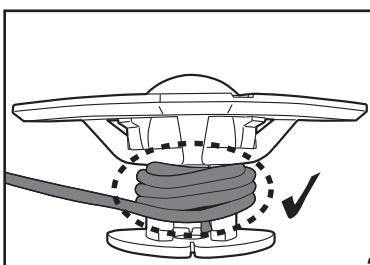
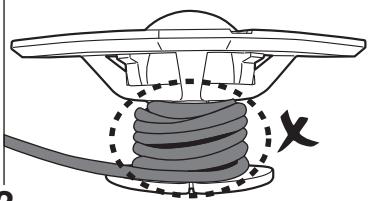
The correct length of the rope should be equivalent to the distance between the top of the robot and the water level. NOTE: Excess length may kink the rope and affect performance as a result.
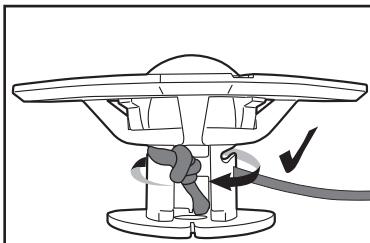
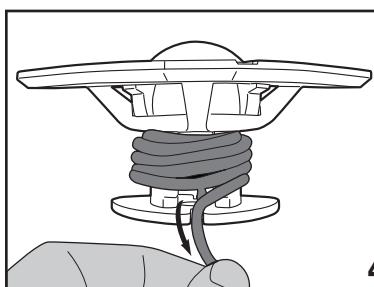
First, align and attach the retrieval cord to the side notches at the top as you wrap the cord around the stem (step 1 & 2). Keep wrapping the cord around the top half of the stem until it reaches the required length (step 3). Pull the cord down to the bottom slot and tuck it in (step 4).

1.
2.
3.
- With the robot switched off, submerge it in the pool and gently shake it a few times to facilitate discharge of air. Excess air trapped in the body could result in erratic behavior of the swivel head (i.e. spinning repeatedly in the pool for a few minutes).
Power indicator
light (Green)
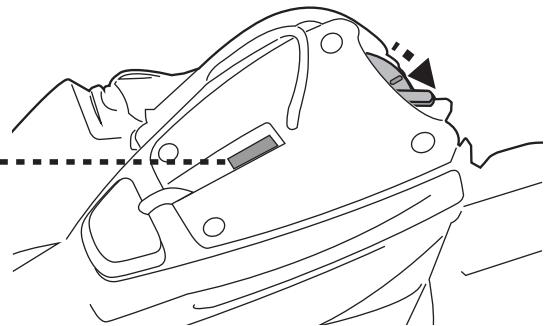
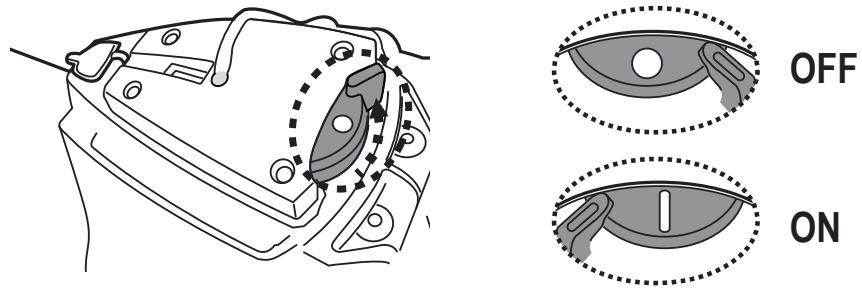
- Slide the power switch to "ON" (while the robot is still submerged) – the indicator light will turn on and activate the motor automatically (water level covering the sensors at the top of the swivel head). Let the robot sink to the pool floor and observe its first forward and reversed movements across the pool bottom. If it runs along the pool wall instead of perpendicularly, retrieve it and redeploy it while making sure its front/back is facing the pool wall.
Power indicator light starts to blink when 10 minutes of usage remains.
Power indicator light :
No light - Power off / no power
Light - Power on
Blinking light - Battery power will be exhausted within 10 minutes.
NOTE:
-
Refrain from making any physical contact with both water sensors.
-
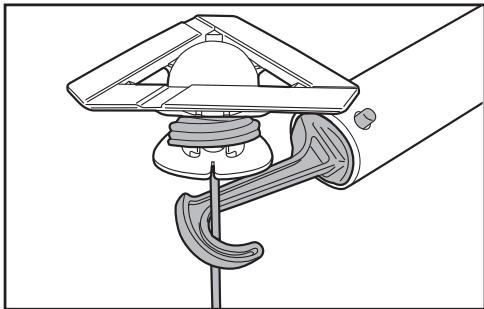
To retrieve the robot from the pool, attach the hook to a telescopic pole (not provided) and use it to retrieve the float, if you are unable to retrieve with your hands.
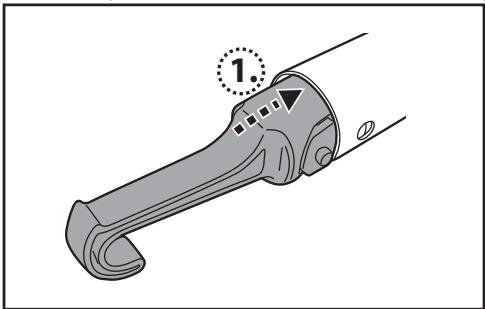
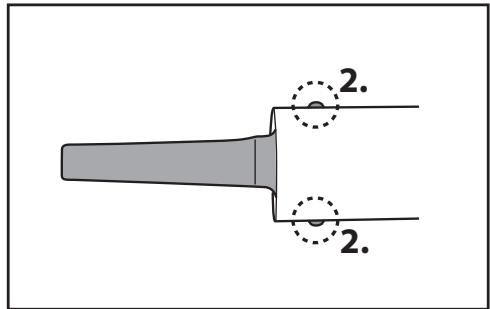
As soon as the robot reaches the water surface, locate the grip that is underneath the base and indicated with the hand symbol (see diagram below) to facilitate retrieval from the pool. Make sure to always grip the robot from this end to prevent debris from falling back into the pool during retrieval.
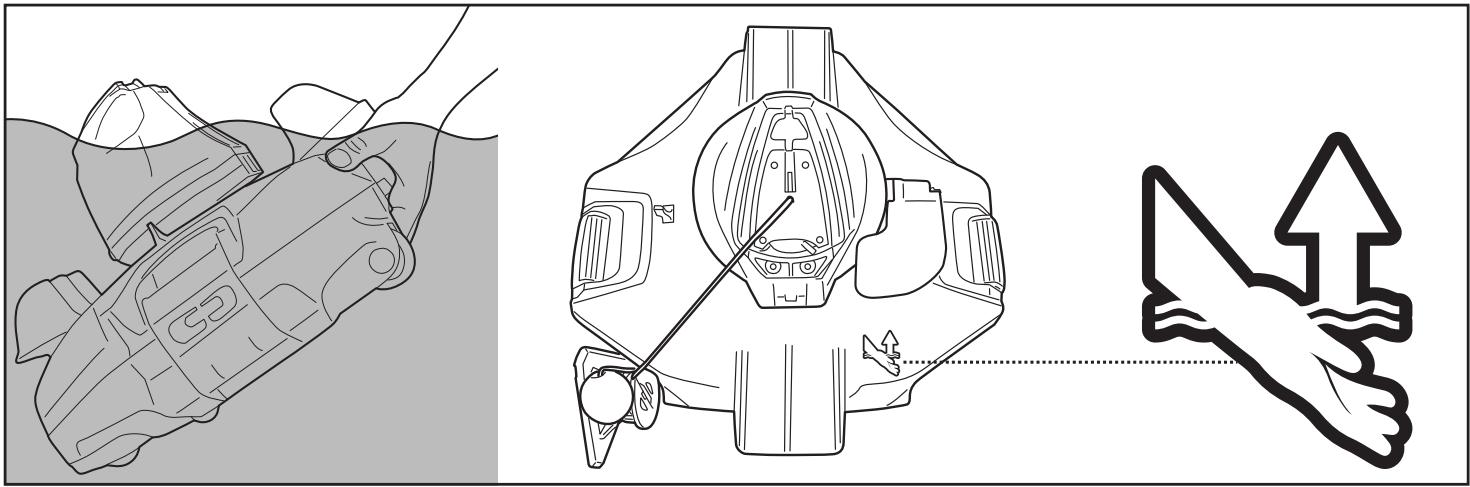
- Slide the power switch OFF. Rinse the robot with fresh water after every use. DO NOT use any detergent.
- Dry the charging port and pins thoroughly (TIPS: Use cotton bud to dry them)
NOTE: To ensure the most efficient cleaning, when your pool is quite dirty, it is recommended to empty the debris compartment after the first 30min of operation, or whenever the robot's movement has slowed down noticeably. Then return the robot (with an emptied debris compartment) to the pool, and let it run through the remaining of its cycle.
EMPTYING THE DEBRIS COMPARTMENT
WARNING! Using the robot without its filter cover in place will Void your warranty.
In order to maximize the cleaning efficiency, clean the debris compartment and the filter cover before and after each use.
CAUTION! Before cleaning the debris compartment, make sure the robot is OFF.
- Place the cleaner on a flat surface. Pull one side clip outwards to lift one side of the cover and repeat the steps on the other side to lift the entire top cover to expose the filter cover.
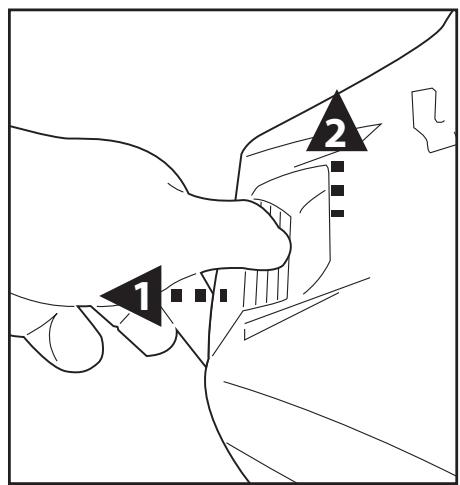
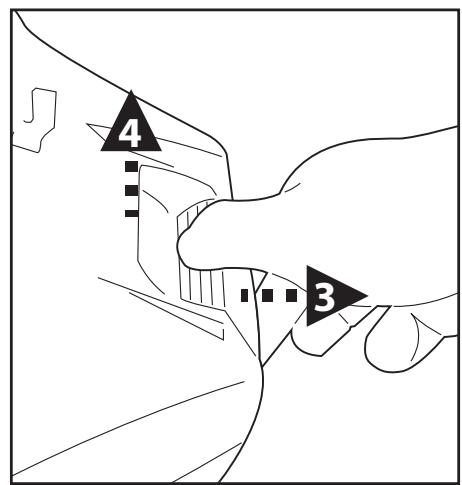
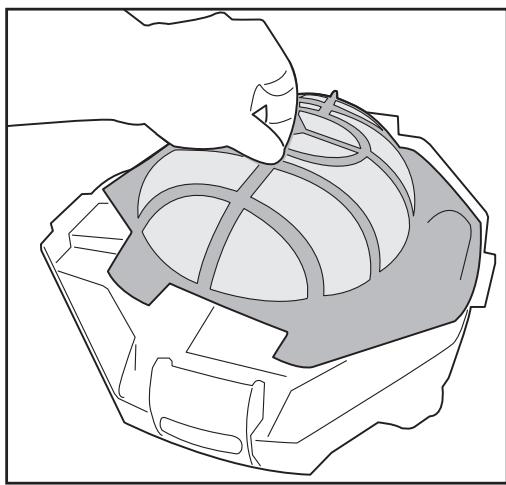
-
Detach the filter cover and remove the debris from the compartment. It is recommended to clean the filter cover net with splashing water. If brushing is deemed necessary, use only a soft brush to clean it carefully and gently to avoid damages.
-
After cleaning, make sure that the filter cover is in place and the body top cover is correctly installed and secured by the side clips.
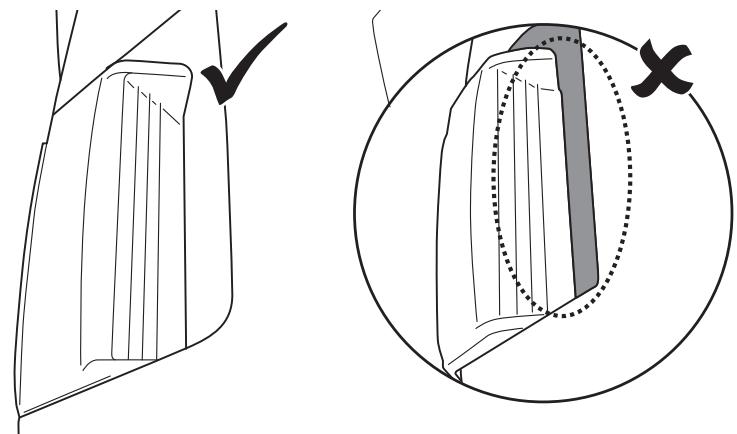
CAUTION!
- Replace a damaged filter cover immediately with a new one before the next operation.
- Replace a damaged float immediately with a new one before the next operation.
Float Replacement
Use a screwdriver (not provided) to unscrew the 4 screws at on the top cover of the swivel head. Untie the knot on the string to remove the damaged float. Ensure the round switch is in place before sliding the string of the new float through the top cover and tying a knot to keep it in place, and then re-install the top cover with screws.
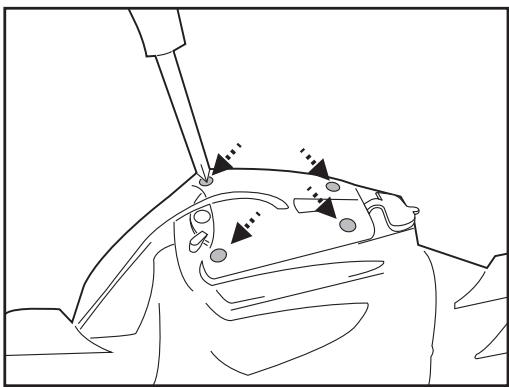
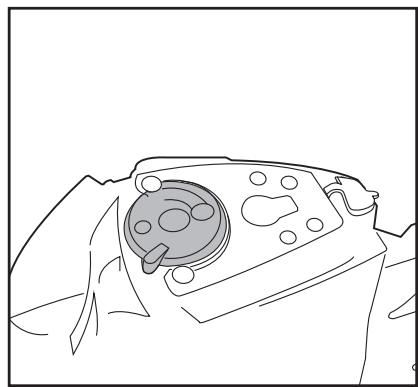
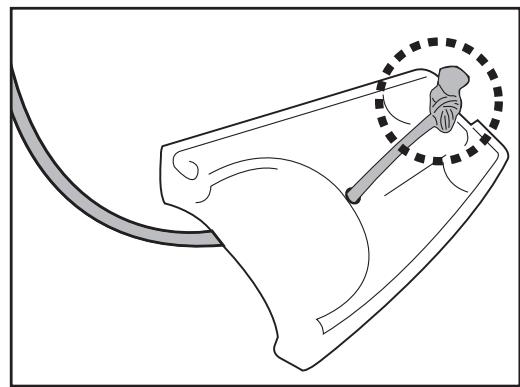
- Replace a damaged flap immediately with a new one before the next operation.
Flap replacement
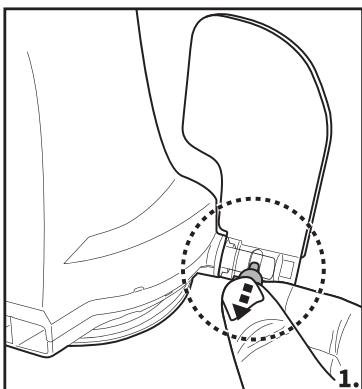
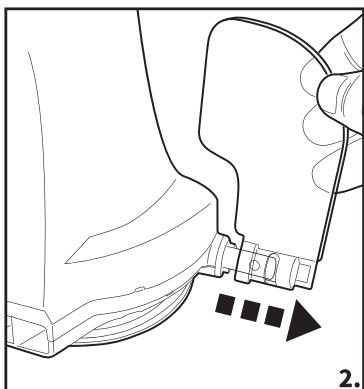
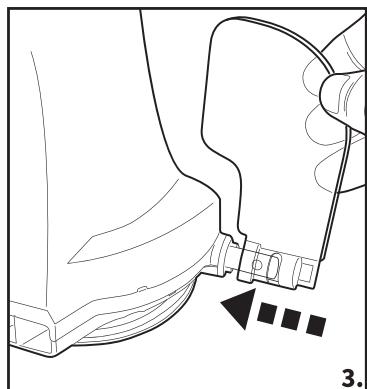

- Be sure to clean and dry the areas around the charging port and water sensors after every use to avoid the forming of stains (byproduct of a natural chemical reaction between electric current and water). Otherwise, the stains can be removed by light scrubbing with a cotton bud soaked with juice of lemon or vinegar.
- Battery discharges on its own during storage. Make sure to fully charge the robot before storage.
- You must recharge the battery at least once every three months when it is not in use.
- Unplug the external adaptor from the socket and the charging plug from the external adaptor and robot.
- Detach accessories from the robot. If necessary, rinse the robot and accessories with fresh water. DO NOT use detergent.
- Be sure to drain the water from the robot before storage.
- Use a damp cloth to clean and dry the robot and its accessories.
- Store them in a well-ventilated area away from sunlight, heat, ignition sources, pool chemicals and from children. Ambient temperature for storage should be 10^ - 25^ ( 50^ - 77^) . NOTE: A higher storage temperature may reduce the battery life.
WARNING!
- Under no circumstances should you disassemble the swivel head to replace its internal components by yourself. Doing so would void the warranty, expose yourself to potential hazards, and possibly damage the device and other properties.
CAUTION!
- Excessive heat can damage the battery and reduce the lifespan of your robot as a result.
- Consult your dealer regarding battery replacement if the following happens:
- Battery does not charge fully.
- Battery operation time is noticeably reduced. Observe and record the run times of the first few operations (on a full charge). Use these run times as a reference point for comparison with run times in the future.
- The battery must be removed from the robot before it is scrapped.
- The robot must be disconnected from the supply mains when the battery is being removed.
- The battery is to be disposed safely in accordance with local ordinances or regulations.
NOTE: Incorrect maintenance may reduce the battery life and affect its capacity as a result.
BATTERY DISPOSAL (To be carried out by an authorized technician)
Your robot is equipped with a maintenance-free rechargeable lithium-ion battery pack, which must be disposed of properly. Recycling is required; please contact your local authority for more information.
WARNING! Never attempt to disassemble a battery pack
- Remove all personal items such as rings, bracelets, necklaces and watches when the battery pack is unwired from the robot.
- A battery can produce a short circuit current high enough to weld a ring (or similar item) to metal, causing a severe burn in the process.
- Wear complete eye protection, gloves and protective clothing when the battery pack is being removed.
- Avoid touching the wires altogether and avoid contact between them and any metal items, which could cause sparking and/or short circuit the battery.
- Never smoke or allow a spark or flame in the vicinity of the battery or the robot.
- Do not expose the battery to fire or intense heat as this may result in an explosion.
CAUTION!
If a battery leak occurs, avoid any contact with the leaking fluids and place the damaged battery in a plastic bag.
- If leaking fluids come in contact with skin and clothing, wash immediately with plenty of soap and water.
- If leaking fluids come in contact with eyes, do not rub eyes, immediately flush eyes with cool running water for at least 15 minutes and do not rub them. Seek medical attention as soon as possible.
How to remove the battery pack for battery disposal (To be done by authorized technician)
Recommended tools (not included): Screwdriver.
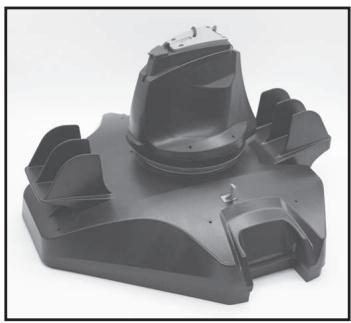
- Follow section "EMPTYING THE DEBRIS COMPARTMENT" to release the top cover (preassembled with the swivel head). Place the cover upside down and use the screwdriver to unfasten the screw on the bottom locking plate. Turn the bottom locking plate anticlockwise to release the swivel head. Remove the swivel smoothening-ring.
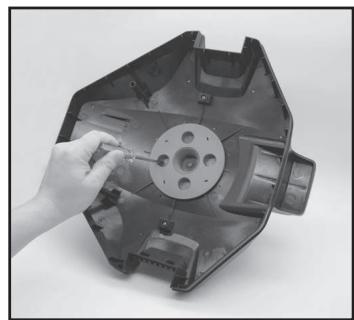
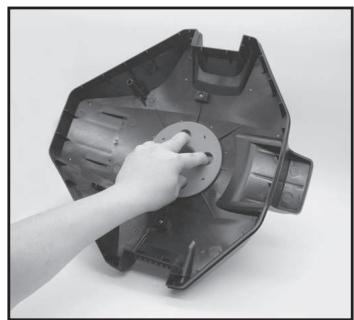
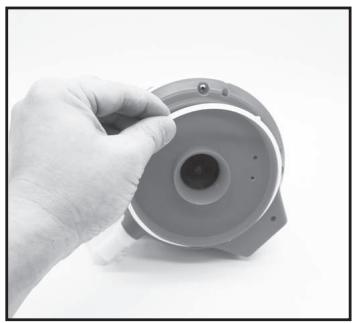
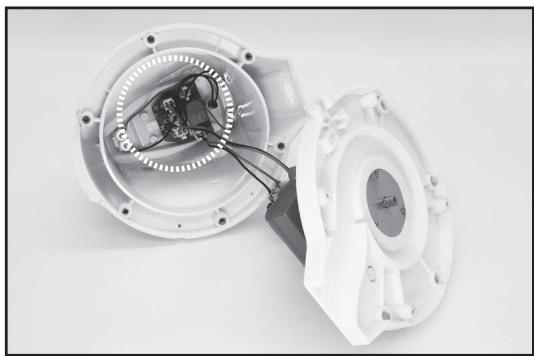
- Use the screwdriver to unscrew the 4 screws located at the bottom of the head to release the bottom plate first. Then unscrew all the screws at the base as shown. Remove the impeller and pry open the base to expose head inside.
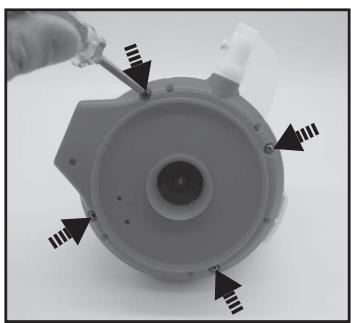
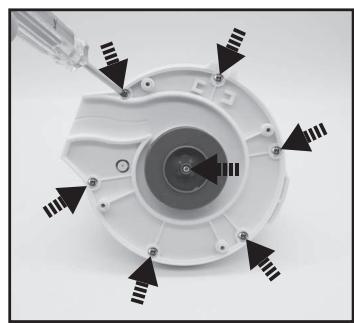
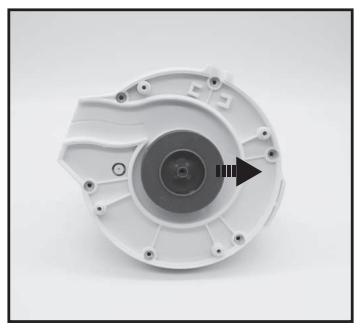
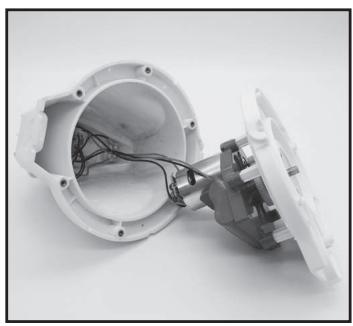
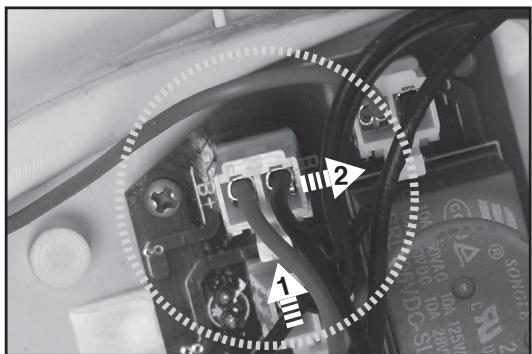
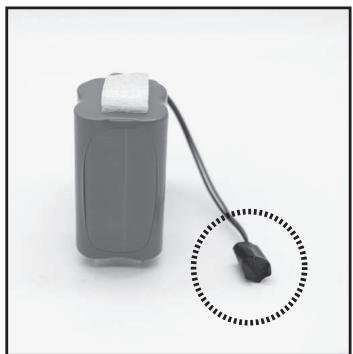
- Remove out the battery pack to expose the PCBA. To detach the battery connection wire, press on the clip of the connector to pull it out. NOTE: Wrap the connector immediately with insulating tape in order to avoid any short circuit caused by the contact of both wire terminals.
| Problem | Possible Cause | Solution |
| Robot does not start working under water | Stained water sensors | Use a cotton bud soaked with juice of lemon or vinegar to clean and remove the stains. |
| Robot does not capture the debris | Battery is running out | Charge the robot again. |
| Impeller is jammed | Power off the robot and inspect the hole under the swivel head to see if the impeller is jammed by large debris. If necessary, contact your dealer for further instructions. WARNING! Make sure the robot is off before the unit is serviced. |
| Suction mouth is clogged | Remove clogged objects from the suction mouth. |
| Impeller is broken | Contact your dealer for replacement. |
| Debris compartment is full | Clean both debris compartment and filter cover. |
| Robot stopped moving in the middle of pool but swivel head is still turning | Robot stopped by obstacle or large creases in the pool liner | Check to see that if there is anything obstructing the cleaner. Remove the obstacle. |
| Robot is hindered by suction from the main drain of pool floor | Turn off the filtration system as instructed in manual. |
| Swivel head rotates repeatedly | Air trapped inside the robot | Submerge the robot while it is still off in the pool and gently shake it a few times to facilitate discharge of air before switching it on (while robot is still submerged). The swivel head may rotate repeatedly for a short while once the robot sinks to the pool bottom. This phenomenon will stop once the air trapped inside the robot is discharged and the robot will begin to move regularly. |
| Robot does not cover the entire pool | Debris compartment is full | Clean the debris compartment. |
| Operation time is shorter as expected | Clean the filter compartment and recharge the robot for 6 hrs |
| Moving direction is interrupted by water circulation generated by filtration system | Turn off the filtration system (as instructed in filtration manual) at least 15 minutes before robot operation. |
| Wheel is jammed | Check and remove debris from the wheel. |
| Position of locking pin is not set properly | Follow instruction to adjust the locking pin position. |
| Brush is deformed | Lay it under sunlight for a few hours to straighten it. If necessary, replace with a new brush. |
| Algae renders the pool floor slippery which results in the robot going in circles | Scrub the pool bottom and robot wheels to remove the algae. |
| Robot moves along the pool wall | Position of locking pin is not set properly / robot facing direction is wrong at beginning | Follow instructions to adjust locking pin setting. Make sure that robot's front/back faces the pool wall at beginning. |
| Robot moves slowly or does not move at all | Debris compartment is full or filter cover is clogged | Clean the debris compartment. Flush the screen with water to remove small particles. If brushing is deemed necessary, use a soft brush to clean the screen gently. Note: make sure that the filter cover is in place before next operation. |
| Brush is deformed | Lay it under sunlight for a few hours to straighten it. If necessary, replace with a new brush. |
| Suction mouth is clogged | Remove clogged objects from the suction mouth. |
| Impeller is jammed | Power off the robot and inspect the hole under the swivel head to see if the impeller is jammed by large debris. If necessary, contact your dealer for further instructions. WARNING! Make sure the robot is off before the unit is serviced. |
| Swivel head does not turn or turn noticeably slowly | Side flap does not come up | Check and remove any debris that hinders the movement of the flap. |
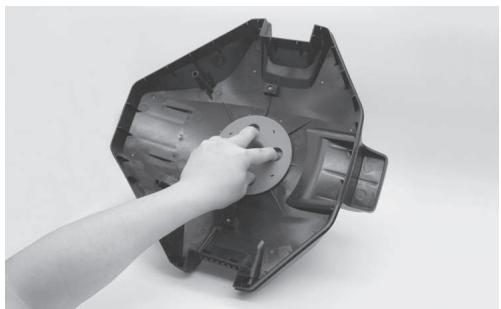
| Swivel head bottom is jammed | Detach the swivel head and smoothening-ring in accordance with instructions of section "How to remove the battery pack" from the manual, then:- Remove trapped debris.- Inspect the smoothening-ring for potential damages and wear and tear. Replace with a new one if necessary.- Verify the smoothening-ring and bottom plate are installed correctly. (refer to below diagrams) |

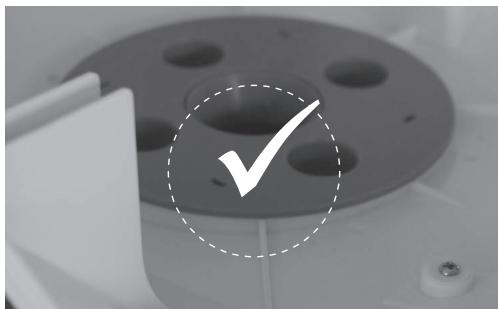
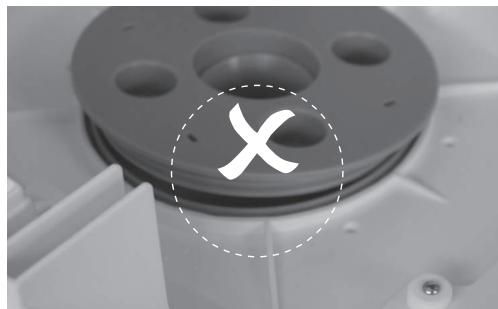
| Problem | Possible Cause | Solution |
| Debris escapes from the robot | Suction mouth's flap (at cleaner bottom) is damaged | Suction mouth's flap works like a door to prevent the debris from escaping from the debris compartment. Contact dealer for replacement parts and instruction. |
| Debris clogged at suction mouth and prevents the flap to close | Remove clogged debris from the suction mouth. |
| Debris leaks outside at the filter cover | Filter cover net is damaged | Replace with a new filter cover from your dealer. |
| Round float sinks | Damaged float and water leakage | Replace with a new float from your dealer. |
| Retrieval cord is kinked | Retrieval cord length is too long | Adjust the length according to instructions in the manual |
| Duration of cleaning cycle is shorter than advertised | Battery is not fully charged | Charge the robot for at least 6 hrs. NOTE: if any stains are found on the charging pins, remove them by using a cotton bud soaked with lemon juice or vinegar. |
| Robot cannot be charged / recharged | Battery is damaged | Contact dealer for battery replacement.
WARNING! DO NOT replace the battery by yourself. This could result in severe or fatal injuries and the warranty will be voided as a result. |
| Charging plug is not completely connected with external adaptor and robot | Make sure that the charging plug is connected with external adaptor and robot properly and completely. Refer to instruction manual. |
| External adaptor is out of order | Contact dealer for replacement.
WARNING! Using the wrong external adaptor will result in damaging the robot / battery and voiding the warranty as a result. |
| Environmental Programmes, WEEE European Directive |
| Please respect the European Union regulations and help to protect the environment. Return non-working electrical equipment to a facility appointed by your municipality that properly recycles electrical and electronic equipment. Do not dispose them in unsorted waste bins. For items containing removable batteries, remove batteries before disposing of the product. |
| CE | © 2020 Kokido Development Ltd. 20009011 All rights reserved. No part of this document may be reproduced or transmitted in any form or by any means, electronic, mechanical, photocopying, recording, or otherwise, without prior written permission of Kokido Development Ltd. (V1) |
If soft copy of this instruction manual is required, please contact our customer service by email: customerservice@kokido.com
SAVE THESE INSTRUCTIONS
AVERTISSEMENT & INSTRUCTIONS
Produtlore: Kokido Development Limited. Unit 1319, Sunbeam Centre, 27 Shing Yip Street, Kwun Tong, Kowloon, HK Fatto in Cina
We reserve the right to change all or part of the features of the articles or contents of this document, without prior notice. International patents pending