eCross Pro XS - Electric scooter URBAN GLIDE - Free user manual and instructions
Find the device manual for free eCross Pro XS URBAN GLIDE in PDF.


| Product Type | Electric Scooter |
| Brand | URBAN GLIDE |
| Model | eCross Pro XS |
| Motor | 800 W |
| Battery Type | Lithium-ion (Li-ion) |
| Battery Capacity | 13 Ah |
| Battery Voltage | Not specified |
| Maximum Speed | 25 km/h |
| Maximum User Weight | 120 kg |
| Maximum User Height | 2 m |
| Recommended Minimum Age | 14 years |
| Brake Type | Front and rear disc brakes |
| Front Light | LED x2 |
| Turn Signals | Front and rear |
| Display | Yes (with settings) |
| Suspension | Front suspension x2 |
| Folding System | Yes, with red lever and folding handle |
| Tire Pressure | 2.4 bars maximum |
| Charger Included | PS84B546Y1500S |
| Range | Not specified |
| Product Weight | Not specified |
| Spare Parts | Available at boutique.urbanglide.com |
| Repairability | Tutorial videos on YouTube (UrbanGlide Channel) |
| Standards | EN ISO 12100, EN 55014-1, EN 60335-1, etc. |
| Manufacturer | PACT GROUP, 29 Promenade Michel Simon, 93160 Noisy-le-Grand, France |
Frequently Asked Questions - eCross Pro XS URBAN GLIDE
User questions about eCross Pro XS URBAN GLIDE
0 question about this device. Answer the ones you know or ask your own.
Ask a new question about this device
Download the instructions for your Electric scooter in PDF format for free! Find your manual eCross Pro XS - URBAN GLIDE and take your electronic device back in hand. On this page are published all the documents necessary for the use of your device. eCross Pro XS by URBAN GLIDE.
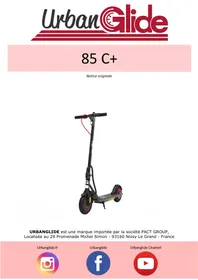
USER MANUAL eCross Pro XS URBAN GLIDE
natural_image
Exterior view of a modern electric scooter with visible charging module and body (no signage or text beyond branding)natural_image
Facebook logo icon, blue circle with white lowercase 'f' (no text or symbols beyond the graphic)Urbanglide Channel

natural_image
YouTube logo icon with red circular background and white play button (no text or symbols)natural_image
Illustration of a person using a scooter with a warning sign (no text or symbols on the diagram itself)natural_image
Simple line drawing of a person riding a scooter with a warning sign (no text or symbols)natural_image
Mechanical linkage diagram showing a lever and pivot point with a red arrow indicating direction (no text or symbols)natural_image
Mechanical diagram showing a vehicle's suspension system with a red arrow indicating motion direction (no text or labels)natural_image
Illustration of a child riding a scooter with a steering wheel (no text or symbols)natural_image
Illustration of a person using an electric scooter with a red arrow indicating motion direction (no text or symbols)natural_image
Mechanical assembly diagram showing a lever mechanism with a red arrow indicating direction (no text or labels)natural_image
Illustration of a person riding an electric scooter with a steering wheel (no text or symbols)natural_image
Diagram of a bicycle steering wheel with red directional arrows indicating motion (no text or symbols)natural_image
Technical line drawing of a device with connectors and a central screen (no text or symbols)
natural_image
Close-up of a hand adjusting a red ribbon cable on a black mechanical device (no text or symbols visible)Système de pliage
natural_image
Close-up of a hand using a red tool to adjust or install a black mechanical component (no text or symbols visible)Utilisation
natural_image
Line drawing of a person riding a scooter, viewed from the side (no text or symbols)natural_image
Illustration of a person riding a scooter with motion arrows indicating speed, next to a circular diagram showing mechanical components (no text or symbols)natural_image
Three human figures in safety gear standing with chains, viewed from the side of a ground line (no text or symbols)Multifunction screen
natural_image
Close-up of a black electric scooter with attached battery pack (no visible text or symbols)Lubrification
natural_image
Close-up of a black motorcycle wheel with visible brake and suspension components (no text or symbols)Réglage système
https://urbanglide.com/contact
BCTC Building & 1-2F, East of B Building, Pengzhou Industrial
Park, Fuyuan 1 ^st Road, Qiaotou, Fuyong Street, Bao'an District,
She nzhen, Guangdong, China
COORDONNÉES DE L'IMPORTATEUR:
PACT GROUP
29 Promenade Michel Simon
93160 Noisy le Grand – France
COORDONNEES DE LA PERSONNE AUTORISE A EDITER LE DOCUMENT TECHNIQUE :
Fung NIM
29 Promenade Michel Simon
93160 Noisy le Grand – France
natural_image
Abstract line drawing with curved and straight lines, no text or symbols presentnatural_image
Exterior view of a modern electric scooter with visible charging module and body (no signage or text beyond branding)URBANGLIDE is a brand imported by the PACT GROUP, Located at 29 Promenade Michel Simon - 93160 Noisy Le Grand - France
Urbanglide.fr

natural_image
Instagram logo icon with gradient background (no text or symbols)Urbanglide

natural_image
Facebook logo icon, blue circle with white lowercase 'f' in center, pink background (no text or symbols beyond logo)Urbanglide Channel

natural_image
YouTube logo icon with red circular background and white play button (no text or symbols)Safety and precaution
Follow and read the instructions in this manual on operating procedures, including ignition, starting, braking, maintenance and storage.
Please read the risks and safety advice in the manual. The use of an electrical product can be dangerous if the user is not vigilant. Misuse and non-compliance with safety instructions does not implicate the company in the event of an accident. The user should use self-judgment and common sense to detect potential hazards. Please check your country's regulations and laws to find out where and how to legally use your product. You must obey the rules and laws applicable to vehicles and pedestrians.
• Protective equipment
Always wear the following protective equipment:
Approved and certified helmet according to your location
Knee pads and elbow patches
Long sleeve t-shirt and long pant
Gloves
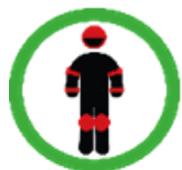
Shoes with rubber soles, never drive in barefoot or sandal. Verify to make the laces made and keep them as far as possible from the wheels and the internal system.
- Driver's advice
The user must not be more than 120 kg, the size and weight do not fully certify that the user will have full control of the vehicle. It is your responsibility to make sure that all users are aware of the risks This appliance may be used by children aged 14 and over and by persons with reduced physical, sensory or mental capabilities, or lacking experience or knowledge, if they are properly supervised or if they have been instructed in the safe use of the appliance and have understood the risks involved. Children must not play with the unit. Cleaning and maintenance by the user must not be carried out by unsupervised children. It is your responsibility to supervise younger children, considering their skills, maturity and ability to follow the rules. Do not touch the motor or brakes of the product immediately after use, as these parts can be extremely hot.
• Security advice
Take the time to learn the basics of practice to avoid any serious accidents during the use of the product, this goes through the following points:
- The age of the driver must be at least 14 years old, for a pleasant ride the hip of the driver must not exceed the handlebars of the scooter, and his visibility must be at least 30cm above the handlebars. . The maximum height of the user must not exceed 2 m.
- Get closer to the seller to be directed to an appropriate training organization;
- Avoid high traffic areas or congested areas;
- In all cases, anticipate your trajectory and speed while respecting the highway code, the pedestrian code and the most vulnerable beings;
- Cross the protected passages while walking;
- Do not divert the vehicle from its initial use;
- Regularly check the tightening of the various bolted elements, in particular the wheel axles, the folding system, the steering system and the brake axle;
- Eliminate sharp edges caused by use;
- Do not modify or transform the vehicle, including the steering tube and sleeve, the stem, the folding mechanism and the rear brake.
- General use
City traffic involves crossing many obstacles, such as sidewalks or steps. It is recommended to avoid jumping obstacles. It is important to anticipate and adapt your trajectory and speed to those of a pedestrian before crossing these obstacles. It is also recommended to get out of the vehicle when these obstacles become dangerous due to their shape, height or the risk of skidding they present.
In the event of an accident, get to safety and put on a yellow vest to be spotted on the road, turn off the scooter and call the emergency services.
The maximum speed of the scooter (25 km/h) may vary depending on the weight of the user, the weather conditions and the inclination of the road
It is your responsibility to operate the electric scooter using good judgment to reduce the risk of injury. Do not operate the electric scooter under the influence of drugs, alcohol or medication that may impair your judgment. Use common sense to detect and avoid hazards that present a risk to you, others and other people's property when operating your electric scooter.

• Proper functioning
To operate this scooter adjustment and maintenance before and after each use is necessary, do not expose yourself to any risk when these operations are carried out, wear personal protective equipment and contact the manufacturer in case of questions or doubts, take into account also from any reasonably foreseeable misuse.
Any load attached to the handlebars will affect the stability of the vehicle, please do not carry heavy loads or attach accessories or additional items not approved by the manufacturer as this may make driving very unstable.
• Procedures and driving conditions
Please check the laws and regulations in your country before using the product. In France, the linear speed on flat ground and a person not exceeding the maximum permissible load is 25km/h. Look around when using the product, and pay attention to any potential hazards. It is important to respect everyone's rights and properties. For your safety, do not engage the accelerator if you are not on the product. This product is not designed for performing jumps, stunts and skids. Never drive on roads, near vehicles, stairs, hills, swimming pools or other bodies of water. Please hold the handlebar with both hands. Never mount more than one person on the product. Be sure to keep your fingers and all other parts of the body away from parts that can heat up during use (brake, motor, chain). Never use the product with an audio player, or with your smartphone in your hand. Never use the product to pull something as this will damage the components and wear out the battery. Never put the product in contact with water, the electrical components may be damaged and create a dangerous situation.
Ride only on flat, solid surfaces. Avoid surfaces with gravel, holes, ice, which can cause loss of product control. Do not ride at night or in areas where visibility is reduced. Also, don't ride indoors, where carpets and rugs can get in the way.
The A-weighted emission sound pressure level at the driving position does not exceed 70dB(A). The total value of the vibrations to which the hand-arm system is exposed does not exceed 2.5m/s ^2 , the maximum frequency-weighted mean square value of the acceleration to which the whole body is exposed does not exceed 0.5m ^2 . (Measurement accuracy uncertain)
After each use, check that each part is in its place and that it is not damaged. Before each use, check the following points:
- Brakes are in good condition
- All components are in good condition and in their places
- The parts having presented anomalies during the last use have been repaired or changed according to the manufacturer's conditions.
Check tire pressure before first use, make sure tires are inflated to 2.4 bars MAX
People who have medical monitoring or treatment such as: cardiac people, pregnant women, non-responsible people, people with back or neck problems, should not use the product.
• Usage of the charger
Before using the product, it is necessary to charge it. A long charge may be required before first use. Please rely on the light on the battery indicator. It is possible to charge your battery at any time to ensure constant power, it is not necessary to wait until the battery is completely empty to charge it. Use only with PS84B546Y1500S power supply unit. To recharge the battery, use only the detachable power supply unit supplied with the device. Please do not use the charger of other brand, these may damage the battery of your product. It is important to charge your battery at least once every 3 months, even if you are not using the product, to ensure a normal life cycle. Avoid shocks and contact with water, these are factors not covered by the warranty that can damage the battery. The charger provided is "intelligent", it is designed to stop at 100% of the charge and not damage the battery. The charger must be in perfect condition each time you use it, check the wires, the condition of the tips and connectors. If the product does not charge, the charger may be faulty, it is then necessary to change it. The charger should only be used by an adult, it is important to unplug it from both sides when not charging. Do not charge your scooter unattended.
The charging connector cover must be closed when the scooter is not being charged. The external flexible cable of this transformer cannot be replaced; if the cable is damaged, the transformer should be disposed of.
- Battery
Please do not store the battery in extreme temperatures. Below 30^ C and above 0^ C. If you do not use your product for 60-90 days, the battery may be less efficient than when it started. This loss of autonomy is due to lack of use and is therefore not covered by the warranty.
At the end of its cycle, the battery must be disposed of separately from undifferentiated generic waste. Dispose of the batteries in the containers provided for this purpose. Collecting and recycling batteries helps to protect the environment and conserve material resources. This product contains a Li-ion battery, any fire must be extinguished using a powder extinguisher (Class D fire)
(The battery is subject to wear).
This device contains a battery which may only be replaced by qualified personnel.
WARNING: To recharge the battery, use only the removable power supply unit supplied with the unit." Charger part number (PS84B546Y1500S).
- Maintenance
Please store your product in a dry and dust-free place, and avoid leaving it too long in a humid space or under the sun. To clean your device, use a damp cloth and mild detergent. Do not use alcohol, gasoline, kerosene or other harsh chemical solvents to clean your device, which will damage its appearance and structure.
Constantly check the condition of your product components, if any part is damaged, please replace it before using the product. If a part is not in working order, you risk falling and injuring yourself.
- Transport
If you wish to transport your product, as well as its battery, by plane or by other means of transport, please contact the competent local authorities and the carrier beforehand in order to inform you of any prohibitions and restrictions on transport. Lithium batteries are considered dangerous in many countries. Please ensure before a trip that access and transport is authorised. International law prohibits the air transport of lithium batteries.
Scooter handling:
Always use both hands on the stem to carry and move the scooter safely, wear suitable footwear and check that the locking system is securely locked.
• Use of the product
To turn on your product, press the Power button located on your handlebars Move the scooter forward with your foot to reach a speed of around 3 km/h, then press the acceleration trigger. The electric system will start up automatically. To brake use the manual brakes located on the handlebars. You can also use the rear mudguard, if your product is equipped with it. Before each use, please check that the wheels are free from obstruction, that the brakes are working. In order to make certain basic adjustments, in particular the play of the brake control, come and discover our tutorial videos available on our YouTube channel: URBANGLIDE CHANNEL.
The use of this type of product over a long period can cause vibrations which can be unpleasant, take breaks regularly. To warn other users of your presence, use the buzzer located on your handlebars, if your product is equipped with them. Use the front LED to light your way in dark places. When you stop your product, use the stand to stabilize it.
- Rebut
THIS PRODUCT CONTAINS LITHIUM BATTERIES WHICH MUST BE SAFELY RECYCLED : The battery must be removed before disposal. Before any intervention, remember to turn it off and unplug it from the power outlet.
WARNING : As with any mechanical component, a vehicle is subject to high stress and wear. Different materials and components may react differently to wear or fatigue. If the expected life of a component is exceeded, it may suddenly break and risk injuring the user. Cracks, scratches, and discoloration in high-stress areas indicate that the component has exceeded its life and should be replaced.
(This scooter is not intended to be used or parked in public places)
Some parts require replacement depending on the degree of wear and its usage time, you can obtain spare parts at the following address (Section ECROSS PRO XS):
https://boutique.urbanglide.com
| Spare parts | Replacement criteria | Acceptability criteria | Replacement method | References |
| Tire | Loss of original shape, cracks, splinters or other signs of wear and tear | Video online no YouTube Urbanglide Channel | On request to customer service | |
| Disc brake | Abnormal noise when braking, low thickness (<2.5mm) | Drive at 15Km/h Brake on 1m, the scooter must stop. | Video online no YouTube Urbanglide Channel | On request to customer service |
| Brake | Abnormal noises when braking or abnormal rubbing noises | Video online no YouTube Urbanglide Channel | ||
| Brake cable | Fraying cable | Video online no YouTube Urbanglide Channel | On request to customer service | |
| Reflectives sticker | When it comes off | Video online no YouTube Urbanglide Channel | On request to customer service | |
| Bearings | Abnormal noises | Contact our customer service | Contact our customer service |
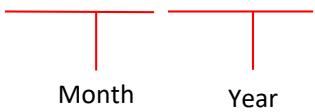
The serial number has the year of manufacture as a prefix located on the information label of your product
MMYYYYXXXXXXXXXXXX
Tips for use
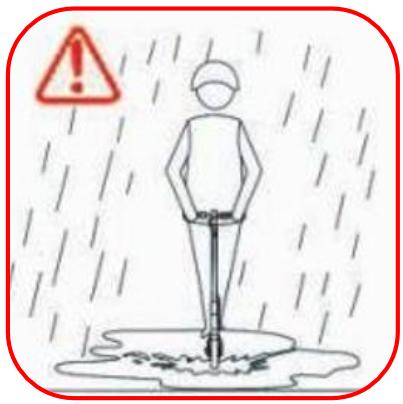
It is not advisable to drive in the rain or in bad weather conditions.
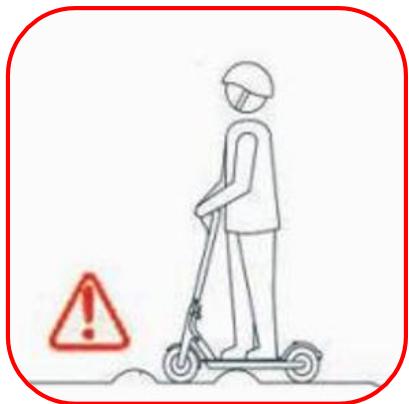
When riding on unstable and impassable terrain, reduce your speed.
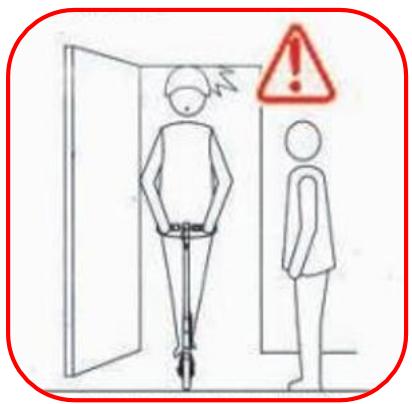
Get off your scooter when you go through a door, lift or stairs.
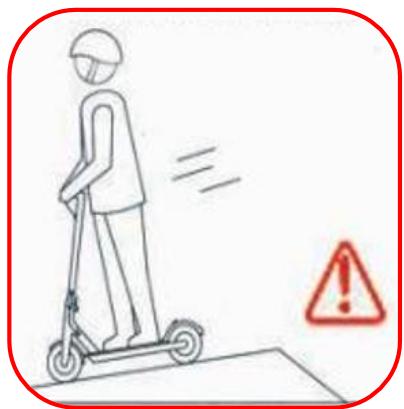
For your safety, do not accelerate on the descents.
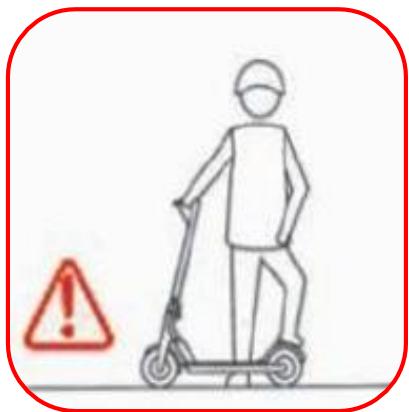
Do not stand on the mudguard of your product to avoid damaging it.
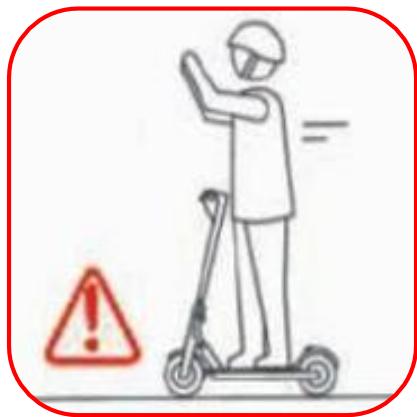
Leave both hands on your scooter when you ride.
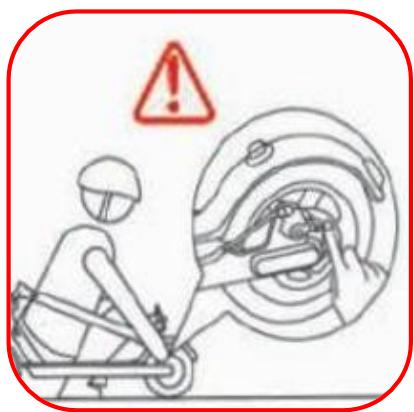
Do not touch the disc brakes after using your scooter, these parts can be hot after a long ride.

Do not go up and down any stairs with only your scooter.
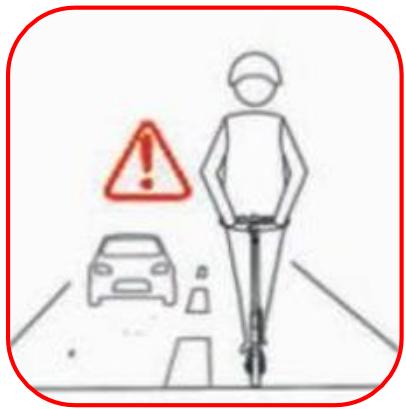
It is forbidden to ride on the road with your electric scooter.
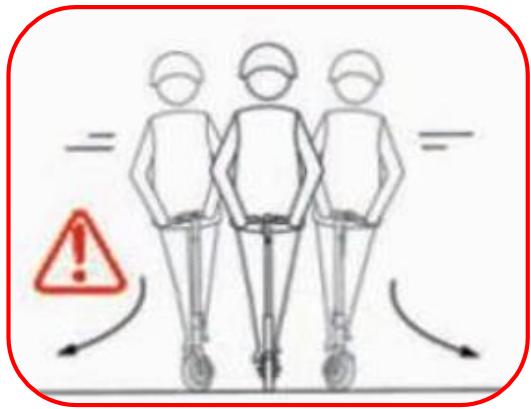
When turning, slow down to avoid any risk of falling.
natural_image
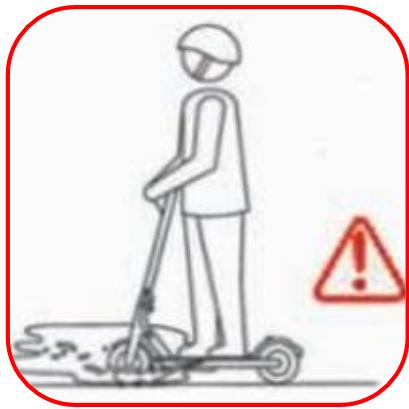
Illustration of a person using a scooter with a warning symbol (no text or labels)Do not ride in a puddle more than 2cm high.
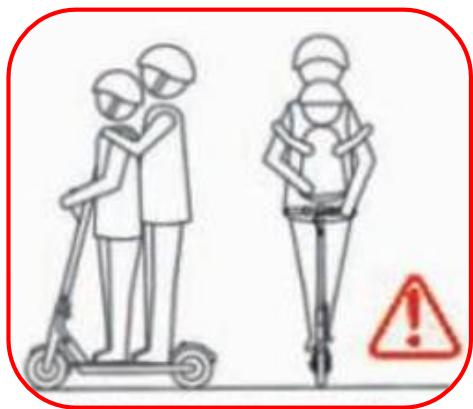
It is forbidden to ride in pairs on your scooter or to ride with a child under the age of 12.
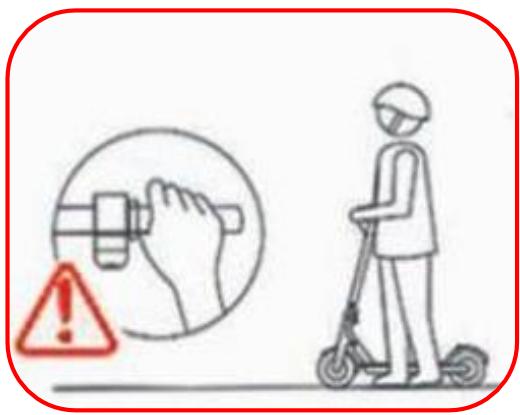
Do not depress the accelerator when you are not on the scooter.
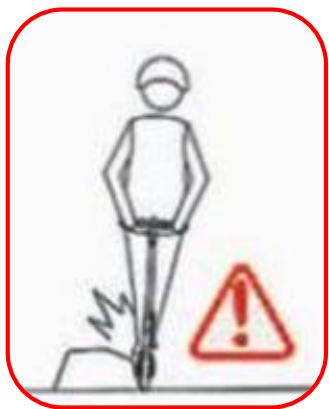
Avoid obstacles when driving
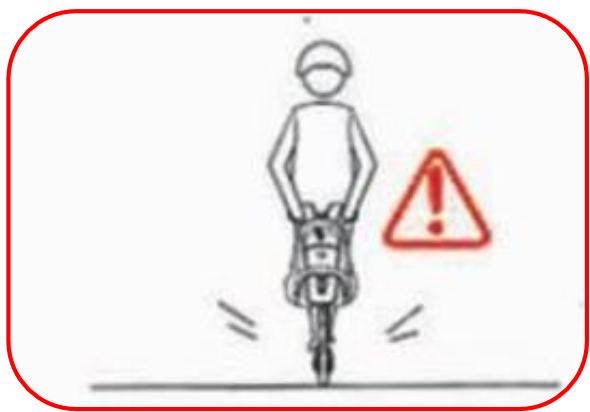
Do not hang anything on your scooter that could affect weight distribution and cause you to fall.
natural_image
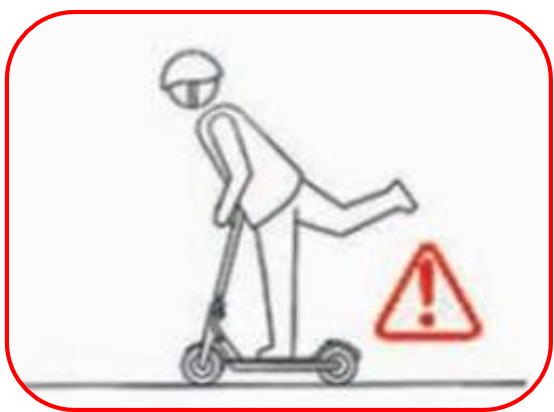
Simple line drawing of a person riding a scooter with a warning sign (no text or symbols)Leave both feet on the tray of your scooter.
The different parts
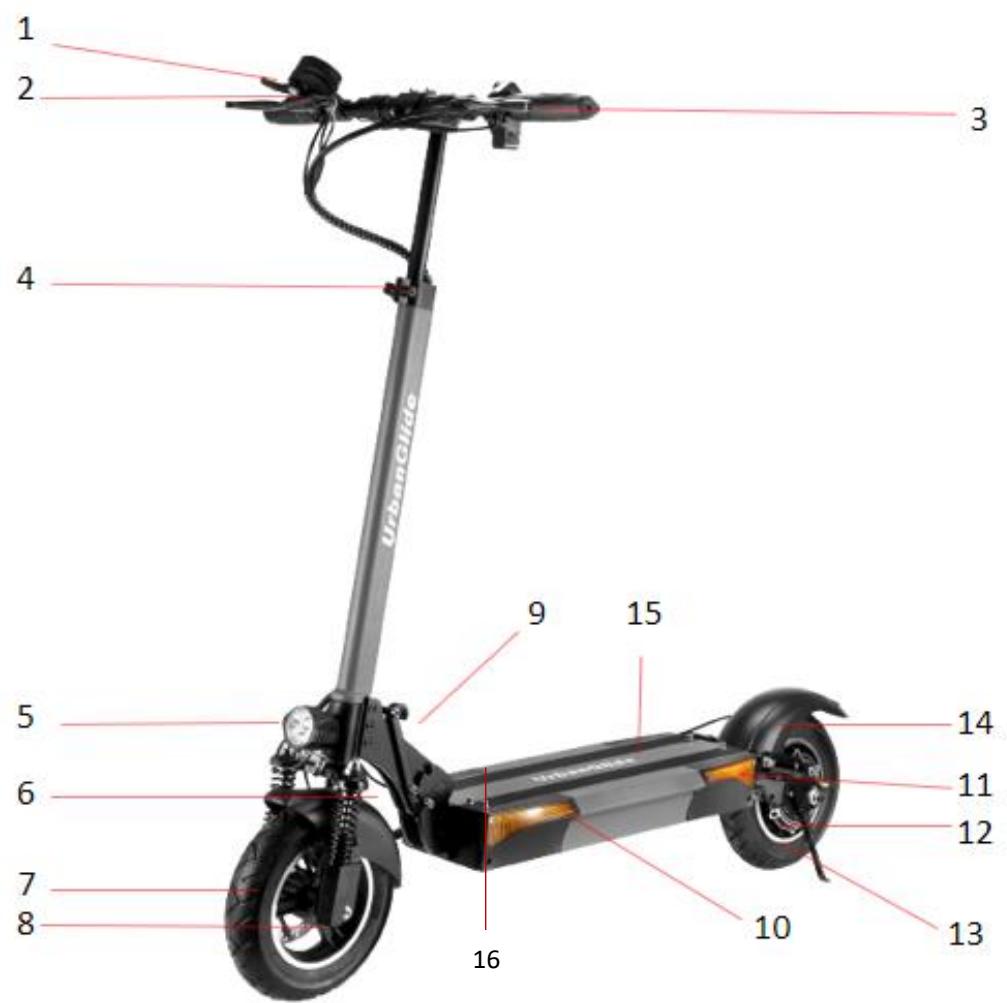
| 1 | Throttle trigger | 6 | Front suspension x2 | 11 | Rear flashing light |
| 2 | Screen | 7 | Front brake pad | 12 | Rear brake pad |
| 3 | Brake handle | 8 | Front wheel | 13 | Rear motorized wheel |
| 4 | Stem adjustment lock | 9 | Folding handle | 14 | Rear mudguard |
| 5 | Front light x2 | 10 | Front flashing light | 15 | Tray |
| 16 | Charging port |
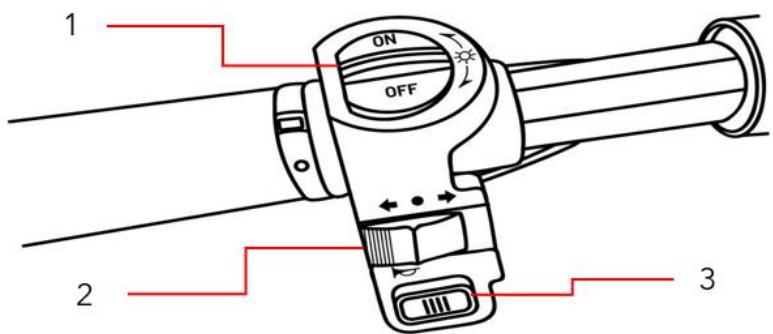
| 1 | Allumer/Eteindre les lumière |
| 2 | Turn signal Right/Left |
| 3 | Front wheel |
Assembly steps
natural_image
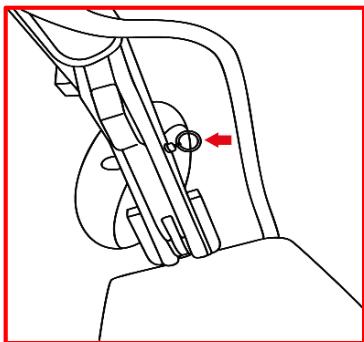
Mechanical linkage diagram showing a lever and pivot point with a red arrow indicating direction (no text or symbols)In order to pull the folding handle, you must remove the safety device by pulling the buckle on the right.

natural_image
Mechanical assembly diagram showing a motor and wheel with a red arrow indicating motion direction (no text or symbols)Then pull the folding handle to unfold your scooter. Straighten the stem, and raise the handlebars up. Once you have straightened to the maximum, return the folding handle to its original position.
natural_image
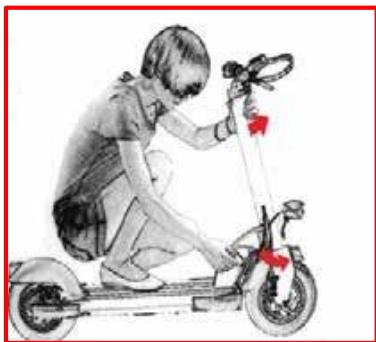
Illustration of a person riding a scooter with a steering wheel (no text or symbols)Then return the safety buckle to its original position, and make sure your handlebars are stable.
natural_image
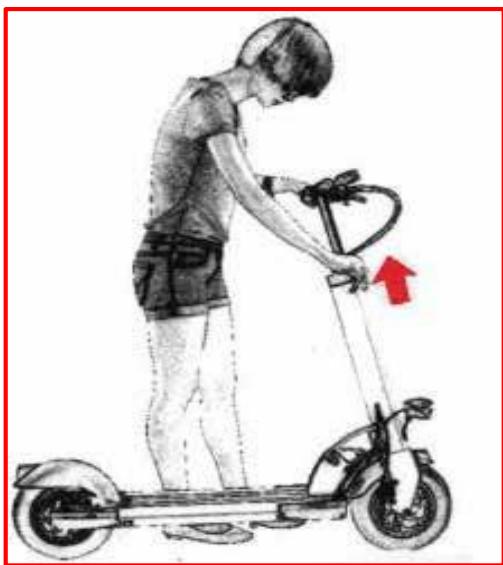
Illustration of a person using an electric scooter with a red arrow indicating motion (no text or symbols)Adjust the size of your handlebars by loosening the clamp on the stem. Be careful not to exceed the height limit indicated. Check that your handlebars are stable and that the clamp is tight.
natural_image
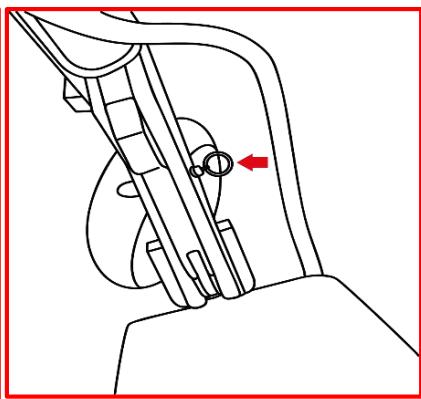
Mechanical assembly diagram showing a lever mechanism with a red arrow indicating direction (no text or symbols present)To fold your scooter, pull on the safety loop.
natural_image
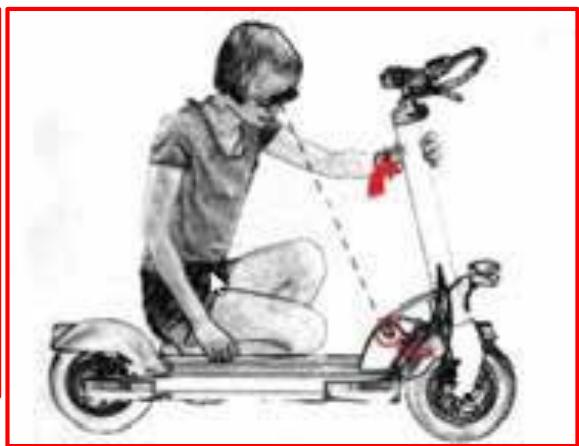
Illustration of a person riding an electric scooter with a steering wheel (no text or symbols)Then pull the folding handle and lower the stem towards the tray of your scooter. Once lowered to its maximum, return the safety buckle to its original position.
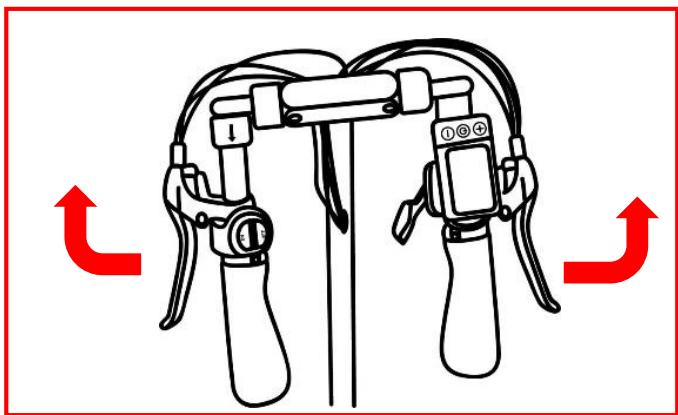
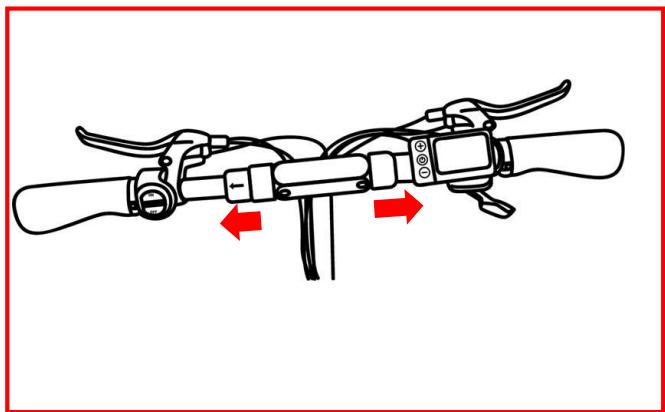
Unfold the handles by simply straightening them. Check that they are stable before using your product.
natural_image
Diagram of a bicycle steering wheel with red directional arrows indicating motion (no text or symbols)To fold them, pull the two parts located on the base of the handles. Lower the handles to the bottom.
Charging and power supply
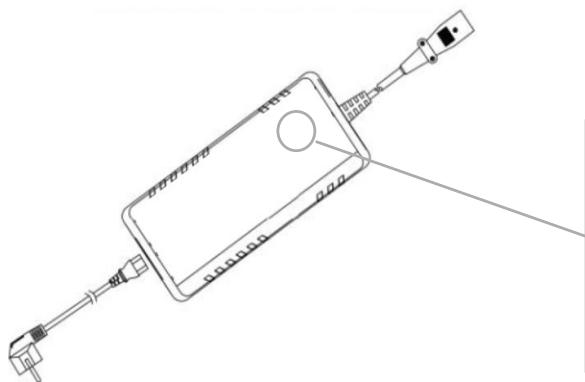
Remove the rubber cap, insert the charger into the charging port on your scooter. Once charged, put the cap back on and make sure it's on and sealed.

When charging your scooter, make sure the charging port is in good condition and that no residue is stuck in it. If it is, clean it with a dry cloth. Use the charger supplied with the product, and only that charger. If you have lost your charger, or it is defective, contact Urbanglide support. Once the charger shows a green light, unplug your product. Do not leave the charger plugged in for too long after charging is complete.
natural_image
Technical line drawing of a device with connectors and a central screen (no text or symbols)
Your device is charging. Please wait until the red LED turns green.

If the LED is green then your device is charged, unplug it and also unplug the charger from its power source.
Foolding system
natural_image
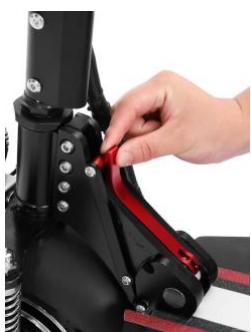
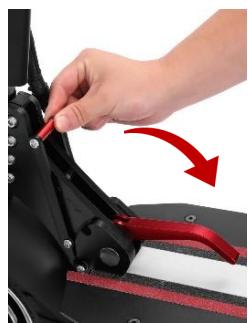
Close-up of a hand adjusting a red ribbon cable on a black athletic equipment (no text or symbols visible)To fold your scooter you will need to grab the red lever and pull it down.
After that simply pull down the lever to fold your scooter.
For unfold just do the opposite of those instruction.
natural_image
Close-up of a hand adjusting a black mechanical component with red arrows indicating motion (no text or symbols visible)Use
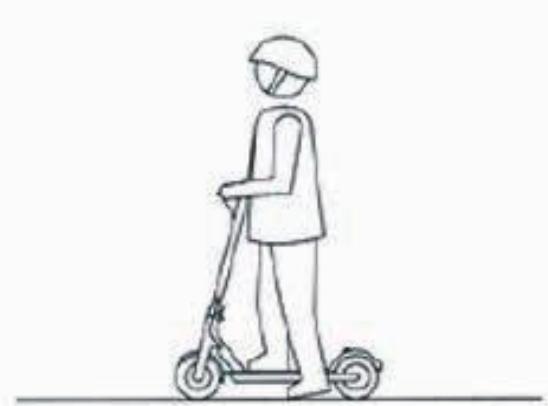
First, turn on your product by pressing the "Power" button located on the handlebars. Check that your battery is charged.
natural_image
Line drawing of a person riding a scooter, viewed from the side (no text or symbols)Place your foot on the deck of your scooter and use your other foot to push forward.
natural_image
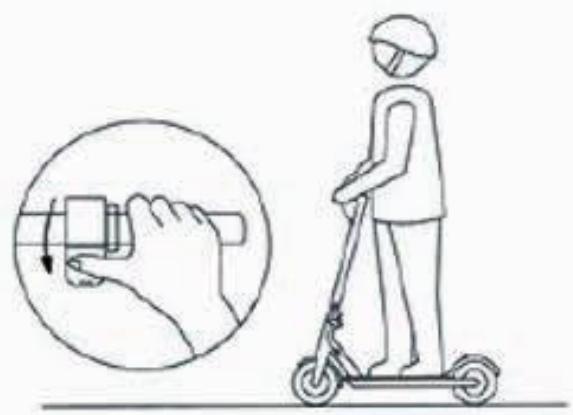
Illustration of a person using a scooter to interact with a hand gesture (no text or symbols present)Gently squeeze the throttle trigger to begin picking up speed.
natural_image
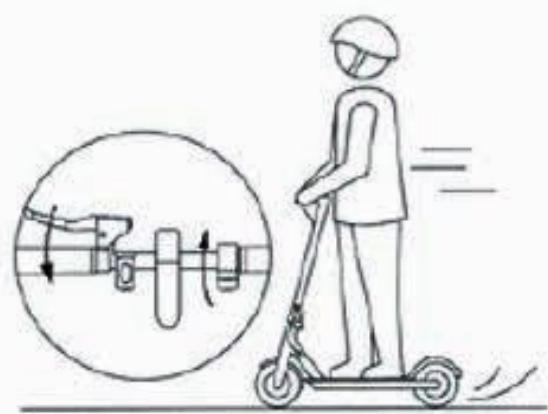
Illustration of a person riding a scooter with motion arrows indicating speed, next to an inset circular diagram showing mechanical components (no text or symbols)To brake, gently squeeze the brake levers on your handlebars.
natural_image
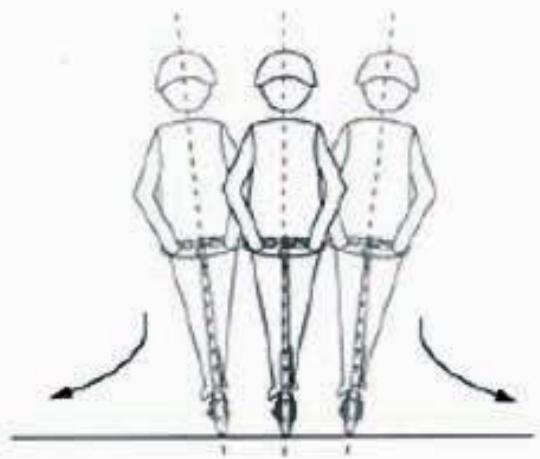
Three human figures in safety gear standing with chains, viewed from the side of a ground line (no text or symbols)When you need to turn, slow down to make your turn safely.
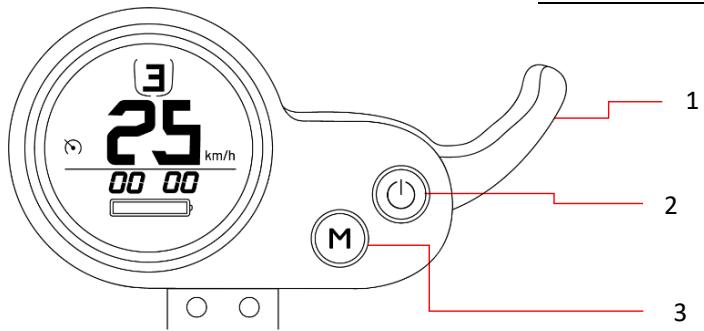
Multifunction screen
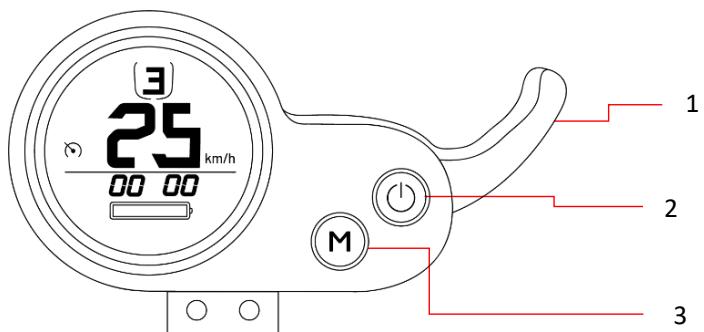
1 Accelerator trigger
2 ON/OFF
3 Speed button
Maintenance
natural_image
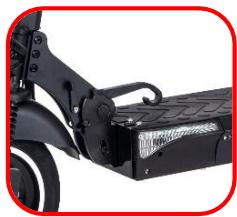
Close-up of a black electric scooter with attached battery pack (no visible text or symbols)Lubrification
The folding system of your scooter needs to be lubricated every 6 months with a neutral non-corrosive oil.
Brake
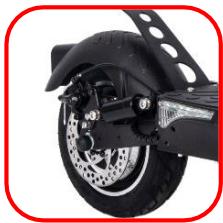
When your brake performance begins to decline, you can adjust the sensitivity of your brake cables.
natural_image
Close-up of a black motorcycle wheel with visible brake and suspension components (no text or symbols)System settings
To enter the settings of your product, press the "ON/OFF" and "MODE" keys on your screen for 5 seconds. After that press the «MODE» button to switch POO parameter.
Caution! If you change all the basic settings, you will change the performance and status of your product. You are advised to change only the settings below:
| Menu | Setting |
| P00 | Wheel diameter setting |
| P01 | Under-voltage setting |
| P02 | Number of pole pairs setting |
| P03 | Speed signal selection |
| P04 | KM / Miles sélection setting |
| P05 | Startup mode0 = Immediate start 1 = Impulse to start |
| P07 | Soft start and hard start setting |
| P08 | Speed limit adjustment in purcentage |
| P09 | Ebs brake strenght adjustment |
| Problem | Possible causes | Solutions |
| Your product is not working. | The battery is not charged | Charge your battery and check that your charger shows a red light. |
| The connection cables are disconnected. | Check that all cables are securely connected and that none of them are damaged. | |
| Your product doesn't work continuously | The battery needs to be recharged | Charge your battery and check that your charger displays a red light correctly. |
| The battery is not fully charged | Check that the motor cable is properly connected. | |
| The battery may need to be replaced. | ||
| Your product has suddenly stopped working. | Overload/Cut | Overloading may cause the product to fail. Please turn off the product, wait 15 seconds, and then turn it back on. |
| A fuse dropped | Start by checking the status of all cables first. | |
| Your product is moving slowly | Brakes are not properly adjusted | Check the condition of the brakes and try to release them. If this does not solve the problem, please contact the after-sales service. |
| The product is overloaded | Check if the user weighs less than the previously recommended weight. Also make sure that no object interferes with the proper functioning of the product. | |
| You use your product in inappropriate conditions | Make sure you are on flat, dry and stable ground. | |
| Wheels and tires are damaged | Check the condition of the product's wheels. |
For any information, contact our after-sales service at the following address:
Https://urbanglide.com/contact/
You will also find many tutorial videos concerning the maintenance of your product on our YouTube channel:
UrbanGlide Channel
Finally, do not hesitate to follow us on our social networks Instagram and Facebook to follow our news.
You can find the latest update of this manual in digital format by logging on to our website:
www.urbanglide.com
(Model section concerned).
The paper version will be given to you on request from our customer service department.
All product names, logos and trademarks are the property of their respective owners. All company, product and service names mentioned in this manual are for identification purposes only. Mention of these names, logos and trademarks is not a recommendation for use.
DECLARATION OF CONFORMITY
We, the undersigned PACT Group, hereby declare that the product.
Model : ECROSS PRO XS
Type : Electric scooter
Function : Electric scooter for individual transportation
Description of product : Electric scooter with 800W motor, 13Ah battery, front, rear and side lights
Manufacturing batch : 102023UREPXSFS
Year of fabrication : 2023
Meets all of the following technical standards and guidelines:
DIRECTIVES
| 2011/65/EU | 2014/30/EU | 2014/35/EU |
STANDARD OF TESTING
| EN ISO 12100 :2010 | EN 55014-1 :2017 | EN 60335-1 :2012+A11 :2014+A13 :2017 |
| EN 60204-1 :2006+A1 :2009+AC :2010 | EN 55014-2 :2015 | EN 62233 :2008 |
| IEC 62321-3-1 :2013 | EN 61000-3-3 :2013 | IEC 60335-1 :2010+A1 :2013+A2 :2016 |
| EN 61000-3-2 :2014 |
All tests were performed by the laboratories listed below:
Shenzhen BCTC Technology Co., Ltd.
BCTC Building & 1-2F, East of B Building, Pengzhou Industrial Park, Fuyuan 1 ^st Road, Qiaotou, Fuyong Street, Bao'an District, She nzhen, Guangdong, China
CONTACT DETAILS OF THE IMPORTER :
PACT GROUP
29 Promenade Michel Simon
93160 Noisy le Grand – France
CONTACT DETAILS OF THE PERSON AUTHORIZED TO EDIT THE TECHNICAL DOCUMENT :
Fung NIM
29 Promenade Michel Simon
93160 Noisy le Grand – France
This declaration is issued under the responsibility of the manufacturer and, if applicable, his agent on 05/10/2023
natural_image
Abstract line drawing with curved and straight lines, no text or symbols presentCompany representative :
PACT GROUP
29 Promenade Michel Simon -
Noisy le Grand France
Maurice Bodokh
CEO
UrbanGlide
CE




- Système de pliage
- Utilisation
- Lubrification
- Réglage système
- Safety and precaution
- • Protective equipment
- - Driver's advice
- • Security advice
- - General use
- • Proper functioning
- • Procedures and driving conditions
- • Usage of the charger
- - Battery
- - Maintenance
- - Transport
- Scooter handling:
- • Use of the product
- - Rebut
- Tips for use
- Assembly steps
- Charging and power supply
- Foolding system
- Use
- Multifunction screen
- Maintenance
- System settings
- UrbanGlide Channel
- DECLARATION OF CONFORMITY
- Shenzhen BCTC Technology Co., Ltd.
- CONTACT DETAILS OF THE IMPORTER :
- CONTACT DETAILS OF THE PERSON AUTHORIZED TO EDIT THE TECHNICAL DOCUMENT :
- UrbanGlide
Brand : URBAN GLIDE
Model : eCross Pro XS
Category : Electric scooter