
CNF 503 E X180C - Refrigerator VALBERG - Free user manual and instructions
Find the device manual for free CNF 503 E X180C VALBERG in PDF.



| Product type | Refrigerator-freezer |
| Brand | VALBERG |
| Model | CNF 503 E X180C |
| Climate class | SN, N, ST, T (+10°C to +43°C) |
| Power supply | 220-240 V ~ 50 Hz |
| Main functions | Super Cool, Super Freeze, Eco Mode, Open door alarm, Demo mode, Digital display with °C/°F toggle |
| Reversible door | Yes, reversible using provided tools |
| Interior lighting | LED (energy class G, professional replacement only) |
| Defrost | Automatic (freezer may require manual defrost if excessive frost) |
| Shelves | Removable glass shelves |
| Vegetable drawer | Yes, removable |
| Freezer drawers | 3 drawers (top, middle, bottom) |
| Door balconies | Small balcony, large balcony, bottle holder |
| Ice cube tray | Yes, included |
| Included accessories | Spare hinges, stoppers, cover, Allen key, etc. for door reversal |
| Control panel | Touchscreen with digital display and selection keys |
| Maintenance | Clean regularly with a soft cloth and mild detergent. Do not use abrasives. |
| Safety | Unplug before cleaning; do not use sharp objects to remove frost; LED lamp replaceable only by a professional. |
| Warranty | 2 years against manufacturing defects (upon presentation of receipt) |
Frequently Asked Questions - CNF 503 E X180C VALBERG
User questions about CNF 503 E X180C VALBERG
0 question about this device. Answer the ones you know or ask your own.
Ask a new question about this device
Download the instructions for your Refrigerator in PDF format for free! Find your manual CNF 503 E X180C - VALBERG and take your electronic device back in hand. On this page are published all the documents necessary for the use of your device. CNF 503 E X180C by VALBERG.
USER MANUAL CNF 503 E X180C VALBERG
Thank you for choosing this VALBERG product. VALBERG products are chosen, tested, and recommended by ELECTRO DEPOT, so you can be sure you are getting a top-quality, easy-to-use product that won't let you down.
We're confident your new device will be a pleasure to use every day!
Welcome to ELECTRO DEPOT.
Table of Contents
| A Product overview | Parts |
| B Product usage | Installing your new appliance Display controls Using your appliance Helpful hints and tips Suggestion of using the appliance |
| C Cleaning and maintenance | Cleaning and maintenance Troubleshooting |
Parts
A Cabinet B Wind channel C Glass shelf D Crisper cover E Fruit & Vegetable Crisper F Upper freezer drawer G Middle freezer drawer H Lower freezer drawer
I Fridge door J Small rack K Fridge gasket L Control panel M Bottle holder N Lower rack O Freezer door P Freezer gasket

NOTE:
- Due to constant development of our products, your refrigerator may be slightly different from this instruction manual, but its functions and usage remain the same.
- To get the best energy efficiency of this product, please place all shelves, drawers on their original position as the illustration above.
Installing your new appliance
Before using the appliance for the first time, you should be aware of the following tips.

Ventilation of appliance
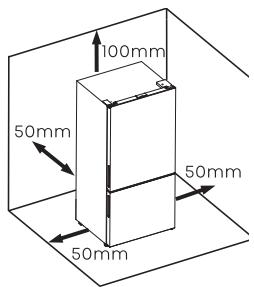
- In order to improve efficiency of the cooling system and save energy, it is necessary to maintain good ventilation around the appliance for the dissipation of heat. For this reason, sufficient clear space should be available around the refrigerator.
Suggest:
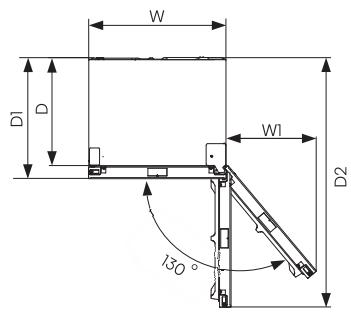
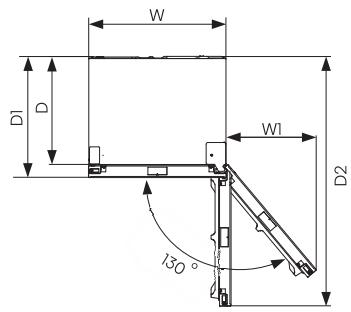
It is advisable to leave at least 50 mm of space from the back to the wall, at least 100 mm from the top, at least 50 mm from the side to the wall, and a clear space upfront to allow the door to open 130°. See the following diagrams.
Relevant information (mm)
| W | W1 | D | D1 | D2 |
| 794 | 520 | 622 | 698 | 1439 |
NOTE:
This appliance performs well in the climate class from SN to ST. It may not work properly if left at a temperature above or below the indicated range for a long period.
| Climateclass | Ambient temperature |
| SN | +10°C to +32°C |
| N | +16°C to +32°C |
| ST | +16°C to +38°C |
| T | +16°C to +43°C |
Place your appliance in a dry area to avoid damage from high moisture. Keep the appliance out of direct sunlight, rain, or frost. Keep the appliance away from heat sources such as stoves, fires, or heaters.
Leveling the appliance
- For proper leveling and air circulation in the lower rear section of the appliance, the bottom feet may need to be adjusted. You can adjust them manually by hand or using a suitable spanner.
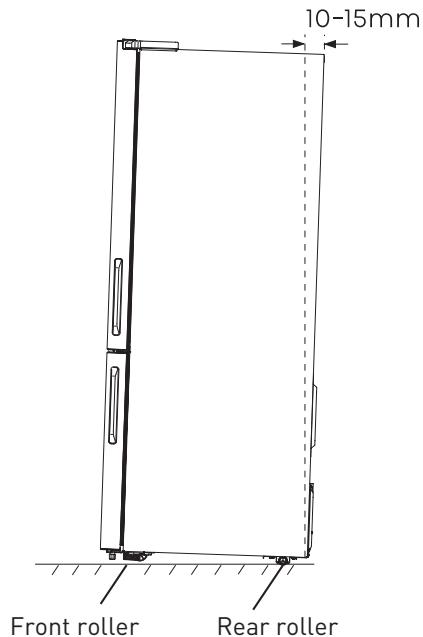
- To allow the doors to self-close, tilt the top backwards by about 15 mm by turning the adjustable feet.
- Whenever you want to move the appliance, remember to turn the feet back up so that the appliance can roll freely. Reinstall the appliance when relocating.
Adjustable bottom feet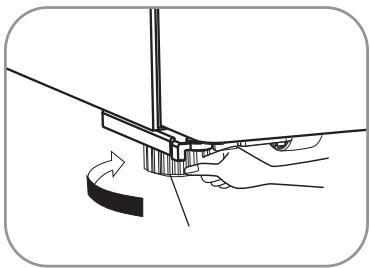

WARNING!
- For proper installation, this refrigerator must be placed on a level surface of hard material that is the same height as the rest of the flooring. This surface should be strong enough to support a fully loaded refrigerator.
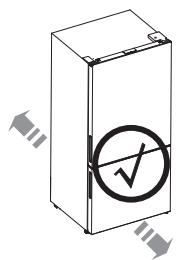
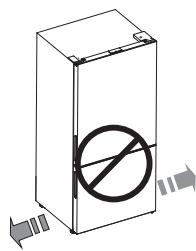
- The rollers, which are not castors, should only be used for forward or backward movement. Moving the refrigerator sideways may damage your floor and the rollers. It is advisable to adjust both bottom feet until they touch the ground after placing the refrigerator.
Reversing the door
The side at which the door opens can be changed from the right side (as supplied) to the left side if required.
Tools you will need:
| Not provided | |
| Wrench/8mm | Cross screwdriver |
| Thin-blade screwdriver | Monkey wrench |
B Product usage
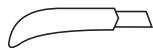
Thin blade (utility knife e.g.)
Additional parts (in the plastic bag)
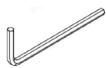
Allen wrench/4mm
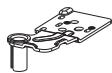
Upper hinge-left
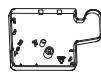
Upper hinge cover-left

Screw hole cover right
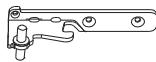
Middle hinge-left

Left stop block for fridge door
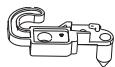
Left door stopper for fridge door
Additional parts (in the plastic bag)

Left stop block for freezer door
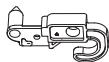
Left door stopper for freezer door
WARNING!
When reversing the door, the appliance must not be connected to the power. Ensure that the plug is removed from the power socket.
NOTE:
If required, you may lay the refrigerator on its back in order to gain access to the base, you should rest it on soft foam packaging or similar material to avoid damaging the backboard of the refrigerator.
B Product usage
To reverse the door, the following steps generally recommended.
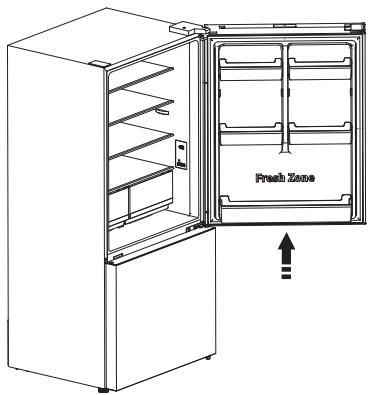
- Stand the refrigerator upright. Open the door to take out all door racks (to avoid damage) and then close the door.
CAUTION!
Please slightly squeeze the door rack from two sides toward center and inside of door rack, and then move it upward when taking out the upper rack and lower rack.
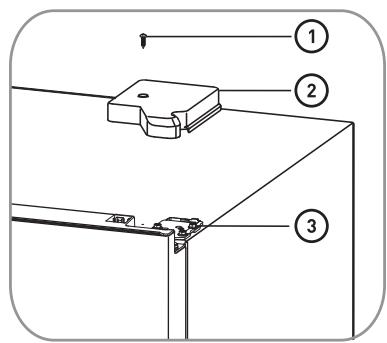
- With the door closed, unscrew ① and remove upper hinge cover-right ② from the righttop corner of cabinet. Remove the reed switch ④ and the humidity sensor unit ⑤ from the cabinet and upper hinge cover-right ② , Install them on the upper hinge cover-left [provided in the plastic accessory bag]. Unscrew the three screws ③ which are used for fixing the upper hinge-right (see the picture below).
B Product usage
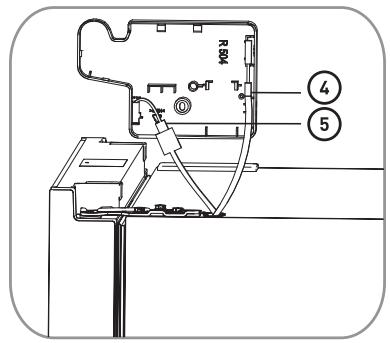
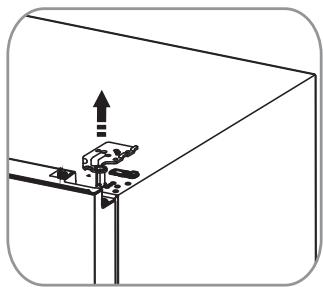
- Remove the upper hinge-right (please hold upper door by hand when installing).
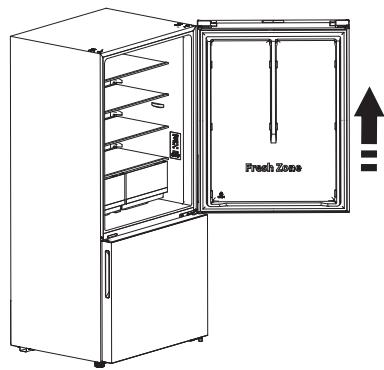
- Remove the upper door from the middle hinge by carefully lifting the door straight up. Then place the upper door on a smooth surface with its panel upwards.
B Product usage
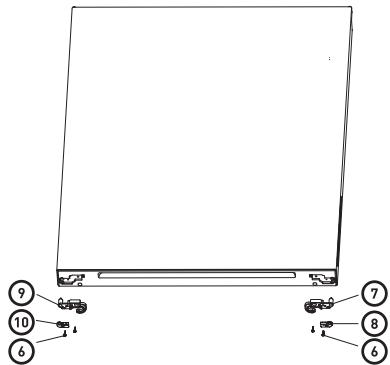
- Unscrew the two screws ⑥ , then take out the right door stopper for fridge door ⑦ and the right stopper block for fridge door ⑧ , Install the replacement left door stopper ⑨ and left stopper block ⑩ (provided in the plastic accessory bag) to the left side with screws ⑥ . Keep ⑦ and ⑧ with the appliance for future reference.
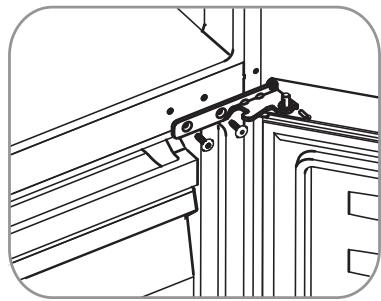
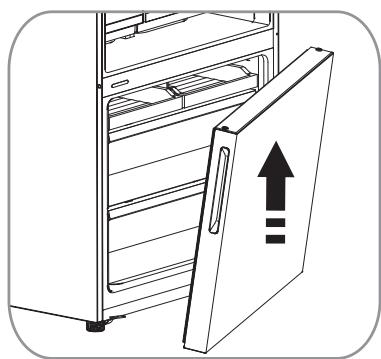
- Use the Allen wrench (provided in the plastic accessory bag) to unscrew the screws used to fix the middle hinge-right and remove middle hinge-right. Then remove the lower door.
B Product usage
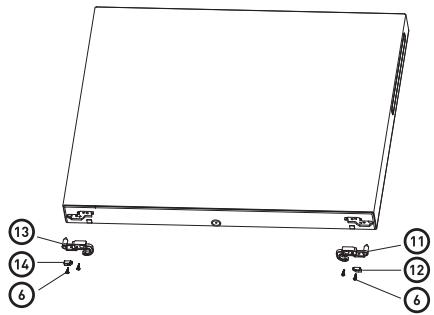
- Place the lower door on a smooth surface with its panel facing up. Unscrew the two screws ⑥, then remove the right door stopper for the freezer door ① and the right stopper block for the freezer door ⑫. Install the replacement left door stopper ⑬ and left stopper block ⑭ (provided in the plastic accessory bag) on the left side using screws ⑤. Keep ⑪ and ⑫ with the appliance for future reference.
- Install the screw hole cover on the right (provided in the plastic accessory bag) at the top-right corner of the cabinet. Remove the screw hole cover on the left from the top-left corner of the cabinet using the thin-blade screwdriver, and place the left screw hole cover and the upper hinge on the right into the plastic accessory bag for future reference.
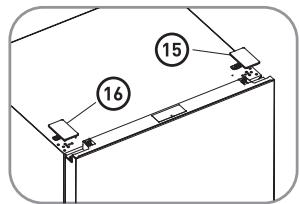
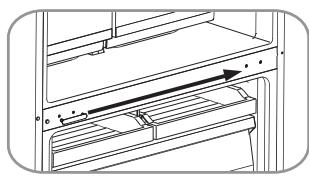
- Change the screw hole covers and screw on the middle cover plate from left to right (as shown in the figure below).
B Product usage
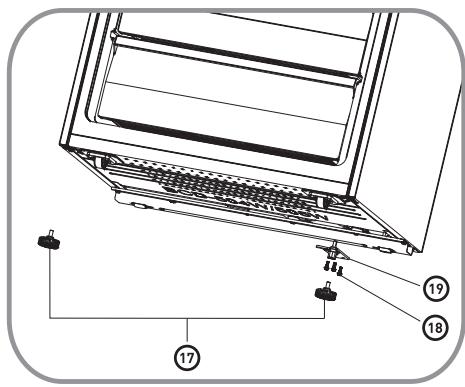
- Lay the refrigerator on its back. Remove the adjustable bottom feet part ⑦, then remove the 3 self-tapping screws ⑧ from the lower hinge on the right ⑨. Unscrew the lower hinge axis on the right, then install it on the reverse hole site and tighten it into position (changing it into the lower hinge on the left). Install the lower hinge on the left at the bottom-left corner of the cabinet, then fix it with 3 screws. Finally, install the adjustable bottom feet part ⑩ on the bottom-left and bottom-right corners of the cabinet.
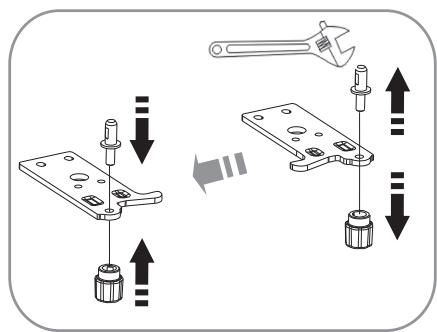
- Stand the refrigerator upright and carefully slot the lower door onto the lower hinge pin on the left, holding it in position. Install the middle hinge on the left (provided in the plastic accessory bag) and ensure the lower door is in place.
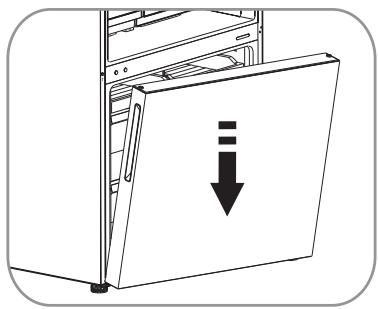
B Product usage
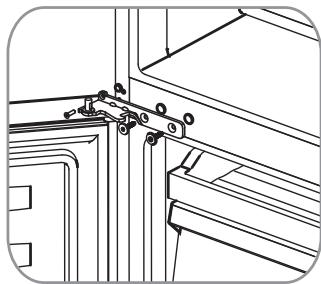
- Carefully slot the upper door onto the middle hinge pin and hold it in position. Move the upper door to an appropriate position, adjust the upper hinge on the left (provided in the plastic accessory bag) and the upper door, then fit the hinge pin into the hinge hole at the top of the upper door to secure it in place. Then fix the upper hinge part with screws (please carefully hold the upper door by hand when installing).
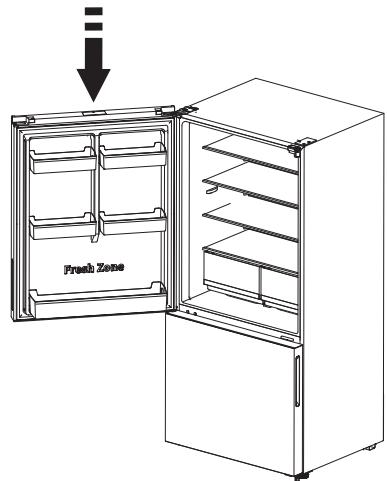
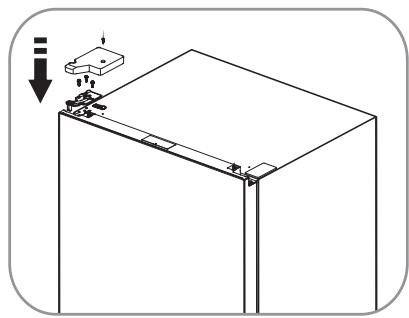
- Assemble the upper hinge cover on the left to match the hinge. Install the door racks back to their original position. Keep the upper hinge cover on the right with the appliance for future reference.
Display controls
- Use your appliance according to the following control regulations. Your appliance has the corresponding functions and modes as shown on the display panels in the pictures below.
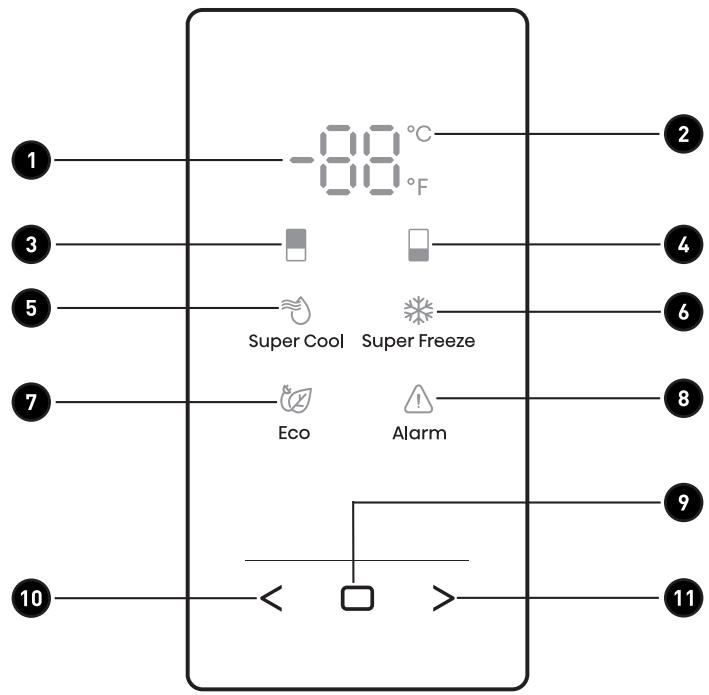
1 Temperature area 2 Celsius/Fahrenheit indicator 3 Fridge compartment icon 4 Freezer compartment icon 5 Super cool icon 6 Super freeze icon
7 Eco icon 8 Alarm icon 9 Confirm control Function selector control: Left control Function selector control: Right control
B Product usage

NOTE:
- Once the appliance is powered on, all icons on the display panel will be lit for 3 seconds with a buzzer sound.
- All the icons will go off if all keys are untouched and all doors are closed for one minute. The control panel will light up when the door is open or you touch any button.
- Setting the refrigerator running at high temperature will accelerate food decomposition. For optimum food preservation, we recommend that when starting the refrigerator for the first time, the temperature of the fridge is set to 4°C (39°F), and that of the freezer to -18°C (0°F).

CAUTION!
The temperature only means the average temperature of the whole refrigerator cabinet. Temperatures inside each compartment may vary from those displayed on the panel, depending on how much food is stored and where the refrigerator is placed. In addition, the actual temperature from higher compartment and lower compartment will be different.

"Switching Celsius and Fahrenheit"
- Press "<" or ">" repeatedly until the Celsius/Fahrenheit Indicator "°C" or "°F" blinks.
- Press the Confirm Control "□" for the first time, and "°C" or "°F" will be always on. After that, each time you press the Confirm Control "□", the temperature will be switched between °C and °F, and the temperature setting value of the corresponding unit will be displayed in the temperature area.

"Fridge temperature control"
- Press "<" or ">" repeatedly until the Fridge icon "□" blinks.
- Press the Confirm Control "□" for the first time, and the Fridge icon "□" will be always on. After that, press the Confirm Control "□" repeatedly to cycle through the available temperature settings, from 8°C to 2°C if you have set temperature type to Celsius.
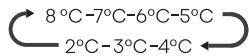
If you have set temperature type to Fahrenheit, the temperature settings cycle will be from 46°F to 36°F.


NOTE: Each press of the button, the temperature drops one degree.
B Product usage

"Freezer temperature control"
- Press " < " or " > " repeatedly until the Freezer icon " □ " blinks.
- Press the Confirm Control " □ " for the first time, and the Freezer icon " □ " will be always on. After that, press the Confirm Control " □ " repeatedly to cycle through the available temperature settings, from -14°C to -24°C if you have set temperature type to Celsius.

If you have set temperature type to Fahrenheit, the temperature settings cycle will be from 7°F to -11°F.
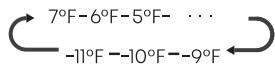
NOTE: Each press of the button, the temperature drops one degree.

"Super Cool"
The Super Cool feature helps to keep food stored in the refrigerator at the setting temperature during periods of high usage, large grocery loads, or temporarily warm room temperatures. The Super Cool feature lowers the temperature in the fridge compartment to 2°C (36°F) to cool food.
- Press " < " or " > " repeatedly until the Super Cool icon " ◯ " blinks.
- Press the Confirm Control "□" to turn the Super Cool function on or off. When the Super Cool function is turned on, the " ≈ " icon lights.
- When setting fridge temperature, the Super Cool function will turn off and the temperature setting will revert back to the previous setting.
NOTE: Super Cool will automatically turn off after 6 hours.

"Super Freeze"
This Super Freeze feature helps to keep the food stored in the freezer as the setting temperature during periods of high usage, large grocery loads, or temporarily warm room temperatures. The Super Freeze feature lowers the temperature in the freezer compartment to -24°C (-11°F) to freeze the food faster.
- Press " < " or " > " repeatedly until the Super Freeze icon " 柴 " blinks.
- Press the Confirm Control "□" to turn the Super Freeze function on or off. When the Super Freeze function is turned on, the " icon lights.
- When setting freezer temperature, the Super Freeze function will turn off and the temperature setting will revert back to the previous setting.
NOTE: Super Freeze will automatically turn off after 52 hours.
When selecting the Super Freeze function, ensure there are no bottled or canned drinks (especially carbonated drinks) in the freezer compartment. Bottles and cans may explode.

"Eco"
The Eco feature makes the refrigerator work in an energy saving mode which is useful for reducing energy consumption when you are away.
- Press < or > repeatedly until the Eco icon blinks.
- Press the Confirm Control "□" to turn the Eco function on or off. When the Eco function is turned on, the "☑" icon lights.
- When setting fridge or freezer temperature, the Eco function will turn off and the temperature setting will revert back to the previous setting.

NOTE: When the Eco function is on, the temperature of fridge is automatically switched to 6°C (43°F) and the temperature of freezer is automatically switched to -17°C (1°F).

"Door Open Alarm"
If the fridge door is opened for longer than 2 minutes, the control panel will display "dr", the "△" icon will blink and the buzzer will sound 3 times every minute for 8 minutes.
Pressing and holding "□" and ">" buttons at the same time for three seconds during door alarm, the "△" icon will be on and buzzing will stop. Closing the fridge door, the "△" icon will go off and buzzing will stop.
"Demo Mode"
Demo mode is for store display, and it prevents the refrigerator from generating cool air. In this Cooling Off Mode, the refrigerator may seem like it is working but it will not make cool air. If you enter the Demo mode, the temperature area will show "OF". To switch off Demo mode, press and hold << and >> buttons at the same time for 5 seconds and the buzzer gave a long sound.
| Fridge setting | Freezer setting | |
| Thermostat setting for ambient T°C: COLD ≈ +16°C (±4°C) | 4°C | -19°C |
| Thermostat setting forambient T°C: NORMAL ≈ +24°C (±4°C) | 4°C | -19°C |
| Thermostat setting for ambient T°C: HOT ≈ +32°C (±4°C) | 4°C | -19°C |
Using your appliance
This section tells you how to use most of the useful features. We recommend that you read through them carefully before using the appliance.
Door rack
- It is suitable for the storage of canned liquid, bottled drinks, and packed food, etc. Do not place too many heavy things in the racks.
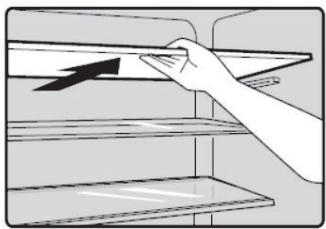
Shelf in refrigerator chamber
There are shelves in the refrigerator chamber, and they can be taken out to be cleaned.
Crisper in refrigerator chamber
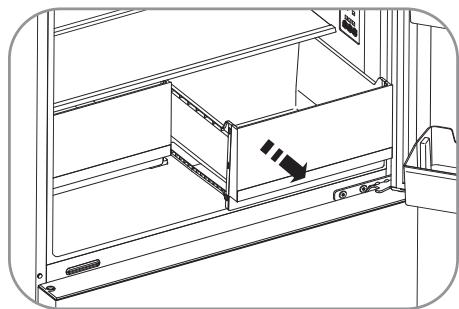
- The crisper is suitable for storage of vegetables and fruit, etc.
- First, pull the crisper out level. Second, tip it up, then you can take out the crisper. According to the opposite sequence, you can position the crisper correctly.
B. Product usage
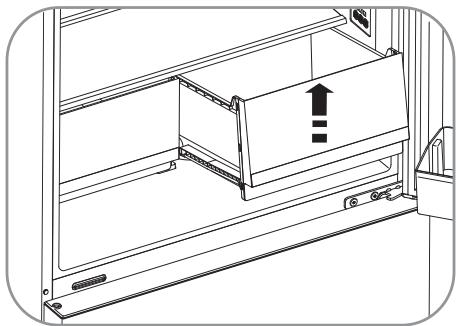
Freezer chamber
- The freezer chamber is suitable for storage of foods required to be frozen, such as meat and ice.
CAUTION!
- Never close the freezer door while the drawers or installation bracket are extended. It may damage the unit.
- Ensure that drink bottles are not left in the freezer for a longer time than needed, as freezing liquid may cause the bottle to break.
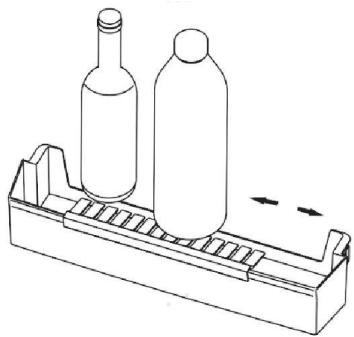
Bottle holder
- The bottle holder can be used to fix the bottle. You can place it on the small or lower door rack and slide it to the left or right as you prefer. It is advisable to put tall bottles or glass bottles in the rack with the bottle holder.
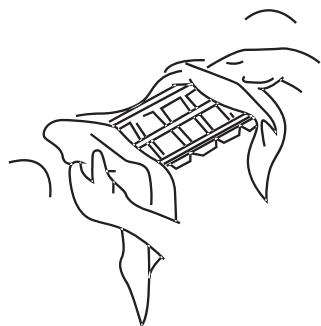
Ice cube tray
- It is used to make ice cubes. To make ice cubes, fill water into the ice cube trays, and the water level shall not exceed the top line (ideally eighty percent of the ice tray volume). Place the tray into the freezer drawer and wait at least two hours for the ice cubes to form. After the cubes are formed, gently twist the tray to separate the cubes from the tray.
Helpful hints and tips
Energy saving tips
We recommend that you follow the tips below to save energy.
- Try to avoid keeping the door open for long periods in order to conserve energy.
- Ensure the appliance is away from any sources of heat (direct sunlight, electric oven, or cooker, etc.).
- Don't set the temperature colder than necessary.
- Don't store warm food or evaporating liquid in the appliance.
- Place the appliance in a well-ventilated, humidity-free room. Please refer to the "Installing Your New Appliance" chapter.
- The description of the appliance diagram shows the correct combination for the drawers, crisper, and shelves. Do not adjust the combination, as this is designed to be the most energy-efficient configuration.
Hints for fresh food refrigeration
- Do not place hot food directly into the refrigerator or freezer. The internal temperature will increase, resulting in the compressor having to work harder and consume more energy.
- Cover or wrap the food, particularly if it has a strong flavor.
- Place food properly so that air can circulate freely around it.
Hints for refrigeration
- Meat (All Types): Wrap in polythene food wrap and place on the glass shelf above the vegetable drawer. Always follow food storage times and use-by dates suggested by manufacturers. Cooked food, cold dishes, etc.: They should be covered and may be placed on any shelf.
- Fruit and vegetables:
- They should be stored in the special drawer provided. Butter and cheese: Should be wrapped in airtight foil or plastic film wrap.
- Milk bottles:
- Should have a lid and be stored in the door racks.
B Product usage
Hints for freezing
- When first starting up or after a period out of use, let the appliance run at least 2 hours on the higher settings before putting food in the compartment.
- Prepare food in small portions to enable it to be rapidly and completely frozen and make it possible to subsequently thaw only the quantity required.
- Wrap up the food in aluminum foil or polyethylene food wraps which are airtight.
- Do not allow fresh, unfrozen food to touch the food which is already frozen to avoid partial defrosting. It is recommended to label and date each frozen package in order to keep track of the storage time.
Hints for fresh food refrigeration
- Ensure that frozen food has been stored correctly by the food retailer. Once defrosted, food will deteriorate rapidly and should not be re-frozen.
- Do not exceed the storage period indicated by the food manufacturer.
Switching off your appliance
- If the appliance needs to be switched off for an extended period, the following steps should be taken to prevent mould on the appliance.
- Remove all food.
- Remove the power plug from the mains socket.
- Clean and dry the interior thoroughly.
- Ensure that all the doors are wedged open slightly to allow air to circulate.
Suggestion of using the appliance
To avoid contamination of food, please respect the following instructions
- Opening the door for long periods can cause a significant increase of the temperature in the compartments of the appliance.
- Clean regularly surfaces that can come in contact with food and accessible drainage systems.
- Store raw meat and fish in suitable containers in the refrigerator, so that it is not in contact with or drip onto other food.
- Two-star frozen-food compartments are suitable for storing pre-frozen food, storing or making ice cream and making ice cubes. One-, two- and three-star compartments are not suitable for the freezing of fresh food.
| Order | Compartmentstype | Target storagetemp. [°C] | Appropriate food |
| 1 | Fridge | +2 ~ +8 | Eggs, cooked food, packaged food, fruits and vegetables, dairy products, cakes, drinks and other foods which are not suitable for freezing. |
| 2 | [***]* - Freezer | ≤ -18 | Seafood (fish, shrimp, shellfish), freshwater aquatic products and meat products (recommended for 3 months, the longer the storage time, the worse the taste and nutrition), suitable for frozen fresh food. |
| 3 | *** - Freezer | ≤ -18 | Seafood (fish, shrimp, shellfish), freshwater aquatic products and meat products (recommended for 3 months, the longer the storage time, the worse the taste and nutrition), are not suitable for frozen fresh food. |
| 4 | Wine | +5 ~ +20 | Red wine, white wine, sparkling wine etc. |
| 5 | ** - Freezer | ≤ -12 | Seafood (fish, shrimp, shellfish), freshwater aquatic products and meat products (recommended for 2 months, the longer the storage time, the worse the taste and nutrition), are not suitable for frozen fresh food. |
| 6 | * - Freezer | ≤ -6 | Seafood (fish, shrimp, shellfish), freshwater aquatic products and meat products (recommended for 1 month, the longer the storage time, the worse the taste and nutrition), are not suitable for frozen fresh food. |
| 7 | 0 - star | -6 ~ 0 | Fresh pork, beef, fish, chicken, some packaged processed foods, etc. (Recommended to eat within the same day, preferably not later than 3 days). Partially packed/wrapped up encapsulated processed foods (non-freezeable foods). |
| 8 | chill | -2 ~ +3 | Fresh/frozen pork, beef, chicken, freshwater aquatic products, etc. (7 days below 0°C and above 0°C is recommended for consumption within that day, preferably no more than 2 days). Seafood (less than 0°C for 15 days, it is not recommended to store above 0°C). |
9
Fresh Food
0~+4
Fresh pork, beef, fish, chicken, cooked food, etc. (Recommended to eat within the same day, preferably no more than 3 days).
NOTE:
Please store different foods according to the compartments or target storage temperature of your purchased products.
- If the refrigerating appliance is left empty for long periods, switch off, defrost, clean, dry, and leave the door open to prevent mould developing within the appliance.
WARNING!
Food needs to be packed in bags before putting into the refrigerator, and liquids need to be packed in bottles or capped containers to avoid the problem that the product design structure is not easy to clean.
Cleaning and maintenance
- For hygienic reasons the appliance (including exterior and interior accessories) should be cleaned regularly (at least every two months).
WARNING!
- The appliance must not be connected to the mains during cleaning.
- Danger of electrical shock! Before cleaning switch the appliance off and remove the plug from the mains socket.
Exterior cleaning
To maintain good appearance of your appliance, you should clean it regularly.
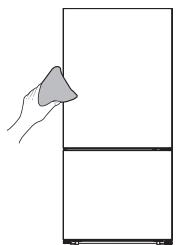
- Wipe the digital panel and display panel with a clean, soft cloth.
- Spray water onto the cleaning cloth instead of spraying directly on the surface of the appliance. This helps ensure an even distribution of moisture to the surface.
- Clean the doors, handles and cabinet surfaces with a mild detergent and then wipe dry with a soft cloth.

WARNING!
- Do not use sharp objects as they are likely to scratch the surface.
- Do not use thinner, car detergent, chlorox, ethereal oil, abrasive cleansers or organic solvent such as benzene for cleaning. They may damage the surface of the appliance and may cause fire.
Interior cleaning
- You should clean the appliance interior regularly. It will be easier to clean when food stocks are low. You can remove the drawers and shelves for a more thorough clean.
- Wipe the inside of the freezer with a weak solution of bicarbonate of soda, and then rinse with warm water using a wrung-out sponge or cloth. Wipe completely dry before replacing the shelves and baskets.
- Thoroughly dry all surfaces and removable parts before putting them back into place.
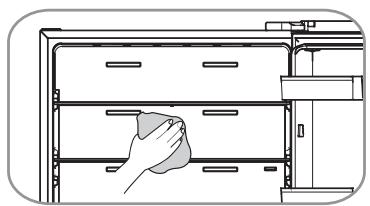
- Although this appliance automatically defrosts, a layer of frost may occur on the freezer compartment's interior walls if the freezer door is opened frequently or kept open too long.
- If the frost is too thick, choose a time when the freezer is nearly empty and proceed as follows:
- Remove existing food and accessories baskets, unplug the appliance from the mains power and leave the doors open. Ventilate the room thoroughly to accelerate the process.
- When defrosting is completed, clean your freezer as described above.

WARNING!
- Do not use sharp objects to remove frost from the freezer compartment.
- Only after the interior is completely dry should the appliance be switched back on and plugged back into the mains socket.
Door seals cleaning
- Take care to keep door seals clean. Sticky food and drinks can cause seals to stick to the cabinet and tear when you open the door. Wash the seals with a mild detergent and warm water. Rinse and dry them thoroughly after cleaning.
Replacing the LED light
- This product contains a light source of energy efficiency class G. Light source in this product can only be replaced by qualified professionals.
- Please contact after-sales service if the light source fails.
- The light source shall be removed at the end of the product's useful life, with sorting and recycling done separately.
- To replace the LED light, the below steps can be followed:
- Unplug your appliance.
- Hold a thin blade, insert it into the gap at either end of the lampshade, and tilt one end of the lampshade.
- Move the blade insertion position to the other end and tilt the lampshade section by section until the lampshade falls off.
- Press the elastic snap of the light box with a thin-blade screwdriver, and pull one end of the elastic snap of the LED light until the LED light is detached, then pull out the connecting terminal of the LED light.
- Replace the LED light, and install it and the lampshade correctly in place.
WARNING!
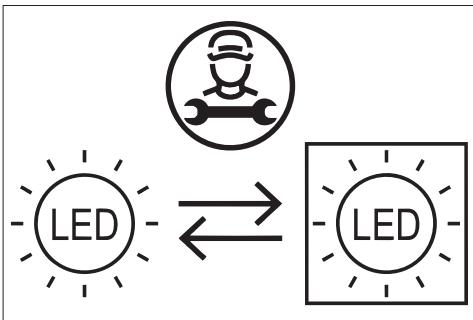
The LED light should be replaced by a professional. If the LED light is damaged, contact the customer helpline for assistance.
Troubleshooting
If you experience a problem with your appliance or are concerned that the appliance is not functioning correctly, you can carry out some easy checks before calling for service, please see below.

WARNING!
Don't try to repair the appliance yourself. If the problem persists after you have made the checks mentioned below, contact a qualified electrician, authorized service engineer, or the shop where you purchased the product.
Problem
Appliance is not working correctly
Possible cause & Solution
- Check whether the power cord is plugged into the power outlet properly.
- Check the fuse or circuit of your power supply, replace if necessary.
- The ambient temperature is too low. Try setting the chamber temperature to a colder level to solve this problem.
- It is normal that the refrigerator is not operating during the automatic defrost cycle, or for a short time after the appliance is switched on to protect the compressor.
| Problem | Possible cause & Solution |
| Odours from the compartments | The interior may need to be cleaned. Some food, containers or wrapping cause odours. |
| Noise from the appliance | The sounds below are quite normal: • Compressor running noises. • Air movement noise from the small fan motor in the freezer compartment or other compartments. • Gurgling sound similar to water boiling. Popping noise during automatic defrosting. • Clicking noise before the compressor starts. Other unusual noises are due to the reasons below and may need you to check and take action: • The cabinet is not level. • The back of appliance touches the wall. • Bottles or containers knocking against each other. |
| The motor runs continuously | It is normal to frequently hear the sound of the motor, it will need to run more when in following circumstances: • Temperature setting is set colder than necessary. • Large quantity of warm food has recently been stored within the appliance. • The temperature outside the appliance is too high. • Doors are kept open too long or too often. • After your installing the appliance or it has been switched off for a long time. |
| A layer of frost occurs in the compartment | Check that the air outlets are not blocked by food and ensure food is placed within the appliance to allow sufficient ventilation. Ensure the door can be fully closed. To remove the frost, please refer to the cleaning and care chapter. |
| Temperature inside is too warm | You may have left the doors open too long or too frequently; • Or the doors are kept open by some obstacle; • Or the appliance is located with insufficient clearance at the sides, back and top. |
| Temperature inside is too cold | Increase the temperature by following the “Display controls” chapter. |
| Doors can’t be closed easily | Check whether the top of the refrigerator is tilted back by 10-15mm to allow the doors to self close, or if something inside is preventing the doors from closing. |
| Water drips on the floor | The water pan (located at the rear bottom of the cabinet) may not be properly leveled, or the draining spout underneath the top of the compressor depot may not be properly positioned to direct water into this pan, or the water spout is blocked, or the water pipe is not fully inserted into the connector. ·You may need to pull the refrigerator away from the wall to check the pan, spout nd connector. ·Check if the refrigerator is power-off for a long time, this may cause the ice in the bucket to melt into water, and flow to the floor. |
| The light is not working | ·The LED light may be damaged. Refer to replace LED lights in cleaning and care chapter. ·The control system has disabled the lights due to the door being kept open too long, close and reopen the door to reactivate the lights. |
| You can hear water bubbling in the refrigerator | ·This is normal. The bubbling comes from the refrigerant coolant liquid circulating through the refrigerator. |

Thank you!
Required information [mm]
| L | L1 | P | P1 | P2 |
| 794 | 520 | 622 | 698 | 1439 |
NOTE:
Freezer compartment
This product is guaranteed against faults caused by defects in manufacturing or the materials used for a period of two years, starting from the date of purchase.* This warranty does not cover defects or damage caused by failure to install the device correctly, incorrect use of the product, or excessive wear and tear.
*Proof of purchase required.
WARRANTY CONDITIONS
- TABLE OF CONTENTS
- PARTS
- NOTE
- INSTALLING YOUR NEW APPLIANCE
- VENTILATION OF APPLIANCE
- SUGGEST
- LEVELING THE APPLIANCE
- WARNING
- REVERSING THE DOOR
- TOOLS YOU WILL NEED
- B PRODUCT USAGE
- ADDITIONAL PARTS (IN THE PLASTIC BAG)
- CAUTION
- DISPLAY CONTROLS
- SWITCHING CELSIUS AND FAHRENHEIT
- FRIDGE TEMPERATURE CONTROL
- FREEZER TEMPERATURE CONTROL
- SUPER COOL
- SUPER FREEZE
- ECO
- DOOR OPEN ALARM
- DEMO MODE
- USING YOUR APPLIANCE
- DOOR RACK
- SHELF IN REFRIGERATOR CHAMBER
- CRISPER IN REFRIGERATOR CHAMBER
- PRODUCT USAGE
- FREEZER CHAMBER
- BOTTLE HOLDER
- ICE CUBE TRAY
- HELPFUL HINTS AND TIPS
- ENERGY SAVING TIPS
- HINTS FOR FRESH FOOD REFRIGERATION
- HINTS FOR REFRIGERATION
- HINTS FOR FREEZING
- SWITCHING OFF YOUR APPLIANCE
- SUGGESTION OF USING THE APPLIANCE
- CLEANING AND MAINTENANCE
- EXTERIOR CLEANING
- INTERIOR CLEANING
- DOOR SEALS CLEANING
- REPLACING THE LED LIGHT
- TROUBLESHOOTING
- PROBLEM
- POSSIBLE CAUSE & SOLUTION
- THANK YOU
- FREEZER COMPARTMENT
- WARRANTY CONDITIONS
Brand : VALBERG
Model : CNF 503 E X180C
Category : Refrigerator