CAMERA SÉCURITÉ EXTÉRIEURE FIXE - Security AVIDSEN - Free user manual and instructions
Find the device manual for free CAMERA SÉCURITÉ EXTÉRIEURE FIXE AVIDSEN in PDF.



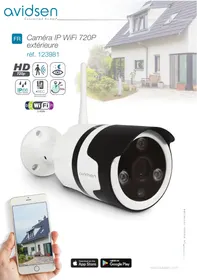
| Product type | Fixed outdoor WiFi IP camera |
| Brand | AVIDSEN |
| Model / Reference | 123981 |
| Resolution | 720p (1280 x 720 pixels) |
| Viewing angle | 68° |
| Night vision | Automatic (twilight sensor), range 25 m |
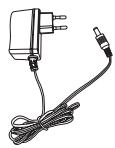
| Power supply | 12 VDC / 1 A (230 V mains adapter included) |
| Network connectivity | WiFi 2.4 GHz b/g/n (WPA/WPA2) and RJ45 Ethernet 10/100 Mbps |
| Local storage | 1 microSD card slot up to 128 GB (not included) |
| Audio | Built-in microphone and speaker for two-way communication |
| Video compression | H.264 |
| Motion detection | Yes, with smartphone notification and recording on SD card |
| Additional functions | Video flip, privacy mode, image rotation, time-stamped recording |
| Protection rating | IP66 |
| Dimensions (W x H x D) | 64 x 64 x 195 mm |
| Weight | 335 g |
| Operating temperature | -10°C to 50°C |
| Operating humidity | 10% to 90% non-condensing |
| Maintenance | Unplug before cleaning; use a soft, slightly damp cloth, no abrasive products |
| Warranty | 2 years parts and labor (excluding negligence or impact) |
| After-sales service | 0 892 701 369 (€0.35/min + call price) |
Frequently Asked Questions - CAMERA SÉCURITÉ EXTÉRIEURE FIXE AVIDSEN
User questions about CAMERA SÉCURITÉ EXTÉRIEURE FIXE AVIDSEN
0 question about this device. Answer the ones you know or ask your own.
Ask a new question about this device
Download the instructions for your Security in PDF format for free! Find your manual CAMERA SÉCURITÉ EXTÉRIEURE FIXE - AVIDSEN and take your electronic device back in hand. On this page are published all the documents necessary for the use of your device. CAMERA SÉCURITÉ EXTÉRIEURE FIXE by AVIDSEN.
USER MANUAL CAMERA SÉCURITÉ EXTÉRIEURE FIXE AVIDSEN
(Not included)

2.4GHz
natural_image
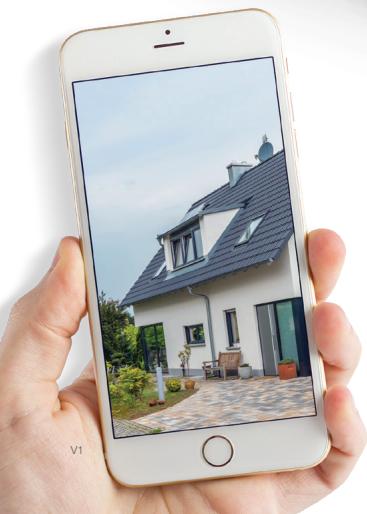
Hand holding a smartphone displaying a modern house with a tiled roof and garden patio (no visible text or symbols)
Download on the
App Store

GET IT ON
Google Play
SOMMAIRE
A - CONSIGNES DE SÉCURITÉ 05
1 - PRÉCAUTIONS D'UTILISATION 05
2 - ENTRETIEN ET NETTOYAGE 05
3 - RECYCLAGE 05
B - DESCRIPTION DU PRODUIT 06
1 - CONTENU DU KIT 06
2 - CAMERA 06
3 - ADAPTATEUR SECTEUR 07
C - INSTALLATION 08
1 - INSTALLATION DE LA CAMÉRA 08
2 - INSERTION D'UNE CARTE MICROSD (NON FOURNIE) 08
3 - CONNEXION DE LA CAMÉRA 09
D - CONFIGURATION 10
1 - CONFIGURATION DE LA CAMÉRA ET AJOUT DANS L'APPLICATION 10
2 - ACCÈS À L'ENSEMBLE DES RÉGLAGES 11
2.1 - CONFIGURATION 12
E - UTILISATION 13
1 - VIDÉO EN DIRECT 13
2 - CONSULTATION DES VIDÉOS ENRIGISTRÉES PAR LA CAMÉRA 13
F - RÉINITIALISATION 15
G-FAQ 16
H - INFORMATIONS TECHNIQUES ET LÉGALES 17
1 - CARACTÉRISTIQUES TECHNIQUES 17
2 - GARANTIE 18
3 - ASSISTANCE ET CONSEILS 18
4 - RETOUR PRODUIT - SAV 18
5 - DÉCLARATION DE CONFORMITE CE 18
1 - PRÉCAUTIONS D'UTILISATION
natural_image
Technical line drawing of a cylindrical mechanical component with mounting holes and central hub (no text or symbols)2 × 1
3 x 1

4 × 3
5 × 3
B - DESCRIPTION DU PRODUIT
natural_image
Line drawing of a hand using a tool to adjust or install a mechanical component (no text or symbols present)2 - INSERTION D'UNE CARTE MICROSD (NON FOURNIE)
natural_image
Technical illustration showing a hand using a screwdriver to adjust or install a cylindrical device (no text or symbols present)natural_image
Two-step diagram showing a hand inserting a device into a container, then adjusting the internal components (no text or symbols present)natural_image
Line drawing of a smart security camera with two wireless devices connected to a device (no text or symbols)D - CONFIGURATION
1 - CONFIGURATION DE LA CAMÉRA ET AJOUT DANS L'APPLICATION
5 - DÉCLARATION DE CONFORMITÉ CE
À la directive RED
natural_image
Simple line drawing of a hand holding a string (no text or symbols)SmartHome France
19 avenue Marcel Dassault
(Not included)

2.4GHz
natural_image
Hand holding a smartphone displaying a modern house with a tiled roof and garden (no visible text or symbols)
Download on the
App Store

GET IT ON
Google Play
CONTENTS
A - SAFETY INSTRUCTIONS 05
1 - OPERATING PRECAUTIONS 05
2 - MAINTENANCE AND CLEANING 05
3 - RECYCLING 05
B - PRODUCT DESCRIPTION 06
1 - KIT CONTENTS 06
2 - CAMERA 06
3 - MAINS ADAPTOR 07
C - INSTALLATION 08
1 - INSTALLING THE CAMERA 08
2 - INSERTING A MICRO SD CARD (NOT INCLUDED) 08
3 - CONNECTING THE CAMERA 09
D - CONFIGURATION 10
1 - CONFIGURING THE CAMERA AND ADDING IT TO THE APP 10
2 - ACCESS TO ALL SETTINGS 11
2.1 - CONFIGURATION 12
E - OPERATION 13
1 - LIVE VIDEO 13
2 - VIEWING VIDEOS RECORDED BY THE CAMERA 13
F - RESETTING 15
G-FAQ 16
H - TECHNICAL AND LEGAL INFORMATION 17
1 - TECHNICAL CHARACTERISTICS 17
2 - WARRANTY 18
3 - HELP AND ADVICE 18
4 - PRODUCT RETURNS/AFTER SALES SERVICE 18
5 - EC DECLARATION OF CONFORMITY 18
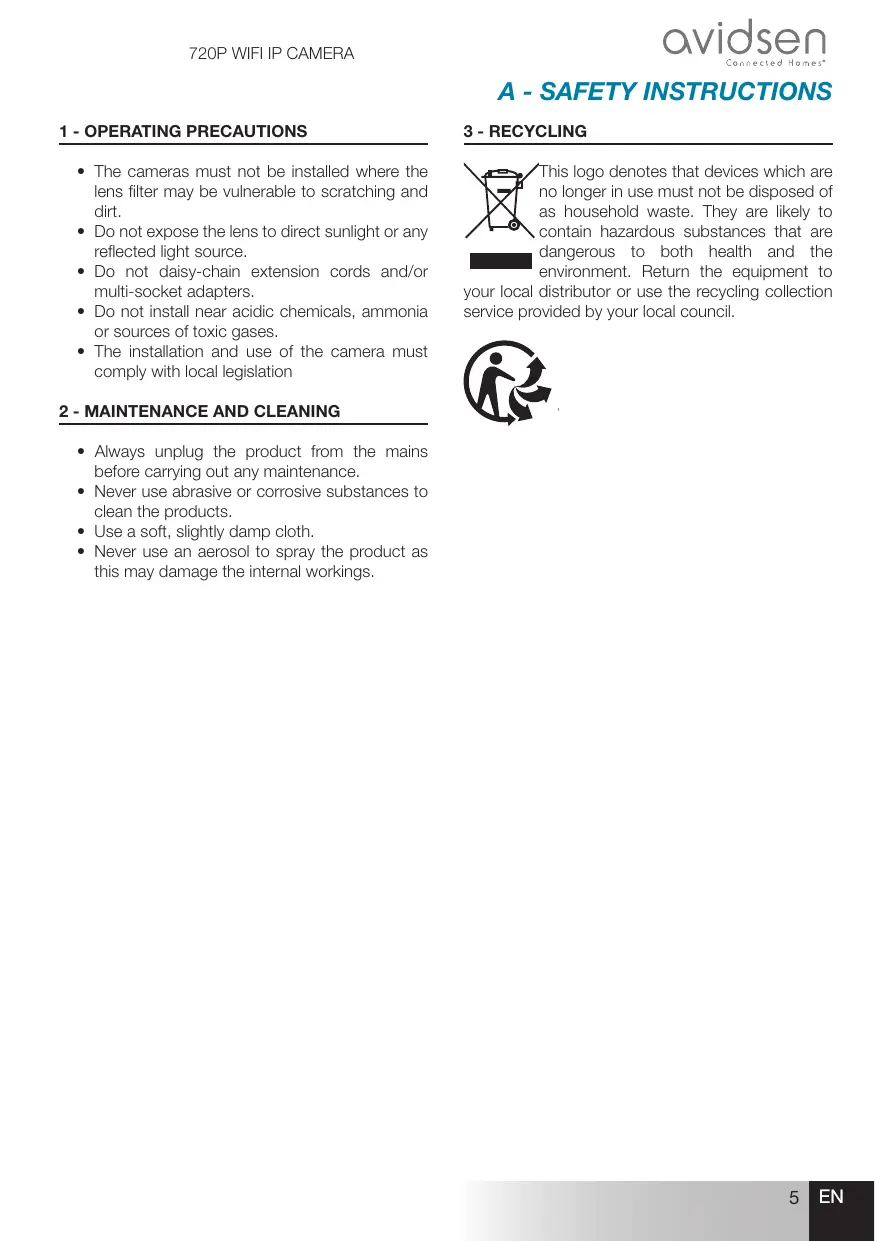
1 - OPERATING PRECAUTIONS
- The cameras must not be installed where the lens filter may be vulnerable to scratching and dirt.
- Do not expose the lens to direct sunlight or any reflected light source.
- Do not daisy-chain extension cords and/or multi-socket adapters.
- Do not install near acidic chemicals, ammonia or sources of toxic gases.
- The installation and use of the camera must comply with local legislation
2 - MAINTENANCE AND CLEANING
- Always unplug the product from the mains before carrying out any maintenance.
- Never use abrasive or corrosive substances to clean the products.
- Use a soft, slightly damp cloth.
- Never use an aerosol to spray the product as this may damage the internal workings.
A - SAFETY INSTRUCTIONS
3 - RECYCLING
This logo denotes that devices which are no longer in use must not be disposed of as household waste. They are likely to contain hazardous substances that are dangerous to both health and the environment. Return the equipment to your local distributor or use the recycling collection service provided by your local council.

B - PRODUCT DESCRIPTION
1 - CONTENTS OF THE KIT
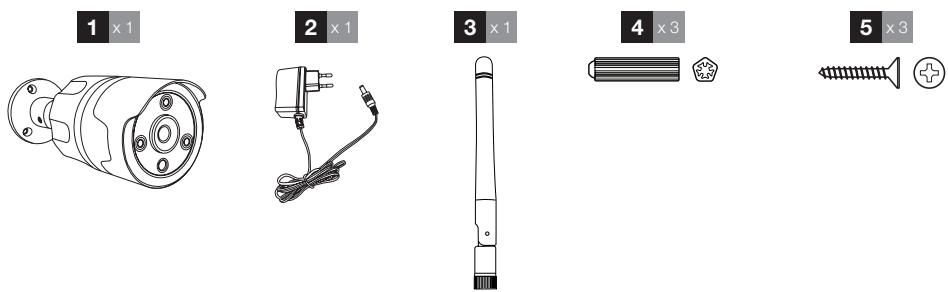
| 1 | Camera |
| 2 | 230V A/C 50 Hz mains adaptor / 12V DC/1A |
| 3 | Antenna to be screwed to rear of camera |
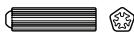
| 4 | Wall plugs for wall-mounting |
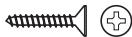
| 5 | Screws for wall-mounting |
2 - CAMERA
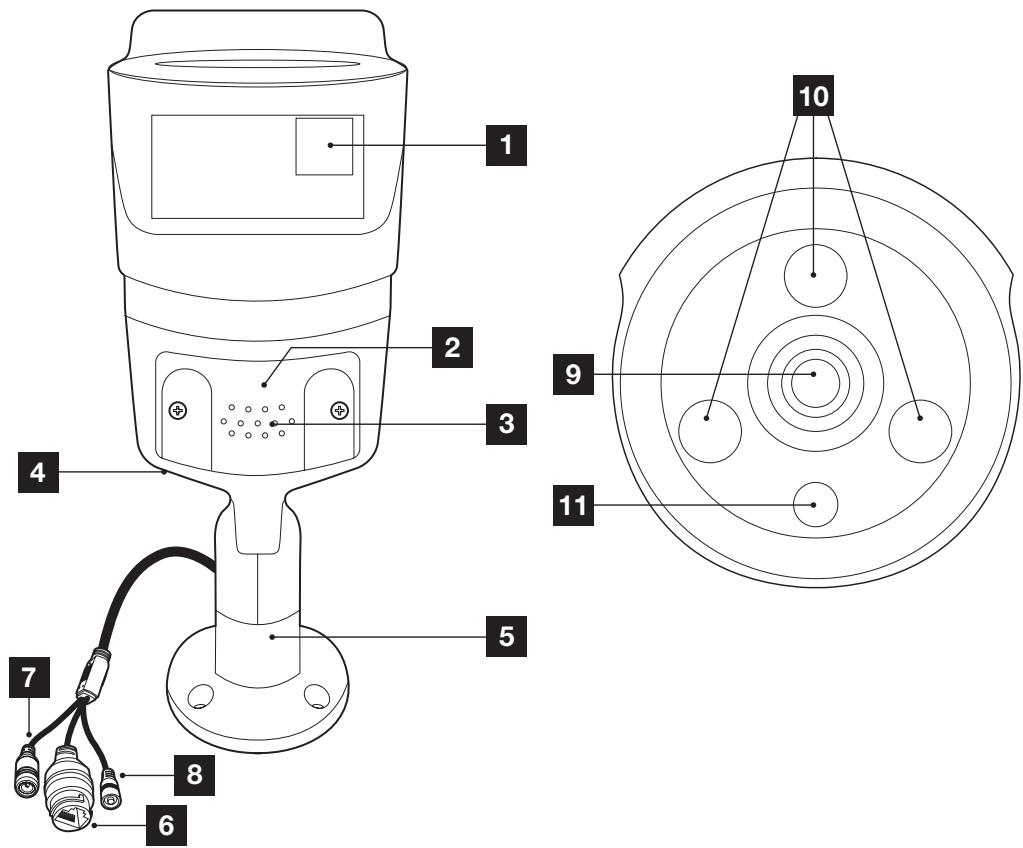
B - PRODUCT DESCRIPTION
| 1 | QRCode to be scanned when starting up using the Protect-Home app |
| 2 | Slot cover for microSD card (not included) of up to 128GB |
| 3 | Loudspeaker grid |
| 4 | Positioning of microphone (on the rear side) |
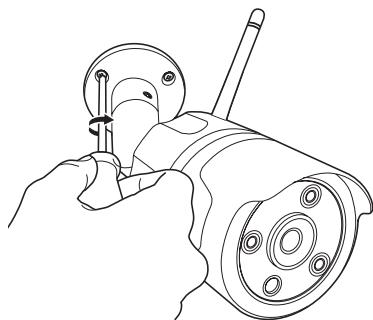
| 5 | Adjustable base (all positions may be locked/unlocked with the Allen key supplied) |
| 6 | RJ45 socket for network connection (optional use) |
| 7 | Mains adaptor power supply (included) |
| 8 | Reset button |
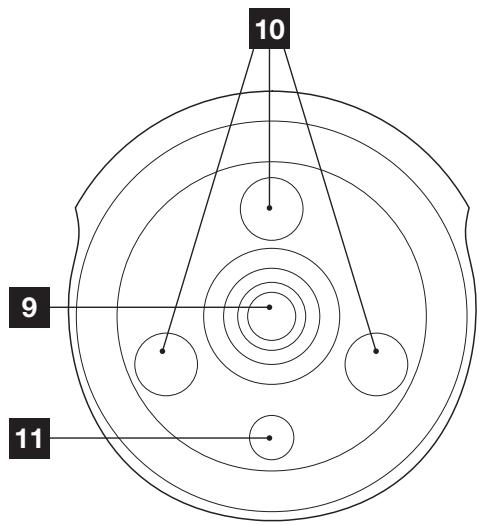
| 9 | Camera lens |
| 10 | Infra-red light for night vision |
| 11 | Dusk sensor for infra-red lighting control |
3 - MAINS ADAPTER
A 230Vac 50Hz / 12Vdc 1A mains adapter is supplied in the kit for the camera power supply. Do not use other power supplies as they could damage the camera and invalidate the warranty.
C - INSTALLATION
1 - INSTALLING THE CAMERA
- The camera can be attached to either wall or ceiling.
- Mount the camera using suitable screws and wall plugs for the type of surface (the screws and plugs supplied are suitable for solid walls).
- Make sure the camera is properly secured to prevent it from falling.
Wall mounting

natural_image
Line drawing of a hand turning a mechanical component with a knob (no text or symbols)Ceiling mounting
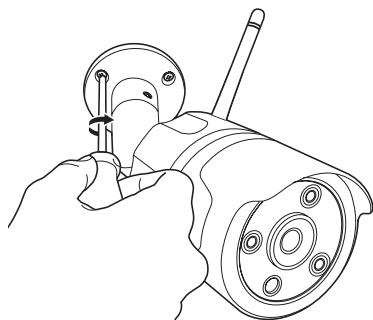
natural_image
Line drawing of a hand using a tool to adjust or install a mechanical component (no text or symbols present)2 - INSERTING A MICRO SD CARD (NOT INCLUDED)
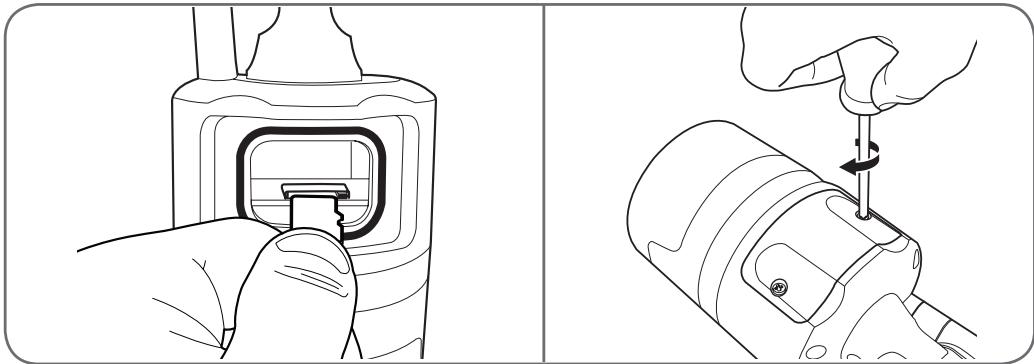
Your camera has a micro SD card slot, which gives it an internal storage memory. The maximum size is 128 GB.
This card is optional, but required if you wish the camera to record independently.
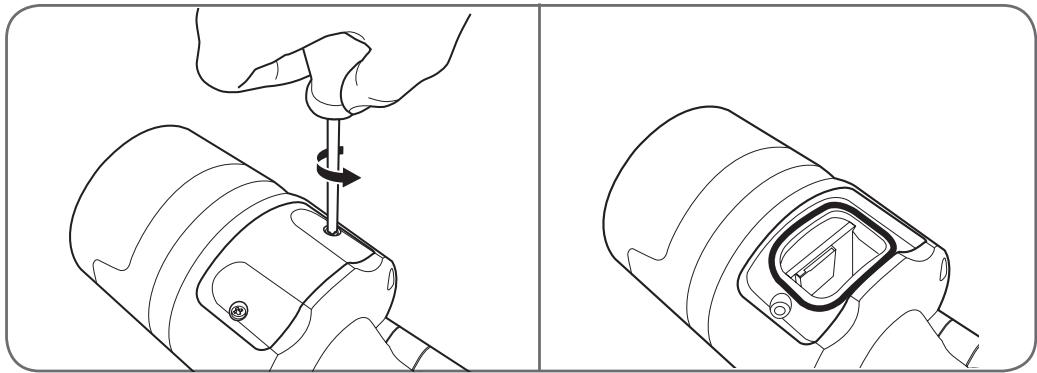
natural_image
Two-step diagram showing a hand using a screwdriver to adjust the internal components of a camera lens (no text or symbols present)- Please insert the microSD card
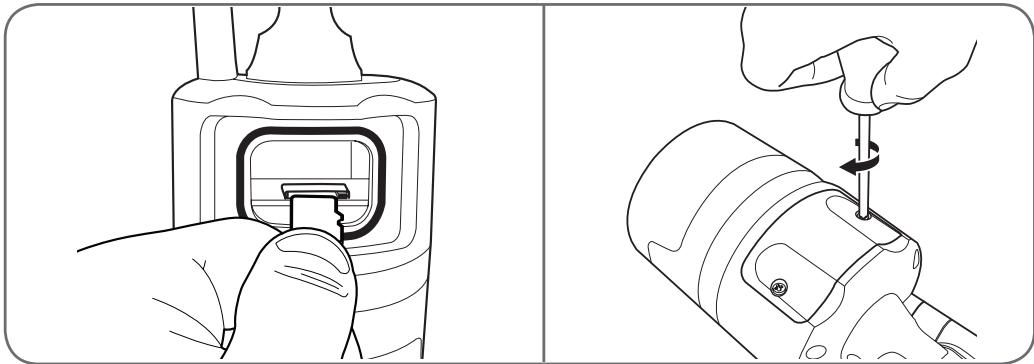
natural_image
Two-step diagram showing a hand inserting a device into a container, then adjusting the internal component with a tool (no text or symbols present)Note: These operations must be carried out with the camera disconnected from the mains power supply.
3 - CONNECTING THE CAMERA
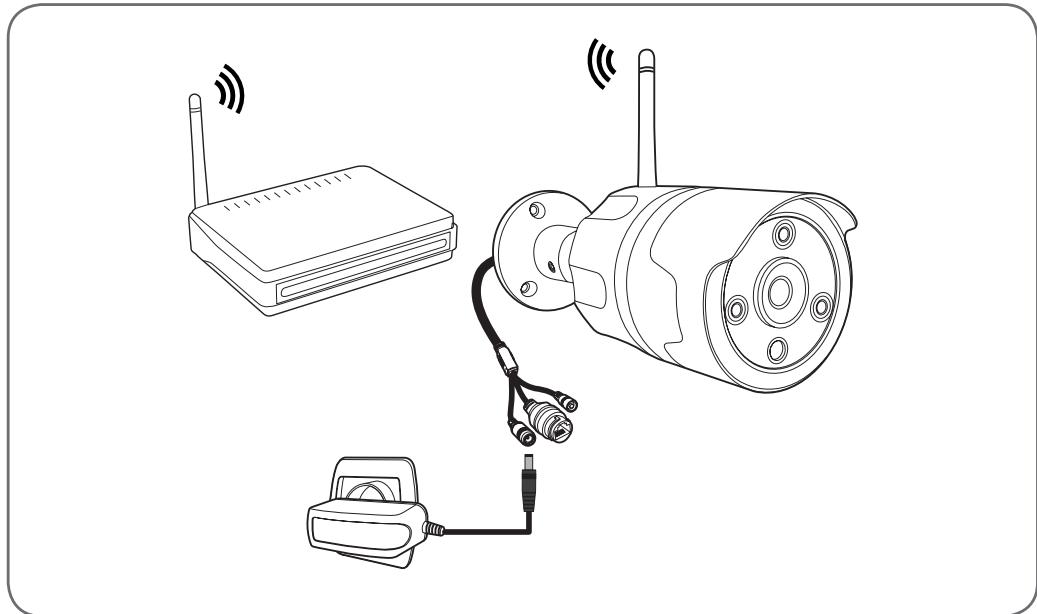
natural_image
Line drawing of a smart security camera with two wireless devices connected to a device (no text or symbols)D - CONFIGURATION
1 - CONFIGURING THE CAMERA AND ADDING IT TO THE APP
Note: the screenshots displayed have been taken from the Android version of the Protect-Home app. The iPhone version works in exactly the same way.
Download the Protect-Home app 📋 on the Appstore or Google Play, then launch the app. Accept the authorisation requests sent by the app if necessary (access to the camera for scanning the QRCode, etc.).
Next, click on the icon + , the app opens the camera on your smartphone and invites you to scan the QRCode shown on the camera:
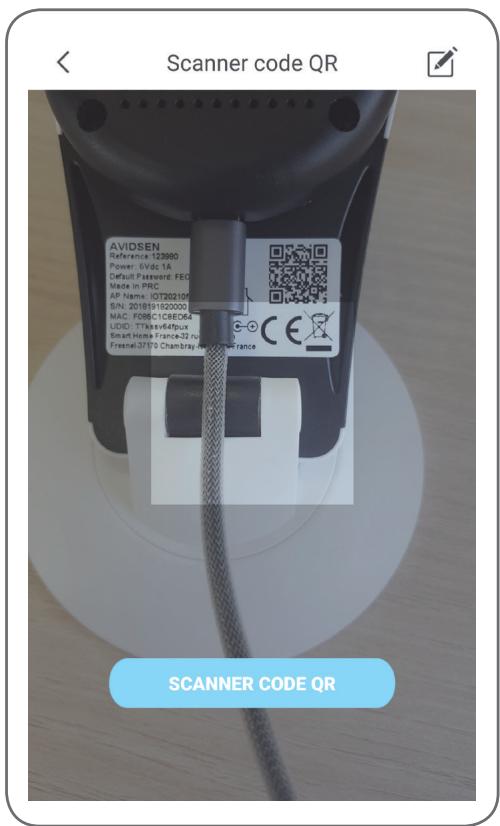
At this point, the camera must be powered on and
720P WIFI IP CAMERA
started up. It plays a standby tune when it is ready.
Click on "Ready music played" to continue.
The app then asks you how you wish to configure the camera:
AP connection: via WiFi connection.
Audio configuration: the data will be transmitted by the smartphone loudspeaker.
Select one of the methods to continue (they are equivalent):
D - CONFIGURATION
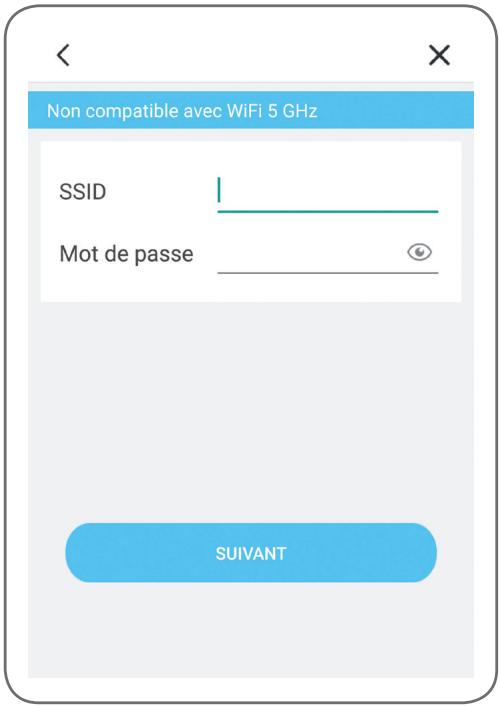
The app then asks you what network and what key it must send to the camera for internet access.
Important: Camera network compatibility: 2.4 GHz - 20/40 auto - WPA/WPA2.
Not compatible with 5 GHz WiFi, not compatible with WEP encryption.
Please check the WiFi settings of your gateway with your Internet service provider if you experience connection difficulties.
- If you have selected “audio configuration”, check that you have activated the sound on your smartphone.
- Position yourself close to your camera with your smartphone (30 cm) to continue.
Click “Next” after indicating the WiFi network to be used and the corresponding key. Your smartphone then sends the instructions to the camera. After a few seconds, once the camera has managed to join the network indicated by your smartphone, the camera plays a tune.
When your smartphone detects the presence of your camera on the network, it asks you which time zone it should use:
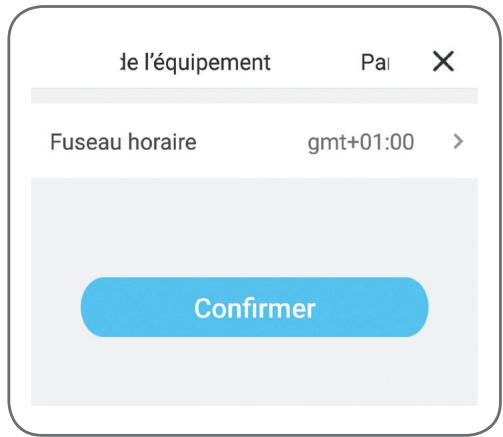
The time indicated is inset in the video recordings made by the camera. (Europe: GMT+ 1 hour in winter, GMT+ 2 hours in summer).
2 - ACCESS TO ALL SETTINGS
When first accessing your camera, you will immediately be asked to change its default password:
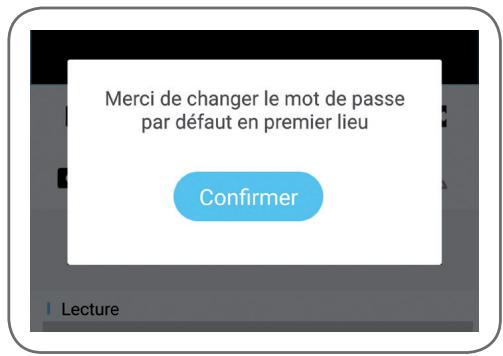
The default password is an 8-letter code indicated on the camera marking at the side of the QRCode. The new password must be a combination of 8 characters consisting of letters and numbers.
2.1 - CONFIGURATION
After clicking on the image of your camera from the camera list, click on the icon ⚙️ to access the full configuration of your camera:
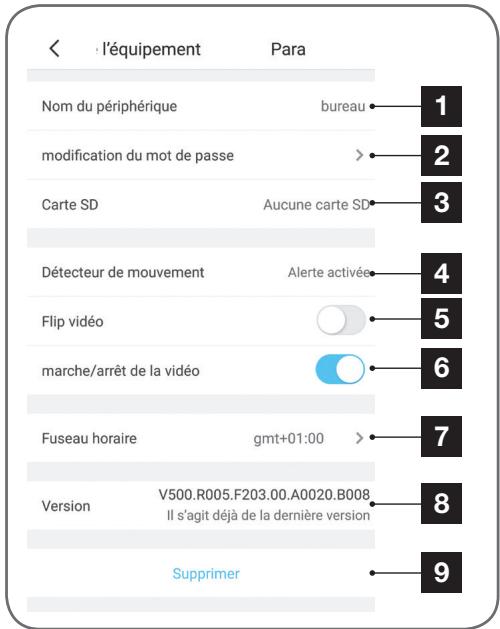
| 1 | It is easier if you rename your camera here after pairing |
| 2 | Change of camera access password, which changes when the camera is started up |
| 3 | MicroSD card management (not included) and formatting |
| 4 | Movement detection management: starting/stopping the recording on the microSD card when a movement is detected in the camera field and activation/de-activation of notifications via the app for increased peace of mind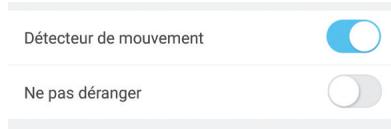 |
| 5 | Vertical inversion of the image for ceiling mounting |
| 6 | Privacy mode: enables the image and sound from the camera to be de-activated from the app (stops all recording and notification at the same time) |
| 7 | Time zone setting to set the time inset in the videos taken by the camera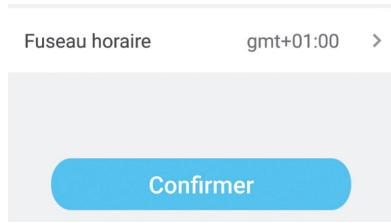 |
| 8 | Current version of the camera firmware |
| 9 | Deletion of the camera: removes the camera from the list of cameras recognized by the app (but does not change the personalised connection password) |
1 - LIVE VIDEO
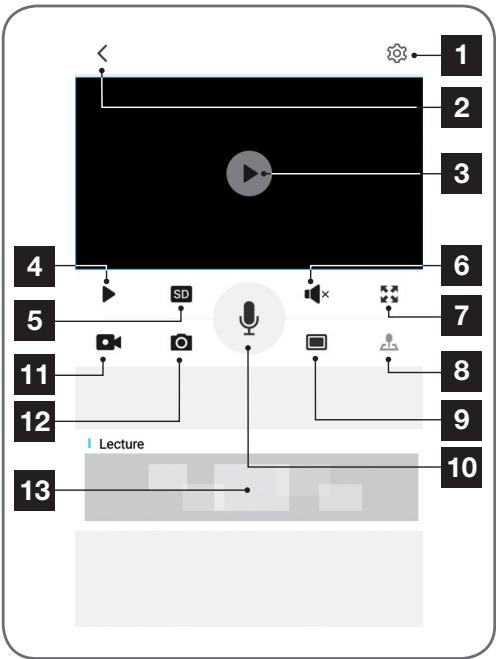
From the list of cameras (home screen of the app after start-up), click on the image or name of your camera to display the live video:
flowchart
graph TD
    A["1"] --> B["2"]
    B --> C["3"]
    C --> D["4"]
    D --> E["5"]
    E --> F["6"]
    F --> G["7"]
    G --> H["8"]
    H --> I["9"]
    I --> J["10"]
    J --> K["11"]
    K --> L["12"]
    L --> M["13"]
    M --> N["Lecture"]
    style A fill:#f9f,stroke:#333
    style B fill:#f9f,stroke:#333
    style C fill:#f9f,stroke:#333
    style D fill:#ccf,stroke:#333
    style E fill:#ccf,stroke:#333
    style F fill:#ccf,stroke:#333
    style G fill:#ccf,stroke:#333
    style H fill:#ccf,stroke:#333
    style I fill:#ccf,stroke:#333
    style J fill:#ccf,stroke:#333
    style K fill:#ccf,stroke:#333
    style L fill:#ccf,stroke:#333
    style M fill:#ccf,stroke:#333
| 1 | Access to the camera configuration |
| 2 | Return to the list of cameras recognized by the app |
| 3 | Live video |
| 4 | Video start/stop |
| 5 | Selection of image quality. Please note: high quality requires a better connection in terms of the camera and smartphone. |
| 6 | On/off switch of camera microphone |
| 7 | Switch to landscape format for full screen video display |
| 8 | Not used on this model |
| 9 | Simultaneous display of up to 4 cameras |
| 10 | Smartphone microphone activation to speak through the camera's speaker |
| 11 | Start/stop of video recording (recording onto smartphone memory) |
| 12 | Immediate photo taking (recording onto smartphone memory) |
| 13 | If a MicroSD card is in the camera and video recordings have been taken by the camera, they can be viewed by clicking here. |
2 - VIEWING VIDEOS TAKEN BY THE CAMERA
On the live display screen, click on the area at the bottom of the screen to read the contents of the microSD card (not included) and the recordings made by the camera in your absence. If videos have been recorded on the MicroSD card (not included) inserted into the camera, their presence is indicated as follows:
E - OPERATION
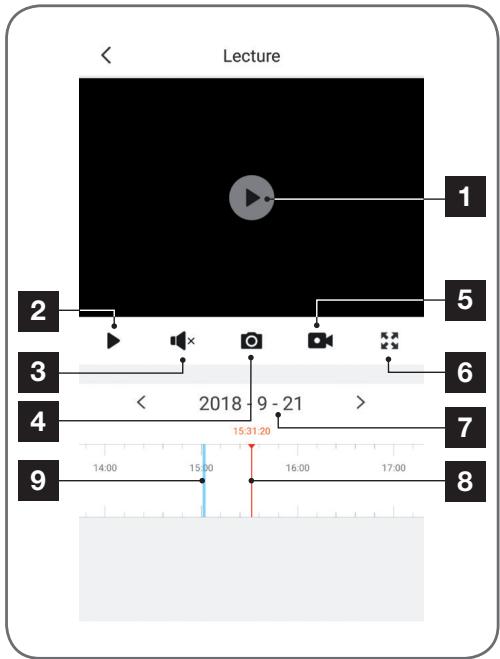
| 1 | When a recorded video is viewed, it appears instead of the live image |
| 2 | Review start/stop |
| 3 | On/off of sound on recorded video |
| 4 | Taking an immediate photo of the recording being viewed (saved to the smartphone memory) |
| 5 | Start/stop of video recording saved to the smartphone memory for the video recording being viewed |
| 6 | Go to full screen |
| 7 | Date being viewed (click on “<” or “>” to change) |
| 8 | The index in red indicates the current viewing time (slide left or right to change the video location or to change video) |
| 9 | The presence of blue coloured lines indicates that videos have been stored on the camera at the corresponding time |
If there is a problem, the WiFi configuration may be reset by pressing and holding the Reset button on the cable until a beep is heard. Once reset, the camera will start up again. After 30 seconds, it is available for reconfiguration.
Note: Pressing the Reset button does not delete the camera from your app
| Symptoms | Possible causes | Solutions |
| Unable to install the Protect-Home app on my Android device | You have an out-of-date or incompatible version of Android on your device | Please contact the technical support of your device's manufacturer in order to obtain a recent Android version |
| Google Play checks all the key components needed to run the application properly. If your equipment does not meet the necessary criteria, the installation will not complete | Try the installation on a different Android device | |
| Unable to install the Protect-Home app on my Apple device | The version of iOS on your device is not up to date | Update the operating system on your device. |
| The camera is not detected as being online when wanting to connect it to a smartphone | Camera connection too slow | Temporarily connect your smartphone to the same network as the camera when adding to the app. |
| Cannot connect to camera over local network | Network/power supply issue | Check your network and electrical connections. |
| Network configuration problem | Check your camera's network connection settings | |
| The camera image feed cannot be accessed over the internet.Poor quality or shaky image | Network configuration problem | Check your device settings (box, router) |
| Incorrect video settings | Check the video settings and reduce the quality if necessary | |
| Movement detection is triggered unnecessarily | Unsuitable movement detection settings | Turn the camera |
| The camera is not detected as being online | Camera connection too slow | Temporarily connect your smartphone to the same |
| When wishing to link it to a smartphone | network as the camera when adding it to the app |
H - TECHNICAL AND LEGAL INFORMATION
1 - TECHNICAL CHARACTERISTICS
| Camera | |
| Power supply | 12V DC/1A |
| Network interface | WiFi IEEE 802.11 b/g/n 2.4Ghz Compatible WPA/WPA2 RJ45 Ethernet 10/100Mbps |
| Optical sensor | 14 " CMOS |
| Minimum luminous intensity | 0 lux |
| Night vision | Automatic (dusk-to-dawn sensor)Range: 25m |
| Viewing angle | 68° |
| Buttons | WiFi setting reset button |
| Video compression | H.264 |
| Resolution | 1280x720 pixels |
| Audio | Built-in microphone and loudspeaker for two-way audio communication |
| Storage | 1 micro SD card slot up to 128 GB memory for storing video via remote access |
| Operating temperature and humidity | -10°C to 50°C, 10% to 90% RH, non-condensing IP44 protection rating |
| Dimensions | L64mm x H64mm x D195mm |
| Weight | 335g |
H - TECHNICAL AND LEGAL INFORMATION
2 - WARRANTY
- This product is under warranty for parts and labour for 2 years from the date of purchase. Proof of purchase must be retained for the duration of the warranty period.
The warranty does not cover damage caused by negligence, knocks or accidents.
The warranty will be void if the device is tampered with.
3 - HELP AND SUGGESTIONS
- If, in spite of the care we have taken in designing our products and drafting these instructions, you do encounter difficulties when installing your product or you have any questions, we recommend you contact one of our specialists who will be glad to help.
- If you encounter operating problems during the installation or a few days afterwards, it is essential that you are in front of your installation when contacting us, so that one of our technicians can diagnose the source of the problem, as it will probably be the result of a setting that is incorrect or an installation that is not to specification. If the problem is caused by the product itself, the technician will give you an RMA number so that you can return the unit to the shop. Without this RMA number, the shop may refuse to exchange the product.
Contact our after sales service team technicians:
0 892 701 369
Monday to Friday, 9AM to 12PM and 2PM to 6PM.

Need some help?
Avidssy
will answer your questions on www.avidsen.com
4 - PRODUCT RETURNS - AFTER SALES SERVICE
If, despite the care we have taken in designing and manufacturing your product, it needs to be returned to our customer service centre, you can check the progress of the work on our website at the following address:
http://sav.avidsen.com
Avidsen undertakes to keep a stock of spare parts for this product throughout the contractual warranty period.
5 - EC DECLARATION OF CONFORMITY
Per the RED directive
Declaration of conformity with the RED Directive SMART HOME FRANCE
hereby declares that the equipment designated below:
720P HD outdoor IP camera 123981
Complies with the RED 2014/53/EU directive and that its conformity has been assessed pursuant to the applicable standards in force:
EN62368-1:2014
EN62479:2010
EN301 489-1 V2.1.1:2017-02
EN301 489-17 V3.1.1:2017-03
EN300 328 V2.1.1:2016-11
Drafted in Tours on 04/10/2018
Alexandre Chaverot, CEO
natural_image
Simple line drawing of a hand holding a pen or stylus (no text or symbols)SmartHome France
19 avenue Marcel Dassault
natural_image
Hand holding a smartphone displaying a modern house with a tiled roof and garden (no visible text or symbols)
Download on the
App Store

GET IT ON
Google Play
INHOUDSOPGAVE
A - VEILIGHEIDSVOORSCHRIFTEN 05
1 - GEBRUIKSVOORSCHRIFTEN 05
2 - ONDERHOUD EN REINIGING 05
3 - RECYCLAGE 05
B - BESCHRIJVING VAN HET PRODUCT 06
1 - INHOUD VAN DE KIT 06
2 - CAMERA 06
3 - LICHTNETADAPTER 07
C - INSTALLATIE 08
1 - INSTALLATIE VAN DE CAMERA 08
2 - EEN MICROSD-KAART PLAATSEN (NIET MEEGELEVERD) 08
3 - AANSLUITING VAN DE CAMERA 09
D - CONFIGURATIE 10
1 - CONFIGURATIE VAN DE CAMERA EN TOEVOEGEN AAN DE TOEPASSING 10
2 - TOEGANG TOT ALLE INSTELLINGEN 11
2.1 - CONFIGURATIE 12
E - GEBRUIK 13
1 - LIVE VIDEO 13
2 - RAADPLEGEN VAN VIDEO'S DIE MET DE CAMERA GEMAAKT ZIJN 13
F - RESETTEN 15
G-FAQ 16
H - TECHNISCHE EN WETTELIJKE INFORMATIE 17
1 - TECHNISCHE EIGENSCHAPPEN 17
2 - GARANTIE 18
3 - HULP EN ADVIES 18
4 - RETOUR PRODUCT - SERVICE NA VERKOOP 18
5 - CE CONFORMITEITSVERKLARING 18
A - VEILIGHEIDSVOORSCHRIFTEN
1 - GEBRUIKSVOORSCHRIFTEN
natural_image
Line drawing of a mechanical component with a handle and threaded end (no text or symbols)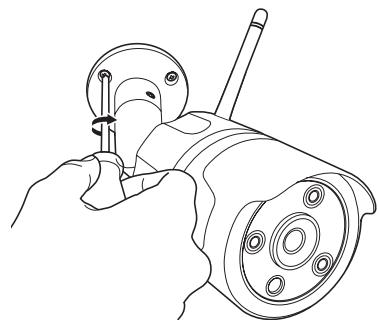
natural_image
Line drawing of a hand using a tool to adjust or install a mechanical component (no text or symbols present)2 - EEN MICROSD-KAART PLAATSEN (NIET MEEGELEVERD)
natural_image
Technical illustration showing a hand using a screwdriver to adjust or install a cylindrical device (no text or symbols present)natural_image
Two-step diagram showing a hand inserting a device into a container, then adjusting the internal components (no text or symbols present)natural_image
Line drawing of a security camera with wireless signal waves connected to a device (no text or symbols)D - CONFIGURATIE
1 - CONFIGURATIE VAN DE CAMERA EN TOEVOEGEN AAN DE TOEPASSING
natural_image
Stylized cartoon character with a smiling face and blue eyes, surrounded by small blue dots (no text or symbols)Hulp nodig?
Avidssy
SmartHome France
19 Avenue Marcel Dassault
(Not included)

2.4GHz
natural_image
Hand holding a smartphone displaying a modern house with a tiled roof and garden (no visible text or symbols)INHALT
natural_image
Line drawing of a mechanical component with a handle and threaded end (no text or symbols)An der Wand
natural_image
Line drawing of a hand using a tool to adjust or install a mechanical component (no text or symbols present)An der Decke
natural_image
Technical illustration showing a hand using a tool to adjust or install a device into a cylindrical component, with no visible text or symbols.natural_image
Two-step diagram showing a hand inserting a device into a container, then adjusting the internal component with a tool (no text or symbols present)natural_image
Line drawing of a smart security camera with wireless signal and connected device (no text or symbols)D - KONFIGURATION
1 - KONFIGURATION DER KAMERA UND HINZUFÜGEN ZUR APP
natural_image
Simple line drawing of a hand holding a string (no text or symbols)
SmartHome France
19 Avenue Marcel Dassault
(Not included)

2.4GHz
natural_image
Hand holding a smartphone displaying a modern house with a tiled roof and garden (no visible text or symbols)
Download on the
App Store

GET IT ON
Google Play
ÍNDICE
natural_image
Two-step diagram showing a hand using a screwdriver to adjust the internal components of a camera lens (no text or symbols present)- Introduzca la tarjeta microSD
natural_image
Two-step diagram showing a hand inserting a device into a container, then adjusting the internal component with a tool (no text or symbols present)natural_image
Line drawing of a security camera with wireless signal waves connected to a device (no text or symbols)D - CONFIGURACIÓN
natural_image
Simple line drawing of a hand holding a pen or stylus (no text or symbols)SmartHome France
19 avenue Marcel Dassault
ZAC des Deux Lions - 37200 Tours - Francia

Câmara IP WiFi 720P exterior
ref. 123981

720p


(Not included)

2.4GHz
natural_image
Hand holding a smartphone displaying a modern house with a tiled roof and garden (no visible text or symbols)
Download on the
App Store

GET IT ON
Google Play
ÍNDICE
A - INSTRUÇÕES DE SEGURANÇA 05
natural_image
Two-step diagram showing a hand using a screwdriver to adjust the internal components of a mechanical device (no text or symbols present)natural_image
Two-step diagram showing a hand inserting a device into a container, then adjusting the internal components (no text or symbols present)natural_image
Line drawing of a smart security camera with two wireless devices connected to a device (no text or symbols)D - CONFIGURAÇÃO
De segunda a sexta-feiran entre as 9h e as 13h e entre as 14h e as 18h.
natural_image
Simple line drawing of a hand holding a pen or stylus (no text or symbols)SmartHome France
19 avenue Marcel Dassault
ZAC des Deux Lions - 37200 Tours - França

Telecamera IP Wi-Fi 720P
configurabili
cod. 123981

720p



(Not included)



2.4GHz
natural_image
Hand holding a smartphone displaying a modern house with a tiled roof and garden (no visible text or symbols)
Download on the
App Store

GET IT ON
Google Play
INDICE
natural_image
Two-step diagram showing a hand using a screwdriver to adjust the internal components of a camera lens (no text or symbols present)natural_image
Two-step diagram showing a hand inserting a device into a container, then adjusting the internal components (no text or symbols present)natural_image
Line drawing of a smart security camera with two wireless devices connected to a device (no text or symbols)D - CONFIGURAZIONE
1 - COME CONFIGURARE LA TELECAMERA E AGGIUNGERLA NELL'APPLICAZIONE
natural_image
Stylized cartoon character with a smiling face and raised arms (no text or symbols)Bisogno di aiuto?
Avidssy
natural_image
Simple line drawing of a hand holding a string (no text or symbols)SmartHome France
19 avenue Marcel Dassault
ZAC des Deux Lions - 37200 Tours - Francia

- SOMMAIRE
- A - CONSIGNES DE SÉCURITÉ 05
- B - DESCRIPTION DU PRODUIT 06
- C - INSTALLATION 08
- D - CONFIGURATION 10
- E - UTILISATION 13
- F - RÉINITIALISATION 15
- G-FAQ 16
- H - INFORMATIONS TECHNIQUES ET LÉGALES 17
- - PRÉCAUTIONS D'UTILISATION
- B - DESCRIPTION DU PRODUIT
- - INSERTION D'UNE CARTE MICROSD (NON FOURNIE)
- D - CONFIGURATION
- - CONFIGURATION DE LA CAMÉRA ET AJOUT DANS L'APPLICATION
- - DÉCLARATION DE CONFORMITÉ CE
- CONTENTS
- A - SAFETY INSTRUCTIONS 05
- B - PRODUCT DESCRIPTION 06
- E - OPERATION 13
- F - RESETTING 15
- H - TECHNICAL AND LEGAL INFORMATION 17
- - OPERATING PRECAUTIONS
- - MAINTENANCE AND CLEANING
- A - SAFETY INSTRUCTIONS
- - RECYCLING
- B - PRODUCT DESCRIPTION
- - CONTENTS OF THE KIT
- - CAMERA
- - MAINS ADAPTER
- C - INSTALLATION
- - INSTALLING THE CAMERA
- - INSERTING A MICRO SD CARD (NOT INCLUDED)
- - CONNECTING THE CAMERA
- - CONFIGURING THE CAMERA AND ADDING IT TO THE APP
- 720P WIFI IP CAMERA
- - ACCESS TO ALL SETTINGS
- - CONFIGURATION
- - LIVE VIDEO
- - VIEWING VIDEOS TAKEN BY THE CAMERA
- E - OPERATION
- H - TECHNICAL AND LEGAL INFORMATION
- - WARRANTY
- - HELP AND SUGGESTIONS
- Avidssy
- - PRODUCT RETURNS - AFTER SALES SERVICE
- - EC DECLARATION OF CONFORMITY
- INHOUDSOPGAVE
- A - VEILIGHEIDSVOORSCHRIFTEN 05
- B - BESCHRIJVING VAN HET PRODUCT 06
- C - INSTALLATIE 08
- D - CONFIGURATIE 10
- E - GEBRUIK 13
- F - RESETTEN 15
- H - TECHNISCHE EN WETTELIJKE INFORMATIE 17
- A - VEILIGHEIDSVOORSCHRIFTEN
- - GEBRUIKSVOORSCHRIFTEN
- - EEN MICROSD-KAART PLAATSEN (NIET MEEGELEVERD)
- D - CONFIGURATIE
- - CONFIGURATIE VAN DE CAMERA EN TOEVOEGEN AAN DE TOEPASSING
- Hulp nodig?
- INHALT
- D - KONFIGURATION
- - KONFIGURATION DER KAMERA UND HINZUFÜGEN ZUR APP
- ÍNDICE
- D - CONFIGURACIÓN
- A - INSTRUÇÕES DE SEGURANÇA 05
- D - CONFIGURAÇÃO
- Telecamera IP Wi-Fi 720P
- configurabili
- INDICE
- D - CONFIGURAZIONE
- - COME CONFIGURARE LA TELECAMERA E AGGIUNGERLA NELL'APPLICAZIONE
Brand : AVIDSEN
Model : CAMERA SÉCURITÉ EXTÉRIEURE FIXE
Category : Security