USER MANUAL 22 km/h - CARE - Fast Runner SP CARE FITNESS
https://cloud.carefitness.com/index.php/s/E2WD22KMNBQzERL
https://www.carefitness.com/sav
GB
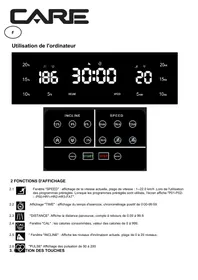
1. WINDOWS DISPLAY
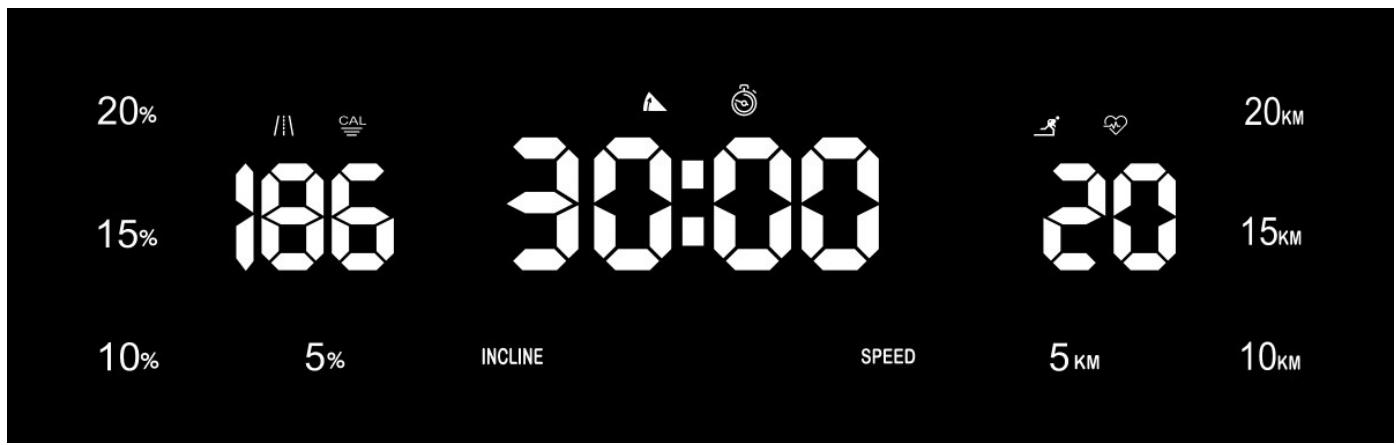
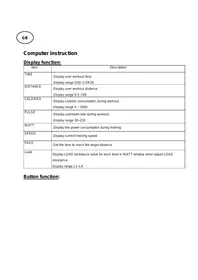
2. DISPLAY FUNCTIONS
2.1 "SPEED" window: display the current speed, speed range: 1--22.0 km/h, When use the pr-set programs, will display "P01-P02---P50-HR1-HR2-HR3-FAT
2.2 "TIME" display: display exercise time, positive timing from 0:00-99:59.
2.3 "DISTANCE." Display the running distance, count forward from 0.00-99.9
2.4 CAL "window: movement burns calories consumed calorie value from 0-999,
2.5 "INCLINE" window : Displays the current incline levers, range 0-20 levels
2.6 "PULSE" Display hand pulse from 50-200
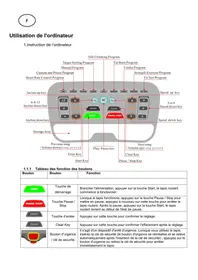
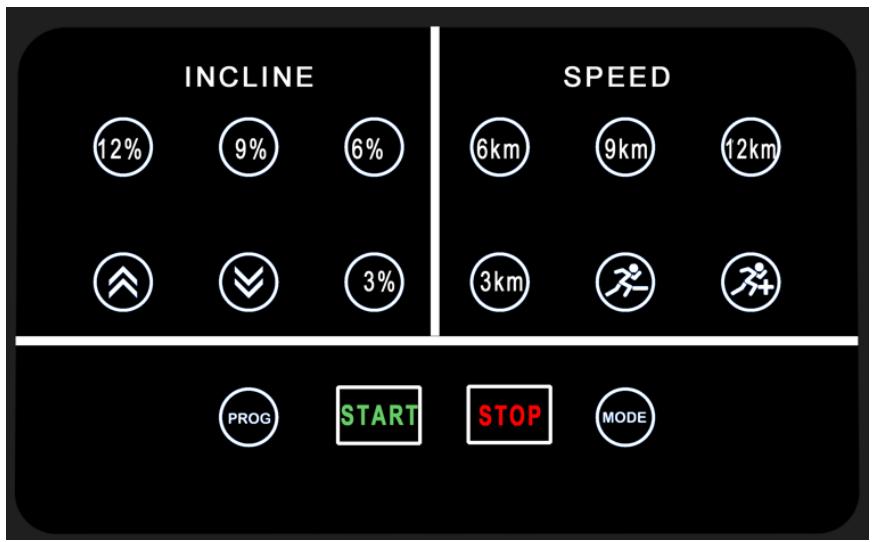
3. KEY FUNCTION
3.1 "START" start the machine, "STOP" stop the treadmill.
3.2 SPEED"+: speed + button, at the running state, press it will be add 0.1KM/H every time, press it for a long time, it will add the speed constantly;
3.3 SPEED"-": speed - button, at the running state, press it will decrease 0.1KM/H every time, press it for a long time, it will decrease the speed constantly.
3.4 "INC +", increase the incline levels during running, press it a long time, it will increase the incline levels constantly
3.5 "INC-" decrease the incline levels during running, press it a long time, it will decrease the incline levels constantly
3.6 MODE: mode button at the stopping state, select the countdown time, countdown distance and countdown calories circularly.
3.7 Bluetooth Speaker for play music
3.8 Quickly Speed buttons:: 3,6.9.12.5.10.15.20
3.9 Quickly Incline buttons: 3.6.9.12.5.10.15.20
3.10 PROG: Use this button to choose the programs : P01-P50 are pr-set programs/User1-3/
HR1-HR2-HR3 are heart rate programs / Body FAT: Test the body fat
4. Quick Start (manual mode)
4.1 turn on the power switch, the magnetic security lock properly absorbed in the panel below the safety lock position.
4.2 press "START" start button, the system enters three seconds of the countdown,
the buzzer sounds, the time display countdown, 5 second countdown after treadmill running speed of 1km / h.
4.3 after the start needed, use the "SPEED +", "SPEED -" keys to adjust the speed of the
treadmill; "INC + INC-" keys to adjust the slope of the treadmill.
5 During the movement of the operation
5.1 "Speed - " key will reduce the operating speed of the treadmill.
5.2 "Speed +" key will increase the operating speed of the treadmill.
5.3 press the "Stop" button, treadmill will stop running.
5.4 Press incline keys to adjust the incline levels of the treadmill
5.5 About five seconds when the movement with both hands heartbeat hand grip heartbeat data.
6. Pre-set programs
| TimeProg | |
| 1 | 2 | 3 | 4 | 5 | 6 | 7 | 8 | 9 | 10 | 11 | 12 | 13 | 14 | 15 | 16 | 17 | 18 | 19 | 20 |
| P01 | SPEED | 2 | 3 | 3 | 4 | 5 | 3 | 4 | 5 | 5 | 3 | 4 | 5 | 4 | 4 | 4 | 2 | 3 | 3 | 5 | 3 |
| INCLINE | 1 | 1 | 2 | 2 | 2 | 3 | 3 | 3 | 2 | 2 | 1 | 2 | 2 | 1 | 1 | 3 | 3 | 2 | 2 | 2 |
| P02 | SPEED | 2 | 4 | 4 | 5 | 6 | 4 | 6 | 6 | 6 | 4 | 5 | 6 | 4 | 4 | 4 | 2 | 2 | 5 | 4 | 2 |
| INCLINE | 1 | 2 | 2 | 2 | 2 | 3 | 3 | 2 | 2 | 2 | 2 | 2 | 3 | 3 | 3 | 4 | 4 | 3 | 2 | 2 |
| P03 | SPEED | 2 | 4 | 4 | 6 | 6 | 4 | 7 | 7 | 7 | 4 | 7 | 7 | 4 | 4 | 4 | 2 | 4 | 5 | 3 | 2 |
| INCLINE | 2 | 3 | 3 | 2 | 2 | 3 | 3 | 3 | 2 | 2 | 2 | 2 | 4 | 4 | 4 | 6 | 6 | 3 | 2 | 2 |
| P04 | SPEED | 3 | 5 | 5 | 6 | 7 | 7 | 5 | 7 | 7 | 8 | 8 | 5 | 9 | 5 | 5 | 6 | 6 | 4 | 4 | 3 |
| INCLINE | 2 | 3 | 3 | 2 | 2 | 3 | 3 | 3 | 2 | 2 | 2 | 2 | 4 | 4 | 4 | 6 | 6 | 3 | 2 | 2 |
| P05 | SPEED | 2 | 4 | 4 | 5 | 6 | 7 | 7 | 5 | 6 | 7 | 8 | 8 | 5 | 4 | 3 | 3 | 6 | 5 | 4 | 2 |
| INCLINE | 3 | 3 | 3 | 4 | 4 | 5 | 5 | 5 | 4 | 4 | 4 | 4 | 5 | 5 | 3 | 3 | 3 | 2 | 2 | |
| P06 | SPEED | 2 | 4 | 4 | 4 | 5 | 6 | 8 | 8 | 6 | 7 | 8 | 8 | 6 | 4 | 4 | 2 | 5 | 4 | 3 | 2 |
| INCLINE | 3 | 5 | 5 | 5 | 4 | 4 | 4 | 3 | 3 | 3 | 3 | 4 | 4 | 4 | 3 | 3 | 3 | 4 | 3 | 2 |
| P07 | SPEED | 2 | 3 | 3 | 3 | 4 | 5 | 3 | 4 | 5 | 3 | 4 | 5 | 3 | 3 | 3 | 6 | 6 | 5 | 3 | 3 |
| INCLINE | 4 | 4 | 4 | 4 | 3 | 3 | 6 | 6 | 6 | 7 | 7 | 8 | 8 | 9 | 9 | 6 | 6 | 5 | 4 | 4 |
| P08 | SPEED | 2 | 3 | 3 | 6 | 7 | 7 | 4 | 6 | 7 | 4 | 6 | 7 | 4 | 4 | 4 | 2 | 3 | 4 | 4 | 2 |
| INCLINE | 4 | 5 | 5 | 5 | 6 | 6 | 6 | 7 | 8 | 9 | 9 | 9 | 10 | 10 | 10 | 1 | 2 | 8 | 6 | 3 |
| P09 | SPEED | 2 | 4 | 4 | 7 | 7 | 4 | 7 | 8 | 4 | 8 | 9 | 9 | 4 | 4 | 4 | 5 | 6 | 3 | 3 | 2 |
| INCLINE | 5 | 5 | 5 | 6 | 6 | 6 | 4 | 4 | 6 | 6 | 5 | 5 | 8 | 8 | 9 | 9 | 9 | 7 | 4 | 2 |
| P10 | SPEED | 2 | 4 | 5 | 6 | 7 | 5 | 4 | 6 | 8 | 8 | 6 | 6 | 5 | 4 | 4 | 2 | 4 | 4 | 3 | 3 |
| INCLINE | 5 | 6 | 6 | 6 | 7 | 5 | 8 | 8 | 4 | 4 | 4 | 5 | 5 | 8 | 8 | 10 | 10 | 8 | 6 | 3 |
| P11 | SPEED | 2 | 5 | 8 | 10 | 7 | 7 | 10 | 10 | 7 | 7 | 10 | 10 | 5 | 5 | 9 | 9 | 5 | 5 | 4 | 3 |
| INCLINE | 4 | 5 | 3 | 2 | 6 | 6 | 2 | 2 | 2 | 2 | 2 | 4 | 5 | 6 | 3 | 2 | 5 | 5 | 2 | 0 |
| P12 | SPEED | 3 | 4 | 9 | 9 | 5 | 9 | 5 | 8 | 5 | 9 | 7 | 5 | 5 | 7 | 9 | 9 | 5 | 7 | 6 | 3 |
| INCLINE | 1 | 2 | 3 | 2 | 3 | 5 | 5 | 0 | 0 | 2 | 3 | 5 | 7 | 3 | 3 | 5 | 6 | 5 | 3 | 3 |
| P13 | SPEED | 3 | 6 | 7 | 5 | 9 | 9 | 7 | 5 | 5 | 7 | 9 | 5 | 8 | 5 | 9 | 5 | 9 | 9 | 4 | 3 |
| INCLINE | 3 | 3 | 5 | 6 | 5 | 3 | 3 | 7 | 5 | 3 | 2 | 0 | 0 | 5 | 5 | 3 | 2 | 3 | 2 | 1 |
| P14 | SPEED | 2 | 2 | 4 | 5 | 6 | 5 | 4 | 3 | 2 | 1 | 2 | 3 | 4 | 5 | 6 | 5 | 4 | 3 | 2 | 1 |
| INCLINE | 4 | 4 | 4 | 4 | 3 | 3 | 6 | 6 | 6 | 7 | 7 | 8 | 8 | 9 | 9 | 6 | 6 | 5 | 4 | 4 |
| P15 | SPEED | 2 | 4 | 6 | 8 | 6 | 6 | 4 | 4 | 2 | 2 | 2 | 4 | 6 | 8 | 6 | 6 | 4 | 4 | 2 | 2 |
| INCLINE | 3 | 3 | 3 | 4 | 4 | 5 | 5 | 5 | 4 | 4 | 4 | 4 | 5 | 5 | 3 | 3 | 3 | 2 | 2 | 2 |
| P16 | SPEED | 2 | 4 | 6 | 8 | 10 | 8 | 6 | 4 | 2 | 2 | 2 | 4 | 6 | 8 | 6 | 6 | 4 | 4 | 2 | 2 |
| INCLINE | 5 | 5 | 5 | 6 | 6 | 6 | 4 | 4 | 6 | 6 | 5 | 5 | 8 | 8 | 9 | 9 | 9 | 7 | 4 | 1 |
| P17 | SPEED | 2 | 2 | 6 | 6 | 8 | 10 | 6 | 6 | 2 | 2 | 2 | 2 | 6 | 6 | 8 | 10 | 6 | 6 | 2 | 2 |
| INCLINE | 4 | 5 | 5 | 5 | 6 | 6 | 6 | 7 | 8 | 9 | 9 | 9 | 10 | 10 | 10 | 10 | 10 | 8 | 6 | 3 |
| P18 | SPEED | 2 | 3 | 4 | 5 | 2 | 3 | 4 | 5 | 3 | 2 | 2 | 3 | 4 | 5 | 2 | 3 | 4 | 5 | 3 | 2 |
| INCLINE | 4 | 4 | 4 | 4 | 3 | 3 | 6 | 6 | 6 | 7 | 7 | 8 | 8 | 9 | 9 | 6 | 6 | 5 | 3 | 2 |
| P19 | SPEED | 2 | 4 | 6 | 2 | 4 | 6 | 2 | 4 | 6 | 2 | 2 | 4 | 6 | 2 | 4 | 6 | 2 | 4 | 6 | 2 |
| INCLINE | 3 | 5 | 5 | 5 | 4 | 4 | 4 | 3 | 3 | 3 | 3 | 4 | 4 | 4 | 3 | 3 | 3 | 4 | 3 | 2 |
| P20 | SPEED | 1 | 3 | 4 | 5 | 6 | 5 | 4 | 3 | 2 | 1 | 1 | 3 | 4 | 5 | 6 | 5 | 4 | 3 | 2 | 1 |
| INCLINE | 3 | 3 | 3 | 4 | 4 | 5 | 5 | 5 | 4 | 4 | 4 | 4 | 5 | 5 | 3 | 3 | 3 | 2 | 2 | 2 |
| P21 | SPEED | 2 | 3 | 3 | 4 | 5 | 3 | 4 | 5 | 5 | 3 | 4 | 5 | 4 | 4 | 4 | 2 | 3 | 3 | 5 | 3 |
| INCLINE | 1 | 1 | 2 | 2 | 2 | 3 | 3 | 3 | 2 | 2 | 1 | 2 | 2 | 1 | 1 | 3 | 3 | 2 | 2 | 2 |
| P22 | SPEED | 2 | 4 | 4 | 5 | 6 | 4 | 6 | 6 | 6 | 4 | 5 | 6 | 4 | 4 | 4 | 2 | 2 | 5 | 4 | 2 |
| INCLINE | 1 | 2 | 2 | 2 | 2 | 3 | 3 | 2 | 2 | 2 | 2 | 2 | 3 | 3 | 3 | 4 | 4 | 3 | 2 | 2 |
| P23 | SPEED | 2 | 4 | 4 | 6 | 6 | 4 | 7 | 7 | 7 | 4 | 7 | 7 | 4 | 4 | 4 | 2 | 4 | 5 | 3 | 2 |
| INCLINE | 2 | 3 | 3 | 2 | 2 | 3 | 3 | 3 | 2 | 2 | 2 | 2 | 4 | 4 | 4 | 6 | 6 | 3 | 2 | 2 |
| P24 | SPEED | 3 | 5 | 5 | 6 | 7 | 7 | 5 | 7 | 7 | 8 | 8 | 5 | 9 | 5 | 5 | 6 | 6 | 4 | 4 | 3 |
| INCLINE | 2 | 3 | 3 | 2 | 2 | 3 | 3 | 3 | 2 | 2 | 2 | 2 | 4 | 4 | 4 | 6 | 6 | 3 | 2 | 2 |
| P25 | SPEED | 2 | 4 | 4 | 5 | 6 | 7 | 7 | 5 | 6 | 7 | 8 | 8 | 5 | 4 | 3 | 3 | 6 | 5 | 4 | 2 |
| INCLINE | 3 | 3 | 3 | 4 | 4 | 5 | 5 | 5 | 4 | 4 | 4 | 4 | 5 | 5 | 3 | 3 | 3 | 2 | 2 | 2 |
| P26 | SPEED | 2 | 4 | 4 | 4 | 5 | 6 | 8 | 8 | 6 | 7 | 8 | 8 | 6 | 4 | 4 | 2 | 5 | 4 | 3 | 2 |
| INCLINE | 3 | 5 | 5 | 5 | 4 | 4 | 4 | 3 | 3 | 3 | 3 | 4 | 4 | 4 | 3 | 3 | 3 | 4 | 3 | 2 |
| P27 | SPEED | 2 | 3 | 3 | 3 | 4 | 5 | 3 | 4 | 5 | 3 | 4 | 5 | 3 | 3 | 3 | 6 | 6 | 5 | 3 | 3 |
| INCLINE | 4 | 4 | 4 | 4 | 3 | 3 | 6 | 6 | 6 | 7 | 7 | 8 | 8 | 9 | 9 | 6 | 6 | 5 | 3 | 3 |
| P28 | SPEED | 2 | 3 | 3 | 6 | 7 | 7 | 4 | 6 | 7 | 4 | 6 | 7 | 4 | 4 | 4 | 2 | 3 | 4 | 4 | 2 |
| INCLINE | 4 | 5 | 5 | 5 | 6 | 6 | 6 | 7 | 8 | 9 | 9 | 9 | 10 | 10 | 10 | 12 | 12 | 8 | 6 | 3 |
| P29 | SPEED | 2 | 4 | 4 | 7 | 7 | 4 | 7 | 8 | 4 | 8 | 9 | 9 | 4 | 4 | 4 | 5 | 6 | 3 | 3 | 2 |
| INCLINE | 5 | 5 | 5 | 6 | 6 | 6 | 4 | 4 | 6 | 6 | 5 | 5 | 8 | 8 | 9 | 9 | 9 | 7 | 4 | 2 |
| P30 | SPEED | 2 | 4 | 5 | 6 | 7 | 5 | 4 | 6 | 8 | 8 | 6 | 6 | 5 | 4 | 4 | 2 | 4 | 4 | 3 | 3 |
| INCLINE | 5 | 6 | 6 | 6 | 7 | 5 | 8 | 8 | 4 | 4 | 4 | 5 | 5 | 8 | 8 | 10 | 10 | 8 | 6 | 3 |
| P31 | SPEED | 2 | 5 | 8 | 10 | 7 | 7 | 10 | 10 | 7 | 7 | 10 | 10 | 6 | 6 | 9 | 9 | 5 | 5 | 4 | 3 |
| INCLINE | 4 | 5 | 3 | 2 | 6 | 6 | 2 | 2 | 2 | 2 | 2 | 4 | 5 | 6 | 3 | 2 | 5 | 5 | 2 | 0 |
| P32 | SPEED | 3 | 4 | 9 | 9 | 5 | 9 | 5 | 8 | 5 | 9 | 7 | 5 | 5 | 7 | 9 | 9 | 5 | 7 | 6 | 3 |
| INCLINE | 1 | 2 | 3 | 2 | 3 | 5 | 5 | 0 | 0 | 2 | 3 | 5 | 7 | 3 | 3 | 5 | 6 | 5 | 3 | 3 |
| P33 | SPEED | 3 | 4 | 9 | 9 | 5 | 9 | 5 | 8 | 5 | 9 | 7 | 5 | 5 | 7 | 9 | 9 | 5 | 7 | 6 | 3 |
| INCLINE | 1 | 2 | 3 | 2 | 3 | 5 | 5 | 0 | 0 | 2 | 3 | 5 | 7 | 3 | 3 | 5 | 6 | 5 | 3 | 3 |
| P34 | SPEED | 2 | 2 | 4 | 5 | 6 | 5 | 4 | 3 | 2 | 1 | 2 | 3 | 4 | 5 | 6 | 5 | 4 | 3 | 2 | 1 |
| INCLINE | 1 | 1 | 1 | 1 | 1 | 1 | 1 | 1 | 1 | 1 | 1 | 1 | 1 | 1 | 1 | 1 | 1 | 1 | 1 | 1 |
| P35 | SPEED | 2 | 4 | 6 | 8 | 6 | 6 | 4 | 4 | 2 | 2 | 2 | 4 | 6 | 8 | 6 | 6 | 4 | 4 | 2 | 2 |
| INCLINE | 1 | 1 | 1 | 1 | 1 | 1 | 1 | 1 | 1 | 1 | 1 | 1 | 1 | 1 | 1 | 1 | 1 | 1 | 1 | 1 |
| P36 | SPEED | 2 | 4 | 6 | 8 | 10 | 8 | 6 | 4 | 2 | 2 | 2 | 4 | 6 | 8 | 6 | 6 | 4 | 4 | 2 | 2 |
| INCLINE | 5 | 5 | 5 | 6 | 6 | 6 | 4 | 4 | 6 | 6 | 5 | 5 | 8 | 8 | 9 | 9 | 9 | 7 | 4 | 2 |
| P37 | SPEED | 2 | 2 | 6 | 6 | 8 | 10 | 6 | 6 | 2 | 2 | 2 | 2 | 6 | 6 | 8 | 10 | 6 | 6 | 2 | 2 |
| INCLINE | 4 | 5 | 5 | 5 | 6 | 6 | 6 | 7 | 8 | 9 | 9 | 9 | 10 | 10 | 10 | 12 | 12 | 8 | 6 | 3 |
| P38 | SPEED | 2 | 3 | 4 | 5 | 2 | 3 | 4 | 5 | 3 | 2 | 2 | 3 | 4 | 5 | 2 | 3 | 4 | 5 | 3 | 2 |
| INCLINE | 4 | 4 | 4 | 4 | 3 | 3 | 6 | 6 | 6 | 7 | 7 | 8 | 8 | 9 | 9 | 6 | 6 | 5 | 3 | 3 |
| P39 | SPEED | 2 | 4 | 6 | 2 | 4 | 6 | 2 | 4 | 6 | 2 | 2 | 4 | 6 | 2 | 4 | 6 | 2 | 4 | 6 | 2 |
| INCLINE | 3 | 5 | 5 | 5 | 4 | 4 | 4 | 3 | 3 | 3 | 3 | 4 | 4 | 4 | 3 | 3 | 3 | 4 | 3 | 2 |
| P40 | SPEED | 1 | 3 | 4 | 5 | 6 | 5 | 4 | 3 | 2 | 1 | 1 | 3 | 4 | 5 | 6 | 5 | 4 | 3 | 2 | 1 |
| INCLINE | 3 | 3 | 3 | 4 | 4 | 5 | 5 | 5 | 4 | 4 | 4 | 4 | 5 | 5 | 3 | 3 | 3 | 2 | 2 | 2 |
| P41 | SPEED | 2 | 3 | 3 | 4 | 5 | 3 | 4 | 5 | 5 | 3 | 4 | 5 | 4 | 4 | 4 | 2 | 3 | 3 | 5 | 3 |
| INCLINE | 1 | 1 | 2 | 2 | 2 | 3 | 3 | 3 | 2 | 2 | 1 | 2 | 2 | 1 | 1 | 3 | 3 | 2 | 2 | 2 |
| P42 | SPEED | 2 | 4 | 4 | 5 | 6 | 4 | 6 | 6 | 6 | 4 | 5 | 6 | 4 | 4 | 4 | 2 | 2 | 5 | 4 | 2 |
| INCLINE | 1 | 2 | 2 | 2 | 2 | 3 | 3 | 2 | 2 | 2 | 2 | 2 | 3 | 3 | 3 | 4 | 4 | 3 | 2 | 2 |
| P43 | SPEED | 2 | 4 | 4 | 6 | 6 | 4 | 7 | 7 | 7 | 4 | 7 | 7 | 4 | 4 | 4 | 2 | 4 | 5 | 3 | 2 |
| INCLINE | 2 | 3 | 3 | 2 | 2 | 3 | 3 | 3 | 2 | 2 | 2 | 2 | 4 | 4 | 4 | 6 | 6 | 3 | 2 | 2 |
| P44 | SPEED | 3 | 5 | 5 | 6 | 7 | 7 | 5 | 7 | 7 | 8 | 8 | 5 | 9 | 5 | 5 | 6 | 6 | 4 | 4 | 3 |
| INCLINE | 2 | 3 | 3 | 2 | 2 | 3 | 3 | 3 | 2 | 2 | 2 | 2 | 4 | 4 | 4 | 6 | 6 | 3 | 2 | 2 |
| P45 | SPEED | 2 | 4 | 4 | 5 | 6 | 7 | 7 | 5 | 6 | 7 | 8 | 8 | 5 | 4 | 3 | 3 | 6 | 5 | 4 | 2 |
| INCLINE | 3 | 3 | 3 | 4 | 4 | 5 | 5 | 5 | 4 | 4 | 4 | 4 | 5 | 5 | 3 | 3 | 3 | 2 | 2 | 2 |
| P46 | SPEED | 2 | 4 | 4 | 4 | 5 | 6 | 8 | 8 | 6 | 7 | 8 | 8 | 6 | 4 | 4 | 2 | 5 | 4 | 3 | 2 |
| INCLINE | 3 | 5 | 5 | 5 | 4 | 4 | 4 | 3 | 3 | 3 | 3 | 4 | 4 | 4 | 3 | 3 | 3 | 4 | 3 | 2 |
| P47 | SPEED | 2 | 3 | 3 | 3 | 4 | 5 | 3 | 4 | 5 | 3 | 4 | 5 | 3 | 3 | 3 | 6 | 6 | 5 | 3 | 3 |
| INCLINE | 4 | 4 | 4 | 4 | 3 | 3 | 6 | 6 | 6 | 7 | 7 | 8 | 8 | 9 | 9 | 6 | 6 | 5 | 3 | 3 |
| P48 | SPEED | 2 | 3 | 3 | 6 | 7 | 7 | 4 | 6 | 7 | 4 | 6 | 7 | 4 | 4 | 4 | 2 | 3 | 4 | 4 | 2 |
| INCLINE | 4 | 5 | 5 | 5 | 6 | 6 | 6 | 7 | 8 | 9 | 9 | 9 | 10 | 10 | 10 | 12 | 12 | 8 | 6 | 3 |
| P49 | SPEED | 2 | 4 | 4 | 7 | 7 | 4 | 7 | 8 | 4 | 8 | 9 | 9 | 4 | 4 | 4 | 5 | 6 | 3 | 3 | 2 |
| INCLINE | 5 | 5 | 5 | 6 | 6 | 6 | 4 | 4 | 6 | 6 | 5 | 5 | 8 | 8 | 9 | 9 | 9 | 7 | 4 | 2 |
| P50 | SPEED | 2 | 4 | 5 | 6 | 7 | 5 | 4 | 6 | 8 | 8 | 6 | 6 | 5 | 4 | 4 | 2 | 4 | 4 | 3 | 3 |
| INCLINE | 5 | 6 | 6 | 6 | 7 | 5 | 8 | 8 | 4 | 4 | 4 | 5 | 5 | 8 | 8 | 10 | 10 | 8 | 6 | 3 |
HRC programs( This function only for the treadmill with HRC function)
6.1 At the stop state and use the "PROG" button to choose the "HR1 or HR2 or HR3.
And press the "START" button to start.
"HR1" program, max speed is 8.0km/h, age 30/default heart rate 150
"HR2" program, max speed is 9.0km/h, age 30/default heart rate 160
"HR3" program, max speed is 10.0km/h, age 30/default heart rate 170
6.2 If use the Mode button enter the age setting, the speed window will display 30,and user can use the incline button to change the age as you want, setting age from 15-80.(PIs refer the heart rate details as below sheet.
6.3 After set the age, use the Mode button, the system will recommend a hart rate goal and display on the window. But just for reference, the use can set the heart rate according to their body situation to increase the heart rate or reduce the heart rate. Can set heart rate from 86-179.
6.4 After user set the age and heart rate, press the MODE button to enter the time setting, the Time window will display 10:00 as default. User can use the incline or speed button to adjust the running time. Time setting can be between 5-99 minutes.
6.5 Press the mode button to enter the waiting state, or press the Start button to start.
6.6 While using the HRC program, can use the incline button or speed button, but the system still will adjust the speed or incline to close your heart rate goal.
6.7 Start the HRC program, at the first 1 minute is warm up time, the system will not adjust the speed or incline. After 1 minute, the system will adjust the speed by 0.5km/h every time to close your set goal. When add the speed to max speed and still did not reach your heart rate goal, then the system will increase the incline level to increase your exercise. If the heart rate is more than your set goal, then system will reduce the incline level by 1 level/10 second till to 0, if your heart rate still higher than the goal, then we will reduce 0.5km/h every 10 second.
| HP1 pram | HP2 pram | HP3 pram |
| Age | Target zone (L-H) | Age | Target zone (L-H) | Age | Target zone (L-H) |
| Lowest | Default | Highest | | Lowest | Default | Highest | | Lowest | Default | Highest |
| 15 | 160 | 165 | 170 | 15 | 170 | 175 | 180 | 15 | 170 | 175 | 180 |
| 16 | 159 | 164 | 169 | 16 | 169 | 174 | 179 | 16 | 170 | 175 | 180 |
| 17 | 158 | 163 | 168 | 17 | 168 | 173 | 178 | 17 | 170 | 175 | 180 |
| 18 | 157 | 162 | 167 | 18 | 167 | 172 | 177 | 18 | 169 | 174 | 179 |
| 19 | 156 | 161 | 166 | 19 | 166 | 171 | 176 | 19 | 169 | 174 | 179 |
| 20 | 155 | 160 | 165 | 20 | 165 | 170 | 175 | 20 | 168 | 173 | 178 |
| 21 | 154 | 159 | 164 | 21 | 164 | 169 | 174 | 21 | 168 | 173 | 178 |
| 22 | 153 | 158 | 163 | 22 | 163 | 168 | 173 | 22 | 168 | 173 | 178 |
| 23 | 152 | 157 | 162 | 23 | 162 | 167 | 172 | 23 | 167 | 172 | 177 |
| 24 | 151 | 156 | 161 | 24 | 161 | 166 | 171 | 24 | 167 | 172 | 177 |
| 25 | 150 | 155 | 160 | 25 | 160 | 165 | 170 | 25 | 166 | 171 | 176 |
| 26 | 149 | 154 | 159 | 26 | 159 | 164 | 169 | 26 | 166 | 171 | 176 |
| 27 | 148 | 153 | 158 | 27 | 158 | 163 | 168 | 27 | 166 | 171 | 176 |
| 28 | 147 | 152 | 157 | 28 | 157 | 162 | 167 | 28 | 165 | 170 | 175 |
| 29 | 146 | 151 | 156 | 29 | 156 | 161 | 166 | 29 | 165 | 170 | 175 |
| 30 | 145 | 150 | 155 | 30 | 155 | 160 | 165 | 30 | 165 | 170 | 175 |
| 31 | 144 | 149 | 154 | 31 | 154 | 159 | 164 | 31 | 164 | 169 | 174 |
| 32 | 143 | 148 | 153 | 32 | 153 | 158 | 163 | 32 | 164 | 169 | 174 |
| 33 | 142 | 147 | 152 | 33 | 152 | 157 | 162 | 33 | 163 | 168 | 173 |
| 34 | 141 | 146 | 151 | 34 | 151 | 156 | 161 | 34 | 163 | 168 | 173 |
| 35 | 140 | 145 | 150 | 35 | 150 | 155 | 160 | 35 | 163 | 168 | 173 |
| 36 | 139 | 144 | 149 | 36 | 149 | 154 | 159 | 36 | 162 | 167 | 172 |
| 37 | 138 | 143 | 148 | 37 | 148 | 153 | 158 | 37 | 162 | 167 | 172 |
| 38 | 137 | 142 | 147 | 38 | 147 | 152 | 157 | 38 | 161 | 166 | 171 |
| 39 | 136 | 141 | 146 | 39 | 146 | 151 | 156 | 39 | 160 | 165 | 170 |
| 40 | 135 | 140 | 145 | 40 | 145 | 150 | 155 | 40 | 160 | 165 | 170 |
| 41 | 134 | 139 | 144 | 41 | 144 | 149 | 154 | 41 | 159 | 164 | 169 |
| 42 | 133 | 138 | 143 | 42 | 143 | 148 | 153 | 42 | 159 | 164 | 169 |
| 43 | 132 | 137 | 142 | 43 | 142 | 147 | 152 | 43 | 158 | 163 | 168 |
| 44 | 131 | 136 | 141 | 44 | 141 | 146 | 151 | 44 | 158 | 163 | 168 |
| 45 | 130 | 135 | 140 | 45 | 140 | 145 | 150 | 45 | 158 | 163 | 168 |
| 46 | 129 | 134 | 139 | 46 | 139 | 144 | 149 | 46 | 157 | 162 | 167 |
| 47 | 128 | 133 | 138 | 47 | 138 | 143 | 148 | 47 | 156 | 161 | 166 |
| 48 | 127 | 132 | 137 | 48 | 137 | 142 | 147 | 48 | 155 | 160 | 165 |
| 49 | 126 | 131 | 136 | 49 | 136 | 141 | 146 | 49 | 154 | 159 | 164 |
| 50 | 125 | 130 | 135 | 50 | 135 | 140 | 145 | 50 | 153 | 158 | 163 |
| 51 | 124 | 129 | 134 | 51 | 134 | 139 | 144 | 51 | 152 | 157 | 162 |
| 52 | 123 | 128 | 133 | 52 | 133 | 138 | 143 | 52 | 151 | 156 | 161 |
| 53 | 122 | 127 | 132 | 53 | 132 | 137 | 142 | 53 | 150 | 155 | 160 |
| 54 | 121 | 126 | 131 | 54 | 131 | 136 | 141 | 54 | 149 | 154 | 159 |
| 55 | 120 | 125 | 130 | 55 | 130 | 135 | 140 | 55 | 148 | 153 | 158 |
| 56 | 119 | 124 | 129 | 56 | 129 | 134 | 139 | 56 | 147 | 152 | 157 |
| 57 | 118 | 123 | 128 | 57 | 128 | 133 | 138 | 57 | 146 | 151 | 156 |
| 58 | 117 | 122 | 127 | 58 | 127 | 132 | 137 | 58 | 145 | 150 | 155 |
| 59 | 116 | 121 | 126 | 59 | 126 | 131 | 136 | 59 | 144 | 149 | 154 |
| 60 | 115 | 120 | 125 | 60 | 125 | 130 | 135 | 60 | 143 | 148 | 153 |
| 61 | 114 | 119 | 124 | 61 | 124 | 129 | 134 | 61 | 142 | 147 | 152 |
| 62 | 113 | 118 | 123 | 62 | 123 | 128 | 133 | 62 | 141 | 146 | 151 |
| 63 | 112 | 117 | 122 | 63 | 122 | 127 | 132 | 63 | 140 | 145 | 150 |
| 64 | 111 | 116 | 121 | 64 | 121 | 126 | 131 | 64 | 139 | 144 | 149 |
| 65 | 110 | 115 | 120 | 65 | 120 | 125 | 130 | 65 | 138 | 143 | 148 |
| 66 | 109 | 114 | 119 | 66 | 119 | 124 | 129 | 66 | 137 | 142 | 147 |
| 67 | 108 | 113 | 118 | 67 | 118 | 123 | 128 | 67 | 136 | 141 | 146 |
| 68 | 107 | 112 | 117 | 68 | 117 | 122 | 127 | 68 | 135 | 140 | 145 |
| 69 | 106 | 111 | 116 | 69 | 116 | 121 | 126 | 69 | 134 | 139 | 144 |
| 70 | 105 | 110 | 115 | 70 | 115 | 120 | 125 | 70 | 133 | 138 | 143 |
| 71 | 104 | 109 | 114 | 71 | 114 | 119 | 124 | 71 | 132 | 137 | 142 |
| 72 | 103 | 108 | 113 | 72 | 113 | 118 | 123 | 72 | 131 | 136 | 141 |
| 73 | 102 | 107 | 112 | 73 | 112 | 117 | 122 | 73 | 130 | 135 | 140 |
| 74 | 101 | 106 | 111 | 74 | 111 | 116 | 121 | 74 | 129 | 134 | 139 |
| 75 | 100 | 105 | 110 | 75 | 110 | 115 | 120 | 75 | 128 | 133 | 138 |
| 76 | 99 | 104 | 109 | 76 | 109 | 114 | 119 | 76 | 127 | 132 | 137 |
| 77 | 98 | 103 | 108 | 77 | 108 | 113 | 118 | 77 | 126 | 131 | 136 |
| 78 | 97 | 102 | 107 | 78 | 107 | 112 | 117 | 78 | 125 | 130 | 135 |
| 79 | 96 | 101 | 106 | 79 | 106 | 111 | 116 | 79 | 124 | 129 | 134 |
| 80 | 95 | 100 | 105 | 80 | 105 | 110 | 115 | 80 | 123 | 128 | 133 |
7. BODY FAT
7.1 When the treadmill at stop state, use the "PROG" button to choose the "FAT"
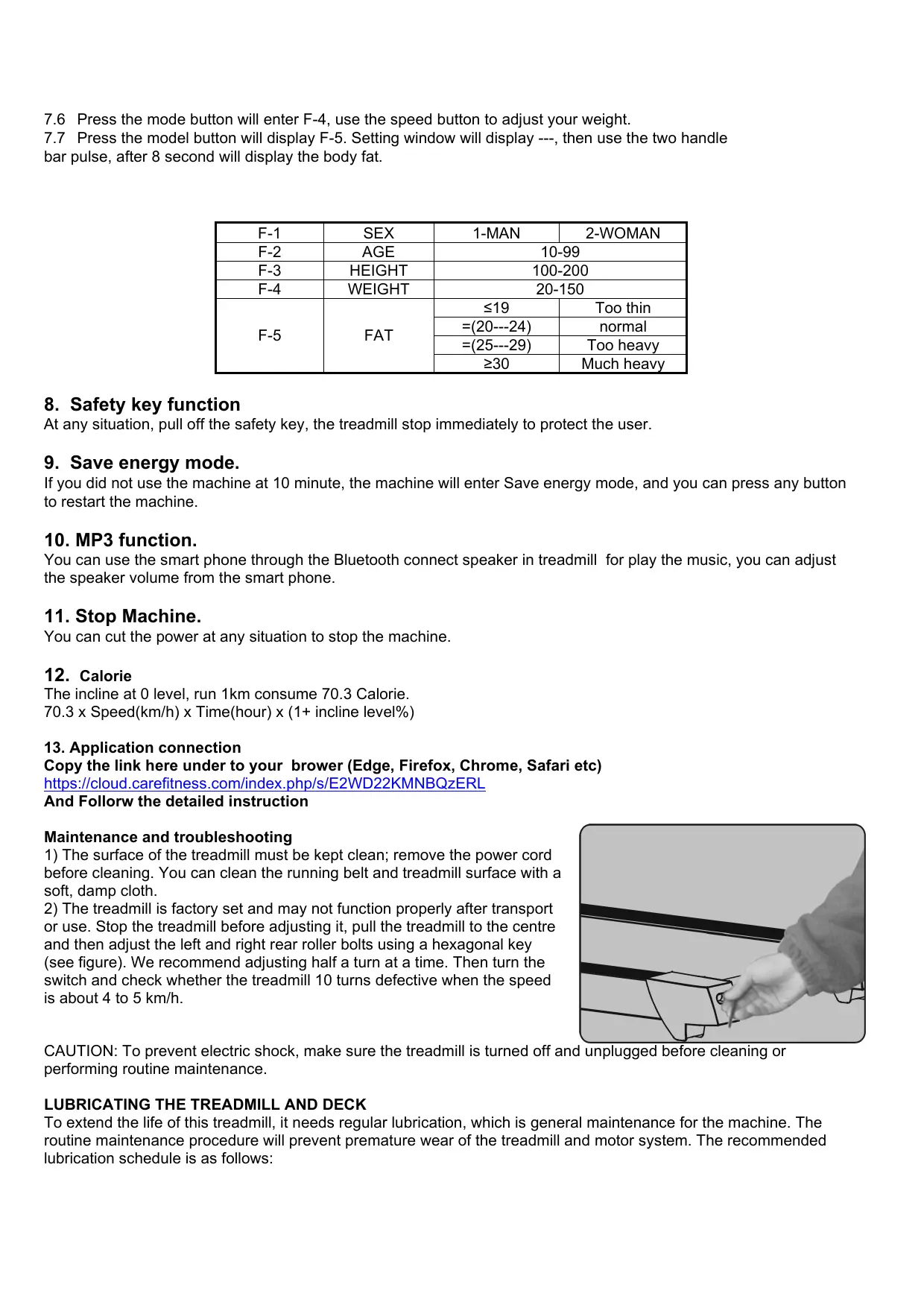
7.2 Set the parameter, F-1 Sex, F-2 Age, F-3, Height, F-4, Weight, F-5, body fat, use the speed button can adjust the parameter from F-1 to F-4. Use the hand pulse after 5-10 second, then the F-5 will display your body fat.
7.3 While enter the body fat, first display F-1, The number 01 mean is MAN, And 02 means Woman, use the speed button the change.
7.4 Press the mode button will enter F-2, use the speed button to set your age between 10-99.
7.5 Press mode button will enter F-3, use the speed button to adjust your height
7.6 Press the mode button will enter F-4, use the speed button to adjust your weight.
7.7 Press the model button will display F-5. Setting window will display ---, then use the two handle bar pulse, after 8 second will display the body fat.
| F-1 | SEX | 1-MAN | 2-WOMAN |
| F-2 | AGE | 10-99 |
| F-3 | HEIGHT | 100-200 |
| F-4 | WEIGHT | 20-150 |
| F-5 | FAT | ≤19 | Too thin |
| =(20---24) | normal |
| =(25---29) | Too heavy |
| ≥30 | Much heavy |
8. Safety key function
At any situation, pull off the safety key, the treadmill stop immediately to protect the user.
9. Save energy mode.
If you did not use the machine at 10 minute, the machine will enter Save energy mode, and you can press any button to restart the machine.
10. MP3 function.
You can use the smart phone through the Bluetooth connect speaker in treadmill for play the music, you can adjust the speaker volume from the smart phone.
11. Stop Machine.
You can cut the power at any situation to stop the machine.
12. Calorie
The incline at 0 level, run 1km consume 70.3 Calorie.
70.3 x Speed(km/h) x Time(hour) x (1+ incline level%)
13. Application connection
Copy the link here under to your brower (Edge, Firefox, Chrome, Safari etc)
https://cloud-carefitness.com/index.php/s/E2WD22KMNBQzERL
And Followw the detailed instruction
Maintenance and troubleshooting
1) The surface of the treadmill must be kept clean; remove the power cord before cleaning. You can clean the running belt and treadmill surface with a soft, damp cloth.
2) The treadmill is factory set and may not function properly after transport or use. Stop the treadmill before adjusting it, pull the treadmill to the centre and then adjust the left and right rear roller bolts using a hexagonal key (see figure). We recommend adjusting half a turn at a time. Then turn the switch and check whether the treadmill 10 turns defective when the speed is about 4 to 5km / h .
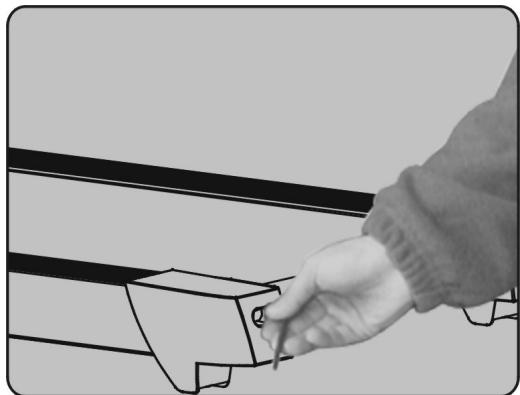
CAUTION: To prevent electric shock, make sure the treadmill is turned off and unplugged before cleaning or performing routine maintenance.
LUBRICATING THE TREADMILL AND DECK
To extend the life of this treadmill, it needs regular lubrication, which is general maintenance for the machine. The routine maintenance procedure will prevent premature wear of the treadmill and motor system. The recommended lubrication schedule is as follows:
| USAGE | LUBRIFICATION |
| 1-6 km/h | Tous les 6 mois |
| 6-12 km/h | Tous les 3 mois |
| 12-16 km/h | Tous les 2 mois |
Lubricant for the treadmill
This schedule corresponds to the recommended application for an individual user, up to 20-30 minutes at a time, 3-4 times a week. For lubrication, please contact your retailer.
CLEANING
Perspiration should be wiped off the console and treadmill surface after your workout. You should wipe your treadmill once a week with a soft, damp cloth. Do not over-moisten the display panel as this may cause electrical and electronic problems.
STORAGE
Store your treadmill in a clean, dry place. Make sure it is switched off and that the plug is unplugged.
MOVING
This treadmill has been designed and fitted with wheels for easy movement. Before moving it, make sure it is switched off and that the plug is unplugged.
FOR HOME USE ONLY!
This treadmill has been designed for home use only. Do not use in an institution or for commercial purposes.
It's important to look after your treadmill (especially the running surface underneath). Good silicone lubrication will also improve the performance of your treadmill.
NOTE: Use the silicone supplied with the treadmill. You can buy more from your local retailer.
WARNING: STOP the treadmill and remove the safety key before lubricating the running surface.
HOW TO APPLY SILICONE TO CARPET
A/ Find the bottle of silicone. It is located in the DIY kit included with this treadmill.
B/ Find a straw and place it on the bottle of silicone as shown in the drawing.
C/ Apply the silicone evenly as shown in the drawing (ATTENTION: the treadmill MUST BE STOPPED before applying the lubricant, to avoid injury, otherwise the edge of the treadmill could cut you or your fingers could be crushed by the rollers).
Do not apply too much silicone to the mat. Too much lubricant can cause the carpet to slip on the rollers.
| Code | Problem | Possible Reason | Solution |
| E01 | Display did not receive the signal | Cable connection | Check or replace the Cables |
| display default | replace the display |
| controller default | replace the controller |
| E02 | The problem between controller and motor | motor connect wires did not connect well | Check that the motor wires are connected correctly |
| No voltage output or abnormal voltage output of controller board | replace the controller |
| motor default | replace the motor |
| E03 | The speed is abnormal | The photoelectric sensor is not properly assembled on the motor | reassemble the sensor |
| Poor photoelectric sensor | replace the sensor |
| Failure of controller board | replace the controller |
| E04 | over voltage | Input voltage too high | adjust the voltage |
| motor default | replace the motor |
| Failure of controller board | replace the controller |
| E05 | over power current | power current too high | adjust the power current |
| Problems with the assembly structure of the treadmill and the motor cause motor resistance or blockage | check the structure if it is well |
| controller default | replace the controller |
| E06 | over voltage | Input voltage too low | Please check whether the power supply line is normal |
| Failure of controller board | replace the controller |
| E07 | safety key did not put well | safety key fail off the treadmill | put the safety key well |
| the safety system default | replace the console |
To order spare parts
To guarantee an efficient service, make sure you have the following items before you contact our After Sales Service:
The name or reference of the product.
The manufacturing number shown on the main chassis and on the packing box.
The number of the missing or faulty part shown on the exploded view of the product described in this manual.
After Sales Service
Email: service-uk@carefitness.com
https://cloud.carefitness.com/index.php/s/E2WD22KMNBQzERL
E mail: service-de@carefitness.com
https://cloud.carefitness.com/index.php/s/E2WD22KMNBQzERL
COMO LUBRICAR EL MARCO (DECK)?
https://cloud.carefitness.com/index.php/s/E2WD22KMNBQzERL
E mail: service-it@carefitness.com
enz.)https://cloud.carefitness.com/index.php/s/E2WD22KMNBQzERL
E-mail: service-nl@carefitness.com
CARE
FITNESS