ManualGo.com
M65RGBElite - Mouse CORSAIR - Free user manual and instructions
Find the device manual for free M65RGBElite CORSAIR in PDF.


Download the instructions for your Mouse in PDF format for free! Find your manual M65RGBElite - CORSAIR and take your electronic device back in hand. On this page are published all the documents necessary for the use of your device. M65RGBElite by CORSAIR.
USER MANUAL M65RGBElite CORSAIR
> Connect the mouse to available USB 2.0 or USB 3.0 port on your computer.
> Download the iCUE software from www.corsair.com/downloads.
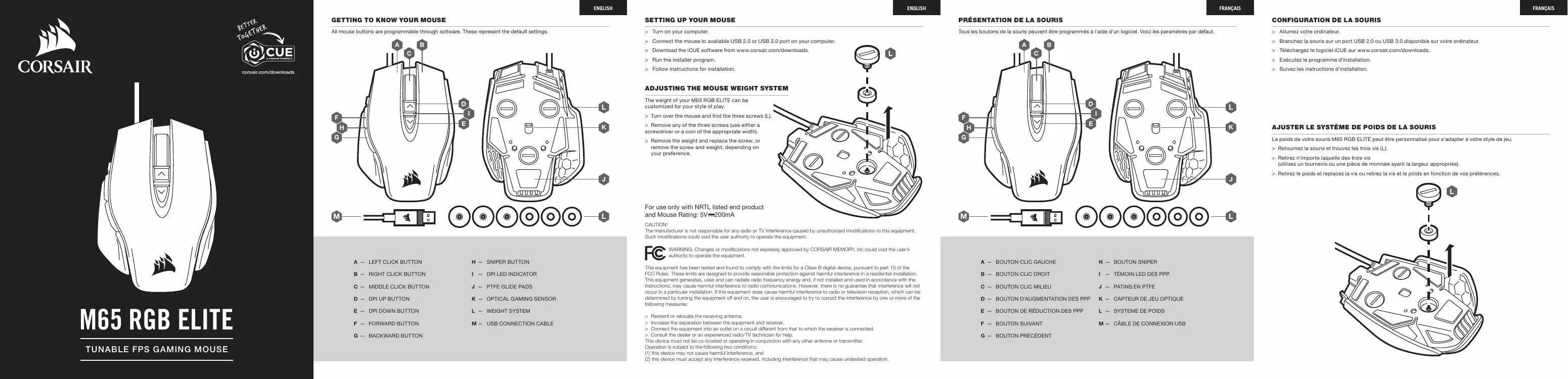
> Turn over the mouse and find the three screws (L).
The weight of your M65 RGB ELITE can be customized for your style of play.
> Remove any of the three screws (use either a screwdriver or a coin of the appropriate width). > Remove the weight and replace the screw, or remove the screw and weight, depending on your preference.
For use only with NRTL listed end product and Mouse Rating: 5V 200mA
CAUTION! The manufacturer is not responsible for any radio or TV interferencecaused by unauthorized modifications to this equipment. Such modifications could void the user authority to operate the equipment.
WARNING: Changes or modifications not expressly approved by CORSAIR MEMORY, Inc could void the user’s
authority to operate the equipment.
TUNABLE FPS GAMING MOUSE
I — DPI LED INDICATOR
K — OPTICAL GAMING SENSOR
This equipment has been tested and found to comply with the limits for a Class B digital device, pursuant to part 15 of the FCC Rules. These limits are designed to provide reasonable protection against harmful interference in a residential installation. This equipment generates, uses and can radiate radio frequency energy and, if not installed and used in accordance with the instructions, may cause harmful interference to radio communications. However, there is no guarantee that interference will not occur in a particular installation. If this equipment does cause harmful interference to radio or television reception, which can be determined by turning the equipment off and on, the user is encouraged to try to correct the interference by one or more of the following measures: > Reorient or relocate the receiving antenna. > Increase the separation between the equipment and receiver. > Connect the equipment into an outlet on a circuit different from that to which the receiver is connected. > Consult the dealer or an experienced radio/TV technician for help. This device must not be co-located or operating in conjunction with any other antenna or transmitter. Operation is subject to the following two conditions: (1) this device may not cause harmful interference, and (2) this device must accept any interference received, including interference that may cause undesired operation.
G — BOUTON PRÉCÉDENT
> Connect the mouse to available USB 2.0 or USB 3.0 port on your computer.
> Download the iCUE software from www.corsair.com/downloads.
> Turn over the mouse and find the three screws (L).
The weight of your M65 RGB ELITE can be customized for your style of play.
> Remove any of the three screws (use either a screwdriver or a coin of the appropriate width). > Remove the weight and replace the screw, or remove the screw and weight, depending on your preference.
For use only with NRTL listed end product and Mouse Rating: 5V 200mA
CAUTION! The manufacturer is not responsible for any radio or TV interferencecaused by unauthorized modifications to this equipment. Such modifications could void the user authority to operate the equipment.
WARNING: Changes or modifications not expressly approved by CORSAIR MEMORY, Inc could void the user’s
authority to operate the equipment.
TUNABLE FPS GAMING MOUSE
I — DPI LED INDICATOR
K — OPTICAL GAMING SENSOR
This equipment has been tested and found to comply with the limits for a Class B digital device, pursuant to part 15 of the FCC Rules. These limits are designed to provide reasonable protection against harmful interference in a residential installation. This equipment generates, uses and can radiate radio frequency energy and, if not installed and used in accordance with the instructions, may cause harmful interference to radio communications. However, there is no guarantee that interference will not occur in a particular installation. If this equipment does cause harmful interference to radio or television reception, which can be determined by turning the equipment off and on, the user is encouraged to try to correct the interference by one or more of the following measures: > Reorient or relocate the receiving antenna. > Increase the separation between the equipment and receiver. > Connect the equipment into an outlet on a circuit different from that to which the receiver is connected. > Consult the dealer or an experienced radio/TV technician for help. This device must not be co-located or operating in conjunction with any other antenna or transmitter. Operation is subject to the following two conditions: (1) this device may not cause harmful interference, and (2) this device must accept any interference received, including interference that may cause undesired operation.
G — BOUTON PRÉCÉDENT
> Connect the mouse to available USB 2.0 or USB 3.0 port on your computer.
> Download the iCUE software from www.corsair.com/downloads.
> Turn over the mouse and find the three screws (L).
The weight of your M65 RGB ELITE can be customized for your style of play.
> Remove any of the three screws (use either a screwdriver or a coin of the appropriate width). > Remove the weight and replace the screw, or remove the screw and weight, depending on your preference.
For use only with NRTL listed end product and Mouse Rating: 5V 200mA
CAUTION! The manufacturer is not responsible for any radio or TV interferencecaused by unauthorized modifications to this equipment. Such modifications could void the user authority to operate the equipment.
WARNING: Changes or modifications not expressly approved by CORSAIR MEMORY, Inc could void the user’s
authority to operate the equipment.
TUNABLE FPS GAMING MOUSE
I — DPI LED INDICATOR
K — OPTICAL GAMING SENSOR
This equipment has been tested and found to comply with the limits for a Class B digital device, pursuant to part 15 of the FCC Rules. These limits are designed to provide reasonable protection against harmful interference in a residential installation. This equipment generates, uses and can radiate radio frequency energy and, if not installed and used in accordance with the instructions, may cause harmful interference to radio communications. However, there is no guarantee that interference will not occur in a particular installation. If this equipment does cause harmful interference to radio or television reception, which can be determined by turning the equipment off and on, the user is encouraged to try to correct the interference by one or more of the following measures: > Reorient or relocate the receiving antenna. > Increase the separation between the equipment and receiver. > Connect the equipment into an outlet on a circuit different from that to which the receiver is connected. > Consult the dealer or an experienced radio/TV technician for help. This device must not be co-located or operating in conjunction with any other antenna or transmitter. Operation is subject to the following two conditions: (1) this device may not cause harmful interference, and (2) this device must accept any interference received, including interference that may cause undesired operation.
G — BOUTON PRÉCÉDENT
WEB: corsair.com BLOG: corsair.com/blog PHONE: (888) 222-4346 FORUM: forum.corsair.com SUPPORT: support.corsair.com YOUTUBE: youtube.com/corsairhowto © 2018 CORSAIR MEMORY, Inc. All rights reserved. CORSAIR and the sails logo are registered trademarks in the United States and/or other countries. All other trademarks are the property of their respective owners. Product may vary slightly from those pictured. 49-001757 AA