CORSAIR M65RGBElite - Mouse

M65RGBElite - Mouse CORSAIR - Free user manual and instructions

Find the device manual for free M65RGBElite CORSAIR in PDF.

📄 4 pages English EN Download 💬 AI Question 10 questions ⚙️ Specs
Notice CORSAIR M65RGBElite - page 1
View the manual : Français FR English EN
Pick your language and provide your email: we'll send you a specifically translated version.
Product Type Wired Gaming Mouse
Brand Corsair
Model M65 RGB Elite
Connection USB 2.0/3.0 (1.8m braided cable)
Sensor Gaming optical (PMW3391, 18,000 DPI)
Resolution 100 to 18,000 DPI (adjustable via dedicated buttons)
Number of Buttons 8 programmable (left click, right click, scroll wheel, back, forward, sniper, DPI increase/decrease)
Lighting Customizable RGB (via iCUE software)
Adjustable Weight 3-weight system (screws) to customize weight
Dimensions (L x W x H) 117.5 x 77.5 x 39.5 mm
Weight (without cable) Approximately 128 g (excluding adjustable weights)
Mouse Feet PTFE (optimized glide)
Configuration Software iCUE (downloadable from corsair.com/downloads)
Compatibility Windows 10/11, macOS (via iCUE)
Onboard Memory 1 settings profile
Warranty 2 years
Maintenance and Cleaning Clean with a soft, dry cloth; avoid any liquid. Unplug before cleaning.
Safety Do not expose to water, moisture, or extreme temperatures. Use only with standard USB ports.
Spare Parts and Repairability Replacement mouse feet available on corsair.com. The USB cable is not user-replaceable.
General Information Certified compatible with Xbox One and PlayStation 4 consoles (via adapter, not included).

Frequently Asked Questions - M65RGBElite CORSAIR

How to adjust the mouse resolution (DPI)?
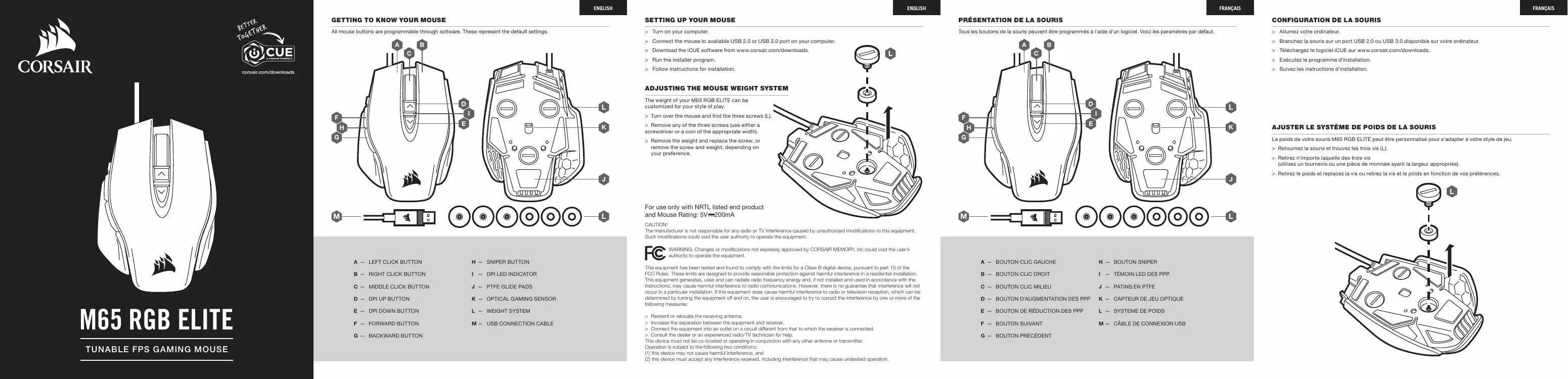
Use the DPI increase (D) and decrease (E) buttons on the top. The LED indicator (I) shows the current level. You can also configure presets in iCUE software.
How to customize the mouse buttons?
Download and install iCUE software from corsair.com. Launch it, select the M65 RGB Elite, and assign actions (macro, shortcut, etc.) to each button. Changes are saved in onboard memory.
How to adjust the mouse weight?
Turn the mouse over. Remove the screws (L) using a screwdriver or a coin. Add or remove weights as desired. Replace the screws. The weight system allows precise adjustment.
How to clean the mouse?
Unplug the mouse. Use a soft, dry cloth to wipe surfaces. For hard-to-reach areas, you can use a dry cotton swab. Never use liquids or abrasive products.
Is the mouse compatible with macOS?
Yes, the M65 RGB Elite is compatible with macOS. iCUE software is available for macOS and allows full customization. Basic functions (click, scroll) work without software.
Where to download iCUE software?
Go to corsair.com/downloads and download the version for your operating system (Windows or macOS). Follow the installation instructions.
How to use the Sniper button?
The Sniper button (H) is located under the scroll wheel. By default, it temporarily reduces sensitivity (DPI) for better aiming control. You can modify its action in iCUE.
What to do if the mouse is not working properly?
Check that the USB cable is properly plugged into a functional port. Try another port. Restart the computer. If the problem persists, reinstall iCUE or contact Corsair support (support.corsair.com).
Does the mouse have internal memory?
Yes, the M65 RGB Elite has onboard memory that can store one complete profile (button assignments, DPI settings, lighting). Once configured via iCUE, settings are saved even without the software.
What sensor does the mouse have?
The M65 RGB Elite is equipped with the PMW3391 optical sensor offering up to 18,000 DPI resolution, precise tracking, and acceleration up to 50G.

User questions about M65RGBElite CORSAIR

0 question about this device. Answer the ones you know or ask your own.

Ask a new question about this device

The email remains private: it is only used to notify you if someone responds to your question.

No questions yet. Be the first to ask one.

Download the instructions for your Mouse in PDF format for free! Find your manual M65RGBElite - CORSAIR and take your electronic device back in hand. On this page are published all the documents necessary for the use of your device. M65RGBElite by CORSAIR.

USER MANUAL M65RGBElite CORSAIR

TUNABLE FPS GAMING MOUSE

BLOG:corsair.com/blog

FORUM:forum.corsair.com

YOUTUBE: youtube.com/corsairhowto

Manual assistant
Powered by Anthropic
Waiting for your message
Product information

Brand : CORSAIR

Model : M65RGBElite

Category : Mouse